712120 - Table Cool Head - Free user manual and instructions
Find the device manual for free 712120 Cool Head in PDF.


User questions about 712120 Cool Head
0 question about this device. Answer the ones you know or ask your own.
Ask a new question about this device
Download the instructions for your Table in PDF format for free! Find your manual 712120 - Cool Head and take your electronic device back in hand. On this page are published all the documents necessary for the use of your device. 712120 by Cool Head.
USER MANUAL 712120 Cool Head
natural_image
Line drawing of a two-door industrial refrigerator with ventilation grilles and a control panel (no text or symbols)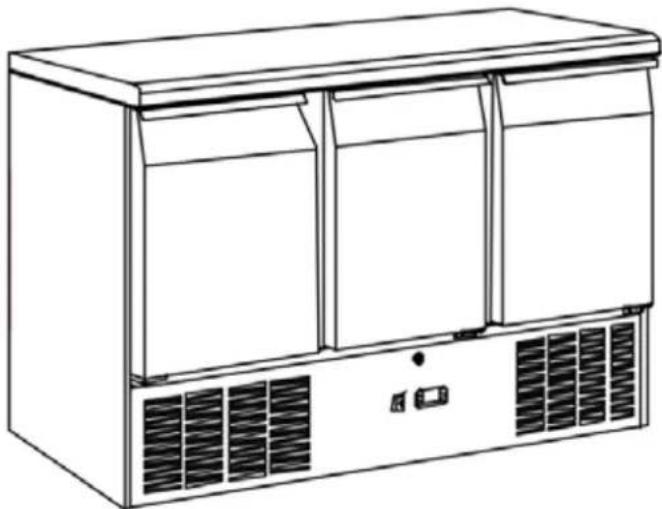
natural_image
Line drawing of a modern stainless steel refrigerator with two doors and ventilation grilles (no text or symbols)E Users manual
F Mode d'emploi
Congratulations on your purchase of this product.
Please take a few minutes before starting operation of the appliance and read the following operating instructions.

Table of Contents
Product Overview 3
Safety Tips 4
Intended Use 5
Location and Installation....6
Operation....7
Cleaning, Care & Maintenance.... 10
Optional Accessory 11
Troubleshooting.... 13
Disposal....14
Technical data.... 15
Warranty 15
Product Overview
| Article Description |
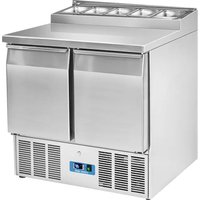
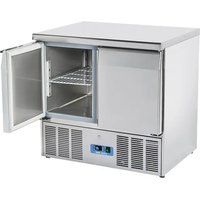
| 2 Doors Saladette |
| 2 Doors Saladette - Granite Top |
| 2 Doors Saladette - 4 drawers |
| 2 Doors Saladette - Stainless Steel Top |
| 2 Doors Sandwich - Saladette |
| 2 Doors Saladette - Square Glass |
| 2 Doors Saladette - Curve Glass |
| 2 Doors Saladette - Small Curve Glass |
| 2 Doors Saladette - Flat Granite Top |
| 2 Doors Saladette - 2 drawers |
| 2 Doors Saladette - S/S Top + Splash Back |
| 2 Doors Saladette - No 3 GN1/1 |
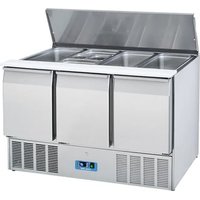
| 3 doors Saladette |
| 3 doors Saladette - Granite Top |
| 3 doors Saladette - 6 drawers |
| 3 doors Saladette - Stainless Steel Top |
| 3 doors Sandwich - Saladette |
| 3 doors Saladette - Square Glass |
| 3 doors Saladette - Curve Glass |
| 3 doors Saladette - Small Curve Glass |
| 3 doors Saladette - Flat Granite Top |
| 3 doors Saladette - Pizza Granite Top |
| 3 doors Saladette - S/S Top + Splash Back |
Safety Tips

IMPORTANT: For your safety read the manual carefully before installing or using this product. Save this manual for future reference.
Consult Local and National Standards to comply with the following:
- Health and Safety at Work Legislation
- Fire Precautions
- IEE Wiring Regulations
- Building Regulations
- DO NOT use the appliance outside.
- DO NOT attempt to service the item yourself.
- DO NOT use damaged appliances. If you are in any doubt, consult service agent.
- DO NOT use electrical appliances inside the appliance (e.g. heaters, ice-cream makers etc.), unless they are of the type recommended by the manufacturer.
- Keep ventilation openings, in the appliance enclosure or in the built-in structure, clear of obstruction.
- DO NOT use mechanical devices or other means to accelerate the defrosting process, other than those recommended by the manufacturer.
- DO NOT damage the refrigerant circuit.
- DO NOT stand or support yourself on the base, drawers or doors.
- DO NOT allow oil or fat to come into contact with the plastic components or door seal. Clean immediately if contact occurs.
- This unit can be used by children aged above 8 years and persons with reduced physical, sensory or mental capabilities or lacking of experience and knowledge who have been given supervision or using instruction of the device and understand the resulting risks (for European market).
- Do not let children play with the appliance.
- Cleaning and user maintenance must not be carried out by children without supervision.
- DO NOT place combustible, explosive or volatile articles, corrosive acids or alkalis or liquids in the appliance.
Safety Tips
- DO NOT use this appliance to store medical supplies.
- DO NOT use jet/pressure washers to clean the appliance.
- DO NOT allow children to play with the packaging, and dispose plastic bags safely.
- Bottles that contain a high percentage of alcohol must be sealed and placed vertically in the refrigerator.
- Always carry, store and handle the appliance in a upright orientation and move by holding the base of the appliance.
- Always switch off and disconnect the power supply to the unit before cleaning.
- If the supply cord is damaged, it must be replaced by the manufacturer, its service agent or similarly qualified persons in order to avoid a hazard.
- This appliance is not intended for use by persons (including children) with reduced physical, sensory or mental capabilities, or lack of experience and knowledge, unless they have been given supervision or instruction concerning use of the appliance by a person responsible for their safety (for market beyond European).
- Children should be supervised to ensure that they do not play with the appliance.
- For indoor use only. Not suitable for installation in an area where a water jet could be used. Shall not be cleaned by a water jet.
- To guarantee safe operation, ensure that the appliance is set up and connected as described in the instruction manual.
- Any repairs and work on the appliance should only be carried out by the customer service department/qualified technician.
- The key to the electrical cabinet should be kept out of the reach of children and users.
- Do not store explosive substances such as aerosol cans with a flammable propellant in this appliance.
Intended Use
Only use this appliance for cooling and storage of food and beverage for commercial purposes.
Location and Installation
- Remove the appliance from the packaging. Make sure that all protective plastic film and coatings are thoroughly removed from all surfaces. To prevent injury or damage to the unit, we recommend that the appliance should be unpacked and set up by two people.
- The climatic class can be found on the rating plate. It specifies the ambient temperatures at which the appliance may be operated. The rating plate can be found inside the appliance.
| Climate Class | Max. Ambient Temperature | Relative Humidity |
| 3 | 25 | 60% |
| 4 | 30 | 55% |
| 5 | 40 | 40% |
- Maintain a distance of 20 cm (7 inches) between the appliance and walls or other objects for ventilation. Increase this distance if the obstacle is a heat source.
- The appliance should be placed on a solid flat and stable floor to reduce noise and vibration. Level the appliance by adjusting the feet.
- Avoid locating the unit in direct sunlight or near heat sources such as ovens or radiators.
- Please make sure the appliance is properly ventilated.
- Check that the power supply and voltage used comply with the details on the rating plate. The plug must be accessible after installation.
- Correctly connect and disconnect the plug. When inserting ensure the plug is fully engaged. While unplugging hold the body of the plug. Never pull the supply cord directly.
- If the unit is to be shut down for long period, switch it off and disconnect the plug from socket outlet. Clean the appliance and leave the door open to prevent odour.
- Important! For your personal safety, this appliance must be properly grounded (earthed). This appliance is equipped with a cord having a grounding wire with a grounding plug. The plug must be inserted into an outlet that is properly grounded and installed. Consult a qualified electrician or service centre if you do not completely understand the grounding instructions. If doubt exits whether the appliance is properly grounded, have a qualified electrician check the circuit to make sure the outlet is properly grounded.
- If the cable does not reach the nearest socket, either rearrange your store layout or ask a qualified electrician to fix a new socket.
- If power is cut off, wait for at least 3 minutes before restarting the appliance to avoid damaging the compressor.
- Slide the shelf/drawer into place.
Note: If the unit has not been stored or moved in an upright position, let it stand upright for approximately 12 hours before operation.
Note: Before using the appliance for the first time, clean the shelves and interior with soapy water.
Operation
Storing food
To get the best results from your appliance, follow these instructions:
• Only store foodstuffs in the appliance when it has reached the correct operating temperature.
- Ensure GN container bays are full at all times, even if the GN containers are unused or empty. Empty bays will greatly reduce efficiency of the appliance.
• Always close the door, lid or drawer when not in use.
- Do not place uncovered hot food or liquid inside the appliance.
- Wrap or cover food where possible.
- Do not obstruct the fan inside the appliance.
- Avoid opening the doors for prolonged periods of time.
- The food must be put into container before placed into cabinet or on the shelf. Food must not be placed into food cabinet directly.
Turn on
- Close the door of the appliance.
- Ensure the power switch is set to [O] then connect to the power outlet.
- Switch on the Power [I]. The current temperature within the appliance is displayed.
- The on the control panel will flash to indicate a delay to compressor start.
Open/ Close the lid or drawer
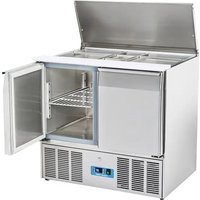
The lid of the Sliding Top Saladette is multi positional
- With the lid closed, slide the panel back into the half open position. This allows partial access to the GN container trays.
- Lift the lid up and back so the hinge settles into the support slot.
- Lift the lid up and completely back so the GN container trays are completely exposed.
WARNING: The sliding lid does not have a locking mechanism. Always make sure that the lid is in the 'half-open' position before opening.
WARNING: Do not pull the drawer out of its full open position to avoid any hurt.
Operation
Temperature Setting and Control (Dixell)
• The front panel of the thermostat display:
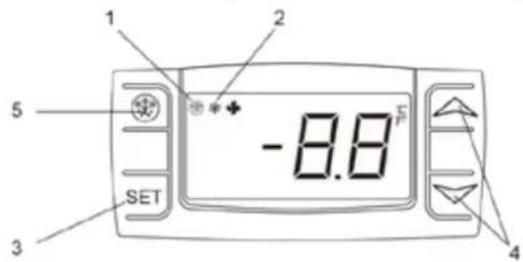
- Defrost indicator
- Compressor operation indicator
- SET key
- Temperature modification keys
- Defrost button
How to see the set point
- Push and immediately release the SET key, the set point will be showed;
- Push and immediately release the SET key or wait about 15s to return to normal visualisation.
How to change the set point
- Push the SET key for more than 2 seconds to change the set point value;
- The value of the set point will be displayed and the “°C” starts blinking;
- To change the set value push the „^(up) or “ (down) arrows within 15s.
- To memorise the new set point value push the SET key again or wait 15s.
Automatic defrost
• The appliance will automatically run defrost cycles.
Note: The cycle starts from the time the appliance is initially powered up.
Manual Defrost:
- Press and hold the DEFROST button for 5 seconds.
- The defrost cycle will start immediately and the Defrost LED illuminates.
Note: Starting a manual defrost also resets the automatic defrost timer.
Operation
Temperature setting and control (EVCO)
The front panel of the thermostat
- Compressor operation light
- Defrosting light
- Energy saving light
- Stand-by light
- Programming key (service agent only)
- Machine On/Stand -by (keep pushed)
- Manual defrost (keep pushed)
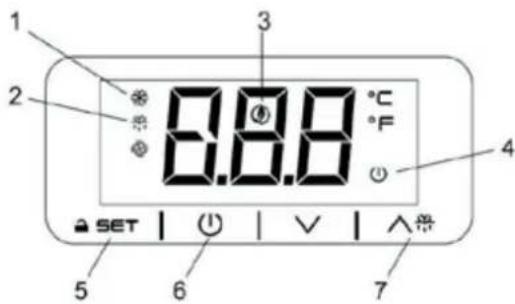
How to turn the machine in ON / STAND -BY status
- Press and hold the ⏻ key for 4s, the machine will turn from ON to STAND -BY status and vice-versa.
- During the button hold the ⏻ LED will blink to show status changing.
How to unlock the keyboard (»Loc» message)
- Push any button for more than 2s, «UnL» message will appear and the keyboard will be unlocked.
Note: For safety reasons the keyboard locks automatically after 30s of keys inactivity.
To execute any operation, please unlock the keyboard first.
How to see and modify the set point
- Push and immediately release the key. The set point will be showed and starts blinking;
• To change the set value push or arrows within 20s.
• To memorize the new set point value push the key again or wait 20s.
Automatic defrost
• The appliance will automatically run defrost cycles.
Note: The cycle starts from the time the appliance is initially powered up.
Manual Defrost:
- Press and hold the DEFROST button for 3s;
- The defrost cycle will start immediately and the Defrost LED illuminates.
Note: Starting a manual defrost also resets the automatic defrost timer.
Cleaning, Care & Maintenance
Routine maintenance
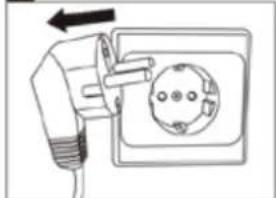
Switch off and disconnect from the power supply before cleaning.
- Clean the enclosure and interior of the appliance as often as possible. - Clean the unit with moist cloth. Never allow the switch, control panel, cable or plug to get wet. - Do not use abrasive cleaning agents. These can leave harmful residues. Use only mild soapy water.
- Clean the door seal with water only. - Ensure that no cleaning water penetrates into the electrical components. - Must not be cleaned by a water jet. - Always wipe dry after cleaning with soft cloth.
- Do not allow water used in cleaning to run through the drain hole into the evaporation pan.
- Take care when cleaning the rear of the appliance. - An agent or technician must carry out repairs if required.
- If the appliance is to be left inactive for long periods, unplug the appliance after having turned the switch to OFF position, empty the refrigerating compartment and clean thoroughly.
Special maintenance
The instructions given in the following paragraph can be followed from qualified technicians
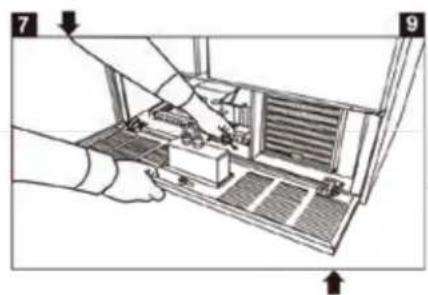
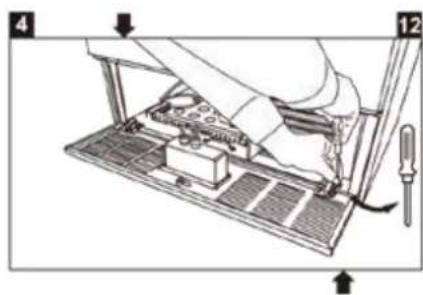
- Periodically clean the condenser using suitable tools (vacuum cleaner or soft brushes) can extend the life of the appliance.
- Check that the electrical connections are not loose.
- Check that the thermostat and the sensor are in proper working order.
Marble Care
- Do not use abrasive materials or detergents to clean the worktop. Wash with warm, soapy water.
- Do not put hot or frozen material on the marble top to avoid break.
- Wipe up any spillages as quickly as possible, particularly liquids such as lemon juice or vinegar.
- Recommend the use of a chopping board to reduce the risk of damage to your worktop.
• Dry thoroughly with a soft cloth after cleaning.
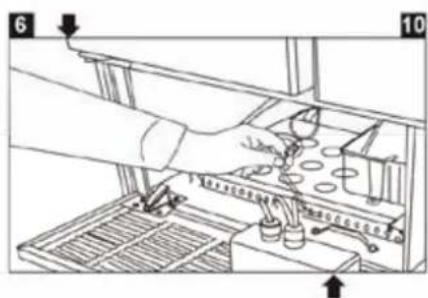
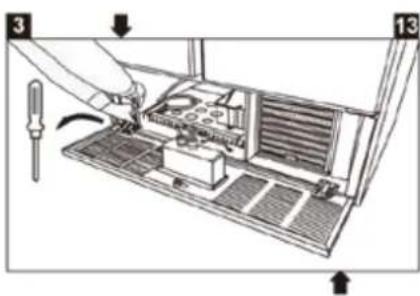
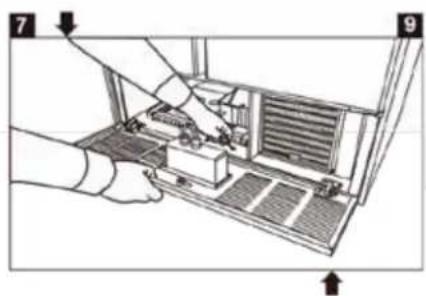
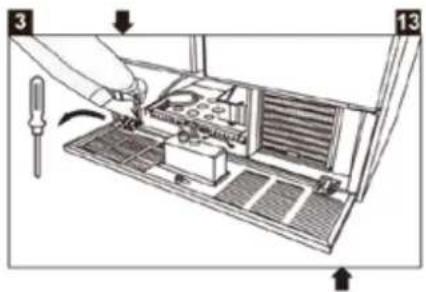
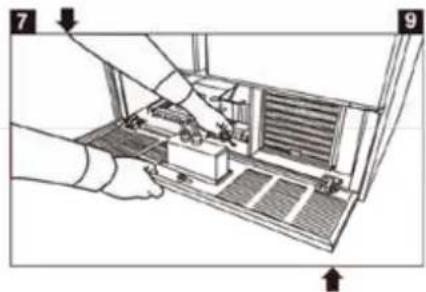
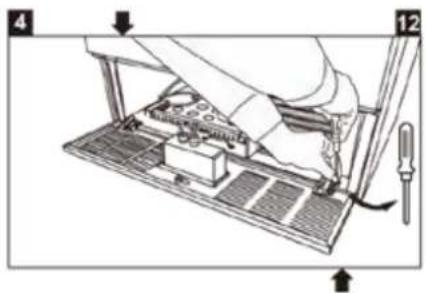
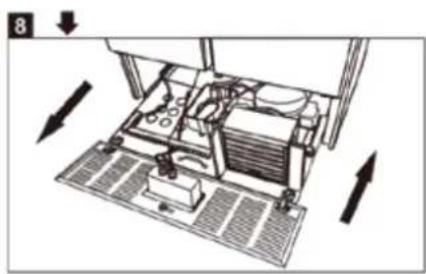
How to clean the condenser filter
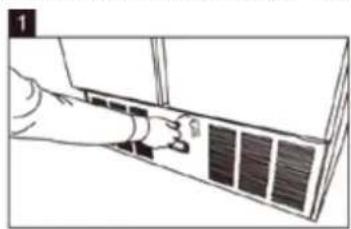
natural_image
Line drawing of a hand inserting a component into an air conditioner unit (no text or symbols)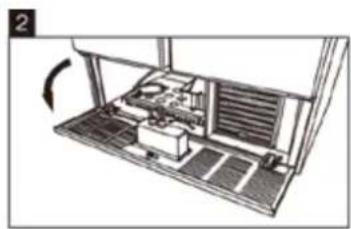
natural_image
Diagram of a refrigerator interior showing internal seating and ventilation system (no text or labels)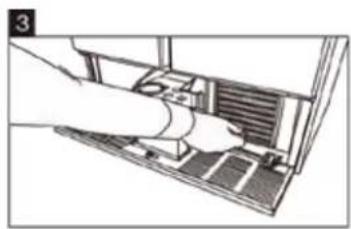
natural_image
Illustration of a hand inserting a device into a computer interface (no text or symbols visible)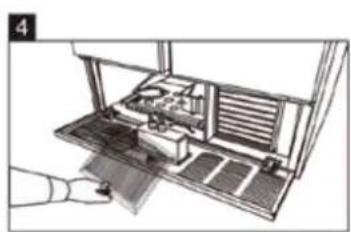
natural_image
Diagram of a hand pressing down on a mechanical device with no visible text or symbols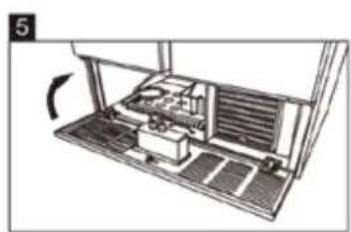
natural_image
Diagram of an electronic device with a scroll wheel and internal components, no visible text or symbols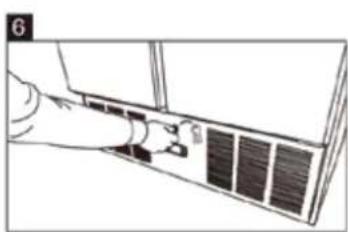
natural_image
Line drawing of a hand inserting a component into a device panel (no text or symbols)
Optional Accessory
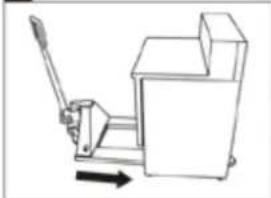
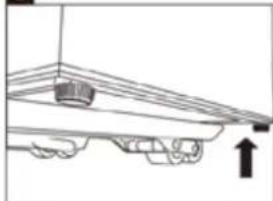
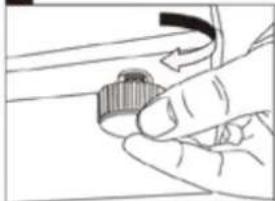
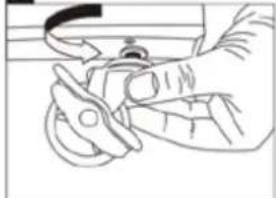
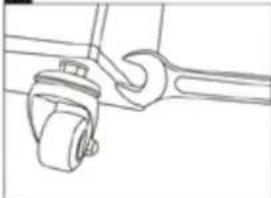
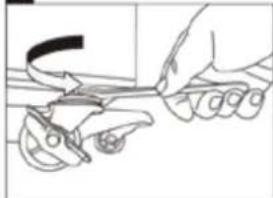
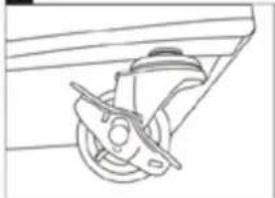
Four pieces of Castor
Positioning: Two castors with break to be fixed at the bottom front and two castors with no break to be fixed at the bottom rear.
Procedure: Follow the 8 steps below to change the Saladettes footings to casters.
1
natural_image
Diagram of an electrical outlet with a plug and socket, showing wiring (no text or symbols)2
natural_image
Line drawing of a mechanical press or clamping device with a lever and directional arrow (no text or symbols)3
natural_image
Simple line drawing of a mechanical setup with a block and an upward arrow (no text or symbols)4
natural_image
Hand holding a small mechanical knob or knob component (no text or symbols visible)5
natural_image
Line drawing of a hand using a tool to adjust or install a component (no text or symbols visible)6
natural_image
Line drawing of a wrench gripping a mechanical component (no text or symbols)7
natural_image
Line drawing of a hand using a tool to cut or trim a piece of scissors (no text or symbols present)8
natural_image
Technical line drawing of a mechanical component with no visible text or symbolsNote: If you intend to purchase optional accessories, please ask our sales staff for advice.
Caution:
- Unplug the appliance from main socket before change.
• Securing the fork lift before change.
• Securing all drawers, shelves, lids and doors before change.
• Empty the cabinet before change. - Lock the brake on the caster after change.
Optional Accessory
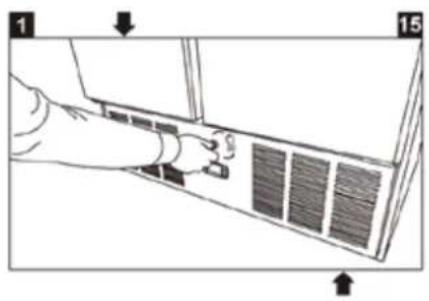
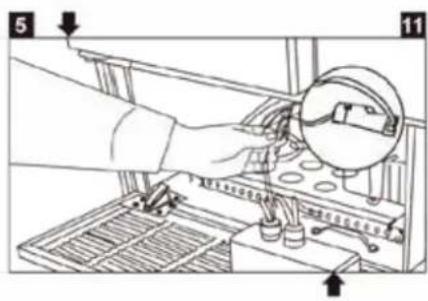
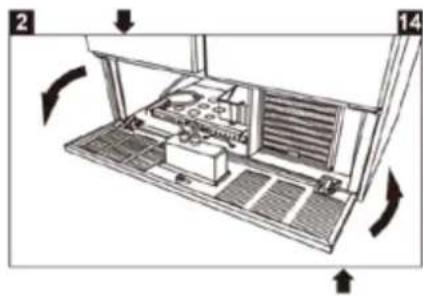
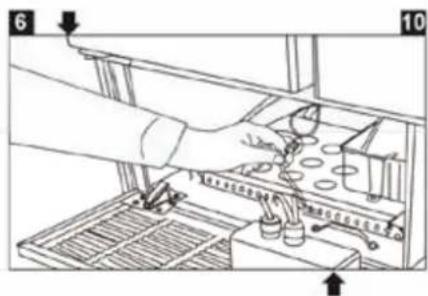
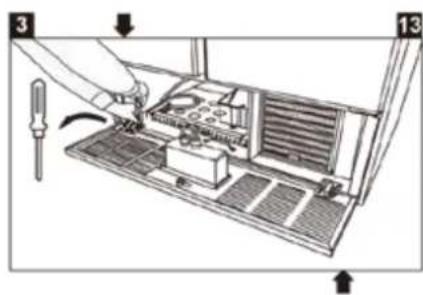
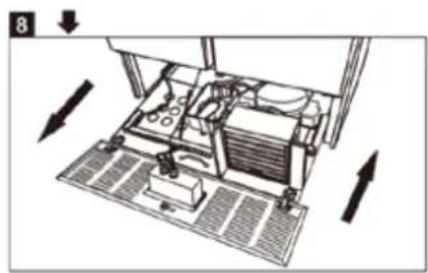
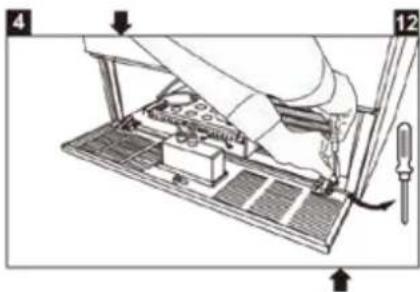
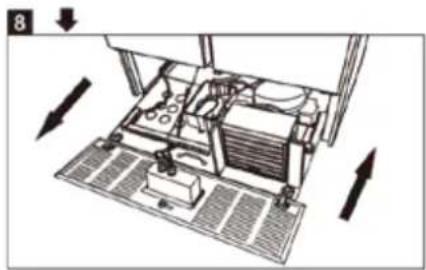
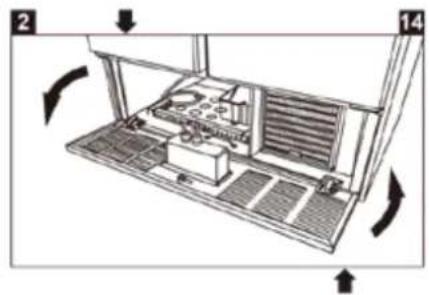
Open the engine room
natural_image
Technical diagram of a mechanical device with directional arrows indicating motion or movement (no text or symbols present)Troubleshooting
| Fault | Potential Failure | Problem solving action |
| The appliance is not working | The unit is not switched on | Check the unit is plugged in correctly and switched on |
| Plug and/ or lead are damaged | Call your agent or qualified technician | |
| Fuse in the plug has blown | Replace the fuse (UK Plug) | |
| Power supply | Check power supply | |
| The appliance turns on, but the temperature is too high/ low | Too much ice on the evaporator | Defrost the appliance |
| Condenser blocked with dust | Call your agent or qualified technician | |
| Doors are not shut properly | Check doors are shut and seals are not damaged | |
| Appliance is located near a heat source or air flow to the condenser is being interrupted | Move the refrigerator to a more suitable location | |
| Ambient temperature is too high | Increase ventilation or move appliance to a cooler position | |
| Unsuitable foodstuffs are being stored in the appliance | Remove any excessive hot foodstuffs or blockages to the fan | |
| Appliance is overloaded | Reduce the amount of food stored in the appliance | |
| The appliance is unusually loud | Loose nut/ screw | Check and tighten all nuts and screws |
| The appliance has not been installed in a level or stable position | Check installation position and change if necessary | |
| The appliance is leaking water | The appliance is not properly leveled | Adjust the screw feet to level the appliance (if applicable) |
| The discharge outlet is blocked | Clear the discharge outlet | |
| Movement of water to the drain is obstructed | Clear the floor of the appliance (if applicable) | |
| The water container is damaged | Call your agent or qualified Technician | |
| The drip tray is overflowing | Empty the drip tray (if applicable) |
Disposal
If the appliance is no longer of use and you wish to dispose of it, remove doors to prevent any small child from be trapped inside. Then please do in an environmentally correct way.
Contact a qualified service technician:
- To recover all Freon/refrigerant
- To remove the compressor or remove the oil from the compressor
- To remove the flammable insulation blowing gases
Then the distributor/ retailer can contact their local metal recycling center to pick up the remaining cabinet, shelves, etc.
There may be special requirements or conditions. You can obtain information on the disposal of refrigeration appliances from:
- Your supplier
• Government authorities (The local council, Ministry of the Environment, etc.)
By law, disposal of hazardous wastes may be subject to fines and imprisonment under the provisions of the environmental regulations.
- The refrigerant of this unit is a hydrocarbon refrigerant and is covered by the Kyoto Protocol.
- Releasing the refrigerant to the atmosphere will harm the environment by contributing to the global warming. The Global Warming Potential (GWP) of R600a/R290 is 3.
Disposal

PAP
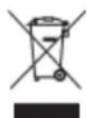
Discarded electric appliances are recyclable and should not be discarded in the domestic waste! Please actively support us in conserving resources and protecting the environment by returning this appliance to the collection centres (if available).
Dispose of packaging in accordance to applicable legal regulations.
Technical data
| Model | Saladette (2 Door, 3 Door) |
| Climate Class | Please refer to the information indicated on the product. You will find the information on the rating label on the back of the unit as well as inside the cooling compartment. The circuit diagram is displayed on the back of the unit as well as inside the cooling compartment |
| Refrigerant Gas | |
| Refrigerant Charge | |
| Temperature Range (°C) | |
| Input Power | |
| Rated Frequency | |
| Rated Voltage | |
| Internal volume | |
| Net Weight | |
| Gross Weight | |
| Foaming Agent | |
| External Dimension (mm) |

CAUTION: RISK OF FIRE AND EXPLOSION WITH FLAMMABLE REFRIGERANT R600a/R290.

Environmental Protection
Discarded electric appliances are recyclable and should not be discarded in the domestic waste! Please actively support us in conserving resources and protecting the environment by returning this appliance to the collection centres (if available).
Warranty
A statutory warranty applies for this product.
Damages caused by wrong treatment or operation, by false placement or storage, improper connection or installation, as well as force or other external influences are not covered by this warranty. We recommend careful reading of the operating instructions as it contains important information.
Note:
- In case this product does not function correctly, please firstly check if there are other reasons, e.g. for electrical appliances interruption of the power supply, or generally incorrect handling are the cause.
- Please note that, where possible, the following documents or rather information should be provided together with your faulty product:
• Purchase receipt
• Model description/ Type/ Brand
- Describe the fault and problem as detailed as possible
In the case of a claim for guarantee or defects, please contact the seller.
GWL 8/14 EN
Cher Client,
natural_image
Line drawing of a door panel with a hand inserting a spring (no text or symbols)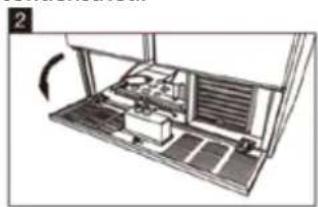
natural_image
Diagram of a computer setup with an open panel and internal components, no visible text or symbols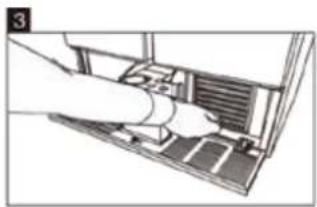
natural_image
Illustration of a hand inserting a device into a computer (no text or symbols visible)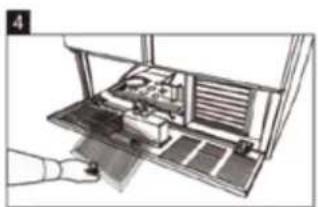
natural_image
Diagram of a computer monitor with an open tray and internal compartments (no text or symbols visible)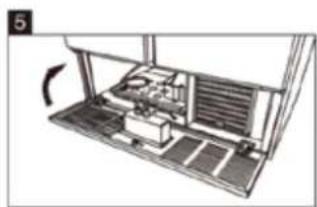
natural_image
Diagram of a mechanical device with internal components and a rotating arrow indicating rotation (no text or symbols)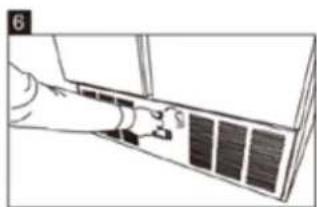
natural_image
Line drawing of a door with a fan and ventilation slots (no text or symbols)
natural_image
Simple line drawing of a mechanical device with a lever and base, no text or symbols present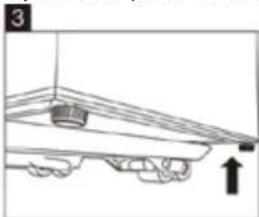
natural_image
Simple line drawing of a mechanical component with an arrow indicating upward motion (no text or symbols)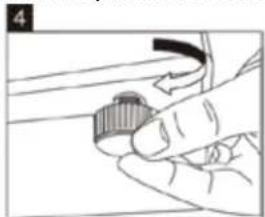
natural_image
Hand holding a knob on a mechanical component (no text or symbols visible)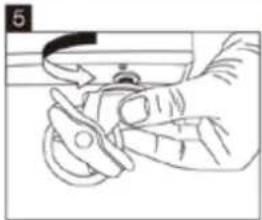
natural_image
Line drawing of a hand holding a tool, no text or symbols present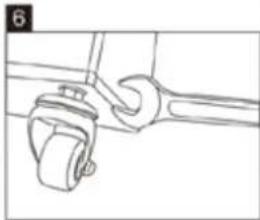
natural_image
Line drawing of a wrench gripping a mechanical component (no text or symbols)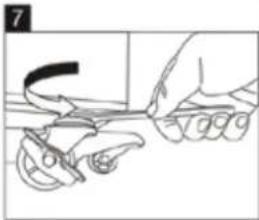
natural_image
Line drawing of a hand using a tool to cut or hold a piece of scissors (no text or symbols)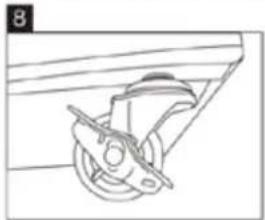
natural_image
Line drawing of a mechanical component with a wheel and lever (no text or symbols)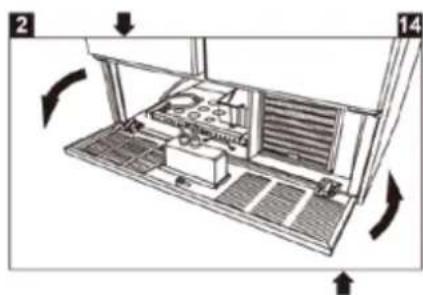
natural_image
Technical diagram of a mechanical device with directional arrows indicating motion (no text or symbols)Dépannage
natural_image
Diagram of a mechanical device with labeled parts and directional arrows indicating rotation (no text or symbols present)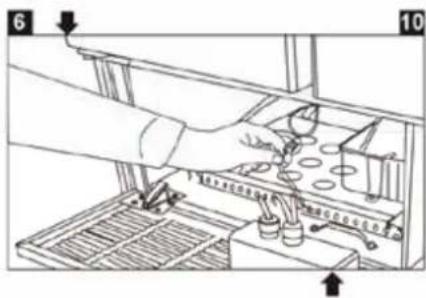
natural_image
Diagram of a refrigerator with cooling fans and heat exchangers, showing airflow direction (no text or labels)Fehlerbehebung