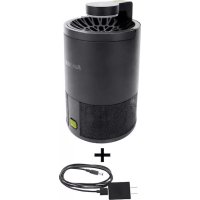
SJBZ15WBLK - Pest control Sun Joe - Free user manual and instructions
Find the device manual for free SJBZ15WBLK Sun Joe in PDF.



| Brand | Sun Joe |
| Model | SJBZ15WBLK |
| Product Type | Electric Insect Trap |
| Use | Indoor, household |
| Power Supply | 5 V DC, 1 A, 5 W (AC adapter 100-240 V AC) |
| Operating Modes | Dim (low) and Normal |
| Attraction Type | UV Light (LED) |
| Capture Mechanism | Suction fan + sticky plate |
| Sticky Plate Diameter | 11 cm |
| Included Sticky Plates | 10 replacement plates |
| Power Cord Length | 1.2 m |
| Net Weight | 430 g |
| Housing Material | Plastic |
| Cleaning | Cleaning brush included, do not use water or solvents |
| Safety Instructions | Do not use outdoors, do not immerse, keep away from children |
| Warranty | 2 years (limited) |
| Customer Service | 1-866-SNOWJOE (1-866-766-9563) |
| Included Accessories | Power adapter, power cord, cleaning brush, manual |
Frequently Asked Questions - SJBZ15WBLK Sun Joe
User questions about SJBZ15WBLK Sun Joe
0 question about this device. Answer the ones you know or ask your own.
Ask a new question about this device
Download the instructions for your Pest control in PDF format for free! Find your manual SJBZ15WBLK - Sun Joe and take your electronic device back in hand. On this page are published all the documents necessary for the use of your device. SJBZ15WBLK by Sun Joe.
USER MANUAL SJBZ15WBLK Sun Joe
If you have any questions or comments, please call the Snow Joe 制 + Sun Joe 制 customer service department at:
1-866-SNOWJOE (1-866-766-9563)
IMPORTANT! Safety Instructions
Read all the instructions before using the device
MWARNING! This device is not
intended for use by children or by unassisted, unsupervised persons whose physical, sensory or mental capabilities prevent them from using it safely. Children should be supervised to ensure that they do not play with the device.
mWARNING! When using the device,
basic safety precautions should always be followed. Failure to follow all instructions listed below may result in electric shock, fire and/or serious injury.
- This device is for indoor, household use only.
- Do not operate the device in explosive atmospheres, such as in the presence of flammable liquids, gases or dust.
- Do not insert foreign objects into this device.
- To reduce the risk of electric shock, disconnect the device from the power supply when not in use, cleaning, or other similar actions. To disconnect, turn off before unplugging the device from the outlet.
- Do not operate the device with a damaged USB adapter or power cable, or after the device malfunctions, is dropped or damaged in any manner. Contact the Snow Joe ® + Sun Joe ® customer service center at 1-866-SNOWJOE (1-866-766-9563) for assistance.
- Keep all connections dry and off the ground.
- Do not clean this device with cleaning agents or solvents as they may damage, weaken or destroy the plastic housing.
- Do not contact moving parts.
- Do not spray or wash in water. Do not use with wet hands or in damp environments.
-
Do not immerse this device or place it where it can fall or be pulled into a tub or sink.
-
Store the device indoors and out of the reach of children when not in use.
- When unplugging the power cable from the device or the USB adapter, pull the plug, not the cable to reduce the risk of damage to the power cable.
- For use only with 5V DC, 2A UL or ETL rated adapters. Do not use unapproved power sources.
- Keep the power cable away from heat, oil and sharp edges. Make sure the cable is not be stepped on, tripped over or subjected to stress when in use.
- Use only identical replacement parts and attachments sold by the manufacturer. Replace or repair damaged parts immediately.
- If the device is malfunctioning, unplug it and contact Snow Joe ® + Sun Joe ® customer service center at 1-866-SNOWJOE (1-866-766-9563).
mCAUTION! Risk of UV exposure. Ensure
product is installed such that no continuous human activity is likely to be performed within 0.99m distance of the unit while illuminated.
Know Your Electric Bug Trapper
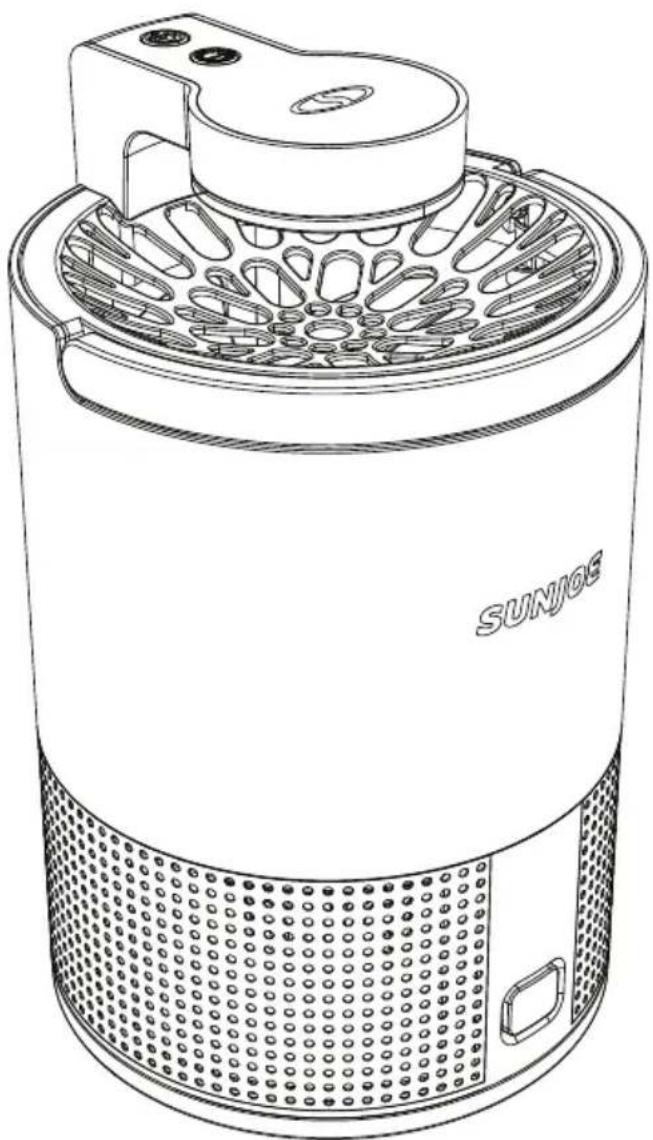
Read the owner's manual and safety rules carefully before using your Electric Bug Trapper. Compare the illustration below to the actual unit in order to familiarize yourself with the location of the various controls and adjustments. Save this manual for future reference.
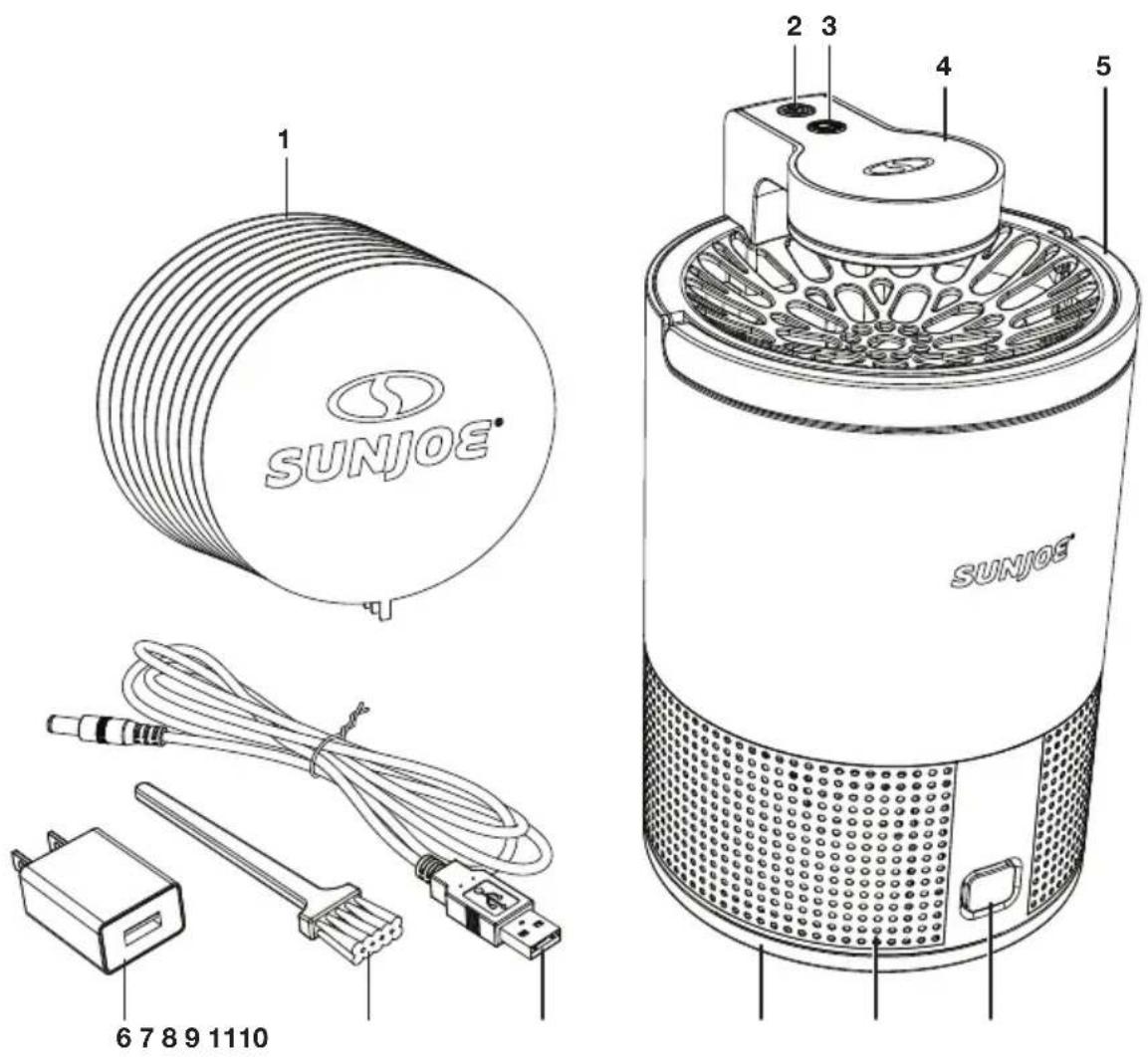
- Replacement glue boards
- Power button
-
Mode button
-
UV LED
- Handle
- USB adapter
-
Cleaning brush
-
Power cable
- Tray
- Air outlet
- Tray release button
Technical Data
Bug Trapper Input. .5V DC | 1A | 5 W
AC Adapter Input. 100 -240V AC
50/60 Hz | 0.35A
AC Adapter Output (USB) 5V DC | 2A
Modes ....Dimmed/Regular
Glue Board Diameter. 4.3 in. (11 cm)
Power Cable Length. 4 ft. (1.2m)
Net Weight. 0.95 lbs (430 g)
Unpacking
Carton Contents
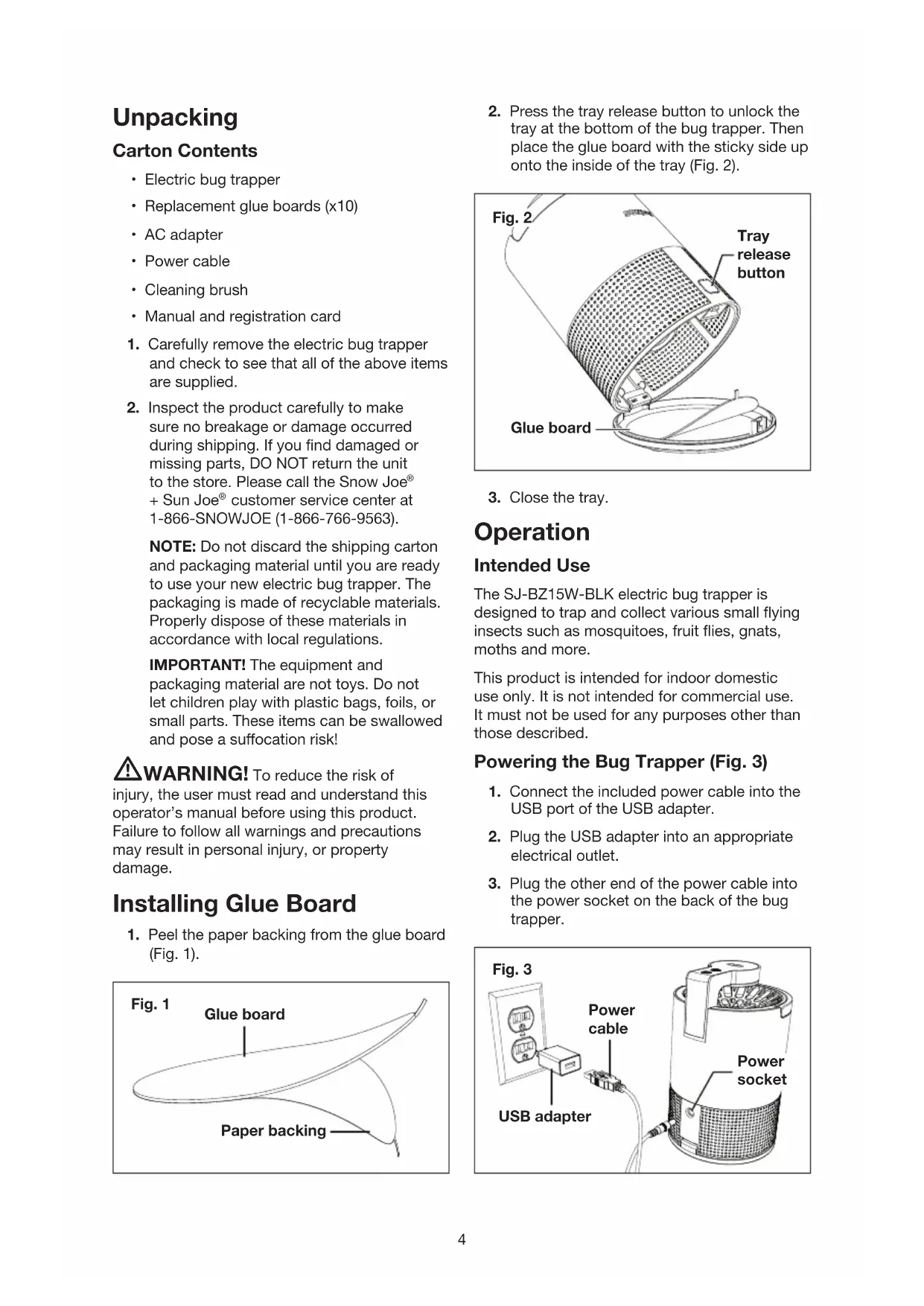
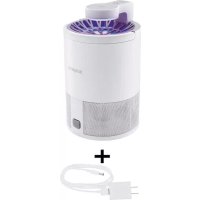
Electric bug trapper
- Replacement glue boards (x10)
- AC adapter
Power cable
- Cleaning brush
- Manual and registration card
- Carefully remove the electric bug trapper and check to see that all of the above items are supplied.
- Inspect the product carefully to make sure no breakage or damage occurred during shipping. If you find damaged or missing parts, DO NOT return the unit to the store. Please call the Snow Joe ® + Sun Joe ® customer service center at 1-866-SNOWJOE (1-866-766-9563).
NOTE: Do not discard the shipping carton and packaging material until you are ready to use your new electric bug trapper. The packaging is made of recyclable materials. Properly dispose of these materials in accordance with local regulations.
IMPORTANT! The equipment and packaging material are not toys. Do not let children play with plastic bags, foils, or small parts. These items can be swallowed and pose a suffocation risk!
WARNING! To reduce the risk of injury, the user must read and understand this operator's manual before using this product. Failure to follow all warnings and precautions may result in personal injury, or property damage.
Installing Glue Board
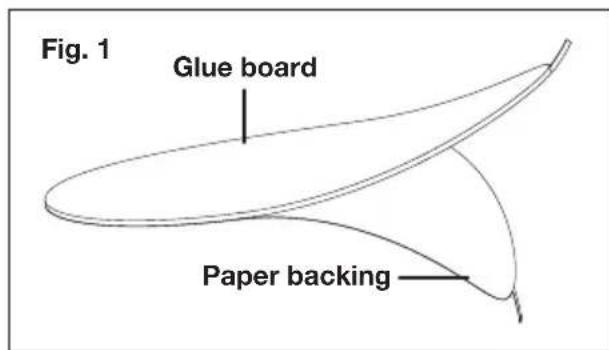
- Peel the paper backing from the glue board (Fig. 1).
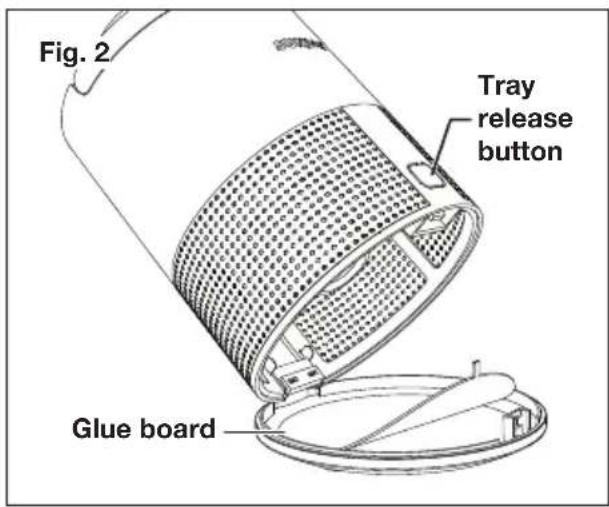
- Press the tray release button to unlock the tray at the bottom of the bug trapper. Then place the glue board with the sticky side up onto the inside of the tray (Fig. 2).
- Close the tray.
Operation
Intended Use
The SJ-BZ15W-BLK electric bug trapper is designed to trap and collect various small flying insects such as mosquitoes, fruit flies, gnats, moths and more.
This product is intended for indoor domestic use only. It is not intended for commercial use. It must not be used for any purposes other than those described.
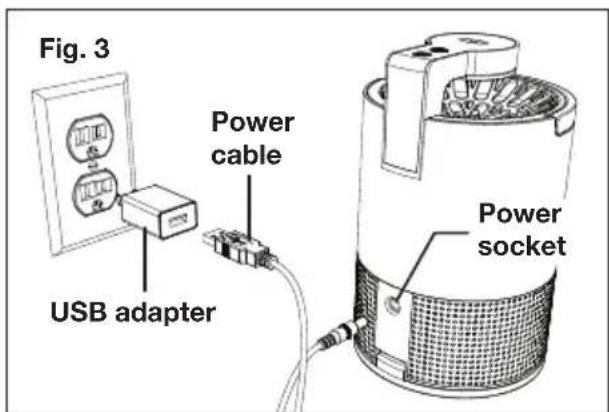
Powering the Bug Trapper (Fig. 3)
- Connect the included power cable into the USB port of the USB adapter.
- Plug the USB adapter into an appropriate electrical outlet.
- Plug the other end of the power cable into the power socket on the back of the bug wrapper.
Modes (Fig. 4)
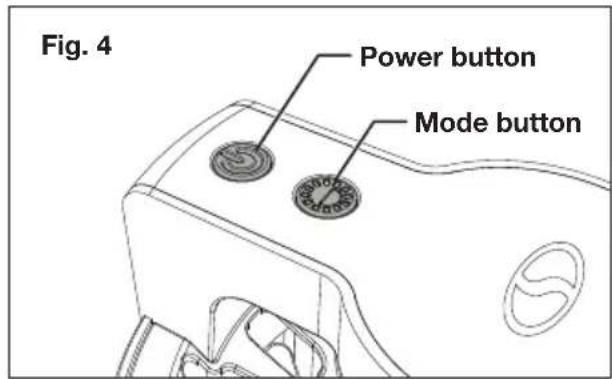
- Press the power button to turn the device on or off.
-
Press the mode button to cycle between two operating modes.
-
Fan + UV (dimmed)
- Fan + UV (regular)
- Simply leave the bug trapper running in an indoor environment. The UV light will attract insects to the device allowing the fan to suck them down onto the glue board.
NOTE: For best results, use in a dark enclosed space away from strong fan or air conditioning drafts.
Maintenance
Replacing the Glue Board
Replace the glue board with the included replacements once it has been sufficiently saturated with insects. Refer to Fig. 2 for instructions on installing a new glue board.
Cleaning
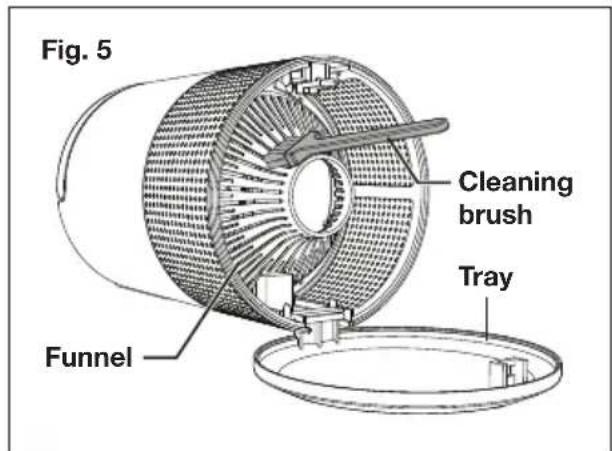
- Unplug the bug trapper then press the tray release button to open the tray.
- Use the included cleaning brush to clean the funnel and tray (Fig. 5).
WARNING! The exterior housing of bug trapper does not require cleaning. Do not attempt to clean the housing with water, solvents or any other liquids.
Service + Support
If your Sun Joe SJ-BZ15W-BLK 5W Electric Bug Trapper requires service or maintenance, please call Snow Joe + Sun Joe customer service at 1-866-SNOWJOE (1-866-766-9563) for assistance.
Model + Serial Numbers
When contacting the company or arranging service from an authorized dealer, you will need to provide the model and serial numbers, which can be found on the registration card. Copy these numbers into the space provided below.
Record the following numbers from the registration card of your new product:

Serial #:
AC Adapter
Federal Communications Commission (FCC)
WARNING! Any changes or
modifications to this unit not expressly approved by the party responsible for compliance could void the user's authority to operate the equipment.
Class B device:
NOTE: This equipment has been tested and found to comply with the limits for a Class B digital device, pursuant to part 15 of the FCC Rules.
These limits are designed to provide reasonable protection against harmful interference in a residential installation.
This equipment generates, uses and can radiate radio frequency energy and, if not installed and used in accordance with the instructions, may cause harmful interference to radio communications.
However, there is no guarantee that interference will not occur in a particular installation.
If this equipment does cause harmful interference to radio or television reception, which can be determined by turning the equipment off and on, the user is encouraged to try to correct the interference by one or more of the following measures:
- Reorient or relocate the receiving antenna.
- Increase the separation between the equipment and receiver.
- Connect the equipment into an outlet on a circuit different from that to which the receiver is connected.
- Consult the dealer or an experienced radio/ TV technician for help.
SNOW JOE ^ 念 + SUN JOE ^ 念 CUSTOMER PROMISE
ABOVE ALL ELSE, Snow Joe, LLC ("Snow Joe") is dedicated to you, our customer. We strive to make your experience as pleasant as possible. Unfortunately, there are times when a Snow Joe®, Sun Joe®, or Aqua Joe® product ("Product") does not work or breaks under normal operating conditions. We think it's important that you know what you can expect from us. That's why we have a Limited Warranty ("Warranty") for our Products.
OUR WARRANTY:
Snow Joe warrants new, genuine, powered and non-powered Products to be free from defects in material or workmanship when used for ordinary household use for a period of two years from the date of purchase by the original, end-user purchaser when purchased from Snow Joe or from one of Snow Joe's authorized sellers with proof of purchase. Because Snow Joe is unable to control the quality of its Products sold by unauthorized sellers, unless otherwise prohibited by law, this Warranty does not cover Products purchased from unauthorized sellers. If your Product does not work or there's an issue with a specific part that is covered by the terms of this Warranty, Snow Joe will elect to either (1) send you a free replacement part, (2) replace the Product with a new or comparable product at no charge, or (3) repair the Product. How cool is that!
This Warranty gives you specific legal rights, and you may also have other rights which vary from State to State.
PRODUCT REGISTRATION:
Snow Joe strongly encourages you to register your Product. You can register online at snowjoe.com/register, or by printing and mailing in a registration card available online from our website, or calling our Customer Service Department at 1-866-SNOWJOE (1-866-766-9563), or by e-mailing us at help@snowjoe.com. Failure to register your Product will not diminish your warranty rights. However, registering your Product will allow Snow Joe to better serve you with any of your customer service needs.
WHO CAN SEEK LIMITED WARRANTY COVERAGE:
This Warranty is extended by Snow Joe to the original purchaser and original owner of the Product.
WHAT IS NOT COVERED?
This Warranty does not apply if the Product has been used commercially or for non-household or rental applications. This Warranty also does not apply if the Product was purchased from an unauthorized seller. This Warranty also does not cover cosmetic changes that do not affect performance. Wearing parts like belts, augers, chains and tines are not covered under this Warranty, and can be purchased at snowjoe.com or by calling 1-866-SNOWJOE (1-866-766-9563).

SUNJOE
ATRAPA-INSECTOS ELECTRICO DE 5 W
LUZ UV | TURBINA | PANEL CON PEGAMENTO
Modelo SJ-BZ15W-BLK
Si Tiene preguntas o commentarios, comuniquese con la central de service al cliente Snow Joe ^+ Sun Joe Ilamando al:
1-866-SNOWJOE (1-866-766-9563)
- IMPORTANT! Safety Instructions
- Read all the instructions before using the device
- Know Your Electric Bug Trapper
- Technical Data
- Unpacking
- Carton Contents
- Installing Glue Board
- Operation
- Intended Use
- Powering the Bug Trapper (Fig. 3)
- Modes (Fig. 4)
- Maintenance
- Replacing the Glue Board
- Cleaning
- Service + Support
- Model + Serial Numbers
- AC Adapter
- Federal Communications Commission (FCC)
- WARNING! Any changes or
- Class B device:
- SNOW JOE ^ 念 + SUN JOE ^ 念 CUSTOMER PROMISE
- OUR WARRANTY:
- This Warranty gives you specific legal rights, and you may also have other rights which vary from State to State.
- PRODUCT REGISTRATION:
- WHO CAN SEEK LIMITED WARRANTY COVERAGE:
- WHAT IS NOT COVERED?
- SUNJOE
- ATRAPA-INSECTOS ELECTRICO DE 5 W
Brand : Sun Joe
Model : SJBZ15WBLK
Category : Pest control