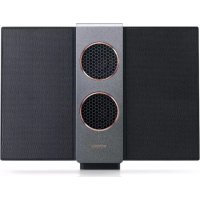
treVolo S - Loudspeaker BENQ - Free user manual and instructions
Find the device manual for free treVolo S BENQ in PDF.



| Product Type | Portable Bluetooth Speaker |
| Brand | BenQ |
| Model | treVolo S |
| Dimensions (closed) | 63.2 x 96.3 x 157.5 mm |
| Weight (with battery) | 1 kg |
| Speaker Type | Electrostatic dual panel |
| Frequency Response | 60 Hz – 20 kHz |
| Battery Life | Up to 18 hours (depending on usage) |
| Power Supply | AC adapter 5V / 2A (Micro USB) |
| Connectivity | Bluetooth 4.2, NFC, 3.5mm audio input, Micro USB (charging) |
| Main Functions | Play/Pause, Volume +/-, 3D Sound Mode, Bluetooth Pairing, Power |
| LED Indicators | Power indicator (green/yellow/red), Bluetooth indicator (flashing blue) |
| Dedicated App | BenQ Audio (Android/iOS) |
| Operating Temperature | 0°C to 40°C |
| Storage Temperature | -10°C to 50°C |
| Care and Cleaning | Wipe with a dry, soft cloth; avoid moisture |
| Safety | Do not expose to water, shocks, extreme temperatures; use the provided adapter |
| Spare Parts and Repairability | Contact BenQ dealer or service center for battery replacement or repair |
| General Information | Compliant with Industry Canada RSS standard and RF exposure guidelines |
Frequently Asked Questions - treVolo S BENQ
User questions about treVolo S BENQ
0 question about this device. Answer the ones you know or ask your own.
Ask a new question about this device
Download the instructions for your Loudspeaker in PDF format for free! Find your manual treVolo S - BENQ and take your electronic device back in hand. On this page are published all the documents necessary for the use of your device. treVolo S by BENQ.
USER MANUAL treVolo S BENQ
© 2018 BenQ Corporation.
All rights reserved. Rights of modification reserved.
BenO P/N-4LH0M01.003
P/N: 4J.2YL01.004
Package content

natural_image
Line drawing of a rectangular electronic device with six circular buttons on top (no text or symbols)
natural_image
Line drawing of a handheld device with cable, connector, and plug (no text or symbols)Speaker x1 Power adapter x1
natural_image
Simple line drawing of a folded paper or document with no text or symbolsQuick start guide x|
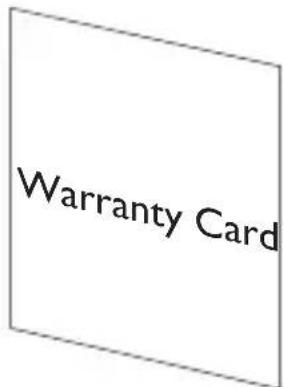
Warranty card x1 (Supply varies from regions.)
Buttons & connectors
Pairing and connecting Bluetooth® devices
1.
natural_image
Line drawing of a refrigerator with an attached power outlet and a magnified inset showing the interior (no text or symbols)2.
natural_image
Line drawing of a refrigerator with an attached plug and a magnified inset showing internal components (no text or symbols)

natural_image
Line drawing of a rectangular device with two circular cutouts on top (no text or symbols)3.
4.
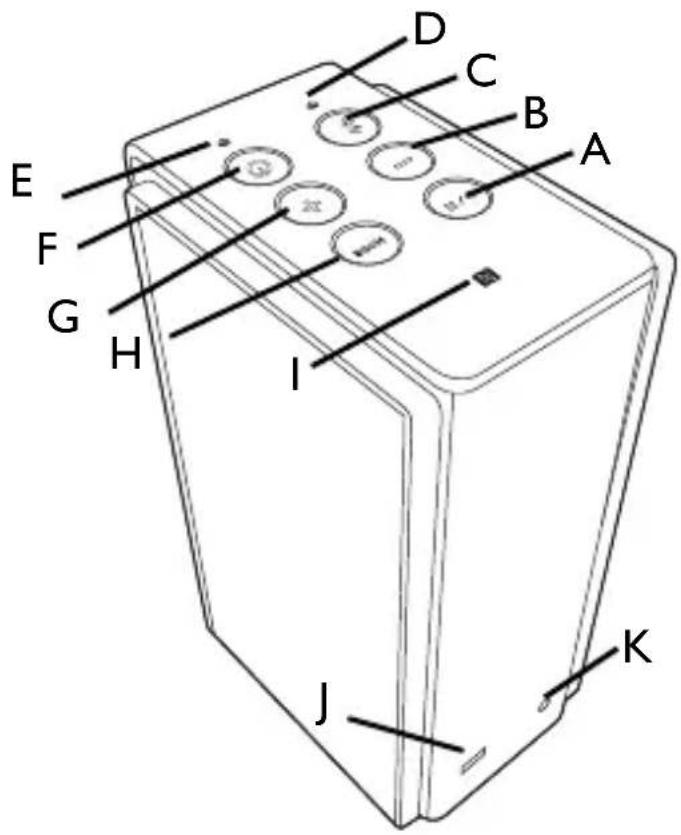
Buttons & connectors
A. Play/Pause E. LED indicator for
I. NFC
Power
B. Volume down F. Power J. Micro USB port
(charger-in jack)
C. Bluetooth®
G. Volume up K. Line-in jack
D. LED indicator for Bluetooth®
H. Sound mode (3D)
Pairing and connecting Bluetooth ® devices
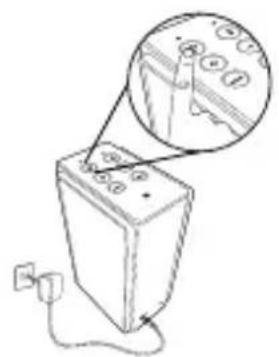
I. Have the power adaptor plugged in. Press and hold the power button for 3 seconds.
-
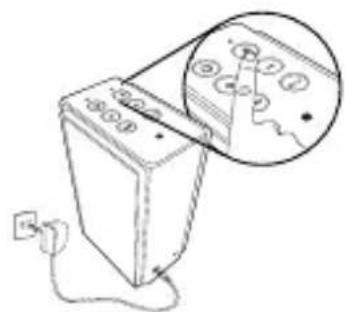
Press and hold the Bluetooth ® button for 3 seconds to make the speaker discoverable. The LED indicator for Bluetooth ® will blink in blue.
-
Turn on Bluetooth ® of your device to discover and pair with “treVolo S”.
-
Flip out both speaker panes and enjoy your music.

- NFC-enabled devices can wake up treVolo S, and treVolo S can automatically connect to Bluetooth® of the devices when they are close to each other.
•treVolo S can paired with another treVolo S to perform Duo mode. See more information on the user manual.
Recommendations
- Download the app “BenQ Audio” to your Android™ or iOS devices from respective application stores to indulge in the best music playing experience.
- To flexibly tune in with the speaker everywhere for optimal acoustics, have it charged beforehand and put it in an open space.
- The LED indicator of power button is lit in green with 81% or more of remaining power, in yellow with 80%\~31% of power, and in red with 30% or less of power.
- The LED indicator of power button also indicates non-distorted 3D sound of “on” in green and of “off” in red. The LED indicator of power button mentioned above all flash for about 5 seconds.
- The input priority of sound is USB > line-in > Bluetooth®.
- On details of treVolo S or other products by BenQ, check out BenQ's official website at www.BenQ.com for further information.
Music playing variations
Connecting to your devices using a cable.
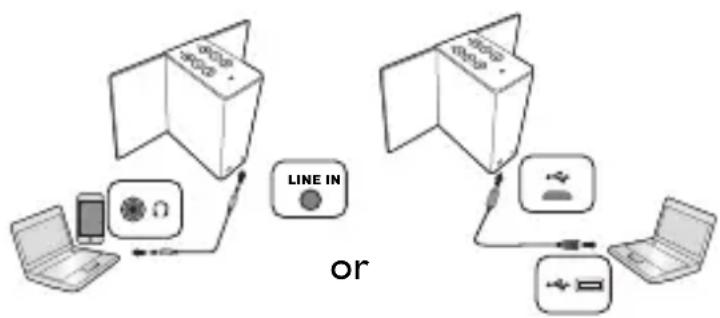
flowchart
graph TD
    A["Device 1"] -->|Wireless Signal| B["Line IN"]
    C["Device 2"] -->|Wireless Signal| B
    B --> D["Device 3"]
    D --> E["Device 4"]
    E --> F["Device 5"]
    F --> G["Device 6"]
    G --> H["Device 7"]
    H --> I["Device 8"]
    I --> J["Device 9"]
    J --> K["Device 10"]
    K --> L["Device 11"]
    L --> M["Device 12"]
    M --> N["Device 13"]
    N --> O["Device 14"]
    O --> P["Device 15"]
    P --> Q["Device 16"]
    Q --> R["Device 17"]
    R --> S["Device 18"]
    S --> T["Device 19"]
    T --> U["Device 20"]
Specification
| Performance Other information | |||
| Frequency response | 60 Hz ~ 20 kHz I/O port Micro USB x1, Line-in x1 | ||
| Play time 18 hours (depends on user scenarios) | Input power rating | DC 5V 2A | |
| Connection Operating | temperature | 0 ~ 40°C | |
| Bluetooth® | Bluetooth® 4.2 | ||
| Storage temperature | -10 ~ 50°CYou will hear a warning sound if the temperature exceeds 60°C. | ||
| Input 3.5 mm stereo input, USB audio | Dimension 63.2 x 96.3 x 157.5 mm (closed) | ||
| Physical Weight 1 kg (battery included) | |||
| Button definition | Power, Volume up, Volume down, Sound mode, Play/Pause, BT pairing | ||
| LED indicator (Power) | Red / Green LED x 1 | ||
| LED indicator (Bluetooth®) | Blue LED x 1 | ||
English
General Safety Information
When setting up or operating your device, please pay special attention to the following:
- Make sure you follow all instructions and warnings related to the system.
- Do not store your device in environments where the temperature is below -10°C or above 50°C , nor use your device in environments where the temperature is below 0°C or above 40°C . Otherwise system performance will be adversely affected.
- Do not expose your device to rain or excess humidity, and keep it away from liquids (such as beverages, faucets, and so on).
- Avoid exposing your device to direct sunlight, or intense light source, and keep it away from sources of heat (such as radiators, space heaters, stoves, and so on).
- Do not expose your device to heavy impacts or strong vibrations.
- Do not use your device near a gas leak.
- Do not use your device near water, for example, near a bathtub, wash bowl, kitchen sink or laundry tub, in a wet basement or near a swimming pool.
- Do not place the device in the vicinity of strong magnetic fields.
- Use the supplied adapter to charge your device, and make sure no heavy objects are placed on the adapter.
- Keep the device accessories away from children.
- Please DO NOT put anything upon the device while using it or leaving it alone.
- Beware of being suffered from the pinch while flipping speaker panes.
Safety information about the battery
The incorrect use of battery may cause leak of chemicals or explosion. Caution: The leak of chemicals may harm the skin and erode the metal contacts. If any chemicals leaks from the device, please use the dry cloth to wipe it clean and contact your BenQ dealer or service center for battery replacement.
Safety information about power adapter
- Use only the power adapter supplied with device. Use of another type of power adapter will result in malfunction and/or danger.
- Please use the proper electric outlet and make sure no heavy objects are placed on the power adapter or power cord.
- Allow adequate ventilation around the adapter when using it to operate the device or charge the battery. Do not cover the power adapter with paper or other objects that will reduce cooling. Do not use the power adapter while it is inside a carrying case.
- Do not use the adapter in a high moisture environment. Never touch the adapter when your hands are wet.
- Connect the adapter to a proper power source. The voltage requirements are found on the product case and/or packaging.
- Do not use the adapter if it becomes damaged.
- Do not attempt to service the adapter. There are no service parts inside. Replace the unit if it is damaged or exposed to excess moisture. Consult your BenQ dealer or service center for help and maintenance.
- The adapter stops charging and the LED indicator of power button is lit in red when the temperature of battery reaches 40° C .
- The adapter is manufactured by ASIAN POWER DEVICES INC, and the model number is WB-10E05R.
Caution
Risk of explosion if battery is replaced by an incorrect type. Dispose of used batteries according to the instructions.
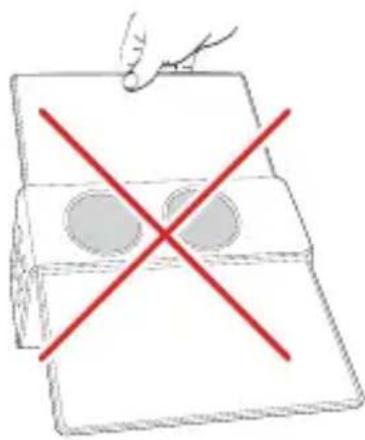
Do not carry the speaker around by holding one of the panes as the speaker may be damaged.
natural_image
Simple line drawing of a box with two circles inside and a red X mark on the side (no text or symbols)限用物質含有情況標示聲明
natural_image
Simple line drawing of a clipboard with a red X mark and two circular cutouts, no text or symbols present.NCC
依低功率電波輻射性電機管理辦法要求
B. Volume - F. Alimentation J. Port micro USB (prise
natural_image
Simple line drawing of a box with two circles inside and a red X mark on top, no text or symbols present.natural_image
Simple line drawing of a box with two circles and a red X mark, no text or symbols present.FCC Statement
Federal Communication Commission Interference Statement
This equipment has been tested and found to comply with the limits for a Class B digital device, pursuant to Part 15 of the FCC Rules. These limits are designed to provide reasonable protection against harmful interference in a residential installation. This equipment generates, uses and can radiate radio frequency energy and, if not installed and used in accordance with the instructions, may cause harmful interference to radio communications. However, there is no guarantee that interference will not occur in a particular installation. If this equipment does cause harmful interference to radio or television reception, which can be determined by turning the equipment off and on, the user is encouraged to try to correct the interference by one of the following measures:
•Reorient or relocate the receiving antenna.
- Increase the separation between the equipment and receiver.
- Connect the equipment into an outlet on a circuit different from that to which the receiver is connected.
- Consult the dealer or an experienced radio/TV technician for help.
IC statement (for Canadian users)
This Class B digital apparatus complies with Canadian ICES-3 (B).
The device complies with RSS-247 of the Industry Canada Rules. Operation is subject to the following two conditions (If the product within RF function):
I. this device may not cause interference and
- this device must accept any interference, including interference that may cause undesired operation of the device.
Information to user
Notice:
Any changes or modifications not expressly approved by the party responsible for compliance could void your authority to operate the equipment.
Information to the user
Note: This equipment has been tested and found to comply with the limits for a Class B digital device, pursuant to part 15 of the FCC Rules. These limits are designed to provide reasonable protection against harmful interference in a residential installation. This equipment generates, uses and can radiate radio frequency energy and, if not installed and used in accordance with the instructions, may cause harmful interference to radio communications. However, there is no guarantee that interference will not occur in a particular installation. If this equipment does cause harmful interference to radio or
television reception, which can be determined by turning the equipment off and on, the user is encouraged to try to correct the interference by one or more of the following measures:
•Reorient or relocate the receiving antenna.
- Increase the separation between the equipment and receiver.
- Connect the equipment into an outlet on a circuit different from that to which the receiver is connected.
- Consult the dealer or an experienced radio/TV technician for help.
This Class B digital apparatus complies with Canadian ICES-003.
To reduce potential radio interference to other users, the antenna type and its gain should be so chosen that the equivalent isotropically radiated power (e.i.r.p.) is not more than that permitted for successful communication.
This device complies with Industry Canada licence-exempt RSS standard(s). Operation is subject to the following two conditions:
I. This device may not cause interference, and
2. This device must accept any interference, including interference that may cause undesired operation of the device.
Labelling requirements
Notice:
This device complies with Part 15 of the FCC Rules and Industry Canada license-exempt RSS standard(s). Operation is subject to the following two conditions: (1) this device may not cause interference, and (2) this device must accept any interference, including interference that may cause undesired operation of the device.
RF Radiation Exposure Statement:
I. This Transmitter must not be colocated or operating in conjunction with any other antenna or transmitter.
- This equipment complies with FCC RF radiation exposure limits set forth for an uncontrolled environment. This equipment should be installed and operated with a minimum distance of 20 centimeters between the radiator and your body.
This device complies with the Canada portable RF exposure limit set forth for an uncontrolled environment and are safe for intended operation as described in this manual. The further RF exposure reduction can be achieved if the product can be kept as far as possible from the user body or set the device to lower output power if such function is available.
Complies with IDA Standards DB101054
- Package content
- Buttons & connectors
- Pairing and connecting Bluetooth® devices
- Pairing and connecting Bluetooth ® devices
- Recommendations
- Music playing variations
- English
- General Safety Information
- Safety information about the battery
- Safety information about power adapter
- Caution
- NCC
- FCC Statement
- Federal Communication Commission Interference Statement
- IC statement (for Canadian users)
- Information to user
- Information to the user
- Labelling requirements
- Notice:
- RF Radiation Exposure Statement:
Brand : BENQ
Model : treVolo S
Category : Loudspeaker