P568000LOCK - Lock Tripp Lite - Free user manual and instructions
Find the device manual for free P568000LOCK Tripp Lite in PDF.


User questions about P568000LOCK Tripp Lite
0 question about this device. Answer the ones you know or ask your own.
Ask a new question about this device
Download the instructions for your Lock in PDF format for free! Find your manual P568000LOCK - Tripp Lite and take your electronic device back in hand. On this page are published all the documents necessary for the use of your device. P568000LOCK by Tripp Lite.
USER MANUAL P568000LOCK Tripp Lite
1111 W. 35th Street, Chicago, IL 60609 USA www.tripplite.com/support
Copyright © 2018 Tripp Lite. All rights reserved.
Package Contents
• P568-000-LOCK (Cable Tie Base, Cable Tie, Screw)
Installation
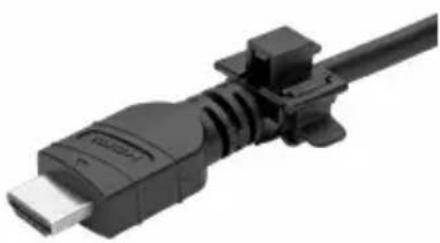
1 Insert the HDMI cable firmly into the cable tie base. The base should be pushed up as close to the connector as possible.
natural_image
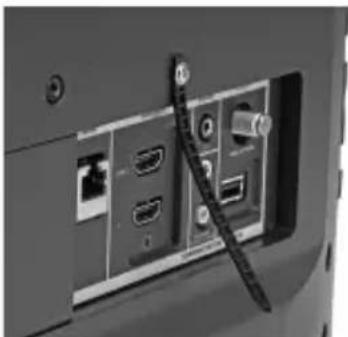
Close-up of a black USB cable with connector (no text or symbols visible)2 Remove the locking screw adjacent to the device's HDMI port. Secure the cable tie to the device with the same locking screw.
natural_image
Back view of a computer monitor showing port labels and connectors (no readable text or symbols)Note: If the device does not contain a locking screw, please use the screw included with the cable lock.
Installation
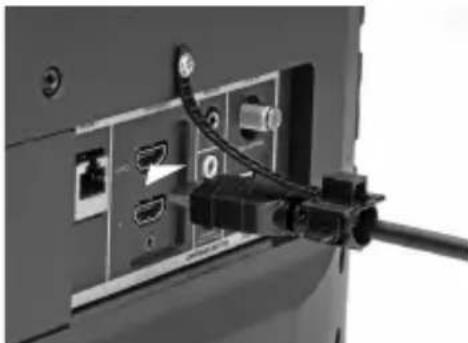
3 Connect the HDMI cable to the device.
natural_image
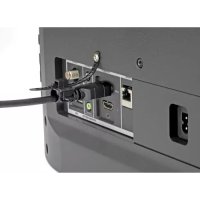
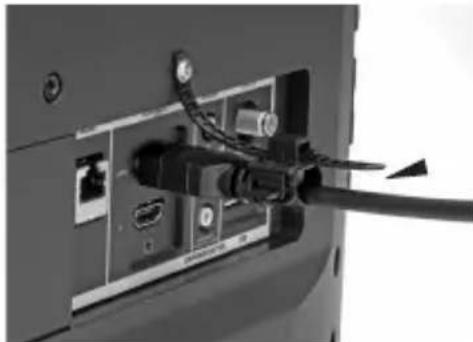
Close-up of a computer monitor rear panel showing internal ports and cable insertion (no text or symbols visible)4 Insert the cable tie into the cable tie base, firmly pulling on it and removing any slack so the HDMI connector does not come unplugged.
natural_image
Close-up of a computer monitor rear panel showing internal ports and cable (no text or symbols visible)Warranty
Lifetime Limited Warranty
Tripp Lite warrants this product, if used in accordance with all applicable instructions, to be free from original defects in material and workmanship for life. If the product should prove defective in material or workmanship within that period, Tripp Lite will, subject to the foregoing terms and limitations, repair or replace the product, in its sole discretion, as your exclusive remedy for Tripp Lite's breach of its limited warranty.
TRIPP LITE'S LIMITED WARRANTY DOES NOT APPLY TO NORMAL WEAR OR TO DAMAGE RESULTING FROM ACCIDENT, MISUSE, ABUSE OR NEGLECT. TRIPP LITE MAKES NO WARRANTIES OTHER THAN THE LIMITED WARRANTY EXPRESSLY SET FORTH HEREIN. EXCEPT TO THE EXTENT PROHIBITED BY APPLICABLE LAW, ALL IMPLIED WARRANTIES, INCLUDING ALL WARRANTIES OF MERCHANTABILITY OR FITNESS FOR A PARTICULAR PURPOSE, ARE HEREBY DISCLAIMED; AND TRIPP LITE'S WARRANTY EXPRESSLY EXCLUDES ALL INCIDENTAL AND CONSEQUENTIAL DAMAGES. (Some states do not allow limitations or exclusion of implied warranties, and some states do not allow the exclusion or limitation of incidental or consequential damages, so the above limitations or exclusions may not apply to you. Tripp Lite's limited warranty gives you specific legal rights, and you may have other rights which vary from jurisdiction to jurisdiction).
Tripp Lite
1111 W. 35th Street
Chicago, IL 60609 USA
WARNING: The individual user should take care to determine prior to use whether this device is suitable, adequate or safe for the use intended. Because individual applications are subject to great variation, Tripp Lite makes no representation or warranty as to the suitability or fitness of these devices for any specific application. The policy of Tripp Lite is one of continuous improvement. Specifications are subject to change without notice.
Tripp Lite has a policy of continuous improvement. Specifications are subject to change without notice.


Manufacturing Excellence.
1111 W. 35th Street, Chicago, IL 60609 USA
www.tripplite.com/support
Guía de Instalación
www.tripplite.com/support
natural_image
Close-up of a black USB cable with connector (no text or symbols visible)natural_image
Back view of a computer monitor showing port labels and connectors (no readable text or symbols)natural_image
Close-up of a computer monitor rear panel showing internal ports and cable insertion (no text or symbols visible)natural_image
Close-up of a computer monitor rear panel showing internal components and cable insertion (no text or symbols visible)Garantía
www.tripplite.com/support
1111 W. 35th Street, Chicago, IL 60609 USA
www.tripplite.com/support
natural_image
Close-up of a black USB cable with metallic connector (no text or symbols visible)natural_image
Back view of a computer monitor showing port labels and connectors (no readable text or symbols)natural_image
Close-up of a computer monitor rear panel showing internal ports and cable insertion (no text or symbols visible)natural_image
Close-up of a computer monitor rear panel showing internal components and cable insertion (no text or symbols visible)Garantie
1111 W. 35th Street, Chicago, IL 60609 USA
www.tripplite.com/support
1111 W. 35th Street, Chicago, IL 60609 USA • www.tripplite.com/support
natural_image
Close-up of a black USB cable with connector (no text or symbols visible)natural_image
Back view of a computer monitor showing port labels and connectors (no readable text or symbols)natural_image
Close-up of a computer monitor rear panel showing internal ports and cable (no text or symbols visible)natural_image
Close-up of a computer monitor rear panel showing internal ports and cable (no text or symbols visible)1111 W. 35th Street, Chicago, IL 60609 USA www.tripplite.com/support
18-03-358 93-3844_RevA