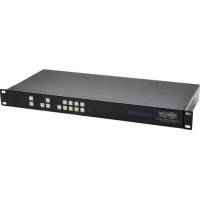
B3024HX4H4K - Video adapter Tripp Lite - Free user manual and instructions
Find the device manual for free B3024HX4H4K Tripp Lite in PDF.


| Product Type | HDMI Matrix Switch/Splitter with Audio Extraction and Multi-Resolution Support |
| Brand | Tripp Lite |
| Model | B302-4HX4H-4K |
| Number of HDMI Inputs | 4 (Female) |
| Number of HDMI Outputs | 4 (Female) |
| Maximum Resolution | 4096x2160 @ 60 Hz (4Kx2K) |
| HDMI Bandwidth | 18 Gbps |
| HDCP Compatible | HDCP 2.2 |
| Audio Extraction | Yes, 3.5 mm stereo audio outputs for speakers/amplifiers |
| HDR Support | Yes, HDR (High Dynamic Range) |
| Control Methods | Front panel, IR remote, RS-232, TCP/IP (software GUI) |
| Power Supply | DC 12 V, 3 A (power adapter included) |
| Power Consumption | 24.2 W |
| Dimensions (L x D x H) | 440 x 200 x 44 mm |
| Weight | 2477 g |
| Operating Temperature | 0 to 45 °C |
| Storage Temperature | -10 to 80 °C |
| Operating Humidity | 10 to 85% RH, non-condensing |
| Warranty | 3-year limited |
| Package Contents | Switch, IR remote, IR receiver cable (1.2 m), power supply with international adapters, mounting hardware, driver CD, user manual |
| Maintenance and Cleaning | Disconnect before cleaning. Use a soft, dry cloth. Do not use liquids or aerosols. |
| Safety | Use only the supplied power supply. Do not expose to moisture. Avoid overloading. |
Frequently Asked Questions - B3024HX4H4K Tripp Lite
User questions about B3024HX4H4K Tripp Lite
0 question about this device. Answer the ones you know or ask your own.
Ask a new question about this device
Download the instructions for your Video adapter in PDF format for free! Find your manual B3024HX4H4K - Tripp Lite and take your electronic device back in hand. On this page are published all the documents necessary for the use of your device. B3024HX4H4K by Tripp Lite.
USER MANUAL B3024HX4H4K Tripp Lite
HDMI Matrix Switch/Splitters with Audio Extractor, IP Access and Multi-Resolution Support
Model: B302-4HX4H-4K, B302-8HX8H-4K
Espanol 15 • Français 29 • Pycckn 43
WARRANTY REGISTRATION
Register your product today and be automatically entered to win an ISOBAR® surge protector in our monthly drawing!
triplite.com/warranty



Manufacturing Excellence.
1111 W. 35th Street, Chicago, IL 60609 USA dot triplite.com/support
Copyright © 2021 Tripp Lite. All rights reserved.
Package Contents
B302-4HX4H-4K or B302-8HX8H-4K HDMI Matrix Switch/Splitter
- IR Remote Control
- IR Receiver Cable, 4 ft.
International Power Supply (Input: 100-240V)
(x4) International Plug Adapters (North America, U.K., Europe, Australia)
- Mounting Hardware
- Driver CD
- Owner's Manual
Optional Accessories
P569-XXX-CERT High-Speed HDMI 2.0 Cables
P312-Series 3.5 mm Audio Cables
N202-Series Cat6 24 AWG Solid-Wire Patch Cables
Product Features
- Shares true 4K video from 4 different HDMI sources among 4 separate displays (B302-4HX4H-4K) or 8 different HDMI sources among 8 separate displays (B302-8HX8H-4K)
- Displays any audio/video signal on any display or the same signal on all displays
Supports true 4K resolutions up to 4096 x 2160 @ 60 Hz
Transmits analog stereo audio - Switches between sources and displays via front-panel pushbuttons, IR remote control, RS-232 serial commands or control software
- Multi-resolution support allows mixing and matching of monitors of various resolutions
HDR (High Dynamic Range) offers richer contrast and expanded color accuracy
Audio extraction allows connection of speakers, amplifiers or sound bars - Remotely access the software GUI by configuring your network to match the pre-assigned IP address
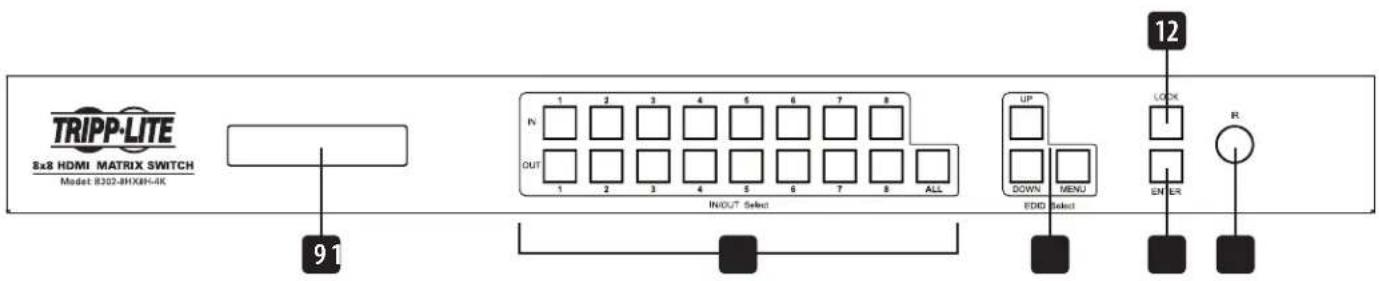
Panel Descriptions
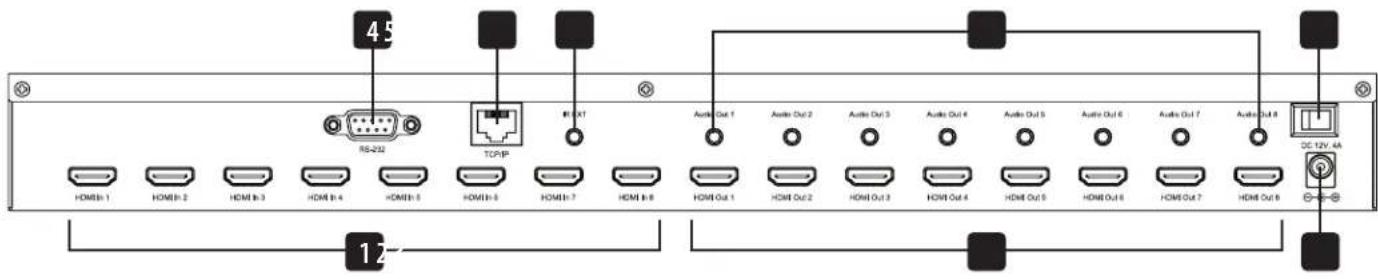
The following panels depict the 8x8 HDMI Matrix Switch/Splitter. It is identical to the 4x4 model, except with 4 more input and output ports.
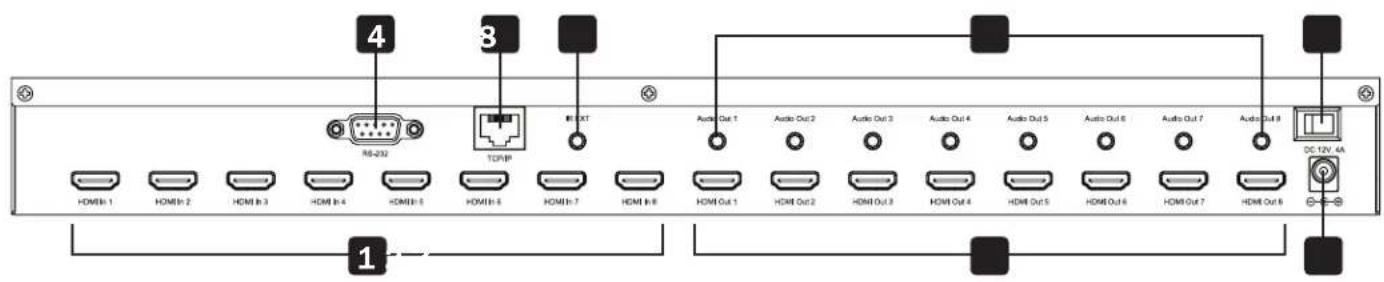
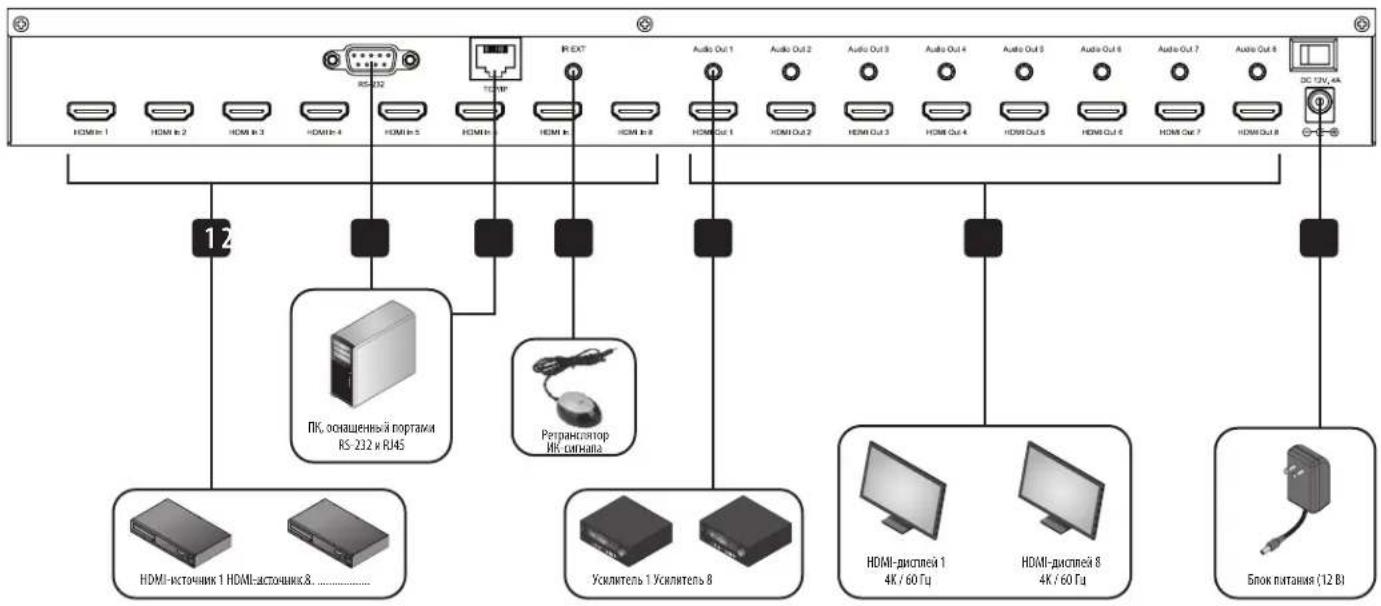
1 HDMI Inputs - Connect up to 8 HDMI source devices.
2 HDMI Outputs - Connect up to 8 HDMI display devices.
3 DC 12V - Connect the included 12V DC power supply.
RS-232 Port - Connect a PC or laptop to send RS-232 serial commands to the unit via terminal.
TCP/IP Port - Connect a PC or laptop via Cat6 cable to remotely control the unit via GUI.
6 IR EXT - Connect the included IR Receiver Cable for IR signal reception from the included IR Remote Control.
7 Audio Outputs - Connect up to 8 sets of speakers or amplifiers.
8 Power - Switch to turn the unit on and off.
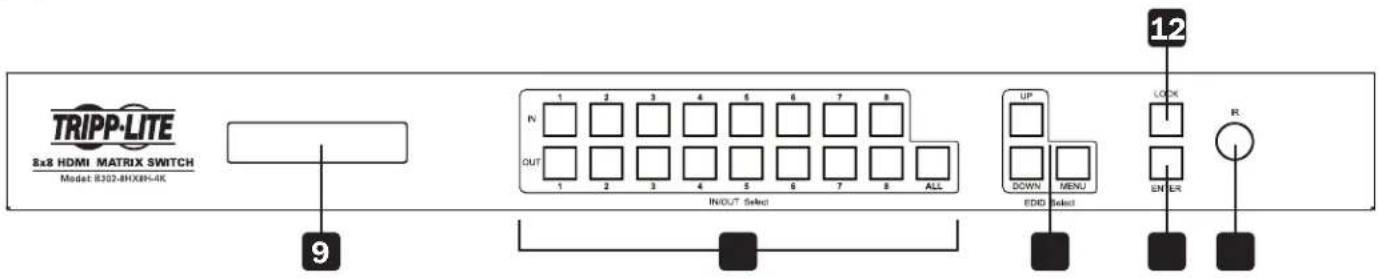
9 LCD Screen - Displays the unit's information and settings.
10 In/Out Select - Let you mix and match any input to any output. Press "ALL" to send one input to all connected displays.
1.1 EDID Select - Let you set EDID information for the Input and Output ports.
12 Lock - Locks all front-panel buttons to prevent accidental changes. Press "LOCK" again to unlock buttons.
13 Enter - Press to confirm commands.
14 IR - IR signal receptor for the included remote control.
Installation
Refer to the following steps and diagram to set up your HDMI matrix switch installation.
Note: Before making any connections, make sure power to all devices connected to the switch is turned off.
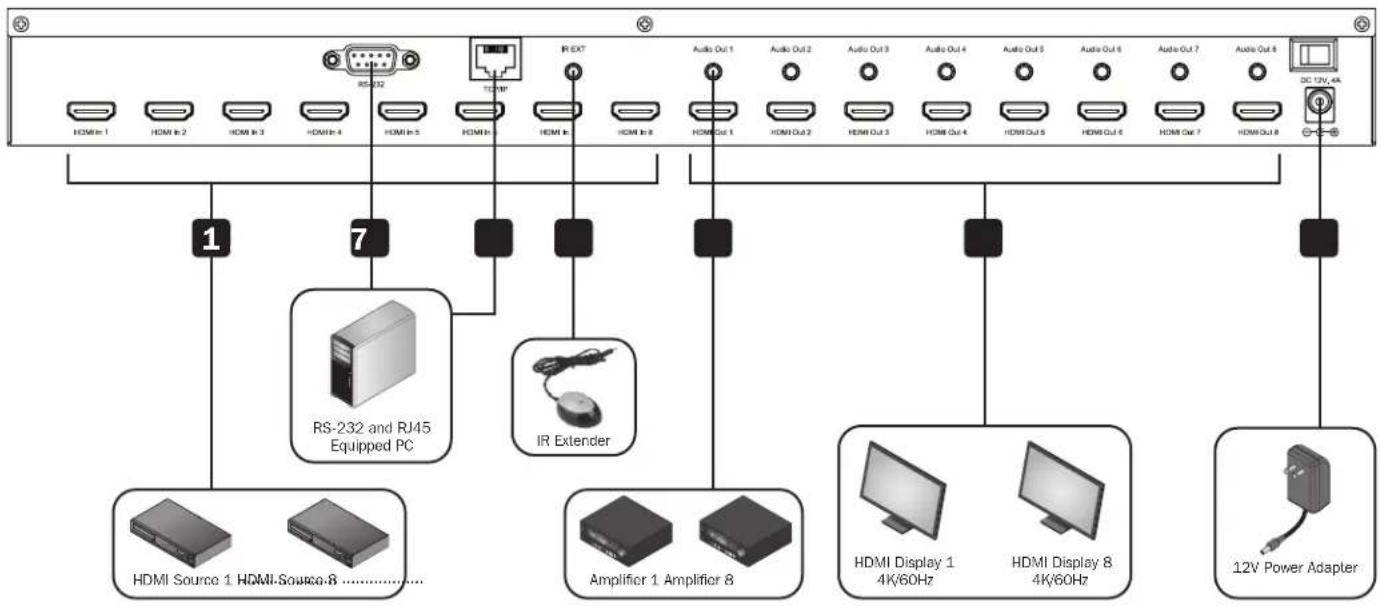
1 Connect up to 8 (B302-8HX8H-4K) or 4 (B302-4HX4H-4K) HDMI sources to the switch with user-supplied cables.
2 Connect up to 8 (B302-8HX8H-4K) or 4 (B302-4HX4H-4K) HDMI displays to the switch with user-supplied cables.
(3) (Optional) Connect up to 8 (B302-8HX8H-4K) or 4 (B302-4HX4H-4K) speakers or amplifiers to the switch with user-supplied 3.5mm audio cables.
4 (Optional) Connect a PC or laptop to the RS-232 port to control the switch via RS-232 commands.
5 (Optional) Connect a PC or laptop to the TCP/IP port with a user-supplied Cat6 cable to control the switch via the GUI.
(Optional) Connect the included IR Receiver Cable to the IR EXT port.
7 Connect the included power supply to the 12V DC port and turn on the power using the power switch. Within 20-30 seconds, each input signal will be displayed with its corresponding output port.
Operation
The following instructions are for the 8x8 HDMI Matrix Switch/Splitter, but apply equally to the 4x4 model.
The B302-Series HDMI Matrix Switch/Splitter features three different methods of control:
1) Front-panel pushbuttons
2) IR remote control
3) TCP/IP or RS-232 control via PC or laptop
Front-Panel Pushbuttons
The following section describes how to change the inputs and outputs manually.
*INPUT 12345678
*OUTPUT 12345678
1) To change an input to a specific output, press the desired input (IN 1-8), then the desired output (OUT 1-8). Press "ENTER" to confirm the new settings.
2) If you wish to send one input to more than one output display, press the desired input (IN 1-8), then the desired outputs (OUT 1-8). Once you have selected all the desired outputs, press "ENTER" to confirm the setting changes. To select all the outputs at once, press "ALL."
3) To preset the output EDID settings of one or all inputs, press the desired input (IN 1-8), then "EDID MENU." The LCD screen will display the input source settings as shown below. Press "UP/DOWN" to select a preset EDID. Please see EDID Table for a list of all the preset resolutions. Hit "ENTER" to confirm the setting.
*IN:1 4KX2K(444)/60Hz
4) To enter the output mode selection menu, press "UP." In the menu, users can choose between Default and Smart mode.
a) Default: All displays are defaulted to output 4K x 2K @ 60 Hz or the user-defined EDID setting.
b) Smart: Outputs the lowest capable resolution of the connected displays.
MODE: Default
MODE: Smart
To switch the mode, press "DOWN." By default, the unit comes preset in Default mode.
Operation
IR Remote Control
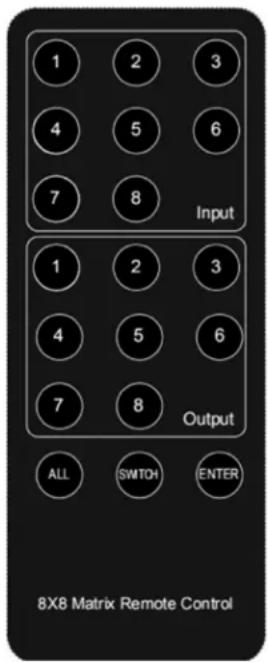
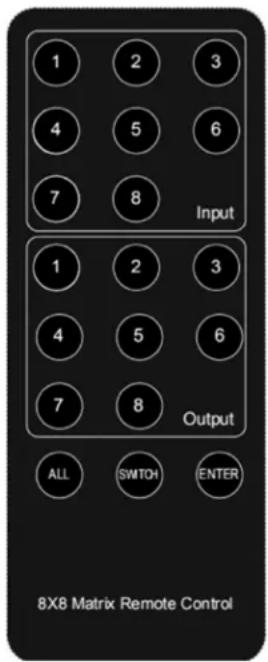
The following section describes how to operate the remote. "N" indicates a number value (1-8). " ^+ " indicates continuous pressing. There is no "+" button.
1) The format of switching channels (inputs to outputs) with the remote control is as follows: Input (N) + Switch + Output (N), Input (N) + Switch + Output (N), ..., + Enter. For example: If you wish to send Input 1 to Output 2 and Input 2 to Output 4, the sequence will be: Input (1) + Switch + Output (2) + Input (2) + Switch + Output (4) + Enter.
2) To select multiple outputs for one input, an example would be: Input (1) + Switch + Output (2) + Output (5) + Output (8) + Enter.
3) "ALL" is the shortcut button to select all output channels (displays). It works in the following fashion: ALL + Input (N) + Enter.
TCP/IP GUI Control
The GUI Control software is available on the included CD and at tripplite.com. GUI software is not compatible with macOS®
1) Run the dedicated GUI software on the target computer to be used.
2) Set the correct COM port number and the following communication parameters: 9600 bps, 1 start bit, 1 end bit, no check bit. Set the data format as ASCII and open the serial port.
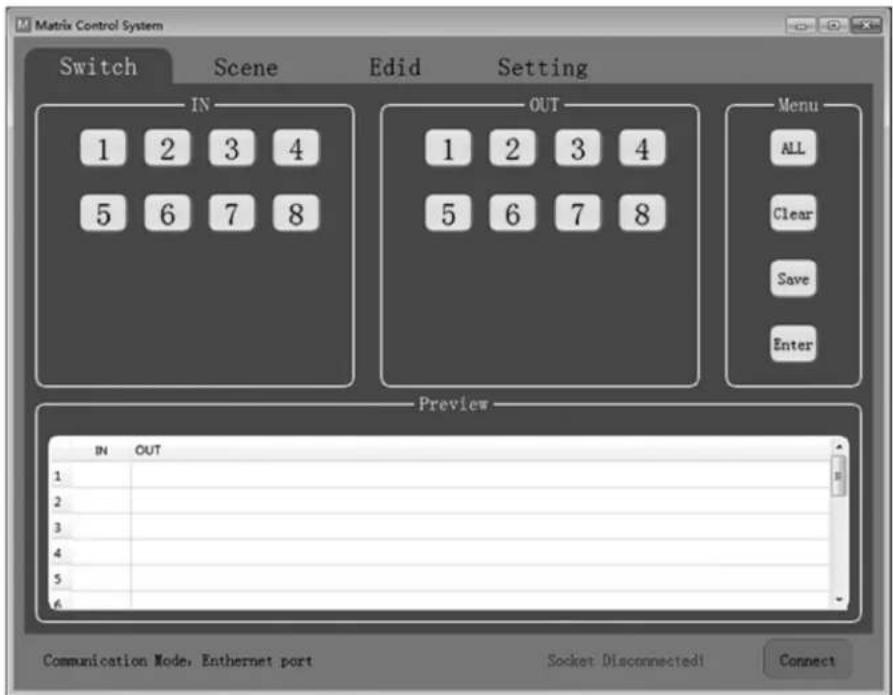
3) The Matrix Control System has four different tabs. Each one will be explained in the following steps.
Operation
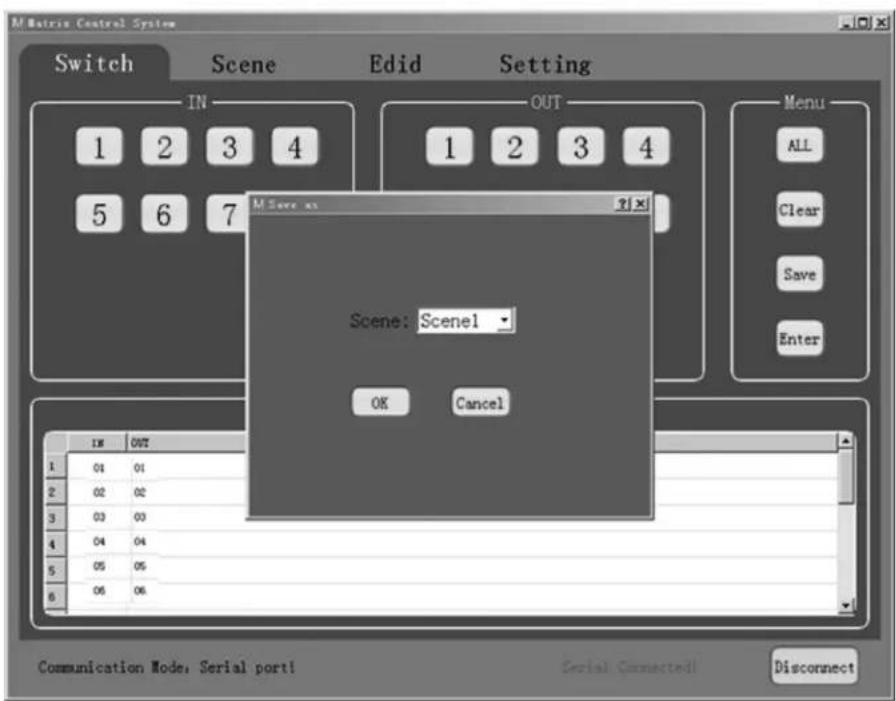
Switch Interface: Scene entering and configuring.
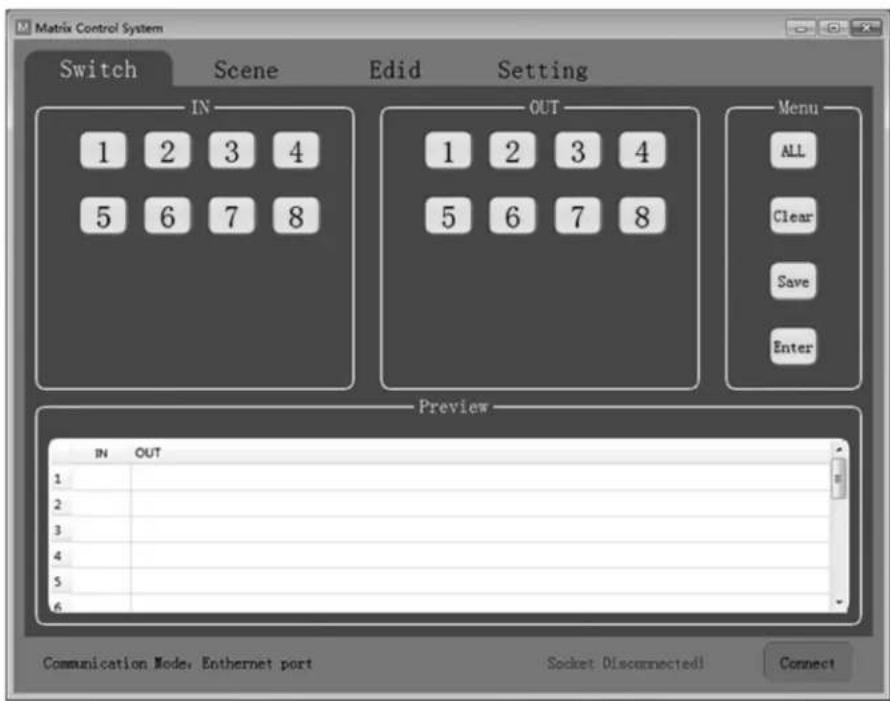
Select the inputs and outputs through the IN/OUT area. The selections will be displayed in the table below.
- ALL: Shortcut button to select all outputs.
- Clear: Clear the contents of the table.
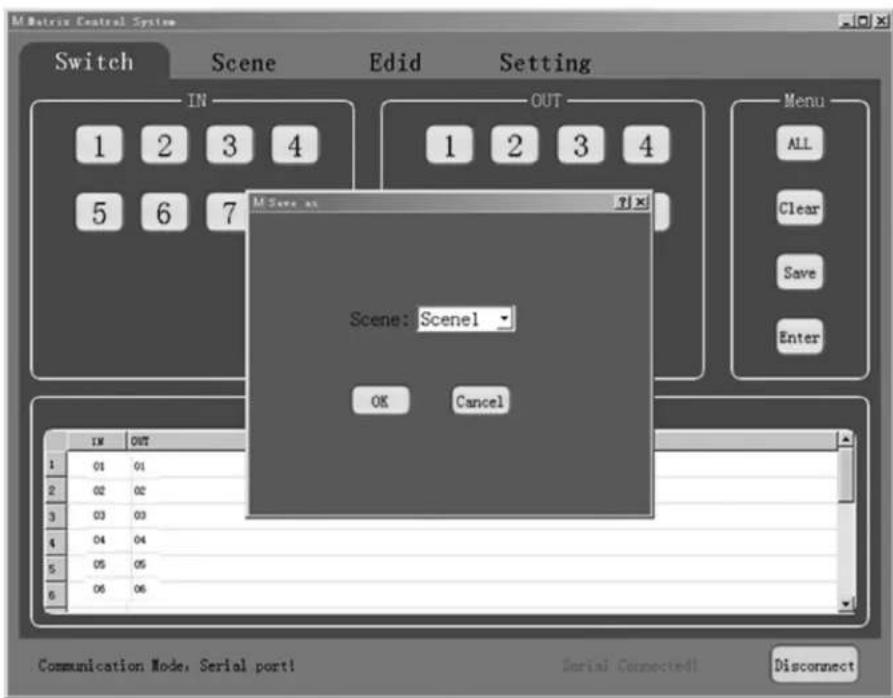
- Save: Save the current scene of the table.
- Enter: Enter the current scene.
Operation
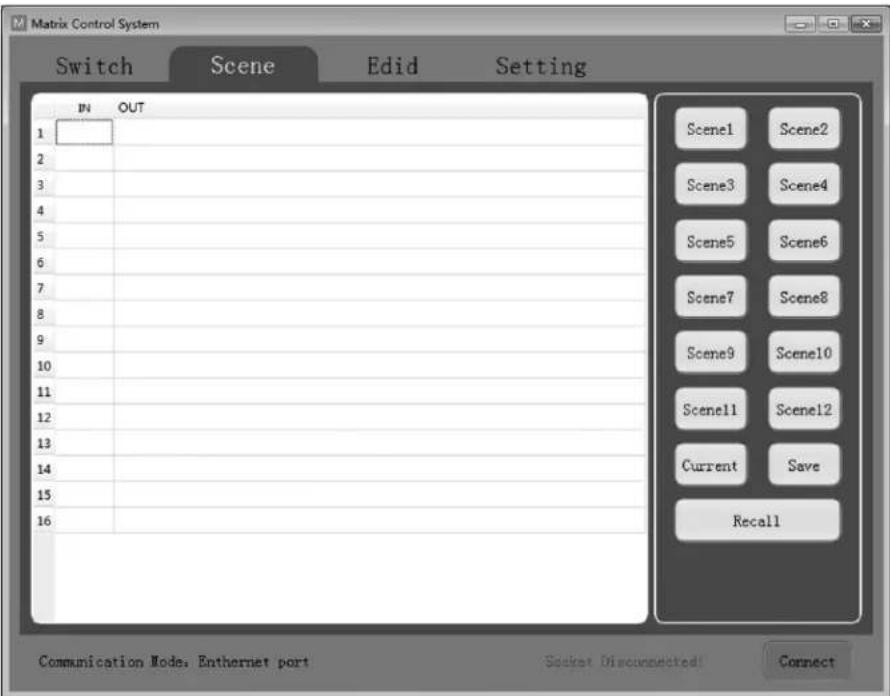
Scene Interface: Scene selection, current scene and recall.
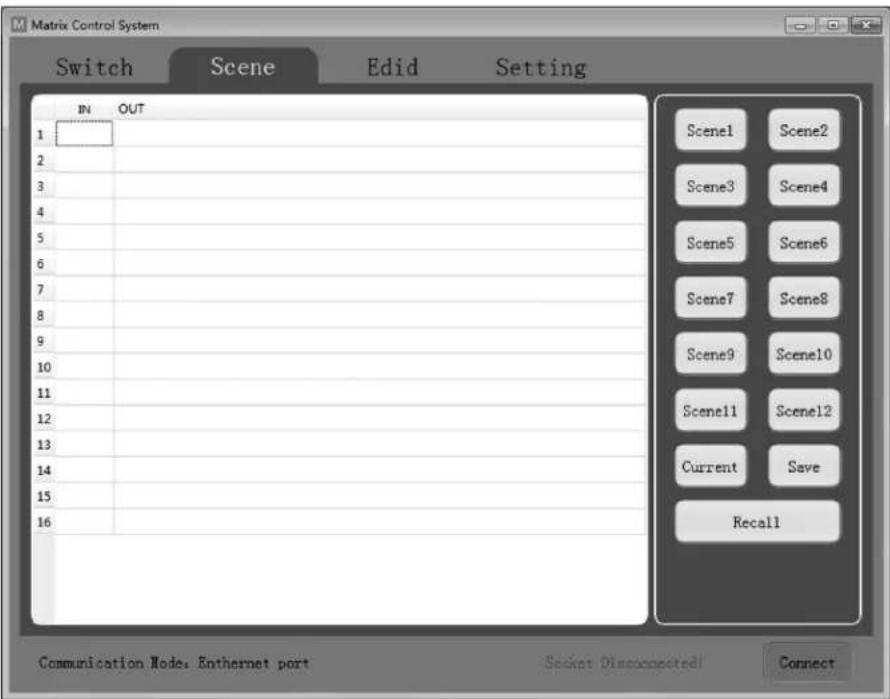
The table on the left side of the interface displays the current scene or the scene that is recalled.
- Scene1-12: User-saved scenes.
- Current: Obtain the current scene of the device.
- Save: Save the current obtained scene of the device.
- Recall: Recall the last scene selected.
Operation
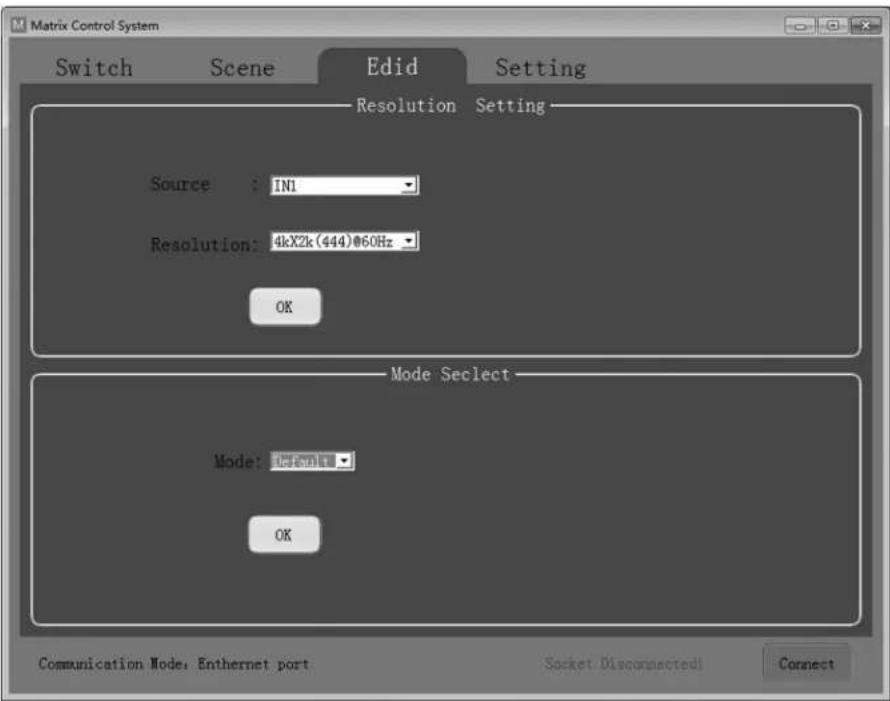
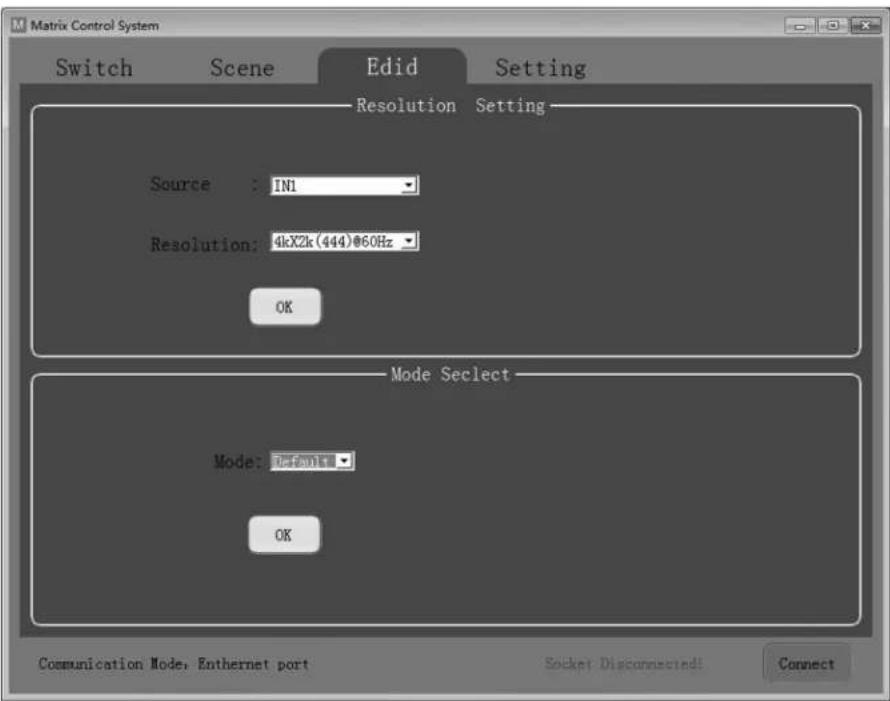
EDID Interface: EDID management.
Set the output resolution of each input as well as the mode.
Source: IN1-8 or IN1-4.
- Resolution: See EDID Table for a full list of available options to choose from.
Mode: Set the output mode to either Default or Smart.
Operation
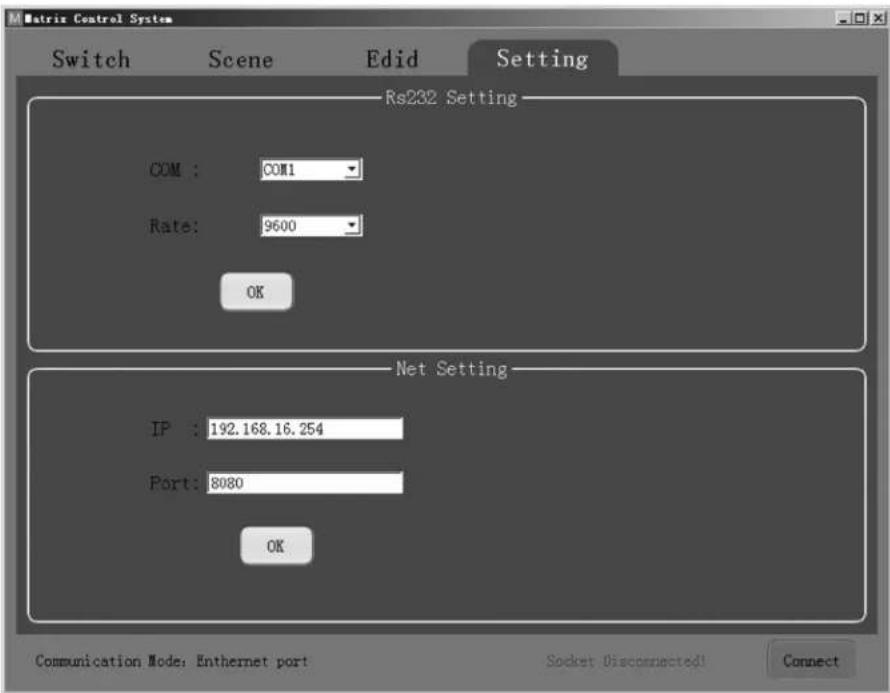
Setting Interface: RS-232 and TCP/IP Settings.
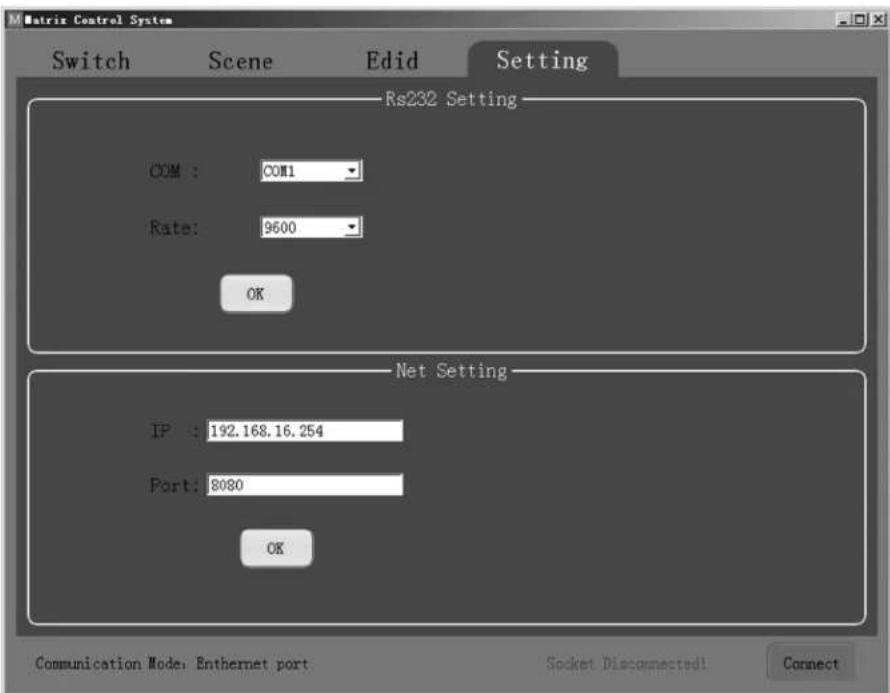
The default communication mode is the RJ45 Ethernet port. Users can configure the communication mode through the RS-232 and Net Setting boxes. Click "OK" in the corresponding box to set the desired communication mode, then click "Connect" to connect. The status bar should change, as shown below.

RS-232 Setting
To control the switch using RS-232 commands, ensure the following communication parameters are set: 9600 bps, 1 start bit, 1 end bit, no check bit. Set the data format as ASCII and open the serial port.
Net Setting
The B302-4HX4H-4K and B302-8HX8H-4K come with a pre-assigned static IP address. They can be accessed remotely by configuring your network to match the pre-assigned IP address style. Simply connect a user-supplied RJ45 cable between the matrix switch and your target computer, and then configure your network settings (IPv4) accordingly.
Note: The pre-assigned IP address will never change even if you disconnect and reconnect the target computer.
Operation
RS-232 Control Commands:
1) In the table below, "a" represents Input and "b" represents Output. The number value range of "a" and "b" depends on the number of inputs and outputs of the controlled matrix. If out of range, it is considered a command input error, and the unit will not execute the command.
2) Please note there is a punctuation mark (. at the end of every command. This cannot be omitted.
3) Note the uppercase and lowercase letters.
| Control Command Description Instruction/Function | ||
| N. Get the number | of channels of the current matrix. | Send the command “N.” and the unit will return “N8.” with 8 representing 8x8 matrix. |
| C. Get the current state of the matrix. | state of the matrix. | Send the command “C.” If the current state is 1→1,2→2,3→3,4→4,5→5,6→6,7→8,8→7, the unit will return C1X1, 2X2, 3X3, 4X4 ,5X5, 6X6, 7X8, 8X7. |
| SaXb. Switch Input | “a” to Output “b.” Send the command “S1X2.” and the unit will switch Input 1 to Output 2. | |
| Sa1Xb1, a2Xb2, a3Xb3. | Switch input a1, a2, a3 to corresponding output b1, b2, b3. | Send the command “S1X3, 1X4.” and the unit will switch Input 1 to Output 3, 4. |
| Mc. Switch between | Default and Smart EDID modes. “c” = 0 = Default mode “c” = 1 = Smart mode | Send the command “M1.” and the unit will switch EDID mode to Smart Mode. |
| laEd. Set EDID of Input | “a” to EDID No. “d.” | Send the command “I2E4.” and the unit will set EDID of Input 2 as EDID No. 4 (See EDID Table) |
Operation
EDID Table
| No. Preset EDID | |
| 1 800 x 600/60 Hz | |
| 2 1024 x 768/60 Hz | |
| 3 1152 x 864/75 Hz | |
| 4 1280 x 720/60 Hz | |
| 5 1280 x 768/60 Hz | |
| 6 1280 x 800/60 Hz | |
| 7 1280 x 1024/60 Hz | |
| 8 1360 x 768/60 Hz | |
| 9 1366 x 768/60 Hz | |
| 10 1600 x 900/60 Hz | |
| 11 1600 x 1200/60 Hz | |
| 12 1680 x 1050/60 Hz | |
| 13 1920 x 1080/60 Hz | |
| 14 1920 x 1200/60 Hz | |
| 15 1920 x 1440/60 Hz | |
| 16 2560 x 1080/60 Hz | |
| 17 2560 x 1600/60 Hz | |
| 18 4K x 2K (444)/30 Hz | |
| 19 4K x 2K (420)/60 Hz | |
| 20 4K x 2K (8b)/60 Hz | |
| 21 4K x 2K (444)/60 Hz | |
Specifications
| Models B302-4HX4H-4K / B302-8HX8H-4K | |
| Input (Female) (x4) HDMI / (x8) HDMI | |
| Output (Female) (x4) HDMI / (x8) HDMI | |
| Maximum Resolution 4096 x 2160 @ 60 Hz (4K x 2K) | |
| HDMI Bandwidth 18 Gbps | |
| HDCP Specification HDCP 2.2 | |
| Operating Temperature 32° to 113°F (0° to 45°C) | |
| Storage Temperature 14° to 176°F (-10° to 80°C) | |
| Operating Humidity 10% to 85% RH, Non-Condensing | |
| Storage Humidity 5% to 90% RH, Non-Condensing | |
| Power Input DC 12V 3A / DC 12V 4A | |
| Power Consumption 24.2W / 40.5W | |
| Dimensions (H x W x D) 440 x 200 x 44 mm / 440 x 250 x 44 mm | |
| Weight 2477 g / 3145 g | |
Warranty and Product Registration
3-Year Limited Warranty
Seller warrants this product, if used in accordance with all applicable instructions, to be free from original defects in material and workmanship for a period of 3 years from the date of initial purchase. If the product should prove defective in material or workmanship within that period, Seller will repair or replace the product, at its sole discretion.
THIS WARRANTY DOES NOT APPLY TO NORMAL WEAR OR TO DAMAGE RESULTING FROM ACCIDENT, MISUSE, ABUSE OR NEGLECT. SELLER MAKES NO EXPRESS WARRANTY OTHER THAN THE WARRANTY EXPRESSLY SET FORTH HEREIN. EXCEPT TO THE EXTENT PROHIBITED BY APPLICABLE LAW, ALL IMPLIED WARRANTYES, INCLUDING ALL WARRANTYES OF MERCHANTABILITY OR FITNESS, ARE LIMITED IN DURATION TO THE WARRANTY PERIOD SET FORTH ABOVE; AND THIS WARRANTY EXPRESSLY EXCUSES ALL INCIDENTAL AND CONSEQUENTIAL DAMAGES. (Some states do not allow limitations on how long an implied warranty lasts, and some states do not allow the exclusion or limitation of incidental or consequential damages, so the above limitations or exclusions may not apply to you. This warranty gives you specific legal rights, and you may have other rights which vary from jurisdiction to jurisdiction.)
WARNING: The individual user should take care to determine prior to use whether this device is suitable, adequate or safe for the use intended. Since individual applications are subject to great variation, the manufacturer makes no representation or warranty as to the suitability or fitness of these devices for any specific application.
Product Registration
Visit tripplite.com/warranty today to register your new Tripp Lite product. You'll be automatically entered into a drawing for a chance to win a FREE Tripp Lite product!*
- No purchase necessary. Void where prohibited. Some restrictions apply. See website for details.
Tripp Lite has a policy of continuous improvement. Specifications are subject to change without notice. Photos and illustrations may differ slightly from actual products.


1111 W. 35th Street, Chicago, IL 60609 USA • triplite.com/support
20-10-226·93-3CA2_RevB
1111 W. 35th Street, Chicago, IL 60609, EE UU • triplite.com/support
1111 W. 35th Street, Chicago, IL 60609, EE UU • triplite.com/support
20-10-226·93-3CA2 RevB
1111 W. 35th Street, Chicago, IL 60609 USA triplite.com/support
1111 W. 35th Street, Chicago, IL 60609 USA tripplite.com/support
20-10-226·93-3CA2_RevB
PykoBODCTBO N0Ib30BaTeJia
MaTPnUHbIe HDMI-NepeKJIouaTeN/ pa3BcTBNTeN CyCTpO'CTBOM BbIeJIeHnaydnoCnIHana N PoIdepJxKo pa3JIuHbIX pa3peShen
Mодenvb:B302-4HX4H-4K,B302-8HX8H-4K
English 1 • Espanol 15 • Français 29


1111 W. 35th Street, Chicago, IL 60609 USA dot tripplite.com/support
OxpanaertcAbotpcknnpabom © 2021 Tripp Lite. Nepeneuata Kaanpeaaetca.
CopexMMoe ynaKOBKN
- Matpnuhnyi HDMI-nepeKJIouaTeNb/pa3BETbnteMb MoD. B302-4HX4H-4K mnn B302-8HX8H-4K
- IK-6JIOK DnCTaHcUHOHHo YnpabJIeHnH
Ka6ebIbIK-pnHemHnKaDmHno1,2M - 5bok nIpa3a (BxOJHoe HApRJeHne: 100-240 B)
- ⅢtenceNb-nepexoDnHKn dny po3etok MeKdyHapOdbx CTaHApTob (CebepHa AmePka, BEnNKo6pTuHaHa, EbPona, ABcTpanHa) - 4 wT.
MOnTaXHbIe npCnOc6JIeHua
KoMnAaKT-DnCK CdpaiBepamu
PykoBOdCTBO noIb30BaTeTn
OnuohbHbIe KomnneKtkyoune
- BbCOKCKOPOCTHbIe Ka6eHIMDMI 2.0 moJ.P569-XXX-CERT
AydinoKabelen3,5MM cepnn P312
CoeHNHTeBbIe Ka6eennCat6 cepnn N202 cOnHOxNtBbIM npoBoaMn Ka1n6pa 24 AWG
XapakTepnCTnKn npodykTa
- 06ecneuBaet paCnppeDeneHne BnueocnHaNoB oOpMata True 4K ot 4pa3nHybIX nCTOuyHKOB HDMi-cnHaJa MeKdy 4OTeNbHbIMn dncnnern (MoJ. B302-4HX4H-4K) INI O8 pa3nHybIX nCTOuyHKOB HDMi-cnHaJa MeKdy 8OTeNbHbIMn dncnnern (MOJ. B302-8HX8H-4K)
06ecneuBaet OTo6paKeHne IyIbOro ayIIO-/BnEoCHrHaHa Na IIObOM dncPiee UIN OndHO rTO rCnHaHa Ha BCex DnCnEx
Поджркmaeтразшенистада对接Туг 4Кdo4096x2160пчсоте60T - Pepeaet aHaNoRoBbI CTpeo3ByK
06ecneuBaet nepeKIOueHHe MeXky HcTOUHKAMn HDCNPEaMn NocPeCDtBOM KHOOK Ha nepeDHe NaHEm, NK-pybTa DnctAunOHoro ynpabNeHn, KOAmHd Chee3 nocdeobatbHbHnHTepFeC RS-232 mnuynpablaHooero nporpaMMHOro o6ceueHn - Pndepkka CnHaiob pa3nUbix pa3peueHH o6cneuHbAet BO3MOxHOCTb COBMeCTHoR I cNOIb3OBAHm I cOHTAHm I cOnPiEeB c pa3Hoi pa3peWauJeI cTocO6HOCTbIO
HDRpaacnpeHHbDnHaMaueckmDnana3OH)06cneuBaET 6oeeBbICKOHTpactHOHIO NIOBbIeHHyTOHOCbZBeTonepea - BbIeHHe aynOcHnHa n oBceNcHMaB eTOB3MOKHOCTb NOkJIIOUeHnK KOLOHOK, yCINITeNeu INI 3BYKObIX nAHeEi
0nncanmnyn3o6paXeHn
Ha cIeJeUOxHx ChIMKax M3o6paXeH MaTPhuHbY (8x8) HDMI-NepeKIOuOaTeB/pa3BeTbTeB. OH mEHTnueH MoEe 4x4 3a MckIOuHem HaJIINr Eeie 4 BxoJHbX II BbxOJbHX NoptOB.
1 BxodbHDMI - 06ecneuBAIO TIOKNIIOUeHNE IO 8yCTPOJcTB-NTOCHNKOB HDMI-CmHaHa.
2 BbixoDbHDMI-06ceNeuBAOTnoKIOUeHMeNo8yctpoCTB oTo6paKeHnHDMi-cunHaHa.
3 Pa3bem DC 12V - o6ecneuBAeT noKluoyHHe 6noka nTuHaHn Ha 12 B noctoHnro ToKa, BxOJaero B KOMIINEKT.
4 Nopr RS-232 - 06cneuBaet noKIOUeHne PI Knnn npTaNBHO KOIMbIepa Ira OTnpaBKn KOMaHd Upe3 NOcIeOBAteBHy nHTepfeRc RS-232 Ha yCTpoiCTBO uepe3 TepMNHaI.
5 Iopr TCP/IP - oecneuBaet noKluHoeHne PI K uN nopTaNBHO KOMNbHepa che3 Kaebb Cat6 dna nctauonHoro ynpabneney yctpoeCTBOM che3 rpaqneckm noIb3ObaTeBCKM INTEPpeic.
6 IR EXT -06ecneuHbAe npKIOUeHnE KAbE Nk-ppmEHnka Iy npMea NK-crHaIob c NK-nylbTa dNCTa HcNOHO rO npBaNeHn, BxoJraero B KOMnNEKT.
7 AynoBbIXOdbI -06ecneuBAOT noKIOUeHHe Do 8 rpynn AkyCTMuecknx yctpoiCTB nIy cinnTeJe.
8 Power (Ntahne) -BkIOuOaET N BbIKIOuOaET NtAHne yCTpoCTBa.
9KK-ekpan -oTo6paKaetnHΦopMaunIO6yCTpoiCTBe n erho hactpoikn.
10 CenekTop BxOa/BbXoA (In/Out) - no3BnraT CMeWnBaT b COBMeaTaB nIO6bIe BXOaCIO6bIMn BixOaMn. Haxmte "ALL" ("BCE") dIy OTnpabKn OJHoro BXoHoro CmHaHa BA BCE NOkNIOueHHbe DnCnnei.
11 CenekTop EDID - no3B0nJaT 3aDaBaTb paCImpeHHbe daHbIe IeHTnIkaun (EDID) dIy BxOdbIx N BbIXoDbIx nOpTOB.
12 Lock (Бл_OKИРОВКА) - 6лOKИРУЕВ СЕ КНОКИ ПЕРДЕН PAHEN BO I36жане HENPEHAMEPHBIX I3MEHIM.ДЯ pa36лOKИРОВHAня KНОК HAXMITE "LOCK" ("БлOKИРОВКА") NOBTOPOHO.
13 Enter (BbOJ) -нaxIMMaTeTcЯДлЯ ПОТВерждЕнЯ BвБДмьхКOMaHД.
14 IR (ИК) - пиемнник IK-cirghanobспьтдцетаншоногу npapbneи,在octabлго В komплкTe.
yctahOBka
DaneepndabnebnpaokdectbnnncemaIINcnoB3OBAHn npHaCTpoKeMaPnuHOro HDMI-nepeknouatena.
Ppumeyaue. Ppeo 00nnoenueem no6bix nokknoeHH y6edomec b mom, ymo numaue cex ycmpoicmb, noknoaembIX K nepeknouameHIO, bkiuOHe.
1 Pnoknouite 8 (nra Mo. B302-8HX8H-4K) nnn 4 (nna Mo. B302-4HX4H-4K) nctouhnoB HDM-crHana K nepeknouateNo uepe3 Ka6eN (B KomnneKT noCTabKn He BXOaT).
2 PndKIOHTe 08 (dma MoD. B3O2-8HX8H-4K) mnn 4 (nma MoD. B3O2-4HX4H-4K) HDMI-dncnneB K nepeKIOUATEIO uee3 Ka6eIN (B KomnneKT nocTabKn He BxoJAT).
3 (Heo6aTeJIbHo) IIOKIOUHTe IO 8 (IIN MoI, B302-8HX8H-4K) INI 4 (INI MoI, B302-4HX4H-4K) KOIOHOK INI yCUNITeEN K NepeKIOUATEIIO Uepe3 ayINOka6en C pa3beMaMn 3,5 MM (B KOMIINEKT NOCTABKN He BXOJNT).
4 (Heo6a3eBho) PoiKIOHTe IIK INN NopTaTINbHb KOMNbIOTep K npTy RS-232 dnyynpaBHeHnpeKeIouateMe C nmoUbHO KOMHa, nepeDaBaembix no Hntepfeyr RS-232.
(Heo63aTeBHO) IOnKIOHHTe INI NnO npTaHBbI KOMNbOTep K npTy TCP/IP Pepe3 Ka6enb Cat6 (B KOMNNEKT NoCTABKn He BxOuT) dIy npabneHn nepeKIOUaTelempepe3 rpaHueckn noJIb30BaTeBckn HHTeppeic.
6 (Heo63aTeIbHo) BCTabBe Ka6eBn-tpmHnKa B nopt IR EXT.
7 PnoknOHTe 6nok nntAHN H KOMNKeTk A NpOry 12V DC H BKNIOHTe NNTAHNE C NMOUb BbIKNoaTeNa ENeKTPoNTAHN. B TeeyHne 20-30 ckyHd KaXdbi BxOHOH CnHaI OTO6pa3NTCAYepe3 COOTBeTCTByIOuB bIXoHDn oPt.
Popraok ekcnnyatau
IpeCTabHeHbIe daee HnctpyKcIIN pIepHa3NaueHbI IaMa MtpuHoro HDMI-nepeKJIouHaeTner/pa3BETBnterMoedn 8x8, Ho NIOHOCTbO paacnpocTpaHraOTc HA Moelb 4x4.
MatpnuHbHDMI-nepeKluOaTeNb/pa3BcTbUteNb cepu B302 mMeet Tpu pa3mUhbx cno6oBa npabBeHnA:
1)KhoNknepeedne naeHn
2) IK-6nokДиctanuHOnHOrO npabneHnA
3)UnpabneHne no nHTepcmy TCP/IP mns RS-232 uepe3 PIK mns nopTaTHBbki KOMnbiTeP
Khoipn nepeedne nahei
BcIeMyIeM pa3dene onncbIaBaeTc npAIOK n3MeHHeNBAxOoB N BbIXoOB BpyHyO.
*INPUT 12345678
*OUTPUT 12345678
1) IINHMeHeHn KaKOro-Nb6o BxOda Ha KOHKpeTHbI BbIXoHaHXMITE Ha HyXhB bXoD (IN 1-8), a 3aTeMa HnyXhB bXoD (OUT 1-8). HaxMITE "ENTER" ("BBOD") nIy NOITBePckDeHn HOBXH NaCTpoE.
2) Ia HapBaHnEHa OJHO BxOJHO CnHa Ha HeckoBko BbXoHbIX DmCnIeB HaxMITE Ha HyKbI BxoI (IN 1-8), a3aTeMa HnyKbIe BbxOJIb (OUT 1-8). Pocne Bbl6opA BCEx HyKbIX BbXoOB HaxMITE "ENTER" ("BBOID") Ira NoTBePxxDeHna N3MeHeHn HAcTpoek. IaOnHOBpeMeHHoro Bbl6opA BCEx BbXoOB HaxMITE "ALL" ("BCE").
3)ДлпnpedbapnteHOrO 3aAHHn BixOHyBx npametpoB EDID nOndor noBceBxOIOB haxMite HaJcAeMbI BxOIN (IN 1-8),a3aTeM "EDID MENU"(MEHIO EDID").HaKK-3KpaHe oTo6pa3raTcHacTpoKn NCTouHNka BxOHO rCnHaja, KaN oKa3aHO HIXe. HaxMITE "UP/DOWN"(BBEPX/BHIN"ДЯ bIbOpa npedbapntelbHO 3aAHHbX npametpoB EDID.CmOCK Bex npedbapnteHbO 3aAHHbX pa3peSeHn PpEctabIne H Ta6nue npametpoB EDID.HaxMITE "ENTER"(BBOD")ДЯ NOITBepKdHEna 3aAHHbX npametpoB.
*IN:1
4KX2K(444)/60Hz
4) IINBxOa B MeHIO BbIbopa pexkMa BbIBoHaXMMte "UP" ("BBEPX").Piocne BxOa B MeHIO NJIb3OBaTeHN MOrTy Bbl6paTb peKm Default (No ymonuHaHIO) mN Smart (HTenIeKryaIbHbI).
a) Default ("No ymojuahno": Bce dncnne Hactpanbaotc no ymojuahno Ha bixoHou cHnap a3peueHem 4K x 2K npu 60 u n npametpb EDID, 3daHHbne nonb3OBatelem.
6)Smart("HntenKeTaybHh":06ecneuBaetBbBOcNHaONB COTBeTCTBN CMNHIMaIbHO BO3MOXbHM pa3peJeHEm NOKIOUeHHbIX IMCnIIeEB.
MODE:
Default
MODE:
Smart
IynepeKJIueHnpeXmHaHxMTe "DOWN"(BHN3).N3HaayabHo yCTpoiCTBO nOCTaOBcko HAcTpoiKa Ho pexM Default ("No ymonuHaHno").
Popraok ekcnnyatau
IK-6nokDnctaHcunOHoroynpaBHeHH
B cneIyouem pa3dene OINcBiBaetcnpaOkbTb CnblbTom dctauHNOHOYO npabHeH.N"N COOTBECTBYET HcIOBOMy 3haueHIO (1-8). "+ "0603Haayet HenpepbHoe Haxkatae. KhoNka "+ "OTCYTCTBYET.
1)ФОмТКOMMyTaUNKaHAnOB(BxOHBx C BxOДHbIMN)PNI NOMOINIyIbTaIINCTAHUHOHOrO ynpaBHeHnBvIgAITcneYIOuMmOBpa3oM:BxoN(N)+KOMmyTaUN+BbxOJ(N),BxoN(N)+KOMmyTaUN+BbxOJ(N),...+BBoJ.HanPIMeP:ДЯOTnpaBKNCnHANOBcoBxOJa1HaBxOJ2nCoBxOJa2HaBxOJ4nocNeDobatbHocTb6yTeHMeTBcneYIOuINBua:DxOJ(1)+KOMmyTaUN+BbxOJ(2)+BxoJ(2)+KOMmyTaUN+BbxOJ(4)+BBoJ.
2)ДЯ Вьбopa Heckoькx BxioOB npn OJHOM BxOe MoKHO npHBecTn CneIyUoiu npIMep: BxoD(1)+KOMMytaua+BbXoD(2)+BbXoD(5)+BbXoD(8)+BBOd.
3) "ALL" ("BCE") - KhoIka 6bICTpO Ro DeiCTBn, npEHa3NaeHHa Dn oHOBpeMeHHoro Bb6opa Bcex BbxoHbix KaHaoB (DncnneeB). Oha pa6otaet cneJyUIM o6pa3OM: BCE + BxoI (N) + BboI.
UnpaBneHne uepe nHTepeic TCP/IP GUI
IporpamHoe oecneueHHe GUI Control npedocTabnTcHa CD-dncke, BxOJaem B KOMnIeK TnoCTaBKn, a TaKxe Ha caTe triplite.com. IporpaMMHoe oecneueHHe GUI HeOBmecTMo ConepaunOHHO CNTeMoH mac05*.
1)3anyctte nporpammmoe o6ecneueHnG UI HA KOMNbTepe, INONB3yEmoB K aaycctBe zeneBoro.
2) 3aIae Homep COM-nopTa n CnEduoime npametpy coeHHeHn:9600 6nt/c,1 hauJIbHbI 6nt,1 KOHeHbI 6nt,6e3 KOHTpoJIbHbIX 6ntOB.YCTAHOBITE fOpMaT daHHbx ASCII nOKpOte noCneDobateBhl npT.
3) BcnteMynpablenma Matrix Control System MeotcyeTbe paNnHbE KlnaKn. Daee npBOntCOnnCaHne KaKdo HIX
Popraok3KcnpyaTaau
KommytauOHbI INHTepeic: BBOI n HAcTpoKa npaMeTpOB.
Bb6epnte BxOndhie N BixOndhie KaHnbl B30ne IN/OUT. Bb6paHHble KaHnbl 6dyT OTo6paKaTaBcB npeIcTabNeHHo HnKe TaBInCe.
- ALL (BCE): Khoika bichpoto deihtbna, npedha3aehnna I na OndHOBpeMeHHoro Bb6opa BCEx BbIXOJIbIX KaHaoB.
Clear (ydauntb): ydaeneHne coedeepmmoro Taebnbl. - Save (CoxpaHnTb): coxpaHeneHe TaBnIe b TEkyuE m BIne.
- Enter (BboD): BboD Tekyuero Bnda.
Popraok3KcnpyaTaun
Scene Interface (Интурфециобожахен): Вьбориобожахен,Tekушeeиобожахени NOBTOphBbIB3OB.
B Tablne Ha Ieboi CTOpOHe INTepefeica npedctablaTcra Tekyuiee N3o6paJxHne NmN 3o6paXHe, BbI3BaHHoe NobTOpHO.
- Scene1-12 (M3o6paqehnne 1-12): M3o6paqehnne, coxpaehnhbte nolb30BaTepeMe.
Current(Tekyuee):noIyueHHeTekyueroN3o6paKeHnCyCTpoCTBa. - Save (CoxpaHnTB): coxpaHene TeKyuIeero m3o6paJKeHm, nOlyuEHHoro cYcTpoiCTBa.
- Recall (Bb3BaTb): noBtOpHbI Bb3OB nOcneHrero Bb6paHoro n3o6paXeHnA.
Popraok3KcnpyaTaun
EDID Interface (NHTepfeic EDID): ynpabLeHne npaMeTpamn EDID.
YCTAHOBKa BbIXoHOro pa3peHmHa Ia KaXdoR OBXoHa COOTBeTCTByOIM peKIM.
Source (MtrovnK)IN1-8nIN1-4.
- Resolution (Pa3peuHHe): nonHbI cnHcK doCTyHbIX BapMaHToB dHa Bb6Op apeDctBaEN B Ta6JIue napaMetpo EDID.
- Mode (PexMM): yctahOBKa BbIXoHOrO pekmHa(Default (No ymoJuaHIO) mN Smart (VHTenIeKTyabHbI)).
Popraok3KcnpyaTaun
Setting Interface (HactpoeuHbI nHTepeue): HAcTpoKn RS-232 u TCP/IP.
Pekn mcbn no ymuaHno: nopt RJ45 Eternet. Nb30aTeN Moryt HacpMaBbpekm c83n uepe3 okHa RS-232 u Net Setting. HaxMnte "OK" B COOTBETcByoem OKHe Iy YCTaHOKJ XenaEMO pekma C83u, a 3aTeM HaxMnte "Connect" ("PioknUHTbc") Iy YCTaHOBKn CoedHeHn. CToPA coTcHn HMeHnTc KaK NokaAHO Hxke.

HactpoJa uHTepphiCa RS-232
Iy npabne Hnpeeklouatelem C nCnoB3oAHmE KOMaHr RS-232 He6xOIMyo yTaHOBt CNeDyUe KOMMyHKaUHbIe napaMeTpbl: 9600 6nt/c, 1HaAHLbHbI 6nt, 1 KOHeHbI 6nt, 6e3 KOthpOlbHbIX 6ntOB. YcTaHOBnTe oOpMat dAnhbx ASCII nOTKpoTe noCneoBoTeNbHbI npT.
Hactpoikacetn
MoJEn B302-4HX4H-4K n B302-8HX8H-4K mmeIOT npEbnBapntBnO npncBoeHHb CTaMueckn IP-aDpe. IJI NOyHeMa ydaenHoro DoCTyna KHM CneJeYt HAcTpoTb ceHa npEbnBapntBnO npncBoeHHb IP-aDpe. IJI 3TOrO IOCTaTOUHO coeMHHT Ka6eMe RJ45 (B KOMPiKeT NoCTabN He BXoHT) MaTPuHb II NpeeknOaTeNb n cIeBeOB KOMPiBoTeP, a 3aTEM COOTBetCTByUcMM o6pa3OM HAcTPONTb napaMeTpbl CETn (IPv4).
Ppumeyaue. Ppeapumembno npucboeHHb I P-adpc Hko2da He MeHemaerca daxne npu omknouehuu u noBmOpHOM nodknouehuu uee02o KOMnbomepa.
Popraok ekcnnyatau
Komahdby npablenya chepe nHTepeic RS-232:
1) B npBedeHNO HnKe TaBnue "a" oTHocITcK npAmeTpam BxoJa, b"- K npAmeTpam BixOJa. Dnana3oH uCIOBbIX 3HaueHIn "a" n "b" 3aBucIT OT kONuEcTBA BxOoB N BbIXoOB UnpabIeMo rMaTPuHOro NepeKnIOvateN. BbXoJ 3a npdeIb Dnana3oHa BocPnHmaeTc KaK OUn6Ka np IN BBOe KOmaHdbI, n yCTpoHCTBO He BblnoHHET daHHyO KOmaHdy.
2) 06paTHe BnMaHHe Ha To, YTo B KOHe KaXDoKoMAHbI CTaBtC TOKa (.PpOnyck TOrO 3HaKa He DOnyckaTe.
3) BykBbl cneIyet BBOIHT cyeTOM pernctpa.
- HDMI Matrix Switch/Splitters with Audio Extractor, IP Access and Multi-Resolution Support
- WARRANTY REGISTRATION
- Package Contents
- Optional Accessories
- Product Features
- Panel Descriptions
- Installation
- Operation
- Front-Panel Pushbuttons
- IR Remote Control
- TCP/IP GUI Control
- RS-232 Setting
- Net Setting
- RS-232 Control Commands:
- Specifications
- Warranty and Product Registration
- 3-Year Limited Warranty
- Product Registration
- PykoBODCTBO N0Ib30BaTeJia
- MaTPnUHbIe HDMI-NepeKJIouaTeN/ pa3BcTBNTeN CyCTpO'CTBOM BbIeJIeHnaydnoCnIHana N PoIdepJxKo pa3JIuHbIX pa3peShen
- CopexMMoe ynaKOBKN
- OnuohbHbIe KomnneKtkyoune
- XapakTepnCTnKn npodykTa
- 0nncanmnyn3o6paXeHn
- yctahOBka
- Popraok ekcnnyatau
- Khoipn nepeedne nahei
- IK-6nokDnctaHcunOHoroynpaBHeHH
- UnpaBneHne uepe nHTepeic TCP/IP GUI
- Popraok3KcnpyaTaau
- Popraok3KcnpyaTaun
- HactpoJa uHTepphiCa RS-232
- Hactpoikacetn
- Komahdby npablenya chepe nHTepeic RS-232:
Brand : Tripp Lite
Model : B3024HX4H4K
Category : Video adapter