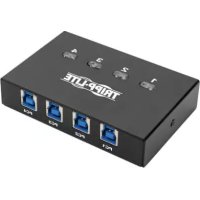
U359004 - USB Hub Tripp Lite - Free user manual and instructions
Find the device manual for free U359004 Tripp Lite in PDF.


| Product Type | USB 3.0 Peripheral Sharing Switch |
| Model | U359-004 (4 ports) |
| Number of Ports | 4 USB-A Ports for Host Computers |
| Peripheral Port | 1 USB-A Port for Shared Peripheral |
| USB Standard | USB 3.0 SuperSpeed, backward compatible with USB 2.0 and 1.1 |
| Maximum Transfer Rate | 5 Gbps |
| Power | USB Bus-Powered, No External Power Required |
| Switching Method | Manual Pushbuttons with LED Indicators |
| System Compatibility | All Operating Systems with USB Port |
| Hot Plug Capability | Yes |
| Installation | Plug and Play, No Software or Driver Required |
| Maximum Host-to-Peripheral Distance | 5 meters (16 feet) |
| Dimensions (approx.) | 100 mm x 60 mm x 20 mm (without cable) |
| Weight (approx.) | 100 g |
| Housing Material | ABS Plastic |
| Color | Black |
| Package Contents | Switch and User Manual |
| Warranty | 3-Year Limited Warranty |
| Operating Temperature | 0°C to 40°C |
| Operating Humidity | 10% to 85% RH (non-condensing) |
Frequently Asked Questions - U359004 Tripp Lite
User questions about U359004 Tripp Lite
0 question about this device. Answer the ones you know or ask your own.
Ask a new question about this device
Download the instructions for your USB Hub in PDF format for free! Find your manual U359004 - Tripp Lite and take your electronic device back in hand. On this page are published all the documents necessary for the use of your device. U359004 by Tripp Lite.
USER MANUAL U359004 Tripp Lite
USB 3.0 Peripheral Sharing Switch
Models: 2-Port (U359-002), 4-Port (U359-004)
Espanol 5 • Français 9 • Pycckn 13
PROTECT YOUR INVESTMENT!
Register your product for quicker service and ultimate peace of mind. You could also win an ISOBAR6ULTRA surge protector—a $100 value! www.triplite.com/warranty


Manufacturing Excellence
1111 W. 35th Street, Chicago, IL 60609 USA • www.triplite.com/support
Copyright © 2018 Tripp Lite. All rights reserved.
Product Features:
- Up to 2 (U359-002) or 4 (U359-004) computers can share a USB 3.0 printer, flash drive or other device
- Backward compatible with USB 2.0 and 1.1
- Features instant switching, delivering one-touch port control via manual push button
Supports SuperSpeed data transfer speeds up to 5 Gbps
Supports all major operating systems that have a USB port
Hot-pluggable - Bus-powered; no power supply required
Package Includes:
2- or 4-Port USB 3.0 Peripheral Sharing Switch
- Owner's Manual
System Requirements:
Computers with available USB ports
USB Device
Quick Installation:
Notes:
- When using the USB Peripheral Sharing Switch to share a USB storage device, you must eject the device before switching ports in order to avoid any data loss.
- Although these switches do not require any software or drivers, the peripheral device that you are sharing between may. Please be sure that you have installed the latest drivers for your peripheral onto both systems before connecting to avoid detection or functionality issues.
- Be sure your computer is powered on prior to installation.
Maximum distance from host device to peripheral is 5m (16 ft.). -
A USB hub can connect to a USB port on the switch, allowing you to add multiple USB peripherals to the installation. To ensure proper function, it is recommended to use a hub with an external power supply.
-
Connect your USB peripheral device to the USB-A port on the switch.
- Connect the first PC to the switch using a user-supplied USB 3.0 cable. The computer will detect the switch, and it will be recognized in the Device Manager or System Preferences section.
- Repeat Step 2 for the remaining ports that need to be connected with user-supplied USB 3.0 cables.
- Once all ports needed are connected, the LEDs on top of the switch will indicate which computer is selected. To switch from one port to another, use the push buttons.
Warranty and Product Registration
3-Year Limited Warranty
Tripp Lite warrants its products to be free from defects in materials and workmanship for a period of three (3) years from the date of initial purchase. Tripp Lite's obligation under this warranty is limited to repairing or replacing (at its sole option) any such defective products. To obtain service under this warranty, you must obtain a Returned Material Authorization (RMA) number from Tripp Lite or an authorized Tripp Lite service center. Products must be returned to Tripp Lite or an authorized Tripp Lite service center with transportation charges prepaid and must be accompanied by a brief description of the problem encountered and proof of date and place of purchase. This warranty does not apply to equipment, which has been damaged by accident, negligence or misapplication or has been altered or modified in any way.
Warranty and Product Registration
EXCEPT AS PROVIDED HEREIN, Tripp Lite MAKES NO WARRANTYES, EXPRESS OR IMPLIED, INCLUDING WARRANTYES OF MERCHANTABILITY AND FITNESS FOR A PARTICULAR PURPOSE. Some states do not permit limitation or exclusion of implied warranties; therefore, the aforesaid limitation(s) or exclusion(s) may not apply to the purchaser.
EXCEPT AS PROVIDED ABOVE, IN NO EVENT WILL Tripp Lite BE LIABLE FOR DIRECT, INDIRECT, SPECIAL, INCIDENTAL OR CONSEQUENTIAL DAMAGES ARISING OUT OF THE USE OF THIS PRODUCT, EVEN IF ADVISED OF THE POSSIBILITY OF SUCH DAMAGE. Specifically, Tripp Lite is not liable for any costs, such as lost profits or revenue, loss of equipment, loss of use of equipment, loss of software, loss of data, costs of substitutes, claims by third parties, or otherwise.
PRODUCT REGISTRATION
Visit www.triplite.com/warranty today to register your new Tripp Lite product. You'll be automatically entered into a drawing for a chance to win a FREE Tripp Lite product!*
- No purchase necessary. Void where prohibited. Some restrictions apply. See website for details.
FCC Notice, Class B
This device complies with part 15 of the FCC Rules. Operation is subject to the following two conditions: (1) This device may not cause harmful interference, and (2) this device must accept any interference received, including interference that may cause undesired operation.
Note: This equipment has been tested and found to comply with the limits for a Class B digital device, pursuant to part 15 of the FCC Rules. These limits are designed to provide reasonable protection against harmful interference in a residential installation. This equipment generates, uses and can radiate radio frequency energy and, if not installed and used in accordance with the instructions, may cause harmful interference to radio communications. However, there is no guarantee that interference will not occur in a particular installation. If this equipment does cause harmful interference to radio or television reception, which can be determined by turning the equipment off and on, the user is encouraged to try to correct the interference by one or more of the following measures:
- Reorient or relocate the receiving antenna.
- Increase the separation between the equipment and receiver.
- Connect the equipment into an outlet on a circuit different from that to which the receiver is connected.
- Consult the dealer or an experienced radio/TV technician for help.
Any changes or modifications to this equipment not expressly approved by Tripp Lite could void the user's authority to operate this equipment.
Tripp Lite has a policy of continuous improvement. Specifications are subject to change without notice.


Manufacturing Excellence
1111 W. 35th Street, Chicago, IL 60609 USA • www.triplite.com/support
1111 W. 35th Street, Chicago, IL 60609 USA • www.triplite.com/support
1111 W. 35th Street, Chicago, IL 60609 USA • www.triplite.com/support
PyKOBODCTBO NOJIb30BaTeЯ
1111 W. 35th Street, Chicago, IL 60609 USA - www.triplite.com/support
OxpaHareTc aBTopcKm npaBOM © 2018 Tripp Lite. IpepeuatKa 3anpeuaTeTcA.
XapakTepnCTnKn n3dennia:
-Bo3MOxHocTb coBMeCTHO uCnOJb30BaHn npInTepa,ΦnAù-HaKoNtEnI nn dpyrOro yctpoiCTBa c pa3beMOM USB 3.0 DBym (dIy MoD.U359-002) nnn YcTBpMb (dIy MoD.U359-004) kOmNbIOTepaMn
- 06paTHa coBMeCTnMoCTb c nHTeppeCaMu USB 2.0 n 1.1
- MrnoBHeHoe nepeKlnoueHne, oecneuBaIOoee ynpabNeHne nopToM OndHM KacAHem KhoNk
- Пордержka ckopocteи петачни даньхdo 5 ГИТ/c (SuperSpeed)
- Пдержka BCEX OCHOBHbIX ONepaционьix CNTem c nopTom USB
B03MOxHocTb noDKJIIOUeHnB "topaem" pexnme
-Питане otшинь6e3 Heo6xOДIMOCTN NcNoIb3OBaHnЯ nCTOuHnka Питаня
KoMnIeKT noCTaBKn:
2- nnn 4-nopTobb KOMMyTaTOp USB 3.0 dna coBmecTHoro nCnoNb3OBAHnpeuΦepnHoro 60bpyoBaHn
-PykoBoOCTBO noIb30BaTeNa
18-10-320 93-3828RevB

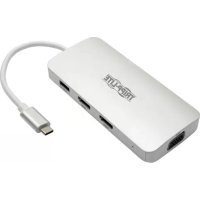
- USB 3.0 Peripheral Sharing Switch
- PROTECT YOUR INVESTMENT!
- Product Features:
- Package Includes:
- System Requirements:
- Quick Installation:
- Notes:
- Warranty and Product Registration
- 3-Year Limited Warranty
- PRODUCT REGISTRATION
- FCC Notice, Class B
- PyKOBODCTBO NOJIb30BaTeЯ
- XapakTepnCTnKn n3dennia:
- KoMnIeKT noCTaBKn:
Brand : Tripp Lite
Model : U359004
Category : USB Hub