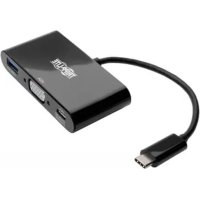
U44406NVUBC - Computer accessory Tripp Lite - Free user manual and instructions
Find the device manual for free U44406NVUBC Tripp Lite in PDF.



| Product Type | USB-C to VGA Adapter with USB-A Hub and Charging |
| Brand | Tripp Lite |
| Model | U444-06N-VU-C / U444-06N-VUB-C |
| Input Connector | USB-C male |
| Output Connectors | VGA female, USB-A female, USB-C port for charging and data |
| Maximum Video Resolution | 1920 x 1080 (1080p) at 60 Hz |
| USB-A Data Transfer Rate | Up to 5 Gbps (USB 3.1 Gen 1) |
| USB-C Charging | Input up to 20 V 3 A (60 W), Power Delivery compatible |
| USB-A Output Power | Up to 5 V 1 A (5 W) |
| Operating Temperature | 0 to 45 °C |
| Operating Humidity | 10 to 85% RH non-condensing |
| Dimensions (approx.) | 7 x 4 x 1.5 cm |
| Weight (approx.) | 30 g |
| Material | ABS Plastic |
| Compatibility | Devices with USB-C port supporting DisplayPort Alt Mode |
| Operating Systems | Windows, macOS, Linux, Chrome OS (no driver required) |
| Maintenance and Cleaning | Clean with a dry, non-abrasive cloth. Disconnect before cleaning. |
| Safety | Do not expose to water or moisture. Do not use if damaged. Unplug during thunderstorms. |
| Spare Parts and Repairability | VGA cables series P502, USB 3.0 cables series U322/U326, USB-C cable U420-003. Not user-serviceable. |
| Warranty | 3-year limited |
Frequently Asked Questions - U44406NVUBC Tripp Lite
User questions about U44406NVUBC Tripp Lite
0 question about this device. Answer the ones you know or ask your own.
Ask a new question about this device
Download the instructions for your Computer accessory in PDF format for free! Find your manual U44406NVUBC - Tripp Lite and take your electronic device back in hand. On this page are published all the documents necessary for the use of your device. U44406NVUBC by Tripp Lite.
USER MANUAL U44406NVUBC Tripp Lite
USB 3.1 Gen 1 USB-C™ to VGA Adapter
Models:
(Charging) U444-06N-V-C, U444-06N-VB-C
(USB-A and USB-C Hub Ports) U444-06N-VU-C,
U444-06N-VUB-C
(Gigabit Ethernet+USB-A Hub Port+Charging)
U444-06N-VGU-C, U444-06N-VGUB-C
USB Type-C and USB-C are trademarks of USB Implementers Forum
Espanol 9·Français 16·Pycckn 23
PROTECT YOUR INVESTMENT!
Register your product for quicker service and ultimate
peace of mind. You could also win an ISOBAR6ULTRA
surge protector—a $100 value!
www.triplite.com/warranty


Mua
E
1111 W. 35th Street, Chicago, IL 60609 USA
www.triplite.com/support
Copyright © 2017 Tripp Lite. All rights reserved.
Package Includes
- U444-06N-V-C, U444-06N-VB-C, U444-06N-VU-C, U444-06N-VUB-C, U444-06N-VGU-C or U444-06N-VGUB-C
- Owner's Manual
Optional Accessories
P502-Series High-Resolution VGA Cables
U322-Series USB 3.0 A/B Device Cables
U326-Series USB 3.0 Micro-B Device Cables
N201-Series Cat6 Gigabit Snagless Patch Cables
- U420-003 USB 3.1 Gen 1 USB-C Male/Male Cable - 3 ft.
Product Features
Note: This section lists features for all USB Type-C models referenced in this manual. See the USB Type-C Features chart to determine which features your model supports.
Supports USB DisplayPort Alternate Mode for connecting a VGA monitor via a USB-C port
Supports VGA video resolutions up to 1920 x 1080, including 1080p (60 Hz)
- Ethernet port supports true 10/100/1000 Mbps network speeds
- USB-A and USB-C hub ports support data transfer rates up to 5 Gbps; backward compatible with previous USB generations
Product Features
- USB-C port supports both data transfer and USB Power Delivery (PD) charging with power input up to 20V 3A (60W)
- Plug and play; no software or drivers required
USB Type-C Features
| Models | U444-06N-V-C/ U444-06N-VB-C | U444-06N-VU-C/ U444-06N-VUB-C | U444-06N-VGU-C/ U444-06N-VGUB-C |
| VGA Port Y Y Y | |||
| USB-A Hub Port N Y Y | |||
| Gigabit Ethernet Port N N Y | |||
| USB-C Port Charging Support Y Y Y | |||
| USB-C Port Data Support N Y N |
Installation
Note: When the unit is connected to the USB-C port on your computer and to a network via Cat5e/6 cabling, a network connection will be automatically established. If no connection is made, you can manually establish one by going to your computer's network settings page. For example, on a Mac you would navigate to the Network section found in System Preferences, click the 'Assist Me' button to get to the Network Setup Assistant, then follow the prompts to establish a connection.
- Connect the adapter's USB Type-C connector to the USB-C port on your laptop, tablet or other compatible device.
- Connect the adapter's VGA port to the monitor's VGA port using a VGA cable (such as Tripp Lite's P502-Series VGA cables).
- Charge your device by connecting its USB-C charger to the adapter's USB-C port.*
- Connect a USB device to the adapter's USB-A hub port.*
- Connect the adapter's RJ45 port to a network using a UTP cable (such as Tripp Lite's N201-Series Cat6 cables).**
*USB-C port for U444-06N-VU-C and U444-06N-VUB-C models support both data transfer and charging.
**See the USB Type-C Features chart for the features your product supports.
Specifications
| Models | U444-06N-V-C/ U444-06N-VB-C | U444-06N-VU-C/ U444-06N-VUB-C | U444-06N-VGU-C/ U444-06N-VGUB-C |
| Input Connectors | |||
| USB | USB-C (Male) | USB-C (Male) | USB-C (Male) |
| USB-C Port Charging Support | YY Y | ||
| USB-C Port Data Support N Y N | |||
| Output Connectors | |||
| VGA | VGA (Female) | VGA (Female) | VGA (Female) |
| USB N/A | USB-A (Female) | USB-A (Female) | |
| Ethernet N/A N/A | RJ45 (Female) | ||
| Environmental | |||
| Operating Temperature 32°F to 113°F (0°C to 45°C) | |||
| Operating Humidity | 10% to 85% RH, Non-Condensing | ||
| Storage Temperature 14°F to 158°F (-10°C to 70°C) | |||
| Storage Humidity 5% to 90% RH, Non-Condensing | |||
| Power Requirements | |||
| USB-C Charging Port | Supports up to 20V 3A (60W) Input | ||
| USB 3.0 Port N/A | Provides up to 5V 1A (5W) Output | ||
Warranty and Product Registration
3-YEAR LIMITED WARRANTY
TRIPP LITE warrants its products to be free from defects in materials and workmanship for a period of three (3) years from the date of initial purchase. TRIPP LITE's obligation under this warranty is limited to repairing or replacing (at its sole option) any such defective products. To obtain service under this warranty, you must obtain a Returned Material Authorization (RMA) number from TRIPP LITE or an authorized TRIPP LITE service center. Products must be returned to TRIPP LITE or an authorized TRIPP LITE service center with transportation charges prepaid and must be accompanied by a brief description of the problem encountered and proof of date and place of purchase. This warranty does not apply to equipment, which has been damaged by accident, negligence or misapplication or has been altered or modified in any way.
EXCEPT AS PROVIDED HEREIN, TRIPP LITE MAKES NO WARRANTIES, EXPRESS OR IMPLIED, INCLUDING WARRANTY OF MERCHANTABILITY AND FITNESS FOR A PARTICULAR PURPOSE.
Some states do not permit limitation or exclusion of implied warranties; therefore, the aforesaid limitation(s) or exclusion(s) may not apply to the purchaser.
EXCEPT AS PROVIDED ABOVE, IN NO EVENT WILL TRIPP LITE BE LIABLE FOR DIRECT, INDIRECT, SPECIAL, INCIDENTAL OR CONSEQUENTIAL DAMAGES ARISING OUT OF THE USE OF THIS PRODUCT, EVEN IF ADVISED OF THE POSSIBILITY OF SUCH DAMAGE. Specifically, TRIPP LITE is not liable for any costs, such as lost profits or revenue, loss of equipment, loss of use of equipment, loss of software, loss of data, costs of substitutes, claims by third parties, or otherwise.
PRODUCT REGISTRATION
Visit www.triplite.com/warranty today to register your new Tripp Lite product. You'll be automatically entered into a drawing for a chance to win a FREE Tripp Lite product!*
- No purchase necessary. Void where prohibited. Some restrictions apply. See website for details.
Warranty and Product Registration
FCC Notice, Class B
This device complies with part 15 of the FCC Rules. Operation is subject to the following two conditions: (1) This device may not cause harmful interference, and (2) this device must accept any interference received, including interference that may cause undesired operation.
Note: This equipment has been tested and found to comply with the limits for a Class B digital device, pursuant to part 15 of the FCC Rules. These limits are designed to provide reasonable protection against harmful interference in a residential installation. This equipment generates, uses and can radiate radio frequency energy and, if not installed and used in accordance with the instructions, may cause harmful interference to radio communications. However, there is no guarantee that interference will not occur in a particular installation. If this equipment does cause harmful interference to radio or television reception, which can be determined by turning the equipment off and on, the user is encouraged to try to correct the interference by one or more of the following measures:
- Reorient or relocate the receiving antenna.
- Increase the separation between the equipment and receiver.
- Connect the equipment into an outlet on a circuit different from that to which the receiver is connected.
- Consult the dealer or an experienced radio/TV technician for help.
Any changes or modifications to this equipment not expressly approved by Tripp Lite could void the user's authority to operate this equipment.
Warranty and Product Registration
WEEE Compliance Information for Tripp Lite Customers and Recyclers (European Union)
Under the Waste Electrical and Electronic Equipment (WEEE) Directive and implementing regulations, when customers buy new electrical and electronic equipment from Tripp Lite they are entitled to:
- Send old equipment for recycling on a one-for-one, like-for-like basis (this varies depending on the country)
- Send the new equipment back for recycling when this ultimately becomes waste
Use of this equipment in life support applications where failure of this equipment can reasonably be expected to cause the failure of the life support equipment or to significantly affect its safety or effectiveness is not recommended. Do not use this equipment in the presence of a flammable anesthetic mixture with air, oxygen or nitrous oxide.
Tripp Lite has a policy of continuous improvement. Specifications are subject to change without notice.

1111 W. 35th Street, Chicago, IL 60609 USA www.triplite.com/support
1111 W. 35th Street, Chicago, IL 60609 EE UU www.triplite.com/support
1111 W. 35th Street, Chicago, IL 60609 EE UU www.triplite.com/support
(Chargement) U444-06N-V-C, U444-06N-VB-C
U444-06N-VGU-C, U444-06N-VGUB-C
1111 W. 35th Street, Chicago, IL 60609 USA
www.triplite.com/support
1111 W. 35th Street, Chicago, IL 60609 USA www.triplite.com/support
22
PykoBODCTBO NOIb30BaTeJia
Перековник USB 3.1 Gen 1 USB-CTM / VGA
Moden:
(Зарядны) U444-06N-V-C, U444-06N-VB-C
(Cnpotamn konchehtpata USB-A n USB-C) U444-06N-VU-C,
U444-06N-VUB-C
U444-06N-VGU-C, U444-06N-VGUB-C
USB Type-C n USB-CЯьлгся товарныIMN 3нakамКомпанn USB Implementers Forum
English 1 · Espanol 9 · Francais 16


1111 W. 35th Street, Chicago, IL 60609 USA • www.triplite.com/support
OxpanyetcnaBTOpcknmpaBOM © 2017 Tripp Lite. Iepeneuatka 3anpeaaetc.
KoMnJIeKT nOcTaBKN
U444-06N-V-C, U444-06N-VB-C, U444-06N-VU-C, U444-06N-VUB-C, U444-06N-VGU-C unnu444-06N-VGUB-C
-PykoB0DCTBO nOlb3OBaTeJIA
OпциональнBLE KOMПЛeKТЮОцne
Ka6eIbICOKoRa3peSeHnVGA cepnn P502
Ka6eIINIpaNIOdknUoyHna yctpoiCTB cepuU322,USB 3.0 A/B
Ka6eIINIpaNIOdknUoyEnyycTpoiCTB cepuU326,USB 3.0 Micro-B
Be3pa3pbIBhIe coeHHntbHbIe Ka6eJn Cat6 Gigabit cepnn N201
Ka6eIb U420-003 c pa3bemamn USB 3.1 Gen 1/USB-C (wTekep/wTekep),ДиИнa 0,9 M
XapakTepnCTnKn npOdyKta
Примechан.В Данном pa3деле npedctablenbI CBOICTBa Bcex mojen USB Type-C, yNOMHaEMbIX B HAcTOnIeM pyKOBoIcTBe.Bo3MOxHocTn CBOe KOKpeTHoN Mojen Bbl MOxTe y3HaTb n3 Ta6nucI"CBOIcTBA HHTepfeniCA USB Type-C".
- Побдевочka рек imma USB DisplayPort Alternate Дя подкюець VGA-MOnHTopa uepe3 nopT USB-C
- Пордержka видаоразрешия стандарта VGA до 1920 x 1080, Вклоча 1080p (60 Г)
- Iopr Ethernet noДeprxmbaet ceTeBbIe ckopoCTn 10/100/1000 M6nt/c
- IopTbI KOHcEHTpaTopa USB-A n USB-C noДepeXnBaIoT ckOpoCTn pepeaH daHHbIXdo 5 Γ6nt/c n o6paTHo COBMeCTmMbIC nHTepΦeicamn USB npedweecByuOux nokoneHn
XapakTepnCTnKn npOdyKta
- Iopr USB-C noДeprKuBaet KaK nepeaCy daHbIX, TaK n 3apRky C noDAye NITAHnY uepe3 pa3bem USB npN BXoHOM NITAHnNdo 20 B/ 3 A (60 Bt)
- Поклочец по Тхноги Plug-and-play 6e3 Heo6xOДмocTN ИспьзOBаня рорpaMMHOrO obecneueHЯ Или ДраиВеров
CboiCTBa nHTeppeimca USB Type-C
| Моdenи | U444-06N-V-C/ U444-06N-VB-C | U444-06N-VU-C/ U444-06N-VUB-C | U444-06N-VGU-C/ U444-06N-VGUB-C |
| Порт VGA ДА ДА ДА | |||
| Порт концentратура USB-A HET ДА ДА | |||
| Порт Gigabit Ethernet HET HET ДА | |||
| Пордержka заряdkи чered зорт USB-C ДА ДА DА | |||
| Пордержka обмени данныIMпчered пот USB-C | HET ДА | HET |
yctahOBka
PpimmeaHne. Ecn daHHoe yctpoCTBO nOdknIOyeHO K npTy USB-C kOmnbIOTepa N K cTeu che3 Ka6eN Cat5e/6, to ceTeBOe coeINHeHne yCTaHaBnBaETcA BTOMaTnueckn.
При OTCYТВИ COEДИЕНЯ OHO можET 6bIb yCTaHOBJIeBO BpyHyO CO CTpaHINcbl cTeBbIX hAcTpoEK KOMMbIOTepa. HanpIMep, Ha yCtpoIcTBe Mac cIeJyET nepeITN B pa3dEN Network ("Cetb") B MeHIO System Preferences ("IapametpbI CnCTeMbI", haxaTb Ha KhONkY 'Assist Me' ("Tpe6yETcI nomOuIb") ДЯ BbI3OBA yTInITbI Network Setup Assistant ("IpOMOHNK NaCTPOIK NcTeBbIX napaMeTpO'B"), a 3aTeM cIeIDoBaT bNoCKa3KaM dJa yCTaHOBJIeHЯ COeDINHeHЯ.
TapaHTnHbIe 06aTeJIbCTBa
OTPAHnueHHaTAPAHnCPOKOM3rO
KoMaHnI TRIPP LITE rapaHTnpyET OTCYCTBue DeΦeKTOB MaTePnaNoB u N3rOToBHeHn B TeueHne TpN (3) rOda c MOMeHTa nepBOHaaybHO nOKyIKN. 06ra3aTeJIbCTBa KOMnHnTRIPP LITE no HactoJeuE rapaHTmOr pArHnUBAIOcpeMOHTom nn 3ameHou (no ee eDInHOuHOMy ycmOTpeHHIO) IIO6bIX TaKx DeΦeKTHbIX n3dEni. Dn aNoIyuEHn ycnyr eo DaHHo rapaHTm Heo6xoIMMo nOlyuHTb Homep Returneded Material Authorization (RMA -pa3peSeHne Ha BO3BpaT MaTePnaNoB) ot KOMnHn TRIPP LITE nn ee aBtOpu3OBaHHoro cepBnCHOrO ueHTpa. IV3dEnn DOJXHb6bITb BO3BpaUeHb B KOMnHaHIO TRIPP LITE nn ABTOpuaHHbI cepBnCHbI ueHTp TRIPP LITE c npedonlatoTpaHCnOpTHbIX paCXoIDOB IN COIpOBoXDaTbCk KpaTKMm ONCaHMe BO3HNKWe IpO6BeMb I DOKUMeHOM, NOITBepKJaOnm DaTu m MeTo erO npNo6peTeHn. DeicTBue hactoJeuE rapaHTm He paacnpocTaPAHReTc Ha o6OpuyDoAHne, NOBpeJdeHHOe B pe3yIbTaTe abapnn, He6peXHoRo 6bpaSeHn UIN HeNPaBUNbHO rCNOb3OBaHHa, a TaKxe BnDOImMeHeHoe KaKIM 6bl To HN 6blIO 6bpa3OM.
3A NCKJIIOUCHHEM INPEYCMOTPEHHbIX 3DECb CUYAEB KOMIAHNA TRIPP LITE HE INPEIOCTABJAREKAKNX-IM60 RAHBIX IIN IOIDPA3UMEBAEMbIX TAPAHTN, BKIIOUAR TAPAHTN KOMMEPUECKOIN PNIFOIDHOCTN IN PNIFOIDHOCTN DIA KAKOIN-JIM60 KOHKPETHOI CEJI.
B HeKOTopbIX Wtatax/rocyaapCTbax orpaHnueHne nn NCKIIOUeHne nOpa3yMeBaembIX rapaHTn He IOnyckaetc; CneIOBaTeNbHO, Bblweyka3aHHoe(-bie) orpaHnueHne(-r) nn NCKIOUeHne(-r) moYr He paCnpocTpaHrTaBCHa nOKynatela.
3A NCKIIOUCHHEM INPEYCMOTPEHHbIX BbIIE CNyUAEB KOMNAHJ TRIPP LITE HIN PNI KAKNX O6CTOATEJIbCTBAX HE HECET OTBETCTBEHHOCTHN 3A INPMABJE, KOCBEHHbIE, CNYAUHbIE IINI NOBOUHbIE YbBITK INI60 YbBITKN, ONPEDEJREMBIE OC0bIMN OBCTOATEJIbCTBAMN, BO3HNUKAIOUINE B CBA3N C INCNOJB3OBAHHE M DAHHORO IN3DEINIA, DAXE B CUYAE EE INHOFMPOBAHUN O BO3MOXHOCTN HACTYNIIEHN TAKNX YbBITKOB. B yactnoctn, KOMNAHJ TRIPP LITE He Hecet OTBETCTBEHHOCTH 3a KaKne-1n6o IN3depxkN, TAKNE KAK UnyeHNbIe pIn6bln IINI DOxOdbI, NOTepr o6OpUDOBAHN, NOTepr BO3MOXHOCTN INCNOJB3OBAHUN O6OpUDOBAHN, NOTepr nporpaMMHOrO oBeCneueHn, noTepr daHHbIX, paXOdbI Ha 3aMeHNTEnn, UpeYlnpOBAHNe npeTeH3n TpeTbx IINu n np.
TapaHTnHbIe 06aTeIbCTBa
1111 W. 35th Street, Chicago, IL 60609 USA www.triplite.com/support
17-12-057 93-36FA_ReVC

- USB 3.1 GEN 1 USB-C™ TO VGA ADAPTER
- PROTECT YOUR INVESTMENT
- PACKAGE INCLUDES
- OPTIONAL ACCESSORIES
- PRODUCT FEATURES
- INSTALLATION
- WARRANTY AND PRODUCT REGISTRATION
- 3-YEAR LIMITED WARRANTY
- PRODUCT REGISTRATION
- FCC NOTICE, CLASS B
- WEEE COMPLIANCE INFORMATION FOR TRIPP LITE CUSTOMERS AND RECYCLERS (EUROPEAN UNION)
- PYKOBODCTBO NOIB30BATEJIA
- ПЕРЕКОВНИК USB 3.1 GEN 1 USB-CTM / VGA
- KOMNJIEKT NOCTABKN
- OПЦИОНАЛЬНBLE KOMПЛEKТЮОЦNE
- XAPAKTEPNCTNKN NPODYKTA
- YCTAHOBKA
- TAPAHTNHBIE 06ATEJIBCTBA
- OTPAHNUEHHATAPAHNCPOKOM3RO
- TAPAHTNHBIE 06ATEIBCTBA
Brand : Tripp Lite
Model : U44406NVUBC
Category : Computer accessory