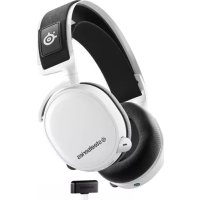
Arctic 7P+ - Headphones STEELSERIES - Free user manual and instructions
Find the device manual for free Arctic 7P+ STEELSERIES in PDF.

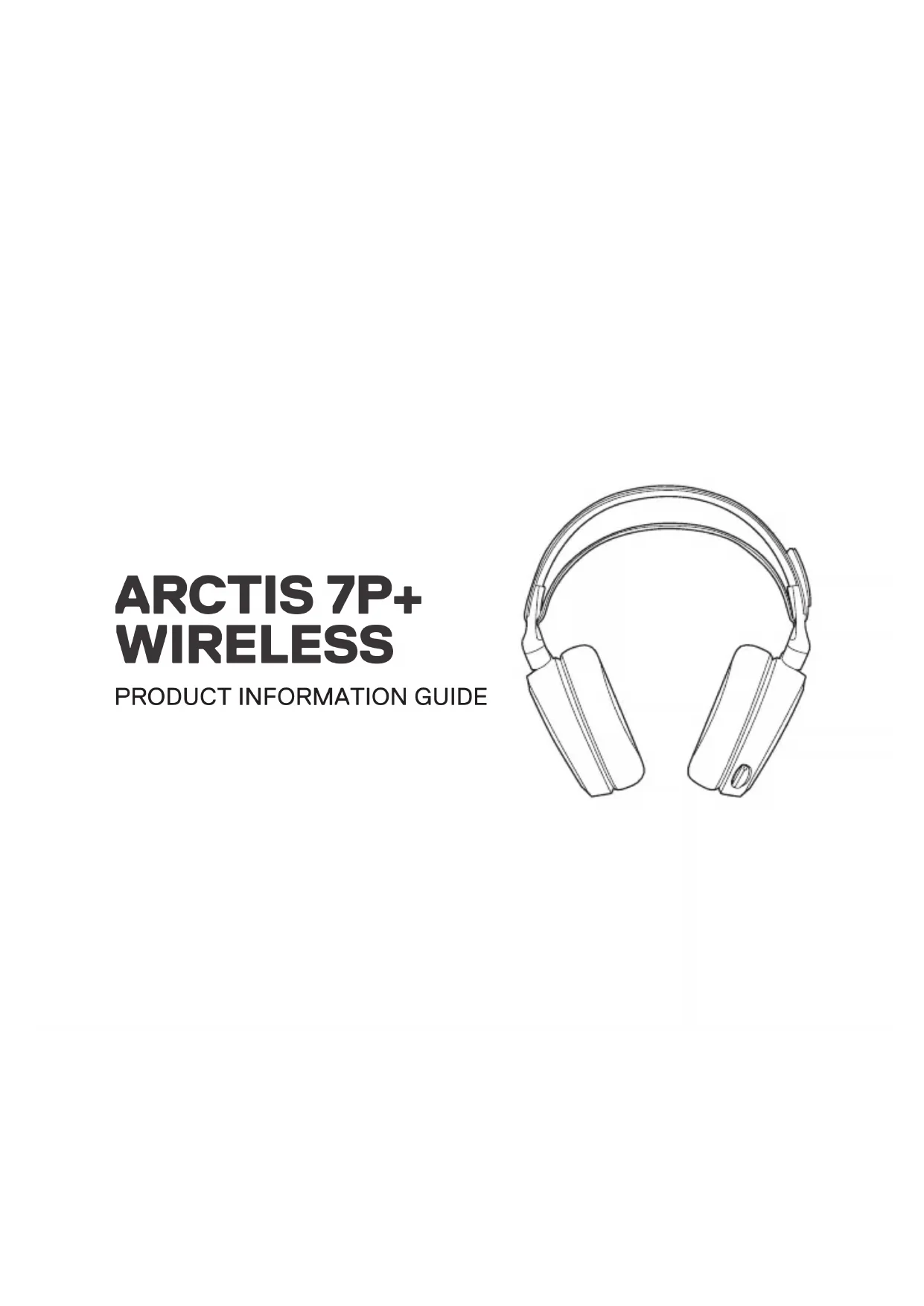


| Brand | Steelseries |
| Model | Arctis 7P+ |
| Product Type | Wireless headset |
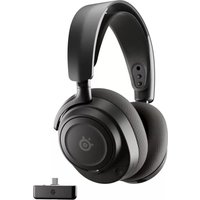
| Color | Black |
| Compatibility | PlayStation 5, PlayStation 4, PC, Nintendo Switch, Android (USB-C) |
| Connectivity | 2.4 GHz wireless via USB-C dongle |
| Battery Life | Up to 30 hours |
| Battery | Rechargeable lithium-ion, charging via USB-C |
| Charging Time | Approximately 3 hours |
| Microphone | Retractable ClearCast (cardioid) |
| Frequency Response (Microphone) | 100 - 6500 Hz |
| Frequency Response (Headphones) | 20 - 20000 Hz |
| Impedance | 32 Ohms |
| Sensitivity | 98 dB |
| Weight | 330 g |
| Included Accessories | USB-C dongle, USB-C to USB-A adapter, 3.5mm audio cable, USB-C charging cable |
| Special Features | 7.1 Surround Sound, adjustable sidetone, multimedia controls |
| Maintenance | Clean with a soft, dry cloth. Do not immerse. |
| Safety | Follow battery warnings. Do not expose to water. |
| Spare Parts | Earpads, cables, microphone available at steelseries.com/gaming accessories |
| Warranty | 1 year |
Frequently Asked Questions - Arctic 7P+ STEELSERIES
User questions about Arctic 7P+ STEELSERIES
0 question about this device. Answer the ones you know or ask your own.
Ask a new question about this device
Download the instructions for your Headphones in PDF format for free! Find your manual Arctic 7P+ - STEELSERIES and take your electronic device back in hand. On this page are published all the documents necessary for the use of your device. Arctic 7P+ by STEELSERIES.
USER MANUAL Arctic 7P+ STEELSERIES
PRODUCT INFORMATION GUIDE
CONTENTS
| Product overview | 5-6 | Translations | |
| Setup | 7 | Español | 15 |
| 简体中文 | 17 | ||
| Charging | 9 | 繁德中文 | 19 |
| Power On/Off | 10 | 日本語 | 21 |
| Pairing | 11 | 黒ロード | 23 |
| Microphone | 12 | Deutsch | 25 |
| Pyccuré | 27 | ||
| Multimedia Control | 13 | Français | 29 |
| Ski Goggle Headband | 14 | Italiano | 31 |
| Português | 33 | ||
| Polak | 35 | ||
| Regulatory | 39 |
WELCOME TO ARCTIS
Your new headset is the result of our unyielding pursuit of perfection since
- We poured our hearts into creating the best possible PlayStation gaming headset by pushing the boundaries of sound quality, mic clarity, comfort and style.
Arctis is our glory; now go chase yours.
STEELSERIES GG
Find help at support.steelseries.com
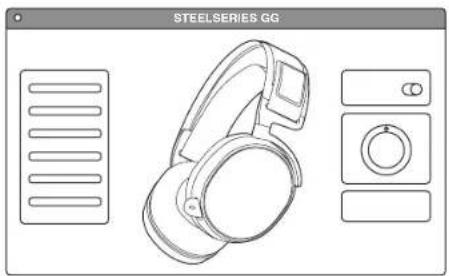
Download SteelSeries GG to customize your audio settings and to integrate with Engine Apps like Discord:steelseries.com/gg
PACKAGE CONTENTS
Product Information Guide
Artcis 7P+ Wireless Headset
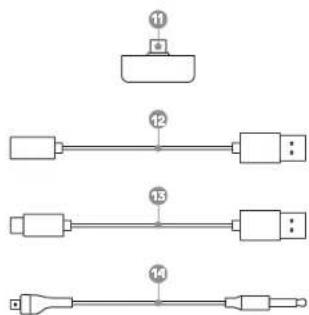
USB-C Wireless Dongle
USB-C to USB-A Adapter Cable
4-pole 3.5 mm Audio Cable
USB-C Charging Cable
SYSTEM COMPATIBILITY
PlayStation 5
PlayStation 4
PC
Nintendo Switch
Android (with USB-C)
PRODUCT OVERVIEW
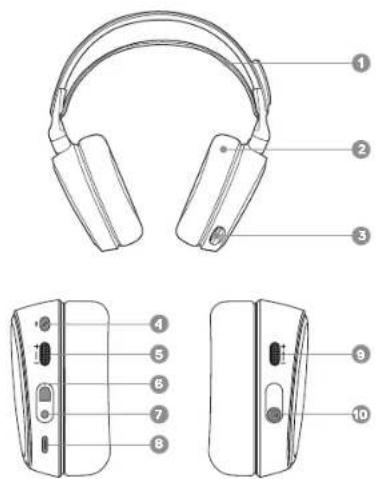
1 Ski Goggle Headband* 2 Airweave Ear Cushions* 3 Retractable Microphone 4 Microphone Mute Button 5 Volume Control 6 Mobile Cable Jack 7 Headphone Share Jack 8 USB-C Charging Jack 9 Sidetone Dial 10 Power Button
*Find accessories at steelseries.com/gaming-accessories
SETUP
More detailed product information at steelseries.com/arctis-7p+
WIRELESS SETUP Connection to USB-A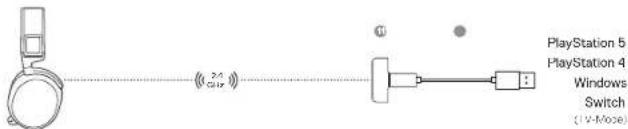
Connection to USB-C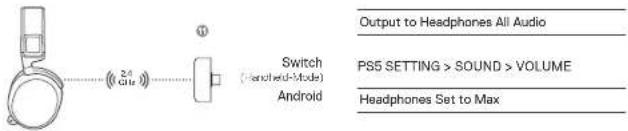
WIRED SETUP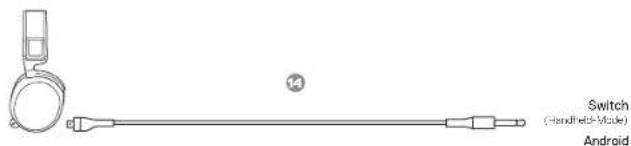
PS5 SETTING > SOUND > AUDIO OUTPUT PS4 SETTING > DEVICES > AUDIO DEVICES Output to Headphones All Audio
CHARGING
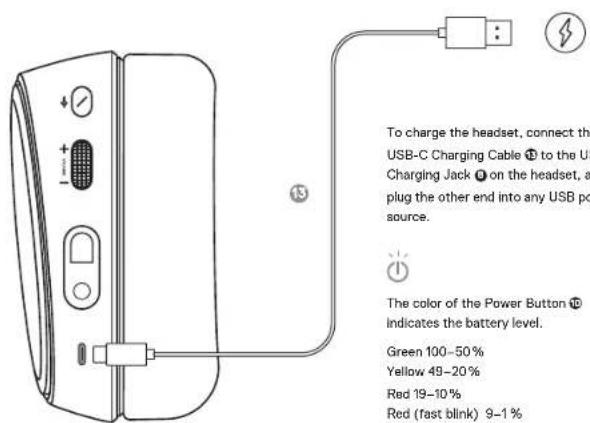
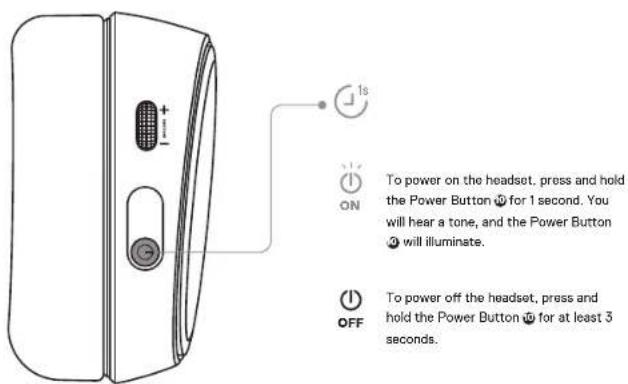
POWER ON/OFF
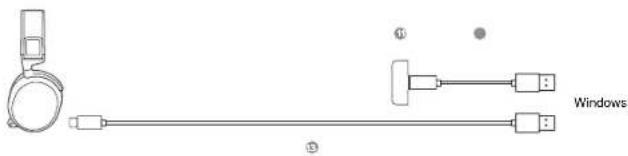
Note: The headset is already paired with the Dongle out of the box. To re-pair the Dongle:
1 Connect the USB-C Wireless Dongle Ⓤ to a Windows PC with SteelSeries GG installed. 2 Use the USB-C Charging Cable ⬤ to connect the headset to the same PC.
3 Use Engine from SteelSeries GG software to initiate the pairing. 4 Engine will show when pairing is completed.
MICROPHONE PAIRING
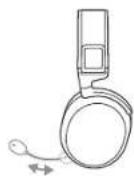
RETRACTABLE MICROPHONE POSITIONING
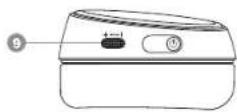
SIDETONE DIAL
The Sidetone Dial can be used to adjust mic monitoring levels. Increase the sidetone level by moving the dial upwards, decrease or disable sidetone by moving the dial downwards.
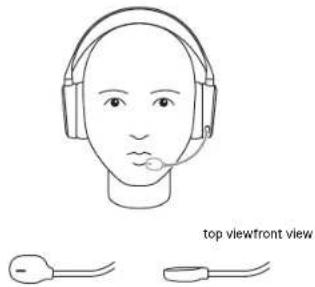
Position the ClearCast Microphone ⚙ close to the corner of your mouth with the flat surface facing you.
MULTIMEDIA CONTROL
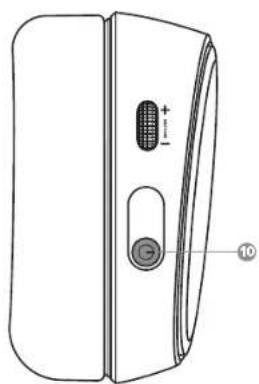
Answer/end voice call single · press Power Button Play/pause music single - press Power Button Next track double · · press Power Button Previous track triple · · press Power Button®
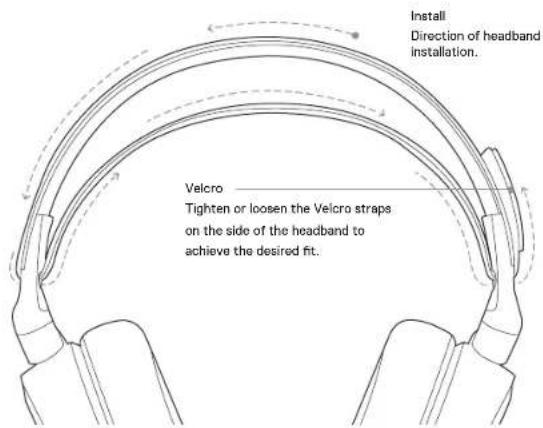
SKI GOGGLE HEADBAND
SPANISH
support.steelseries.com
Product Overview
19 Ski goggle head strap
20 Airweave ear cushions*
21 Retractable microphone
22 Microphone mute button
23 Volume control
24 Mobile cable jack
25 Headphone sharing jack
26 USB-C charging jack
27 Sidetone control dial
28 Power button
29 USB-C wireless transmitter
30 USB-C to USB-A adapter cable
31 USB-C charging cable
32 4-pole 3.5mm audio cable
*Find accessories at steelseries.com/gaming-accessories
Setup
Wireless setup
Connect to USB-A
Connect to USB-C
PS5 Settings > Sound > Audio Output
Output to Headphones - All Audio
PS5 Settings > Sound > Volume
Headphones set to Maximum
PS4 Settings > Devices > Audio Devices
Output to Headphones - All Audio
Wired setup
Charging
*Find accessories at steelseries.com/gaming-accessories
Settings
Wireless Settings
Connect to USB-A
Connect to USB-C
PS5 Settings > Sound > Audio Output
Output to Headphones: All Audio
PS5 Settings > Sound > Volume
Set Headphones to Maximum
PS4 Settings > Devices > Audio Devices
Output to Headphones: All Audio
Wired Settings
Charging
Accessories available at *steelseries.com/gaming-accessories
You can purchase them there.
Settings
Wireless connection settings
Connection to USB-A
Connection to USB-C
PS5 Settings > Audio > Audio Output
Headphone Output: All Audio
PS5 Settings > Audio > Volume
Set Headphones to Maximum
USB-C Wireless Dongle
11 USB-C Wireless Dongle
steelseries.com/gaming-accessories
SETUP
Switch, Android [via USB-C]
support.steelseries.com
PRODUCT OVERVIEW
steelseries.com/gaming-accessories
INSTALLATION
WIRELESS INSTALLATION
USB-A connection
USB-C connection
Wireless USB-C dongle
11 Wireless USB-C dongle
steelseries.com/gaming-accessories
SETUP
steelseries.com/gaming-accessories
SETUP
steelseries.com/gaming-accessories
SETUP
Europe - EU Declaration of Conformity
Hereby, SteelSeries ApS, declares that the equipment complies with Directive RED 2.0 (2014/53/EU), EMC Directive (2014/30/EU), and LVD (2014/35/EU) which are issued by the Commission of the European Community.
The full text of the EU declaration of conformity is available at the following Internet address: https://steelseries.com/ Operating Temperature: 0 to +40 °C
SteelBerie ApS hereby confirms that, to date, based on feedback from our suppliers, our products applied to the EU territory comply with the REACH (Registration, Evaluation, Authorization, and Restriction of Chemicals) (EC) 1907/2006 compliance program. We are fully committed to offering REACH-compliant products and posting accurate REACH compliance status for all of our products.
Frequency Bands and Powers (Headset and Transceiver)
a. Frequency band(s) in which the radio equipment operates: 2.400 - 2.4035 GHz
b. Maximum radio frequency power transmitted in the
frequency band(s) in which the radio equipment operates
EIRP: π/4-DQPSK: 7.76 dBm (Headset ANT 1)
EIRP: π/4-DQPSK: 9.57 dBm (Headset ANT 2)
EIRP: π/4-DQPSK: 9.32 dBm (Transceiver)
c. Firmware Version: T1.00.05

UK Declaration of Conformity
Hereby, SteelSeries ApS declares that the following equipment complies with the Electromagnetic Compatibility Regulations 2015, the Electrical Equipment (Safety) Regulations 2016, the Radio Equipment Regulations 2017, and the Restriction of the Use of Certain Hazardous Substances in Electrical and Electronic Equipment Regulations 2012 issued by the Department for Business, Energy & Industrial Strategy.
The full text of the UK declaration of conformity is available at the following internet address: http://steelseries.com/
WEEE
This product must not be disposed of with your other household waste. Please dispose of it in compliance with local regulations, or contact your local city office, your household waste disposal service, or the shop where you purchased the product.
TURKEY ROHS COMPLIANCE
Republic of Turkey: In conformity with the EEE Regulation
Safety Guideline for Lithium Battery
This battery must not be disposed of with your other household waste. Dispose of it in compliance with local regulations, or contact your local city office, your household waste disposal service, or the shop where you purchased the product.

Federal Communication Commission Interference Statement
This device complies with Part 15 of the FCC Rules. Operation is subject to the following two conditions: (1) This device may not cause harmful interference, and (2) this device must accept any interference received, including interference that may cause undesired operation.
This equipment has been tested and found to comply with the limits for a Class B digital device, pursuant to Part 15 of the FCC Rules. These limits are designed to provide reasonable protection against harmful interference in a residential installation. This equipment generates, uses, and can radiate radio frequency energy and, if not installed and used in accordance with the instructions, may cause harmful interference to radio communications. However, there is no guarantee that interference will not occur in a particular installation. If this equipment does cause harmful interference to radio or television reception, which can be determined by turning the equipment off and on, the user is encouraged to try to correct the interference by one or more of the following measures:
- Reorient or relocate the receiving antenna.
- Increase the separation between the equipment and receiver.
- Connect the equipment into an outlet on a circuit different from that to which the receiver is connected.
- Consult the dealer or an experienced radio/TV technician for help.
FCC Caution:
Any changes or modifications not expressly approved by the party responsible for compliance could void the user's authority to operate this equipment.
This transmitter must not be co-located or operating in conjunction with any other antenna or transmitter.
Radiation Exposure Statement:
The device has been evaluated to meet general RF exposure requirements. The device can be used in portable exposure conditions without restriction.
FCC ID: ZHI-K-1635 (Wireless Headset)
IC ID: ZIK-HSSXG/ ZIK-HSSXB (Transceiver)
Frequency bands and Powers (Mouse and Transceiver)
a. Frequency band(s) in which the radio equipment operates: 2.400 - 2.4836 GHz
b. Maximum radio frequency power transmitted in the
frequency band(s) in which the radio equipment operates:
- Conducted Peak Power/π/4 DGPEK: 4.58 dBm (Headset ANT)
- Conducted Peak Power/ 6/4 DCPEK 4.9 dBm (Headset ANT)
- Conducted Peak Power/10V-LCPAC 3.4 dBm (Transceiver)
c. Firmware Version: 1.00.00
Regions Contact Information
| USA SteelSeries ApS, 658 W Randolph St., Suite 3E, Chicago, IL 80651, USA +1 312 258 9467 |
More information and support from https://steelseries.com/
Industry Canada Statement:
This device complies with Industry Canada license, except RSS standard(s). Operation is subject to the following two conditions:
1) this device may not cause interference, and
2) This device must accept any interference, including interference that may cause undesired operation of the device. This device complies with Industry Canada CNR.
This Class B digital apparatus complies with Canadian ICES-003.
This device and its antenna(s) must not be co-located or operating in conjunction with any other antenna or transmitter, except as provided for built-in radios.
The Country Code Selection feature is disabled for products marketed in the US and Canada.
The appliance must not be exposed to splashes or drops of water and it should not be used as a support for any object filled with liquid, such as a vase.
RISK OF EXPLOSION IF BATTERY PACK IS NOT REPLACED BY SAME TYPE AS SPECIFIED BY THE MANUFACTURER.
Please keep all listed important warnings and cautions below while using this battery pack to avoid any damage or hazard.
- The battery polarity (+) and (-) are not connected and charged reversely. Risk of explosion if the battery polarity (+) and (-) is reversed.
- Please keep the battery pack away from fire and high heat sources due to the explosion that might happen. Do not place your battery pack closer to any heater or hot location.
- This battery pack shall not be hit or impacted. This battery pack shall not be dealt with any sharp or keen objects either.
- This battery pack shall not be exposed to moisture, dropping or splashing.
- If any electrolyte leaks out of this battery pack and touches the user's eyes or skin, please seek medical advice immediately.
WARNING!
RISK OF EXPLOSION IF THE BATTERY PACK IS NOT REPLACED WITH THE SAME TYPE AS SPECIFIED BY THE MANUFACTURER.
Radiation Exposure Statement:
The device has been evaluated to meet general RF exposure requirements. The device can be used in portable equipment.

SteelSeries Products and Australian Consumer Law
Our goods come with guarantees that cannot be excluded under Australian consumer law. You are entitled to a replacement or refund for a major failure and compensation for any other reasonably foreseeable loss or damage. You
are also entitled to have the goods repaired or replaced if the goods fail to be of acceptable quality and the failure does not amount to a major failure.
Should your product be defective, you can make a claim under Australian consumer law.
SteelSeries will provide its own remedies equivalent to those remedies in the consumer guarantee provisions of the Australian Consumer Law at any time within 24 months of the date of purchase. For the avoidance of doubt, SteelSeries acknowledges that the Australian Consumer Law may provide for remedies beyond 24 months for a number of its products.
Summary of Australian statutory consumer guarantees
Consumer guarantees in relation to goods
The goods will be of acceptable quality. The goods will be fit for a particular purpose. The goods will match their description. The goods will match the sample or demonstration model. You have the right to the goods. You have undisturbed possession of the goods. There are no undisclosed securities on the goods.
Consumer guarantees in relation to services
We will provide the services with due care and skill. The services will be fit for a particular purpose. The services will be provided within a reasonable time.
For SteelSeries-created goods, in addition to the above, we also guarantee that we will provide repairs or spare parts for a reasonable time. Under Australian consumer law, the remedy you are entitled to if a product fails to meet a consumer guarantee will depend on whether the failure to comply with the guarantee is major or minor.
Minor failures to comply with a consumer guarantee can normally be fixed or resolved in a reasonable amount of time. In this case, the seller can choose to offer you a refund, replacement, repair or, in the case of service, resupply. If the seller does not fix the problem or takes too long, you may be able to get it fixed by someone else and recover the costs from the seller depending on the circumstances.
Remedies for major failure with goods
Return the product and ask for a refund. Return the product and ask for an identical replacement, or one of similar value, if reasonably available. Keep the product and ask for compensation for the drop in value caused by the problem. Remedies for major failure with services
Cancel the contract and pay a reasonable amount for the work done, or seek a refund for money already paid. Keep the contract and negotiate a reduced price for the drop in value of the service — this may mean asking for some of your money back if you have already paid.
For goods, there is a major failure to comply with a consumer guarantee when:
- You would not have purchased the product if you had known about the problem.
- The product is significantly different from the description, sample or demonstration model you were shown.
- The product is substantially unfit for its normal purpose and cannot easily be made fit within a reasonable time.
- The product is substantially unfit for a purpose that you told the supplier about and cannot easily be made fit. It is within a company's
- The product is unsafe
For services, there is a major failure to comply with a consumer guarantee when:

- You would not have engaged the service if you had known the nature and extent of the problem.
The service does not meet the reasonable expectations for that type of service, and the problem cannot be
rectified within a reasonable time.
- You told the supplier that you wanted the service for a specific purpose, which was not fulfilled, and the problem
could not be easily rectified within a reasonable time.
- You told the supplier that you wanted a specific result, yet the service and end result failed to meet your
specifications and could not be easily rectified within a reasonable time.
- The supply of the service has created an unsafe situation
For information on Australian consumer law, please visit the Australian Consumer Law website or
http://www.pcrp.gov.cn
Importer Name and Address: poram-Momori-LD/Levall, El Duncha-Jesgue, Kreshey-NSW 2018
Telephone technical support: +61 2 9381 (CDU)
This product is compliant with requirements of Circular No. 30/2017/TT-BCT: Regulations "Stipulating the permissible content limitation of some toxic chemicals in the electronic",
FOR YOUR INFORMATION: THE PERMISSIBLE CONTENT LIMITATION OF SOME TOXIC CHEMICALS IN THE ELECTRONIC
Restriction on Hazardous Substances statement (India)
Restriction on Hazardous Substances statement (India)
The product complies with the "India E-waste Rule 2011" and prohibits the use of lead, mercury, and hexavalent chromium.
polybrominated biphenyls or polybrominated diphenyl ethers in concentrations exceeding 0.1 weight % and 0.31 weight
Micro-power devices should be noted in their product instructions:
ACMA Compliance (Australia/New Zealand)
RFD (2014/33/EU), EMCD (2014/30/EU) and LVD (2014/35/EU) Compliances (The Commission of the European Community).

RFD (2014/33/EU), EMCD (2014/30/EU) and LVD (2014/35/EU) Compliances (The Commission of the European Community).

Singapore approval (IMDA)

Product Name (产品名称/產品名稱) Model No. (型号/型號) Rated (规格/規格) by
Wireless Headset (無線耳機/無線耳機) HS33 = 200 mA
Accessories Information (配件資訊/配件信息) Product Name: (產品名稱/產品名稱) Model No. (型號/型號)
Accessories Information Product Name: Model No.
Rated (specifications): 5V Made in China Product operating ambient temperature: 0-40°C Operating Temperature: 0 to +40 °C
| Regions Contract Information | ||
| 亚洲 | 东北(中和直球—第186路4路及4路之4) | +896 2 8226.885 |
| Asia | 4F - A, No. 16B, Jian Yei Rd., Zhonghe Dist., New Taipei City 235603, Taiwan (H.O.O.) | +896 2 8226.885 |
| USA 666 (R) Randolph St. Suits &: Chicago, IL 60681, USA +1 572 268 0467 | ||
| Europe | Hevinshome's 1st Floor, DK-245C Copenhagen SV, Denmark | +4b /025 06 7b |
More information and support from https://steelseries.com/

Learn more at steelseries.com


- CONTENTS
- WELCOME TO ARCTIS
- STEELSERIES GG
- PACKAGE CONTENTS
- SYSTEM COMPATIBILITY
- PRODUCT OVERVIEW
- SETUP
- CHARGING
- POWER ON/OFF
- MICROPHONE PAIRING
- RETRACTABLE MICROPHONE POSITIONING
- SIDETONE DIAL
- MULTIMEDIA CONTROL
- SKI GOGGLE HEADBAND
- SPANISH
- 28 POWER BUTTON
- WIRELESS SETUP
- WIRED SETUP
- SETTINGS
- WIRELESS SETTINGS
- WIRED SETTINGS
- WIRELESS CONNECTION SETTINGS
- INSTALLATION
- WIRELESS INSTALLATION
- EUROPE - EU DECLARATION OF CONFORMITY
- UK DECLARATION OF CONFORMITY
- WEEE
- SAFETY GUIDELINE FOR LITHIUM BATTERY
- FEDERAL COMMUNICATION COMMISSION INTERFERENCE STATEMENT
- FCC CAUTION
- RADIATION EXPOSURE STATEMENT
- INDUSTRY CANADA STATEMENT
- RISK OF EXPLOSION IF BATTERY PACK IS NOT REPLACED BY SAME TYPE AS SPECIFIED BY THE MANUFACTURER
- WARNING
- RISK OF EXPLOSION IF THE BATTERY PACK IS NOT REPLACED WITH THE SAME TYPE AS SPECIFIED BY THE MANUFACTURER
- STEELSERIES PRODUCTS AND AUSTRALIAN CONSUMER LAW
- SUMMARY OF AUSTRALIAN STATUTORY CONSUMER GUARANTEES
- CONSUMER GUARANTEES IN RELATION TO GOODS
- REMEDIES FOR MAJOR FAILURE WITH GOODS
- RESTRICTION ON HAZARDOUS SUBSTANCES STATEMENT (INDIA)
- ACMA COMPLIANCE (AUSTRALIA/NEW ZEALAND)
Brand : STEELSERIES
Model : Arctic 7P+
Category : Headphones