450100 - Blender CaterChef - Free user manual and instructions
Find the device manual for free 450100 CaterChef in PDF.



| Product Type | Multi-function blender with cooking and steaming |
| Brand | CaterChef |
| Model | 450100 |
| Dimensions (approx.) | Height: 45 cm, Width: 25 cm, Depth: 25 cm |
| Weight (approx.) | 5 kg |
| Power supply | 220-240 V, 50/60 Hz, 1200 W |
| Mixing bowl capacity | 2 L |
| Measuring cup capacity | 100 mL |
| Main functions | Mixing, cooking, steaming, flour mode, weighing, reverse, TopSpeed, timer, temperature control (37-120 °C), 20 speed levels |
| Supplied parts | Mixing bowl, bowl cover, blade, measuring cup, steamer basket, steamer grate, steamer lid, whisk, filter basket, spatula |
| Bowl material | Stainless steel and plastic |
| Display | Touchscreen with menu |
| Safety | Closed lid detection, motor overload protection (E1, E2, E3), sharp blade with precautions |
| Maintenance and cleaning | Blade and bowl to be cleaned manually (not dishwasher safe); accessories dishwasher safe (top rack) |
| Repairability | Spare parts available (blade, bowl, etc.); contact after-sales service |
| General information | 44-page manual available in multiple languages |
Frequently Asked Questions - 450100 CaterChef
User questions about 450100 CaterChef
0 question about this device. Answer the ones you know or ask your own.
Ask a new question about this device
Download the instructions for your Blender in PDF format for free! Find your manual 450100 - CaterChef and take your electronic device back in hand. On this page are published all the documents necessary for the use of your device. 450100 by CaterChef.
USER MANUAL 450100 CaterChef
MULTIFUNCTIONE VOEDSEL BLENDER INSTRUCTIE
*450.100
INHOUD
Outlook Instruction of Blender 02
Mixing Blade. .05
Mixing Bowl. 06
Mixing Bowl Lid. 07
Measuring Cup. 07
Basket. 08
Whisk. 08
Steamer. .09
Spatula. 11
Operating Instruction 10
Tum on 10
Turn off 11.
Reading Safety Notice! 11
Setting for Time, Temperature, Speed. 12
Flour, Scale, Reversal. 13
TopSpeed、Main Menu、User Guide. 14
Recipe. 15
Safety Notice、Setting(Language、Unit System、Display
Setting) 18
Clean and Care Instruction. 19
Troubleshooting Tips and Handling Tips. 20
Service Centre 21
Safety Precautions!

Safety Caution Words:
Pay you attention on this words of "Danger"、“Caution"、“Care”、“Attention”

Danger
Means there are Danger, Wrong operation may cause
life Danger or Serious personal injury.

Caution
Means there are Danger, Wrong operation may cause
life Danger or Serious personal injury.

Care
Means there are Danger, Wrong operation may
cause moderate or minor personal injury.
Attention
Tips, will not cause personal injury.
Read instruction carefully before using this product and operation.

To prevent electric shock
This product is equipped with earthing protection, please use in good earthing protection power supply.
- Be sure the machine's plug is off when cleaning or dismounting the parts and not using the machine.
- It is forbidden to soak or rinse the machine. If it is to be cleaned, it can only be wiped with a damp cloth. Do not let water or dirt things into the host.
- Stopping to operate the machine when it's power cord or plug is damaged, product failure, the product has been damaged. Please send the machine to the nearest authorized service organization for maintenance.

Avoid burns and cuts, do not force open the mixing bowl lid.
Only when the speed is set to 0 and the mixing bowl is in the state of unlocking can you open it.

To avoid blocking the hole of mixing bowl lid. The mixing bowl may be heating due to high pressure and may cause scald if using high temperature food.
- If mixing bowl hole is blocked or food ejects from measuring cup during using, please unplug the machine immediately. And do not touch it until it's cool.
- Do not put too much food into steamer and mixing bowl, the food can not be over the maximum marking line.
- When using steamer, do not cook food that is easy to block the pores of the steamer.
Do not cover the mixing bowl lid and steamer during cooking.

To avoid high temperature food spills. If not, will caused burns by steam or high temperature food ejection.
Please be careful to move the mixing bowl to avoid food spills.
The host should be placed on a clean, flat, solid table to avoid falling.
When used, the power cord should not be suspended at the table to avoid winding
- In the processing of hot food, do not start the "TopSpeed" function, or suddenly enter the high-speed, otherwise the hot food maybe spill out. Hot food should be processed slowly and increase the speed gradually.
Mixing bowl. mixing bowl lid, steamer and measuring cup are very hot when dealing with hot food, do not touch these parts.
In cooking, some working mode will produce a lot of steam, please stay away from steam.
- Please be careful of steam ejection from mixing bowl, steamer, steamer edge and the top of steamer when moving the top edge.

Avoid cuts.
- The blade is very sharp, please be careful when operating. Please hold the top of the blade when removing and installing mixing blade.
In case of removing and installing mixing blade, please avoid accidental falling.
Do not put hands and any items into mixing bowl, so as not to hurt the person and mixing blade damage
Make sure to plug off the machine when removing and installing mixing blade
Please keep your hair and clothes away from the machine.

Avoid personal injury and machine damage.
If any parts of machine are damaged, stop using the machine immediately and contact our company for replacement.
Do not leave this machine unattended when using it.
In the flour function and cut up the food, due to the imbalance of food will make machine waggle, do not put host on edge of table to avoid falling.
Know more about your blender
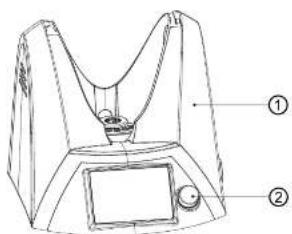
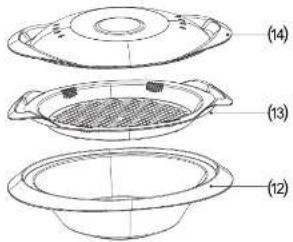
(1)Host (2)Switch Konb (3)Bowl Holder
(4)Mixing Bowl (5)Mixing Bowl Ltd (6)Mixing Blade
(7)Mixing Blade Ring (8)Measuring cup
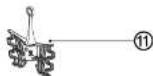
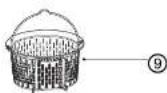
(9)Basket (10)Spalula (11)Whisk (12)Steamer
(13)Steamer Frame (14)Steamer Cover
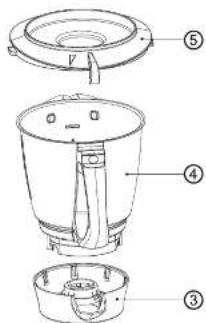
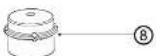
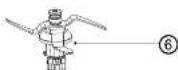


Mixing blade
How to remove the Mixing blade?
- Remove the mixing bowl and keep the opening upward.
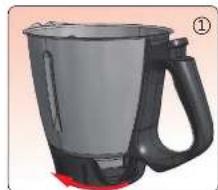
- One hand s should hold the handle and the other hand s should hold the bowl holder, rotate the bowl holder 30 degrees anticlockwise to loosen the mixing blade and remove the bowl holder as shown in Figure 1.
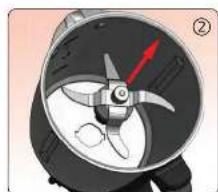
+Then hold the upper part of mixing blade to remove it as shown in
Figure 2 How to install the mixing blade
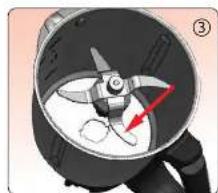
- One hand hold handle of mixing bowl, and keep the opening upward, another hand hold the upper of mixing blade to put it back to the mixing bowl, as shown in Figure 3.
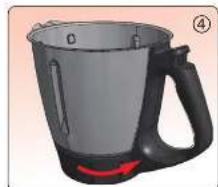
Connect the bowl holder and mixing bowl as shown in Figure 4. - Rotate the bowl holder 30 degrees clockwise to lock the mixing blade and the bowl as shown in Figure 4.

Caution
Please make sure that the mixing bowl is removed or the machine is powered off when cleaning the mixing blade.
- The mixing blade is very sharp, please be careful. Please hold the top of mixing blade during removing and installing to avoid accidental falling to hurt the person and the mixing blade.
Keep hair and clothes away from machine when using and operating it.
Do not put hands or any items into the mixing bowl to avoid personal injury or machine damage.
Attention
- When installing mixing blade, make sure that the sealing ring of mixing blade and bowl holder and blade are closely connected, to prevent liquid leakage.
- If liquid leaks into the machine, unplug then clean it according to maintenance on page 19
Mixing bowl
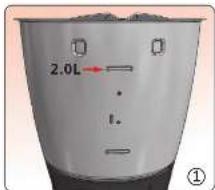
The maximum capacity of mixing bowl is 2L, and mixing bowl side marked a capacity scale, should not exceed the maximum capacity when placing the food, as shown in figure 1.
Caution
Overfull food may cause damage.
- Ensure the hole of mixing bowl lid will not be blocked during operation.
The food in mixing bowl can not over maximum capacity scale. - When moving mixing bowl, be careful to avoid food overflow or spill.
Attention
- Make sure the mixing blade and bowl holder are connected well when installing the mixing bowl, to avoid machine damage.
- When installing mixing blade, make sure that the sealing ring of mixing blade and bowl holder and blade are closely connected, to prevent liquid leakage.
If the liquid leaks into the machine, unplug and clean it according to maintenance on page 19. - To avoid the parts of machine suffering corrosion, please do not let the stylus (as shown in figure 2) on the bottom of the mixing bowl touch any corrosive object during cleaning. Make sure the stylus is completely dry after cleaned, so as to prevent the water entering the machine through contacted-needle to cause corrosion.

Mixing bowl lid
The main function of mixing bowl lid is to cover the mixing bowl. Ensure the mixing bowl lid is locked well during use, otherwise the machine will not work.
Do not open the mixing bowl by force.
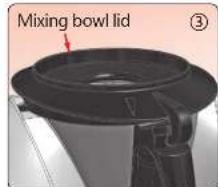
- Place mixing bowl lid on the top of mixing bowl and rotate it clockwise to the middle of bowl handle, as shown in figure 3.
Attention
Keep the silicone seal of mixing bowl lid clean, so as not to affect the sealing effect of the seal ring.
Regularly check whether there is damage to the sealing ring; if not, damaged, please stop using and replace it.
Even if sealing ring not damaged, it is recommended to replace it at least once every two years.
Caution
It is strictly prohibited to cover mixing bowl lid with rags or any similar articles, to ensure that the steam can not discharge!
Measuring cup
Main function of measuring cup:
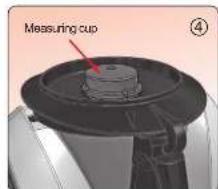
- When cooking, it can be a cover of the mixing bowl lid, and has functions of seal and heat insulation as shown in figure 4.
- Blocking food debris pop or overflow
- To measure the ingredients, full capacity is 100mL
Attention
When cooking, the measuring cup mouth must be upward, to avoid heating.
Be careful of the spraying steam when taking out of cup during cooking to avoid scalding.
Basket
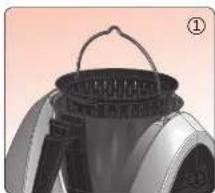
Basket is mainly used for:
1, Filtration, mainly used for filtering fruit juice or vegetable juice, etc.
2,The role of food barrier during cooking.
3. Used for cooking small foods, such as rice and other small food. 4. Used for draining excess water.
Install / remove:
- Take basket's handle and put it into mixing bowl then place the handle on the edge of the pot, as shown in figure 1.
Take handle to remove basket.
Attention
Do not put too much food in basket when cooking, especially ingredients that easy to block holes of basket, such as rice, etc.
Whisk
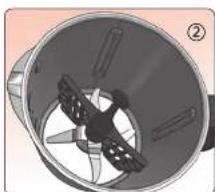
Whisk is mainly used for mixing food, such as cream and protein.
Use only after placing whisk above the mixing blade, and connect closely, as shown in figure 2.
Attention
Whisk only can be used when it connected with mixing blade closely.
- When using whisk, the speed should not exceed 4 level.
-You can't add ingredients when using the whisk
Do not use whisk to treat solid ingredients or very thick ingredients.
- Do not treat too much food in one time, if too much food is treated at once, you can not achieve good results.
Steamer
Methods and procedures
1, Placing mixing bowl and add at least 500mL of water, then cover it.
2. Placing the steamer on mixing bowl lid, embedded into mixing bowl lid's groove, as shown in figure 3.
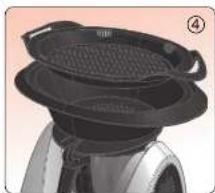
3. Put ingredients into steamer; if steaming various ingredients, can be placed in the steamer and steam rack, as shown in figure 4
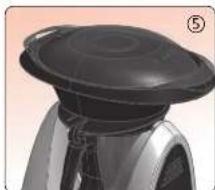
4. Cover the steamer after placing all ingredients, as shown in figure 5.

Caution
Do not put too much food in steamer to prevent blocking of steamer, steamer frame and steamer lid.
Attention
Make sure measuring cup has been removed before placing the stoomer.
Make sure connecting well between mixing bowl lid, steamer, steamer frame and steamer lid, to avoid steam leakage.
*The speed can not be more than level 5 when starting cook and steam function, otherwise can not start heating function.
Spatula
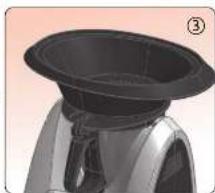
Mainly used for
Scrape the ingredients out from the mixing bowl after cooked or remove the processed ingredients.
Attention
Do not use the spatula during the machine operation, so as to avoid damage.
Operating instructions
Caution
- Do not put the machine close to a heat source, especially hot stove or high temperature appliance, otherwise it is likely to make the machine catch fire.
- Before using, please place the machine on a clean, strong horizontal table, to prevent the machine sliding.
Do not put the machine on the edge of the table, and do not use in unattended state. The mixing bowl, mixing bowl lid, steamer, steamer lid and measuring cup are with high temperature during cooking: do not touch to avoid burns.
Power on
Before use, please pull out the power cord on the right side of machine with appropriate length.
In principle, the length is with what the plug insert into the socket and the power cord is not tight is admissible.
- The power cord should not be stretched out too long, so as to avoid winding, but if too short and too tight may affect the accuracy of weighing function.
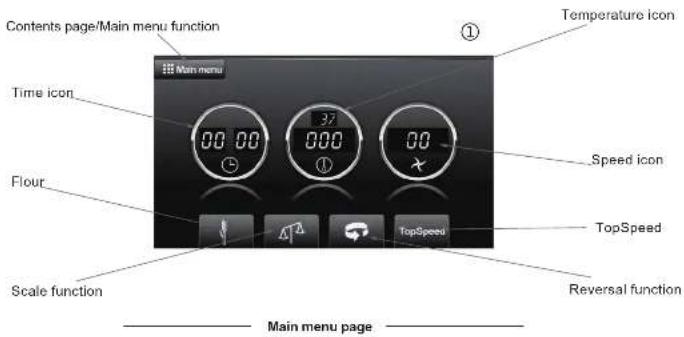
- After the host is connected to the power supply, press knob to start the machine. The screen will display as shown in figure 1.
Power off
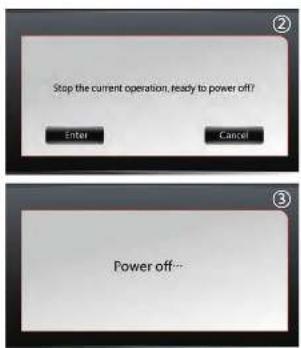
In the operation state, long press the knob until the display shows "Stop the current operation, ready to power off", as shown in Figure 2, then click "Enter" to turn off, or click "Cancel" to return to the operation state.
In the idle state, long press the knob until the screen display "Power off..." as shown in Figure 3, then click "Enter" to turn off, or click "Cancel" to return the original state.
Reading safety notice
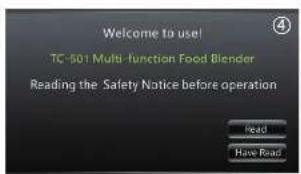
On the boot page, click on "Read" to read the contents of the safety notice, if read, click "have read" directly into the home page, as shown in figure 4.
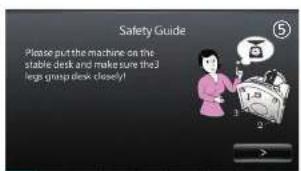
- Click on the "Read" into the contents of safety notice, it can be read by clicking on the "or" until the last page; click on "Have read" exit the safety notice and go to the main page as shown in figure 5.
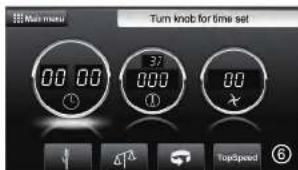
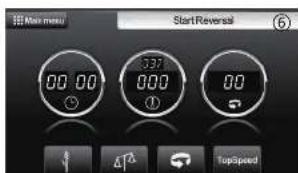
On the main page as shown in Figure 6, you can click the icon on display to set the time, temperature and speed, after selection, rotate the knob to adjust time, temperature and speed parameters.
Time Set
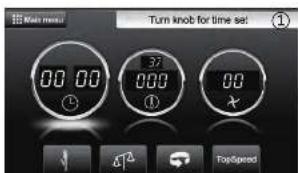
- Click the time icon on the left of the main menu page, there will be a icon that shows "Turn knob for time set" as shown in figure 1, then you can rotate knob to set the time
To increase the time please rotate knob clockwise, the maximum is 90:00. To reduce the time please rotate knob counterclockwise, the minimum is 00:00.
Temperature Set
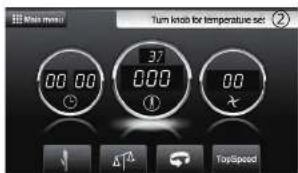
- Click the temperature icon on the middle of the main menu page, there will be a icon that shows "Turn knob for temperature set".
- Temperature diagram consists of two parts, the upper and smaller number is the current temperature of mixing bowl. It will only be displayed when the temperature reaches or exceeds 37 degrees. The
- blow and larger number is to set the temperature, rotate the knob to set the temperature. The temperature can be set to 37-45-50-55-60-65-70-75-80-85-90-95-100-105-110-115-120 and steam as shown in figure 2.
- Turn knob clockwise to increase the temperature, and turn knob counterclockwise to reduce the temperature.
Speed level set
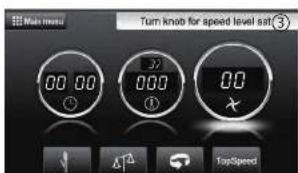
- Click the speed icon on the right of the main menu page, the top right of the display screen will show "turn knob for speed level set" as shown in Figure 3.
The motor of machine will be start when on 0.5 level.There are 20 levels,as 0.5-1.0-1.5-2.0-2.5- 3.0-3.5-4.0-4.5-5.0-5.5-6.0-6.5-7.0-7.5-8.0-8.5- 9.0-9.5-10.The higher level,the faster speed. - Turn the knob clockwise to increase the level, turn the knob counterclockwise to reduce level.
Flour function
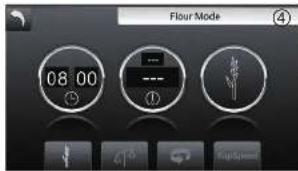
- Click the Flour icon on the bottom of the main menu page as shown in Figure 4, the top right of the display screen will show "Flour mode".
- Turn the speed knob to start the flour function till countdown to 00:00. Click the time icon to adjust the flour time, the maximum is 8 minutes.
Scale Function
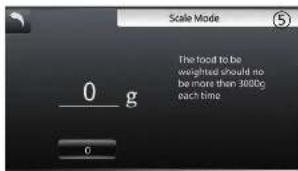
- Click the Scale icon on the bottom of the main menu, the top right of the display screen will show "Scale mode" as shown in Figure 5.
- The left of the display is the current weight, click the reset button to clear it if the current weight is not 0. Then can put the food and start scale function.
Reversal Function
-Clip the reversal icon as shown in Figure 6, the speed will become a reversal icon, the direction of mixing blade rotation will change to reversal. Click again on the reversal icon, the direction of the mixing blade can change back to the forward.
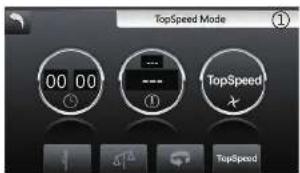
Top Speed function
-Clip the TopSpeed button on the lower right corner of the main menu page as show in Figure 1. The motor will reach the highest speed on this function. The default time of the TopSpeed is 3 seconds, you
can also set the time by knob, the setting range is 1-15 seconds.
If start the machine under the TopSpeed mode, the
* machine will achieve the highest speed directly, and run according to time slot.
Heating function will NOT work in the TopSpeed
mode
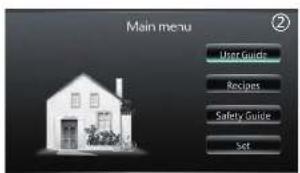
Main Menu
- Click the Main Menu to choose the other functions if needed as shown in Figure 2.
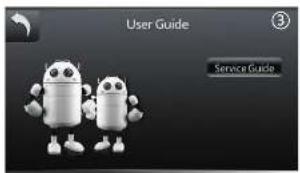
User Guide
- Click the user guide to access the page as shown in Figure3.
- Click the Service Guide to get the basic information and the contact information.
Safety Notice!
In the Main Menu, click the "Safety Notice" to read the details. Click < to previous page or > to next page to read the contents of the Safety Notice until the last page, then back to the main page.
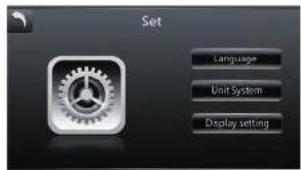
Set
Click on "Set" on the Main Menu, there will be options as shown in Figure 1.
+Language
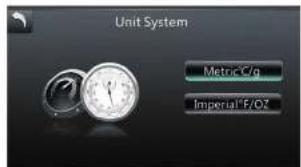
+Unit System
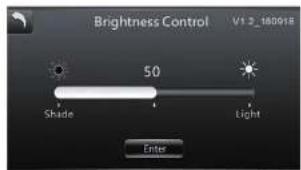
*Display Setting
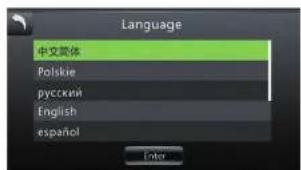
Language
Click "Language" to choose the language needed as shown in Figure 2. Once the language has been selected, the text on the display will be changed to the language chosen (except the recipes).




Cleaning and Maintenance
How to clean the mixing bowl?
- Remove the mixing bowl from the machine and remove the mixing blade as well if needed.
2, Scrub with a mild detergent and soft cleaning cloth, then rinse and allow to dry thoroughly before putting it back on the machine.
3, The mixing bowl must not be cleaned in the dishwasher.

Caution
The mixing blade is really sharp, please be carefully when removing it!
Attention
Do not use sharp objects such as stainless steel cleaning ball to clean the mixing bowl to avoid damage or affect the usability of the mixing bowl.
- Do not use corrosive cleaners to clean the mixing bowl to avoid corrosion, and please dry the stylus(as shown in figure 5) promptly.
How to clean the mixing blade?
Hold the upper part of the mixing blade(as shown in figure 6), clean with a soft cleanser, then rinse with water and let dry.
It must not be cleaned in the dishwasher.

Caution
The mixing blade is really sharp, please be carefully during cleaning.
Attention
Do not use corrosive cleaners to clean the mixing blade, so as not to cause rust.
- The rust on the blade is harmless, and can be removed by soft brush or vinegar.
Do not soak it in water for a long time, otherwise the seal of the mixing blade may lose efficacy.
How to clean other accessories?
All the accessories are made of high quality food grade plastic, they can be cleaned with a mild detergent and soft cleaning cloth.
The accessories can be cleaned by dishwasher.
Attention
- Do not use sharp objects such as stainless steel cleaning ball to clean the accessories to avoid scratching the surface.
If cleaned by dishwasher, put the accessories on the upper layer to avoid squeezing
Troubleshooting
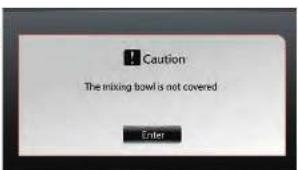
The mixing bowl is not covered
- It indicates that the mixing bowl lid did not cover as required, if the same tip still appears after covered, please contact customer our service center.
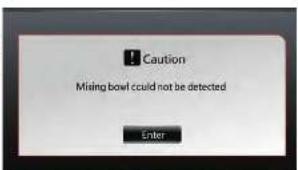
The mixing bowl could not be detected
- It indicates that the mixing bowl is not installed as required, if the same tip still appear after installation, please contact customer our service center.
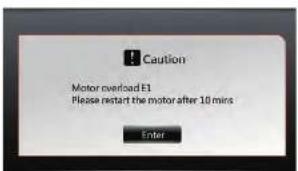
Motor overload E1
- Shut down the motor and reduce the ingredients in the mixing bowl, or add the appropriate liquid according to the recipe.
- Keep the vent of the machine air flow open, wait for about 10 minutes to cool down then restart the motor
If the same tip still appears after a long wait, please contact our service center.
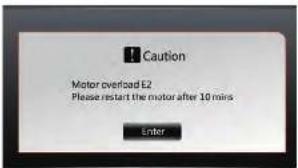
Motor overload E2
- Shut down the motor and reduce the ingredients in the mixing bowl, or add the appropriate liquid according to the recipe.
- Keep the vent of the machine air flow open, wait for about 10 minutes to cool down then restart the motor
If the same tip still appears after a long wait, please contact our service center.
Motor overload E3
Shut down the motor and reduce the ingredients in the mixing bowl, or add the appropriate liquid according to the recipe.
- Keep the vent of the machine air flow open, wait for about 10 minutes to cool down then restart the motor
If the same tip still appears after a long wait, please contact our service center.

Centre de service. 21
"Précautions", "Attention"

Danger
- MULTIFUNCTIONE VOEDSEL BLENDER INSTRUCTIE
- INHOUD
- Safety Precautions!
- Danger
- Caution
- Care
- Attention
- Read instruction carefully before using this product and operation.
- To prevent electric shock
- Avoid burns and cuts, do not force open the mixing bowl lid.
- To avoid blocking the hole of mixing bowl lid. The mixing bowl may be heating due to high pressure and may cause scald if using high temperature food.
- To avoid high temperature food spills. If not, will caused burns by steam or high temperature food ejection.
- Avoid cuts.
- Avoid personal injury and machine damage.
- Know more about your blender
- Mixing blade
- How to remove the Mixing blade?
- Figure 2 How to install the mixing blade
- Mixing bowl
- Overfull food may cause damage.
- Mixing bowl lid
- Measuring cup
- Main function of measuring cup:
- Basket
- Basket is mainly used for:
- Install / remove:
- Whisk
- Whisk is mainly used for mixing food, such as cream and protein.
- Steamer
- Methods and procedures
- Spatula
- Mainly used for
- Operating instructions
- Power on
- Power off
- Reading safety notice
- Time Set
- Temperature Set
- Speed level set
- Flour function
- Scale Function
- Reversal Function
- Top Speed function
- Main Menu
- User Guide
- Safety Notice!
- Set
- Language
- Cleaning and Maintenance
- How to clean the mixing bowl?
- How to clean the mixing blade?
- How to clean other accessories?
- Troubleshooting
- The mixing bowl is not covered
- The mixing bowl could not be detected
- Motor overload E1
- Motor overload E2
- Motor overload E3
Brand : CaterChef
Model : 450100
Category : Blender