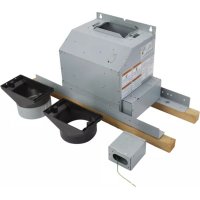
W10692945 - Fan JENN-AIR - Free user manual and instructions
Find the device manual for free W10692945 JENN-AIR in PDF.


| Product Type | Smart Remote Blower for Range Hood |
| Brand | JENN-AIR |
| Model | W10692945 |
| Weight | Approx. 11.3 kg (25 lb) |
| Power Supply | 120 V, AC, 60 Hz, 15 A |
| Ventilation Duct Diameter | 6 inches (15.2 cm) round |
| Recommended Duct Type | Rigid or flexible metal, but preference for rigid |
| Maximum Equivalent Duct Length | 35 ft (10.7 m) |
| Maximum Number of 90° Elbows | 3 |
| Mounting Structure Load Capacity | 25 lb (11.3 kg) minimum |
| Main Functions | Air extraction, smart ventilation, compatible with select hoods |
| Safety | Mandatory power disconnect before service; use metal ducts; follow electrical codes |
| Maintenance and Cleaning | Clean surfaces regularly to prevent grease buildup; check connections |
| Included Parts | Transition fittings with and without damper, junction box, connectors, screws, cable clamps, etc. |
| Repairability | Installation and repair by a qualified technician; follow local codes |
| Applications | Residential only; indoor use |
Frequently Asked Questions - W10692945 JENN-AIR
User questions about W10692945 JENN-AIR
0 question about this device. Answer the ones you know or ask your own.
Ask a new question about this device
Download the instructions for your Fan in PDF format for free! Find your manual W10692945 - JENN-AIR and take your electronic device back in hand. On this page are published all the documents necessary for the use of your device. W10692945 by JENN-AIR.
USER MANUAL W10692945 JENN-AIR
INSTALLATION INSTRUCTIONS IN-LINE SMART KIT
Installation Instructions
For questions about features, operation/performance, parts, accessories or service, call: 1-800-253-1301 or visit our website at www.whirlpool.com
In Canada, call 1-800-807-6777 or visit our website at www.whirlpool.ca
INSTRUCTIONS D'INSTALLATION VENTILATEUR DEPORTÉ INTELLIGENT
Tools and Parts 4
Location Requirements. 4
Venting Requirements. 5
Electrical Requirements 6
INSTALLATION INSTRUCTIONS 6
Prepare Location. 6
Prepare In-Line Smart Kit. 6
Install In-Line Smart Kit
KVWB40DS Series Range Hoods. 7
Complete Installation 10
Make Electrical Connection 11
Install In-Line Smart Kit
KVUB60DS Series Range Hoods 12
Complete Installation 16
Make Electrical Connection 17
Install In-Line Smart Kit
JXW85DS, JXI85DS, KVWB60DS, and KVIB60DS
Series Range Hoods 18
Complete Installation 23
Make Electrical Connection 24
Install In-Line Smart Kit
WW75UC and WV175UC Series Range Hoods. 25
Complete Installation 29
Make Electrical Connection 30
WIRING DIAGRAM 31
TABLE DES MATIÈRES
SECURITE DE LA HOTTE DE CUISINIÈRE 32
EXIGENCES D'INSTALLATION 34
Your safety and the safety of others are very important.
We have provided many important safety messages in this manual and on your appliance. Always read and obey all safety messages.

This is the safety alert symbol.
This symbol alerts you to potential hazards that can kill or hurt you and others.
All safety messages will follow the safety alert symbol and either the word "DANGER" or "WARNING."
These words mean:
ADANGER
WARNING
You can be killed or seriously injured if you don't immediately follow instructions.
You can be killed or seriously injured if you don't follow instructions.
All safety messages will tell you what the potential hazard is, tell you how to reduce the chance of injury, and tell you what can happen if the instructions are not followed.
State of California Proposition 65 Warnings:
WARNING: This product contains one or more chemicals known to the State of California to cause cancer.
WARNING: This product contains one or more chemicals known to the State of California to cause birth defects or other reproductive harm.
IMPORTANT SAFETY INSTRUCTIONS
WARNING: TO REDUCE THE RISK OF FIRE, ELECTRIC SHOCK, OR INJURY TO PERSONS, OBSERVE THE FOLLOWING:
Use this unit only in the manner intended by the manufacturer. If you have questions, contact the manufacturer.
Before servicing or cleaning the unit, switch power off at service panel and lock the service disconnecting means to prevent power from being switched on accidentally. When the service disconnecting means cannot be locked, securely fasten a prominent warning device, such as a tag, to the service panel.
Installation work and electrical wiring must be done by qualified person(s) in accordance with all applicable codes and standards, including fire-rated construction.
- Do not operate any fan with a damaged cord or plug. Discard fan or return to an authorized service facility for examination and/or repair.
- Sufficient air is needed for proper combustion and exhausting of gases through the flue (chimney) of fuel burning equipment to prevent backdrafting. Follow the heating equipment manufacturer's guideline and safety standards such as those published by the National Fire Protection Association (NFPA), the American Society for Heating, Refrigeration and Air Conditioning Engineers (ASHRAE), and the local code authorities.
- When cutting or drilling into wall or ceiling; do not damage electrical wiring and other hidden utilities.
Ducted fans must always be vented outdoors.
CAUTION: For general ventilating use only. Do not use to exhaust hazardous or explosive materials and vapors.
CAUTION: To reduce risk of fire and to properly exhaust air, be sure to duct air outside - do not vent exhaust air into spaces within walls or ceilings, attics or into crawl spaces, or garages.
WARNING: TO REDUCE THE RISK OF FIRE, USE ONLY METAL DUCTWORK.
WARNING: TO REDUCE THE RISK OF A RANGE TOP GREASE FIRE:
- Never leave surface units unattended at high settings. Boilovers cause smoking and greasy spillovers that may ignite. Heat oils slowly on low or medium settings.
Always turn hood ON when cooking at high heat or when flambeing food (i.e. Crepes Suzette, Cherries Jubilee, Peppercorn Beef Flambé).
Clean ventilating fans frequently. Grease should not be allowed to accumulate on fan or filter.
Use proper pan size. Always use cookware appropriate for the size of the surface element.
WARNING: TO REDUCE THE RISK OF INJURY TO PERSONS IN THE EVENT OF A RANGE TOP GREASE FIRE, OBSERVE THE FOLLOWING:a
SMOTHER FLAMES with a close fitting lid, cookie sheet, or metal tray, then turn off the burner. BE CAREFUL TO PREVENT BURNS. If the flames do not go out immediately, EVACUATE AND CALL THE FIRE DEPARTMENT.
NEVER PICK UP A FLAMING PAN - you may be burned.
DO NOT USE WATER, including wet dishcloths or towels - a violent steam explosion will result.
Use an extinguisher ONLY if:
- You know you have a class ABC extinguisher, and you already know how to operate it.
- The fire is small and contained in the area where it started.
- The fire department is being called.
- You can fight the fire with your back to an exit.
Based on "Kitchen Fire Safety Tips" published by NFPA.
WARNING: To reduce the risk of fire or electrical shock, do not use this fan with any solid-state speed control device.
READ AND SAVE THESE INSTRUCTIONS
INSTALLATION REQUIREMENTS
Tools and Parts
Gather the required tools and parts before starting installation. Read and follow the instructions provided with any tools listed here.
Tools needed
■ Drill
1 14 (3.0 cm) drill bit
18" (3.0 mm) drill bit
■ Pencil
Wire stripper or utility knife
Tape measure or ruler
■ Pliers
Caulking gun and weatherproof caulking compound
Vent clamps
Metal duct tape
■ Jigsaw or keyhole saw
Flat-blade screwdriver
Metal snips
Phillips screwdriver
10^n (25.4 mm) driver extension
Parts needed
1 12'' (13 mm) UL listed or CSA approved wiring conduit and connector. The length of the conduit is determined by the distance between the In-Line Smart Kit and the range hood.
8-14 AWG wires, one of each of the following colors: black, white, red, blue, gray, brown, yellow and green/yellow (ground). The lengths of the wires are determined by the distance between the In-Line Smart Kit and the range hood.
3-UL listed strain relief 1 / 2 (13 mm)
6^ (15.2 cm) round vent duct
Parts supplied
Remove parts from packages. Check that all parts are included.
1-6" (15.5 cm) vent transition without backdraft damper
1-6" (15.5 cm) vent transition with backdraft damper
4-3.5×6.5mm mounting screws
4-3.5 x 9.5 mm mounting screws
1-9-pin pigtail electrical connector with 8 wire pigtail
1 - Metal terminal box and cover
16 - UL listed or CSA approved wire connectors
1-T10 Torx 假 _ 喜 adapter
1-T20 *Tox*adapter
1 - Plastic wire clip
4-5x45mmmounting screws
3-2.9 x 13 mm mounting screws
1-UL listed or CSA approved plastic strain reliefs
1 - in-line housing
1-in-line base
1 - in-line mounting bracket
1 - Cover plate
1-UL listed or CSA approved wire clamp
Location Requirements
IMPORTANT: Observe all governing codes and ordinances. Have a qualified technician install the In-Line Smart Kit.
All openings in the ceiling and wall where the In-Line Smart Kit will be installed must be sealed.
For Mobile Home Installations
The installation of this in-line blower system must conform to the Manufactured Home Construction Safety Standards, Title 24 CFR, Part 328 (formerly the Federal Standard for Mobile Home Construction and Safety, Title 24, HUD, Part 280) or when such standard is not applicable, the standard for Manufactured Home Installation 1982 (Manufactured Home Sites, Communities and Setups) ANSI A225.1/NFPA 501A, or latest edition, or with local codes.

Product Dimensions
†®TORX and T20 are registered trademarks of Acument Intellectual Properties, LLC.
Venting Requirements
Vent system must terminate to the outdoors.
- Do not terminate the vent system in an attic or other enclosed area.
- Do not use 4'' (10.2 cm) laundry-type wall caps.
Use round, metal venting only. Rigid metal venting is recommended. Plastic or metal foil venting is not recommended.
The length of the vent system and the number of elbows should be kept to a minimum to provide efficient performance.
For the Most Efficient and Quiet Operation:
Use no more than three 90^ elbows.
Make sure there is a minimum of 24^ (61.0 cm) of straight vent between the elbows if more than 1 elbow is used.
- Do not install 2 elbows together.
Use clamps and metal duct tape to seal all joints in the vent system.
The vent system must have a damper.
Use weatherproof caulking compound to seal the exterior wall or roof opening around the cap.
The size of all venting should be uniform.
Cold Weather Installations
An additional back draft damper should be installed to minimize backward cold air flow. A thermal break should be installed to minimize conduction of outside temperatures as part of the vent system. The damper should be on the cold air side of the thermal break.
The break should be as close as possible to where the vent system enters the heated portion of the house.
Makeup Air
Local building codes may require the use of makeup air systems when using ventilation systems greater than specified CFM of air movement. The specified CFM varies from locale to locale.
Consult your HVAC professional for specific requirements in your area.
Typical In-Line Smart Kit Installations
A 6" (15.2 cm) round vent system is needed for installations (not included).
The In-Line Smart Kit inlet and outlet openings are 6'' (15.2 cm) round. The exhaust (outlet) opening on the range hood must also be 6'' (15.2 cm) round.
NOTE: Flexible vent is not recommended. Flexible vents create back pressure and air turbulence that can greatly reduce In-Line Smart Kit performance.
The vent system may terminate either through the roof or wall.
NOTE: Plywood may be used as a mounting base to span open areas between ceiling joists and rafters. If used, be sure to use plywood capable of supporting 25 lb (11.3 kg).

A. Mounted on top of ceiling joists (vertical duct)
B. Mounted to cross-members tied to trusses (horizontal duct)
Calculating Vent System Length
To calculate the length of the system you need, add the equivalent feet (meters) for each vent piece used in the system.
Vent Piece 6" (15.2 cm) Round
| 45° elbow | 2.5 ft (0.8 m) |
| 90° elbow | 5.0 ft (1.5 m) |
The maximum recommended equivalent vent length is 35 ft (10.7 m).

Example Vent System
The following example falls within the maximum recommended vent length of 35 ft (10.7 m).
1-90°elbow=5.0ft(1.5m)
1 - wall cap = 0.0 ft (0.0 m)
8 ft (2.4m) straight = 8.0 ft (2.4m)
Length of system = 13.0 ft (3.9m)
Electrical Requirements
Observe all governing codes and ordinances.
Ensure that the electrical installation is adequate and in conformance with National Electrical Code, ANSI/NFPA 70 (latest edition), or CSA Standards C22.1-94, Canadian Electrical Code, Part 1 and C22.2 No. 0-M91 (latest edition) and all local codes and ordinances.
If codes permit and a separate ground wire is used, it is recommended that a qualified electrician determine that the ground path is adequate.
A copy of the above code standards can be obtained from:
National Fire Protection Association
1 Batterymarch Park
Quincy, MA 02169-7471
CSA International
8501 East Pleasant Valley Road
Cleveland, OH 44131-5575
A 120 volt, 60Hz AC only, 15-amp, fused electrical circuit is required.
If the house has aluminum wiring, follow the procedure below:
- Connect a section of solid copper wire to the pigtail leads.
- Connect the aluminum wiring to the added section of copper wire using special connectors and/or tools designed and UL listed for joining copper to aluminum.
Follow the electrical connector manufacturer's recommended procedure. Aluminum/copper connection must conform with local codes and industry accepted wiring practices.
Wire sizes and connections must conform with the rating of the appliance as specified on the model/serial rating plate. The model/serial plate is located behind the filter on the rear wall of the range hood.
Wire sizes must conform to the requirements of the National Electrical Code, ANSI/NFPA 70 (latest edition), or CSA Standards C22.1-94, Canadian Electrical Code, Part 1 and C22.2 No. 0-M91 (latest edition) and all local codes and ordinances.
INSTALLATION INSTRUCTIONS
Prepare Location
CAUTION: To reduce the risk of fire and electrical shock, install the In-Line Smart Kit only with the range hood model series listed in these instructions.
Before cutting or drilling into the ceiling or walls, make sure there is proper clearance within the ceiling or wall for the vent system.
- When cutting or drilling into the ceiling or wall, do not damage electrical wiring on other hidden utilities.
Determine which venting method to use: roof, or wall.
The In-Line Smart Kit must be installed to a secure structure of the roof, ceiling, wall, or floor. The In-Line Smart Kit may also be installed into a new or existing frame construction. The structure must be capable of supporting 25 lb (11.3 kg). The installation holes on the in-line mounting bracket to be used to mount the In-Line Smart Kit to the structure.

A. Distance between installation holes: 24^ (61 cm),
1912 (49.2 cm), 18" (46.2 cm), and 1412 (36.8 cm)
B. Distance between installation holes: 7 34 (19.7 cm)
C. Mounting structure
Prepare In-Line Smart Kit
WARNING
Excessive Weight Hazard
Use two or more people to move and install range hood.
Failure to do so can result in back or other injury.
- Using two or more people, move the In-Line Smart Kit and the range hood to a workbench or work space.
- Unpack all parts supplied with the In-line smart kit. Use the "Tools and Parts" section of this manual to verify that all parts have been included.
- Remove the In-line-Smart assembly from the wooden packaging material
NOTE: Do not move the In-Line Smart Kit to the mounting location until the range hood blower motor has been installed in the in-line housing. Do not install the range hood until the In-Line Smart Kit and vent system have been installed.
IMPORTANT: Installation of the In-Line Smart Kit is model specific. Before installing, determine the model number of the range hood to be used with the In-Line Smart Kit. See the appropriate "Install In-Line Smart Kit" section.
Install In-Line Smart Kit KVWB40DS Series Range Hoods
Remove Blower Motor from Range Hood Housing
WARNING
Electrical Shock Hazard
Disconnect power before servicing.
Replace all parts and panels before operating.
Failure to do so can result in death or electrical shock.
- Disconnect power.
WARNING
Excessive Weight Hazard
Use two or more people to move and install range hood.
Failure to do so can result in back or other injury.
- Using two or more people, place the range hood on its back. Be sure to set the range hood on a covered surface.
- Using the T10 Torx adapter, remove the 8 screws securing the bottom panel to the range hood. Remove the bottom panel and set it aside.

A. Bottom panel
B. Screws (8)
C. Range hood
- Using the T10 Torx adapter, remove the 4 screws from the blower motor cover plate. Remove the cover plate from the motor and set it aside.

A. Blower motor cover plate
B. Screws (4)
C. Range hood
- Disconnect the blower motor from the range hood wiring. Press the top and bottom clip of the 9-pin electrical connector to disconnect.
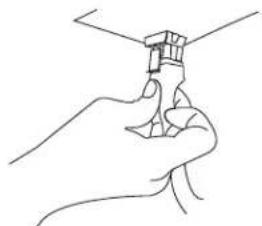
- Using the T20 ^ Tox ^ adapter with a long extension, remove the 6 screws that secure the blower motor and insulation retainers (2) to the range hood housing. Set the screws and insulating retainers aside.
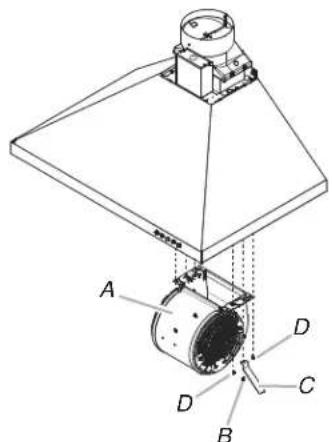
A. Blower motor
B. Screws - insulation retainer (2)
C. Insulation retainers (2)
D. Screws -blower motor mounting (4)
- Push on the blower motor to disengage the two spring tabs from the keyhole slots in the top of the range hood housing.

A. Keyhole slots
- Remove the blower motor from the range hood housing and set it aside.
- Reinstall the 2 insulation retainers and 2 screws to the range hood housing. Use the T20™ Torx™ adapter with a long extension.
- Reinstall the blower motor cover plate and bottom panel. Use the T10 Torx® adapter and the screws previously removed.
Assemble the In-Line Smart Kit
- Using the T20 ® Tox ^® adapter, remove the 3 screws from the terminal box cover on the in-line housing. Set the screws and cover aside.
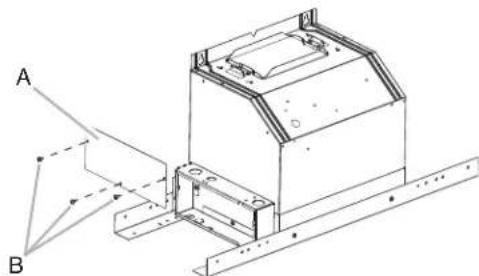
A. Terminal box cover B.Screws (3)
- Disassemble the in-line housing from the in-line base. Using the T20® Torx® adapter, remove the 2 screws from inside the terminal box near the top and the 2 screws located on the opposite side. Lift the housing off the base and mounting bracket.

A. In-line housing B. In-line base C. Screws (4)
- Install the vent transition without a backdraft damper to the bottom of the in-line base. Use the T10 Torx adapter and install 2 - 3.5 x 9.5 mm mounting screws to secure the transition to the base.

A. In-line base
B. Vent transition (without backdraft damper) C. 3.5× 9.5 mm screws (2)
- Place the blower motor inside the in-line housing.
- Engage the blower motor spring tabs into the keyhole slots located at the top of the in-line housing. Push the motor so the spring tabs are secured into the small neck of the keyhole slots.

A. Keyhole slots
- Locate the 4 screws removed from the blower motor. Use these 4 screws to secure the motor to the in-line housing. Tighten with the T20° Tox° adapter.

A. In-line housing
B. Blower motor
C. Screws (4)
-
Place the in-line housing (with blower motor installed) near the in-line base.
-
Connect the 9-pin connector from the blower motor to the 9-pin connector inside the in-line base.
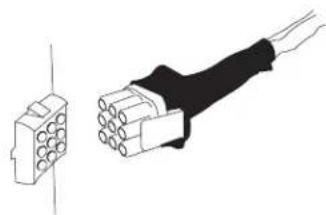
-
Slide the in-line housing inside the in-line base. Align the mounting holes in the in-line housing to the mounting holes in the in-line base. Secure with the 4 screws removed when the in-line housing was removed from the in-line base. Use the T20 Tox adapter to secure the screws.
-
Install the vent transition with a backdraft damper to the top of the in-line housing. Use the T10 Torx® adapter and install 2 - 3.5 x 9.5 mm mounting screws to secure the transition to the housing.

A. In-line housing
B. Vent transition (with backdraft damper)
C. 3.5 × 9.5 mm screws (2)
Install In-Line Smart Kit
The In-Line Smart Kit must be installed to a secure structure of the roof, ceiling, wall, or floor. The In-Line Smart Kit may also be installed into a new or existing frame construction.
WARNING
Excessive Weight Hazard
Use two or more people to move and install range hood.
Failure to do so can result in back or other injury.
- Using two or more people, position the assembled In-Line Smart Kit (housing, base and mounting bracket) in its final mounting location.
- Use a pencil to mark the location of the 4 mounting holes.
- Drill 4 mounting pilot holes where marked.
- Install the In-Line Smart assembly in its final location using 4 - 5 × 45 mm mounting screws mm screws.

A. 5 × 45 ~mm screws (4)
B. Secure structure (joist, rafters or trusses)
C. In-line smart assembly
Complete Installation
Determine and make all necessary cuts and drill holes for the vent system.
IMPORTANT: When cutting or drilling into the ceiling or wall, be sure to not damage electrical wiring or other hidden utilities.
- Install the range hood in its final location. Use the Installation Instructions provided with the range hood.
- Determine the location where the 12 (13 mm) wiring conduit will be routed through the ceiling or wall to connect the In-Line Smart Kit and the range hood.
- Drill a 114 (3.2 cm) hole(s) in this location.
- Locate the terminal boxes on the In-Line Smart Kit and the range hood.
- Remove the terminal box cover on the range hood. Set the cover and screws aside.

A. Range hood terminal box cover
B. Electrical knockouts
C. Range hood terminal box
D.Screws (3)
- Remove the electrical knockout from the In-Line Smart Kit (B, see the following illustration) and the range hood terminal box.
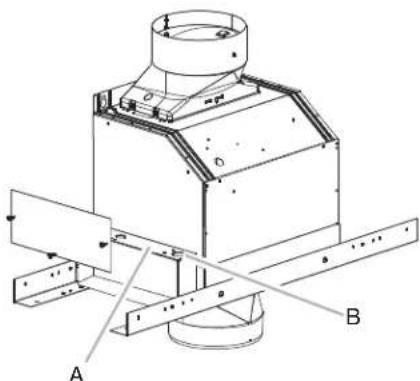
A. In-line smart kit terminal box
B. Electrical knockouts
- Install the UL listed or CSA approved strain reliefs (3) in the range hood and In-Line Smart kit electrical knockouts.
- Connect the vent system to the vent transition on the range hood. Connect the vent system to the vent transition located on the bottom In-Line Smart Kit. Use clamps and metal duct tape to seal all joints.
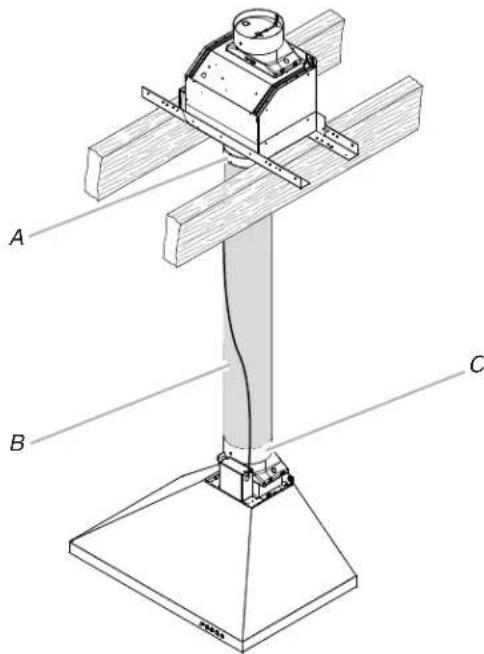
A. Vent transition - in-line smart kit (bottom)
B. Vent system
C. Vent transition - range hood
WARNING

Electrical Shock Hazard
Disconnect power before servicing.
Replace all parts and panels before operating.
Failure to do so can result in death or electrical shock.
Connect Range Hood
- Connect the 9-pin pigtail electrical connector provided with the In-Line Smart Kit to the 9-pin electrical connector inside the range hood.
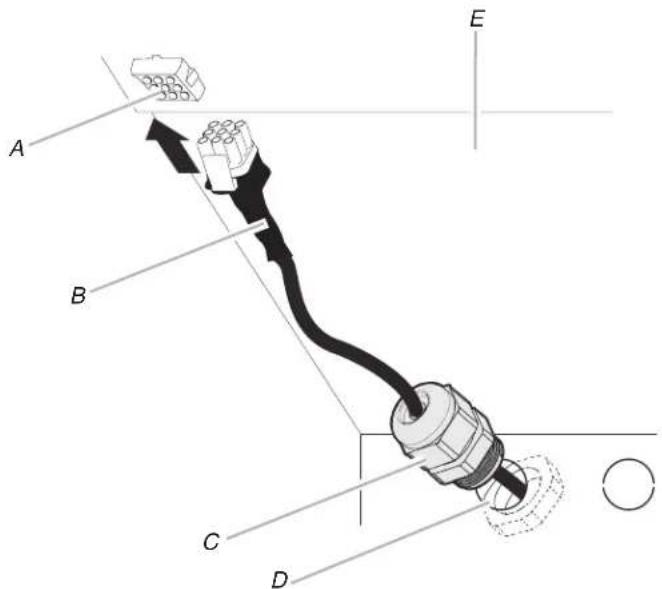
A. 9-pin connector (range hood)
B. 9-pin pigtail electrical connector
C. Plastic strain relief
D. Electrical knockout
E. Range hood (inside)
Connect Range Hood and In-Line Smart Kit
- Measure the distance between the In-Line Smart Kit and the range hood terminal box.

A. Distance between in-line smart kit and the range hood terminal box
- Install 8 - 14 AWG wires with an insulating sleeve or conduit between the terminal box and UL listed strain reliefs.
- Connect together the set of 8 wires in the In-Line Smart Kit terminal box.
- Connect together the set of 8 wires in the range hood terminal box.

A. Conduit and 8-14 AWG wires
B. Terminal box (range hood)
C. 9-pin pigtail electrical connector
D. Range hood power supply
E. Home power supply
Connect In-Line Smart Kit
Electrical Connection In-Line Smart Kit
- Use a UL listed or CSA approved wire connector to connect the black wires together.
- Use a UL listed or CSA approved wire connector to connect the white wires together.
- Use a UL listed or CSA approved wire connector to connect the red wires together.
- Use a UL listed or CSA approved wire connector to connect the blue wires together.
- Use a UL listed or CSA approved wire connector to connect the gray wires together.
- Use a UL listed or CSA approved wire connector to connect the brown wires together.
- Use a UL listed or CSA approved wire connector to connect the yellow wires together.
- Use a UL listed or CSA approved wire connector to connect the green/yellow wires together.
- Tighten the UL listed or CSA approved strain relief.
Electrical Connection Range Hood
WARNING

Electrical Shock Hazard
Electrically ground blower.
Connect ground wire to green and yellow ground wire in terminal box.
Failure to do so can result in death or electrical shock.
- Repeat all steps above to make the electrical connection in the range hood terminal box.
- Connect power supply wires together using the "Make Electrical Connections" section in the range hood manual.
- Reinstall the terminal box covers on the In-Line Smart Kit and range hood.
- Reconnect power.
Install In-Line Smart Kit
KVUB60DS Series Range Hoods
NOTE: KVUB60DS series range hoods must be top vented for installation with the In-Line Smart Kit.
Remove Blower Motor from Range Hood Housing
WARNING

Electrical Shock Hazard
Disconnect power before servicing.
Replace all parts and panels before operating.
Failure to do so can result in death or electrical shock.
- Disconnect power.
WARNING
Excessive Weight Hazard
Use two or more people to move and install range hood.
Failure to do so can result in back or other injury.
-
Using two or more people, place the range hood on its back. Be sure to set the range hood on a covered surface.
-
Using the T10 Torx adapter, remove the 8 screws securing the bottom panel to the range hood. Remove the bottom panel and set it aside.

A. Bottom panel
B. Screws (8)
C. Range hood
- Using the T10 Torx adapter, remove the 4 screws from the blower motor cover plate. Remove the cover plate from the motor and set it aside.

A. Blower motor cover plate
B. Screws (4)
C. Range hood
- Disconnect the blower motor from the range hood wiring. Press the top and bottom clip of the 9-pin electrical connector to disconnect.

- Using the T20 Tox adapter with a long extension, remove the 4 screws that secure the blower motor to the range hood housing and set them aside.

A. Blower motor
B. Screws - blower motor mounting (4)
- Push on the blower motor to disengage the 2 spring tabs from the keyhole slots in the top of the range hood housing.
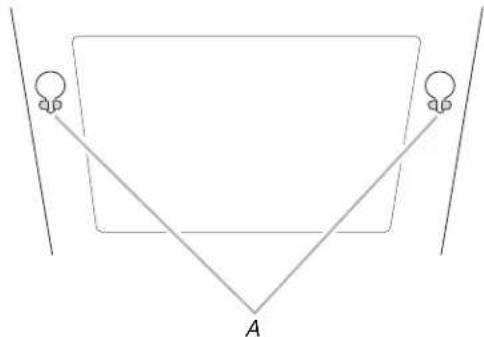
A.Keyhole slots
- Remove the blower motor from the range hood housing and set it aside.
- Remove the electrical knockout from the top of the range hood and install 1 - UL listed or CSA approved plastic strain relief. Run the 9-pin connector and pigtail wires through the strain relief as shown.
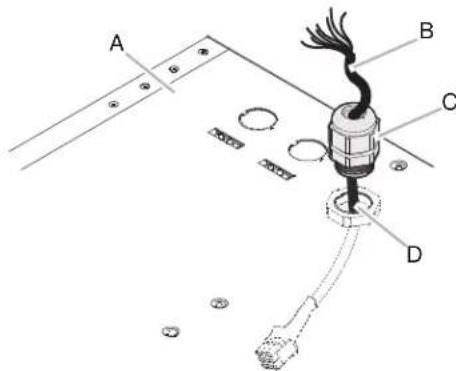
A. Range hood (top)
B. 9-pin electrical connector (wires)
C. UL listed or CSA approved plastic strain relief
D. Electrical knockout
- Connect the 9-pin connector installed to the 9-pin connector on the inside of the range hood electrical box.

- Install the metal terminal box supplied with the In-Line Smart Kit to the top of the range hood using 2 - 3.5 x 6.5 mm mounting screws.

- Reinstall the blower motor cover plate and bottom panel. Use the T10 Torx adapter and the screws previously removed.
Assemble the In-Line Smart Kit
- Using the T20 Tox adapter, remove the 3 screws from the terminal box cover on the in-line housing. Set the screws and cover aside.

A. Terminal box cover B.Screws (3)
- Disassemble the in-line housing from the in-line base. Using the T20° Tox® adapter, remove the 2 screws from inside the terminal box near the top and the 2 screws located on the opposite side. Lift the housing off the base and mounting bracket.

A. In-line housing B. In-line base C.Screws (4)
- Install the vent transition without a backdraft damper to the bottom of the in-line base. Use the T10 Torx adapter and install 2 - 3.5 x 9.5 mm mounting screws to secure the transition to the base.

A. In-line base
B. Vent transition (without backdraft damper)
C. 3.5 × 9.5 mm screws (2)
-
Place the blower motor inside the in-line housing.
-
Engage the blower motor spring tabs into the keyhole slots located at the top of the in-line housing. Push the motor so the spring tabs are secured into the small neck of the keyhole slots.

A. Keyhole slots
- Locate the 4 screws removed from the blower motor. Use these 4 screws to secure the motor to the in-line housing. Tighten with the T20 Tox adapter.

A. In-line housing
B. Blower motor
C. Screws (4)
-
Place the in-line housing (with blower motor installed) near the in-line base.
-
Connect the 9-pin connector from the blower motor to the 9-pin connector inside the in-line base.

-
Slide the in-line housing inside the in-line base. Align the mounting holes in the in-line housing to the mounting holes in the in-line base. Secure with the 4 screws removed when the in-line housing was removed from the in-line base. Use the T20° Tox adapter to secure the screws.
-
Install the vent transition with a backdraft damper to the top of the in-line housing. Use the T10 Torx adapter and install 2 - 3.5 × 9.5 mm mounting screws to secure the transition to the housing.

A. In-line housing
B. Vent transition (with backdraft damper)
C. 3.5 × 9.5 mm screws (2)
Install In-Line Smart Kit
The In-Line Smart Kit must be installed to a secure structure of the roof, ceiling, wall, or floor. The In-Line Smart Kit may also be installed into a new or existing frame construction.
WARNING
Excessive Weight Hazard
Use two or more people to move and install range hood.
Failure to do so can result in back or other injury.
- Using two or more people, position the assembled In-Line Smart Kit (housing, base and mounting bracket) in its final mounting location.
- Use a pencil to mark the location of the 4 mounting holes.
- Drill 4 mounting pilot holes where marked.
- Install the In-Line Smart assembly in its final location using 4 - 5 × 45 ~mm screws.
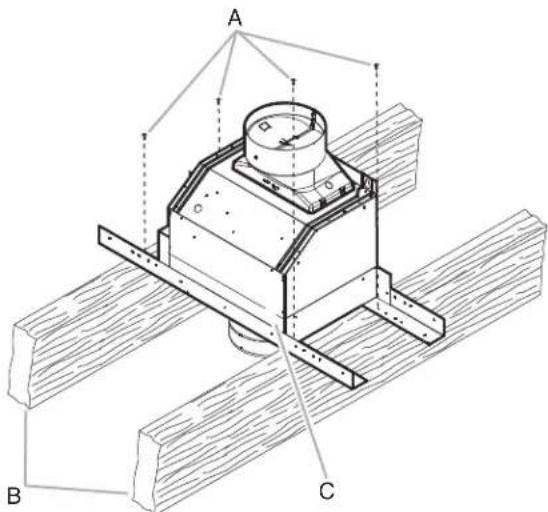
A. Mounting screws (4)
B. Secure structure (joist, rafters or trusses)
C. In-line smart assembly
Complete Installation
Determine and make all necessary cuts and drill holes for the vent system.
IMPORTANT: When cutting or drilling into the ceiling or wall, be sure to not damage electrical wiring or other hidden utilities.
- Install the range hood in its final location. Use the Installation Instructions provided with the range hood.
- Determine the location where the 12 (13 mm) wiring conduit will be routed through the ceiling or wall to connect the In-Line Smart Kit and the range hood.
- Drill a 114 (3.2 cm) hole(s) in this location.
- Locate the terminal box on the In-Line Smart Kit and the terminal box on the top of the range hood.
- Remove the cover from the range hood terminal box. Set the cover and screws aside.

A. Terminal box cover
B.Screws (2)
C. Terminal box
D. Electrical knockout
- Remove the electrical knockout from the In-Line Smart Kit (B, see the following illustration) and the range hood terminal box.

A. In-line smart kit terminal box
B. Electrical knockouts
- Install the UL listed or CSA approved strain reliefs (3) in the range hood and In-Line Smart kit electrical knockouts.
- Connect the vent system to the vent transition on the range hood. Connect the vent system to the vent transition located on the bottom In-Line Smart Kit. Use clamps and metal duct tape to seal all joints.
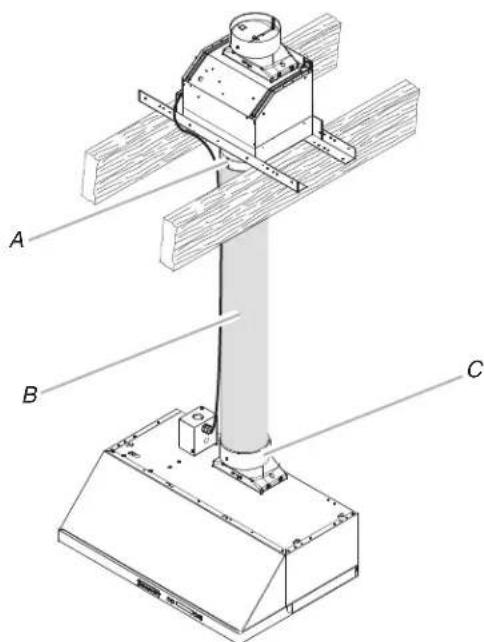
A. Vent transition - in-line smart kit (bottom)
B. Vent system
C. Vent transition - range hood
Make Electrical Connection
WARNING

Electrical Shock Hazard
Disconnect power before servicing.
Replace all parts and panels before operating.
Failure to do so can result in death or electrical shock.
Connect Range Hood and In-Line Smart Kit
- Measure the distance between the In-Line Smart Kit and the range hood terminal box.
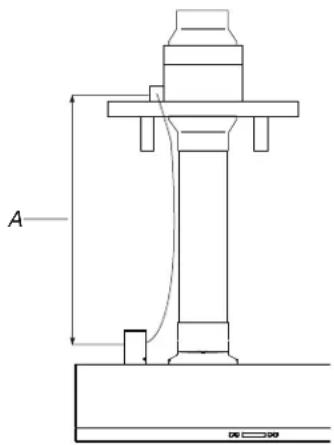
A. Distance between in-line smart kit and the range hood terminal box
- Install 8 - 14 AWG wires with an insulating sleeve or conduit between the terminal box and UL listed strain reliefs.
-
Connect together the set of 8 wires in the In-Line Smart Kit terminal box.
-
Connect together the set of 8 wires in the range hood terminal box.

Connect In-Line Smart Kit
Electrical Connection In-Line Smart Kit
- Use a UL listed or CSA approved wire connector to connect the black wires together.
- Use a UL listed or CSA approved wire connector to connect the white wires together.
- Use a UL listed or CSA approved wire connector to connect the red wires together.
- Use a UL listed or CSA approved wire connector to connect the blue wires together.
- Use a UL listed or CSA approved wire connector to connect the gray wires together.
- Use a UL listed or CSA approved wire connector to connect the brown wires together.
- Use a UL listed or CSA approved wire connector to connect the yellow wires together.
- Use a UL listed or CSA approved wire connector to connect the green/yellow wires together.
- Tighten the UL listed or CSA approved strain relief.
Electrical Connection Range Hood
WARNING

Electrical Shock Hazard
Electrically ground blower.
Connect ground wire to green and yellow ground wire in terminal box.
Failure to do so can result in death or electrical shock.
- Repeat all steps above to make the electrical connection in the range hood terminal box.
- Connect power supply wires together using the "Make Electrical Connections" section in the range hood manual.
- Reinstall the terminal box cover on the In-Line Smart Kit and range hood.
- Reconnect power.
Install In-Line Smart Kit JXW85DS, JXI85DS, KVWB60DS, and KVIB60DS Series Range Hoods
Remove Blower Motor from Range Hood Housing
WARNING

Electrical Shock Hazard
Disconnect power before servicing.
Replace all parts and panels before operating.
Failure to do so can result in death or electrical shock.
- Disconnect power.
WARNING
Excessive Weight Hazard
Use two or more people to move and install range hood.
Failure to do so can result in back or other injury.
- Using two or more people, place the range hood on its back. Be sure to set the range hood on a covered surface.
- Open the stainless steel panel.

A. Stainless steel panel
- Using the T10 Torx adapter remove the screws securing the filter retainer panel to the range hood. See the following illustrations for screw locations and numbers.
JXW85DS and JXI85DS Range Hoods
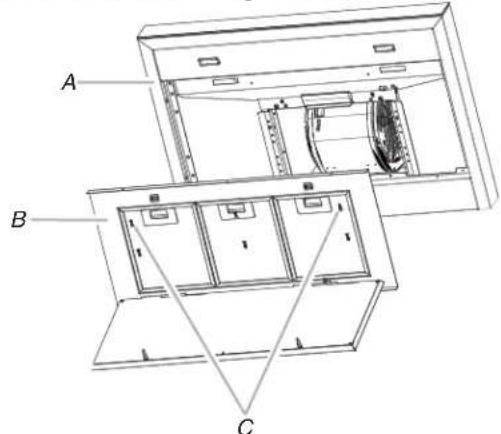
A. Range hood
B. Filter retainer panel
C. Screws (6)
KVWB60DS and KVIB60DS Range Hoods

A. Range hood
B. Filter retainer panel
C. Screws (12)
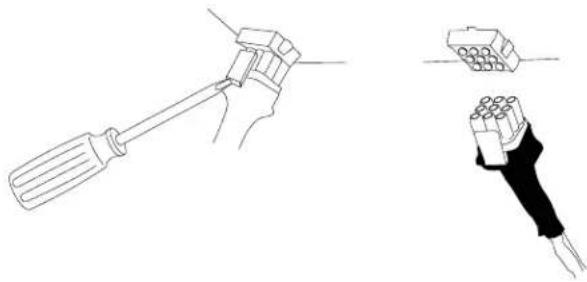
- Disconnect the blower motor from the range hood wiring. Using a flat blade screwdriver, and press down on the top clip of the 9-pin electrical connector while pressing the bottom clip. Unplug the blower motor from the 9-pin connector.
- Using the T10 Torx adapter, remove the screw that secures the temperature sensor to the bottom rear panel.

A. Temperature sensor
B. Sensor mounting screw
- Using the T10 Torx adapter, remove the 2 screws from the bottom of the rear panel. Pull the bottom rear panel towards the front of the range hood to disengage the spring tabs from the bottom flange of the rear panel. Set the panel and screws aside.

A. Bottom rear panel mounting screws
B. Bottom rear panel
- Using the T20 Torx adapter with a long extension, remove the 4 screws that secure the blower motor to the range hood housing and set them aside.

A. Range hood housing
B. Blower motor
C. Screws (4)
- Push on the blower motor to disengage the 2 spring tabs from the keyhole slots in the top of the range hood housing.

A. Keyhole slots
- Reinstall the bottom rear panel using the T10 Torx® adapter and the 2 screws previously removed.
- Reinstall the temperature sensor to the bottom rear panel using the T10 Torx® adapter and the screw previously removed.
- Reinstall the filter retainer panel using the T10 Torx® adapter and the screws previously removed.
- Using the T10 Torx® adapter, remove the 7 screws securing the plastic electrical box cover to the range hood. Remove the cover and set it aside.

A. Plastic electrical box cover
B.Screws (7)
- Remove the 2 electrical knockouts from the top of the range hood electrical box and install a UL listed or CSA approved plastic strain relief into the front knockout.
- Remove the 9-pin connector inside the range hood electrical box. Insert a flat-blade screwdriver into the lateral clips while removing the connector (see the following illustration).
- Cut the wire tie that is closest to the 9-pin electrical connector.

A. Wire tie
B. 9-pin electrical connector (wires)
- Mount the cover plate supplied with the In-Line Smart Kit to close the opening in the electrical box. NOTE: Bend the cover plate along the perforation so it conforms to the shape of the electrical box.

A. Opening
B. Cover plate
C. Cover plate ground wire
- Run the 3 electrical power wires (black, white and green) and the cover plate ground wire (green) through the small electrical knockout in the top of the range hood electrical box. Secure all 4 wires with 1 - UL listed or CSA approved wire clamp. Snap the wire clamp into the electrical knockout.

A. Electrical power wires (4)
B. UL listed or CSA approved wire clamp
C. Range hood electrical box
- Run the 9-pin pigtail electrical connector through the UL listed or CSA approved strain relief. NOTE: The 9-pin connector must be inside the range ho electrical box.

A. UL listed or CSA approved strain relief
B. 9-pin pigtail electrical connector
C. Range hood electrical box
- Connect the 9-pin connector installed to the 9-pin connector on the inside of the range hood electrical box.

-
Reinstall the plastic electrical box cover. Use the T10 Torx and the screws previously removed.
-
Install the metal terminal box supplied with the In-Line Smart Kit to the top of the range hood electrical box. Use 2 - 3.5 × 6.5 mm screws to secure the terminal box.
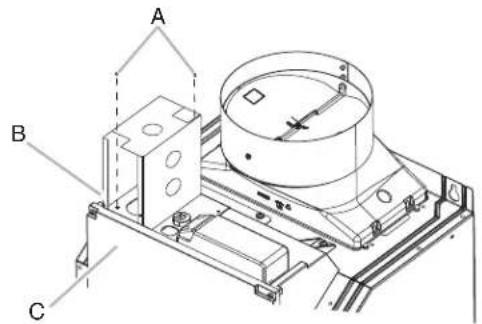
A. 3.5 × 6.5 ~mm screws (2)
B. Metal terminal box
C. Range hood electrical box
Assemble the In-Line Smart Kit
- Using the T20 ^ Torx^ adapter, remove the 3 screws from the terminal box cover on the in-line housing. Set the screws and cover aside.
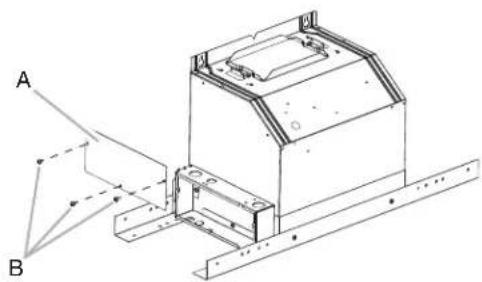
A. Terminal box cover
B.Screws (3)
- Disassemble the in-line housing from the in-line base. Using the T20° Tox® adapter, remove the 2 screws from inside the terminal box near the top and the 2 screws located on the opposite side. Lift the housing off the base and mounting bracket.
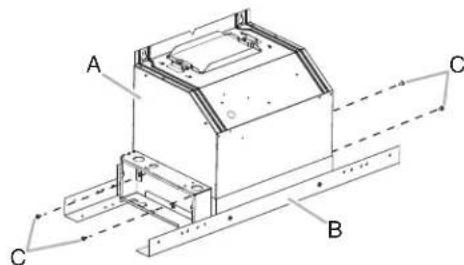
A. In-line housing
B. In-line base
C. Screws (4)
- Install the vent transition without a backdraft damper to the bottom of the in-line base. Use the T10 Torx adapter and install 2 - 3.5 x 9.5 mm mounting screws to secure the transition to the base.

A. In-line base
B. Vent transition (without backdraft damper)
C. 3.5 × 9.5 mm screws (2)
-
Place the blower motor inside the in-line housing.
-
Engage the blower motor spring tabs into the keyhole slots located at the top of the in-line housing. Push the motor so the spring tabs are secured into the small neck of the keyhole slots.

A. Keyhole slots
- Locate the 4 screws removed from the blower motor. Use these 4 screws to secure the motor to the in-line housing. Tighten with the T20° Tox° adapter.
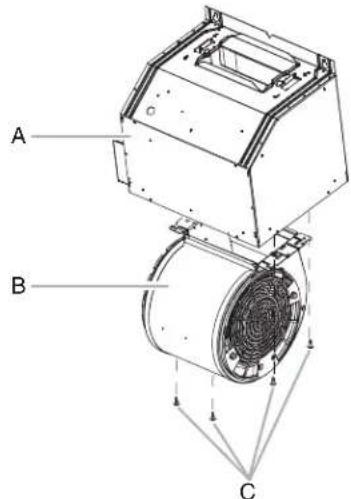
A. In-line housing
B. Blower motor
C. Screws (4)
-
Place the in-line housing (with blower motor installed) near the in-line base.
-
Connect the 9-pin connector from the blower motor to the 9-pin connector inside the in-line base.
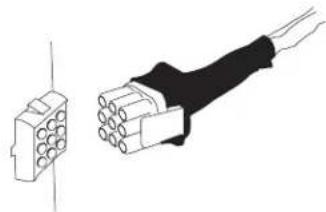
-
Slide the in-line housing inside the in-line base. Align the mounting holes in the in-line housing to the mounting holes in the in-line base. Secure with the 4 screws removed when the in-line housing was removed from the in-line base. Use the T20° Tox adapter to secure the screws.
-
Install the vent transition with a backdraft damper to the top of the in-line housing. Use the T10 Torx adapter and install 2 - 3.5 × 9.5 mm mounting screws to secure the transition to the housing.

A. In-line housing
B. Vent transition (with backdraft damper)
C. 3.5 × 9.5 mm screws (2)
Install In-Line Smart Kit
The In-Line Smart Kit must be installed to a secure structure of the roof, ceiling, wall, or floor. The In-Line Smart Kit may also be installed into a new or existing frame construction.
WARNING
Excessive Weight Hazard
Use two or more people to move and install range hood.
Failure to do so can result in back or other injury.
- Using two or more people, position the assembled In-Line Smart Kit (housing, base and mounting bracket) in its final mounting location.
- Use a pencil to mark the location of the 4 mounting holes.
- Drill 4 mounting pilot holes where marked.
- Install the In-Line Smart assembly in its final location using 4 - 5 × 45 ~mm screws.
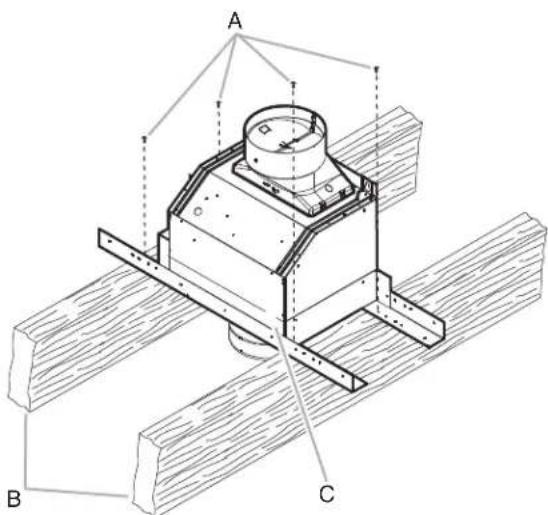
A. Mounting screws (4)
B. Secure structure (joist, rafters or trusses)
C. In-line smart assembly
Complete Installation
Determine and make all necessary cuts and drill holes for the vent system.
IMPORTANT: When cutting or drilling into the ceiling or wall, be sure to not damage electrical wiring or other hidden utilities.
1. Install the range hood in its final location. Use the Installation Instructions provided with the range hood.
2. Determine the location where the 12 (13 mm) wiring conduit will be routed through the ceiling or wall to connect the In-Line Smart Kit and the range hood.
3. Drill a 114'' (3.2 cm) hole(s) in this location.
4. Locate the terminal box on the In-Line Smart Kit and the electrical box on the range hood
5. Remove the electrical knockout from the In-Line Smart Kit (B, see the following illustration) and the range hood terminal box.

A. In-line smart kit terminal box B. Electrical knockouts
- Remove the 2 electrical knockouts on the side of the terminal box installed on the range hood.
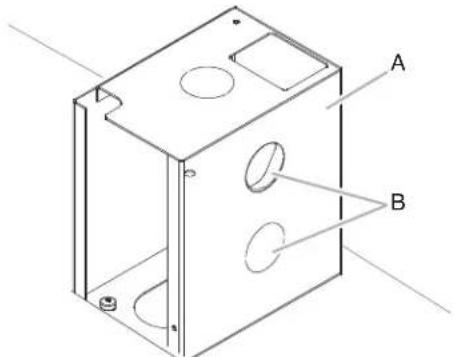
A. Metal terminal box (range hood)
B. Electrical knockouts (2)
- Connect the vent system to the vent transition on the range hood. Connect the vent system to the vent transition located on the bottom In-Line Smart Kit. Use clamps and metal duct tape to seal all joints.

A. Vent transition - in-line smart kit (bottom)
B. Vent system
C. Vent transition - range hood
Make Electrical Connection
WARNING
Electrical Shock Hazard
Disconnect power before servicing.
Replace all parts and panels before operating.
Failure to do so can result in death or electrical shock.
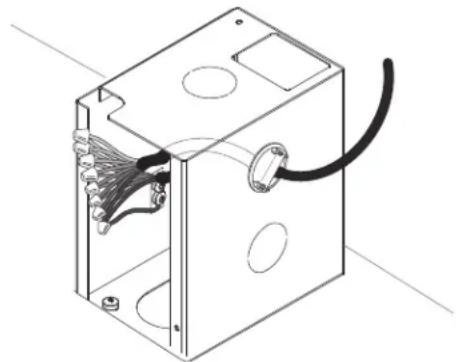
Connect Range Hood and In-Line Smart Kit
- Install the UL listed or CSA approved strain reliefs (3) in the range hood and In-Line Smart Kit electrical knockouts.
- Measure the distance between the In-Line Smart Kit and the range hood terminal box.

A. Distance between in-line smart kit and the range hood terminal box
- Install 8 - 14 AWG wires with an insulating sleeve or conduit between the terminal box and UL listed strain reliefs.
-
Connect together the set of 8 wires in the In-Line Smart Kit terminal box.
-
Connect together the set of 8 wires in the range hood terminal box.
Connect In-Line Smart Kit
Electrical Connection In-Line Smart Kit
- Use a UL listed or CSA approved wire connector to connect the black wires together.
- Use a UL listed or CSA approved wire connector to connect the white wires together.
- Use a UL listed or CSA approved wire connector to connect the red wires together.
- Use a UL listed or CSA approved wire connector to connect the blue wires together.
- Use a UL listed or CSA approved wire connector to connect the gray wires together.
- Use a UL listed or CSA approved wire connector to connect the brown wires together.
- Use a UL listed or CSA approved wire connector to connect the yellow wires together.
- Use a UL listed or CSA approved wire connector to connect the green/yellow wires together.
- Tighten the UL listed or CSA approved strain relief.
Electrical Connection Range Hood
WARNING

Electrical Shock Hazard
Electrically ground blower.
Connect ground wire to green and yellow ground wire in terminal box.
Failure to do so can result in death or electrical shock.
- Repeat all steps above to make the electrical connection in the range hood terminal box.
- Connect power supply wires together using the "Make Electrical Connections" section in the range hood manual.
- Reinstall the terminal box cover on the In-Line Smart Kit and reinstall the electrical box cover on the range hood.
- Reconnect power.
Install In-Line Smart Kit WvW75UC and WV175UC Series Range Hoods
Remove Blower Motor from Range Hood Housing
WARNING

Electrical Shock Hazard
Disconnect power before servicing.
Replace all parts and panels before operating.
Failure to do so can result in death or electrical shock.
- Disconnect power.
WARNING
Excessive Weight Hazard
Use two or more people to move and install range hood.
Failure to do so can result in back or other injury.
- Using two or more people, place the range hood on its back. Be sure to set the range hood on a covered surface.
- Open the stainless steel panel. Grasp panel at the left corners and pull down to disengage the 2 catch pins from the spring catches. The panel is attached at the right and will rotate down.

- Remove the metal grease filter by pulling the spring release handle and then pulling down the filter.

A. Spring release handle
- Remove the 2 screws securing the insulating retainer to the blower motor and set them aside.
- Disconnect the blower motor from the range hood wiring. Using a flat blade screwdriver, and press down on the top clip of the 9-pin electrical connector while pressing the bottom clip. Unplug the blower motor from the 9-pin connector.

- Using the T20 Torx adapter with a long extension, remove the 4 screws, 4 steel washers and 4 rubber washers that secure the blower motor to the range hood housing and set them aside.

A. Blower motor
B. Screws, steel washers, and rubber washers(4)
- Using the T10 Torx adapter, remove the 7 screws securing the plastic electrical box cover to the range hood. Remove the cover and set it aside.
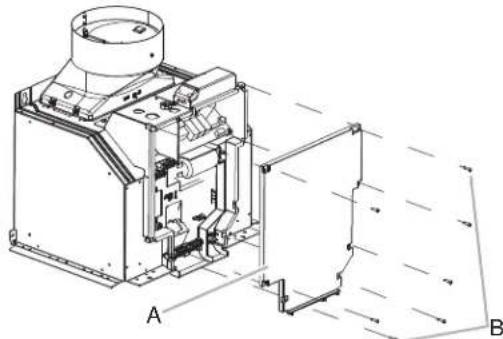
A. Plastic electrical box cover
B. Screws (7)
- Remove the 2 electrical knockouts from the top of the range hood electrical box and install a UL listed or CSA approved plastic strain relief into the front knockout.
- Remove the 9-pin connector inside the range hood electrical box. Insert a flat-blade screwdriver into the lateral clips while removing the connector (see the following illustration).
- Cut the wire tie that is closest to the 9-pin electrical connector.

A. Wire tie
B. 9-pin electrical connector (wires)
- Mount the cover plate supplied with the In-Line Smart Kit to close the opening in the electrical box. NOTE: Bend the cover plate along the perforation so it conforms to the shape of the electrical box.
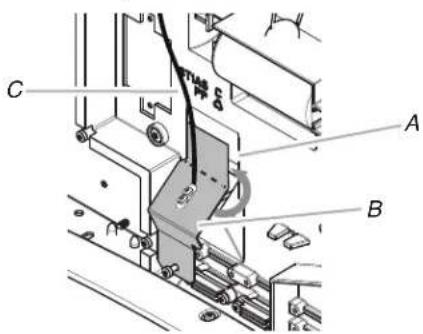
A. Opening
B. Cover plate
C. Cover plate ground wire
- Run the 3 electrical power wires (black, white and green) and the cover plate ground wire (green) through the small electrical knockout in the top of the range hood electrical box. Secure all 4 wires with 1 - UL listed or CSA approved wire clamp. Snap the wire clamp into the electrical knockout.

A. Electrical power wires (4)
B. UL listed or CSA approved wire clamp
C. Range hood electrical box
- Run the 9-pin pigtail electrical connector through the UL listed or CSA approved strain relief. NOTE: The 9-pin connector must be inside the range ho electrical box.

A. UL listed or CSA approved strain relief
B. 9-pin pigtail electrical connector
C. Range hood electrical box
- Connect the 9-pin connector installed to the 9-pin connector on the inside of the range hood electrical box.

-
Reinstall the plastic electrical box cover. Use the T10 Torx and the screws previously removed.
-
Install the metal terminal box supplied with the In-Line Smart Kit to the top of the range hood electrical box. Use 2 - 3.5 × 6.5 ~mm screws to secure the terminal box.

A. 3.5 × 6.5 ~mm screws (2)
B. Metal terminal box
C. Range hood electrical box
Assemble the In-Line Smart Kit
- Using the T20 Tox adapter, remove the 3 screws from the terminal box cover on the in-line housing. Set the screws and cover aside.

A. Terminal box cover
B. Screws (3)
- Disassemble the in-line housing from the in-line base. Using the T20° Tox® adapter, remove the 2 screws from inside the terminal box near the top and the 2 screws located on the opposite side. Lift the housing off the base and mounting bracket.

A. In-line housing
B. In-line base
C. Screws (4)
- Install the vent transition without a backdraft damper to the bottom of the in-line base. Use the T10 Torx adapter and install 2 - 3.5 x 9.5 mm mounting screws to secure the transition to the base.
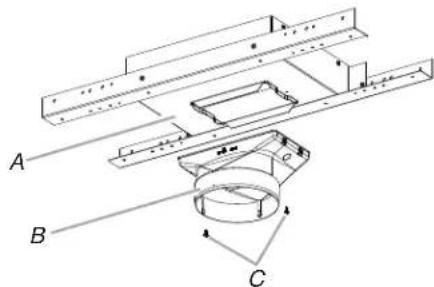
A. In-line base
B. Vent transition (without backdraft damper)
C. 3.5 × 9.5 mm screws (2)
-
Place the blower motor inside the in-line housing.
-
Engage the blower motor spring tabs into the keyhole slots located at the top of the in-line housing. Push the motor so the spring tabs are secured into the small neck of the keyhole slots.
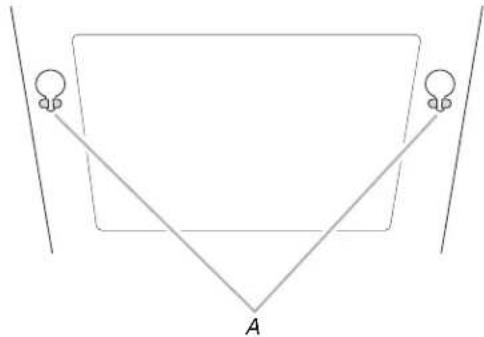
A. Keyhole slots
- Locate the 4 screws removed from the blower motor. Use these 4 screws to secure the motor to the in-line housing. Tighten with the T20 Tox adapter.

A. In-line housing
B. Blower motor
C. Screws (4)
-
Place the in-line housing (with blower motor installed) near the in-line base.
-
Connect the 9-pin connector from the blower motor to the 9-pin connector inside the in-line base.
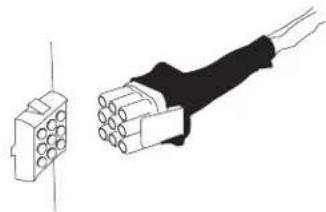
-
Slide the in-line housing inside the in-line base. Align the mounting holes in the in-line housing to the mounting holes in the in-line base. Secure with the 4 screws removed when the in-line housing was removed from the in-line base. Use the T20° Torx adapter to secure the screws.
-
Install the vent transition with a backdraft damper to the top of the in-line housing. Use the T10 Torx adapter and install 2 - 3.5 × 9.5 mm mounting screws to secure the transition to the housing.

A. In-line housing
B. Vent transition (with backdraft damper)
C. 3.5 × 9.5 mm screws (2)
Install In-Line Smart Kit
The In-Line Smart Kit must be installed to a secure structure of the roof, ceiling, wall, or floor. The In-Line Smart Kit may also be installed into a new or existing frame construction.
WARNING
Excessive Weight Hazard
Use two or more people to move and install range hood.
Failure to do so can result in back or other injury.
- Using two or more people, position the assembled In-Line Smart Kit (housing, base and mounting bracket) in its final mounting location.
- Use a pencil to mark the location of the 4 mounting holes.
- Drill 4 mounting pilot holes where marked.
- Install the In-Line Smart assembly in its final location using 4 - 5 × 45 ~mm screws.

A. Mounting screws (4)
B. Secure structure (joist, rafters or trusses)
C. In-line smart assembly
Complete Installation
Determine and make all necessary cuts and drill holes for the vent system.
IMPORTANT: When cutting or drilling into the ceiling or wall, be sure to not damage electrical wiring or other hidden utilities.
- Install the range hood in its final location. Use the Installation Instructions provided with the range hood.
- Determine the location where the 12 (13 mm) wiring conduit will be routed through the ceiling or wall to connect the In-Line Smart Kit and the range hood.
- Drill a 114 (3.2 cm) hole(s) in this location.
- Locate the terminal box on the In-Line Smart Kit and the electrical box on the range hood
- Remove the electrical knockout from the In-Line Smart Kit (B, see the following illustration) and the range hood terminal box.

A. In-line smart kit terminal box B. Electrical knockouts
- Remove the 2 electrical knockouts on the side of the terminal box installed on the range hood.

A. Metal terminal box (range hood)
B. Electrical knockouts (2)
- Connect the vent system to the vent transition on the range hood. Connect the vent system to the vent transition located on the bottom In-Line Smart Kit. Use clamps and metal duct tape to seal all joints.
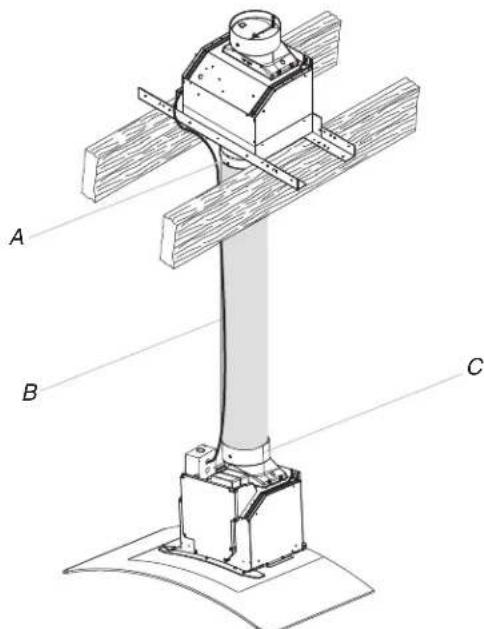
A. Vent transition - in-line smart kit (bottom)
B. Vent system
C. Vent transition - range hood
Make Electrical Connection
WARNING

Electrical Shock Hazard
Disconnect power before servicing.
Replace all parts and panels before operating.
Failure to do so can result in death or electrical shock.
Connect Range Hood and In-Line Smart Kit
- Install the UL listed or CSA approved strain reliefs (3) in the range hood and In-Line Smart Kit electrical knockouts.
- Measure the distance between the In-Line Smart Kit and the range hood terminal box.
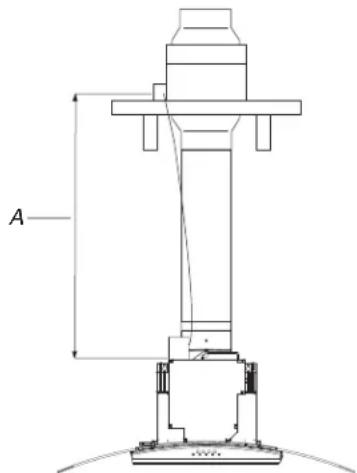
A. Distance between in-line smart kit and the range hood terminal box
- Install 8 - 14 AWG wires with an insulating sleeve or conduit between the terminal box and UL listed strain reliefs.
-
Connect together the set of 8 wires in the In-Line Smart Kit terminal box.
-
Connect together the set of 8 wires in the range hood terminal box.

Connect In-Line Smart Kit
Electrical Connection In-Line Smart Kit
- Use a UL listed or CSA approved wire connector to connect the black wires together.
- Use a UL listed or CSA approved wire connector to connect the white wires together.
- Use a UL listed or CSA approved wire connector to connect the red wires together.
- Use a UL listed or CSA approved wire connector to connect the blue wires together.
- Use a UL listed or CSA approved wire connector to connect the gray wires together.
- Use a UL listed or CSA approved wire connector to connect the brown wires together.
- Use a UL listed or CSA approved wire connector to connect the yellow wires together.
- Use a UL listed or CSA approved wire connector to connect the green/yellow wires together.
- Tighten the UL listed or CSA approved strain relief.
Electrical Connection Range Hood
WARNING

Electrical Shock Hazard
Electrically ground blower.
Connect ground wire to green and yellow ground wire in terminal box.
Failure to do so can result in death or electrical shock.
- Repeat all steps above to make the electrical connection in the range hood terminal box.
- Connect power supply wires together using the "Make Electrical Connections" section in the range hood manual.
- Reinstall the terminal box cover on the In-Line Smart Kit and reinstall the electrical box cover on the range hood.
- Reconnect power.

WIRING DIAGRAM
SE14CA
SECURITE DE LA HOTTE DE CUISINIÈRE
National Fire Protection Association
1 Batterymarch Park
Quincy, MA 02169-7471
CSA International
8501 East Pleasant Valley Road
Cleveland, OH 44131-5575




- INSTALLATION INSTRUCTIONS IN-LINE SMART KIT
- INSTRUCTIONS D'INSTALLATION VENTILATEUR DEPORTÉ INTELLIGENT
- TABLE DES MATIÈRES
- Your safety and the safety of others are very important.
- ADANGER
- WARNING
- IMPORTANT SAFETY INSTRUCTIONS
- READ AND SAVE THESE INSTRUCTIONS
- INSTALLATION REQUIREMENTS
- Tools and Parts
- Tools needed
- Parts needed
- Parts supplied
- Location Requirements
- For Mobile Home Installations
- Venting Requirements
- For the Most Efficient and Quiet Operation:
- Cold Weather Installations
- Makeup Air
- Typical In-Line Smart Kit Installations
- Calculating Vent System Length
- Electrical Requirements
- INSTALLATION INSTRUCTIONS
- Prepare Location
- Prepare In-Line Smart Kit
- Excessive Weight Hazard
- Install In-Line Smart Kit KVWB40DS Series Range Hoods
- Assemble the In-Line Smart Kit
- Install In-Line Smart Kit
- Complete Installation
- Connect Range Hood
- Connect Range Hood and In-Line Smart Kit
- Connect In-Line Smart Kit
- Electrical Connection In-Line Smart Kit
- Electrical Shock Hazard
- KVUB60DS Series Range Hoods
- Remove Blower Motor from Range Hood Housing
- Make Electrical Connection
- Electrical Connection Range Hood
- Install In-Line Smart Kit JXW85DS, JXI85DS, KVWB60DS, and KVIB60DS Series Range Hoods
- Install In-Line Smart Kit WvW75UC and WV175UC Series Range Hoods
- SECURITE DE LA HOTTE DE CUISINIÈRE
Brand : JENN-AIR
Model : W10692945
Category : Fan