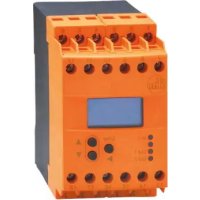
DD2510 - Controller IFM - Free user manual and instructions
Find the device manual for free DD2510 IFM in PDF.


| Brand | IFM |
| Model | DD2510 |
| Product type | Speed controller (FR-1) for monitoring rotations and movements |
| Dimensions (L × H × D) | 45 × 124.7 × 35.5 mm (approx.) |
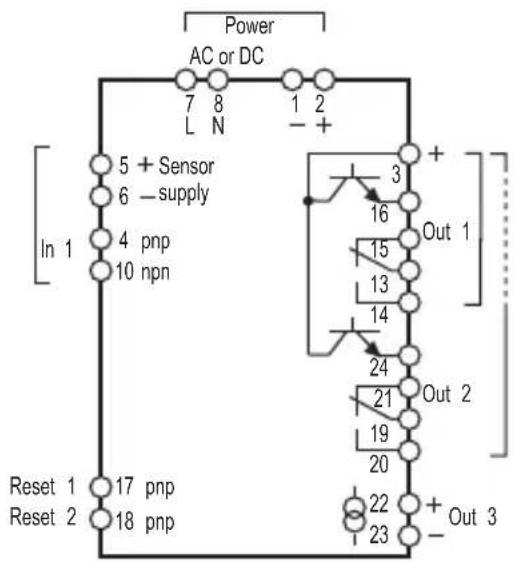
| Weight | Approx. 200 g |
| Power supply | AC (terminals 7/8) or DC 24 V (terminals 1/2) – see label |
| Power consumption | See label (not specified in manual) |
| Display | OLED 5 digits with mode and channel indicators |
| Inputs | 1 sensor input (PNP/NPN/NAMUR) + 2 reset inputs |
| Outputs | 2 relay outputs (changeover, 6 A max), 2 transistor outputs (PNP, 15 mA), 1 analog output (0/4…20 mA, load 500 Ω) |
| Max input frequency | ≤ 5 kHz (DD2510) |
| Main functions | Speed monitoring, frequency-current conversion, timers, memory, test mode, key lock |
| Protection | Enclosure IP50, terminals IP20 |
| Ambient temperature | -40…60 °C |
| Maintenance | Maintenance-free; do not open; repair only by manufacturer |
| Safety | Installation by qualified electrician; comply with SELV; not for personnel protection |
| Approvals | CE, cULus (according to technical data) |
| Manual | 75 pages in French, downloadable free of charge |
Frequently Asked Questions - DD2510 IFM
User questions about DD2510 IFM
0 question about this device. Answer the ones you know or ask your own.
Ask a new question about this device
Download the instructions for your Controller in PDF format for free! Find your manual DD2510 - IFM and take your electronic device back in hand. On this page are published all the documents necessary for the use of your device. DD2510 by IFM.
USER MANUAL DD2510 IFM
natural_image
Abstract geometric icon with white line and circular design, no text or symbols presentCE
natural_image
Pure electrical circuit lines without any symbolsInhalt
11.2 Zulassungen/Normen....25
Monitor FR-1 Monitor FR-1N
flowchart
graph TD
    A["AC or DC"] --> B["Power"]
    B --> C["In 1"]
    C --> D["5 + Sensor"]
    C --> E["6 - supply"]
    C --> F["4 pnp"]
    C --> G["10 npn"]
    D --> H["3"]
    E --> I["16"]
    F --> J["15"]
    G --> K["13"]
    H --> L["Out 1"]
    I --> M["Out 2"]
    J --> N["Out 3"]
    K --> O["Out 2"]
    L --> P["Out 1"]
    M --> Q["Out 2"]
    N --> R["Out 3"]
    O --> S["Out 2"]
    P --> T["Out 3"]
    Q --> U["Out 3"]
    R --> V["Out 3"]
    S --> W["Out 3"]
    T --> X["Out 3"]
    U --> Y["Out 3"]
    V --> Z["Out 3"]
    W --> AA["Out 3"]
    X --> AB["Out 3"]
    Y --> AC["Out 3"]
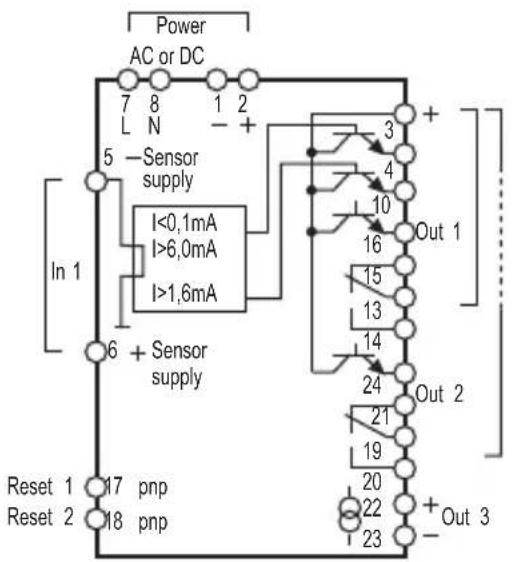
Klemmenbelegung

WARNUNG
1 Preliminary note ....4
1.1 Symbols used ....4
1.2 Warning signs used ....4
2 Safety instructions ....5
2.1 General 5
2.2 Target group....5
2.3 Electrical connection 5
2.4 Operation ....5
2.5 Installation location 6
2.6 Housing temperature 6
2.7 Tampering with the device 6
3 Functions and features ....6
4 Operating and display elements ....8
4.1 Display stand-by mode 9
5 Installation....9
5.1 Installation of the device 9
5.2 Installation of the sensors ....10
6 Electrical connection ....10
6.1 Terminal connection ....10
6.2 Voltage supply (power) 10
6.2.1 AC supplies....10
6.2.2 DC supplies 11
6.3 Inputs....11
6.3.1 Connection of the sensors (In1) 11
6.3.2 Reset inputs (reset 1 and 2) 11
6.3.3 Typical input circuit F...-x 12
6.4 Outputs 12
6.4.1 Relay outputs (Out1, 2) ......12
6.4.2 Transistor outputs (Out1, 2) ......13
6.4.3 Analogue output (Out 3)....13
6.5 Additional outputs for NAMUR devices (F...-xN) 13
6.5.1 Fault output....13
6.5.2 Stepping output 13
7 Navigation and parameter overview 14
7.1 System parameters....15
7.1.1 FOx 15
7.1.2 SOx....15
7.1.3 FWx 16
7.1.4 NC1 16
7.1.5 DIM 16
7.1.6 VER 17
7.1.7 AO3....17
7.2 Application parameters 17uk
7.2.1 SPx 17
7.2.2 HYx 17
7.2.3 STx 17
7.2.4 DTx 18
7.2.5 FTx 18
7.2.6 FA3 18
8 Programming 19
8.1 Programming example DT1 (Delay Time, output 1) .....19
8.2 Notes on programming 20
8.2.1 RUN mode 20
8.2.2 Time Out Function 20
8.2.3 Numerical entries....20
8.2.4 Factory Reset 21
8.2.5 KEY function (locking) 21
9 Test mode 22
9.1 Activate the test mode .....22
9.2 Terminate the test mode .....22
9.3 Test parameters ......23
10 Scale drawing 24
11 Technical data ....24
11.1 Overview 24
11.2 Approvals/standards ....25
12 Maintenance, repair, disposal 25
This document is the original instructions.


1 Preliminary note
This document is part of the device and contains information about the correct handling of the product.
This document is intended for specialists. These specialists are people who are qualified by their training and their experience to see risks and to avoid possible hazards that may be caused during operation or maintenance of the device.
Read this document before use to familiarise yourself with operating conditions, installation and operation. Keep this document during the entire duration of use of the device.
Adhere to the warning notes and safety instructions.
1.1 Symbols used
▶ Instruction
Reaction, result
[...] Designation of pushbuttons, buttons or indications
→ Cross-reference

Important note
Non-compliance can result in malfunction or interference.

Information
Supplementary note.
1.2 Warning signs used

WARNING
Warning of serious personal injury.
Death or serious irreversible injuries may result.

CAUTION
Warning of personal injury.
Slight reversible injuries may result.
NOTE
Warning of damage to property.
2 Safety instructions
2.1 General
Follow the operating instructions. Non-observance of the instructions, operation which is not in accordance with use as prescribed below, wrong installation or incorrect handling can affect the safety of operators and machinery.
The installation and connection must comply with the applicable national and international standards. Responsibility lies with the person installing the device.
2.2 Target group
The device must only be installed, connected and put into operation by a qualified electrician.
UK
2.3 Electrical connection
Disconnect the unit externally before handling it. Also disconnect any independently supplied relay load circuits.
Make sure that the external voltage is generated and supplied according to the requirements for safe extra-low voltage (SELV) since this voltage is supplied without further measures near the operating elements and at the terminals for the supply of connected sensors.
The wiring of all signals in connection with the SELV circuit of the device must also comply with the SELV criteria (safety extra-low voltage, safe electrical isolation from other electric circuits).
If the externally supplied or internally generated SELV voltage is externally grounded, the responsibility lies with the user in accordance with the applicable national installation regulations. All statements in this manual refer to the unit the SELV voltage of which is not grounded.
It is not allowed to supply external voltage to the terminals for the pulse pick-up supply. The consumption of current which exceeds the value given in the technical data is not allowed.
An external main switch must be installed for the unit which can switch off the unit and all related circuits. This main switch must be clearly assigned to the unit.
2.4 Operation
Be careful when handling the unit once power is applied. This is only allowed by qualified personnel due to the protection rating IP 20.
The design of the unit corresponds to the protection class II except for the terminal blocks. Protection against accidental contact (finger protection to IP 20) for qualified personnel is only guaranteed if the terminal screw has been completely screwed in.
2.5 Installation location
For the correct operation the unit must be mounted in a housing (protection rating IP 40 or higher) which can only be opened using a tool or in a locked control cabinet.
The device has been tested for an impact energy of 1 joule according to EN61010.
2.6 Housing temperature
As described in the technical specifications below the device can be operated in a wide ambient temperature range. Because of the additional internal heating the operating elements and the housing walls can have high perceptible temperatures when touched in hot environments.
2.7 Tampering with the device
In case of malfunction of the unit or queries please contact the manufacturer. Any tampering with the device can seriously affect the safety of operators and machinery. This is not permitted and leads to the exclusion of any liability and warranty claims.
3 Functions and features
The monitor FR-1/FR-1N is a pulse evaluation system. It monitors rotating, linear, vibrating or oscillating movements.
It receives the pulses from external sensors, measures the pulse interval and calculates the input frequency. This value is compared with the set switch points; the outputs are switched in accordance with the set parameters. The integrated frequency-to-current converter converts the input frequency into an analogue output signal.
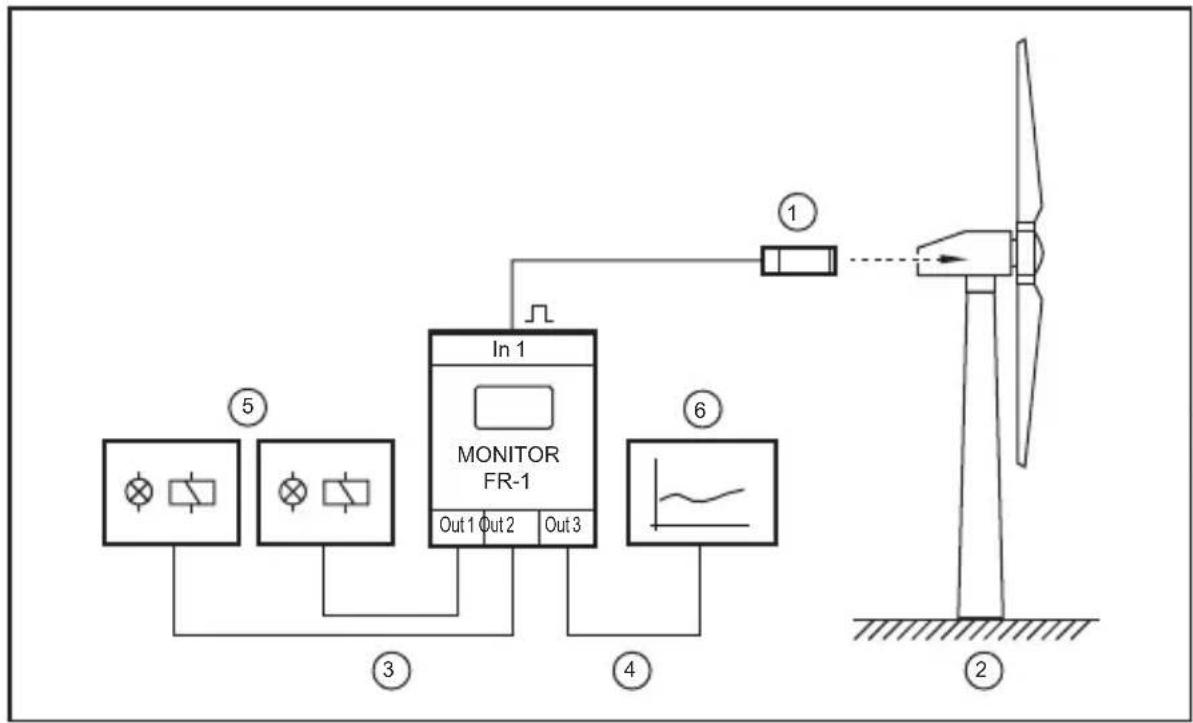
flowchart
graph TD
    A["Fan ⑤"] --> B["Monitor FR-1"]
    C["Fan ③"] --> B
    D["Wind Turbine ②"] --> E["Output Stage ④"]
    B --> F["In 1"]
    B --> G["Out 1 Out 2 Out 3"]
    style B fill:#f9f,stroke:#333
    style E fill:#ccf,stroke:#333
UK
Example: speed monitoring in a wind power station
1: sensor at the rotor or generator shaft
2: wind power station
3: switching outputs
4: analogue output
5: signals depending on the selected switching functions
6: recording or display

WARNING
The device is not approved for safety-related tasks in the field of operator protection.
Using an electrical connection of the outputs from two or more units to achieve a redundant circuit, they can also be used for safety-related tasks. All applicable technical standards must be followed.
4 Operating and display elements
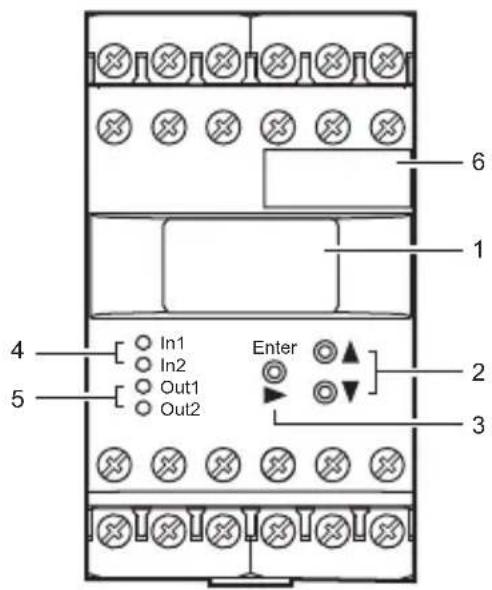
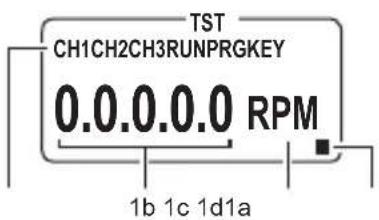
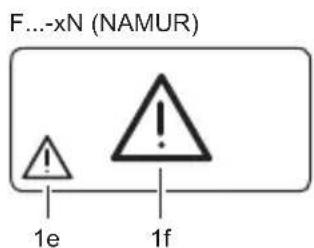
| 1 OLED display | |||
| 1a Indicators for input channels and operating modes | |||
| CH... Input channels | |||
| RUN Run mode (normal operating mode) | |||
| TST Test mode (check of the switching characteristics without pulse pick-up connected) | |||
| PRG Programming mode (setting of the parameter values) | |||
| KEY Locking | |||
| 1b Actual values and parameter values (5-digit, numerical) | |||
| Outside the value ranges the display shows "----". | |||
| 1c | Parameter abbreviation and units (3-digit, alphanumeric) | ||
| 1d Display is in stand-by mode, no values visible (→4.1) | |||
| 1e Display in display modeSymbol for wire break/ short circuit on the cable of the pulse pick-up (only F...-xN) | |||
| 1f Display in standby modeSymbol for wire break/ short circuit on the cable of the pulse pick-up (only F...-xN) | |||
| 2 | [ ▲] and [▼] buttons | ||
| Selection of the actual value display, parameter selection, setting of the parameter values | |||
| 3 [Enter/►] button | |||
| 4 LEDs In1/2 (yellow) Input pulse | |||
| 5 LEDs Out1/2 (green) Switching status of the outputs 1 and 2 | |||
UK
F...-xN = device with NAMUR input
4.1 Display stand-by mode
If no button is pressed for more than 10 minutes, the display changes to the standby mode. Values and units are no longer visible.
The stand-by mode can be identified by a flashing rectangle.

Even if no values and units are visible, the device continues its monitoring function on the basis of the set parameters and switches the relay and transistor outputs accordingly.
Press any button to switch the display on again.
5 Installation
5.1 Installation of the device
▶ Install the device on a 35 mm DIN rail.
Leave enough space between the unit and the top and bottom of the control cabinet to enable air circulation and to avoid excessive heating.
▶ Take into account the internal heating of all units when mounting several units side by side. The environmental conditions must be observed for every unit.
5.2 Installation of the sensors
▶ Follow the manufacturer's installation instructions.
6 Electrical connection
6.1 Terminal connection
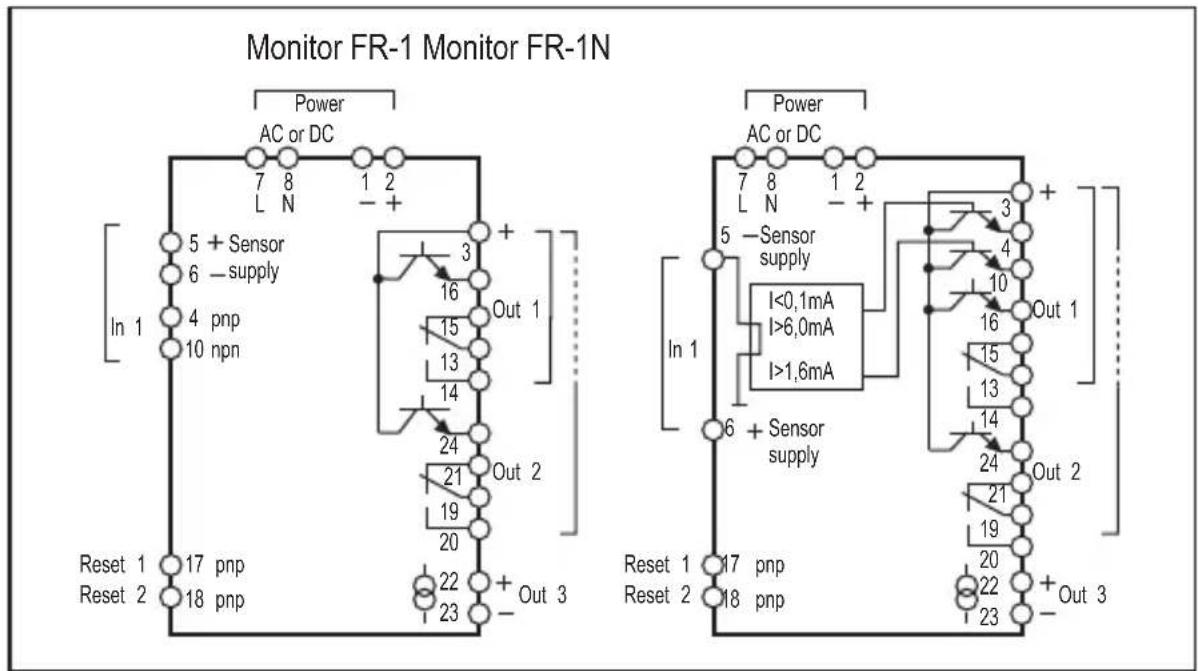
Terminal connection

WARNING
Do not use unconnected terminals such as terminal 9 as support point terminal.
6.2 Voltage supply (power)
▶ Voltage supply see type label.
The device may only be operated using one of the possible voltage connections, i.e. either terminals 7/8 (AC) or terminals 1/2 (24 V DC).
▶ All supply and signal cables must be laid separately. Use a screened cable if required in the application.
6.2.1 AC supplies
The AC supply cable must be protected according to the cross-section used (max. 16 A).
If the unit is supplied on AC, the low voltage provided for the sensor supply meets the SELV criteria according to EN 61010, overvoltage category II, soiling degree 2.
6.2.2 DC supplies
The SELV criteria (safety extra-low voltage) must be met for the DC supply.
The DC supply cable L+ (terminal 2) must be protected externally with a 315 mA time-lag fuse (5 x 20 mm or similar).
The DC supply terminals are directly connected to the sensor supply terminals.
6.3 Inputs
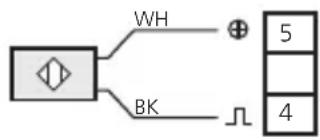
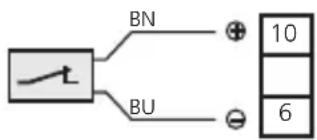
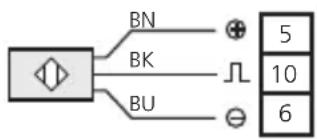
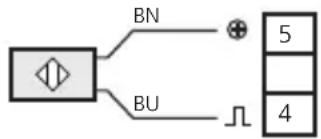
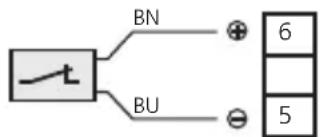
6.3.1 Connection of the sensors (In1)
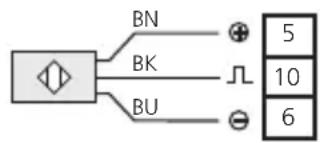
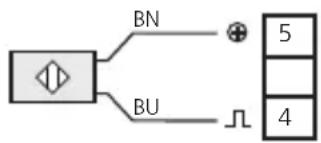
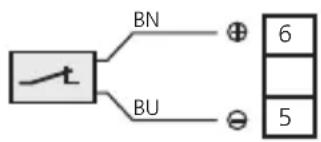
DC PNP to FR-1 DC NPN to FR-1 AC/DC to FR-1
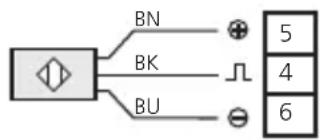
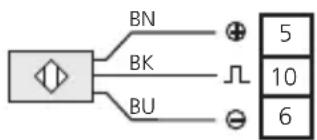
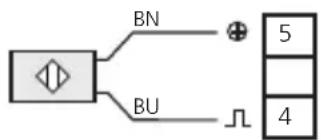
DC quadronorm to FR-1 NAMUR up to 25 V to FR-1 NAMUR 8.2 V to FR-1 N
flowchart
graph TD
    A["Input"] --> B["Summing Junction"]
    C["Input"] --> B
    D["Input"] --> B
    B --> E["Output 5"]
    B --> F["Output 4"]
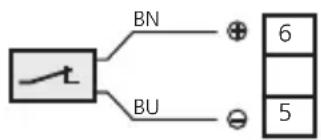
Connection of the sensors

The connection of mechanical switch contacts is not recommended since they tend to bounce and produce faulty pulses.
The terminals 5/6 can be used for the sensor supply or for the reset inputs (only F...-x).
6.3.2 Reset inputs (reset 1 and 2)
The start-up delay can be started or a saved error can be reset via the reset inputs (terminals 17/18).
The internal +24 V DC voltage (terminal 5) or an external +24 V DC voltage is connected with terminal 17 or 18 via a closing contact.
▶ If an external voltage is used, the negative reference point of this voltage must be connected to terminal 1 of the monitor.
When the contact is opened (+ 24 V DC no longer applied), the start-up delay or the memory reset starts.


A +24 V DC continuous signal leads to a permanent bridging of the monitoring, i.e. the same state as during the start-up delay is indicated. When the voltage is no longer applied and the set start-up delay has elapsed, monitoring starts.
Note on F...-xN:
The +24 V DC signal voltage required for the reset inputs is not available to the F...-xN. This must be taken from an external voltage source. The reference point (GND) of the external power supply must be connected to terminal 1 of the monitor; otherwise no switching operation is possible.
6.3.3 Typical input circuit F...-x
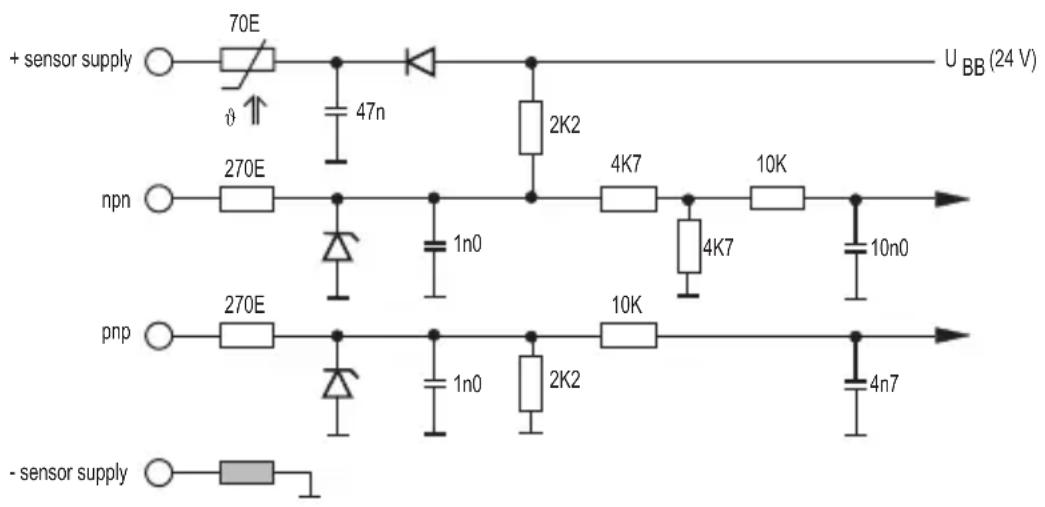
6.4 Outputs
6.4.1 Relay outputs (Out1, 2)
▶ To prevent excessive wear and to comply with the EMC standards, interference suppression of the contacts is required for switching inductive loads.

WARNING
If the device is operated on an AC supply (terminals 7/8) this must use the same supply cable as the voltage supply to switch an AC voltage via the relay outputs.

If the relay outputs are used for switching very small currents (e.g. PLC inputs), considerable contact resistance can arise. In this case use the transistor outputs.
6.4.2 Transistor outputs (Out1, 2)
The transistor outputs need an external voltage of +24 V DC on terminal 3.
▶ Connect the reference point (GND) of the external power supply to terminal 1 of the monitor. Otherwise no switching operation is possible.
The SELV criteria (safety extra-low voltage) must be met for the DC supply of the transistor outputs.
The DC supply cable L+ (terminal 3) must be protected externally with a 315 mA time-lag fuse (5 x 20 mm or similar).
6.4.3 Analogue output (Out 3)
The analogue output is not electrically separated from the pulse pick-up supply and the 24 V DC supply voltage.
No dangerous contact circuits must be connected to the analogue output.
6.5 Additional outputs for NAMUR devices (F...-xN)
6.5.1 Fault output
The fault output (terminal 4) indicates a wire fault between monitor and sensor (wire break/short circuit). In case of a fault the respective output is blocked.
6.5.2 Stepping output
Signals from NAMUR sensors cannot be transferred to the inputs of other systems by simple cable links. To use the signals for other inputs, the F...-xN monitor provides a copy of the input pulses at the stepping output (terminal 10, ratio 1:1).
7 Navigation and parameter overview
The pushbuttons [▲] / [▼] and [Enter/▶] are used for the navigation, entry of values and acknowledgement within the parameters arranged in columns.
RUN mode Parameter range and PRG mode
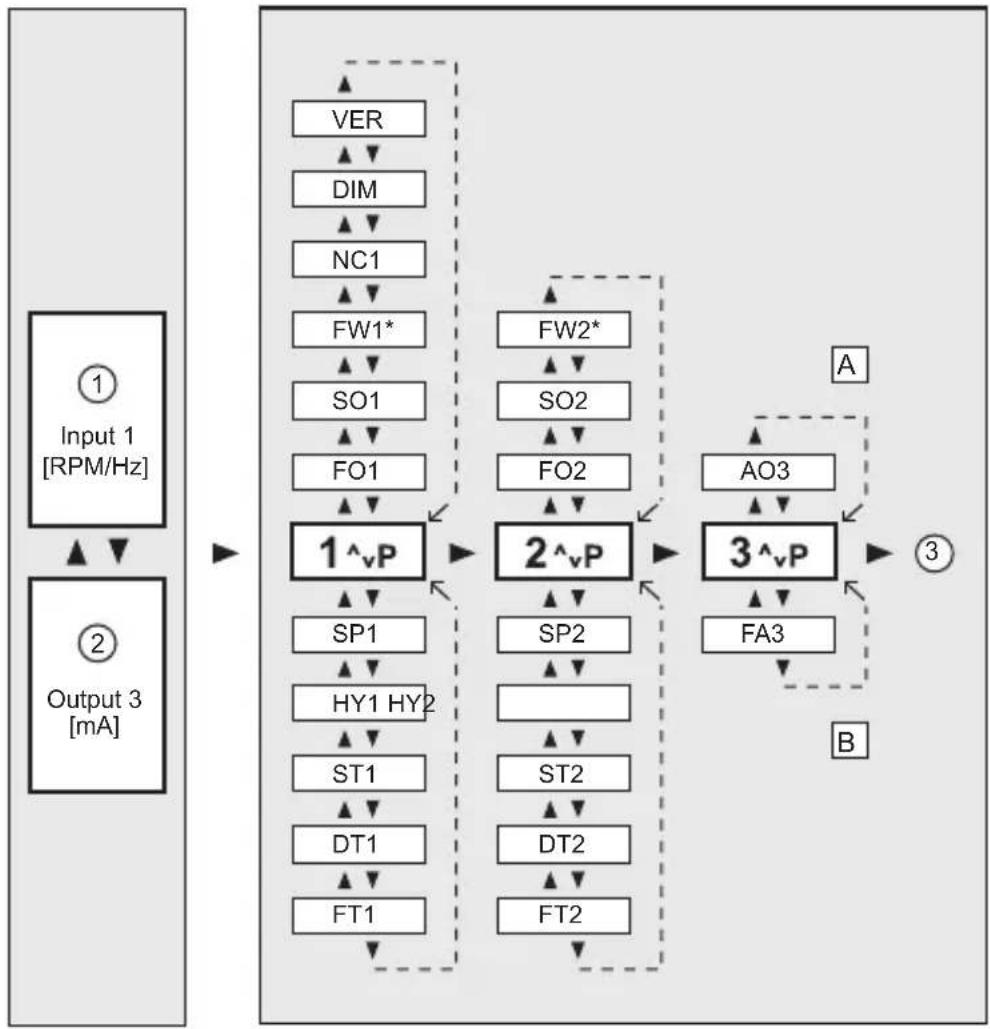
flowchart
graph TD
    subgraph_Input_1["Input 1 [RPM/Hz"]]
        A["①"] --> B["Output 3 [mA"]]
        C["②"] --> B
    end

    subgraph_Output_2["Output 3 [mA"]]
        D["VER"] --> E["1^vP"]
        F["DIM"] --> E
        G["NC1"] --> E
        H["FW1*"] --> I["2^vP"]
        J["SO1"] --> I
        K["FO1"] --> I
        L["SP1"] --> M["HY1 HY2"]
        N["ST1"] --> O["DT1"]
        P["FT1"] --> Q["DT2"]
        R["FW2*"] --> S["2^vP"]
        T["SO2"] --> S
        U["FO2"] --> S
        V["SP2"] --> W["3^vP"]
        X["ST2"] --> Y["FA3"]
    end

    subgraph_Output_3["Output 3 [mA"]]
        Z["A"] --> AA["3^vP"]
        AB["AO3"] --> AA
        AC["B"] --> AA
    end

    style Input_1 fill:#f9f,stroke:#333
    style Output_2 fill:#ccf,stroke:#333
    style Output_3 fill:#cfc,stroke:#333
1: Indication: actual value input 1
2: Indication: actual value output 3
3: Back to the RUN mode
A: System parameters
B: Application parameters
*) only F...-xN
7.1 System parameters
7.1.1 FOx
Function Output (switching function of the outputs 1/2)
| 1 Relay energised (transistor output switched) when the current value is below the switch point SPx (signalled state: "minimum speed"/"blocked"). | |
| 2 Relay de-energised (transistor output blocked) when the current value is below the switch point SPx (signalled fault: "underspeed"/"blocked"). | |
| 3 Relay energised (transistor output switched) when the current value is above the switch point SPx (signalled state: "rotational speed reached"). | |
| 4 Relay de-energised (transistor output blocked) when the current value is above the switch point SPx (signalled fault: "overspeed"). | |
| 5 Relay is energised (transistor output switched) within a frequency range (acceptable range). | |
| 6 Relay is de-energised (transistor output blocked) within the frequency range. With the functions 5 and 6 a frequency range above and below the switch point SPx is defined in connection with the parameter HYx (hysteresis). | |
UK
7.1.2 SOx
Store Output (latching function outputs 1/2)
| When this parameter is active, the respective output does not switch back automatically but must be reset. | |
| Values 0 = inactive | |
| 1 = front reset ([Enter/▶] > 3 s) | |
| 2 = front reset and external reset | |
| Default value 0 (inactive) | |
7.1.3 FWx
Function Wire Break Monitoring (only F...-xN)
| Relay characteristics for wire fault or short circuit, i.e. input frequency = 0 | ||
| Frequency > SPx FWx = inactive (0) FWx = active (1) | ||
| FOx = 1 or 4 relay energised relay de-energised | ||
| FOx = 2 or 3 relay de-energised relay remains de-energised | ||
| Frequency < SPx FWx = inactive (0) FWx = active (1) | ||
| FOx = 1 or 4 relay energised relay de-energised | ||
| FOx = 2 or 3 relay de-energised relay remains de-energised | ||
| Frequency in the range FWx = inactive (0) FWx = active (1) | ||
| FOx = 5 relay deenergised relay remains de-energised | ||
| FOx = 6 relay energised relay deenergised | ||
| In case of fault the preset analogue initial value AO3 is available at the analogue output. | ||
| Values 0 = inactive | ||
| 1 = active | ||
| Default value 0 | ||
7.1.4 NC1
Number of Cams (input 1)
| Number of cams detected per revolution. On the basis of this value the monitor calculates the rotational speed (measured frequency ÷ NC1 = displayed speed in RPM). For frequency measurements NC1 = 1 should remain set. | |
| Values 1...999 | |
| Default value 1 | |
7.1.5 DIM
Dimension (display format)
| Indication in Hz or RPM (revolutions per minute).When a new unit is selected, the monitor converts all existing values into the new unit! | |
| Values 0 = RPM | |
| 1 = Hz | |
| Default value 0 = RPM | |
7.1.6 VER
Software version
The installed software version is displayed (5-digit number with abbreviation VCO).
7.1.7 AO3
Analogue Offset (for analogue output 3)
| Current value displayed and provided for an input value of 0 Hz/RPM. | |
| Value range 0.0...20 mA (typical setting: 0.0 or 4.0 mA) | |
| Default value 4.0 mA | |
UK
7.2 Application parameters
7.2.1 SPx
Switch Point (outputs 1/2)
| Value at which the output 1/2 changes its switching state according to switching function FOx. | |
| Values 0.1 ... 1000.0 Hz or | 1 ... 60000 RPM (unit depends on DIM) |
| Default value SP1 = 100 R | PM, SP2 = 1000 RPM |
7.2.2 HYx
Hysteresis (for switch points SP1/SP2)
| The hysteresis value determines the distance between the switch-off point and the switch point SPx. Prevents a possible chattering of the switching output. In connection with the switching functions 5 and 6 (FOx) an acceptable range or an error range can be defined. | |
| Values 0.0...1000.0 % of the value for SPx | |
| Default value 5.0 | |
7.2.3 STx
Start-Up Delay Time (for outputs 1/2)
| Enables the suppression of error messages when a plant is started. When the device is switched on or when the 24 V signal is removed from the reset input, the respective output for the time set here is in the "good" state (= no fault). | |
| Values 0.0...1000.0 s | |
Default value 0.0 (no start-up delay)
7.2.4 DTx
Delay Time (for outputs 1/2)
| Enables a delayed switching of the outputs 1/2. The respective output switches only if the current value is above or below the switch point for more than the time set here. | |
| Values 0.0...1000.0 s | |
| Default value 0.0 (no delay time) | |
7.2.5 FTx
Fleeting Time (for outputs 1/2)
| If an event occurs, the output changes its state during the set time and then switches back to the initial state. | |
| Values 0.0...1000.0 s | |
| Default value 0.0 (fleeting time not active) | |
7.2.6 FA3
Final Value Analogue (for analogue output 3)
| Input value in Hz or RPM at which the final value 20 mA is displayed or provided. The output signal is limited to 20.5 mA. | |
| Value range 0.1 ... 1000.0 | Hz or 1 ... 60000 RPM (unit depends on DIM) |
| Default value 1000 RPM | |
8 Programming

WARNING
If programming takes place during operation, dangerous contact voltage may occur. Therefore ensure that programming is done by a qualified electrician.

Parameter changes during operation, especially changes to the switching function and the switch points can lead to malfunction in the plant. Therefore disconnect it during the change and then check the function.
| Programming consists of 6 steps: | |
| 1. Change from the RUN mode to the parameter range 1 or 2 or 3 [Enter/▶] | |
| 2. Selection of the requested parameter (FOx, SOx, NCx, etc.) | [▲]/[▼] |
| 3. Change to the PRG mode [Enter/▶] | |
| 4. Setting or changing the parameter value [▲]/[▼] | |
| 5. Acknowledgement of the set parameter value [Enter/▶] >3 s | |
| 6. Return to the RUN mode [Enter/▶] >3 s | |
UK
8.1 Programming example DT1 (Delay Time, output 1)
| Operation Display | |
| Change from the RUN mode to the parameter range (here 1) | |
| ▶ Briefly press [Enter/▶] once.> The 1st parameter range is displayed. | CH1RUN |
| Selection of the requested parameter (here DT1) | |
| ▶ Press the [▼] button until the parameter DT1 is displayed with the currently set value (here default value 0.0). | CH1RUN |
| Change to the PRG mode | |
| ▶ Briefly press [Enter/▶] once.> The unit is in the programming mode.> PRG indicator visible, parameter abbreviation flashes. | CH1RUNPRG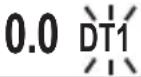 |
| Setting or changing the parameter value | |
| ► Press [▲] / [▼] until the requested parameter value is displayed (→ 8.2.3 Numerical entries). | CH1RUNPRG15.0 DT1 |
| Acknowledgement of the set parameter value | |
| ► Press [Enter/►] until the parameter abbreviation no longer flashes and the indicator PRG has disappeared.> The new parameter value is indicated and effective. | CH1RUN15.0 DT1 |
| Return to the RUN mode | |
| ► Press [Enter/►] for about 3 s or wait for the time-out function (approx. 15 s).> The unit is again in the RUN mode, the current value is indicated. | CH1RUN1665 RPM |
8.2 Notes on programming
8.2.1 RUN mode

During programming the unit internally remains in the RUN mode (RUN indicator visible).
This means that until a new value is acknowledged with [Enter/▶], the unit carries out its monitoring function on the basis of the previously set parameters and switches the relay and transistor outputs accordingly.

The monitoring function of the monitor is deactivated by continuously pressing [Enter/▶] in the RUN mode. The deactivation is effective as long as the button is pressed.
8.2.2 Time Out Function
If during programming no pushbutton is pressed for approx. 15 s, this is seen as a cancellation.
Parameter changes which are not acknowledged with [Enter/▶] are rejected. The previously set parameter value is restored and remains effective for the monitoring functions.
8.2.3 Numerical entries
▶ Press [▲] or [▼] and hold it.
The smallest decade becomes active and is counted up or down depending on the selected pushbutton (e.g. 1, 2, 3,...0). Then comes the next decade, etc.
As soon as the pushbutton is released, the active decade flashes. It is set by pressing [▲] or [▼] several times. The preceding decade then flashes and can be set.
8.2.4 Factory Reset
The factory default values can be restored by pressing [▲] and [▼] simultaneously during power on. All previously entered parameter values are lost.
8.2.5 KEY function (locking)
The unit can be locked to prevent incorrect entries.
After locking, only the actual value indication can be switched with the [▲] and [▼] buttons. Parameter range and PRG mode can no longer be selected.
UK
| Locking Unlocking | |
| ► Press [▲] and [▼] simultaneously and hold them pressed.> The KEY indicator flashes.► Release the pushbuttons when the KEY indicator is continuously indicated. | ► Press [▲] and [▼] simultaneously and hold them pressed.> The KEY indicator flashes.► Release the pushbuttons when the KEY indicator is no longer indicated. |
9 Test mode
In the test mode the switching behaviour of the monitor can be checked, set and stored without any connected pulse pick-up. The monitor runs through a freely definable frequency range and switches the outputs according to the selected switching function and switch points.
9.1 Activate the test mode
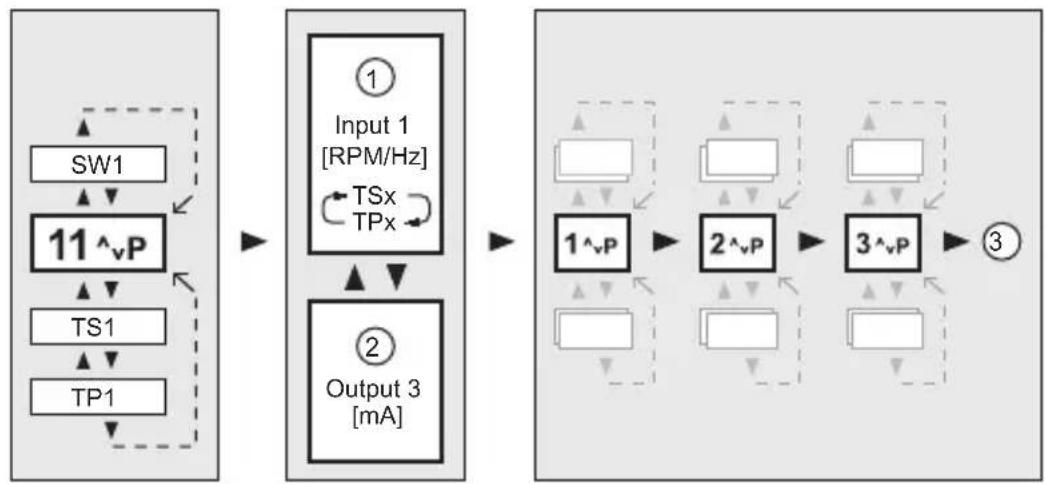
▶ Apply the operating voltage and press [Enter/▶] simultaneously.
The display indicates the parameter range 11 and "TST".
In addition to the system and application parameters, the parameters for the test frequency are available.
Test parameters Display mode System/application parameters
flowchart
graph LR
    A["SW1"] --> B["11^vP"]
    B --> C["TS1"]
    C --> D["TP1"]
    D --> E["Input 1 [RPM/Hz"]]
    E --> F["TSx TPx"]
    F --> G["Output 3 [mA"]]
    G --> H["1^vP"]
    H --> I["2^vP"]
    I --> J["3^vP"]
    J --> K["③"]
1: Test frequency
2: Analogue output
3: Back to the test parameters
9.2 Terminate the test mode
▶ Switch off the unit.
9.3 Test parameters
| SW1 Sweep on input 1 | ||
| Change of speed of the test frequency | ||
| Values 1...5 (1 = fast, 5 = slow) | ||
| Default value 1 | ||
| TS1 Test Start on input 1 | ||
| Initial value of the test frequency | ||
| Values 1...60,000 RPM or 0.1...1000.0 Hz | ||
| Default value 50 RPM | ||
| TP1 Test Stop on input 1 | ||
| Final value of the test frequency | ||
| Values 1...60,000 RPM or 0.1...1000.0 Hz | ||
| Default value 1500 RPM | ||
UK
10 Scale drawing
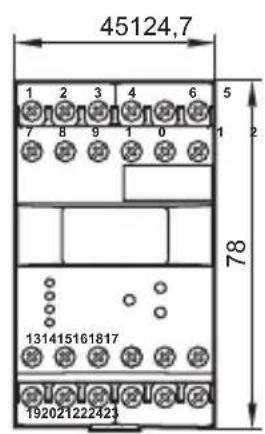
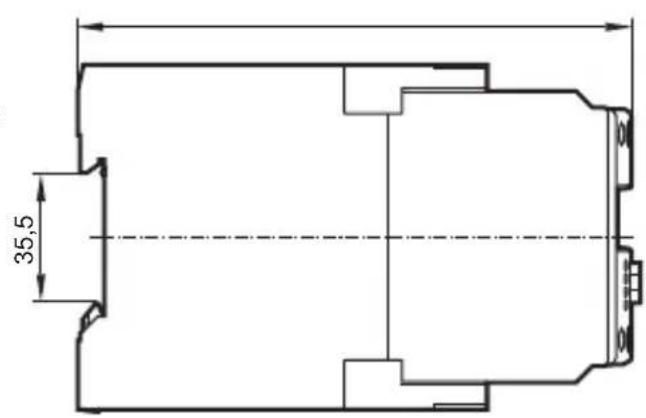
11 Technical data
11.1 Overview
| Art. no. DD2503 DD2510 DD2603 | |||
| Monitor type FR-1 | FR-1 | FR-1N | |
| Supply voltageFrequency rangePower consumption | see type label | ||
| Sensor types | PNP/NPN; NAMUR | NAMUR (to EN 50227) | |
| Sensor supply | 24 V DC | 8.2 V DC | |
| Input frequency | ≤ 5 kHz | ≤ 3 kHz | ≤ 5 kHz |
| Relay outputs | 2 changeover contacts potential free | ||
| Switching current | ≤ 6 A | ≤ 4 A | ≤ 6 A |
| Switching voltage | ≤ 250 V AC; B300, R300 | ||
| Transistor outputs | PNP switched; externally supplied | ||
| Switching current | ≤ 15 mA; short-circuit proof | ||
| Switching voltage | 24 V DC (± 20%) | ||
| Analogue output | 0/4...20 mA, short-circuit proof, no feedback | ||
| Load | ≤ 500 ohms | ||
| Protection housing / terminals | IP 50 / IP 20 | ||
| Ambient temperature | -40...60 °C | -10...60 °C | -40...60 °C |
| Storage temperature -40...85°C | -25...80°C | -40...85°C | |
| Max. relative air humidity 80% (31 °C) linearly decreasing to 50% (40 °C) | |||
| Maximum operating altitude 2000 | m above sea level | ||
| Connection 21 dual-chamber terminals; 2 x 2.5 mm2 (AWG 14) | |||
| cULus test conditions housing dimensions for temperature rise test: 200 x 200 x 150 mm | |||
UK
Data sheets can be found at:
www.ifm.com → Data sheet search → article number.
11.2 Approvals/standards
EC declarations of conformity, approvals etc. can be downloaded at:
www.ifm.com → Data sheet search → Article number → More information
12 Maintenance, repair, disposal
The device is maintenance-free.
▶ Do not open the housing as the device does not contain any components which can be repaired by the user. The device must only be repaired by the manufacturer.
▶ Dispose of the device in accordance with the national environmental regulations.
Contenu
8 Programmation ....20
11.2 Homologations/normes

- Inhalt
- WARNUNG
- Preliminary note
- Symbols used
- Warning signs used
- WARNING
- CAUTION
- NOTE
- Safety instructions
- General
- Target group
- Electrical connection
- Operation
- Installation location
- Housing temperature
- Tampering with the device
- Functions and features
- Operating and display elements
- Display stand-by mode
- Installation
- Installation of the device
- Installation of the sensors
- Electrical connection
- Terminal connection
- Voltage supply (power)
- AC supplies
- DC supplies
- Inputs
- Connection of the sensors (In1)
- Reset inputs (reset 1 and 2)
- Typical input circuit F...-x
- Outputs
- Relay outputs (Out1, 2)
- Transistor outputs (Out1, 2)
- Analogue output (Out 3)
- Additional outputs for NAMUR devices (F...-xN)
- Fault output
- Stepping output
- Navigation and parameter overview
- System parameters
- FOx
- SOx
- FWx
- NC1
- DIM
- VER
- AO3
- Application parameters
- SPx
- HYx
- STx
- DTx
- FTx
- FA3
- Programming
- Programming example DT1 (Delay Time, output 1)
- Notes on programming
- RUN mode
- Time Out Function
- Numerical entries
- Factory Reset
- KEY function (locking)
- Test mode
- Activate the test mode
- Terminate the test mode
- Test parameters
- Technical data
- Approvals/standards
- Maintenance, repair, disposal
- Contenu
- Homologations/normes
Brand : IFM
Model : DD2510
Category : Controller