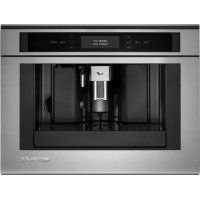
JBC7624BS - Coffee machine JENN-AIR - Free user manual and instructions
Find the device manual for free JBC7624BS JENN-AIR in PDF.

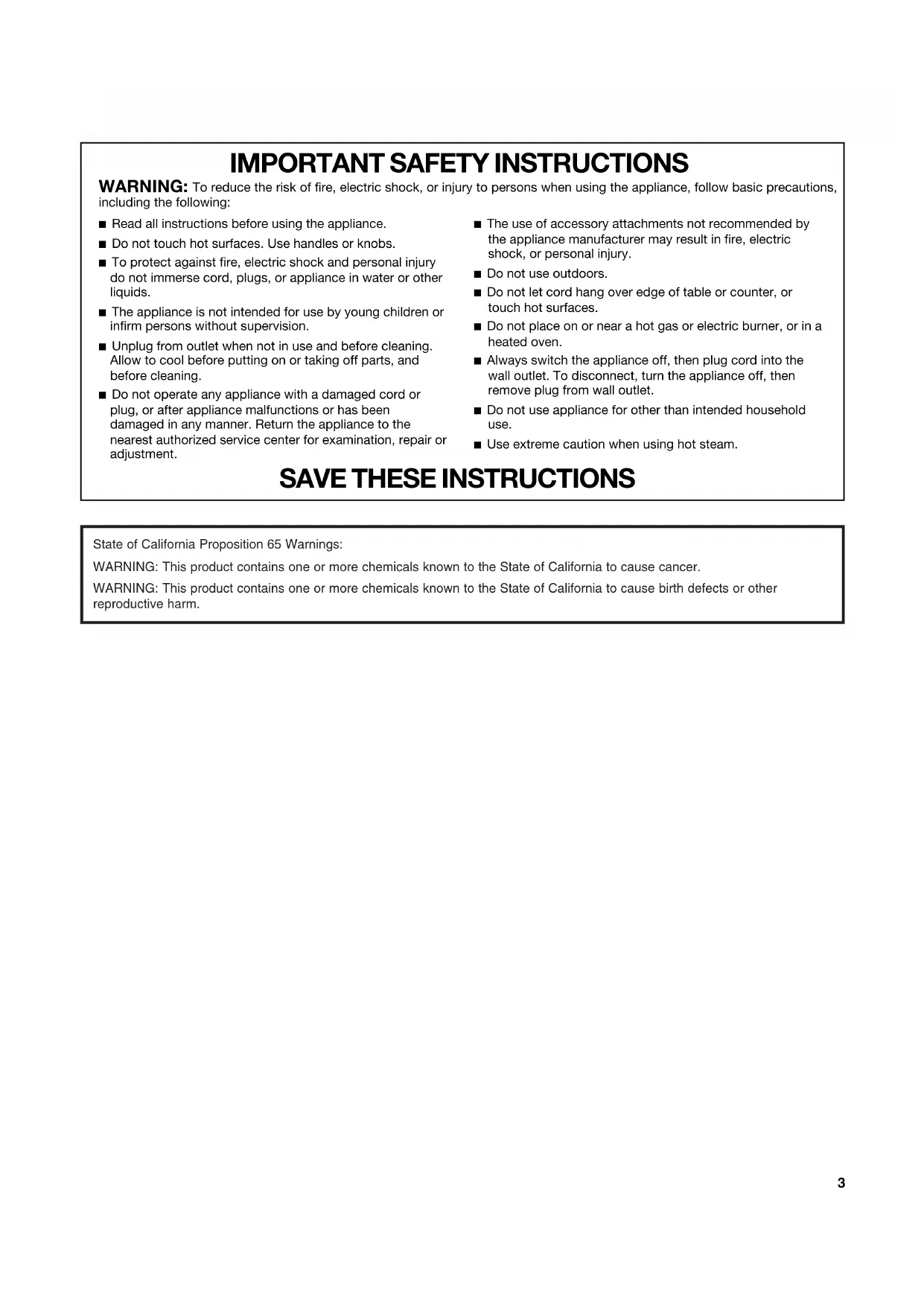

| Product type | Automatic espresso machine with integrated bean grinder |
| Brand | JENN-AIR |
| Model | JBC7624BS |
| Power supply | 120 V, 60 Hz (domestic use) |
| Coffee types prepared | Espresso, regular coffee, cappuccino, long coffee, ground coffee |
| Water tank capacity | Approx. 1.5 L (fill up to MAX line) |
| Bean container capacity | Approx. 250 g (fill without packing down) |
| Grounds container | Capacity for about 14 cups before emptying |
| Drip tray | With level indicator (red float) |
| Milk container | Integrated, with frothing nozzle and intake tube, dishwasher safe |
| Programs and settings | Intensity (extra mild to extra strong), size (espresso to mug), temperature (low, medium, high), auto shut-off, delayed start, clock, water hardness, descaling |
| Grinder | Stainless steel, adjustable (7 settings) |
| Adjustable coffee spout height | Yes (up to approx. 15 cm) |
| Hot water dispensing | Yes, via a dedicated spout (approx. 250 mL per cycle) |
| Display and controls | LCD screen, navigation keys, 1 coffee/2 coffee buttons, cappuccino, hot water, menu |
| Automatic rinsing function | Yes, on startup and standby |
| Descaling | Automatic program with recommended descaling agent |
| Cleaning | Removable brew unit washable with water, tray and grounds container cleanable manually, milk container dishwasher safe |
| Safety | Automatic shut-off, overheating protection, important safety instructions |
| Spare parts and repairability | Original parts available through Jenn-Air after-sales service (1-800-JENNAIR) |
Frequently Asked Questions - JBC7624BS JENN-AIR
User questions about JBC7624BS JENN-AIR
0 question about this device. Answer the ones you know or ask your own.
Ask a new question about this device
Download the instructions for your Coffee machine in PDF format for free! Find your manual JBC7624BS - JENN-AIR and take your electronic device back in hand. On this page are published all the documents necessary for the use of your device. JBC7624BS by JENN-AIR.
USER MANUAL JBC7624BS JENN-AIR
JENN-AIR™ BUILT-IN COFFEE SYSTEM SYSTÈME INFUSEUR À CAFÉ JENN-AIR™
Use & Care Guide
For questions about features, operation/performance, parts, accessories, or service in the U.S.A., call: 1-800-JENNAIR (1-800-536-6247) or visit our website at www.jennair.com.
In Canada, call: 1-800-JENNAIR (1-800-536-6247), or visit our website at www.jennair.ca.
PARTS AND FEATURES....4
Switching On and Preheating 8
Making Coffee or Espresso Using Coffee Beans....8
Changing the Amount of Coffee 9
Adjusting the Coffee Grinder 10
Making Espresso with Ground Coffee....10
Making Cappuccino....10
Dispensing Hot Water 12
COFFEE SYSTEM CARE ....13
General Cleaning....13
Vacation or Storage 15
Switching Off the Coffee System....15
TROUBLESHOOTING 16
ASSISTANCE OR SERVICE....18
In the U.S.A. 18
In Canada 18
WARRANTY 19
TABLE DES MATIÈRES
SÉCURITÉ DU SYSTÈME INFUSEUR À CAFÉ....21
PIÈCES ET CARACTÉRISTIQUES ......22
AVANT D'UTILISER LE SYSTÈME INFUSEUR À CAFÉ......23
UTILISATION DU SYSTÈME INFUSEUR À CAFÉ .....24
Réglages....24
ASSISTANCE OU SERVICE....35
Au Canada....35
GARANTIE....35
Your safety and the safety of others are very important.
We have provided many important safety messages in this manual and on your appliance. Always read and obey all safety messages.

This is the safety alert symbol.
This symbol alerts you to potential hazards that can kill or hurt you and others.
All safety messages will follow the safety alert symbol and either the word "DANGER" or "WARNING."
These words mean:
! DANGER
WARNING
You can be killed or seriously injured if you don't immediately follow instructions.
You can be killed or seriously injured if you don't follow instructions.
All safety messages will tell you what the potential hazard is, tell you how to reduce the chance of injury, and tell you what can happen if the instructions are not followed.
IMPORTANT SAFETY INSTRUCTIONS
WARNING: To reduce the risk of fire, electric shock, or injury to persons when using the appliance, follow basic precautions, including the following:
- Read all instructions before using the appliance.
■ Do not touch hot surfaces. Use handles or knobs.
■ To protect against fire, electric shock and personal injury do not immerse cord, plugs, or appliance in water or other liquids.
■ The appliance is not intended for use by young children or infirm persons without supervision.
■ Unplug from outlet when not in use and before cleaning. Allow to cool before putting on or taking off parts, and before cleaning.
■ Do not operate any appliance with a damaged cord or plug, or after appliance malfunctions or has been damaged in any manner. Return the appliance to the nearest authorized service center for examination, repair or adjustment.
■ The use of accessory attachments not recommended by the appliance manufacturer may result in fire, electric shock, or personal injury.
■ Do not use outdoors.
■ Do not let cord hang over edge of table or counter, or touch hot surfaces.
■ Do not place on or near a hot gas or electric burner, or in a heated oven.
■ Always switch the appliance off, then plug cord into the wall outlet. To disconnect, turn the appliance off, then remove plug from wall outlet.
■ Do not use appliance for other than intended household use.
■ Use extreme caution when using hot steam.
SAVE THESE INSTRUCTIONS
State of California Proposition 65 Warnings:
WARNING: This product contains one or more chemicals known to the State of California to cause cancer.
WARNING: This product contains one or more chemicals known to the State of California to cause birth defects or other reproductive harm.
PARTS AND FEATURES
This manual covers several models. The coffee system you have purchased may have some or all of the items listed. The locations and appearances of the features shown here may not match those of your model.
Front View:

A. Cup tray
B. Service door
C. Coffee feed
D. Coffee grounds container
E. Brewing unit
F. On/standby button
G. Cup tray lights
H. Control panel
I. Hot water and steam nozzle
J. Water tank
K. Coffee spout (height-adjustable)
L. Drip tray
Rear View:

A. Main on/off switch
B. Grinding coarseness adjustment knob
C. Coffee bean container
D. Coffee bean container lid
E. Ground coffee funnel cap
F.Scoop
G. Scoop compartment
H. Ground coffee funnel feed
I. Power supply cable
J. Terminal board
K. Storage tray
Milk and Accessories Container:

A. Milk intake tube
B. Frothed milk spout
C. Milk frother

D. Milk frother pointer
E. Clean button
F. Milk container handle
G. Hot water spout
Coffee has been used to factory test the machine. It is completely normal for there to be traces of coffee in the mill.
Customize water hardness as soon as possible. See "Water Hardness" in the "Settings" section.
IMPORTANT: Complete the following steps before the coffee system is used for the first time.
- Check that the hot water spout is installed. If it is not, insert the hot water spout into the hot water and steam nozzle.

A. Hot water and steam nozzle
B. Hot water spout
-
Turn on the coffee system.
-
The available languages will scroll automatically. Wait until "Press OK to install ENGLISH" is displayed. Press and hold OK.
-
After 5 seconds, "FILL TANK!" will be displayed. Remove the water tank, rinse and fill to the MAX line with fresh water. Replace the water tank.

A. Water tank
- "HOT WATER Press OK" will be displayed. Place a cup underneath the hot water spout. Press OK. After a few seconds, hot water will be dispensed.

A. Hot water spout
- "TURNING OFF Please wait..." will be displayed. The coffee system will turn off.
- Slide the coffee system forward using the handles as shown in the following illustration.

A. Handles
- Open the coffee bean container lid, fill the coffee bean container with coffee beans and close the lid.
IMPORTANT: Do not place ground coffee, freeze-dried coffee, caramelized coffee or foreign objects into the coffee bean container, as they could damage the machine.

A. Coffee bean container
- Push the coffee system back into the housing. It is now ready for normal use.
NOTE: When first using the coffee system, you need to make 4-5 cups of coffee and 4-5 cappuccinos before the coffee system gives good results.
NOTE: Each time the machine is turned on using the main On/Off switch, it runs a self-diagnosis function and then goes into standby mode. To turn the machine on again, press the On/Standby button to the left of the coffee spout. See the illustration in the "Parts and Features" section.
COFFEE SYSTEM USE
![graph TD A["1 Coffee"] --> B["2 Coffee"] B --> C["Menu"] C --> D["Strength"] D --> E["Size"] E --> K["K"] K --> D E --> F["E"] F --> G["G"] G --> H["Hot Water"] G --> I["Cappuccino"] J["J. OK"] --> K K --> I style A fill:#f9f,stroke:#333 style B fill:#f9f,stroke:#333 style C fill:#ccf,stroke:#333 st…](/content/2026/03/577748/images/c2e0c71db8cb752a3f0c51bfa5654cb6fa1d0a610e76bdd60ab5443b0ffb3f00.jpg)
Settings
You can control several settings through the Settings Menu: Rinsing, Beep, Statistics, Default Values, Water Hardness, Auto-Off, Coffee Temperature, Descaling, Auto-Start, Language and Adjust Time.
To access the Settings Menu, press MENU. To exit the Settings Menu, press MENU again.
Rinsing
This function is used to rinse the coffee spout or preheat the brewing unit if more than 2 minutes have passed since the machine was last preheated. Hot water from the rinse cycle can be used to preheat a small cup of coffee.
- Press MENU.
- Press the up and down arrow keys until "RINSING" is displayed. Press OK.
-
"OK to confirm" will be displayed. Press OK.
-
"Please wait..." and a progress bar will be displayed. 1 oz (30 mL) of hot water will run into the drip tray. NOTE: If desired, you can place a small cup beneath the coffee spout. The hot water will warm the cup. Empty the hot water before using the cup for coffee.
Beep
The coffee system is factory-set with tones enabled, but they can be disabled.
- Press MENU.
- Press the up and down arrow keys until "BEEP Enabled" is displayed. Press OK.
- "BEEP Disable?" will be displayed. Press OK to deactivate the tones.
- Press MENU to exit the menu.
To reactivate the tones, repeat steps 1-4.
Statistics
This function allows you to view the machine statistics.
- Press MENU.
-
Press the up and down arrow keys until "STATISTICS" is displayed. Press OK.
-
Press the up and down arrow keys to see:
■ Total cups of coffee made
■ Total liters of water used
■ Total number of descalings
■ Total cups of cappuccinos made
- Press MENU once to exit the Statistics menu. Press MENU again to exit the main menu.
Default Values
This function will restore all settings to the factory-set defaults.
- Press MENU.
- Press the up and down arrow keys until "DEFAULT VALUES" is displayed. Press OK.
- "OK to confirm" will be displayed. Press OK.
- "Restore" will be displayed for a few seconds. All settings will be reset to default.
- Press MENU to exit the menu.
Water Hardness
It is important to set the correct water hardness for proper descaling.
- Remove the "Total hardness test" water hardness strip (found in the bag containing literature) from its packaging.
- Immerse the strip fully in a cup of water for a few seconds.
- Remove the strip and wait approximately 30 seconds until it changes color and red squares appear on the strip.
- Press MENU.
- Press the up and down arrow keys until "WATER HARDNESS" is displayed. Press OK.
- Press the up and down arrow keys to select the number of dots corresponding to the number of red squares that have formed on the test strip. For example, if the test strip shows 3 red squares, select ●●●○
- Press OK.
Auto-Off
The coffee system is factory-set to go into standby mode automatically after 30 minutes of inactivity.
- Press MENU.
- Press the up and down arrow keys until "AUTO-OFF" is displayed. Press OK.
- Press the up and down arrow keys until the desired period of time before the coffee system goes into standby mode is selected: 30 minutes, 1 hour or 2 hours.
- Press OK.
- Press MENU to exit the menu.
Coffee Temperature
The temperature of the brewed coffee can be changed.
- Press MENU.
- Press the up and down arrow keys until "COFFEE TEMPERATURE" is displayed. Press OK.
- Press the up and down arrow keys until the desired coffee temperature is selected: low, medium or high.
- Press OK to confirm the temperature chosen.
- Press MENU to exit the menu
Descaling
If "DESCALE!" is displayed, the coffee system needs to be descaled.
NOTE: Failure to descale the machine regularly can result in decreased product performance and may result in product damage.
- When the machine is ready for use, attach the hot water spout to the hot water and steam nozzle.

A. Hot water and steam nozzle
B. Hot water spout
- Press MENU.
- Press the up and down arrow keys until "DESCALING" is displayed. Press OK.
- "DESCALING OK to confirm" will be displayed. Press OK.
- "Add Descaler Press OK" will be displayed. Remove the water tank and empty the contents. In the water tank, pour in the contents of a packaged descaler and water, following the manufacturer's instructions.
IMPORTANT: Do not use vinegar to descale the coffee system. Use a packaged descaling agent. When using a descaling agent, follow the directions on the package for the recommended amounts of descaling agent and water.
Replace the water tank.

A. Water tank
- Place a 2 qt (2 L) or larger container underneath the hot water spout.
- Press OK. "DESCALING UNDERWAY" will be displayed and the descaling solution will be dispensed.
- The descaling program will automatically alternate between runoffs and pauses.
- "RINSING FILL TANK!" will be displayed. Empty the descaling runoff and replace the container.
- Remove the water tank and empty the contents. Rinse the water tank thoroughly to remove all traces of descaler. Add 3 cups (710 mL) water to the water tank.
-
Replace the water tank. "RINSING Press OK" will be displayed. Press OK.
-
"RINSING" will be displayed. Hot water will be dispensed.
- "RINSING COMPLETE Press OK" will be displayed. Press OK.
- "FILL TANK!" will be displayed. Remove the water tank, fill it with clean water and replace the tank.
The descaling program is complete, and the machine is ready to prepare coffee.
NOTE: If the descaling cycle is interrupted before it has been completed, it will need to be restarted from the beginning.
Auto Start
The coffee system can be set to switch on automatically at a preset time.
NOTE: The internal clock must be set before activating Auto Start. See "Setting the Clock" in this section.
To Activate Auto Start:
- Press MENU.
- Press the up and down arrow keys until "AUTO-START Disabled" is displayed. Press OK.
- "AUTO-START Enable?" will be displayed. Press OK.
- "AUTO-START 07:30" will be displayed. Press the up and down arrow keys until the desired hour is displayed. Press OK.
- Press the up and down arrow keys until the desired minute is displayed. Press OK.
- Press OK. The display will show "AUTO-START Enabled."
- Press MENU to exit the menu.
To Change Auto Start while Enabled:
- Press MENU.
- Press the up and down arrow keys until "AUTO-START Enabled" is displayed. Press OK.
- Press the up and down arrow keys until "ADJUST TIME" is displayed. Press OK.
- "AUTO-START XX:XX" will be displayed. Press the up and down arrow keys until the desired hour is displayed. Press OK.
- Press the up and down arrow keys until the desired minute is displayed. Press OK.
- Press OK. The display will show "AUTO-START Enabled."
- Press MENU to exit the menu.
To Deactivate Auto Start:
- Press MENU.
- Press the up and down arrow keys until "AUTO-START Enabled" is displayed. Press OK.
- "AUTO-START Disable?" will be displayed. Press OK. The display will show "AUTO-START Disabled."
- Press MENU to exit the menu.
Language
The coffee system language can be changed.
- Press MENU.
- Press the up and down arrow keys until "LANGUAGE" is displayed. Press OK.
- Press the up and down arrow keys until the correct language is displayed.
- Press OK.
- Press MENU to exit the menu.
Setting the Clock
The coffee system has an internal 24-hour clock.
- Press MENU.
- Press the up and down arrow keys until "ADJUST TIME" is displayed. Press OK.
- Press the up and down arrow keys until the correct hour is displayed. Press OK.
- Press the up and down arrow keys until the correct minute is displayed. Press OK.
- Press MENU to exit the menu.
Switching On and Preheating
Every time the coffee system is switched on, it will perform an automatic preheat and rinse cycle that cannot be interrupted. The coffee system is ready for use after this cycle is complete.
To switch the coffee system on, press the On/Standby button once. "HEATING UP Please wait..." will be displayed. There may be some hot water runoff through the coffee spout.
When "MEDIUM CUP Standard taste" is displayed, the coffee system is ready for use.
To preheat the coffee system again, see "Rinsing" in the "Settings" section.
Making Coffee or Espresso Using Coffee Beans
The coffee system is factory-set to make a standard-strength medium cup of coffee. The strength of the coffee can be changed by pressing Strength until the desired strength is displayed: extra-mild, mild, standard, strong, extra-strong or ground.
NOTE: Do not use ground coffee unless the ground coffee option is selected.
To change the amount of coffee dispensed for each cup size, see the "Changing the Amount of Coffee" section.
If the display shows "FILL TANK!" the water tank must be filled. The water tank may still contain some water; this is normal.
To Make Coffee:
- Make sure there are coffee beans in the coffee bean container.
- Place 1 or 2 cups under the coffee spouts as shown in the following illustration.

One cup Two cups

For a creamier coffee, lower the coffee spout as near as possible to the cups.

A. Coffee spout
- Press SIZE to select the size of the coffee cup: espresso, small cup, medium cup, large cup or mug.
- Press 1 COFFEE to make 1 cup of coffee or 2 COFFEE to make 2 cups of coffee.
- The coffee system will grind the coffee beans and dispense the coffee. After the preset quantity of coffee has been dispensed, the coffee system will automatically stop and empty the coffee grounds into the grounds container.
NOTE: The coffee system can be interrupted at any time by pressing the 1 Coffee or 2 Coffee button again.
- After a few seconds, the coffee system will be ready for use again.
- To switch off the coffee system, press the On/Standby button. The coffee system will run an automatic rinse cycle and then go into standby mode.
If the coffee runoff is too slow or incomplete, or if the runoff is too quick and the coffee is not creamy enough, see the “Adjusting the Coffee Grinder” section.
Do not remove the water tank during the coffee runoff. If the water tank is removed, the coffee system cannot make coffee and will display "FILL TANK!" Check the water level in the tank and replace it. To restart the coffee system, press OK. "HOT WATER Press OK" will be displayed. Press OK. Water will run off from the spout for approximately 30 seconds. After the runoff completes, the coffee system will return to the programmed standard settings.
The coffee system may require you to repeat the operation several times to eliminate any air in the water line.
Tips for Hotter Coffee:
■ Run a Rinse cycle before brewing coffee. See "Rinsing" in the "Settings" section.
■ Do not use very thick cups as they will absorb the heat unless preheated.
■ Preheat all cups by rinsing them with hot water. See “Rinsing” in the “Settings” section.
To Clean:
After every 14 cups of coffee made, the drip tray needs to be cleaned and the coffee grounds container emptied.
- Open the service door on the front by pulling the coffee spout.

A. Coffee spout
B. Service door
- Remove the drip tray and clean it.
NOTE: When cleaning the coffee system, always fully remove the drip tray.

A. Coffee grounds container
B. Drip tray
- Empty the coffee grounds container and replace it.
NOTE: Every time the drip tray is removed, the coffee grounds container must be emptied. Failure to do so may clog the coffee system.
- Replace the drip tray and close the service door.
Changing the Amount of Coffee
The coffee system is factory-set to automatically deliver approximately the following amounts of coffee:
■ Espresso: 1 oz (30 mL)
■ Small cup: 1½ oz (45 mL)
■ Medium cup: 2 oz (60 mL)
■ Large cup: 3 oz (90 mL)
■ Mug: 4 oz (120 mL)
These settings can be adjusted up to 6 oz (180 mL).
NOTE: The 2 Coffee button can be used to dispense twice as much coffee as the 1 Coffee button even with custom settings. If you wish to return to the original settings, see "Default Values" in the "Settings" section.
- Press SIZE until the display shows the desired coffee size.
- Place your cup beneath the coffee spout. Press and hold 1 COFFEE until "PROGRAM QUANTITY" is displayed.
NOTE: The coffee system will begin dispensing coffee before "PROGRAM QUANTITY" is displayed.
- Press 1 COFFEE again to stop the runoff and save the desired amount of coffee for the size.
The machine is now reprogrammed and ready for use.
Adjusting the Coffee Grinder
The coffee grinder is factory-set and does not require adjustment. If coffee runoff is too fast or too slow, the grinding coarseness can be adjusted.
NOTE: The grinding coarseness adjustment knob can be turned only while the grinder is in operation.

A. Grinding coarseness adjustment knob
For slower runoff and creamier coffee, turn the knob 1 click counterclockwise (finer ground coffee). For faster runoff, turn the knob 1 click clockwise (coarser ground coffee).

A. Counterclockwise for finer grind
B. Clockwise for coarser grind
Making Espresso with Ground Coffee
- Press STRENGTH repeatedly until "Ground" is selected.
- Slide the coffee system forward using the handles as shown in the following illustration.

A. Handles
- Lift the small central lid, pour one scoop of ground coffee into the funnel.
NOTE: Only use ground coffee meant for espresso coffee machines.

A. Center funnel
NOTE: Use only the scoop provided. Do not add more than one scoop of ground coffee.
- Close the central lid. Push the coffee system back into the housing and continue with Step 2 in the "Making Coffee or Espresso Using Coffee Beans" section.
NOTE: Only one cup of coffee can be made at a time with ground coffee. Do not use 2 COFFEE.
To deactivate the ground coffee function, press STRENGTH again.
Making Cappuccino
- Press STRENGTH until the desired strength is selected.
- Twist the milk container lid clockwise and lift up to remove it.

-
Fill the container with approximately 1/2 cup (100 mL) of milk for each cappuccino you want to make. Do not fill above the MAX line on the milk container. For best results, use cold skim or 2% milk.
-
Make sure the milk intake tube is properly inserted into the rubber washer, then replace the milk container lid.

A. Milk intake tube
B. Rubber washer
- Position the milk frother pointer on the milk container lid between the words "Cappuccino" and "Caffelatte." Move the pointer toward "Caffelatte" for a lighter froth and toward "Cappuccino" for a thicker froth.

A. Lighter froth
B. Milk frother pointer
C. Thicker froth
- Remove the hot water spout and attach the milk container to the hot water and steam nozzle.

A. Hot water and steam nozzle
B. Hot water spout

A. Hot water and steam nozzle
B. Milk container
- Place a cup under the coffee spout, and lift the milk spout over it as shown in the following illustration.

A. Milk spout
B. Coffee spouts
C. Cup
- Press CAPPUCCINO. "CAPPUCCINO" will be displayed. After a few seconds, frothed milk will run out of the milk spout and fill the cup below. After the milk runoff stops, coffee runoff will begin automatically.
NOTE: Press CAPPUCCINO at any time to stop the cappuccino process.
- When the coffee runoff stops, the cappuccino is ready. Add sugar and powdered cocoa to taste.
If the coffee system runs out of milk during the milk runoff, release the milk container and add more milk. Reattach the milk container and press CAPPUCCINO to prepare more cappuccino. After making cappuccino, always clean the internal tubes of the milk container lid and the hot water and steam nozzle.
To Clean Milk Frother:
- "PRESS CLEAN BUTTON" will be displayed.
- Place a container under the milk spout.
- Press and hold CLEAN on the milk container lid for at least 8 seconds.

A. Clean button
- "CLEANING" and a progress bar will be displayed. Do not release CLEAN until the progress bar is complete and cleaning has ended. The Clean cycle will stop when the Clean button is released.
- After cleaning, remove the milk container. Push the spout down against the container and place it in the refrigerator. Do not leave milk out of the refrigerator for more than 15 minutes.
To Clean Hot Water and Steam Nozzle:
Use a damp sponge or cloth to clean the hot water and steam nozzle after each use.

A. Hot water and steam nozzle
To Change the Amount of Milk and Coffee:
The coffee system is factory-set to automatically deliver a 1 cup (225 mL) cappuccino. The amount of milk and coffee used can be custom-set.
- Fill the milk container with milk to the MAX level.
- Place a cup under the coffee and milk spouts.
- Press and hold the Cappuccino button until "PROGRAM QUANTITY Milk for Cappuccino" is displayed. The coffee system will dispense milk.
- Press the Cappuccino button again to stop the milk runoff and save the desired amount of milk for the default setting.
- After a few seconds, the coffee system will begin dispensing coffee. "PROGRAM QUANTITY Coffee for Cappucc." will be displayed.
- Press the Cappuccino button again to stop the coffee runoff and save the desired amount of coffee for the default setting.
Dispensing Hot Water
The coffee system can dispense hot water without brewing coffee. Make sure the hot water spout is attached to the hot water and steam nozzle and that the coffee system is ready for use.
- Place a container under the hot water spout.
- Press HOT WATER.
- "HOT WATER Press OK" will be displayed. Press OK.
- "HOT WATER" will be displayed, and hot water will run out of the spout.
NOTE: Do not run hot water for more than 2 minutes at a time.
- To stop the hot water, press HOT WATER again. The hot water runoff will stop automatically when the preset amount of water has been dispensed.
NOTE: The coffee system is factory-set to automatically deliver approximately 1 cup (250 mL) of hot water.
COFFEE SYSTEM CARE
General Cleaning
To avoid damage to the coffee system, do not use solvents or abrasive detergents to clean the coffee system. Use a soft damp cloth to clean the exterior of the coffee system. Clean all machine parts regularly.
IMPORTANT: Before any cleaning, turn the coffee system off using the main On/Off switch and unplug it.
IMPORTANT: Do not immerse the coffee system in water.
Cleaning the Drip Tray and Coffee Grounds Container
The drip tray has a red float as a water level indicator. Empty and clean the drip tray before the red float protrudes from the cup tray.

A. Float
NOTE: If the drip tray is not emptied, the water can overflow. This can damage the machine.
Empty and clean the coffee grounds container regularly.
- Open the service door on the front of the coffee system by pulling on the coffee spout.

A. Coffee spout
B. Service door
- Remove the drip tray and clean it with a soft damp cloth. NOTE: When removing the drip tray, the coffee grounds container must be emptied.

A. Coffee grounds container
B. Drip tray
- Remove the coffee grounds container and empty it.
- Clean the coffee grounds container with a soft damp cloth before replacing it.
- Replace the drip tray.
- Close the service door.
Cleaning the Water Tank
Clean the water tank approximately every month with a damp cloth and mild detergent. Remove all traces of detergent before using the coffee system.
Cleaning the Coffee Spouts
Clean the spouts regularly using a damp sponge or cloth.

Regularly check that the holes in the coffee spouts are not blocked. If they are, remove coffee deposits with a toothpick as shown.

Cleaning the Ground Coffee Feed Funnel
Check approximately once a month that the feed funnel for ground coffee is not blocked.
Cleaning the Inside
Check the inside of the coffee system approximately once a week for dirt and debris. If necessary, remove coffee deposits with a damp sponge or cloth.
Cleaning the Brewing Unit
Clean the brewing unit every month.
IMPORTANT: The brewing unit cannot be removed while the coffee system is switched on. Do not attempt to use force to remove the brewing unit.
-
Make sure the coffee system is properly switched off. See the "Switching Off the Coffee System" section.
-
Open the service door on the front of the coffee system by pulling on the hot water and steam spout.

A. Hot water and steam spout
B. Service door
- Remove the drip tray and the coffee grounds container.

A. Coffee grounds container
B. Drip tray
- Press the two red release buttons inward and pull the brewing unit out.

A. Red release buttons
B. Brewing unit
- Soak the brewing unit in water for about 5 minutes, then rinse.
NOTE: Do not use any detergent to clean the brewing unit. The inside of the piston is treated with lubricant that detergent would remove.
- After cleaning, reinsert the brewing unit so that the support and the pin at the bottom are fully engaged. Push the PUSH symbol until it clicks into place and the two red release buttons have clicked out.

A. Support
B. Pin
NOTE: If you are having difficulty replacing the brewing unit, compress the moving parts from both the top and bottom as shown in the following illustration before reinserting it.

-
Replace the drip tray and coffee grounds container.
-
Close the service door.
Cleaning the Milk Container
All of the milk container components can be washed in the top rack of a dishwasher.
- Turn the milk container lid clockwise and remove it.
- Remove the milk spout and intake tube.
- Remove the pointer by pulling it outward.
- Wash all the components thoroughly with hot water and mild detergent. Make sure there is no milk residue left inside the holes or the groove on the fine end of the pointer.
- Check that the intake tube and spout are not clogged with milk residue.
- Replace the pointer, milk spout, and intake tube.
- Replace the milk container lid.
Vacation or Storage
If the coffee system will be unused for an extended period of time, empty the coffee grounds container, drip tray and water tank. Turn the coffee system off using the main On/Off switch and unplug it before storage.
Switching Off the Coffee System
Each time the coffee system is put into standby mode, it performs an automatic rinse that cannot be interrupted.
To turn off the coffee system, press the On/Standby button on the front of the coffee system. "TURNING OFF Please wait..." will display, and hot water will run off from the coffee spout.
The coffee system will automatically go into standby mode after 30 minutes. To change this duration, see "Auto-Off" in the "Settings" section.
NOTE: If the coffee system will not be used for an extended period of time, press the main On/Off button on the side of the machine. Auto-Set will not work when the machine is turned off by the main On/Off button.
TROUBLESHOOTING
Try the solutions suggested here first in order to avoid the cost of an unnecessary service call.
| Problem Possible Cause Remedy | ||
| The coffee is not hot The cups have not been preheated. Heat the cups by rinsing them with hot water. | ||
| The brewing unit has cooled down because 2-3 minutes have elapsed since the last coffee was made. | Before making coffee, heat the brewing unit by selecting the Rinse function from the menu. | |
| The set temperature is not high enough. Change the set temperature. See “Coffee Temperature” in the “Settings” section. | ||
| The coffee is not creamy enough. | The coffee is ground too coarsely. Turn the grinding coarseness adjustment knob one click counterclockwise toward the number 1 while the coffee mill is in operation. See the “Adjusting the Coffee Grinder” section. | |
| The blend of coffee is unsuitable. Use a blend of coffee specifically for espresso coffee machines. | ||
| The coffee runs out too slowly or in drips. | The coffee is ground too finely. Turn the grinding coarseness adjustment knob one click clockwise toward the number 7 while the coffee mill is in operation. Continue one click at a time until coffee runoff is satisfactory. Results are only visible after making 2 cups of coffee. See the “Adjusting the Coffee Grinder” section. | |
| The coffee runs out too quickly. | The coffee is ground too coarsely. Turn the grinding coarseness adjustment knob one click counterclockwise toward the number 1 while the coffee mill is in operation. Results are visible only after making 2 cups of coffee. See the “Adjusting the Coffee Grinder” section. | |
| The coffee does not run out of one or both of the spouts. | The spouts are blocked. Clean the spouts with a toothpick. | |
| The coffee comes out around the service door instead of from the spouts. | The holes in the spouts are clogged with dry coffee powder. | Clean the spouts with a toothpick, a sponge, or a hard-bristled kitchen brush. |
| The coffee feed inside the service door is blocked. Clean the coffee feed thoroughly, especially around the hinges. | ||
| Water comes out of the spouts instead of coffee. | Ground coffee is blocking the funnel. | Clean the funnel with a wooden or plastic fork and clean the inside of the machine. |
| The milk does not come out of the milk spout. | The intake tube is not inserted or is inserted incorrectly. | Insert the intake tube in the rubber washer in the milk container lid. |
| The milk is not well-frothed. | The milk container lid is dirty. | Clean the milk container lid as described in “To Clean Milk Frother” in the “Making Cappuccino” section. |
| The milk pointer is incorrectly positioned. | Adjust the pointer as described in the “Making Cappuccino” section. | |
| The milk contains large bubbles or spurts out of the milk spout. | The milk is not cold enough or is not 2%. | For best results, use cold skim or 2% milk. If results are still not satisfactory, try changing brand of milk. |
| The milk frother pointer is incorrectly adjusted. | Move the pointer slightly toward the word “Caffelatte.” See the “Making Cappuccino” section. | |
| The milk container lid is dirty. | Clean the milk container lid as described in “To Clean Milk Frother” in the “Making Cappuccino” section. | |
| Display Messages | ||
| Displayed Message Possible Cause Remedy | ||
| ADD GROUND COFFEE The “ground coffee” function has been selected without placing any ground coffee in the funnel. | Slide the coffee system out. Using the funnel, add ground coffee. | |
| CLOSE DOOR! The service door is open. Close the service door. | ||
| DESCALE!(alternating with)MEDIUM CUP Standard taste | Indicates that descaling is needed. The descaling program must be run as soon as possible. Follow the instructions in “Descaling” in the “Settings” section. | |
| FILL BEANS CONTAINER! | The coffee beans have run out. Fill the beans container. | |
| FILL TANK! | The water tank is empty or incorrectly positioned. | Fill the tank with water and/or insert it correctly, pushing it in as far as it will go. |
| GENERAL ALARM | The inside of the coffee system is very dirty. | Clean the inside of the coffee system thoroughly, as described in “Cleaning the Inside” in the “General Cleaning” section. If the message is still displayed after cleaning, contact a service center. |
| GROUND TOO FINE ADJUST MILL INSERT WATER SPOUT Press OK | The ground is too fine so the coffee runs off too slowly. | Turn the grinding adjustment knob one click toward number 7. |
| GROUND TOO FINE ADJUST MILL(alternating with)Press OK(and then)FILL TANK! | The water tank was removed during coffee runoff.There is air in the water line. | Replace the tank and press OK. The display will show “HOT WATER” and will dispense hot water. Then it is ready for use. |
| INSERT BREWING UNIT | The brewing unit has not been replaced after cleaning. | Insert the brewing unit as described in the “Cleaning the Brewing Unit” section. |
| INSERT MILK CONTAINER! | The milk container is missing or incorrectly positioned. | Insert the milk container correctly, pushing it in as far as it will go. |
| INSERT GROUNDS CONTAINER | After cleaning, the grounds container has not been replaced. | Open the service door and insert the grounds container. |
ASSISTANCE OR SERVICE
Before calling for assistance or service, please check
“Troubleshooting.” It may save you the cost of a service call. If you still need help, follow the instructions below.
When calling, please know the purchase date and the complete model and serial number of your appliance. This information will help us to better respond to your request.
If you need replacement parts
If you need to order replacement parts, we recommend that you use only factory specified parts. These factory specified parts will fit right and work right because they are made with the same precision used to build every new JENN-AIR ™ appliance.
To locate factory specified parts in your area, call us or your nearest JENN-AIR ™ designated service center.
In the U.S.A.
Call the Jenn-Air Customer eXperience Center toll free: 1-800-JENNAIR (1-800-536-6247)
Our consultants provide assistance with:
■ Features and specification on our full line of appliances.
■ Installation information.
■ Use and maintenance procedures.
■ Repair parts sales.
■ Specialized customer assistance (Spanish speaking, hearing impaired, limited vision, etc.).
■ Referrals to local dealers, repair parts distributors and service companies. Jenn-Air designated service technicians are trained to fulfill the product warranty and provide after-warranty service, anywhere in the United States.
To locate the Jenn-Air designated service company in your area, you can also look in your telephone directory Yellow Pages.
For further assistance:
If you need further assistance, you can write to Jenn-Air with any questions or concerns at:
Jenn-Air Brand Home Appliances
Customer eXperience Center
553 Benson Road
Benton Harbor, MI 49022-2692
Web address: www.jennair.com
Please include a daytime phone number in your correspondence.
In Canada
Call the Jenn-Air Customer eXperience Centre toll free:
1-800-JENNAIR (1-800-536-6247)
Our consultants provide assistance with:
■ Use and maintenance procedures.
■ Repair parts sales.
■ Referrals to local dealers, repair parts distributors and service companies. Jenn-Air designated service technicians are trained to fulfill the product warranty and provide after-warranty service, anywhere in Canada.
For further assistance:
If you need further assistance, you can write to:
Jenn-Air Brand Home Appliances
Customer eXperience Centre
200 - 6750 Century Ave.
Mississauga, Ontario L5N 0B7
Web address: www.jennair.ca
Please include a daytime phone number in your correspondence.
JENN-AIR™ MAJOR APPLIANCE WARRANTY
ONE YEAR LIMITED WARRANTY
For one year from the date of purchase, when this major appliance is installed, operated and maintained according to instructions attached to or furnished with the product, Jenn-Air brand of Whirlpool Corporation or Whirlpool Canada LP (hereafter “Jenn-Air”) will pay for factory specified replacement parts and repair labor to correct defects in materials or workmanship that existed when this major appliance was purchased. In the event of product replacement, your appliance will be warranted for the remaining term of the original unit's warranty period.
YOUR SOLE AND EXCLUSIVE REMEDY UNDER THIS LIMITED WARRANTY SHALL BE PRODUCT REPAIR AS PROVIDED HEREIN. Service must be provided by a Jenn-Air designated service company. This limited warranty is valid only in the United States or Canada and applies only when the major appliance is used in the country in which it was purchased. Outside the 50 United States and Canada, this limited warranty does not apply. This limited warranty is effective from the date of original consumer purchase. Proof of original purchase date is required to obtain service under this limited warranty.
ITEMS EXCLUDED FROM WARRANTY
This limited warranty does not cover:
- Service calls to correct the installation of your major appliance, to instruct you on how to use your major appliance, to replace or repair house fuses, or to correct house wiring or plumbing.
- Service calls to repair or replace appliance light bulbs, air filters or water filters. Consumable parts are excluded from warranty coverage.
- Replacement parts or repair labor if this major appliance is used for other than normal, single-family household use or when it is used in a manner that is contrary to published user or operator instructions and/or installation instructions.
- Damage resulting from accident, alteration, misuse, abuse, fire, flood, acts of God, improper installation, installation not in accordance with electrical or plumbing codes, or use of products including but not limited to consumables or cleaning products not approved by Jenn-Air.
- Cosmetic damage, including scratches, dents, chips or other damage to the finish of your major appliance, unless such damage results from defects in materials or workmanship and is reported to Jenn-Air within 30 days from the date of purchase.
- Any food loss due to refrigerator or freezer product failures.
- Costs associated with the removal from your home of your major appliance for repairs. This major appliance is designed to be repaired in the home and only in-home service is covered by this warranty.
- Repairs to parts or systems resulting from unauthorized modifications made to the appliance.
- Expenses for travel and transportation for product service if your major appliance is located in a remote area where service by an authorized Jenn-Air servicer is not available.
- The removal and reinstallation of your major appliance if it is installed in an inaccessible location or is not installed in accordance with published installation instructions.
- Replacement parts or repair labor for major appliances with original model/serial numbers that have been removed, altered or cannot be easily determined. This warranty is void if the factory applied serial number has been altered or removed from your major appliance.
- Removal or replacement of trim, decorative panels, flooring, cabinetry, islands, countertops, drywall or other built-in fixtures that interfere with servicing, removal or replacement of the product.
The cost of repair or replacement under these excluded circumstances shall be borne by the customer.
DISCLAIMER OF IMPLIED WARRANTIES
IMPLIED WARRANTIES, INCLUDING ANY IMPLIED WARRANTY OF MERCHANTABILITY OR IMPLIED WARRANTY OF FITNESS FOR A PARTICULAR PURPOSE, ARE LIMITED TO ONE YEAR OR THE SHORTEST PERIOD ALLOWED BY LAW. Some states and provinces do not allow limitations on the duration of implied warranties of merchantability or fitness, so this limitation may not apply to you. This warranty gives you specific legal rights, and you also may have other rights that vary from state to state or province to province.
DISCLAIMER OF REPRESENTATIONS OUTSIDE OF WARRANTY
Jenn-Air makes no representations about the quality, durability, or need for service or repair of this major appliance other than the representations contained in this warranty. If you want a longer or more comprehensive warranty than the limited warranty that comes with this major appliance, you should ask Jenn-Air or your retailer about buying an extended warranty.
LIMITATION OF REMEDIES: EXCLUSION OF INCIDENTAL AND CONSEQUENTIAL DAMAGES
YOUR SOLE AND EXCLUSIVE REMEDY UNDER THIS LIMITED WARRANTY SHALL BE PRODUCT REPAIR AS PROVIDED HEREIN. JENN-AIR SHALL NOT BE LIABLE FOR INCIDENTAL OR CONSEQUENTIAL DAMAGES. Some states and provinces do not allow the exclusion or limitation of incidental or consequential damages, so these limitations and exclusions may not apply to you. This warranty gives you specific legal rights, and you also may have other rights that vary from state to state or province to province.
If outside the 50 United States and Canada, contact your authorized Jenn-Air dealer to determine if another warranty applies.
If you need service, first see the "Troubleshooting" section of the Use & Care Guide. After checking "Troubleshooting," you may find additional help by checking the "Assistance or Service" section or by calling us at 1-800-JENNAIR (1-800-536-6247). 9/13
Keep this book and your sales slip together for future reference. You must provide proof of purchase or installation date for in-warranty service.
Write down the following information about your major appliance to better help you obtain assistance or service if you ever need it. You will need to know your complete model number and serial number. You can find this information on the model and serial number label located on the product.
| Dealer name |
| Address |
| Phone number |
| Model number |
| Serial number |
| Purchase date |
SÉCURITÉ DU SYSTÈME INFUSEUR À CAFÉ

A. Réservoir d'eau
A. Bec à eau chaude
A. Réservoir d'eau

A. Poignées
A. Flotteur
A. Support B. Tige
ASSISTANCE OU SERVICE
Adresse Internet : www.jennair.ca

- JENN-AIR™ BUILT-IN COFFEE SYSTEM SYSTÈME INFUSEUR À CAFÉ JENN-AIR™
- USE & CARE GUIDE
- TABLE DES MATIÈRES
- YOUR SAFETY AND THE SAFETY OF OTHERS ARE VERY IMPORTANT
- DANGER
- WARNING
- IMPORTANT SAFETY INSTRUCTIONS
- SAVE THESE INSTRUCTIONS
- PARTS AND FEATURES
- FRONT VIEW
- REAR VIEW
- SETTINGS
- RINSING
- BEEP
- STATISTICS
- DEFAULT VALUES
- WATER HARDNESS
- AUTO-OFF
- COFFEE TEMPERATURE
- DESCALING
- AUTO START
- TO ACTIVATE AUTO START
- TO CHANGE AUTO START WHILE ENABLED
- TO DEACTIVATE AUTO START
- LANGUAGE
- SETTING THE CLOCK
- SWITCHING ON AND PREHEATING
- MAKING COFFEE OR ESPRESSO USING COFFEE BEANS
- TO MAKE COFFEE
- TIPS FOR HOTTER COFFEE
- TO CLEAN
- CHANGING THE AMOUNT OF COFFEE
- ADJUSTING THE COFFEE GRINDER
- MAKING ESPRESSO WITH GROUND COFFEE
- MAKING CAPPUCCINO
- TO CLEAN MILK FROTHER
- TO CLEAN HOT WATER AND STEAM NOZZLE
- TO CHANGE THE AMOUNT OF MILK AND COFFEE
- DISPENSING HOT WATER
- COFFEE SYSTEM CARE
- GENERAL CLEANING
- CLEANING THE DRIP TRAY AND COFFEE GROUNDS CONTAINER
- CLEANING THE WATER TANK
- CLEANING THE COFFEE SPOUTS
- CLEANING THE GROUND COFFEE FEED FUNNEL
- CLEANING THE INSIDE
- CLEANING THE BREWING UNIT
- CLEANING THE MILK CONTAINER
- VACATION OR STORAGE
- SWITCHING OFF THE COFFEE SYSTEM
- TROUBLESHOOTING
- ASSISTANCE OR SERVICE
- IF YOU NEED REPLACEMENT PARTS
- IN THE U.S.A
- OUR CONSULTANTS PROVIDE ASSISTANCE WITH
- FOR FURTHER ASSISTANCE
- IN CANADA
- JENN-AIR™ MAJOR APPLIANCE WARRANTY
- ONE YEAR LIMITED WARRANTY
- ITEMS EXCLUDED FROM WARRANTY
- THIS LIMITED WARRANTY DOES NOT COVER
- DISCLAIMER OF IMPLIED WARRANTIES
- DISCLAIMER OF REPRESENTATIONS OUTSIDE OF WARRANTY
- LIMITATION OF REMEDIES: EXCLUSION OF INCIDENTAL AND CONSEQUENTIAL DAMAGES
- SÉCURITÉ DU SYSTÈME INFUSEUR À CAFÉ
- ASSISTANCE OU SERVICE
Brand : JENN-AIR
Model : JBC7624BS
Category : Coffee machine