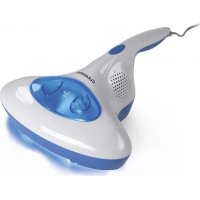
03406 - Vacuum Cleaner Cleanmaxx - Free user manual and instructions
Find the device manual for free 03406 Cleanmaxx in PDF.



| Product type | Anti-dust mite vacuum cleaner |
| Model | SV1801A (Ref. 03406) |
| Brand | Cleanmaxx |
| Power supply | 220-240 V ~ 50/60 Hz |
| Power consumption | 300 W |
| Protection class | II |
| Filter type | Washable HEPA |
| Dust bin capacity | Approx. 200 ml (estimate) |
| Main functions | Suction, germicidal UV-C lamp, vibrating head |
| Surfaces for use | Mattresses, sheets, duvets, upholstered furniture |
| Safety | Automatic shut-off of UV-C lamp if the device is lifted; two safety switches |
| Filter maintenance | Clean by tapping or rinsing under cold water; dry completely before reassembly |
| Filter replacement frequency | Every 12 to 18 months |
| UV-C lamp replacement frequency | Every 12 to 24 months |
| Dust bin cleaning | After each use |
| Power cord length | Approx. 5 m (estimate) |
| Weight | Approx. 2 kg (estimate) |
| Dimensions (L x W x H) | Approx. 30 x 20 x 15 cm (estimate) |
| Color | White/gray (estimate) |
Frequently Asked Questions - 03406 Cleanmaxx
User questions about 03406 Cleanmaxx
0 question about this device. Answer the ones you know or ask your own.
Ask a new question about this device
Download the instructions for your Vacuum Cleaner in PDF format for free! Find your manual 03406 - Cleanmaxx and take your electronic device back in hand. On this page are published all the documents necessary for the use of your device. 03406 by Cleanmaxx.
USER MANUAL 03406 Cleanmaxx
natural_image
Hand using a cleaner on a white fabric surface (no visible text or symbols)03406
DE
Gebrauchsanleitung
ab Seite 3
EN
Operating instructions
starting on page 12
FR
Mode d'emploi
Safety Instructions 13
Items Supplied 15
Device Overview 16
Safety Devices 16
Tips and Notes 17
Use 17
Cleaning and Storage 17
Troubleshooting 18
Technical Data 19
Disposal 19
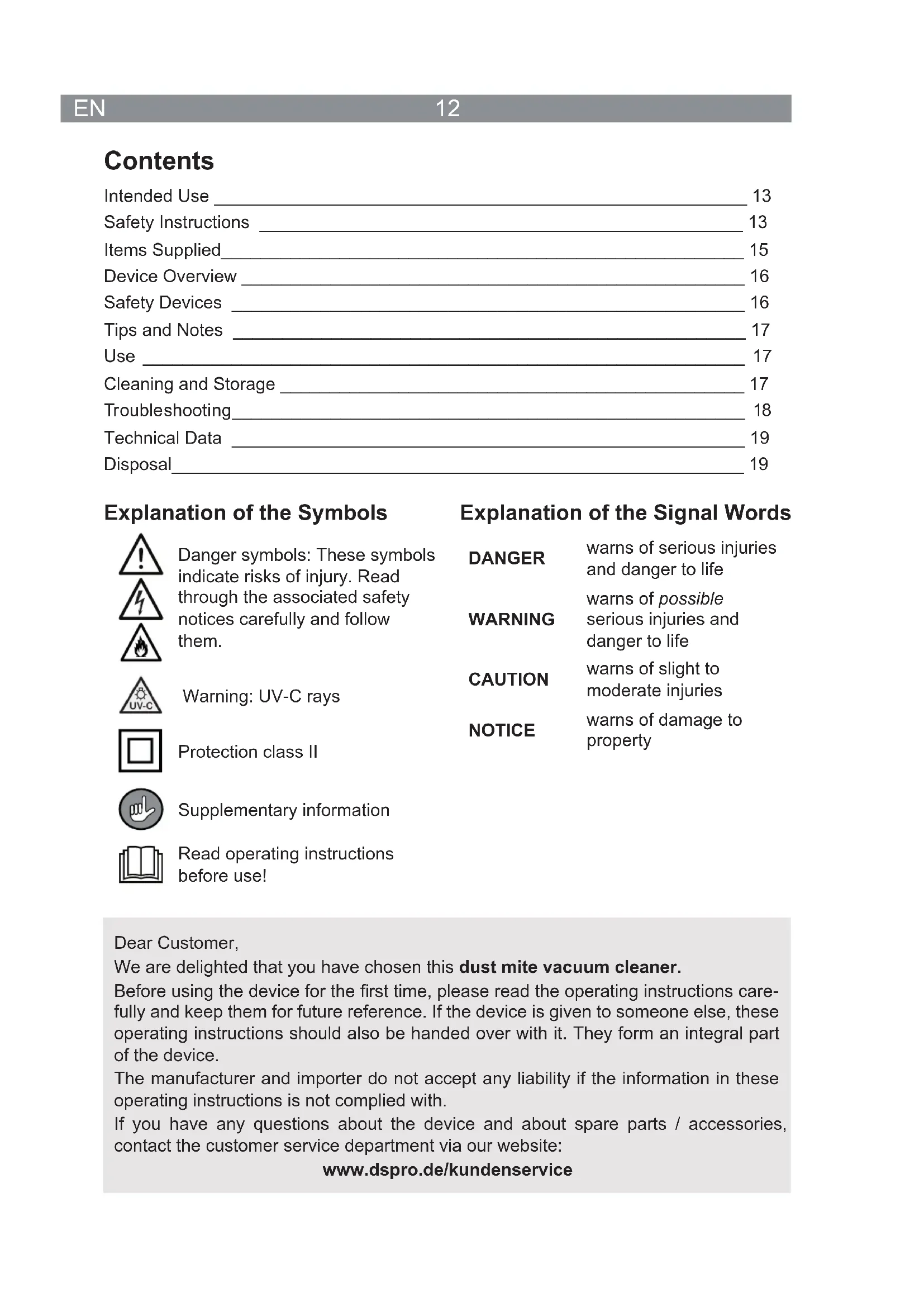
Explanation of the Symbols


Danger symbols: These symbols indicate risks of injury. Read through the associated safety notices carefully and follow them.
Warning: UV-C rays
Protection class II

Supplementary information

Read operating instructions before use!
Explanation of the Signal Words
DANGER
warns of serious injuries and danger to life
WARNING
warns of possible
serious injuries and danger to life
CAUTION
warns of slight to moderate injuries
NOTICE
warns of damage to property
Dear Customer,
We are delighted that you have chosen this dust mite vacuum cleaner.
Before using the device for the first time, please read the operating instructions carefully and keep them for future reference. If the device is given to someone else, these operating instructions should also be handed over with it. They form an integral part of the device.
The manufacturer and importer do not accept any liability if the information in these operating instructions is not complied with.
If you have any questions about the device and about spare parts / accessories, contact the customer service department via our website:
- This device is intended to be used to kill off bacteria and remove dust, germs and domestic dust mites. It is suitable for use on mattresses, bed sheets, bed covers, upholstered furniture and similar items.

On no account should the device be used to suck up the following:
– liquids or wet substances (e. g. wet carpet shampoo)
– glowing ash, cigarette ends, matches, etc.
- i n fl ammable or explosive substances
– very fine dust (e. g. concrete dust), ash or toner
- pointed, hard objects such as large pieces of broken glass
- The device is for personal use only and is not intended for commercial applications.
- The device should only be used as described in these operating instructions. Any other use is deemed to be improper.
- The following are excluded from the warranty: all defects caused by improper handling, damage or unauthorised attempts at repair. This also applies to normal wear and tear.
Safety Instructions

WARNING: Read all safety notices, instructions, illustrations and technical data provided with this device. Failure to follow the safety notices and instructions may result in electric shock, fire and / or injuries.
This device must not be used by children. The device and the connection are to be kept away from children.
This device may be used by people with reduced physical, sensory or mental abilities or a lack of experience and / or knowledge if they are supervised or have received instruction on how to use the device safely and have understood the dangers resulting from this. Children must not play with the device.
- The device must always be disconnected from the mains power when it is left unattended and before assembling, disassembling or cleaning the device.
- Never immerse the device or the connection in water or other liquids and ensure that they cannot fall into water or become wet.
In the interest of your own safety, you should inspect the device for damage each time before you use it. The device may only be used if it has no visible signs of damage! If the device or the connection of the device is damaged, it must be replaced by the manufacturer, customer service department or a similarly qualified person (e.g. specialist workshop) in order to avoid any hazards.

DANGER – Danger of Electric Shock!
■ Use and store only in closed rooms.
- Do not use the device in rooms with high humidity.
- Should the device fall into water, switch off the power supply immediately. Do not attempt to pull the device out of the water while it is still connected to the mains power!
- Never touch the device or the connection with wet hands when these components are connected to the mains power.
- Never suck up liquids. Do not pour liquids into the dust container. Keep the motor unit away from moisture or wet conditions!

WARNING – Danger of damage to the eyes and skin!
Germicidal ultraviolet rays are harmful to the eyes and skin. Never expose yourself or other people and animals to direct or reflected rays! If you come into contact with the rays, consult a doctor immediately.
■ Make sure that the safety switches of the UV-C lamp are not blocked!

WARNING – Danger of Injury!
- Danger of suffocation! Keep children and animals away from the packaging material.
- Danger of strangulation! Make sure that the mains cable is always kept out of the reach of small children and animals.
- Danger of becoming stuck! Keep animals, hair, jewellery, wide clothing, fingers and all other body parts away from the suction opening of the device. They could become stuck to the device. Should the vacuum become stuck, switch the device off immediately.
- Danger of tripping! Make sure that the connected mains cable does not present a trip hazard.

WARNING – Danger of Fire!
- Do not use the device in rooms containing easily ignitable substances or poisonous and explosive fumes.
- Do not cover the device during operation in order to prevent it from catching fire. Do not insert anything into the openings of the device and make sure that these and the ventilation slots at the sides do not become clogged or covered up.
NOTICE – Risk of Damage to Material and Property
- Only connect the device to a socket that is properly installed and matches the technical data of the device. The socket must also be readily accessible after connection so that the connection to the mains can quickly be isolated.
■ Make sure that the connection not squashed, bent or laid over sharp edges and does not come into contact with hot surfaces. Do not wrap the connection around the device (danger of the cable breaking).
15 EN
■ Switch off the device and pull the mains plug out of the plug socket:
-in the event of a thunderstorm,
– in the event of damage / faults (e.g. unusual noises, odour or smoke development)
-if liquids have been sucked up,
-if the device has been dropped.
Have the device checked by an expert before it is used again.
■ The device must be switched off when inserting or removing the mains plug.
- Never pull or carry the device by the mains cable. Always pull the mains plug and never the mains cable to disconnect the device from the mains power.
- Protect the device from heat, naked flames, sub-zero temperatures, persistent moisture, wet conditions and impacts.
- Do not try to lubricate the rollers with lubricant or oil. This would cause dust and dirt to increasingly adhere to the rollers.
- Use only original spare parts from the manufacturer in order to guarantee that there is no interference that may prevent the device from working and to avoid damage.
- Do not place or lay any heavy objects on the device or the connection.
Items Supplied
- Motor unit
- Dust container
- HEPA fi Iter
- UV-C lamp
- Operating instructions
Check the items supplied for completeness and any transport damage. If you find any damage to the components, do not use them, but contact our customer service department.

Possible dirt residues in the dust container can be attributed to quality checks and do not constitute a defect with the device.
Device Overview
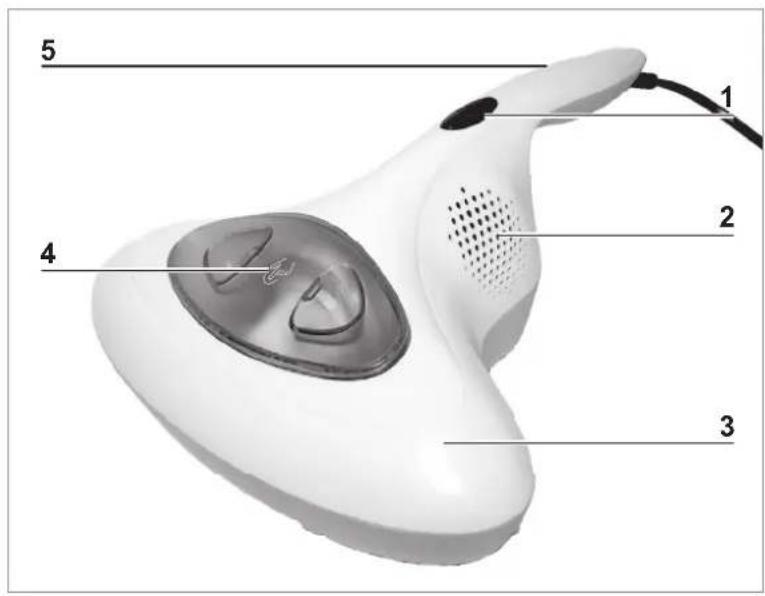
text_image
5 1 2 4 31 On / Off switch
2 Ventilation slots
3 Motor unit
4 Dust container
5 Handle
6 Roller
7 Suction opening
8 UV-C lamp cover
9 Safety switch, right
10 Vibration head
11 UV-C lamp (under the cover)
12 Safety switch, left
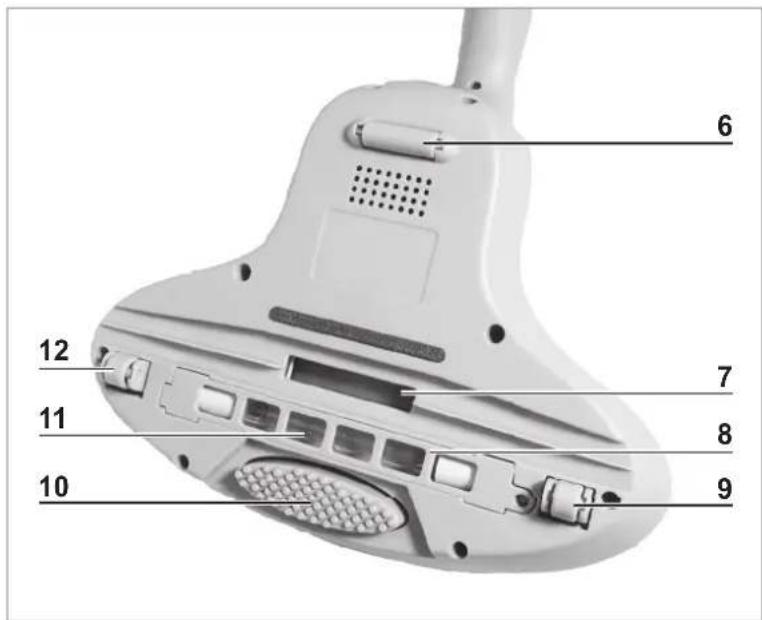
text_image
6 12 7 11 8 10 9Safety Devices
The device has two safety switches (9, 12). The UV-C lamp (11) only switches on if both safety switches are pressed into the motor unit (3) (automatic switch-off function of the UV-C lamp deactivated). This happens automatically when the device is placed on a flat surface. If the safety switches lose contact with the surface below, the automatic switch-off function is activated and the UV-C lamp stops being lit (automatic switch-off function of the UV-C lamp activated).
Tips and Notes

• Always clean mattresses on both sides.
- We recommend cleaning new mattresses once a month. Older mattresses should initially be cleaned every day for a week. We then recommend cleaning them once a month.
- The filter should be replaced every 12 – 18 months; the UV-C lamp (11) should be replaced every 12 – 24 months. If you have any questions about spare parts, please contact the customer service department via our website: www.dspro.de/kundenservice
Use

PLEASE NOTE!
The device should only be used if it has been completely and correctly assembled! The dust container and the filter must be inserted and must not be damaged. If the dirt were to get inside the motor unit, this could damage the motor.
■ Make sure that the safety switches of the UV-C lamp are not blocked!
- Insert the mains plug into a properly installed plug socket that is easily accessible.
- Place the device down fl at on the surface which is to be cleaned.
- Press the On / Off switch (1) to switch on the device. The device starts to vacuum and the UV-C lamp (11) and the vibration head (10) switches on.

The vibration shakes up the surface which is to be cleaned and the dust which is agitated is sucked in through the suction opening (7).
- Guide the device very slowly and evenly over the surface to be cleaned.
- After vacuuming, press the On / Off switch to switch off the device.
- Remove the mains plug from the plug socket.
Cleaning and Storage

PLEASE NOTE!
■ Empty the dust container each time after you use the device. The filter must also be regularly cleaned in order to prevent overloading of the motor.
- Do not use any sharp or abrasive cleaning agents or cleaning pads to clean the device. These can damage the surface.
- Make sure that the mains plug has been pulled out and the device is disconnected from the power.
- As required, wipe down the motor unit with a damp soft cloth. Then dry it with a soft cloth.
- Wipe out the recess for the dust container (4) with a duster.
- Store the device in a dry, cool place that is not accessible to children and animals.
Cleaning the Dust Container and HEPA Filter
- Press onto the dust container (4) to unlock it.
- Reach into the recess in the dust container and pull it up and out of the motor unit (3).
- Reach into the opening and pull the HEPA-filter out of the dust container.
- Empty the dust container.
- Wipe out the dust container with a dry duster if necessary.
- Tap out the HEPA-filter and clean it with a soft brush if necessary. Please note: For thorough cleaning the filter can be rinsed under cold (!) running water.
NOTICE: Allow the HEPA-filter to dry completely before the device is reassembled.
- Insert the HEPA-fi Iter into the dust container.
- Insert the dust container into the motor unit. It must audibly click into place.
Cleaning the UV-C Lamp

PLEASE NOTE!
■ CAUTION – Danger of Burns! The UV-C lamp will become hot during use. Allow the UV-C lamp to cool sufficiently after using the device.
- Undo the two screws on the cover (8) of the UV-C lamp (11) and take off the cover.
- Wipe down the UV-C lamp with a dry duster. NOTE: Make sure that you do not touch the UV-C lamp with your fingers!
- Place the cover back on and fix it in place with the two screws.
Troubleshooting
If the device does not work properly, first check whether you are able to rectify the problem yourself. If the problem cannot be solved with the steps that are listed, contact the customer service department.

Do not attempt to repair a electrical device yourself!
| Problem Possible cause / solution / tips | |
| The device generates no suction. | Is the mains plug inserted in the socket correctly? Correct the fit of the mains plug.Is the plug socket defective? Try another socket.Check the fuse of the mains connection.Is the device switched on? Press the On / Off switch (1). |
| Low suction force. | Is the dust container (4) too full? Empty the dust container.Is the filter heavily clogged up? Clean the filter.Is the suction opening (7) blocked? Switch off the device, pull the mains plug out of the plug socket and remove the blockage. |
| The UV-C lamp (11) does not light up. | · The automatic switch-off function of the UV-C lamp has been activated. Check the safety switches (see the “Safety Devices” chapter).· The automatic switch-off function has not been activated. The UV-C lamp or the device is defective. Contact our customer service department. |
| During vacuum cleaning, an unpleasant smell is detected. | · Is the device being used for the fi rst time? A smell often develops when new devices are fi rst used. The smell should disappear once the device has been used several times.· Has the device already been used frequently? The device is defective. Switch off the device, pull the mains plug out of the plug socket and contact the customer service department. |
Technical Data
Model number: SV1801A
Article number: 03406
Voltage supply: 220 – 240 V \~ 50 / 60 Hz
Power: 300 W
Protection class: II
ID operating instructions: Z 03406 M DS V1 0419

Disposal

PLEASE NOTE!
The UV-C lamp should be removed prior to disposal of the device and disposed of separately from the device. Notes on how to remove the UV-C lamp can be found in the “Cleaning and Storage” chapter – “Cleaning the UV-C Lamp”.

Dispose of the packaging material in an environmentally friendly manner so that it can be recycled.
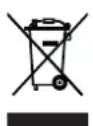
This device is governed by the European Directive 2012/19/EU on waste electrical and electronic equipment (WEEE). Do not dispose of this device as normal domestic waste, but rather in an environmentally friendly manner via an officially approved waste disposal company.
Customer Service / Importer:
DS Produkte GmbH
Tel.: +49 38851 314650 (Calls to German landlines are subject to your provider's charges.)
All rights reserved.