CL520 - Keyboard Nacon - Free user manual and instructions
Find the device manual for free CL520 Nacon in PDF.


| Product type | Mechanical keyboard |
| Brand | Nacon |
| Model | CL520 |
| Dimensions (L x W x H) | 449 x 138 x 19 mm |
| Cable length | 180 cm |
| Power supply | 5V / 300 mA via USB |
| System compatibility | Windows 7/8/10 (Plug & Play) |
| Switch type | Outemu Red (linear) |
| Backlighting | RGB (Red, Green, Blue) with effects |
| Dedicated keys | Multimedia (play, next/previous track), calculator, search, computer |
| Volume control | Wheel (volume, mute, backlighting in RGB mode) |
| Windows lock | Yes (Fn + Windows) |
| Removable feet | Yes |
| Macro creation | Yes via dedicated software (www.nacongaming.com) |
| Care and cleaning | Soft, clean, damp cloth; no detergents |
| Maximum operating temperature | 35 °C |
| Usage | Indoors only, avoid moisture and dust |
| Warranty | 2 years (subject to proof of purchase) |
Frequently Asked Questions - CL520 Nacon
User questions about CL520 Nacon
0 question about this device. Answer the ones you know or ask your own.
Ask a new question about this device
Download the instructions for your Keyboard in PDF format for free! Find your manual CL520 - Nacon and take your electronic device back in hand. On this page are published all the documents necessary for the use of your device. CL520 by Nacon.
USER MANUAL CL520 Nacon
Thank you for purchasing this NACON® product.
This product has been designed to enhance your gaming experience. Please keep this user manual in a safe place for future reference.
Warranty
This NACON® branded product is guaranteed by the manufacturer for a period of 2 years from the date of purchase. In the event of a material or manufacturing defect during this period, the product will be replaced free of charge with the same model or a similar article, at our sole and absolute discretion.
Please keep your proof of purchase in a safe place for the entire term of the warranty, as you will need it to make any claim or request regarding the warranty. Without this document, we will not be able to process your request. For all home purchases (mail order and internet sales), please keep the original packaging.
This warranty does not cover defects resulting from accidental damage, improper use or normal wear and tear. These provisions do not affect your statutory rights.
To open the declaration of conformity, please go to:
www.nacongaming.com/my-nacon/support/
Product features
Plug'n'play USB connection compatible with Windows 7/8/10
RGB (Red, Green, Blue) backlighting
Dedicated multimedia keys
Volume control knob
Windows lock key
Outemu Red switches
Removable feet
26 anti-ghosting keys
Package contents
1 gaming keyboard
1 Quick IB
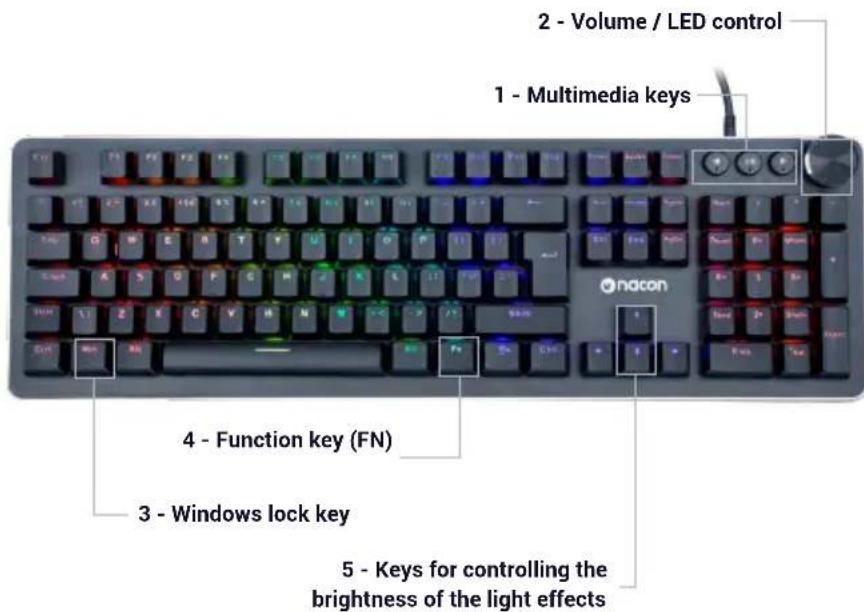
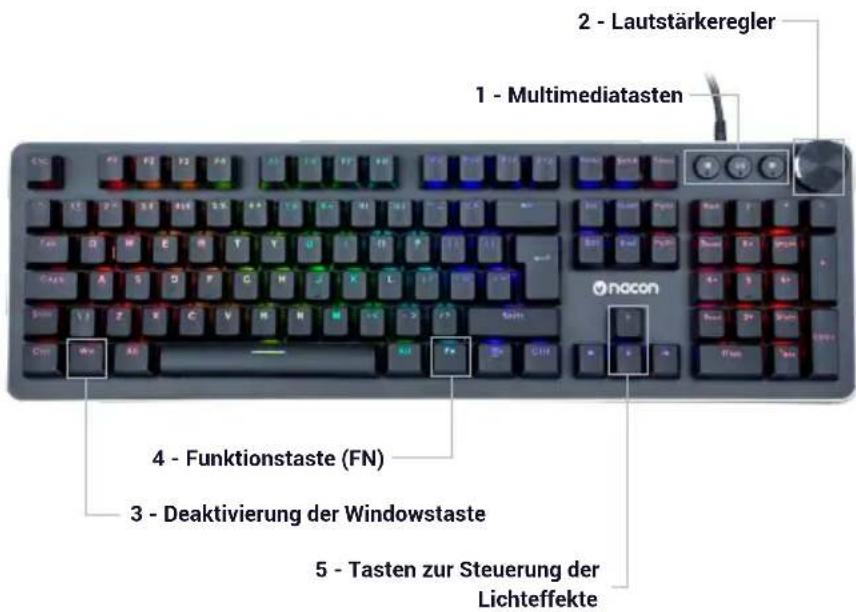
Control elements
Connecting to a PC (first time)
The NACON CL 520 gaming keyboard is a Plug'n'Play device. In other words, the driver will be installed automatically when you connect it to the PC for the first time. Here is the procedure in detail.
- Turn on your computer and wait for it to start. Then log in to access your Windows desktop.
- Connect the NACON CL 520 keyboard by connecting the USB cable to a free USB port on your PC.
- Windows will then detect the new device and the driver installation process will start a few seconds later (a small icon will appear in the taskbar).
- The duration of the installation depends on the speed of your system. When the installation is complete, the icon will change. You can now use your keyboard.
Windows™ lock (Winlock) key
By default, when you press the Windows key (3), the Start menu is displayed on the screen. If you are playing and accidentally press this button, you will unexpectedly quit your game. To avoid this problem, you can deactivate this function by pressing the [Fn]+Windows (3) keys to deactivate the Windows key.
LED control
You can change the brightness of the effect by simultaneously pressing [Fn] + up or down arrow keys.
You can also use the wheel to control the effects and the light intensity.
-Hold the wheel down for 3 seconds to enter the backlighting management mode.
- Turn the wheel to increase or decrease the brightness of the backlighting.
-A short press of the wheel changes the light effects of the keyboard.
-Hold the wheel down for 3 seconds to go back to the volume mode.
The backlighting effects settings can be configured using the software (available on the www.naongaming.com website).
Volume management
The wheel increases or decreases the volume of the computer. A short press on the wheel mutes the sound.
Creating a macro
Using the software (available on the www.naongaming.com website), you can create your profiles and macros at will with the macro menu.
FN + F3 = calculator
FN + F4 = media player
FN + F5 = previous track
FN + F6= next track
FN+F7=play/pause
FN + F8 = stop
FN + F9 = Mute
FN + F10 = Volume -
FN + F11 = Volume +
FN + Win = Windows key lock
FN + up or down arrow = increases or decreases the backlighting
Recycling
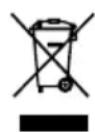
Do not dispose of this product with the household waste.
Dispose of your old electrical appliance at a suitable collection centre. Recycling is important and helps protect the
environment by reducing waste. EU and Turkey only.
Important precautions
1/ This product is designed for indoor use only. Do not expose it to direct sunlight or bad weather.
2/ Do not expose the product to splashes, rain, drips or moisture. Do not immerse it in a liquid.
3/ Do not expose to dust, high levels of humidity, extreme temperatures or mechanical shocks.
4/ Do not use and do not open if the equipment is damaged. Do not attempt to repair it.
5/ When cleaning the outside, only use a soft, clean and damp cloth. Detergents can damage the finish and get inside the product.
6/ Do not carry the product while holding it by the cable.
7/ This product is not designed for people (including children) suffering from a physical, sensory or mental handicap, or for users without the necessary and relevant experience or knowledge (unless they have been given advice and instructions on how to use the device from a person responsible for the user).
Do not leave the product unattended, do not leave this product within the reach of children. Not suitable for children under 7 (the cable can get wrapped around the neck).
8/ The maximum operating temperature must not exceed 35^
Ergonomics
Keeping your hand in the same position for a prolonged period of time can result in pain. If this happens repeatedly, please consult your doctor.
As a precaution, take a 15-minute break every hour.
Technical specifications
Dimensions: 449× 138× 19mm
Cable length: 180 cm
Consumption: 5V = 300mA
DC power supply
Technical support
Email: support@naongaming.com
Website: www.naongaming.com
Legal Notices
Windows™ 7/8/10 are registered trademarks of Microsoft Corporation.

nacon
WWW.NACONGAMING.COM

@NaconGaming

laongaming

on International

nacon
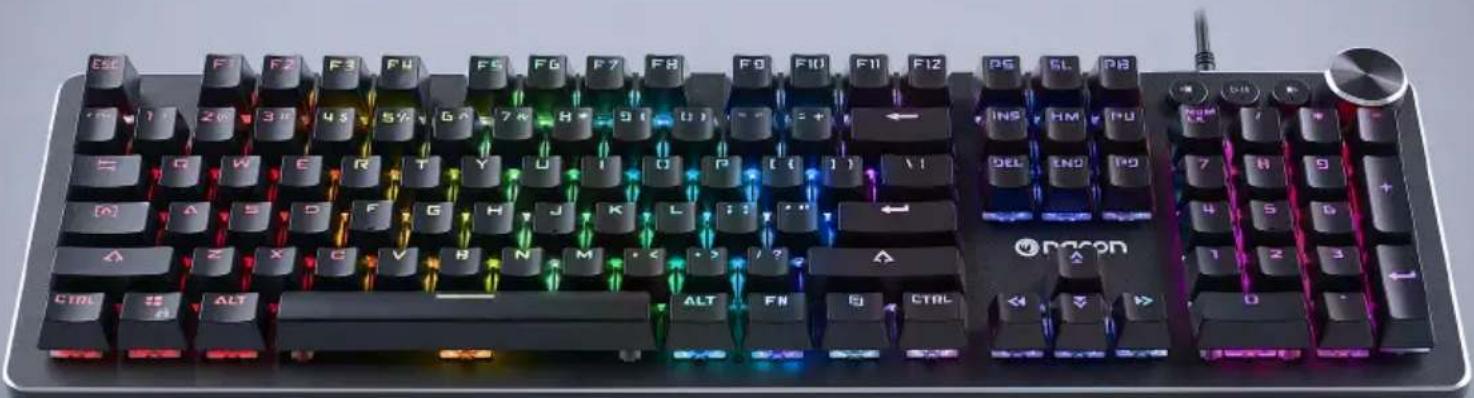
CL-520
MECHANICAL KEYBOARD
CLAVIER MÉCANIQUE
WINDOWS™Compatible
NC5145/PCCL-520


Nacon, 396-466 Rue de la Voyette, CRT2 59273 Fretin, France
2020 Nacon 852 538 461 R.C.S. Lille Métropole - 59814 Lesquin Cedex.
26 touches anti-ghosting
FN + F7 = lecture/pause
FN+F8=stop
FN + F9 = Mute
FN + F10 = Volume -
FN + F11 = Volume +
FN + Win = verrouillage touche Windows
Informations relatives au support technique
Email: support.be@naongaming.com
Site Internet: www.naongaming.com
Adresse: Bigben Interactive Belgium s.a./n.v. Waterloo Office Park / Bâtiment H Drève Richelle 161 bte 15, 1410 Waterloo, Belgium
I Mentions légales
www.naongaming.com/de/my-nacon/support/
Produktmerkmale
26 Anti-Ghosting-Tasten
Verpackungsinhalt
1 Gaming-Tastatur CL-520
1 Kurzanleitung
1 Steuerelemente
Email: support.de@nacongaming.com
Website: www.naongaming.com/de
Tel.: 02271-9047997
www.nacongaming.com/my-nacon/support/
26 anti-ghosting-toetsen
Website: www.naongaming.com
Email: support.nl@nacongaming.com
In Belgie:
Bigben Interactive Belgium s.a./n.v. Waterloo Office Park / Bâtiment H Drève Richelle
161 bte 15, 1410 Waterloo, Belgium
Site Internet: www.naongaming.com
Email: support.be@nacongaming.com
www.naongaming.com/it/my-nacon/supporto/
26 tasti anti-ghosting
Website: www.naongaming.com
Email: support.it@naongaming.com