EGSSWS3F01 - Smart Home EnerGenie - Free user manual and instructions
Find the device manual for free EGSSWS3F01 EnerGenie in PDF.


| Product Type | Wireless smart plug set, 3 channels, French plugs, 16 A |
| Input Voltage | 230 VAC, 50 Hz |
| Maximum Current | 16 A |
| Maximum Power | 3680 W |
| Remote Control Frequency | RF 433 MHz |
| Remote Control Range | Up to 30 meters |
| Remote Control Power Supply | 1 alkaline battery 23A 12 V DC |
| Dimensions (L x W x H) | 163 x 60 x 130 mm |
| Net Weight | 0.46 kg |
| Child Safety | Integrated safety shutters |
| Number of Controlled Outlets | 3 |
| Remote Control Functions | Individual On/Off, All On/All Off |
| Manual Control | On/Off button on each outlet |
| Battery Type | 23A 12 V DC (included) |
| Operating Temperature | 0 °C to 40 °C |
| Operating Humidity | 5% to 85% non-condensing |
| Care and Cleaning | Unplug before cleaning; use a dry cloth |
| Spare Parts and Repairability | Replaceable batteries; no user-serviceable parts |
| Warranty | 24 months |
Frequently Asked Questions - EGSSWS3F01 EnerGenie
User questions about EGSSWS3F01 EnerGenie
0 question about this device. Answer the ones you know or ask your own.
Ask a new question about this device
Download the instructions for your Smart Home in PDF format for free! Find your manual EGSSWS3F01 - EnerGenie and take your electronic device back in hand. On this page are published all the documents necessary for the use of your device. EGSSWS3F01 by EnerGenie.
USER MANUAL EGSSWS3F01 EnerGenie
natural_image
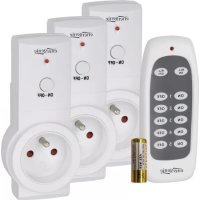
Product display of multiple electric shock absorbers with control buttons and a battery (no visible text or symbols)EG-SSWS3F-01
SMART SWITCHING WIRELESS SOCKET
SET, 3 CHANNEL, FRENCH SOCKETS, 16 A
USER MANUAL
HANDBUCH
HANDLEIDING
MANUEL DESCRIPTIF
Smart switching wireless socket set, 3 channel, French sockets, 16 A
• Smart switching socket set: 3 wireless remote controlled 16 A sockets
• RF 433 MHz remote control up to 30 meters or manual switch button
- Child-safe shutter
Specifications
• Input voltage: 230 VAC, 50 Hz
• Maximum load: 16 A, 3680 W
- Remote control unit: 23A-type 12 VDC alkaline battery x 1 pc
• Dimensions: 163 x 60 x 130 mm
• Net weight: 0.46 kg



REMOTE CONTROLLER
- Install the provided battery in the remote control's battery compartment, making sure the polarity of the battery is correct.
- Plug a receiver socket in wall power socket, then LED indicator will be lighted up. And LED flashes one time per second. If LED won't flash, please press and hold the ON-OFF button on the socket for 3 seconds until the LED indicator begins to flash. The socket is ready to be connected to the remoter.
- Press and hold the ON button you have chosen for 2 seconds on the remoter. The LED on the socket will begin to flash rapidly and then stop, the socket is connected successfully.
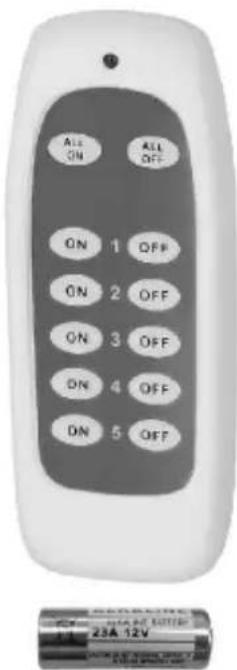
- Repeat above last two steps, choosing a different ON button on the remoter for each socket.
- To check that connection has been successful, press the relevant 'ON' and 'OFF' buttons; the LED on the socket will be switched on and off.
OPERATION
- Plug the device you want to remotely operate in a receiver.
- Press the relevant ON or OFF button on the remoter to operate the plug or
- Directly press ON-OFF button on the receiver to operate the receiver socket.
- Press ALL ON or ALL OFF button on the remoter to operate all of receiver sockets
HOW TO DECODE
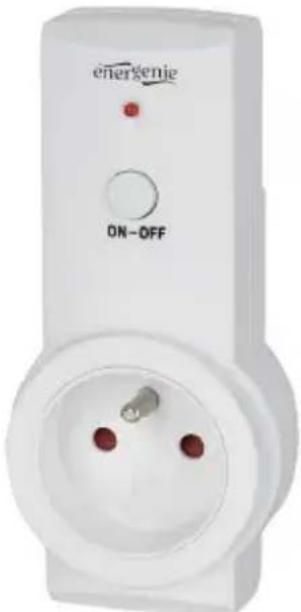
- Press ON-OFF button on receiver for 3 seconds.
After the LED flashes from quickly to once per second, decoding is successful.
- Press ALL OFF switch on remoter for 3 seconds. After the LED flashes from quickly to once per second, decoding is successful.
TROUBLE SHOOTING
If the socket does not respond to the remoter operation, it can be due to:
- Low battery on the remote – Replace it.
• Distance too large between the remoter and the receiver. - The pressing time on buttons must be at least 2 seconds.
| (ENG) Declaration of conformityThis product is tested and complies with the essential requirements of the laws of member states concerning EMC(2014/30/EU), RoHS (2011/65/EU). The CE declaration can be found underwww.gembird.eu | (NL/BE) Verklaring van overeenstemmingDit product is getest en voldoet aan alle geldende nationale en Europese richtlijnen en regelgeving met betrekking tot EMC(2014/30/EU), RoHS (2011/65/EU). Dit product heeft een CE-markering en de bijbehorende CE-verklaring van overeenstemming is beschikbaar op onze website:www.gembird.eu |
| (FR/BE) Déclaration de conformitéLe produit est contrôlé et rempli les exigences des directives nationales et de la directive EMC(2014/30/EU), RoHS (2011/65/EU). La conformité CE a été démontrée et les déclarations correspondantes sont déposées chez le fabricant a:www.gembird.eu | (DE) KonformitätserklärungDieses Produkt wurde getestet und stimmt mit den grundlegenden Anforderungen der Richtlinie EMC(2014/30/EU), RoHS (2011/65/EU) überein. Die Konformitätserklärung kann auf unserer Webseitewww.gembird.euheruntergeladen werden. |
| Deklaracja zgodnościTen produkt został przetestowany i jest zgodny z zasadniczymi wymaganiami przepisów ustawowych państw członkowskich dotyczących EMC(2014/30/EU), RoHS (2011/65/EU). Deklaracja CE znajduje się pod adresemwww.gembird.eu | |

All brands and logos are registered trademarks of their respective owners
| Waste disposal:[IMAGE]Do not deposit this equipment with the household waste. Improper disposal can harm both the environment and human health. For Information about waste collection facilities for used electrical and electronic devices, please contact your city council or an authorized company for the disposal of electrical and electronic equipment. | Entsorgungshinweise:   Werfen Sie dieses Gerät nicht in den Hausmüll. Unsachgemäße Entsorgung kann sowohl der Umwelt als auch der menschlichen Gesundheit schaden.Informationen zu Sammelstellen für Altgeräte erhalten Sie bei Ihrer Stadtverwaltung oder einer autorisierten Stelle für die Entsorgung von Elektro-und Elektronikgeräten. Werfen Sie dieses Gerät nicht in den Hausmüll. Unsachgemäße Entsorgung kann sowohl der Umwelt als auch der menschlichen Gesundheit schaden.Informationen zu Sammelstellen für Altgeräte erhalten Sie bei Ihrer Stadtverwaltung oder einer autorisierten Stelle für die Entsorgung von Elektro-und Elektronikgeräten. |
| Richtlijnen m.b.t. afvalverwerking[IMAGE]Batterijen en accu’s dienen als klein-chemisch afval afgeleverd te worden bij toegewezen afvalverzamelpunten (zie www.afvalgids.nl). U dient ervoor te zorgen dat de batterijen/accu’s leeg zijn en dus geen stroom meer kunnen leveren. Let op, de batterijen/accu’s dienen onbeschadigd ingeleverd te worden. Gooi dit product niet weg in uw vuilnisbak. Dit kan zowel het milieu als de menselijke gezondheid schade toebrengen. Informatie over het inleveren van dit product kunt u inwinnen bij uw gemeentelijke vuilnisdienst of andere geautoriseerde instelling in uw buurt. | Traitement des déchets: Ne jetez pas cet appareil dans les déchets domestiques. Un traitement inapproprié peut être dommageable à l’environnement et à la santé humain.Vous trouvez des informations sur les centres de rassemblement des appareils vieux chez l’administration municipale ouchez un centre autorisé pour le traitement des appareils électriques ou électroniques. Ne jetez pas cet appareil dans les déchets domestiques. Un traitement inapproprié peut être dommageable à l’environnement et à la santé humain.Vous trouvez des informations sur les centres de rassemblement des appareils vieux chez l’administration municipale ouchez un centre autorisé pour le traitement des appareils électriques ou électroniques. |
SYMBOL WEEE – objaśnienie  Nie wyrzucać tego urządzenia z odpadami komunalnymi( to nie jest odpad domowy ). Niewłaściwa utylizacje może zaszkodzić zarówno środowisku i zdrowiu ludzkiemu. Aby uzyskać informacje o punktach zbiórki odpadów dla używanych urządzeń elektrycznych i elektronicznych, prosimy skontaktować się z Urzędem Miejskim w Twojej gminie lub autoryzowaną firmą odpowiedzialną za utylizację sprzętu elektrycznego i elektronicznego. Nie wyrzucać tego urządzenia z odpadami komunalnymi( to nie jest odpad domowy ). Niewłaściwa utylizacje może zaszkodzić zarówno środowisku i zdrowiu ludzkiemu. Aby uzyskać informacje o punktach zbiórki odpadów dla używanych urządzeń elektrycznych i elektronicznych, prosimy skontaktować się z Urzędem Miejskim w Twojej gminie lub autoryzowaną firmą odpowiedzialną za utylizację sprzętu elektrycznego i elektronicznego. | |
All brands and logos are registered trademarks of their respective owners
| WARRANTY CONDITIONS | GARANTIE BEDINGUNGEN |
| The receipt must clearly list the date of purchase and the part number, in addition it should be printed. Keep the receipt for the entire warranty period since it is required for all warranty claims. During the warranty period the defective items will be credited, repaired or replaced at the manufacturer's expense. Work carried out under the warranty neither extends the warranty period nor starts a new warranty period. The manufacturer reserves the right to void any warranty claim for damages or defects due to misuse, abuse or external impact (falling down, impact, ingress of water, dust, contamination or break). Wearing parts (e.g. rechargeable batteries) are excluded from the warranty. Upon receipt of the RMA goods, Gembird Europe B.V. reserves the right to choose between replacement of defective goods or issuing a credit note. The credit note amount will always be calculated on the basis of the current market value of the defective products | Die Garantie beträgt 24 Monate ab Verkaufsdatum an den Endverbraucher. Das Kaufdatum und der Gerätetyp sind durch eine maschinell erstellte Kaufquittung zu belegen. Bitte bewahren Sie Ihren Kaufbeleg daher für die Dauer der Garantie auf, da er Voraussetzung für eine eventuelle Reklamation ist. Innerhalb der Garantiezeit werden alle Mängel, wahlweise durch den Hersteller entweder durch Instandsetzung, Austausch mangelhafter Teile oder im Austausch, behoben. Die Ausführung der Garantieleistung bewirkt weder eine Verlängerung noch einen Neubeginn der Garantiezeit.Eine Garantieleistung entfällt für Schäden oder Mängel die durch unsachgemäße Handhabung oder durch äußere Einwirkung (Sturz, Schlag, Wasser, Staub, Verschmutzung oder Bruch) herbeigeführt wurden. Verschleißteile (z.B. Akkus) sind von der Garantie ausgenommen. |
| Gembird Europe B.V.Wittevrouwen 56, 1358CD Almere, The Netherlandswww.gembird.nl/servicesupport@gmb.nl | GEMBIRD Deutschland GmbHCoesterweg 45, 59494 Soest, Deutschlandwww.gembird.deWenn Sie Hilfe im Umgang mit unseren Produkten benötigen, können Sie uns kostenlos via E-Mail ansupport@gembird.deoder über unser Hilfe-Forum erreichen:http://gembird-support.de/ |
| GARANTIE VOORWAARDEN | CONDITIONS DE GARANTIE |
| Op de aankoopbon moeten de aankoopdatum en productomschrijving duidelijk vermeld staan.Gelieve de aankoopbon de gehele garantieperiode te bewaren, deze is ten alle tijden benodigd voor alle garantie aanspraken.Tijdens de garantieperiode zullen alle gebreken verholpen of vervangen worden door de fabrikant d.m.v. reparatie, omruiling van het defecte onderdeel of het gehele apparaat. Aanspraken tijdens de garantieperiode leiden niet tot verlenging hiervan. Garantieaanspraak vervalt bij schade of gebreken die ontstaan zijn door oneigenlijk gebruik, misbruik of invloeden van buitenaf (vallen, stoten, water, stof, vuil of breken). Slijtagegevoelige onderdelen (b.v. batterijen) zijn uitgesloten van garantie. Bij ontvangst van de RMA goederen behoudt Gembird zich het recht om te kiezen tussen vervanging van de defecte waren of het uitgeven van een kreditnota. Het bedrag van de kreditnota zal altijd gecalculeerd zijn op basis van de huidige marktprijs voor het defecte produkt. | Le talon de garantie doit énumérer clairement la date d'achat et le type d'appareil.Conservez le reçu d'achat pendant toute la durée de la garantie car elle est nécessaire pour toute réclamation.Au cours de la période de garantie tous les défauts doivent être remplacé aux frais du fabricant, soit par la réparation ou la remplacement de la pièce défectueuse ou l'ensemble du produit.Les travaux effectués sous garantie ne prolongent pas la période de garantie ni ne commencent pas une nouvelle période de garantie.Le fabricant se réserve le droit d'annuler toute demande de garantie pour les dommages ou défauts dus à une mauvaise utilisation, abus ou les effets externes (chute, choc, pénétration de l'eau, la poussière, etc..).Les pièces d'usure (par exemple les piles rechargeables) sont exclus de la garantie.Dès réception de la marchandise sous garantie, le SAV de Gembird Europe BV se réserve le droit de choisir entre le remplacement des produits défectueux ou de délivrer un avoir.Le montant d'avoir sera toujours calculée sur la base de la valeur actuelle du marché des produits défectueux. |
| Gembird Europe B.V.Wittevrouwen 56, 1358CD Almere, The Netherlands www.gembird.nl/service helpdesk@gembird.nlTel: 0900-GEMBIRD(€ 0,25 p/m binnen Nederland, exclusief mobiele telefoonkosten) | Gembird Europe B.V.Wittevrouwen 561358CD Almere, The Netherlands www.gembird.nl/supportsupport@gmb.nl+33(0) 251 404849Prix d'appel depuis telephone fixe Pays-Bas : 0.15 euro / minPrix d'appel depuis telephone mobile / autre pays - selon operateur |
ГАРАНТИЙНЫЙ ТАЛОН
Brand : EnerGenie
Model : EGSSWS3F01
Category : Smart Home