KM0670 - Earphones Krüger&Matz - Free user manual and instructions
Find the device manual for free KM0670 Krüger&Matz in PDF.



| Product type | Over-ear headphones |
| Brand | Krüger&Matz |
| Model | KM0670 |
| Connectivity | Bluetooth 4.0, wired AUX 3.5 mm |
| Speakers | 40 mm, neodymium magnet |
| Frequency range | 20 Hz – 20 kHz |
| Impedance | 32 Ω |
| Sensitivity | 95 dB ±3 dB |
| Active noise cancellation (ANC) | Yes, up to -15 dB (50-500 Hz) |
| Microphone | Built-in, sensitivity -42 dB ±3 dB |
| Music playback time | Up to 11 hours |
| Standby time | Up to 1000 hours |
| Battery | Lithium-ion 360 mAh |
| Power input | 5 V, 220 mA via micro USB |
| Ports | Micro USB (charging), gold-plated AUX 3.5 mm |
| AUX cable length | 120 cm, TPE |
| Material | Walnut wood |
| Weight | Approximately 200 g (estimate) |
| Care and cleaning | Damp cloth (water), no chemicals |
| Safety | Moderate volume, do not use in traffic |
| Repairability | Refer to authorized service |
Frequently Asked Questions - KM0670 Krüger&Matz
User questions about KM0670 Krüger&Matz
0 question about this device. Answer the ones you know or ask your own.
Ask a new question about this device
Download the instructions for your Earphones in PDF format for free! Find your manual KM0670 - Krüger&Matz and take your electronic device back in hand. On this page are published all the documents necessary for the use of your device. KM0670 by Krüger&Matz.
USER MANUAL KM0670 Krüger&Matz
Wireless headphones KM0670
Read the instruction manual before first use and keep it for future reference.
-
Minimize the volume on your audio device before connecting the headphones in order to avoid hearing damage from sudden exposure to excessive volume. Keep the volume at a reasonable level throughout entire time of using the headphones. To prevent damage to your hearing, do not raise the volume too high.
-
Do not use the headphones in places where the inability to hear ambient sound presents a serious risk (such as at railroad crossings, train stations, construction sites or on roads where vehicles and bicycles are traveling). Never use the headphones while driving a car, riding a motorcycle or bicycle or operating any other vehicle, as it may cause potential risk to your safety.
-
Stop using the headphones if you feel a tinnitus, hearing discomfort, irritation or have other adverse reactions.
-
Do not attempt to repair this device yourself. In case of damage, contact with an authorized service point for check-up/repair.
-
Do not subject the headphones to strong impact.
-
Clean this device with soft, slightly damp cloth. Do not use any abrasives or chemical agents to clean this product.
-
Protect this product from moisture, humidity, water and any other liquid. Avoid using/storing it in extreme temperatures. Do not expose it to direct sunlight and sources of heat.
-
Never use this device if it is damaged.
-
Use only authorized accessories.
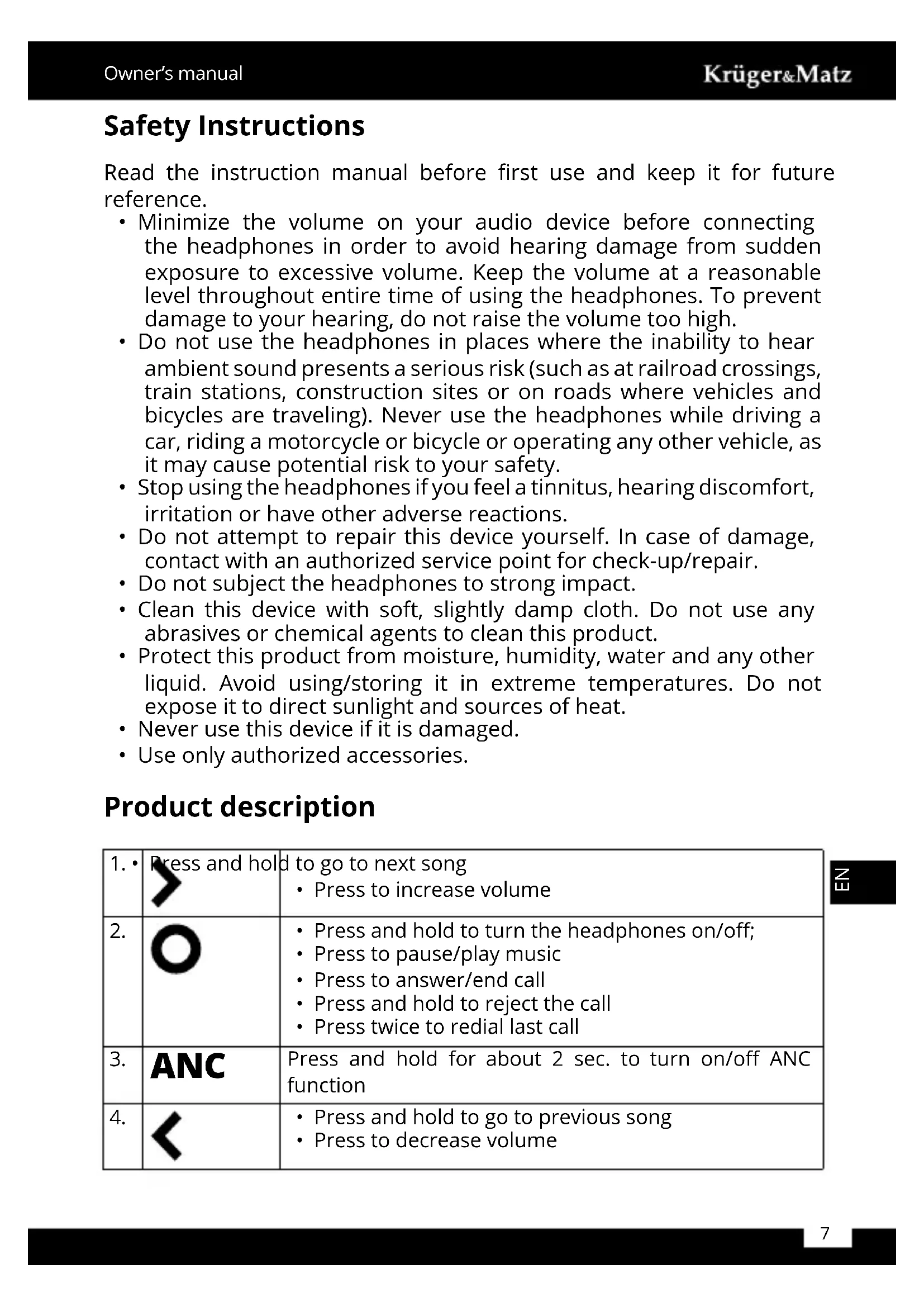
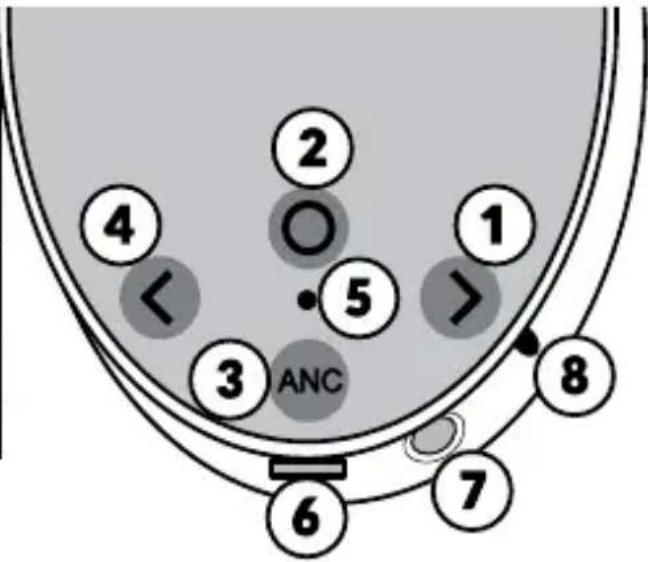
Product description
| 1. | Press and hold | to go to next song • Press to increase volume |
| 2. | O | • Press and hold to turn the headphones on/off; • Press to pause/play music • Press to answer/end call • Press and hold to reject the call • Press twice to redial last call |
| 3. | ANC | Press and hold for about 2 sec. to turn on/off ANC function |
| 4. | < | • Press and hold to go to previous song • Press to decrease volume |
| 5. LED indicator LED indicator • charging (red) • pairing / operation (blue) • ANC (green) | ||
| 6. Micro USB Micro USB port (charging) | ||
| 7. AUX input 3,5 m m input | ||
| 8. Microphone Micro microphone |
Bluetooth mode - Pairing
- Keep the devices in near distance (preferably within 1 meter).
- Press and hold the button to turn the headphones on, and wait a few seconds until blue light blinks; device enters Bluetooth pairing mode.
- Turn on the Bluetooth on your phone (or other device), and search for external devices.
- Pair with the headphones (KM 670). The headphones will issue a sound signifying successful pairing.
Note:
- When in Bluetooth mode, when there is an incoming call the headphones will switch to call automatically.
- Please note, playback time/talk time as well as Bluetooth range depends on various numerous factors, and my differ from the stated value.
Z
AUX mode
To enter AUX mode, just plug in the cable. The headphones will turn off and enter AUX mode automatically; then start the playback from the external device.
Note:
- the built-in microphone of the headphone will not work when under the AUX mode.
- playlist management and volume control in AUX mode are available only on the external device.
Charging
Connect the headphones to AC charger or a computer USB port. Red LED keeps lighting during charging. Once the charging is completed, the LED is off.
Note:
- use only original accessories to charge the headphones.
- charge the headphones at least once every 3 months to keep its battery in good condition.
- the headphone's battery must be charged in order to use them in Bluetooth mode. However, when using in AUX mode (without ANC function), the headphones will work even if the battery is empty.
ANC
- After turning the ANC function on, you may hear a slight hissing noise, this is normal and will cease after a few seconds.
- ANC function is only available if the headphones' battery is charged, even when using in AUX mode.
Specification
- Speaker size: 40 ~mm
- Magnet: neodymium
Frequency response: 20 Hz - 20kHz
Impedance: 32 Ω
S/N ratio: 90 dB - SPL (Sound pressure level): 95 dB ±3 dB
Nominal input power: 20mW
Maximum input power: 40mW
ANC (active noise cancellation) function
Over-15 dB noise reduction (in 50~500 Hz range) - Bluetooth: 4.0
- Bluetooth range: up to 10m
- Bluetooth profiles: HSP v1.2, HFP v1.3, A2PD v1.3, AVRCP v1.5, SPP v1.5
Built in microphone - Microphone sensitivity: -42 dB ± 3dB
Voice call management
- Playback time: up to 11 h
- Talk time: up to 11 h
- Standby time: up to 1000 h
- Ports: AUX-in (3,5 mm), micro USB (charging)
- Battery capacity: 360 mAh
- Power supply: 5 ~V, 220 ~mA
Wood: walnut
Plug: 3,5 mm, gold-plated
Cord: 120 cm, TPE
LEARN MORE
For more information on this product, go to www.krugermatz.com.
Visit www.krugermatz.com website for more products and accessories.
In case of any doubts or questions reach out to our Frequently Asked Questions section.
"The LECHPOL ELECTRONICS Sp. z o.o. Sp.k. company declares that product KM0670 is consistent with the essential requirements and other relevant provisions of directive 2014/53/UE. The proper declaration for download from www.lechpol.eu"
乙
English Correct Disposal of This Product (Waste Electrical & Electronic Equipment)



(Applicable in the European Union and other European countries with separate collection systems) This marking shown on the product or Its literature, indicates that It should not be disposed with other household wastes at the end of its working life. To prevent possible harm to the environment or human health from uncontrolled waste disposal, please separate this from other types of wastes and recycle it responsibly to promote the sustainable reuse of material resources. Household users should contact either the retailer where they purchased this product, or their local government office, for details of where and how they can take this item for environmentally safe recycling. Business users should contact their supplier and check the terms and conditions of the purchase contract. This product should not be mixed with other commercial wastes for disposal.
Made in China for LECHPOL ELECTRONICS Sp. z o.o. Sp.k., ul. Garwolinska 1, 08-400 Mietne.
Krüger&Matz is a registered trademark

Brand : Krüger&Matz
Model : KM0670
Category : Earphones