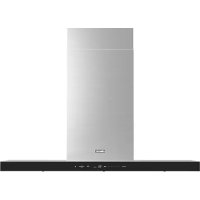
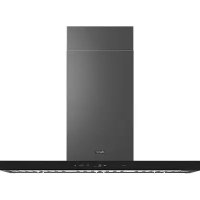
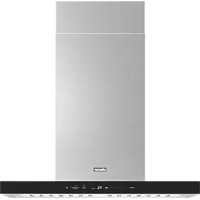
DHD48U990WSDA - Range hood Dacor - Free user manual and instructions
Find the device manual for free DHD48U990WSDA Dacor in PDF.



| Brand | Dacor |
| Model | DHD48U990WSDA |
| Product Type | Island or wall-mounted chimney range hood |
| Width | 48 inches (approx. 122 cm) |
| Approximate Weight | 32 kg (70 lb) |
| Power Supply | 120 V ~ 60 Hz, 15 A |
| Fan(s) | Dual fans (depending on configuration) |
| Maximum Airflow (Boost) | Up to 1200 CFM (dual fans) |
| Normal Airflow (High) | Up to 780 CFM (dual fans) |
| Fan Speeds | Low, Medium, High, Boost (10 min), Auto |
| Timer | Yes, adjustable from 0 to 99 minutes |
| Lighting | LED strip, 2 brightness levels |
| Bluetooth Connectivity | Yes, for pairing with compatible Dacor cooktop |
| ConnectOn Function | Automatic on/off with compatible cooktop |
| Automatic Heat Detection | Yes, adjusts speed based on heat |
| Filters | Metal grease filters, dishwasher safe |
| Filter Alarm | Yes, flashes after 50 hours of use |
| Material | Brushed stainless steel |
| Control | Touch button controls |
| Warranty | 2 years parts and labor (USA/Canada) |
Frequently Asked Questions - DHD48U990WSDA Dacor
User questions about DHD48U990WSDA Dacor
0 question about this device. Answer the ones you know or ask your own.
Ask a new question about this device
Download the instructions for your Range hood in PDF format for free! Find your manual DHD48U990WSDA - Dacor and take your electronic device back in hand. On this page are published all the documents necessary for the use of your device. DHD48U990WSDA by Dacor.
USER MANUAL DHD48U990WSDA Dacor
Pro-Canopy Wall Hood
Hotte murale Pro-Canopy
Campana de pared Pro-Canopy
DHD**U990C*/DA
Chimney Wall Hood
Important Information for Customer 3
Important Safety Information 4
Operations 7
Cooktop and hood connectivity 8
Care and Maintenance 10
Maintenance 10
Troubleshooting 12
Getting help 12
Warranty and Service 13
Installer
Leave these instructions with the owner.
Customer
Read this manual completely before using your Hood. Save the manual for reference.
For service and warranty information, see pg. 13
If you have any questions (other than warranty questions) call Dacor customer service.
WARNING
This indicates that death or serious injuries may occur as a result of non-observance of this warning.
CAUTION
This indicates that minor or moderate injuries may occur as a result of non-observance of this warning.
NOTE
This indicates that damage to the appliance or property may occur as a result of non-observance of this advisory.
WARNING
Use this unit only in the manner intended by the manufacturer. If you have questions, contact the manufacturer.
WARNING
- When cutting or drilling into wall or ceiling, do not damage electrical wiring and other hiding utilities.
- Ducted fans must always be vented to the outdoors.
INSTALLER: LEAVE THESE INSTRUCTIONS WITH THE APPLIANCE AFTER INSTALLATION IS COMPLETE.
When properly cared for, your new appliance has been designed to be safe and reliable. Read all instructions carefully before use. These precautions will reduce the risk of burns, electric shock, fire and injury to persons. When using kitchen appliances, basic safety precautions must be followed, including those in the following pages.
Proper Installation and Maintenance
WARNING
Remove all the tape and packaging before using the appliance. Destroy the packaging after unpacking the appliance. Never allow children to play with packaging material. This appliance is intended for normal family household use only. It is not approved for outdoor use. Refer to the Statement of Limited Warranty in this manual. If you have any questions, contact the manufacturer.
Do not store or use corrosive chemicals, vapors, fl ammables, or non-food products in or near this appliance. It is specifically designed for use when heating or cooking food. The use of corrosive chemicals in heating or cleaning will damage the appliance and could result in injury.
Do not operate this appliance if it is not working properly, or if it has been damaged. Contact an authorized servicer. Do not repair or replace any part of the appliance unless specifically recommended in this manual. Refer all servicing to a factory authorized service center.
CAUTION
Grease left on filters can melt and move into the vent.
WARNING
Hidden surfaces may have sharp edges. Use caution when reaching behind or under appliance.
Fire Safety
WARNING
Use this appliance only for its intended use as described in this manual.
Always have a working smoke detector near the kitchen. In the event that personal clothing or hair catches fi re, drop and roll immediately to extinguish fl ames. Have an appropriate fi re extinguisher available, nearby, highly visible and easily accessible near the appliance.
Smother fl ames from food fi res other than grease fi res with baking soda. Never use water on cooking fi res.
WARNING
TO REDUCE THE RISK OF INJURY TO PERSONS IN THE EVENT OF A RANGE TOP GREASE FIRE OBSERVE THE FOLLOWING:*
- Smother flames with a close fitting lid, cookie sheet, or metal tray, then turn off the burner. Be careful to prevent burns. If the flames do not go out immediately, evacuate and call the fire department.
- Never pick up a fl amming pan – you may get burned.
- Do not use water, including dishcloths or towels – a violent steam explosion will result.
- Use an extinguisher only if:
a) You have a class ABC extinguisher, and you already know how to operate it.
b) The fire is small and contained in the area where it started.
c) The fire department is being called.
d) You can fight the fire with your back to an exit.
*Based on "Kitchen Fire Safety Tips" published by NFPA
Whenever possible, do not operate the ventilation system during a cooktop fire. However, do not reach through fire to turn it off.
READ AND SAVE THESE INSTRUCTIONS
WARNING
RISK OF FIRE
Hot oil and grease catch fi re fast. Never leave hot oil and grease unsupervised. Never extinguish a fi re with water. Suffocate fl ames carefully with a lid, a fi re blanket or similar.
WARNING
RISK OF FIRE
Grease deposits in the filter can ignite. Clean the filter at least every two months or as frequently necessary. Never operate the appliance without the filter.
WARNING
RISK OF FIRE
Grease deposits in the filter can catch fire. Never work with a naked flame near the appliance (e.g. fl ambéing).
WARNING
RISK OF FIRE
Use only metal ductwork.
WARNING
RISK OF BURNS
The accessible parts get hot during operation. Never touch hot parts. Keep children away. When children become old enough to use the appliance, it is the responsibility of the parents or legal guardians to ensure that they are instructed in safe practices by qualified persons.
Do not allow anyone to climb, stand, lean, sit or hang on any part of an appliance. This can damage the appliance or cause injury.
WARNING
Be sure the entire appliance (including the filters and strip LED, if applicable) has cooled and grease has solidified before attempting to clean any part of the appliance.
Do not use steam cleaners to clean the appliance.
Proposition 65 Warnings
This product may contain a chemical known to the State of California, which can cause cancer or reproductive harm. Therefore, the packaging of your product may bear the following label as required by California:
STATE OF CALIFORNIA PROPOSITION 65 WARNING:
WARNING
Cancer and reproductive harm - www.p65warnings.ca.gov
Protecting the environment
Unpack the appliance and dispose of the packaging inline with the environmental requirements.
NOTICE
Always turn appliance on when cooking to avoid condensation buildup. Condensation can lead to corrosion damage.
Risk of damage due to moisture entering into the electronic circuitry.
Never clean operator controls with a wet cloth. Surface damage may be caused due to incorrect cleaning. Clean stainless steel surfaces in the brushing direction only. Do not use any stainless steel cleaners for operators controls.
Never use strong or abrasive cleaning agents, since they can cause surface damage.
Risk of damage from condensation back flow. Install exhaust vent at slight downward slope away from the appliance.
Operations

| A | Power | Press the POWER button and the hood will be activated at default speed (default speed: Low).Press again and the hood will turn off. |
| B | Low | Press the Low button and the hood will be activated at low speed. |
| C | Med | Press the Med button and the hood will be activated at medium speed. |
| D | High | Press the High button and the hood will be activated at high speed. |
| E | Boost | Press the Boost button and the hood will be activated at maximum speed for 10 minutes. After 10 minutes, the hood will reduce to high speed.Normal mode: High & Boost CFM is the same (max. 390 CFM for single fan models and 780 CFM for double fan models).Power mode: Please refer to CFM conversion section (pg. 9) for specific model detail.High mode is max. 390 CFM for single fan models and max. 780 CFM for double fan models.Boost mode is max. 600 CFM for single fan models and max. 1,200 CFM for double fan models. |
| F | Auto | Press the Auto button to activate the auto heat-sensing feature. When Auto is activated, the fan speed will increase as the cooktop heat increases and decrease as the cooktop heat decreases.To turn off auto heat-sensing, press one of the hood speed buttons (Low, Med, High or Boost). This will disable the auto heat-sensing feature. To re-enable auto heat-sensing feature, press the Auto button.Even if there is no heat (including when cooktop is off or not connected via Bluetooth) the hood will operate at low speed, until Power button is pressed.Auto heat-sensing feature does not require the hood to be connected via Bluetooth with a compatible Dacor cooktop. |
| G | Timer Display | Shows the timer settings. |
| H | Timer | Setting the Timer ONPress the Timer button to set the working time.Each time you press the Timer, you add 10 minutes to the displayed time, up to a maximum of 99 minutes. The hood will stay on for the amount of time you have set.After the Timer counts down to zero, the timer LED light will start to blink. The Timer LED will blink for 5 seconds, and then the hood will turn off automatically.Setting the Timer OFFPress the Timer button for 3 seconds and the Timer function will turn off. |
| I | Light | Press the Light button. The lights come on at the high setting.Press the Light button a second time. The lights turn dimmer. Press the Light button a third time, the lights turn off.Muting / Unmuting the hoodPress and hold the Light button for 3 seconds to turn off the control sounds.Press and hold again to turn on the sounds |
| J | ConnectOn(Auto Connectivity) | Press the ConnectOn button to activate the function.The hood will turn on/off automatically following the cooktop.Press again to deactivate the function. |
Hood connectivity
This appliance has a feature which allows you to pair compatible Dacor cooking products and your hood via Bluetooth. After you enable this function and pair your hood and a compatible product, the hood fan will automatically come on at Low speed when you turn on a cooking burner / element. The hood fan will also shut off automatically when you turn off the cooking burner / element.
* Bluetooth connection (pairing)
- Press the ConnectOn button on hood for 3 seconds. The pairing mode will be activated and the Bluetooth icon will blink.
- Press the Bluetooth button on the cooking product.
- After the pairing process finishes, the Bluetooth light will stay lit and bt appears in the display.
NOTE
For a detailed description of the pairing method, see the user manual of a compatible Dacor cooking product.
Bluetooth disconnection (pairing reset)
- Press and hold the ConnectOn button and Light button on the hood for 3 seconds.
- The Bluetooth connection disconnects.
ConnectOn (Auto Connectivity)
The ConnectOn function lets you quickly connect the hood via Bluetooth with a compatible Dacor cooking product after they have been paired. To turn the function on, press the ConnectOn button. To turn the function off and disconnect the hood and cooking product, press the ConnectOn button again. While connected, the hood fan will automatically turn on when you turn on the cooking product. The hood fan will also shut off automatically when you turn off the cooking product.
Note that the hood fan speed will turn on at:
• Auto speed (if Auto button was last enabled)
- Low speed (if Auto button was last disabled)
- Press the ConnectOn button to activate the function.
- The hood will turn on/off automatically with the paired product.
- Press again to deactivate the function.
NOTE
These functions are only available if you have installed a compatible Dacor Bluetooth cooking product.
Reset the filter alarm
- Press the POWER button for 3 seconds to reset the filter alarm.
NOTE
Every 50 hours of fan use, the filter alarm light (Low button) will blink indicating the filters may need to be cleaned.
Performance (CFM) conversion
Pro-Canopy Wall Hood
- Press and hold the High and Boost button on the hood for 3 seconds to convert fan performance (CFM conversion mode on).
- Normal mode: 40 appears in the display. The fan will operate normally (max. 370 CFM for single fan models and max. 790 CFM for double fan models).
- Press and hold again the High and Boost button on the hood for 3 seconds to convert fan performance (CFM conversion mode off).
- Power mode: 60 appears in the display. The fan will operate powerfully (max. 490 CFM for single fan models and max. 890 CFM for double fan models).
Chimney Wall Hood
- Press and hold the High and Boost button on the hood for 3 seconds to convert fan performance (CFM conversion mode on).
- Normal mode: 40 appears in the display. The fan will operate normally (max. 370 CFM for single fan models and max. 690 CFM for double fan models).
- Press and hold again the High and Boost button on the hood for 3 seconds to convert fan performance (CFM conversion mode off).
- Power mode: 60 appears in the display. The fan will operate powerfully (max. 450 CFM for single fan models and max. 800 CFM for double fan models).
Chimney Island Hood
- Press and hold the High and Boost button on the hood for 3 seconds to convert fan performance (CFM conversion mode on).
- Normal mode: 40 appears in the display. The fan will operate normally (max. 370 CFM for single fan models and max. 680 CFM for double fan models).
- Press and hold again the High and Boost button on the hood for 3 seconds to convert fan performance (CFM conversion mode off).
- Power mode: 60 appears in the display. The fan will operate powerfully (max. 450 CFM for single fan models and max. 790 CFM for double fan models).
CAUTION
Do not activate this function without a qualified person. We recommend that a qualified technician install the hood. It is the installer's responsibility to ensure the hood complies with the installation clearances specified for the product. To activate Power mode, a make-up air system may be required.
Make-up air
- When using ventilation systems with greater than specified CFM of air movement, review local building codes as they may require make-up air systems. Consult an HVAC professional for specific requirements for your areas as CFM requirements may vary between locals.
- Consult an HVAC professional to select the correct CFM capacity hood for your application. The CFM capacity depends on the cooking product BTU rating, size and location, size of the kitchen, and the hood ductwork in the kitchen.
Maintenance
WARNING
To avoid risk of fire and explosion do not use flammable liquids or solvents. Always unplug or disconnect the appliance from the power supply before servicing or cleaning.
Do not use steam cleaners to clean the appliance. Hidden surfaces may have sharp edges. Use caution when reaching behind or under the appliance.
WARNING
RISK OF BURNS
The appliance will become hot when in use, let it cool before cleaning.
WARNING
RISK OF ELECTRIC SHOCK
Moisture can cause electric shock. Only clean appliance with a damp cloth. Prior to cleaning, pull the plug or flip the breaker in the fuse box.
Cleaning agents
To prevent various surfaces from becoming damaged due to incorrect cleaning agents follow the specifications given. Do not use:
- Cleaning agents that are harsh or abrasive
• Cleaning agents with high alcohol content
• Hard abrasive pads or sponges
• High pressure or steam cleaners
Thoroughly rinse all new sponges before use.
Exterior surfaces
To avoid damage to the exterior surface, do not use steel wool or soap-filled scouring pads to clean the hood. Always wipe dry to avoid water marks.
Cleaning method
- Liquid detergent soap and water or all-purpose cleanser.
- Wipe with a damp soft cloth or non-abrasive sponge, then rinse with clean water and wipe dry.
- Do not use cleaning agents containing bleach.
Filters and drip tray
- Use 2 hands to remove the filters. Grasp the filter handles, pull toward the front of the hood, and then pull down on rear handle to remove. Repeat for each filter.
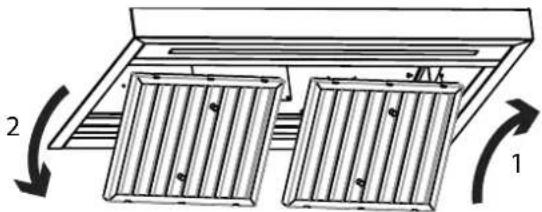
Model shown for reference only, features may vary
- For Pro-Canopy models only, remove drip tray from the drip tray bracket.
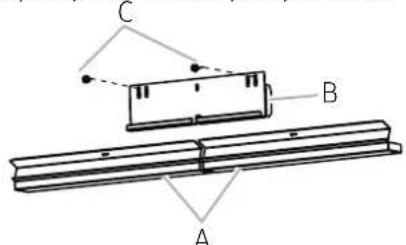
A. Drip tray
B. Drip tray bracket
C. Drip tray screws
- Wash filters and drip trays as needed in a dishwasher or hot detergent solution to clean.
-
For Pro-Canopy models only place drip tray in its original position, replace and tighten drip tray screws.
-
To reinstall the filters by grasping the filter handles with both hands and then place the front edge of the filter into the hood.
- Push up on the back the handle, and then set rear of filter into the drip tray to secure. Repeat for each filter.
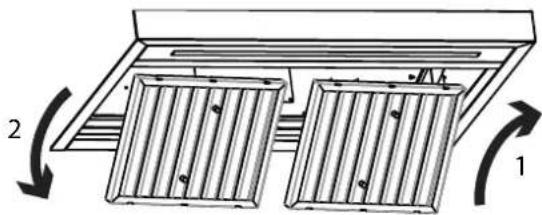
Replacing strip LED
The strip LED is replaceable by a service technician only. See the support contact information in the Warranty section.
This table lists various minor problems concerning hood issues, possible causes, and solutions. If you have an issue listed in this table, try resolving the issue by applying the corresponding solution. If you cannot resolve the issue, contact Dacor (see Warranty and Service for contact info).
| Problem Cause Solution | ||
| Nothing works (control panel not lit; fan lights not working) | Main power is OFF; Power to hood OFFPower outageHood not connected to the power source | Check hood's main power; turn on power at source; check for tripped breaker or blown fuse.Call your electric companyConnect it to power source |
| Light(s) not working (control panel lit; fan working) | Strip LED burned outCall for service | |
| Fan not drawing heat and smoke properly | Fan speed too lowFilters cloggedDamper jammed shut;ducting clogged | See Operating instructions sectionCall for service to supply the filters and change the filtersConsult qualified installation professional* |
| Fan shuts off by itself | Hood's "Timer" feature was set | If timer is set, fan turns off after set time.Max time 99 min. |
| Fan not working (control panel lit; lights working) | Fan electrical malfunctionCall for service | |
| Fan turns on by itself | ConnectOnwas started | Exhaust fan starts automatically if ConnectOnis enabled or if units paired via Bluetooth with a Dacor cooktop is on; press POWERto turn off the fan |
| Fan turns on by itself | Auto on feature is working | The fan will automatically turn off when the heat has cooled down |
| Auto on does not work as intended | Discnconnect power source and call for service | |
| ConnectOn not working | The hood is not connected to the cooktop | Only a Dacor compatible cooktop can be paired with the hood. |
| Bluetooth light blinks or shuts off automatically | The hood has trouble connecting to a compatible range or cooktop | Reset Bluetooth on hood: Press and hold both Light and ConnectOnfor 5 secs (display shows changes for )rt |
*Dacor does not manufacture/warrant/service the ducting that vents heat/smoke from the hood to the outside. The owner shall have a qualified person install/maintain the ducting.
Getting help
Before requesting service:
- Review Troubleshooting
- Familiarize yourself with the hood warranty, terms and conditions
- If none of the previous suggestions resolves your issue, call Dacor customer service.
Customer Service
Before you request help or schedule service:
- Try the Solutions offered in the Problem—Solution table in the "Troubleshooting" section.
- Become familiar with the warranty terms and conditions of your product.
- If none of these tips or suggestions resolves your problem, visit dacor.com or call our Customer Service center at (833) 353-5483 (United States), (844) 509-4659 (Canada)
United States - Warranty
CERTIFICATE OF WARRANTY ON DACOR HOOD - UNITED STATES:
FULL TWO-YEAR WARRANTY
This warranty covers any defects in materials or workmanship in the Dacor-branded new appliance purchased from a Dacor Authorized Dealer or other seller authorized by Dacor.
This full warranty runs for two years starting from the date of original retail purchase receipt or closing date for new construction, whichever period is longer. Dacor will repair or replace your product.
LIMITED WARRANTY
After the Full Warranty period has ended, this product is warranted against defects in materials or workmanship reported to us during the applicable warranty periods as follows:
Cosmetic Defects. In addition, for 60 days from the date of purchase, your product is warranted to be free from cosmetic defects in material and workmanship (such as scratches of stainless steel, paint/porcelain blemishes, chip, dents, or other damage to the fi nish). Color variations are excluded, and display, floor-model, "as-is" or refurbished products are specifically excluded.
COVERAGE LIMITATIONS
Service will be provided by a Dacor designated service company during regular business hours. Please note service providers are independent entities and are not agents of Dacor.
The owner must provide proof-of-purchase or a closing statement for new construction upon request. All Dacor products must be accessible for service.
Warranty will be null and void on product that has altered, defaced, or missing serial numbers and tags.
Warranty is null and void if non-CSA approved product is transported from the U.S.A.
WHAT IS NOT COVERED
| ·Due to differences in painted parts, kitchen lighting, product placement, and other factors; this warranty does not apply to color variation. | ·Service calls to educate the customer on proper use and care of the product. |
| ·Service fees for travel to islands and remote areas, which include but are not limited to, ferries, toll roads, or other travel expenses. | ·Consequential or incidental damage, including but not limited to: food or medicine loss, time away from work, or restaurant meals. |
| ·Commercial, business, or rental use, or any application other than residential consumer use. | ·Failure of the product caused by improper product installation. |
| ·Replacement of house fuses, fuse boxes, or resetting of circuit breakers. | ·Damage caused by accident, fi re, fl ood, power interruption, power surges, or acts of God. |
| ·Liability or responsibility for damage to surrounding property including cabinetry, floors, ceilings and other structures or objects. | ·Breakage, discoloration or damage to glass, metal surfaces, plastic components, trim, paint, or other cosmetic fi nish caused by improper usage, care, abuse, or neglect. |
| ·Except as noted above, consumable parts such as fil tters and LED lamps are not covered and are the responsibility of the purchaser. |
THE REMEDIES PROVIDED IN THE ABOVE EXPRESS WARRANTIES ARE THE SOLE AND EXCLUSIVE REMEDIES. THEREFORE, NO OTHER EXPRESS WARRANTIES ARE MADE, AND OUTSIDE THE FIFTY STATES OF THE UNITED STATES AND CANADA, ALL IMPLIED WARRANTIES, INCLUDING BUT NOT LIMITED TO, ANY IMPLIED WARRANTY OF MERCHANTABILITY OR FITNESS FOR A PARTICULAR USE OR PURPOSE, ARE LIMITED IN DURATION TO ONE YEAR FROM THE DATE OF ORIGINAL PURCHASE. IN NO EVENT SHALL DACOR BE LIABLE FOR INCIDENTAL EXPENSE OR CONSEQUENTIAL DAMAGES.
IN THE EVENT DACOR PREVAILS IN ANY LAWSUIT, DACOR SHALL BE ENTITLED TO REIMBURSEMENT OF ALL COSTS AND EXPENSES, INCLUDING ATTORNEY'S FEES, FROM THE DACOR CUSTOMER. NO WARRANTIES, EXPRESS OR IMPLIED, ARE MADE TO ANY BUYER FOR RESALE.
Some states do not allow limitations on how long an implied warranty lasts, or do not allow the exclusion or limitation of inconsequential damages, therefore the above limitations or exclusions may not apply to you. This warranty gives you specific legal rights, and you may also have other rights that vary from state-to-state.
Warrantor: Samsung Electronics America, Ridgefi eld Park, NJ, 07660
CANADA – Warranty
CERTIFICATE OF WARRANTY ON DACOR HOOD - CANADA:
This Limited Warranty covers only those Products supplied and distributed in Canada by us and delivered new, in the original carton or packaging, to the original consumer purchaser that are purchased from an authorized reseller or distributor, except as otherwise stated herein. Except where prohibited by applicable provincial law, only the original consumer purchaser of the Product has any rights under this Limited Warranty and this Limited Warranty may not be transferred or assigned.
Any additional statements such as dealer advertising or presentation, whether oral or written, that make additional warranties or modifications to this Limited Warranty do not constitute warranties by us and should not be relied upon.
1. WHAT IS COVERED AND FOR HOW LONG
We warrant to the original purchaser (“Purchaser”) that your Dacor Hood purchased from an authorized reseller or distributor in Canada (the “Products”) is free from defects in material and workmanship encountered in normal use for the warranty period identified below, effective as of the date of purchase or closing date for new construction, whichever period is longer.
| Dacor Product or Part Warranty Period and Warranty Coverage | |
| Hood Two (2) Years: Parts and Labour | |
Cosmetic Defects. For sixty (60) days from the date of purchase, the Product is warranted to be free from cosmetic defects in material and workmanship (such as scratches of stainless steel, paint/porcelain blemishes, chip, dents, or other damage to the finish). Color variations are excluded, and display, floor-model, "as-is" or refurbished products are specifically excluded.
2. COVERAGE LIMITATIONS
If the Product fails to operate according to the Product's specifications during the applicable warranty period and the failure is due to improper workmanship or defective material, we will repair or replace, at our sole option, and without charge to the Purchaser, the Product or any defective component part of the Product. We may, at our sole option, use rebuilt, reconditioned, or new parts or components when repairing any Product. If the same model Product or part is not available for replacement, we may, at our sole option, replace the Product or part with any rebuilt, refurbished, reconditioned or new Product or part of similar utility and value to the Product or part being replaced.
We expressly reserve the exclusive right, at our sole option, and in lieu of any service, repair or replacement of a Product under this Limited Warranty, to offer the Purchaser a partial refund of the original purchase price paid by the Purchaser for that Product (a "Partial Refund"). The amount of any Partial Refund to be offered shall be determined in our discretion based on the fair market value of the Product given its age and condition. If Purchaser accepts that offer of a Partial Refund, the Purchaser shall be deemed to have released us from any claim or liability whatsoever under this Limited Warranty or under any other applicable express or implied warranty or condition in respect of that Product.
All repaired parts or replaced Products will be warranted for a period equal to the remainder of the original Limited Warranty on the original Product or for 90 days, whichever is longer.
3. WHAT IS NOT COVERED
The remedies provided for in this Limited Warranty are available only within Canada.
This Limited Warranty does not cover any defect, malfunction, failure or damage caused by or resulting from any of the following:
(a) removal, installation, re-installation, maintenance, or service of the Product that was not authorized by us; (b) accident, fire, flood, power interruption, power surges, incorrect line voltage or supply or electrical current, fuses, house wiring, circuit breakers, connectors not supplied by us, unusual electrical or electromechanical stress, acts of God, or acts of nature; (c) misuse, abuse, neglect, mishandling, misapplication, alteration or modification of the Product or any part of the Product; (d) use of the Product in conjunction with products, equipment, utilities, services, parts, supplies, accessories, applications, external wiring, connectors, or ancillary or peripheral equipment not supplied or authorized by us; (e) uses for which the Product was not intended.
Further, this Limited Warranty does not cover: (i) any Product or part from which the serial number has been removed or on which the serial number has been made illegible.
Removing the serial number on any Product or rendering it illegible on any Product will immediately void the Limited Warranty for that Product; (ii) any damage whatsoever that occurs during shipment of the Product once the Product has been accepted by the Purchaser; (iii) any damage whatsoever resulting from any failure to follow operating, maintenance or environmental instructions contained in any instruction booklet or owner's manual available in connection with the Product; (iv) service fees for travel to islands and remote areas, which include but are not limited to, ferries, toll roads, or other travel expenses; (v) replacement of house fuses, fuse boxes, or resetting of circuit breakers; (vi) liability or responsibility for damage to surrounding property including cabinetry, floors, ceilings and other structures or objects; (vii) the cost of service calls for instructions, for the correction of installation errors, for customer adjustments that are explained in the Product owner's manual, or where the Product operates according to the Product's specifications. There may be a service charge for service calls made for issues not covered under this Limited Warranty; (viii) breakage, discoloration or damage to glass, metal surfaces, plastic components, trim, paint, or other cosmetic fi nish caused by improper usage, care, abuse, or neglect; (ix) except as noted above, consumable parts such as filters and light bulbs are not covered and are the responsibility of the Purchaser; (x) commercial, business, or rental use, or any application other than residential consumer use; (xi) colour variation due to differences in painted parts, kitchen lighting, product placement, and other factors;
We do not warrant or guarantee uninterrupted or error-free operation of the Product.
4. WHAT ARE THE LIMITATIONS ON IN-HOME WARRANTY SERVICE?
In-home service is subject to availability, and it is not available in all areas of Canada.
In-home service will only be provided if the Product is unobstructed and easily accessible from floor level to service personnel. If repair cannot be completed during in-home service or if in-home service is not available in your area, you may be directed to deliver the Product to a Dacor Authorized Service Center for warranty service. The cost of transportation of the Product to and from a Dacor Authorized Service Centre shall be paid by the Purchaser unless we elect to provide that transportation at our discretion.
To receive in-home service, the Purchaser must first contact Dacor Customer Care for problem determination and service procedures. All in-home warranty repairs must be performed by a Dacor Authorized Service Center. Valid proof of purchase must be presented to us at the time that service is requested and before warranty services are rendered.
When in-home service is not available, the Purchaser must return the Product to a Dacor Authorized Service Center for analysis. Assistance on where to deliver the Product can be obtained by contacting our Customer Service center. The cost of transporting the Product to or from the Authorized Service Center must be paid by the Purchaser.
5. WHAT ARE THE LIMITS OF OUR LIABILITY?
EXCEPT AS EXPRESSLY SET FORTH IN THIS LIMITED WARRANTY, OUR LIABILITY IS SUBJECT TO THE FOLLOWING LIMITATIONS:
(A) THE PURCHASER TAKES THE PRODUCT "AS IS" AND WE MAKE NO WARRANTY OR REPRESENTATION OF ANY KIND WHATSOEVER WITH RESPECT TO THE PRODUCT.
(B) THERE ARE NO CONDITIONS, EXPRESS OR IMPLIED, STATUTORY OR OTHERWISE, WITH RESPECT TO THE PRODUCT.
(C) IN PARTICULAR, AND WITHOUT LIMITING THE GENERALITY OF THE FOREGOING PARAGRAPHS (A) AND (B), WE MAKE NO WARRANTY, CONDITION OR REPRESENTATION AS TO ANY OF THE FOLLOWING: (i) THE MERCHANTABILITY OF THE PRODUCT OR ITS FITNESS FOR ANY PARTICULAR PURPOSE OR USE; (ii) TITLE OR NON-INFRINGEMENT; (iii) DESIGN, CONDITION, QUALITY, OR PERFORMANCE OF THE PRODUCT; (iv) THE WORKMANSHIP OF THE PRODUCT OR THE COMPONENTS CONTAINED THEREIN; (v) COMPLIANCE OF THE PRODUCT WITH THE REQUIREMENTS OF ANY LAW, RULE, SPECIFICATION OR CONTRACT PERTAINING TO THE PRODUCT.
(D) NOTHING CONTAINED IN ANY INSTRUCTION MANUAL OR OWNER'S MANUAL SHALL BE CONSTRUED TO CREATE AN EXPRESS WARRANTY OF ANY KIND WHATSOEVER WITH RESPECT TO THE PRODUCT.
THE PROVISIONS FOUND IN PARAGRAPHS (E) AND (F) BELOW DO NOT APPLY IN CIRCUMSTANCES WHERE THIS LIMITED WARRANTY IS GOVERNED BY THE LAWS OF THE PROVINCE OF QUEBEC.
(E) ALL IMPLIED WARRANTIES AND CONDITIONS THAT MAY ARISE BY OPERATION OF LAW, INCLUDING ANY APPLICABLE IMPLIED WARRANTY OR CONDITION OF MERCHANTABILITY OR FITNESS FOR A PARTICULAR PURPOSE, ARE HEREBY LIMITED TO THE SAME DURATION OF TIME AS THIS LIMITED WARRANTY. SOME PROVINCES PROHIBIT LIMITATIONS ON HOW LONG AN IMPLIED WARRANTY LASTS, AND THE LIMITATION ON THE DURATION OF THE IMPLIED WARRANTY WILL NOT APPLY TO THE EXTENT THAT THE LIMITATION IS PROHIBITED BY APPLICABLE PROVINCIAL LAW.
(F) WE SHALL NOT BE LIABLE FOR DAMAGES OF ANY KIND (INCLUDING, WITHOUT LIMITATION, ANY INCIDENTAL, SPECIAL, CONSEQUENTIAL OR SIMILAR DAMAGES) THAT RESULT OR ARISE DIRECTLY OR INDIRECTLY FROM ANY OF THE FOLLOWING: (i) THE PURCHASE, USE, OR MISUSE OF THE PRODUCT; (ii) ANY LOSS OF USE OF THE PRODUCT OR INABILITY TO USE THE PRODUCT; (iii) ANY BREACH OF THE EXPRESS WARRANTY; (iv) ANY LOSS OF ANTICIPATED PROFITS OR BENEFITS; (v) ANY LOSS OF FOOD OR CONSUMABLES; (vi) ANY TORT (INCLUDING NEGLIGENCE OR GROSS NEGLIGENCE) OR FAULT COMMITTED BY US, ITS AGENTS OR EMPLOYEES; (vii) ANY BREACH OF CONTRACT; (viii) ANY CLAIM BROUGHT AGAINST THE PURCHASER BY ANY OTHER PARTY. SOME PROVINCES PROHIBIT THE EXCLUSION OR LIMITATION OF INCIDENTAL OR CONSEQUENTIAL DAMAGES, AND THE ABOVE EXCLUSION OF INCIDENTAL OR CONSEQUENTIAL DAMAGES WILL NOT APPLY TO THE EXTENT THAT THE EXCLUSION IS PROHIBITED BY APPLICABLE PROVINCIAL LAW.
(G) THIS WARRANTY GIVES YOU SPECIFIC LEGAL RIGHTS, AND YOU MAY ALSO HAVE OTHER RIGHTS, WHICH VARY FROM PROVINCE TO PROVINCE. THIS LIMITED WARRANTY STATES THE PURCHASER'S EXCLUSIVE REMEDY. EXCEPT WHERE PROHIBITED BY APPLICABLE PROVINCIAL LAW, THIS LIMITED WARRANTY IS NOT TRANSFERABLE WITHOUT OUR EXPRESS CONSENT.
(H) IF ANY PORTION OF THIS LIMITED WARRANTY IS HELD ILLEGAL OR UNENFORCEABLE BY REASON OF ANY LAW, SUCH PARTIAL ILLEGALITY OR UNENFORCEABILITY SHALL NOT AFFECT THE ENFORCEABILITY FOR THE REMAINDER OF THIS LIMITED WARRANTY.
If the Product is purchased from a non-authorized reseller or distributor or purchased outside of Canada, this Limited Warranty does not apply except that the above limitations specified in Sections 5(A) through 5(I) shall apply.
Warrantor in Canada: Samsung Electronics Canada Inc., Mississauga, ON, L5N 0B9 Canada
OUTSIDE THE UNITED STATES AND CANADA:
LIMITED FIRST YEAR WARRANTY
If your Dacor product fails to function within one year of the original date of purchase due to a defect in material or workmanship, Dacor will furnish a new part, F.O.B. factory to replace the defective part.
All delivery, installation, labor costs, and other service fees are the responsibility of the purchaser.
Sommaire
If you have any questions or comments relating to Dacor appliances, please contact the Dacor Customer Service Center.
| Country Contact Center Web Site | |
| U.S.A. 1-833-353-5483 www.dacor.com | |
| CANADA 1-844-509-4659 www.dacor.com |
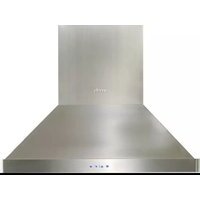
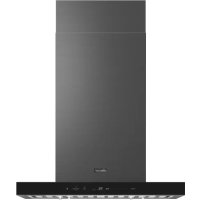
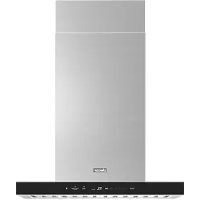
- PRO-CANOPY WALL HOOD
- HOTTE MURALE PRO-CANOPY
- CAMPANA DE PARED PRO-CANOPY
- CHIMNEY WALL HOOD
- IMPORTANT INFORMATION FOR CUSTOMER 3
- IMPORTANT SAFETY INFORMATION 4
- OPERATIONS 7
- CARE AND MAINTENANCE 10
- MAINTENANCE 10
- TROUBLESHOOTING 12
- WARRANTY AND SERVICE 13
- INSTALLER
- CUSTOMER
- WARNING
- CAUTION
- NOTE
- PROPER INSTALLATION AND MAINTENANCE
- FIRE SAFETY
- READ AND SAVE THESE INSTRUCTIONS
- PROPOSITION 65 WARNINGS
- STATE OF CALIFORNIA PROPOSITION 65 WARNING
- PROTECTING THE ENVIRONMENT
- NOTICE
- OPERATIONS
- HOOD CONNECTIVITY
- BLUETOOTH CONNECTION (PAIRING)
- BLUETOOTH DISCONNECTION (PAIRING RESET)
- CONNECTON (AUTO CONNECTIVITY)
- RESET THE FILTER ALARM
- PERFORMANCE (CFM) CONVERSION
- CHIMNEY ISLAND HOOD
- MAKE-UP AIR
- MAINTENANCE
- CLEANING AGENTS
- EXTERIOR SURFACES
- CLEANING METHOD
- FILTERS AND DRIP TRAY
- REPLACING STRIP LED
- GETTING HELP
- CUSTOMER SERVICE
- UNITED STATES - WARRANTY
- CERTIFICATE OF WARRANTY ON DACOR HOOD - UNITED STATES
- FULL TWO-YEAR WARRANTY
- LIMITED WARRANTY
- COVERAGE LIMITATIONS
- CANADA – WARRANTY
- CERTIFICATE OF WARRANTY ON DACOR HOOD - CANADA
- WHAT IS COVERED AND FOR HOW LONG
- WHAT IS NOT COVERED
- WHAT ARE THE LIMITATIONS ON IN-HOME WARRANTY SERVICE
- WHAT ARE THE LIMITS OF OUR LIABILITY
- OUTSIDE THE UNITED STATES AND CANADA
- LIMITED FIRST YEAR WARRANTY
- SOMMAIRE
Brand : Dacor
Model : DHD48U990WSDA
Category : Range hood