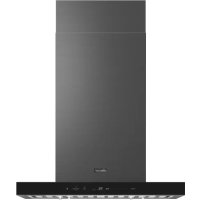
DHD36U990IM - Range hood Dacor - Free user manual and instructions
Find the device manual for free DHD36U990IM Dacor in PDF.



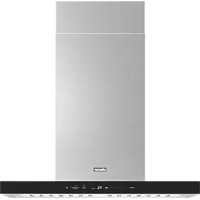
| Product type | Kitchen hood |
| Brand | Dacor |
| Model | DHD36U990IM |
| Width | 36 inches (91.2 cm) |
| Depth | 27¼ inches (69.3 cm) |
| Height (min-max) | 32¼ - 52½ inches (82 - 133.3 cm) |
| Power supply | 120 V, 60 Hz, 15 A |
| Duct diameter | 10 inches (25.4 cm) round |
| Exhaust type | External exhaust through roof or wall |
| Filter material | Metal grease filters |
| Number of filters | 2 (for 36 inch model) |
| Minimum mounting height | 30 inches (76.2 cm) above gas cooktop, 24 inches (60.9 cm) for electric |
| Maximum recommended mounting height | 36 inches (91.4 cm) above cooking surface |
| Installation type | Ceiling mount (island) |
| Box contents | Hood, duct cover extensions, brackets, screws, mounting template |
| Accessories sold separately | Extension kit DHD-D0000IM/DA |
| Maintenance | Clean grease filters and fans regularly |
| Safety | Disconnect power before servicing; use metal ducts only |
| Customer service | Contact your Dacor dealer or customer service |
| Standards | Complies with FCC Part 15, ICES-003 Class B |
Frequently Asked Questions - DHD36U990IM Dacor
User questions about DHD36U990IM Dacor
0 question about this device. Answer the ones you know or ask your own.
Ask a new question about this device
Download the instructions for your Range hood in PDF format for free! Find your manual DHD36U990IM - Dacor and take your electronic device back in hand. On this page are published all the documents necessary for the use of your device. DHD36U990IM by Dacor.
USER MANUAL DHD36U990IM Dacor
Installation Instructions
Instructions d'Installation
Important Safety Instructions 4
Installation Requirements 7
Electrical requirements 7
Venting requirements 8
Venting methods 8
Ducting options 9
What is in the box 10
Tools and parts 11
Dimetions and clearances 12
Accessories - Sold Separately 12
Installation 12
Installation instructions 12
Ceiling support structures 13
Installing the single fan hood 14
Electrical connection 16
Install the double fan hood 17
Electrical connection 20
Duct cover installation 21
Completing the installation 22
AttachDacor badge 23
Important Notes
Installer
- In the interest of safety and to minimize problems, read this manual thoroughly before starting the installation.
- Leave this manual with the customer.
- Show the owner how to shut off power to the hood.
Customer
Keep this manual for personal and professional reference.
Customer Service
To resolve questions and installation issues, contact your Dacor dealer or Dacor customer service. Before calling, have the hood's model and serial number available. (See the data label inside the hood above the filters on the chassis' rear wall).
All specifications are subject to change without notice. Dacor assumes no liability for such changes. ©2022 Dacor, all rights reserved.
APPROVED FOR RESIDENTIAL APPLIANCES
READ AND SAVE THESE INSTRUCTIONS
PLEASE READ ENTIRE INSTALLATION GUIDE BEFORE PROCEEDING.
INSTALLATION MUST COMPLY WITH ALL LOCAL CODES.
IMPORTANT: Save these instructions for the local electrical inspector's use.
INSTALLER: Please leave these instructions with this unit for the owner.
OWNER: Please retain these instructions for future reference.
Symbols used in this manual
WARNING
Hazards or unsafe practices that may result in severe personal injury or death.
WARNING
Turn off power circuit at service panel and lock out panel before wiring this appliance.
CAUTION
Hazards or unsafe practices that may result in electric shock, personal injury, or property damage.
NOTE
Useful tips and instructions.
These warning icons and symbols are here to prevent injury to you and others.
Please follow them explicitly. After reading this section, keep it in a safe place for future reference.
State of California Proposition 65 warning (US only)
WARNING
This product contains chemicals known to the State of California to cause cancer and birth defects or other reproductive harm - www.p65 warnings.ca.gov
- FCC Notice
CAUTION
FCC CAUTION:
Any changes or modifi cations not expressly approved by the party responsible for compliance could void the user's authority to operate the equipment.
This device complies with Part 15 of FCC Rules. Operation is subject to following two conditions:
- This device may not cause harmful interference, and
- This device must accept any interference received including interference that cause undesired operation.
For products sold in the US and Canadian markets, only channels 1~11 are available. You cannot select any other channels.
FCC STATEMENT:
This equipment has been tested and found to comply within the limits for a Class B digital device, pursuant to part 15 of the FCC Rules. These limits are designed to provide reasonable protection against harmful interference in a residential installation.
This equipment generates, uses, and can radiate radio frequency energy and, if not installed and used in accordance with the instructions, may cause harmful interference to radio communications.
However, there is no guarantee that interference will not occur in a particular installation. If this equipment does cause harmful interference to radio or television reception, which can be determined by turning the equipment off and on, the user is encouraged to try to correct the interference by one or more of the following measures:
Reorienting or relocating the receiving antenna
- Increasing the separation between the equipment and receiver
- Connecting the equipment to an outlet that is on a different circuit than the radio or TV
- Consulting the dealer or an experienced radio/TV technician for help
FCC RADIATION EXPOSURE STATEMENT:
This equipment complies with FCC radiation exposure limits set forth for an uncontrolled environment. This equipment should be installed and operated so there is at least 8 inches (20 cm) between the radiator and your body. This device and its antenna(s) must not be co-located or operated in conjunction with any other antenna or transmitter.
2. IC Notice
The term "IC" before the radio certificat ion number only signifi es that Industry Canada technical specifie cations were met. Operation is subject to the following two conditions: (1) this device may not cause interference, and (2) this device must accept any interference, including interference that may cause undesired operation of the device.
This Class B digital apparatus complies with Canadian ICES-003. For products sold in the US and Canadian markets, only channels 1~11 are available. You cannot select any other channels.
IC RADIATION EXPOSURE STATEMENT:
This equipment complies with IC RSS-102 radiation exposure limits set forth for an uncontrolled environment. This equipment should be installed and operated so there is at least 8 inches (20 cm) between the radiator and your body.
This device and its antenna(s) must not be co-located or operated in conjunction with any other antenna or transmitter.
WARNING
TO REDUCE THE RISK OF FIRE, ELECTRIC SHOCK, OR INJURY TO PERSONS, OBSERVE THE FOLLOWING PRECAUTIONS:
- Use this unit only in the manner intended by the manufacturer. If you have questions, contact the manufacturer.
- Before servicing or cleaning the unit, switch the power off at the service panel and lock the service panel to prevent power from being switched on accidentally. If the service panel cannot be locked, securely fasten a prominent warning device, such as a tag to the service panel.
- Installation work and electrical wiring must be done by qualified person(s) in accordance with all applicable codes and standards, including fire-rated construction.
- Sufficient air is needed for proper combustion and exhausting of gases through the flue (chimney) of fuel burning equipment to prevent backdrafting. Follow the heating equipment manufacturer's guideline and safety standards such as those published by the National Fire Protection Association (NFPA), the American Society for Heating, Refrigeration and Air Conditioning Engineers (ASHRAE), and the local code authorities.
- When cutting or drilling into the wall or ceiling; do not damage electrical wiring and other hidden utilities.
- Ducted fans must always be vented outdoors.
CAUTION
For general ventilating use only. Do not use to exhaust hazardous or explosive materials and vapors.
CAUTION
To reduce risk of fire and to properly exhaust air, be sure to duct air outside - do not vent exhaust air into spaces within walls or ceilings, attics or into crawl spaces, or garages.
WARNING
TO REDUCE THE RISK OF FIRE, USE ONLY METAL DUCTWORK
WARNING
TO REDUCE THE RISK OF A RANGE TOP GREASE FIRE:
- Never leave surface units unattended at high settings. Boilovers cause smoking and greasy spillovers that may ignite. Heat oils slowly on low or medium settings.
Always turn the hood ON when cooking at high heat or when flambeing food (i.e. Crepes Suzette, Cherries Jubilee, Peppercorn Beef Flambé).
Clean ventilating fans frequently. Grease should not be allowed to accumulate on the fan or filter. - Use proper pan sizes. Always use cookware appropriate for the size of the surface element.
WARNING
TO REDUCE THE RISK OF INJURY TO PERSONS IN THE EVENT OF A RANGE TOP GREASE FIRE, OBSERVE THE FOLLOWING PRECAUTIONS:*
SMOTHER FLAMES with a close fitting lid, cookie sheet, or metal tray, then turn off the burner. BE CAREFUL TO PREVENT BURNS. If the fl ames do not go out immediately, EVACUATE AND CALL THE FIRE DEPARTMENT.
- NEVER PICK UP A FLAMMING PAN - you may get burned.
DO NOT USE WATER, including wet dishcloths or towels - a violent steam explosion will result.
- Use an extinguisher ONLY if:
- You know you have a class ABC extinguisher, and you already know how to operate it.
- The fire is small and contained in the area where it started.
- The fire department is being called.
- You can fight the fire with your back to an exit.
*Based on "Kitchen Fire Safety Tips" published by NFPA.
WARNING
To reduce the risk of fire or electrical shock, do not use this fan with any solid-state speed control device.
WARNING
Do not let children near this appliance. Do not let children play with this appliance.
Keep all packaging materials out of children's reach. Properly dispose the packaging materials after this appliance is unpacked.
NOTE
Suitable for use in household cooking area.
Read and save these Instructions
Electrical requirements
IMPORTANT
Observe all governing codes and ordinances.
It is the customer's responsibility:
- To contact a qualified electrical installer.
To assure that the electrical installation is adequate and in conformance with National Electrical Code, ANSI/NFPA 70 - latest edition, or CSA Standards C22.1-94, Canadian Electrical Code, Part 1 and C22.2 No.0-M91 - latest edition* and all local codes and ordinances.
If codes permit and a separate ground wire is used, it is recommended that a qualified electrician determine that the ground path is adequate.
A copy of the above code standards can be obtained from: National Fire Protection Association
1 Batterymarch Park
Quincy, MA 02169-7471
CSA International
8501 East Pleasant Valley Road
Cleveland, OH 44131-5575
- A 120 volt, 60Hz , AC only, 15-amp, fused electrical circuit is required.
-
If the house has aluminum wiring, follow the procedure below.
-
Connect a section of solid copper wire to the pigtail leads.
-
Connect the aluminum wiring to the added section of copper wire using special connectors and/or tools designed and UL listed for joining copper to aluminum.
-
Follow the electrical connector manufacturer's recommended procedure. Aluminum/copper connection must conform with local codes and industry accepted wiring practices.
- Wire sizes and connections must conform with the rating of the appliance as specified on the model/ serial rating plate. The model/serial plate is located behind the filter on the rear wall of the hood.
- Wire sizes must conform to the requirements of the National Electrical Code, ANSI/NFPA 70 (latest edition), or CSA Standards C22.1-94, Canadian Electrical Code, Part 1 and C22.2 No. 0-M91 (latest edition and all local codes and ordinances).
Venting requirements
- Vent system must terminate outdoors.
- Do not terminate the vent system in an attic or other enclosed area.
- Do not use a 4'' (10.2 cm) laundry-type wall cap.
- Use metal vent only. Rigid metal vent is recommended.
- Plastic or metal foil vent is not recommended.
-
The length of the vent system and the number of elbows should be kept to a minimum to provide efficient performance. For the most efficient and quiet operation:
-
Use no more than three 90^ elbows.
- Make sure there is a minimum of 30^ (76.2 cm) of straight vent between the elbows if more than 1 elbow is used. Do not install 2 elbows together.
Venting methods
To use the hood's top outlet to vent your hood, a 10'' (25.4 cm) round vent system is required. This vent system is not included and must be purchased separately.
NOTE
Flexible vent is not recommended. Flexible vent creates back pressure and air turbulence that greatly reduces performance. The vent system can terminate either through the roof or wall.
Always install a metal vent cover where the ductwork exits the house. Hood must be vented to the outside of building only
Discharge direction
This hood is factory set for venting through the roof (vertical discharge) or wall (horizontal discharge).
To vent through a wall, a 90^ elbow is needed.
Ductwork installation guidelines
For safety reasons, ducting should vent directly outdoors (not into an attic, underneath the house, into the garage or into any enclosed space). Do not exceed 50 ft (15.24m) of duct. Keep duct runs as short and straight as possible. Elbows and transitios fittings reduce air flow efficiency.
Back to back elbows and "S" turns give very poor delivery and are not recommended. A short straight length of duct at the inlet of a remote fan gives the best delivery.
- Use clamps to seal all joints in the vent system.
- The vent system must have a damper. If the roof or wall cap has a damper, do not use the damper supplied with the hood.
- Use caulking to seal the exterior wall or roof opening around the cap.
- The size of the vent should be uniform.
Ducting recommendations
Proper performance is dependent upon proper ducting.
Cold weather
Cold weather installations should have an additional backdraft damper installed to minimize backward cold air flow and a nonmetallic thermal break to minimize conduction of outside temperatures as part of the ductwork. The damper should be on the cold air side of the thermal break. The break should be as close as possible to where the ducting enters the heated portion of the house.
Make-up air
Local building codes may require the use of make-up air systems when using ducted ventilation systems greater than specified CFM of air movement. The specified CFM varies from locale to locale. It is the responsibility of the owner and the installer to determine if additional requirements and/or standards apply to specific installations.
Ducting options
The hood is equipped with a 10^ (25.4 cm) round transition for discharge of fumes to the outside.
Closely follow the instructions set out in this manual. Dacor is not responsible for any eventual inconveniences, damages or fires caused by not complying with the instructions in this manual.
Preparation
Do not cut a joist or stud unless absolutely necessary. If a joist or stud must be cut, then a supporting frame must be constructed.
Fittings material is provided to secure the hood to most types of walls/ceilings.
However, a qualified technician must verify suitability of the materials in accordance with the type of wall/ceiling.
Before making cutouts, make sure there is proper clearance within the ceiling or wall for the exhaust vent.
Mounting Height
CAUTION
Mount this hood so that the bottom edge above the cooking product is at 30^ (76.2 cm) minimum for a gas cooking product or 24^ (60.9 cm) for an electric cooking surface.
There is no maximum mounting height, however, we recommend mounting the hood no greater than 36^ (91.4 cm) above the cooking surface. For every inch (2.54 cm) above 36^ (91.4 cm), fume and moisture capture efficiency diminishes at an increasing rate and may not deliver an acceptable level of ventilating performance.
This hood is intended for household use.
Check your ceiling height and hood height before selecting your hood.
Roof Venting Wall Venting
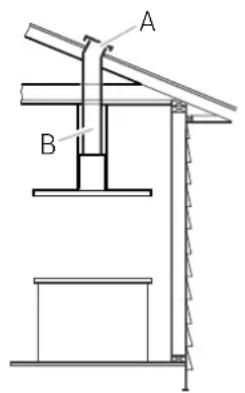
A. Roof Cap
B. 10^ (25.4 cm) Round Vent
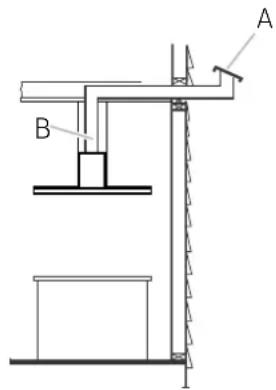
A. Roof Cap
B. 10^ (25.4 cm) Round Vent
Installation Requirements
What is in the box
| Hood assembly (1) 36" single fan | Duct cover extension (2) 36" single fan | 10" Transition (1) 36" single fan | Horizontal supports (2) 36" single fan |
| Transition adapter (1) 36" single fan | Upper vertical supports (4) Lower vertical supports (4) 36" single fan | ||
| Hood base (1) 42" double fan 54" double fan | Blower housing with 10" transition (1) 42" double fan 54" double fan | Horizontal support (1) 42" double fan 54" double fan | Duct cover extension (2) 42" double fan 54" double fan |
| Vertical supports (4) 42" double fan 54" double fan | |||
| Hardware bag (1) Product literature (2) Upper duct covers (2) Lower duct covers (2) | Filters 36" (2) 42" (3) 54" (3) | ||
Tools and parts
Remove the packaging.
CAUTION
Remove the carton carefully. Wear gloves to protect against sharp edges.
WARNING
Remove the protective film before putting into operation.
Parts Supplied
- Hardware bag includes:
| Part Qty | |
| 5 x 45 mm | 4 |
| 8 x 40 mm | 4 |
| 3.5 x 9.5 mm | Single fan model (4) |
| 4.2 x 8 mm | Single fan model (70) Double fan model (40) |
| 3.5 x 6.5 mm | 2 |
| Torx adapter | #10 - Single fan model (1) #20 - Single fan model (1) #20 - Double fan model (1) |
| Mounting screws | 2 |
| Mounting template | 1 |
Parts not supplied
Tools/materials required
- Level
- Drill with 3 / 16 (4.76 mm) drill bit
Pencil - Wire stripper or utility knife
- Tape measure or ruler
- Pliers
- Caulking gun and weatherproof caulking compound
- Vent clamps
Jigsaw
Metal snips -
Screwdrivers:
-
Phillips
-
Flat - blade
Parts needed
Home power supply cable
- 12 (12.7 mm) UL listed or CSA approved strain relief
3 UL listed wire connectors
- 1 wall or roof cap
Metal vent system
Dimetions and clearances
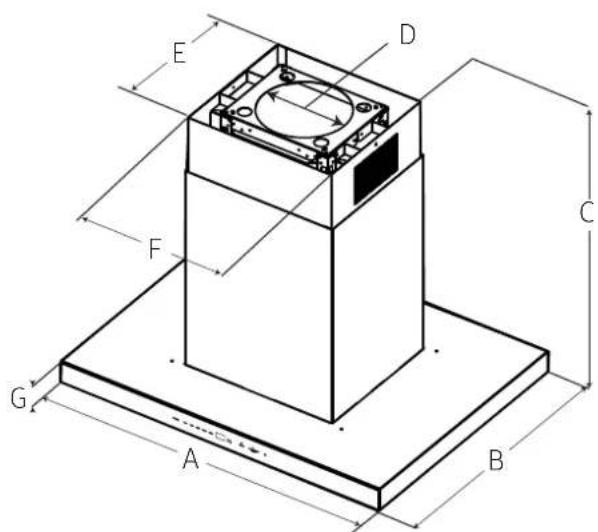
| 36"42"54" | |||
| A | 36"(91.2 cm) | 42"(106.5 cm) | 54"(136.7 cm) |
| B 27¼" (69.3 cm) | |||
| C | max. 52½" (133.3 cm)min. 32¼" (82 cm) | ||
| D 10" (25.4 cm) | |||
| E 14½" (37.3 cm) | |||
| F 16½" (42 cm) | |||
| G 2¾" (6 cm) | |||
Accessories - Sold Separately
Installation instructions
We recommend that a qualified technician install the hood. It is the installer's responsibility to ensure the hood complies with the installation clearances specified for the product.
- It is recommended that the vent system be installed before the hood is installed.
- Before making cutouts, make sure there is proper clearance within the ceiling or wall for the exhaust vent.
-
Confirm that all installation parts have been removed from the shipping carton.
-
Turn off the power at the circuit breaker panel or fuse box.
- Determine which venting method to use: roof or wall venting.
NOTE
This hood is factory set to vent through the top air exit.
- Select a flat surface for assembling the hood. Place a covering over that surface.
Ceiling support structures
- This vent hood is heavy. Adequate structure and support must be provided in all types of installations.
- At the hood location, install 2'' × 4'' cross framing between ceiling joists as shown ( 2'' × 4'' are required to support the weight of the hood).
Arrange cross framing in the ceiling to suit the existing structure. Your ceiling joists will be like one of the following: NOTE: Top ceiling joists parallel to front of hood.
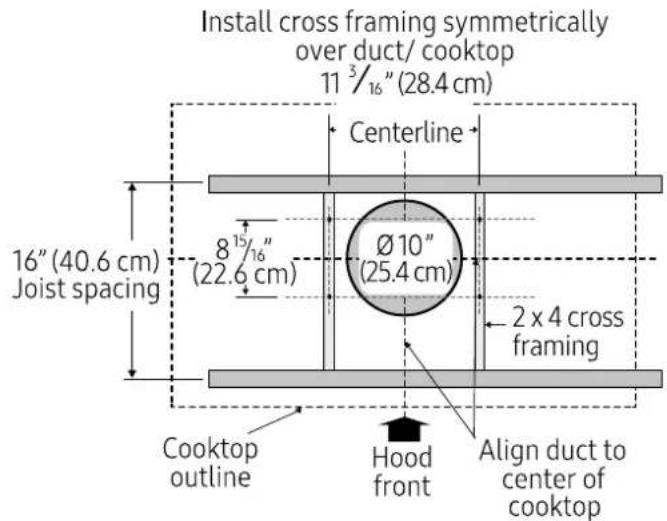
EXAMPLE A
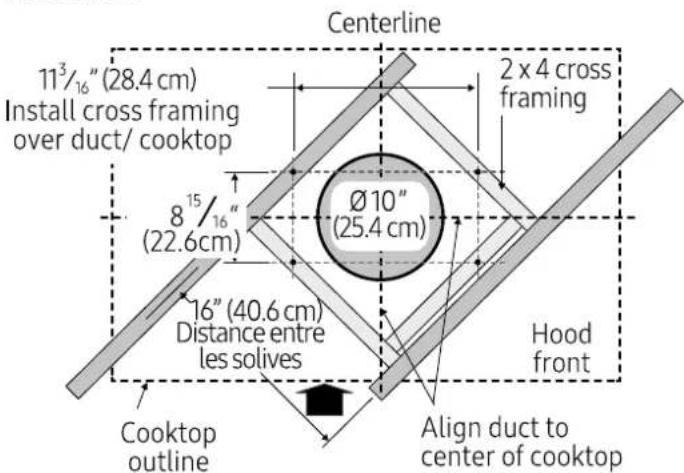
EXAMPLE C
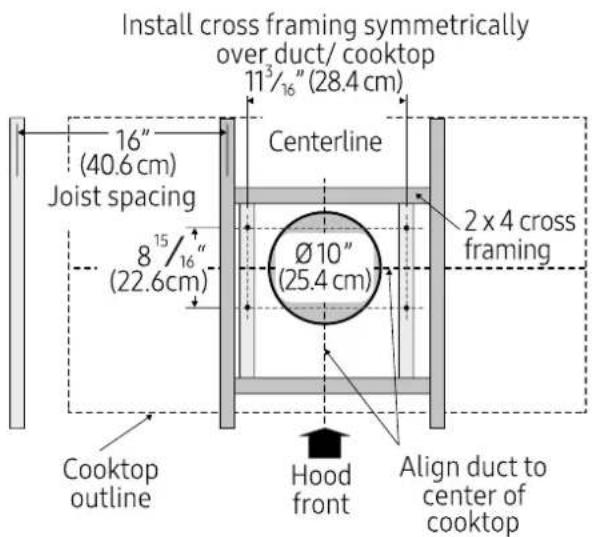
EXAMPLE B
Installing the single fan hood
- Place the template in the ceiling considering the instructions for ceiling support structures.

NOTE
Always consider the front of hood when placing the template on the ceiling. It will define the control's location.
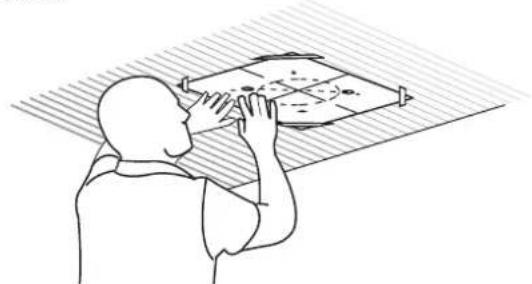
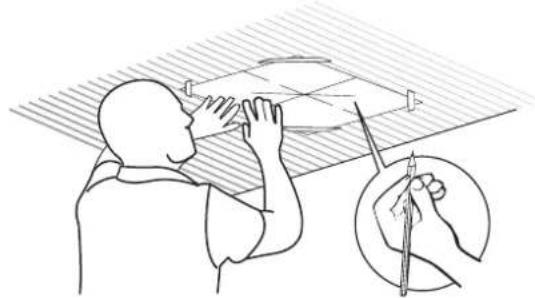
- Mark with a pencil the hole locations for screws and duct in the ceiling. Remove the template.
- Fix one duct cover extension on each of both sides of one of the horizontal supports with 4 - 4.2 × 8 mm screws using the Torx 20 adapter. That will be the upper horizontal support.
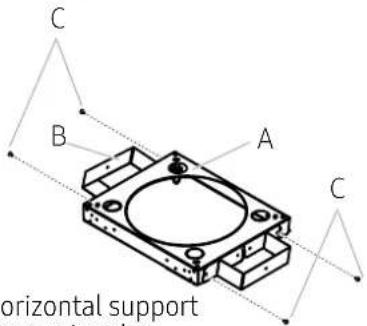
A. Upper horizontal support
B. Duct cover extension
C. 4 - 4.2 × 8 ~mm screws
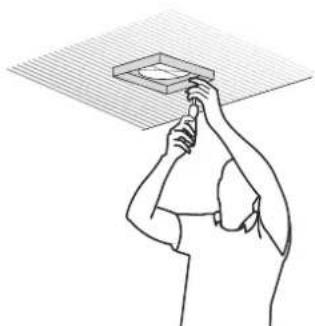
- Fix the upper horizontal support to the ceiling with 4 - 5 × 45 mm screws. Use 8 × 40 mm anchors if necessary.
- Install the 10^ (25.4 cm) round transition over the transition adapter and place it over the vent opening on the hood assembly as pictured below.
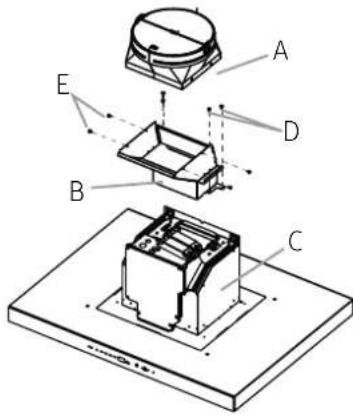
A. 10^ round transition
B. Transition adapter
C. Hood assembly
D. 4 - 3.5 × 9.5 ~mm screws
E. 4 - 4.2 × 8 ~mm screws
- Fix lower vertical supports over the lower horizontal support with 16 - 4.2 x 8 mm screws.
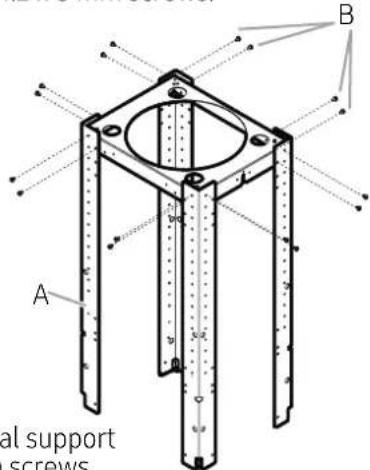
- Install the 4 vertical supports with 16 - 4.2 × 8 mm screws.
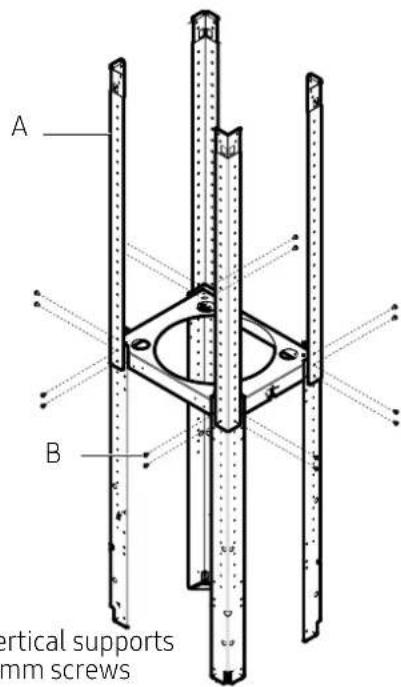
A. 4 - Upper vertical supports
B. 16 - 4.2 × 8 ~mm screws
- Install the structure to the horizontal support with 16 - 4.2 × 8 mm screws.
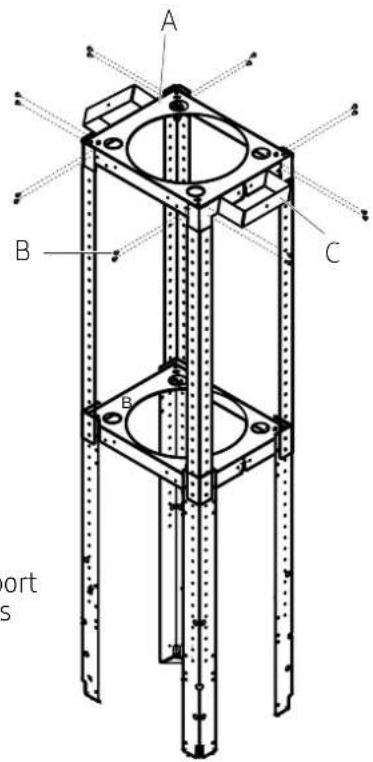
A. Upper horizontal support
B. 16 - 4.2 × 8 ~mm screws
C. Duct cover extension
- Using 2 or more people, lift the hood assembly under the structure.
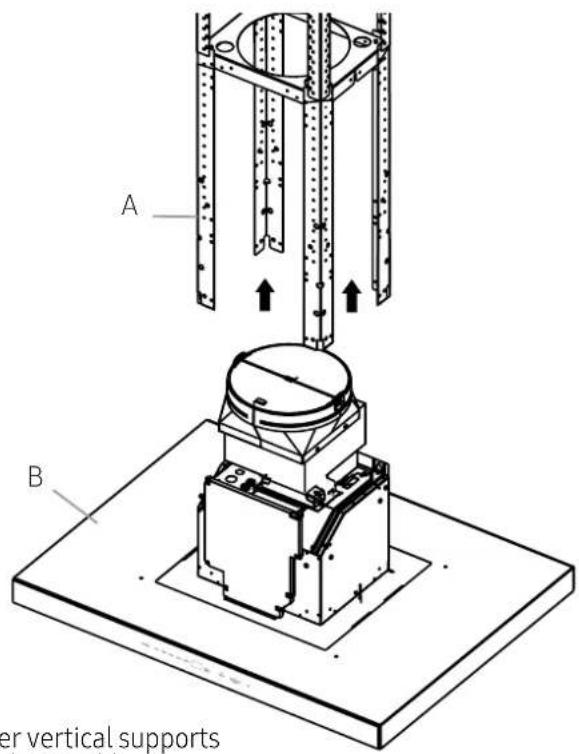
- Attach the hood assembly to the lower vertical supports with 2 mounting screws.
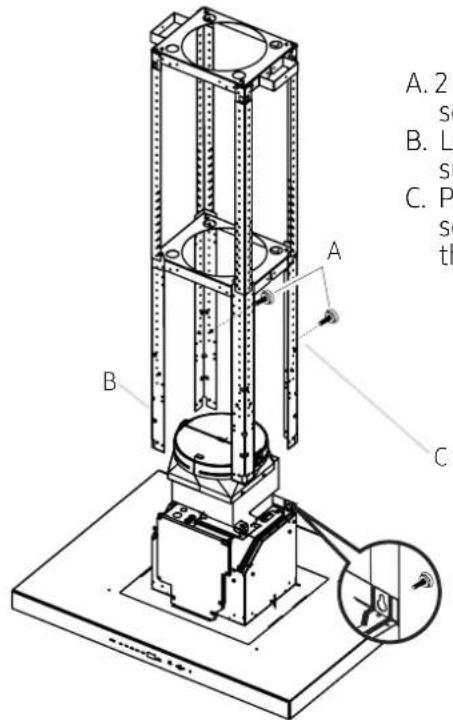
A. 2 - Mounting screws
B. Lower vertical support
C. Place mounting screws through the structure
- Install the 4 vertical supports with 16 - 4.2 × 8 mm screws. Check everything is tightly screwed.
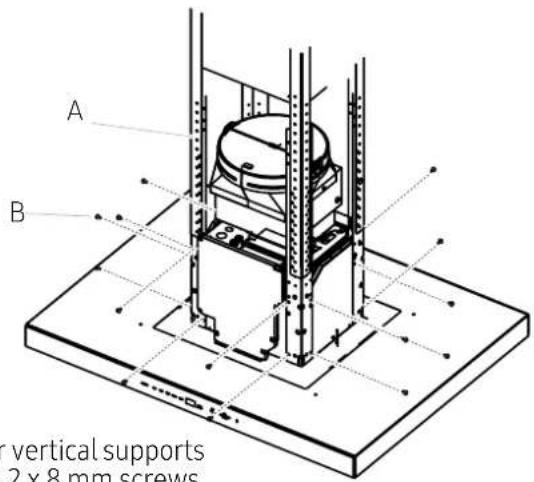
- Remove the 2 mounting screws from the structure.
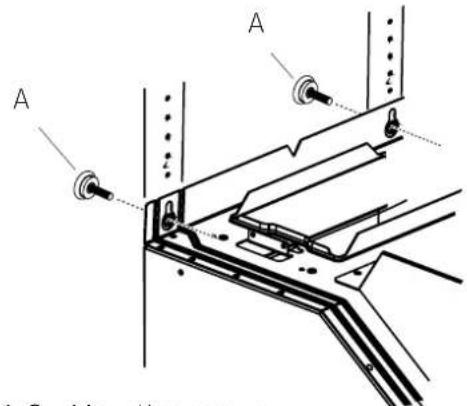
A.2 - Mounting screws
A. Lower vertical supports
B. 16 - 4.2 × 8 ~mm screws
Electrical connection
WARNING
ELECTRICAL SHOCK HAZARD.
WARNING
DISCONNECT POWER BEFORE SERVICING.
REPLACE ALL PARTS AND PANELS BEFORE OPERATING.
FAILURE TO DO SO CAN RESULT IN DEATH OR
ELECTRICAL SHOCK.
- Disconnect power.
- Remove terminal box cover.
- Remove the knockout in the terminal box cover and install a UL listed or CSA approved 1/2 strain relief.
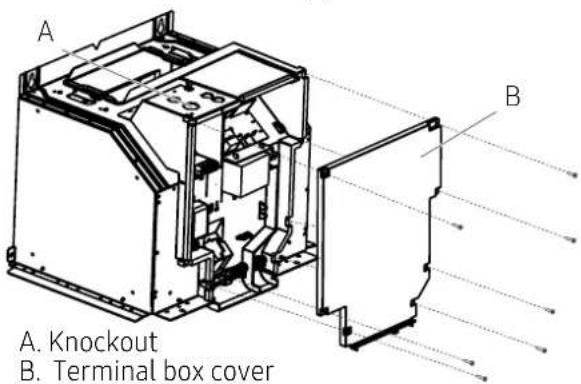
- Run home power supply cable through strain relief, into terminal box.
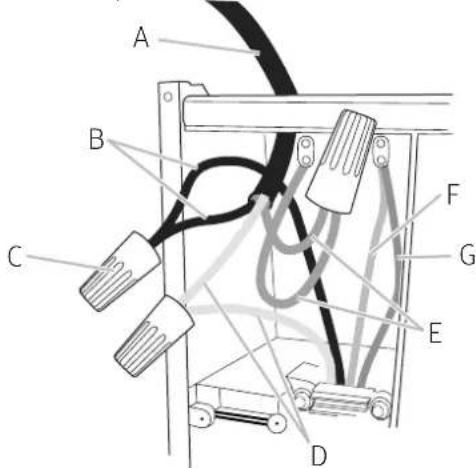
A. Home power supply cable
B. Black wires
C. UL listed wire connectors
D. White wires
E. Green (or bare) and yellow-green ground wires
F. Power board ground wires
G. Fan ground wires
- Use UL listed wire connectors and connect black wires (B) together.
- Use UL listed wire connectors and connect white wires (D) together.
WARNING
ELECTRICAL SHOCK HAZARD.
WARNING
- Connect green (or bare) ground wire from home power supply to yellow-green ground wire (E) in terminal box using UL listed wire connectors.
- Tighten strain relief screw.
- Install terminal box cover.
- Reconnect power.
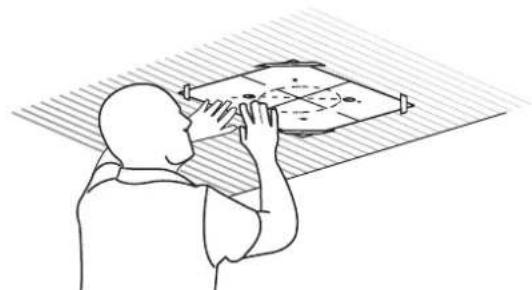
- Place the template in the ceiling considering the instructions for ceiling support structures.
NOTE
Always consider the front of hood when placing the template on the ceiling. It will define the control's location.
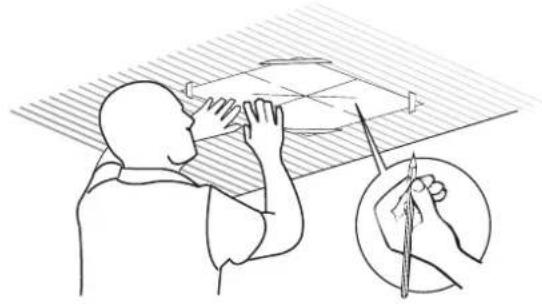
- Mark with a pencil the hole locations for screws and duct in the ceiling. Remove the template.
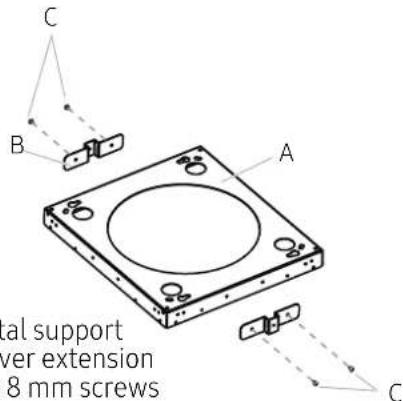
- Fix one duct cover extension on each of both sides of the horizontal support with 4 - 4.2 × 8 mm screws using the Torx 20 adapter.
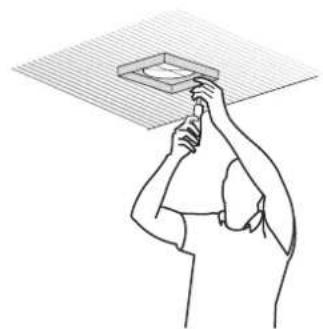
- Fix the horizontal support to the ceiling with 4 - 5 × 45 mm screws. Use 8 × 40 mm anchors if necessary.
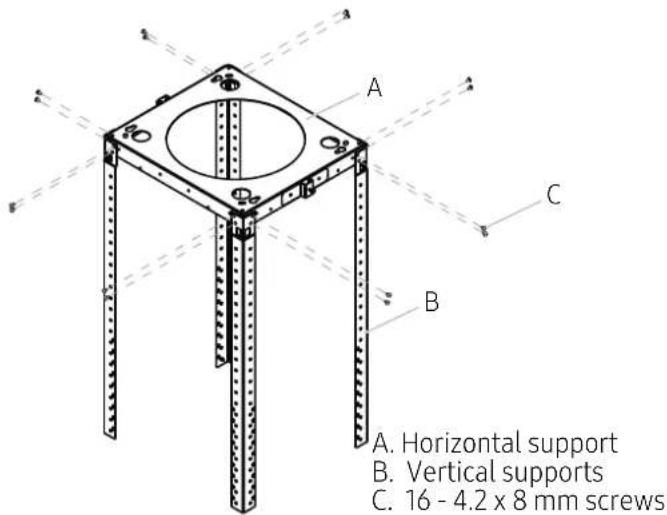
- Install the 4 vertical supports over the horizontal support with 16 - 4.2 × 8 mm screws.
- Using 2 or more people, lift the blower housing under the structure.
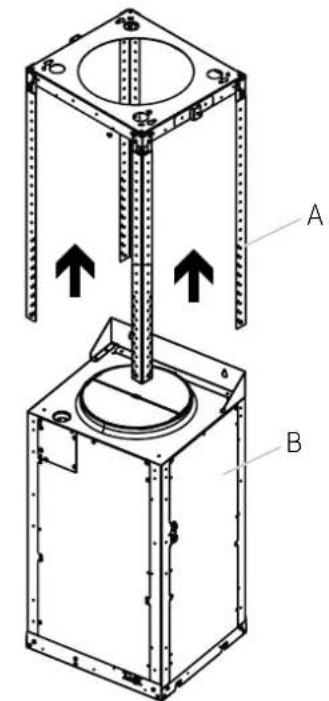
A. Vertical supports
B. Blower housing
- Attach the blower housing to the vertical supports with 2 mounting screws.
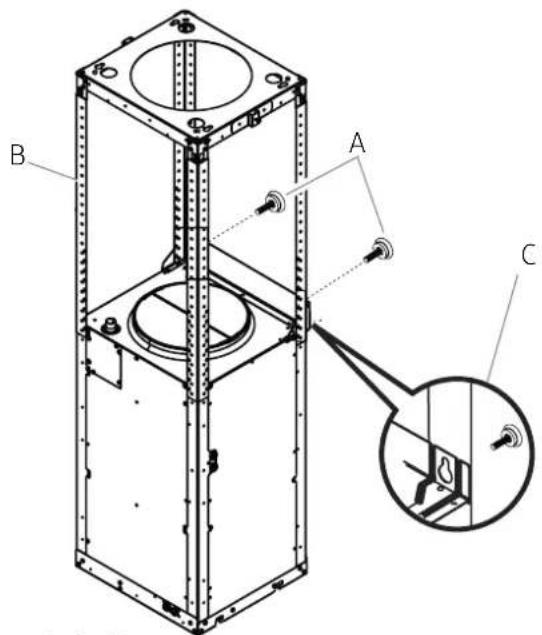
A. 2 - Mounting screws
B. Vertical support
C. Place leveling screws through the structure
- Install the 4 vertical supports with 16 - 4.2 × 8 mm screws. Check everything is tightly screwed.
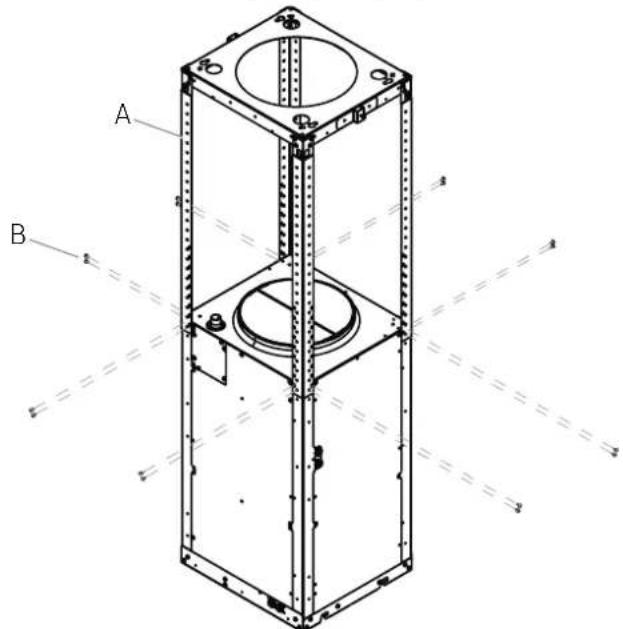
A. Vertical supports
B. 16 - 4.2 × 8 ~mm screws
- Remove the 2 mounting screws from the structure.
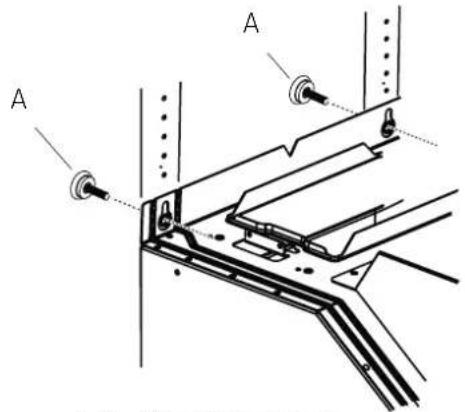
A. 2 - Mounting screws
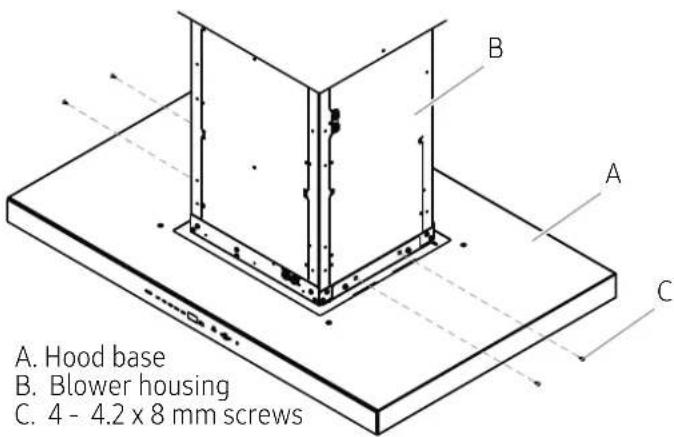
- Using 2 or more people, lift the hood base beneath the motor housing. Insert the hood base pins into the housing lower slots. Once the four pins are inserted, the hood base is supported.
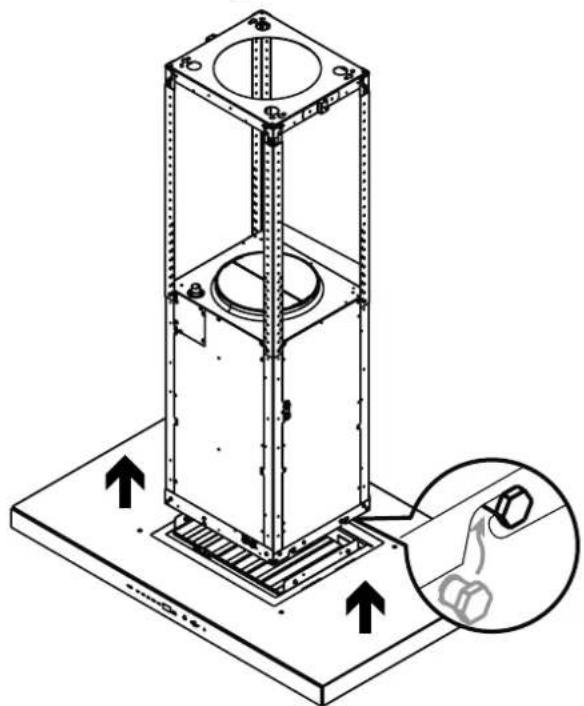
- Secure the hood base to the blower housing with 4 - 4.2 × 8 ~mm screws.
- Untie the base connector and plug with the blower housing wire connector.
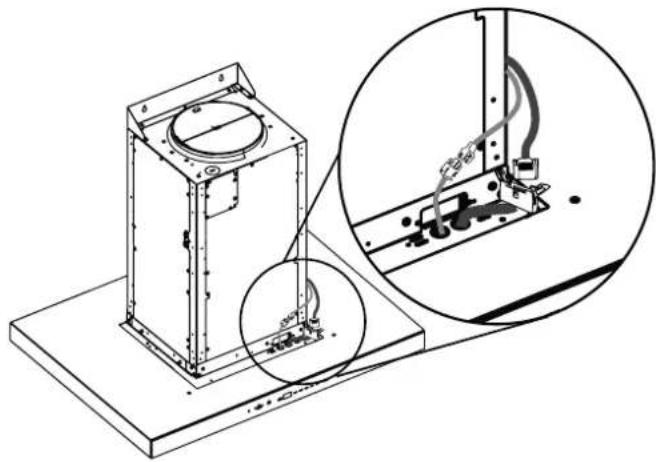
Electrical connection
WARNING
ELECTRICAL SHOCK HAZARD.
WARNING
DISCONNECT POWER BEFORE SERVICING.
REPLACE ALL PARTS AND PANELS BEFORE OPERATING.
FAILURE TO DO SO CAN RESULT IN DEATH OR
ELECTRICAL SHOCK.
- Disconnect power.
- Remove terminal box cover.
- Remove the knockout in the terminal box cover and install a UL listed or CSA approved 1 / 2 strain relief.
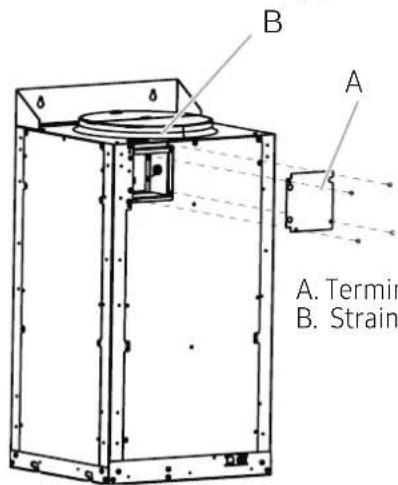
A. Terminal box cover B. Strain relief
- Run home power supply cable through strain relief, into terminal box.
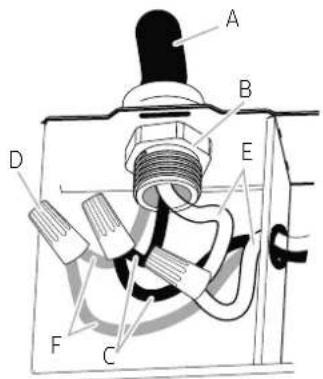
A. Home power supply cable
B. UL listed or CSA approved strain relief
C. Black wires
D. UL listed wire connectors
E. White wires
F. Green (or bare) and yellow-green ground wires
- Use UL listed wire connectors and connect black wires (C) together.
- Use UL listed wire connectors and connect white wires (E) together.
WARNING
ELECTRICALLY GROUND BLOWER.
CONNECT GROUND WIRE TO GREEN AND YELLOW GROUND WIRE IN TERMINAL BOX. FAILURE TO DO SO CAN RESULT IN DEATH OR ELECTRICAL SHOCK.
- Connect green (or bare) ground wire from home power supply to yellow-green ground wire (F) in terminal box using UL listed wire connectors.
- Tighten strain relief screw.
- Install terminal box cover.
- Reconnect power.
Duct cover installation
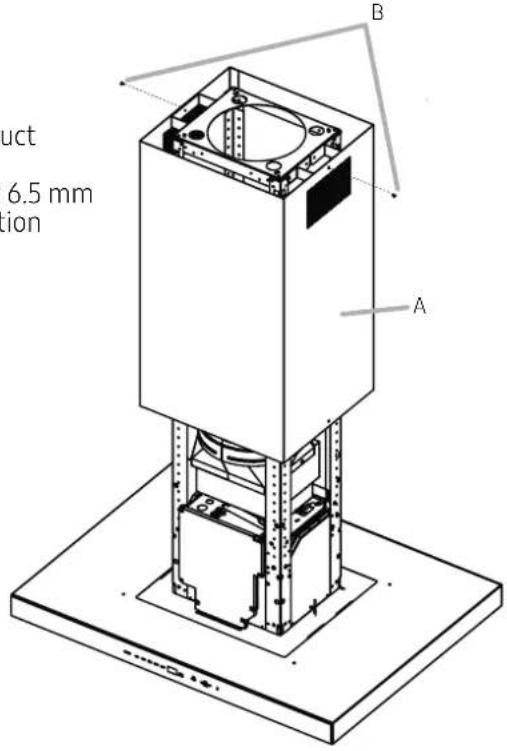
- Attach the upper duct covers to the duct cover extensions using 2 - 3.5 x 6.5 mm screws on the screw slots (B) using the Torx 10 adapter.
NOTE
The slotted holes in the upper duct covers will be visible when assembled, and can be hidden down inside the lower duct covers.
A. Upper duct covers
B. 2 - 3.5 × 6.5 mm installation screws
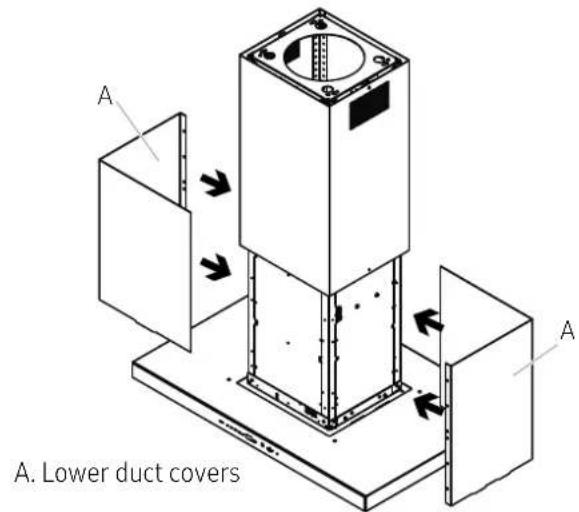
- Place lower duct covers.
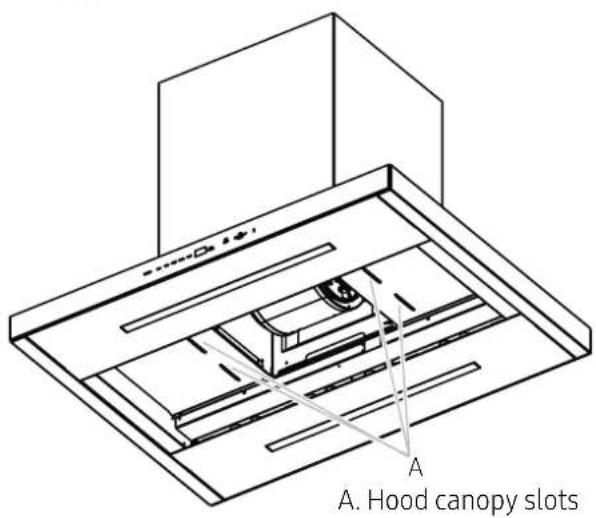
- Place the lower duct covers over the hood canopy slots.
Completing the installation
Place the filters and check the operation of the hood.
- Grasp the filter handles with both hands and then place the front edge of the filter into the hood.
- Push up on the back the handle, and then set rear of filter into the drip tray to secure. Repeat for each filter.
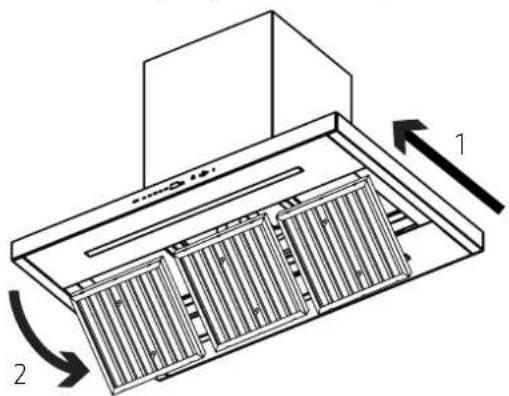
Model shown for reference only, features may vary
- To get the most efficient use from your new hood, read the "Use and Care" manual.
- Keep these Installation Instructions and Use and Care Guide close to hood for easy reference.
Installation
AttachDacor badge
Use the template on this page for alignment of the badge. Cut out the template and tape it onto the hood front surace and verify the template is aligned with the right side of the hood and within the upper and lower edge of the front surface. Practice placing the badge first before removing the adhesive release paper.
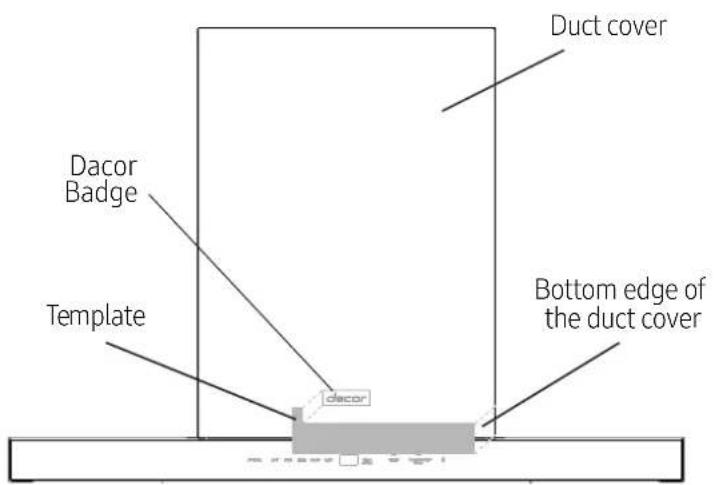
| NOTE: The badge has very high retention adhesive - once the badge is attached its extremely difficult to remove. | After this practice, remove the release paper from the back of the badge, and attach the badge to the hood without any overlap of the badge to this template. |
| Before removing the release paper from the back of the badge, practice placing the badge in the proper position on the hood without any overlap between the badge and this template. | Remove and discard this template. |
Sommaire
State of California Proposition 65 warning (US only)
A AVENTISSEMENT
National Fire Protection Association
1 Batterymarch Park
Quincy, MA 02169-7471
CSA International
8501 East Pleasant Valley Road
Cleveland, OH 44131-5575
This hood is factory set for venting through the roof (vertical discharge) or wall (horizontal discharge).
National Fire Protection Association
1 Batterymarch Park
Quincy, MA 02169-7471
CSA International
8501 East Pleasant Valley Road
Cleveland, OH 44131-5575
- Important Safety Instructions 4
- Installation Requirements 7
- Installation 12
- Important Notes
- Installer
- Customer
- Customer Service
- Symbols used in this manual
- State of California Proposition 65 warning (US only)
- FCC CAUTION:
- FCC STATEMENT:
- FCC RADIATION EXPOSURE STATEMENT:
- IC Notice
- IC RADIATION EXPOSURE STATEMENT:
- WARNING
- CAUTION
- NOTE
- Read and save these Instructions
- Electrical requirements
- IMPORTANT
- Venting requirements
- Venting methods
- Discharge direction
- Ductwork installation guidelines
- Ducting recommendations
- Cold weather
- Make-up air
- Ducting options
- Preparation
- Mounting Height
- Installation Requirements
- Tools and parts
- Remove the packaging.
- Parts Supplied
- Parts not supplied
- Tools/materials required
- Parts needed
- Dimetions and clearances
- Accessories - Sold Separately
- Installation instructions
- Ceiling support structures
- Installing the single fan hood
- Electrical connection
- Duct cover installation
- Completing the installation
- Installation
- AttachDacor badge
- Sommaire
- A AVENTISSEMENT
Brand : Dacor
Model : DHD36U990IM
Category : Range hood