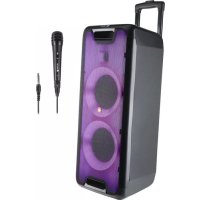
Wild Rave 2 - Loudspeaker NGS - Free user manual and instructions
Find the device manual for free Wild Rave 2 NGS in PDF.


| Product type | Portable amplified speaker |
| Brand | NGS |
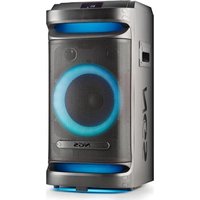
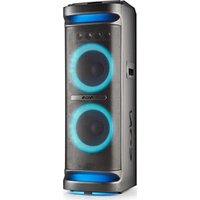
| Model | Wild Rave 2 |
| Maximum output power | 300 W |
| RMS power | 100 W |
| Built-in rechargeable battery | 12 V / 3.6 Ah |
| Battery life | Up to 6 hours at 70% volume (lights and super bass off) |
| Bluetooth technology | Yes |
| Bluetooth range | 10 meters |
| Frequency response | 40 Hz - 18 kHz |
| Audio inputs | USB, LINE (3.5 mm auxiliary), microphone (6.35 mm), guitar (6.35 mm) |
| LED display | Yes, displays operational information |
| LED lights | Yes, 6 modes (LED1 to LED6) |
| TWS function | Yes, for wireless stereo pairing between two speakers |
| Remote control | Yes, included |
| Power supply | 12 V / 2 A AC adapter (included) |
| Charge indicator | Red light when charging, green when charged |
| Sound settings | Main volume, treble ±6 dB, bass ±6 dB, echo, guitar/mic volume |
Frequently Asked Questions - Wild Rave 2 NGS
User questions about Wild Rave 2 NGS
0 question about this device. Answer the ones you know or ask your own.
Ask a new question about this device
Download the instructions for your Loudspeaker in PDF format for free! Find your manual Wild Rave 2 - NGS and take your electronic device back in hand. On this page are published all the documents necessary for the use of your device. Wild Rave 2 by NGS.
USER MANUAL Wild Rave 2 NGS
NORSK I SUOMI I SVENSKA I DANSK I LIETUVIU


www.ngs.eu
USER'S MANUAL
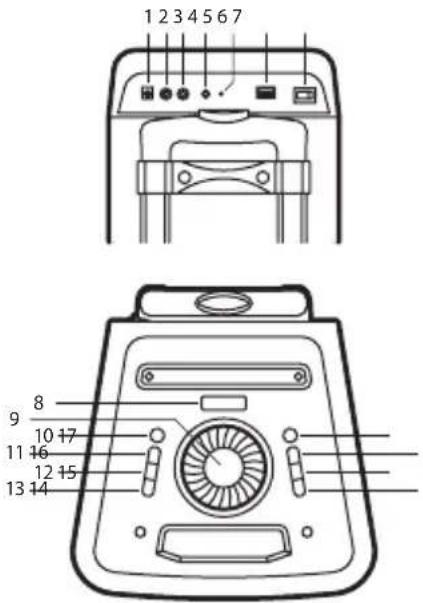
DESCRIPTION OF TOP AND BACK PANEL
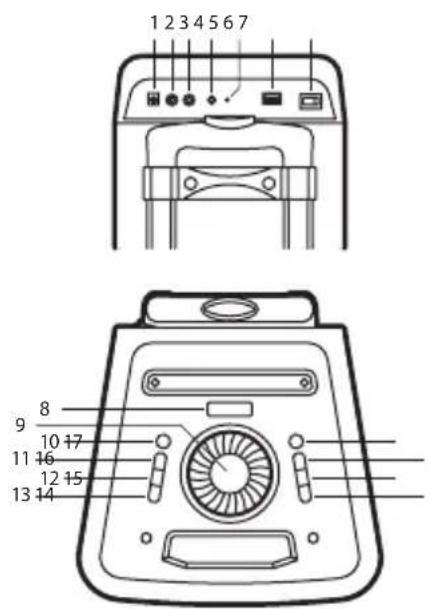
1 DC INPUT: DC input socket
2 MIC: Wired microphone input socket
3 GUITAR: Guitar input socket
4 LINE IN: Line input socket
5 CHARGING: Charging light
6 USB: USB input socket
7 Power switch: Switch power between ON or OFF
8 LED display
9 VOLUME/MULTI: Increase or decrease speaker main volume.
ENGLISH

NGS
10 STANDBY
11 SOURCE: Press to charge the source between USB, BT, LINE
12 LIGHT FX: Press to change the source between LED1, LED2, LED3, LED4, LED5, LED6, OFF
13 X-DRIVE: Press to turn the extra bass effect ON/OFF. Press for 2 seconds to unpair bluetooth device.
14 PREV: Press this key to go to the previous track in USB/BT mode.
15 PLAY/PAUSE: Press to play/pause a track.
16 NEXT: Press this key to go to the next track in USB/BT mode.
17 MENU: Press this key to change the menu between mic/guitar volume, echo volume, bass, treble.
- Display "Z" mean for MIC/GUITAR VOL 10, rotate VOLUME/MULTI knob to adjust 0-30.
- Display "E" mean for ECHO VOL 10, rotate VOLUME/MULTI knob to adjust 0-30.
- Display "8" mean for BASS 00, rotate VOLUME/MULTI knob to adjust ± 6dB.
- Display "E" mean for TREBLE 00, rotate VOLUME/MULTI knob to adjust ± 6dB.
USER'S MANUAL
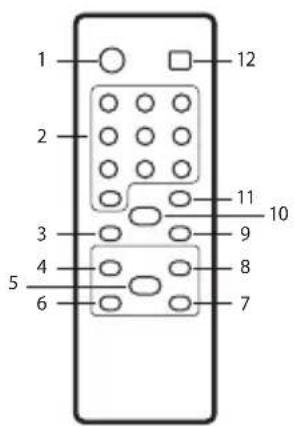
DESCRIPTION OF REMOTE CONTROL
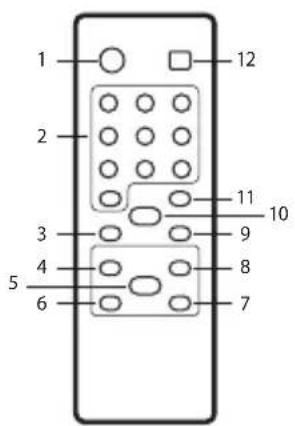
1 STANDBY: Standby ON/OFF
2 0-9 numeric keys: These keys are used to play a track directly in USB source mode. Eg: To play 12th track in the USB playlist press the numeric key "1" followed by "2".
3 VOL-: To decrease the volume
4 : Play the previous song
5 ▶: Play / pause
6 ◀: Fast rewind a song by pressing, only in USB input mode.
7 ▶: Fast forward song by pressing, only in USB input mode.
8 ▶▶: Play the next song
9 VOL+: To increase the volume.
10 MUTE: Press to switch mute ON/OFF.
11 REPEAT: To choose repeat mode in USB input mode: repeat one (ONE), repeat all (ALL), repeat randomize (RAN).
12 SOURCE: Press to change the source between USB, BT, LINE.
TWS MODE (TRUE WIRELESS STEREO)
A. Turn on 2 speakers and select both INPUT modes as Bluetooth.
B. Press "▶" key on speaker set for 2 seconds and "E" will be displayed. When the display light is "b" or a tone is heard from another device, the TWS is established.
C. Turn on the Bluetooth feature on your mobile phone to search for Bluetooth devices and select "NGS WILDRAVE" from the search result. Select OK o YES to pair this unit with your mobile phone and steady blue light indicate a successful connection. Once connected you can play music from your mobile phone.
D. Press "▶II" key on the speaker unit for 2 seconds. Turn off the TWS features when "L" is displayed.
USB CARD / BLUETOOTH
USB CARD PLAYING
When power ON the product, if USB card inserted, it can play the MP3 / AMR / WAV / WMA / FLAC format music from the USB. Press PREV/NEXT buttons to select the song you want. Press the play/pause button to pause / resume the music.
BLUETOOTH MODE
A. Press the SOURCE button until the screen displays the word BL. In Bluetooth mode the device goes into searching / paring / reconnect mode for pair.
B. Now, turn ON the Bluetooth function on your mobile phone.
C. Search for "NGS WILDRAVE" and select it to pair (for first time pairing or pairing a new mobile device).
D. The Bluetooth speaker will be reconnecting automatically if your mobile phone has been paired (depend on the mobile phone's type and configuration, manual reconnection may require on some devices).
E. To unpair the speaker from the mobile phone, press and hold the X DRIVE button for 2 seconds.
USER'S MANUAL
LINE IN
You can connect the device with the external multimedia audio sources through the port "LINE IN". After connection, just set the mode to LINE by pressing the "SOURCE" button on the device. The device can play the audio files from multimedia sources like PC, mobile phone, MP3 and MP4, etc.
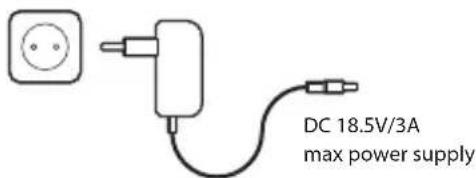
CHARGING INSTRUCTIONS
During playback, if the battery is low, the red light will turn on indicating that the speaker should be charged or else it will turn off soon.
- Set the switch in the OFF position.
- Connect the power adapter to the speaker.
- Connect the adapter to electrical power.
- When the charge LED turns from red to green, it indicates that it's fully charged. Disconnect the charger from the mains and disconnect the adapter from the speaker.
ENGLISH

NGS
TECHNICAL SPECIFICATIONS
WILDRAVE 1 WILDRAVE 2
Output peak power 200W 300W
Battery 12V/3.6Ah 12V/3.6Ah
Bluetooth Yes Yes
Working range 10m 10m
Frequency response 40Hz\~18kHz 40Hz\~18kHz
USB port Yes Yes
Aux input Yes Yes
Microphone Yes Yes
Guitar input Yes Yes
LED screen Yes Yes
Battery level indicator Yes Yes
LED lights Yes Yes
RMS 80W 100W
Battery life 6 hours* 6 hours*
DC input 12V / 2A
* 4 hours at 100% volume (lights and super-bass off) 6 hours at 70% volume (lights and super-bass off) 10 hours at 50% volume (lights and super-bass off)
DC CHARGING
If at any time in the future you should need to dispose of this product please note that:
Waste electrical products should not be disposed of with household waste. Please recycle where facilities exist.
Check with your Local Authority or retailer for recycling advice.
(Waste Electrical and Electronic Equipment Directive)
MANUEL DE L'UTILISATEUR
DESCRIPTION DU PANNEAU SUPÉRIEUR ET ARRIÈRE
DC 18,5V/3A
DC 18,5V/3A
MODALITÀ TWS (TRUE WIRELESS STEREO)
DC 18,5V/3A
Alimentazione max
DC 18,5V/3A
DC 18,5V/3A
max netspanning
REŽIM TWS (TRUE WIRELESS STEREO)
DC 18,5V/3A
REŽIM TWS (TRUE WIRELESS STEREO)
DC 18,5V/3A
KAPTA USB / BLUETOOTH
ΑΝΑΠΑΡΑΓΩΓΗ ΑΠΟ USB
TWS MÓD (TRUE WIRELESS STEREO)
- Vis "Zumiddel for MIC/GUITAR VOL 10, vri VOLUME/MULTI-knappen for å justere 0-30.
- Vis "E" middel for ECHO VOL 10, vri VOLUME/MULTI-knappen for å justere 0-30.
- Vis "B" middel for BASS 00, vri VOLUME/MULTI-knappen for å justere ± 6dB.
- Vis "L" middel for TREBLE 00, vri VOLUME/MULTI-knappen for å justere ± 6dB.
BRUKERVEILEDNING
BESKRIVELSE AV FJERNKONTROLL
DC 18,5V/3A
TWS REŽIMAS (TRUE WIRELESS STEREO)
HAS BEEN TESTED AND FOUND IN CONFORMITY WITH THE FOLLOWING HARMONIZED EUROPEAN STANDARDS:
HA SIDO TESTADO EN CONFORMIDAD CON LAS SIGUIENTES NORMAS STANDARD EUROPEAS ARMONIZADAS:
EN62368-1:2014
EN 55032:2015,
EN 50663:2017
EN55035:2017,
ETSIEN 301 489-1 V2.2.3(2019-11)
EN61000-3-22:2014.
ETSIEN 301 489-17 V3.2.4 (2020-09)
EN61000-3-3:2013
ETSIEN 300 328 V2.2.2(2019-07)
AND THEREFORE COMPLY WITH THE ESSENTIAL REQUIREMENTS AND PROVISIONS OF THE FOLLOWING DIRECTIVES OF THE EUROPEAN PARLIAMENT AND EUROPEAN COUNCIL:
Y, POR LO TANTO, CUMPLE CON LOS REQUERIMIENTOS Y PROVISIONES DE LAS SIGUIENTES DIRECTIVAS DEL PARLAMENTO EUROPEO:
RADIO EQUIPMENT DIRECTIVE 2014/53/EU
ROHS DIRECTIVE 2011/65/EU & (EU) 2015/863
technical support: www.ngs.eu/support
www.ngs.eu
- DESCRIPTION OF TOP AND BACK PANEL
- ENGLISH
- DESCRIPTION OF REMOTE CONTROL
- TWS MODE (TRUE WIRELESS STEREO)
- USB CARD / BLUETOOTH
- USB CARD PLAYING
- BLUETOOTH MODE
- LINE IN
- CHARGING INSTRUCTIONS
- TECHNICAL SPECIFICATIONS
- WILDRAVE 1 WILDRAVE 2
- DC CHARGING
- DESCRIPTION DU PANNEAU SUPÉRIEUR ET ARRIÈRE
- MODALITÀ TWS (TRUE WIRELESS STEREO)
- REŽIM TWS (TRUE WIRELESS STEREO)
- KAPTA USB / BLUETOOTH
- ΑΝΑΠΑΡΑΓΩΓΗ ΑΠΟ USB
- TWS MÓD (TRUE WIRELESS STEREO)
- BRUKERVEILEDNING
- BESKRIVELSE AV FJERNKONTROLL
- TWS REŽIMAS (TRUE WIRELESS STEREO)
Brand : NGS
Model : Wild Rave 2
Category : Loudspeaker