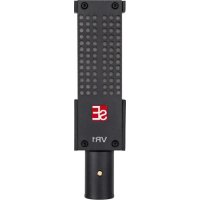
VR1 - Microphone SE Electronics - Free user manual and instructions
Find the device manual for free VR1 SE Electronics in PDF.


| Product Type | Passive Ribbon Microphone |
| Brand | SE Electronics |
| Model | VR1 |
| Category | Microphone |
| Main Component | Hand-adjusted 2.5 μm aluminum ribbon |
| Magnet | Neodymium |
| Polar Pattern | Figure-8 |
| Frequency Response | 20 – 18,000 Hz |
| Sensitivity | 1.78 mV/Pa (-55 dB) |
| Electrical Impedance | 300 Ohms |
| Recommended Load Impedance | >1 kOhms |
| Maximum Sound Pressure Level (SPL) | 135 dB (0.5% THD at 1 kHz) |
| Power Supply | None (passive); protected against phantom power |
| Connector | 3-pin XLR male |
| Dimensions (L x W x H) | 33 mm x 17 mm x 127 mm |
| Weight | 230 g |
| Box Contents | Microphone, clip, screw adapter, suspension mount, wooden storage box |
| Care and Cleaning | Clean with a soft, dry cloth after each use; store in the box |
| Safety | Use with safety-compliant and grounded equipment |
| Warranty | Possible extension to 3 years after registration on the SE Electronics website |
| Country of Origin | Not specified, but international brand (USA) |
Frequently Asked Questions - VR1 SE Electronics
User questions about VR1 SE Electronics
0 question about this device. Answer the ones you know or ask your own.
Ask a new question about this device
Download the instructions for your Microphone in PDF format for free! Find your manual VR1 - SE Electronics and take your electronic device back in hand. On this page are published all the documents necessary for the use of your device. VR1 by SE Electronics.
USER MANUAL VR1 SE Electronics
natural_image
Two black industrial sensor modules labeled VR1 and VR2, each with a SE logo and perforated top (no text or symbols on the modules themselves)Thank you
We would like to thank you cordially for choosing this sE microphone! This manual contains some important instructions for setting up and operating your new equipment. Please take a few minutes to read the instructions below carefully. We hope you will enjoy working with it as much as we enjoyed designing and building it for you.
Most Sincerely,
Your sE Team
Brief Description
The VR1 and VR2 ribbon microphones mark a new era in ribbon technology. Whereas most ribbon microphones have a dark, muted high-frequency response, the VR1 and VR2 utilize a clever mechanical device to achieve nearly full-range frequency response that extends well beyond that of most other ribbon microphones, approaching nearly 20kHz. This provides an extended level of top-end detail, so the result includes not only the distinctly natural low-end and midrange that most ribbons provide, but also minimal loss in high frequency content. Guitar and brass tones retain their "edge", cymbals still sound rich and full, and a supremely natural sound is achieved from top to bottom.
Additionally, the VR1 and VR2 can handle very high sound pressure levels and thus can be utilized for applications not normally considered for most ribbon microphones, including loud brass, drums, and electric guitar cabinets, both in the studio and on stage.
The VR1 is a passive ribbon, so it does not require phantom power – though it is “phantom-protected”, so it will not be damaged by accidental application of phantom power. Given its lower output, it is ideally suited for loud sources such as electric guitars, drum overheads, and brass.
The VR2 is an active ribbon and requires +48V phantom power for operation. With higher sensitivity than the VR1, it is ideally suited for applications including acoustic instruments, piano, and vocals, as well as the same sources as the VR1 (guitars, drums, brass).
What's in the box
Your packaging should contain the follow items. If anything is missing, please contact your sE Electronics dealer and let them know.
- VR1 / VR2 microphone
- microphone stand clip
- thread adapter
- wooden case
- shock mount
Powering - VR2 ONLY
To ensure proper operation, the VR2 microphone requires a phantom power source providing 48 Volts according to IEC 61938.

Risk of damage
Do not connect the VR2 microphone to any power supply other than a phantom power source (input with phantom power or external IEC standard phantom power supply) with a floating connector, using a balanced cable with studio grade connectors to IEC 268-12 only. This is the only way to ensure safe and reliable operation.
Note: The VR1 is a passive ribbon microphone and does not require phantom power for operation.
Safety and maintenance

Risk of damage
Please make sure that the piece of equipment to which your microphone will be connected fulfils the safety regulations enforced in your country and is fitted with a ground lead.
Cleaning the microphone
After every use, clean the microphone with a dry, soft cloth tissue and store it in a solid case or a zipper pouch.
Technical Specifications
| VR1 | VR2 | |
| Electronics | Passive | Active |
| Transducer | Hand-tensioned 2.5μm aluminum ribbon | Hand-tensioned 2.5μm aluminum ribbon |
| Magnet | Neodymium | Neodymium |
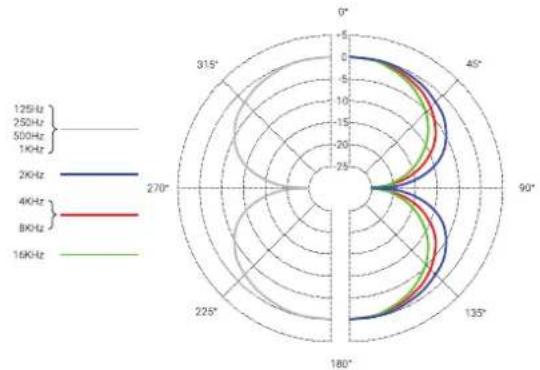
| Polar Pattern | Figure-8 | Figure-8 |
| Frequency Range | 20 – 18,000 Hz | 20 – 18,000 Hz |
| Sensitivity | 1.78 mV/Pa (-55 dB) | 14.1 mV/Pa (-37 dB) |
| Electrical Impedance | 300 Ohms | 200 Ohms |
| Recommended Load Impedance | >1k Ohms | >1k Ohms |
| Max SPL | 135 dB (0.5% THD @ 1kHz) | 135 dB (0.5% THD @ 1kHz) |
| Equivalent Noise Level | - | 18 dB(A) |
| Dynamic Range | - | 117 dB |
| Signal to Noise Ratio | - | 76 dB |
| Connectivity | 3-pin male XLR connector | 3-pin male XLR connector |
| Power Requirements | - | +48V Phantom |
| Current Consumption | - | 2.4 mA |
| Dimensions | 33 mm (1.30 in.) x 17 mm (0.67 in.) x 127 mm (5.00 in.) | 33 mm (1.30 in.) x 17 mm (0.67 in.) x 187 mm (7.36 in.) |
| Weight | 230 g (8.11 oz) | 360 g (12.70 oz) |
Frequency Response
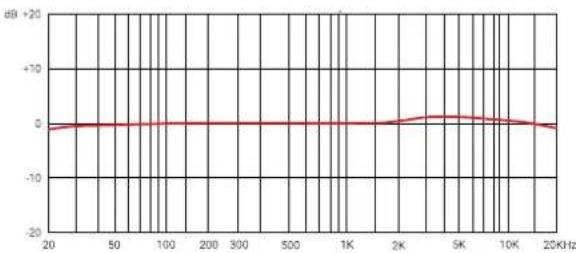
line
| Frequency (KHz) | dB | | --------------- | ------ | | 20 | 0 | | 50 | 0 | | 100 | 0 | | 200 | 0 | | 300 | 0 | | 500 | 0 | | 1K | 0 | | 2K | 0 | | 5K | 0 | | 10K | 0 | | 20K | 0 |Polar Pattern
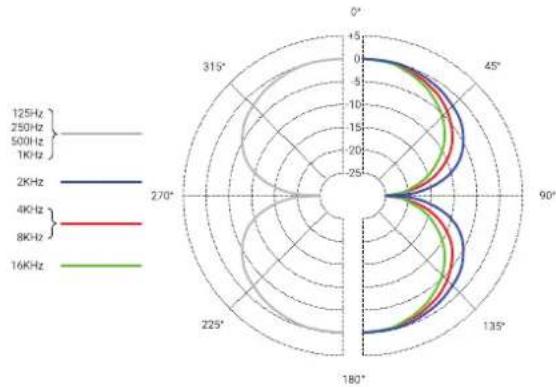
Support
In case you are experiencing any problems or have any questions regarding your sE product, please contact your dealer first for the fastest and more direct service. If an authorized service is required, it will be arranged by that dealer: http://www.seelectronics.com/dealers
If you still have difficulties with support or assistance, please do not hesitate to contact us directly: http://www.seelectronics.com/contact-us
Lastly, remember to register your new gear to extend your warranty to a full three years:
http://www.seelectronics.com/registration
Contact
Feel free to contact us:
sE Electronics International, Inc. www.seelectronics.com
448 Ignacio Blvd, STE 411 contact@seelectronics.com
Novato, CA 94949
USA
Our international distributors and sales representatives: http://www.seelectronics.com/contact-us

This product conforms to the standards listed in the Declaration of Conformity. Please contact us if you want to order a free copy of the Declaration of Conformity
Technical data subject to change without notice.
Danke
Beschädigungsgefahr
Beschädigungsgefahr
http://www.seelectronics.com/registration
Grazie
Rischidi infortunio
Rischio di danni
line
| Frequency | dB | | --------- | ------ | | 20 | -1.0 | | 50 | -0.5 | | 100 | -0.2 | | 200 | -0.1 | | 500 | -0.1 | | 1K | -0.1 | | 2K | 0.0 | | 5K | 0.5 | | 10K | 0.3 | | 20K | -0.5 |Pattern Polare
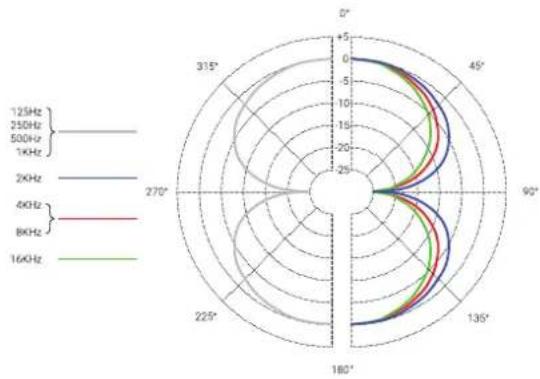
radar
| Frequency | Angle (°) | Value | |---|---|---| | 125Hz | 0 | 0 | | 125Hz | 45° | 5 | | 125Hz | 90° | 0 | | 125Hz | 135° | -5 | | 125Hz | 180° | -10 | | 125Hz | 225° | -15 | | 125Hz | 270° | -20 | | 125Hz | 315° | -25 | | 250Hz | 0 | 0 | | 250Hz | 45° | 5 | | 250Hz | 90° | 0 | | 250Hz | 135° | -5 | | 250Hz | 180° | -10 | | 250Hz | 225° | -15 | | 250Hz | 270° | -20 | | 250Hz | 315° | -25 | | 500Hz | 0 | 0 | | 500Hz | 45° | 5 | | 500Hz | 90° | 0 | | 500Hz | 135° | -5 | | 500Hz | 180° | -10 | | 500Hz | 225° | -15 | | 500Hz | 270° | -20 | | 500Hz | 315° | -25 | | 1KHz | 0 | 0 | | 1KHz | 45° | 5 | | 1KHz | 90° | 0 | | 1KHz | 135° | -5 | | 1KHz | 180° | -10 | | 1KHz | 225° | -15 | | 1KHz | 270° | -20 | | 1KHz | 315° | -25 | | 2KHz | 0 | 0 | | 2KHz | 45° | 5 | | 2KHz | 90° | 0 | | 2KHz | 135° | -5 | | 2KHz | 180° | -10 | | 2KHz | 225° | -15 | | 2KHz | 270° | -20 | | 2KHz | 315° | -25 | | 4KHz | 0 | 0 | | 4KHz | 45° | 5 | | 4KHz | 90° | 0 | | 4KHz | 135° | -5 | | 4KHz | 180° | -10 | | 4KHz | 225° | -15 | | 4KHz | 270° | -20 | | 4KHz | 315° | -25 | | 8KHz | 0 | 0 | | 8KHz | 45° | 5 | | 8KHz | 90° | 0 | | 8KHz | 135° | -5 | | 8KHz | 180° | -10 | | 8KHz | 225° | -15 | | 8KHz | 270° | -20 | | 8KHz | 315° | -25 | | 16KHz | 0 | 0 | | 16KHz | 45° | 5 | | 16KHz | 90° | 0 | | 16KHz | 135° | -5 | | 16KHz | 180° | -10 | | 16KHz | 225° | -15 | | 16KHz | 270° | -20 | | 16KHz | 315° | -25 |Supporto
Risque de dommages
Risque de dommages
line
| Frequency | dB | | --------- | ------ | | 20 | 0 | | 50 | 0 | | 100 | 0 | | 200 | 0 | | 300 | 0 | | 500 | 0 | | 1K | 0 | | 2K | 0 | | 5K | 0 | | 10K | 0 | | 20K | 0 |Diagramme polaire
radar
| Frequency | Angle (°) | Value | |---|---|---| | 125Hz | 0 | 6 | | 125Hz | 45° | 7 | | 125Hz | 90° | 6 | | 125Hz | 135° | 5 | | 125Hz | 180° | 4 | | 125Hz | 225° | 3 | | 125Hz | 270° | 2 | | 125Hz | 315° | 1 | | 250Hz | 0 | 6 | | 250Hz | 45° | 7 | | 250Hz | 90° | 6 | | 250Hz | 135° | 5 | | 250Hz | 180° | 4 | | 250Hz | 225° | 3 | | 250Hz | 270° | 2 | | 250Hz | 315° | 1 | | 500Hz | 0 | 6 | | 500Hz | 45° | 7 | | 500Hz | 90° | 6 | | 500Hz | 135° | 5 | | 500Hz | 180° | 4 | | 500Hz | 225° | 3 | | 500Hz | 270° | 2 | | 500Hz | 315° | 1 | | 800Hz | 0 | 6 | | 800Hz | 45° | 7 | | 800Hz | 90° | 6 | | 800Hz | 135° | 5 | | 800Hz | 180° | 4 | | 800Hz | 225° | 3 | | 800Hz | 270° | 2 | | 800Hz | 315° | 1 | | 16KHz | 0 | 6 | | 16KHz | 45° | 7 | | 16KHz | 90° | 6 | | 16KHz | 135° | 5 | | 16KHz | 180° | 4 | | 16KHz | 225° | 3 | | 16KHz | 270° | 2 | | 16KHz | 315° | 1 |Support
Riesgo de daños
http://www.seelectronics.com/registration
Contacto
sE Electronics International, Inc. www.seelectronics.com
448 Ignacio Blvd, STE 411 contact@seelectronics.com
Novato, CA 94949
USA
Nuestros distribuidores y representantes locales: http://www.seelectronics.com/contact-us

Рискповреждения
http://www.seelectronics.com/registration
Our international distributors & sales representatives: http://www.seelectronics.com/contact-us
This product conforms to the standards listed in the Declaration of Conformity. Please contact us if you want to order a free copy of the Declaration of Conformity. Technical data subject to change without notice.
IMPORTANT
WARRANTY REGISTRATION
Thank you for purchasing an sE product! You are automatically entitled to a two-year warranty, but can extend this to a full three years with registration. To register your new equipment and to read the full warranty details, please go here:
http://www.seelectronics.com/registration
Most Sincerely,
Your sE Team