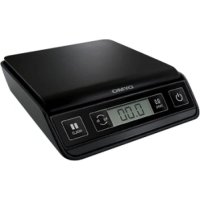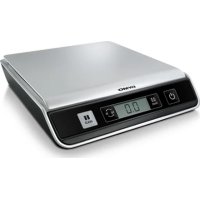
M25 - Electronic scale DYMO - Free user manual and instructions
Find the device manual for free M25 DYMO in PDF.


| Product Type | Precision Electronic Scale |
| Brand | Dymo |
| Model | M25 |
| Maximum Capacity | 25 lb (11 kg) |
| Minimum Weight | 0.2 oz (4 g) |
| Graduation | 0.1 oz (2 g) |
| Accuracy (less than half capacity) | ±0.2 oz |
| Accuracy (more than half capacity) | ±0.4 oz |
| Measurement Units | lb/oz (default), kg/g (switchable) |
| Power Supply | USB 2.0 via computer or 3 AAA alkaline batteries |
| Battery Life | Auto-off after 3 minutes of inactivity |
| Display | LCD (Liquid Crystal Display) |
| Functions | Tare, Hold, Zero, Unit change |
| Interface | USB 2.0 HID low speed |
| Operating Temperature | 10 to 40 °C (50 to 104 °F) |
| Certification | Not legal for trade |
| Warranty | 1 year against defects in design, material and workmanship |
| Maintenance | Use on a stable surface, avoid shocks and humidity, clean with a soft cloth |
| Safety | Disconnect USB before changing batteries, avoid electrostatic discharges |
| Dimensions (approx.) | Not specified in the manual |
| Weight | Not specified |
Frequently Asked Questions - M25 DYMO
User questions about M25 DYMO
0 question about this device. Answer the ones you know or ask your own.
Ask a new question about this device
Download the instructions for your Electronic scale in PDF format for free! Find your manual M25 - DYMO and take your electronic device back in hand. On this page are published all the documents necessary for the use of your device. M25 by DYMO.
USER MANUAL M25 DYMO
text_image
DYM0® DYM0® TARE 0.0 kg lb HOLD M10 | M25DYMO® Digital USB Postal Scale
This User Guide provides instructions for using your DYMO® Digital USB Postal Scale.
Visit www.dymo.com/register to register your scale.
Setting Up the Scale
The scale is powered through a USB port on your computer. When not connected to your computer, the scale can be powered by three AAA batteries.
To set up the scale
- Unpack the scale.
- Set the scale on a firm, flat surface.
- Remove the protective covering from the LCD display.
-
Plug the USB cable into the USB port on the back of the scale.
-
Plug the USB cable into an available USB port on your computer.
The scale is automatically recognized by your computer when the power is turned on.
When connecting the scale through a USB hub, always use a powered hub.
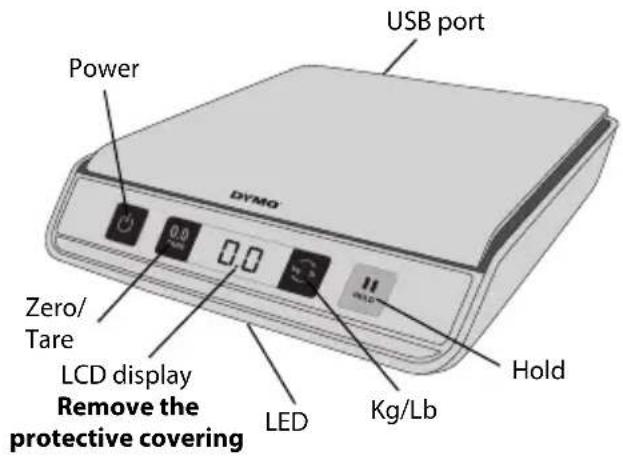
text_image
USB port Power DYSO Zero/ Tare LCD display Remove the protective covering LED Kg/Lb Hold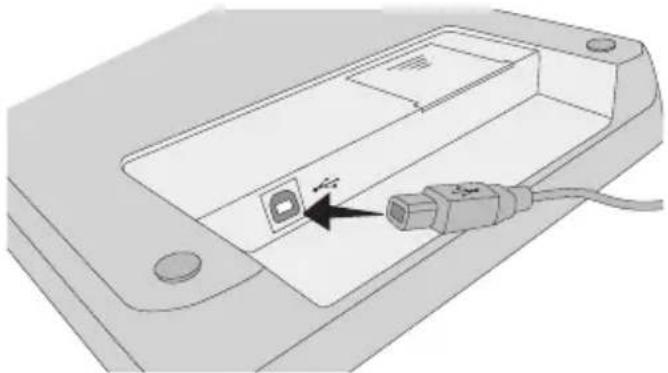
natural_image
Diagram of an electronic device showing a port with a USB cable inserted into the internal casing (no text or symbols)Inserting the Batteries
When not connected to your computer, the scale can be powered by three AAA alkaline batteries. The scale automatically turns off after three minutes of inactivity.
To insert the battery
- Disconnect the USB cable from the computer or USB hub.
- Turn the scale over.
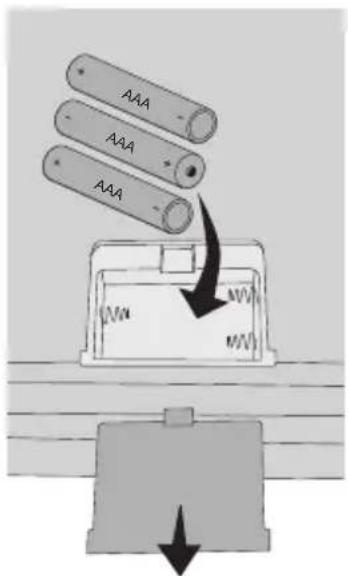
- Remove the battery compartment cover.
- Insert three AAA batteries as shown.
Make sure to insert the batteries correctly. Inserting the batteries backwards can damage the scale.
- Replace battery compartment cover.
Remove the batteries if the scale will not be used for a long period of time.
text_image
AAA AAA AAATurning On the Power
The scale has an Auto Shut Off feature which automatically turns off the scale after three minutes of inactivity.
To turn the scale on
◆ Press on the front of the scale.
When the scale is first turned on, wait a few seconds for the scale to stabilize before weighing items. The display shows 0 g, 0.0 oz, or 0.00 oz when ready.
To turn the scale off
◆ Press on the front of the scale to turn the scale off.
The scale turns off automatically after three minutes of inactivity.
Using the Scale
Always wait for 0 g, 0.0 oz, or 0.00 oz to display before placing an item on the scale platform.
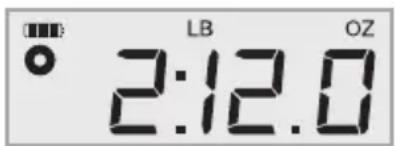
After placing an item on the scale, wait for several seconds for the weight to appear. When the scale is ready, a o appears to the left of the weight.
text_image
LB OZ 2:12.0To weigh an item
◆ Place an item on the scale platform.
Using the Tare Feature
You can weigh small items or items that cannot be easily placed on the scale platform by placing the items in a container and using the Tare/Zero button to eliminate the weight of the container.
To use the tare feature
- Place an empty container on the platform.
- When the scale is ready, press 0.0 TANG
The display is set to zero.
- Place the items to be weighed in the container.
The display shows the weight of the items, without the weight of the container.
- After removing the container, press 0.0 LSB reset the scale to zero.
Using the Hold Feature
When an item being weighed extends over the front of the scale and you cannot see the display, you can freeze the display so that the weight is still displayed after removing the item.
To use the Hold feature
- Press .
The LED flashes and the display shows HOLD, and then 0 g, 0.0 oz, or 0.00 oz when ready.
- Place the item on the scale.
After a few seconds, the LED stops flashing and stays illuminated.
- Remove the item from the scale.
The LED stays illuminated and the weight continues to be displayed for about ten seconds.
Changing the Units of Measure
Your scale can display weight in English (pounds) or metric (kilograms) units. The default unit of measure is English. Each time you turn on the scale, the scale defaults to the unit of measure that was last used.
To change the units of measure
◆ Press toggle between English and metric units.
Caring for the Scale
With proper care and handling, your scale will give you years of service. Keep the following in mind when using your scale:
- Your scale works best when operated and stored at normal room temperature. Avoid lengthy exposure to extreme heat or cold.
- Only operate the scale on a stable, vibration free surface.
- Exposure to dust, dirt, moisture, vibration, and air currents; and proximity to other electronic equipment can affect the reliability and accuracy of your scale.
- Using the scale in proximity to wireless devices, such as mobile phones, can cause the scale display to fluctuate when the device is in use.
- Although this scale is designed to be quite durable, gently place items to be weighed on the platform. Avoid rough treatment, as this may permanently damage the internal sensor and void your warranty.
- You can permanently damage the scale by placing significantly overweight items on the scale platform.
- Avoid shaking, dropping, or otherwise shocking the scale. This is a precision instrument and MUST BE HANDLED WITH EXTREME CARE.
- The scale has been calibrated at the factory and will not need to be calibrated again.
Technical Specifications
NOT LEGAL FOR TRADE
Model M10 M25
| Capacity 0.2 oz | → 10 pounds(4 g → 4.5 kg) | 0.2 oz → 25 pounds(4 g → 11 kg) |
| Weight Increments 0.1 oz (2 g) | 0.1 oz (2 g) | |
| Accuracy | ||
| Under half the capacity | ±0.2 oz | ±0.2 oz |
| Over half the capacity | ±0.4 oz | ±0.4 oz |
| Units lb/oz (kg/g) kg/g (lb/oz) | ||
| Auto Shut Off After three minutes of inactivity | ||
| Operating Temperature 50° - 104° F (10° - 40° C) | ||
| Interface USB 2.0 Low Speed HID Scale Device | ||
| Power USB or 3 AAA alkaline batteries | ||
For information about our other scale products, visit www.dymo.com.
Troubleshooting
| Problem/Error Message Solution | |
| No display Ensure the scale is plugged in, or replace the batteries. | |
| LOis displayed Replace the batteries. | |
| Negative number is displayed A tare value is displayed as a negative number when the items are removed from the scale. Press0.0TAREreset the scale to zero. | |
| 00000is displayed The item on the scale platform exceeds the maximum capacity of the scale. Remove the item immediately to prevent damage to the scale. | |
| Display reads 0 g, 0.0 oz, or 0.00 oz with an item on the platform | This can happen because:The Tare/Zero button,0.0TAREas pressed while an item was on the scale.Power to the scale was disconnected or turned off and then on again with an item on the scale.In both of these cases, remove the item from the platform and press0.0TAREto return the display to 0 g, 0.0 oz, or 0.00 oz. |
If you need further assistance, contact Technical Support at (877) 724-8324. You can also obtain support at www.dymo.com.
Warranty

ONE-YEAR LIMITED WARRANTY
Sanford, L.P., d/b/a Dymo ("Dymo") warrants the Dymo scales to be free from defects in design, materials and workmanship for one year from the date of purchase. If this product is found to be defective within that time, we will promptly repair or replace it at our cost. This warranty does not cover accidental damage, wear and tear or consequential or incidental loss.
WHAT IS COVERED?
This warranty covers this product only and only against defects in design, materials or workmanship. If, after inspection of your returned product, we find that the product is defective in design, materials or workmanship, we shall at no charge to you repair or replace the product at our discretion, and return the product to you. You are responsible for the full cost of shipping the product to Dymo, but there is no charge for the inspection or the return postage.
WHAT IS NOT COVERED?
This warranty does not cover loss of or damage to a computer or other devices connected directly or indirectly to this Dymo product. This warranty also does not cover any loss of or damage to data, programs, records or other information. This warranty does not cover any defect or loss which would not have occurred if instructions in the owner's manual had been followed. This warranty does not cover other incidental or consequential damages even if Dymo has been informed of the possibility of such damages. This warranty is in lieu of all other warranties, express or implied. This warranty gives you specific rights and you may also have other rights, which may vary from state to state or country to country.
HOW TO MAKE A WARRANTY CLAIM
To make a warranty claim, please contact customer support
Customer Support - (877) 724-8324
www.dymo.com
Declaration of Conformity
This equipment has been tested and found to comply with the limits for a Class B digital device, pursuant to part 15 of the FCC Rules. These limits are designed to provide reasonable protection against harmful interference in a residential installation. This equipment generates, uses and can radiate radio frequency energy and, if not installed and used in accordance with the instructions, may cause harmful interference to radio communications. However, there is no guarantee that interference will not occur in a particular installation. If this equipment does cause harmful interference to radio or television reception, which can be determined by turning the equipment off and on, the user is encouraged to try to correct the interference by one or more of the following measures:
• Reorient or relocate the receiving antenna.
- Increase the separation between the equipment and receiver.
- Connect the equipment into an outlet on a circuit different from that to which the receiver is connected.
- Consult the dealer or an experienced radio/TV technician for help.
Electrostatic Discharge Precautions
Electrostatic discharge (Static Electricity or ESD) can cause damage to any electronic device, including the scale. To avoid damage, follow these simple steps:
• Always disconnect the scale from your computer or USB hub when changing the battery.
• Always discharge any accumulated static electricity from yourself before connecting the scale to your computer or USB hub. If your computer uses a three-pin, grounded connector, you can do this by touching the metal case of your computer. As an alternative, try touching a cold water faucet.
Environmental Information
The equipment that you bought has required the extraction and use of natural resources for its production. It may content hazardous substances for the health and the environment.
In order to avoid the dissemination of those substances in our environment and to diminish the pressure on the natural resources, we encourage you to use the appropriate take-back systems. Those systems will reuse or recycle most of the materials of your end life equipment in a sound way.
The crossed-bin symbol marked in your device invites you to use those systems.
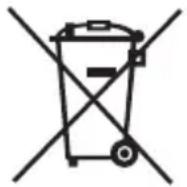

If you need more information on the collection, reuse and recycling systems, please contact your local or regional waste administration. You can also contact us for more information on the environmental performance of our products.
Documentation Feedback
We are constantly working to produce the highest quality documentation for our products. We welcome your feedback.
Send us your comments or suggestions about our online Help, printed, or PDF manuals.
Please include the following information with your feedback:
• Product name and version number
- Type of document: printed manual, PDF, or online Help
- Topic title (for online Help) or page number (for printed or PDF manuals)
- Brief description of content (for example, step-by-step instructions that are inaccurate, information that requires clarification, areas where more detail is needed, and so on)
- Suggestions for how to correct or improve the documentation
We also welcome your suggestions for additional topics you would like to see covered in the documentation.
Send email feedback to:
documentation@dymo.com
Please keep in mind that this email address is only for documentation feedback. If you have a technical question, please contact Customer Service.
natural_image
Diagram of a device component with an attached plug and cable, showing no text or symbolsGARANTIE LIMITÉE D'UN AN
Assistance client : (877) 724-8324
www.dymo.com
natural_image
Dark background with scattered small gray squares of varying sizes (no text or symbols)
text_image
DYMO®A NewellRubbermaid. Brand
Distributed by: DYMO, Atlanta, GA 30328
800-426-7827: www.dymo.com
© 2010 Sanford, L.P.
W006480_B