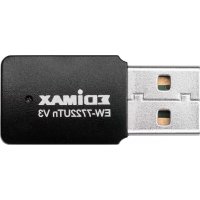
EW7722UTn V3 - Network card / adapter Edimax - Free user manual and instructions
Find the device manual for free EW7722UTn V3 Edimax in PDF.


| Product Type | USB Wi-Fi Adapter |
| Brand | Edimax |
| Model | EW-7722UTn V3 |
| Wi-Fi Standard | Wi-Fi 4 (IEEE 802.11n), N300 |
| Frequency Band | 2.4 GHz |
| Maximum Data Rate | 300 Mbit/s |
| Host Interface | USB 2.0 (compatible with USB 1.1) |
| Wireless Security | WEP, WPA/WPA2, WPA3 SAE |
| WPS | Yes (software and hardware) |
| Antenna | Internal, omnidirectional |
| LED Indicators | Connection status (fast blinking = connected, slow = not connected) |
| Supported Operating Systems | Windows 7/8/8.1/10, macOS 10.11 to 10.15, Linux |
| Power Supply | Via USB port |
| Dimensions | Approximately 2.5 x 1.5 x 0.8 cm |
| Weight | Approximately 5 g |
| Operating Temperature | 0 °C to 40 °C |
| Operating Humidity | 10 % to 90 % (non-condensing) |
| Package Contents | USB adapter, quick installation guide |
| Care and Cleaning | Unplug before cleaning, use a dry lint-free cloth |
| Safety | Indoor use only, do not expose to liquids, do not repair yourself |
| Spare parts and repairability | No user-serviceable parts; contact Edimax after-sales service |
| Certifications | CE (Directives 2014/53/EU and 2014/35/EU) |
Frequently Asked Questions - EW7722UTn V3 Edimax
User questions about EW7722UTn V3 Edimax
0 question about this device. Answer the ones you know or ask your own.
Ask a new question about this device
Download the instructions for your Network card / adapter in PDF format for free! Find your manual EW7722UTn V3 - Edimax and take your electronic device back in hand. On this page are published all the documents necessary for the use of your device. EW7722UTn V3 by Edimax.
USER MANUAL EW7722UTn V3 Edimax
No. 278, Xinhu 1st Rd., Neihu Dist., Taipei City, Taiwan
Email: support@edimax.com.tw
Edimax Technology Europe B.V.
Fijenhof 2, 5652 AE Eindhoven, The Netherlands
Email: support@edimax.nl
Edimax Computer Company
530 Technology Drive Suite 100, Irvine, CA 92618, USA
Email: support@edimax.us
Table des matieres
https://www.edimax.com/download

To select your product and find related download materials, enter the model number into the search box on the right side or follow the simple steps below:

How do I find the model number?
https://www.edimax.com/download

To select your product and find related download materials, enter the model number into the search box on the right side or follow the simple steps below:
https://www.edimax.com/download

To select your product and find related download materials, enter the model number into the search box on the right side or follow the simple steps below:
*Feel free to contact us anytime if you need help or if you can't find your product.
Copyright © Edimax Technology Co., Ltd. all rights reserved. No part of this publication may be reproduced, transmitted, transcribed, stored in a retrieval system, or translated into any language or computer language, in any form or by any means, electronic, mechanical, magnetic, optical, chemical, manual or otherwise, without the prior written permission from Edimax Technology Co., Ltd.
Edimax Technology Co., Ltd. makes no representations or warranties, either expressed or implied, with respect to the contents thereof and specifically disclaims any warranties, merchantability, or fitness for any particular purpose. Any software described in this manual is sold or licensed as is. Should the programs prove defective following their purchase, the buyer (and not this company, its distributor, or its dealer) assumes the entire cost of all necessary servicing, repair, and any incidental or consequential damages resulting from any defect in the software. Edimax Technology Co., Ltd. reserves the right to revise this publication and to make changes from time to time in the contents thereof without the obligation to notify any person of such revision or changes.
The product you have purchased and the setup screen may appear slightly different from those shown in this QIG. The software and specifications are subject to change without notice. Please visit our website www.edimax.com for updates. All brand and product names mentioned in this manual are trademarks and/or registered trademarks of their respective holders.
Federal Communication Commission Interference Statement
This equipment has been tested and found to comply with the limits for a Class B digital device, pursuant to Part 15 of FCC Rules. These limits are designed to provide reasonable protection against harmful interference in a residential installation. This equipment generates, uses, and can radiate radio frequency energy and, if not installed and used in accordance with the instructions, may cause harmful interference to radio communications. However, there is no guarantee that interference will not occur in a particular installation. If this equipment does cause harmful interference to radio or television reception, which can be determined by turning the equipment off and on, the user is encouraged to try to correct the interference by one or more of the following measures:
- Reorient or relocate the receiving antenna.
- Increase the separation between the equipment and receiver.
- Connect the equipment into an outlet on a circuit different from that to which the receiver is connected.
- Consult the dealer or an experienced radio technician for help.
FCC Caution
This device and its antenna must not be co-located or operating in conjunction with any other antenna or transmitter. This device complies with Part 15 of the FCC Rules. Operation is subject to the following two conditions: (1) this device may not cause harmful interference, and (2) this device must accept any interference received, including interference that may cause undesired operation. Any changes or modifications not expressly approved by the party responsible for compliance could void the authority to operate equipment.
Federal Communications Commission (FCC) Radiation Exposure Statement
This equipment complies with FCC radiation exposure set forth for an uncontrolled environment. In order to avoid the possibility of exceeding the FCC radio frequency exposure limits, human proximity to the antenna shall not be less than 0.5cm during normal operation.
Federal Communications Commission (FCC) RF Exposure Requirements
SAR compliance has been established in the laptop computer(s) configurations with PCMCIA slot on the side near the center, as tested in the application for certification, and can be used in laptop computer(s) with substantially similar physical dimensions, construction, and electrical and RF characteristics. Use in other devices such as PDAs or lap pads is not authorized. This transmitter is restricted for use with the specific antenna tested in the application for certification. The antenna(s) used for this transmitter must not be co-located or operating in conjunction with any other antenna or transmitter.
RED Compliance Statement
Compliance with 2014/53/EU Radio Equipment Directive (RED)
In accordance with Article 10.8(a) and 10.8(b) of the RED, the following table provides information on the frequency bands used and the maximum RF transmit power of the product for sale in the EU:
| Frequency range (MHz) | Max. Transmit Power (dBm) |
| 2412-2472 | 19.995 |
This equipment should be installed and operated with a minimum distance of 20 centimeters between the radiator and your body.
A simplified DoC shall be provided as follows: Article 10(9)
Hereby, Edimax Technology Co., Ltd. declares that the radio equipment type N300 Wireless LAN USB
Adapter is in compliance with Directive 2014/53/EU
The full text of the EU declaration of conformity is available at the following internet
address: http://www.edimax.com/edimax/global/
Safety
This equipment is designed with the utmost care for the safety of those who install and use it. However, special attention must be paid to the dangers of electric shock and static electricity when working with electrical equipment. All guidelines of this and of the computer manufacture must therefore be allowed at all times to ensure the safe use of the equipment.
EU Countries Intended for Use
The ETSI version of this device is intended for home and office use in Austria, Belgium, Bulgaria, Croatia, Cyprus, Czech, Denmark, Estonia, Finland, France, Germany, Greece, Hungary, Ireland, Italy, Latvia, Lithuania, Luxembourg, Malta, Netherlands, Poland, Portugal, Romania, Slovakia, Slovenia, Spain, Sweden, Turkey, and United Kingdom. The ETSI version of this device is also authorized for use in EFTA member states: Iceland, Liechtenstein, Norway, and Switzerland.
EU Countries Not Intended for Use
None
EU Declaration of Conformity
English: This equipment is in compliance with the essential requirements and other relevant provisions of Directive 2014/53/EU, 2014/35/EU.
Français: Cet équipement est conforme aux exigences essentielles et autres dispositions de la directive 2014/53/EU, 2014/35/EU.
Čestina: Toto zařízení je v souladu se základním i požadavky a ostatnémi príslušnými ustanoveními směrnic 2014/53/EU, 2014/35/EU.
Polski: Urzadzenie jest zgodne z ogólnym i wymaganiani oraz szczególnymi warunkami okreslonymi Dyrektywa UE 2014/53/EU, 2014/35/EU.
Româna: Acest echipament este în conformitate cu cerințele esentialeși alte prevederi relevante ale Directivei 2014/53/UE, 2014/35/UE.
Pycckn: 3TOOBpyoBaHne COOTBeTCTByeT OCHOBbIM Tpe6OBAHNm I NOLOKeHNm DInpeKTHBbl 2014/53/EU, 2014/35/EU.
Magyar: Ez a berendezés megfelel az alapvető követelmenyeknek és más vonatkoź irányelveknek (2014/53/EU, 2014/35/EU).
Türkce: Bu cihaz 2014/53/EU, 2014/35/EU direktifleri zorunlu istekler ve diger hukumlerle ile uyumludur.
YkpaHcbKa: O6laHaHHB BiINObIaE BmOram i yMOBaM dnepeKTHu 2014/53/EU, 2014/35/EU.
Slovencina: Toto zariadenie splna zakladné poziadavya a d'alsie prislušné ustanovenia smernić 2014/53/EU, 2014/35/EU.
Deutsch: Dieses Gerät erfüllt die Voraussetzungen gemäß den Richtlinien 2014/53/EU, 2014/35/EU.
Espanol: El presente equipo cumple los requisitos esencias de la Directiva 2014/53/EU, 2014/35/EU.
Italiano: Questo appearecchio è conforme ai requisiti essenziali e alle altre disposizioni applicabili della Direttiva 2014/53/EU, 2014/35/UE.
Nederlands: Dit apparaat voldoet aan de essentièle eisen en andere van toepassing zichnde bepalingen van richtlijn 2014/53/EU, 2014/35/EU.
Portugues: Este equipamento cumpre os requisitos essenciais da Direcva 2014/53/EU, 2014/35/EU.
Norsk: Dette utstyret er i samsvar med de viktigste kravene og andre relevante regler i Direktiv 2014/53/EU, 2014/35/EU.
Svenska: Denna utrustning ar i overensstammelse med de vasantiga kraven och ovriga relevanta bestammelser i direktiv 2014/53/EU, 2014/35/EU.
Dansk: Dette udstyr er i overensstemmelse med de væ sentligste krav og andre relevante forordninger i direktiv 2014/53/EU, 2014/35/EU.
suomen kieli: Tamä laite tayttä direktiivien 2014/53/EU, 2014/35/EU. oleelliset vaatimukset ja muut asiaankuuluvat märäykset.
FOR USE IN
EE
E
SE
E
HC
UK
EL
UK(NI)
AT
ER
IS
BE
HR
A
U
BC
A
N
C
C
D C
ZDK
YLV
H R
DE
L
UA


WEEE Directive & Product Disposal

At the end of its serviceable life, this product should not be treated as household or general waste. It should be handed over to the applicable collection point for the recycling of electrical and electronic equipment, or returned to the supplier for disposal.
Declaration of Conformity
We, Edimax Technology Co., Ltd., declare under our sole responsibility, that the equipment described below complies with the requirements of the European Radio Equipment directives.
Equipment: N300 Wireless LAN USB Adapter
The following European standards for essential requirements have been followed:
Directives 2014/53/EU
Spectrum : EN 300 328 V2.2.2 (2019-07)
EMC : EN 301 489-1 V2.1.1 (2017-02)
EN 301 489-17 V3.1.1 (2017-02)
EMF : EN 62311:2008
Safety (LVD) : IEC 62368-1:2014 (2nd Edition) and/or EN 62368-1:2014+A11:2017
Edimax Technology Europe B.V.
Fijenhof 2,
5652 AE Eindhoven,
The Netherlands
Date & Place of Issue: 31/August/2022, Eindhoven
Signature:
Printed Name: David Huang
Title: Director
a company of:
Edimax Technology Co., Ltd.
No. 278, Xinhu 1st Rd., Neihu Dist.,
Taipei City, Taiwan
Date & Place of Issue: 31/August/2022, Taipei
Signature:
Printed Name: Hunter Chen
Title: Director

Declaration of Conformity
We, Edimax Technology Co., Ltd., declare under our sole responsibility, that the equipment described below complies with the requirements of the United Kingdom Radio Equipment directives.
Equipment: N300 Wireless LAN USB Adapter
The following European standards for essential requirements have been followed:
Radio Equipment Regulations 2017 (S.I. 2017/1206)
Spectrum : EN 300 328 V2.2.2 (2019-07)
EMC : EN 301 489-1 V2.1.1 (2017-02)
EN 301 489-17 V3.1.1 (2017-02)
EMF : EN 62311:2008
Safety (LVD) : IEC 62368-1:2014 (2 ^nd Edition) and/or EN 62368-1:2014+A11:2017
Edimax Technology Europe B.V.
Fijenhof 2,
5652 AE Eindhoven,
The Netherlands
Date & Place of Issue: 31/August/2022, Eindhoven
Signature: BmalA_ym
Printed Name: David Huang
Title: Director
a company of:
Edimax Technology Co., Ltd.
No. 278, Xinhu 1st Rd., Neihu Dist.,
Taipei City, Taiwan
Date & Place of Issue: 31/August/2022, Taipei
Signature:
Printed Name: Hunter Chen
Title: Director