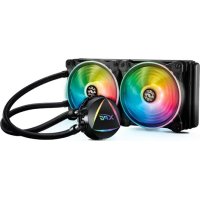
Levante 240 - Computer cooling system XPG - Free user manual and instructions
Find the device manual for free Levante 240 XPG in PDF.


| Product Type | All-in-one liquid cooling system (AIO) |
| Brand | XPG |
| Model | Levante 240 |
| Radiator dimensions | 270 x 120 x 27 mm |
| Pump block dimensions | 75 x 75 x 55 mm |
| Number of fans | 2 |
| Fan dimensions | 120 x 120 x 25 mm |
| Fan speed | 800 ~ 1800 RPM (PWM) |
| Maximum noise level | 36 dBA |
| Maximum airflow | 75 CFM |
| Static pressure | 2.5 mmH₂O |
| Pump speed | 2600 RPM (±10%) |
| Radiator material | Aluminum |
| Pump block material (CPU contact) | Copper |
| Compatible Intel sockets | LGA 1700 / 1200 / 115x / 2066 |
| Compatible AMD sockets | AM5 / AM4 |
| Power supply | 12 V DC (via SATA connector for pump, PWM for fans) |
| Warranty period | 5 years |
| Maintenance and cleaning | Use a clean, damp cloth. Do not use soap or solvent. |
| Operating temperature range | 0°C to 40°C |
| Total weight | Approximately 1.2 kg |
Frequently Asked Questions - Levante 240 XPG
User questions about Levante 240 XPG
0 question about this device. Answer the ones you know or ask your own.
Ask a new question about this device
Download the instructions for your Computer cooling system in PDF format for free! Find your manual Levante 240 - XPG and take your electronic device back in hand. On this page are published all the documents necessary for the use of your device. Levante 240 by XPG.
USER MANUAL Levante 240 XPG
限用物质及其化学符 (Restricted substance and its chemical symbols)
This form has been prepared in accordance with the provisions of SJ/T 11364-2014
○ : 表示该有害物质在该部件所有均质材料中的含量在 GB/T 26572 规定的限量要求以下。Indicates toxic and hazardous substances in all homogeneous materials of the stated part is below the limit requirement of GB/T 26572-2011 standard
- 该有害物质至少在该部件的某一均质材料中的含量超出GB/T 26572-2011规定限量要求,且目前业界没有成熟的替代方案,符合欧盟RoHS指令环保要求 Indicates toxic and hazardous substances in all homogeneous materials of the stated part is within the limit requirement of the European Restriction of Hazardous Substances Directive 2011/65/EC(the *RoHS Directive)。
ADATA Technology Co., Ltd.
2F, No. 258, Liancheng Rd., Zhonghe Dist., New Taipei City 235, Taiwan
Product Name: XPG LEVANTE 240
產品類別:一體式水冷/一体式水冷
Radiator Installation 09
Pump Unit Installation 10
Specifications 12
Warranty Guide 13
SPECIFICATIONS and PRODUCT FEATURES
| WATER BLOCK | |
| Water Block Dimension | 85 x 72 x 36 mm |
| Water Block Material | Copper |
| CPU Socket Support | Intel: LGA 1200, 115x, 1700, 2066, 2011AMD: AM4 (TR4 Threadripper bracket not included) |
| Thermal Grease | Pre-Applied |
| RADIATOR | |
| Radiator Dimension | 272 x 121 x 27mm |
| Radiator Material | Aluminum |
| Tube | Sleeved Rubber tube |
| FAN | |
| Fan Size | 2 Fan Slots (120mm) |
| Fan Dimension | 120 x 120 x 25 mm |
| Bearing Type | Fluid Dynamic Bearing |
| Fan Speed | 600-2000 RPM ± 10% |
| Fan Static Pressure | 1.42mm-H2O |
| Fan Air Flow | 61.5 CFM |
| Fan Noise 34.0 dB (A) | |
| Connector Type 4-Pin PWM | |
| Protection Auto-Restart | |
PRODUCT FEATURES
- Reliable high performance CPU Liquid Cooler with Asetek's Cooling Solution.
- External ARGB Controller for the fans and the water pump.
. 2 Vibrant Dual-Ring 120mm ARGB Fans. - Fluid Dynamic Bearing (FDB) fans with 4-Pin PWM design.
- ARGB lighting for the water block and fans.
• Large surface 240mm all aluminum radiator. - All-in-One hassle-free installation, no additional setup required.
PACKAGE CONTENTS
CPU LIQUID COOLER

Intel MOUNTING BRACKET


Intel LGA 1200 / 115x STANDOFF SCREWS

Intel LGA 2066 / 2011 STANDOFF SCREWS Intel LG
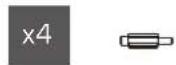
PACKAGE CONTENT : MOUNTING AMD CPUs
AM4 STANDOFF SCREWS

AMD AM4 MOUNTING BRACKET

(AMD TR4 Threadripper bracket not included)
MOTHERBOARD SETUP : Intel PLATFORM MOTHERBOARD SETUP : AMD PLATFORM
Intel Platform (LGA 1200, 115x, 1700, 2066, 2011)

- For LGA 1200 / 115X Socket Installation, slide the backplate pins inwards.
- For LGA 1700 / 2066 / 2011 Socket Installation, slide the backplate pins outwards.
1.2.

Install the Intel Backplate in the rear of the motherboard.
For LGN 2055 / 2011 socket
For LGA 115x/1200 socket
For LGA 1700 socket
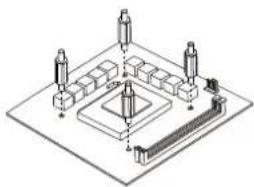
Screw the backplate with the provided standoffs.
AMD Platform (AM4 Socket)
- Remove the pre-installed AMD heatsink mount.

- Secure with the provided AM4 Standoff Screws.

FAN INSTALLATION on the RADIATOR
- Use the provided Fan Screws to install the Fans on the Radiator.

- Connect each 4-Pin Fan Power Connector in series as diagram below. Finally connect the provided Fan Power Cable to motherboard.

07
FAN INSTALLATION on the RADIATOR
- Connect each 3-Pin LED Cable in series as diagram below. Then connect the provided ARGB LED CABLE to motherboard or I/O Ports.

Connect this ARGB LED CABLE to Pump's ARGB 3-Pin connector for Daisy Chain Lighting Effect.
08
RADIATOR INSTALLATION
- For the best cooling performance, we recommend mounting the fans as an air-intake to your PC case.
• Refer to chassis manual for more information on Radiator Compatibility.

PUMP INSTALLATION : Intel and AMD BRACKET


09
PUMP INSTALLATION : DAISY CHAIN LIGHTING EFFECT
Connect Pump's ARGB 3-Pin to either motherboard, I/O's ARGB 3-Pin, or to the provided External LED LIGHTING CONTROLLER for Daisy Chain Effect.
PUMP INSTALLATION : POWER
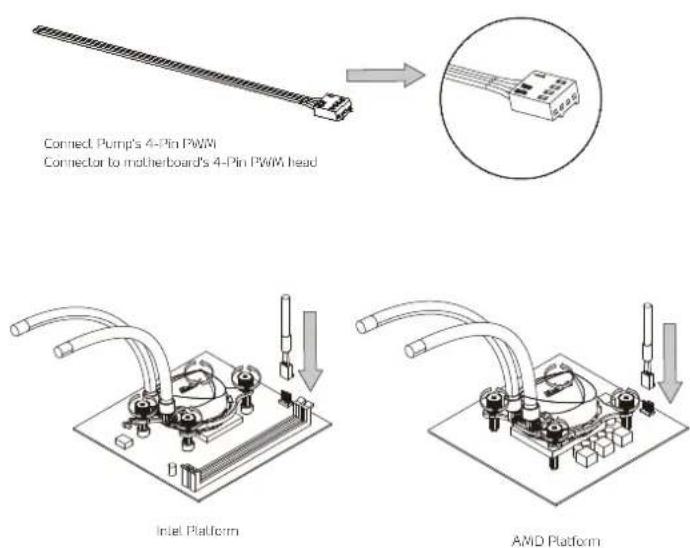
10
An external LED LIGHTING CONTROLLER is provided to switch lighting effects
(up to 13 pre-set Modes, 5 different levels of Speed and 5 different levels of Brightness).

Connect to Pump's 3-Pin or to the provided ARGB LED CABLE

Connect to PSU's SATA Connector
EN
CLEANING INSTRUCTIONS
Please use a clean damp cloth to clean the product properly.
Do not apply any soap or solvent agent on the surface to preserve its integrity.
SAFETY INSTRUCTIONS
For a proper use of the product, and to ensure your safety, please follow the following instructions:
- Keep the device away from liquids, excess humidity or moisture to avoid any shock hazards. Should the device come into contact with liquids, please make sure to unplug the device immediately, store it in a dry place, and contact support for assistance.
- Operate the device only within the specific temperature range of 0°C (32°F) to 40°C (104°F). Should the temperature exceed this range, unplug and/or switch off the device in order to let the temperature stabilize to an optimal level.
- Should you have any other trouble operating the device properly and normal troubleshooting does not work, please unplug the device and contact our service for support.
- Do not attempt to service or fix the device by yourself at any time.
DURATION OF WARRANTY
ADATA Technology Co., Ltd. provides a 5 year warranty period for this product unless regional laws and regulations state otherwise.
LIMITATION OF WARRANTY
This limited warranty covers only repairs or replacements of products manufactured by ADATA Technology Co. Ltd. and its authorized partners.
Please note that ADATA is responsible for providing free repairs except for the following reasons:
- The warranty label is altered, damaged or missing.
- Product serial number does not conform to our original system.
- Products purchased from an unauthorized agent.
- Damage caused by natural calamity
- Any abuse outside the intended product operation.
ONLINE CUSTOMER SERVICE
For frequently asked questions, additional information and service instruction please visit the product page at www.xpg.com
DE


- PRODUCT FEATURES
- PACKAGE CONTENTS
- PACKAGE CONTENT : MOUNTING AMD CPUS
- MOTHERBOARD SETUP : INTEL PLATFORM MOTHERBOARD SETUP : AMD PLATFORM
- FAN INSTALLATION ON THE RADIATOR
- RADIATOR INSTALLATION
- PUMP INSTALLATION : DAISY CHAIN LIGHTING EFFECT
- CLEANING INSTRUCTIONS
- SAFETY INSTRUCTIONS
- DURATION OF WARRANTY
- LIMITATION OF WARRANTY
- ONLINE CUSTOMER SERVICE
Brand : XPG
Model : Levante 240
Category : Computer cooling system