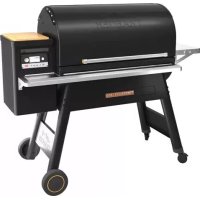
Timberline 1300 - Barbecue TRAEGER - Free user manual and instructions
Find the device manual for free Timberline 1300 TRAEGER in PDF.



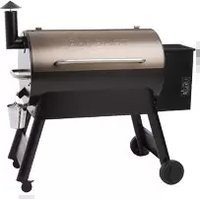
| Product type | Wood pellet barbecue |
| Brand | Traeger |
| Model | Timberline 1300 |
| Dimensions (L x D x H) | 132 x 69 x 119 cm approx. |
| Weight | 98 kg approx. |
| Cooking area | 0.55 to 0.84 m² (850 to 1300 sq in) |
| Hopper capacity | 10.9 kg (24 lb) |
| Temperature range | 74 °C to 260 °C (165 °F to 500 °F) |
| Power supply | 120 V, 60 Hz, grounded outlet (3 prongs) |
| Wi-Fi technology | WiFIRE® - control via Traeger app |
| Super Smoke function | Yes, for extra smoke between 74 °C and 107 °C |
| Keep warm function | Yes, keeps at 74 °C |
| Cooking probe included | Yes, with temperature alarm |
| Adjustable grates | 3 levels in stainless steel, sliding lower grate |
| Removable cutting board | Bamboo, magnetic attachment on hopper |
| Grease management system | Channel, chute and tray with disposable tray covers |
| Exterior material | Painted steel, stainless steel for some parts |
| Use | Outdoor only |
| Warranty | 3 years |
| Included accessories | Grease bucket lid (pack of 5), drip tray cover (pack of 5) |
Frequently Asked Questions - Timberline 1300 TRAEGER
User questions about Timberline 1300 TRAEGER
0 question about this device. Answer the ones you know or ask your own.
Ask a new question about this device
Download the instructions for your Barbecue in PDF format for free! Find your manual Timberline 1300 - TRAEGER and take your electronic device back in hand. On this page are published all the documents necessary for the use of your device. Timberline 1300 by TRAEGER.
USER MANUAL Timberline 1300 TRAEGER
READ ALL INSTRUCTIONS BEFORE INSTALLING AND USING THE APPLIANCE
Please read this entire manual before installation and use of this pellet-burning appliance. Failure to follow these instructions could result in property damage, bodily injury, or even death. Contact local building or fire officials about restrictions and installation inspection requirements in your area.
Cooking with a hardwood fire brings years of enjoyment – to you and your lucky friends and family. Your new Traeger grill is specially designed to make cooking easier while giving you optimal performance with the most savory-flavored food.
As with all grills and cooking appliances, any time you burn a material (whether it be wood, gas, or charcoal), organic gases are formed during the cooking process. One gas that can be particularly harmful in concentrated quantities is carbon monoxide. In an outdoor, open-air environment, carbon monoxide should naturally dissipate and not harm you.
WARNING! Follow these guidelines to prevent this colorless, odorless gas from poisoning you, your family, your pets, or others:
- Know the symptoms of carbon monoxide poisoning: headache, dizziness, weakness, nausea, vomiting, sleepiness, and confusion. Carbon monoxide reduces the blood's ability to carry oxygen. Low blood oxygen levels can result in loss of consciousness and death.
- See a doctor if you or others develop cold- or flu-like symptoms. Carbon monoxide poisoning, which can easily be mistaken for a cold or flu, is often detected too late.
-
Alcohol consumption and drug use increase the effects of carbon monoxide poisoning.
-
Carbon monoxide is especially toxic to mother and child during pregnancy, infants, the elderly, smokers, and people with blood or circulatory system problems, such as anemia or heart disease.
- Only use your Traeger grill outside on a noncombustible floor and away from combustible materials.
- Never use gasoline, gasoline-type lantern fuel, kerosene, charcoal lighter fluid, or flammable liquids to start or "freshen up" a fire in this appliance. Keep all such liquids well away from this appliance when in use.
IMPORTANT: READ CAREFULLY AND RETAIN FOR FUTURE REFERENCE.
If you are assembling this unit for someone else, provide this manual for the owner to read and save for future reference.
DANGER!
For North American Consumers:
- Plug into an appropriate 3-prong outlet.
- An electrical supply with GFCI protection is required. To protect against shock hazard, locate a grounded 3-prong receptacle in reach of the 6' (1.8-m) power cord. When installing the receptacle, follow the National Electrical Code and local codes and ordinances.
For Consumers in the European Union:
- Plug into an appropriate earthed outlet.
- Do not remove earth prong or modify plug in any way. Do not use an adapter or extension cord.
DANGER!
- Hazardous voltage is present, which can shock, burn, or cause death. Disconnect the power cord before servicing the grill unless otherwise noted in this Owner's Manual.
- Never use or store flammable liquids near the grill.
- Never use gasoline or lighter fluid to manually light your grill.
WARNING!
Smoke Hazard
A pellet overflow condition can occur during start-up, resulting in unusually thick, white smoke that lasts a long time. If this occurs, power down your grill with the Main Power switch and unplug. If this condition continues long enough, gases can build up from partial ignition and fully ignite, causing the lid to "burp." If this burp occurs and your grill has not been properly maintained as described in "Maintaining Your Grill" on pages 26-27, a grease fire could result. To remedy this condition, let the grill cool down completely, remove all internal components, and thoroughly clean all ash and pellets from the grill and firepot (see page 27, "Cleaning the Ash from Inside and Around the Firepot").
WARNING!
Burn Hazard
Many parts of the grill will become very hot during operation. Care must be taken to avoid burns, both during operation and afterwards, while the grill is still hot.
- Never leave the grill unattended when young children are present.
- Never move the grill when it is operating.
- Let the grill cool thoroughly before moving or attempting to transport.
WARNING!
Fire Hazard
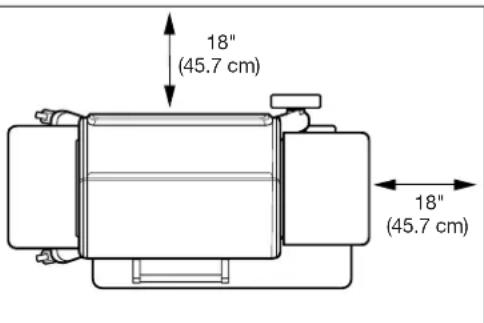
- When operating this grill, maintain a MINIMUM distance of 18 inches (45.7 cm) from the grill to combustibles.
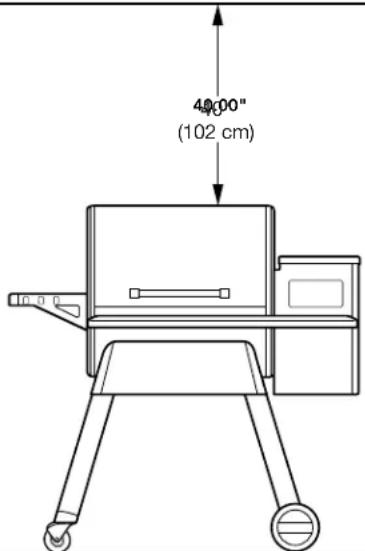
- When operating this grill under overhead combustibles, a MINIMUM of 40 inches (102 cm) is required.
WARNING!
Air Contaminant Hazard
- Assemble and operate this grill ONLY per the instructions in the Assembly Guide and this Owner's Manual.
• This grill is intended for OUTDOOR USE ONLY. - Never use heating fuel pellets in the grill, due to potential hazardous contaminants and additives that may be present.
CAUTION!
- Always store wood pellets in a dry location, away from heat-producing appliances and other fuel containers.
- Keep the grill clean. See the cleaning instructions in this Owner's Manual.
- Do not use accessories not specified for use with this grill.
- For best results and flavor, use genuine TRAEGER® BRAND HARDWOOD PELLETS.
- Even if there is ample room in the grill, be cautious of loading excessive amounts of food that can release large quantities of flammable grease, for example more than a pound of bacon, especially if the grill has not been well-maintained. If your previous cooks have produced large quantities of flammable grease, it is highly recommended that the grease be cleaned from the grill before using it again.
For Consumers in the European Union:
- This appliance is not intended for use by persons (including children) with reduced physical, sensory, or mental capabilities, or lack of experience and knowledge, unless they have been given supervision or instruction concerning use of the appliance by a person responsible for their safety.
- Children should be supervised to ensure they do not play with the appliance.
SAVE THESE INSTRUCTIONS
LIVE FLAVOR FULL
UNLOCK THE FULL POWER OF YOUR GRILL
WITH THE TRAEGER APP
TABLE OF CONTENTS
2 IMPORTANT SAFETY
6 WHY TRAEGER WOOD PELLETS?
7
MAKE GRILL MAINTENANCE A REAL BREEZE
8 GETTING TO KNOW YOUR GRILL
II SEASONING YOUR GRILL
13 USING YOUR GRILL
14 CHOOSING A COOK METHOD
21 ADDITIONAL CONTROL FUNCTIONS
22
HOPPER CLEAN-OUT
23 TIMBERLINE FEATURES
26 MAINTAINING YOUR GRILL
28 FREQUENTLY ASKED QUESTIONS
30 TROUBLESHOOTING
32 OPERATING TIPS
35 SERVICE AND WARRANTY
WHY TRAEGER WOOD PELLETS?
AT TRAEGER, WE'RE BIG ON TASTE. That's why we create our own 100% all-natural hardwood pellets, ensuring only the best quality wood is used to flavor your food and burn the most efficiently and reliably. We can't guarantee the same results from other pellet brands, so we always recommend using our pellets for the optimal experience.
100% ALL-NATURAL HARDWOOD
No fillers, no unnatural additives—just pure hardwood for pure flavor.
WOOD-FIRED TASTE & SMOKE SCIENCE
Just the right moisture ratio results in highest-quality pure hardwood flavor.
USA
TRAEGER-OWNED MILLS & PELLET PRODUCTION PROCESS
After 30 years in business, we've created the "gold standard" in pellet production.
| TRAEGER HARDWOOD | GOOD WITH ANYTHING. GREAT WITH: | |||||||
| BEEF | POULTRY | PORK | LAMB | SEAFOOD | BAKED | VEGGIES | WILD GAME | |
| ALDER | √ | < | ||||||
| APPLE | √ | |||||||
| CHERRY | √ | |||||||
| HICKORY | √ | |||||||
| MAPLE | ||||||||
| MESQUITE | √ | < | ||||||
| OAK | < | |||||||
| PECAN | √ | |||||||
| BIG GAME BLEND | √ | < | ||||||
| TURKEY BLEND | ||||||||
| TEXAS BEEF BLEND | ||||||||
| SIGNATURE BLEND | √ | < | ||||||
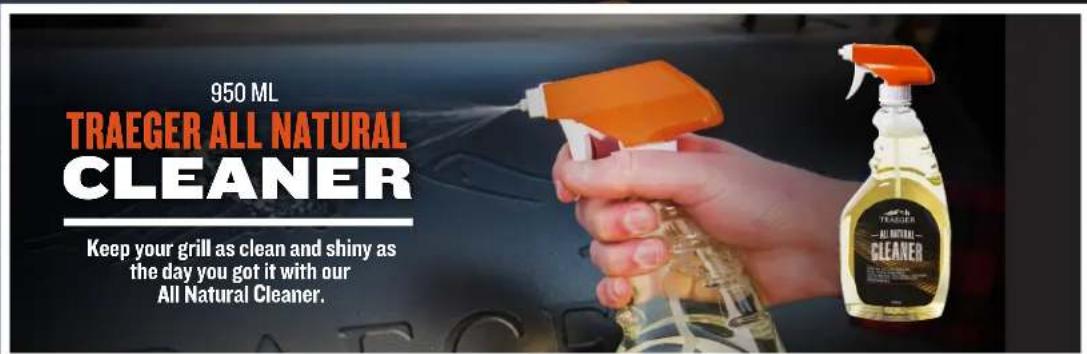
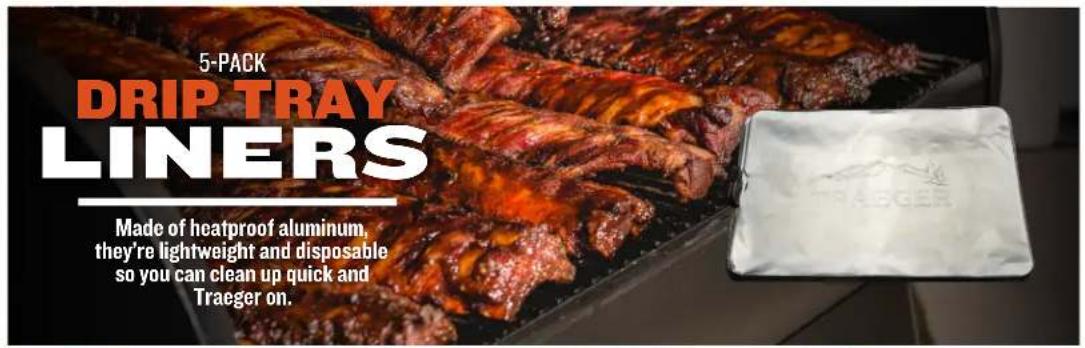
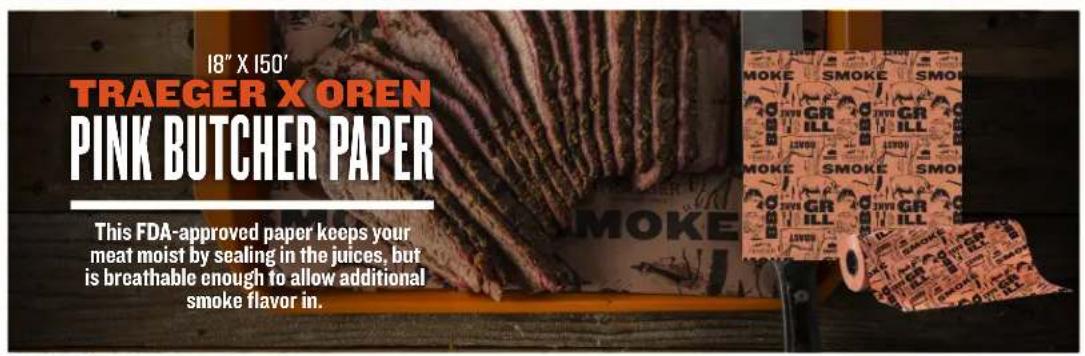
MAKING SURE YOUR GRILL IS CLEAN and free of built-up grease and debris is critical for keeping the pure,
wood-fired flavor of your grill intact. The best way to ensure this is by using our lineup of cleaning and maintenance materials, available at your local dealer or online at traegergrills.com.

GETTING TO KNOW YOUR GRILL
Refer to the Assembly Guide to assemble and install your Traeger® Timberline Grill.
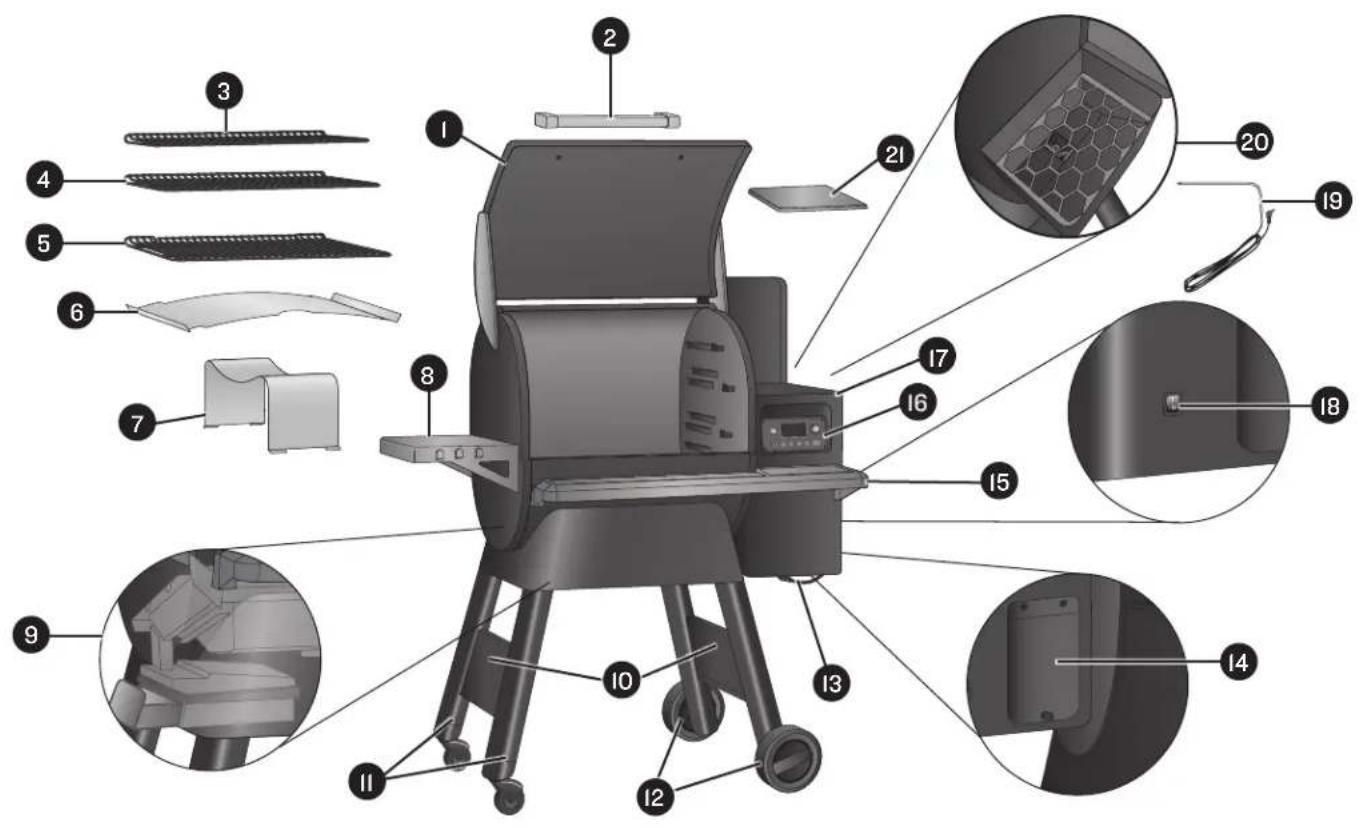
GRILL PARTS AND FEATURES
| Part Description Part Description | ||||
| 1 | Grill Door | 12 | All-Terrain Wheel Legs | |
| 2 | Door Handle | 13 | Detachable Power Cord | |
| 3 | Top Grill Grate | 14 | Hopper Clean-Out Door (back of grill) | |
| 4 | Middle Grill Grate | 15 | Front Shelf | |
| 5 | Bottom Grill Grate | 16 | Traeger Controller with WiFIRE® Technology | |
| 6 | Grease Drip Tray | 17 | Pellet Hopper | |
| 7 | Heat Baffle | 18 | Main Power Switch (back of grill) | |
| 8 | Side Shelf | 19 | Meat Probe | |
| 9 | Grease Management System | 20 | Pellet Hopper Interior with Grate | |
| 10 | Leg Braces | 21 | Cutting Board (placed on top of hopper) | |
| 11 | Locking-Caster Legs | |||
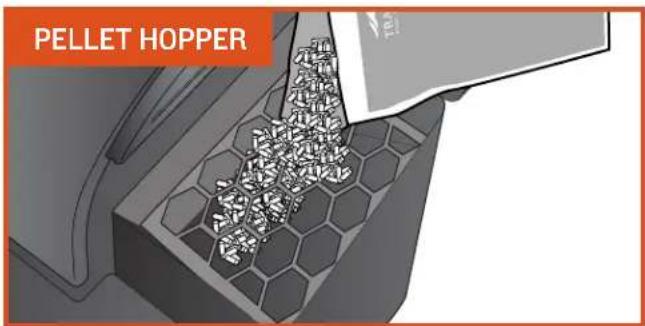
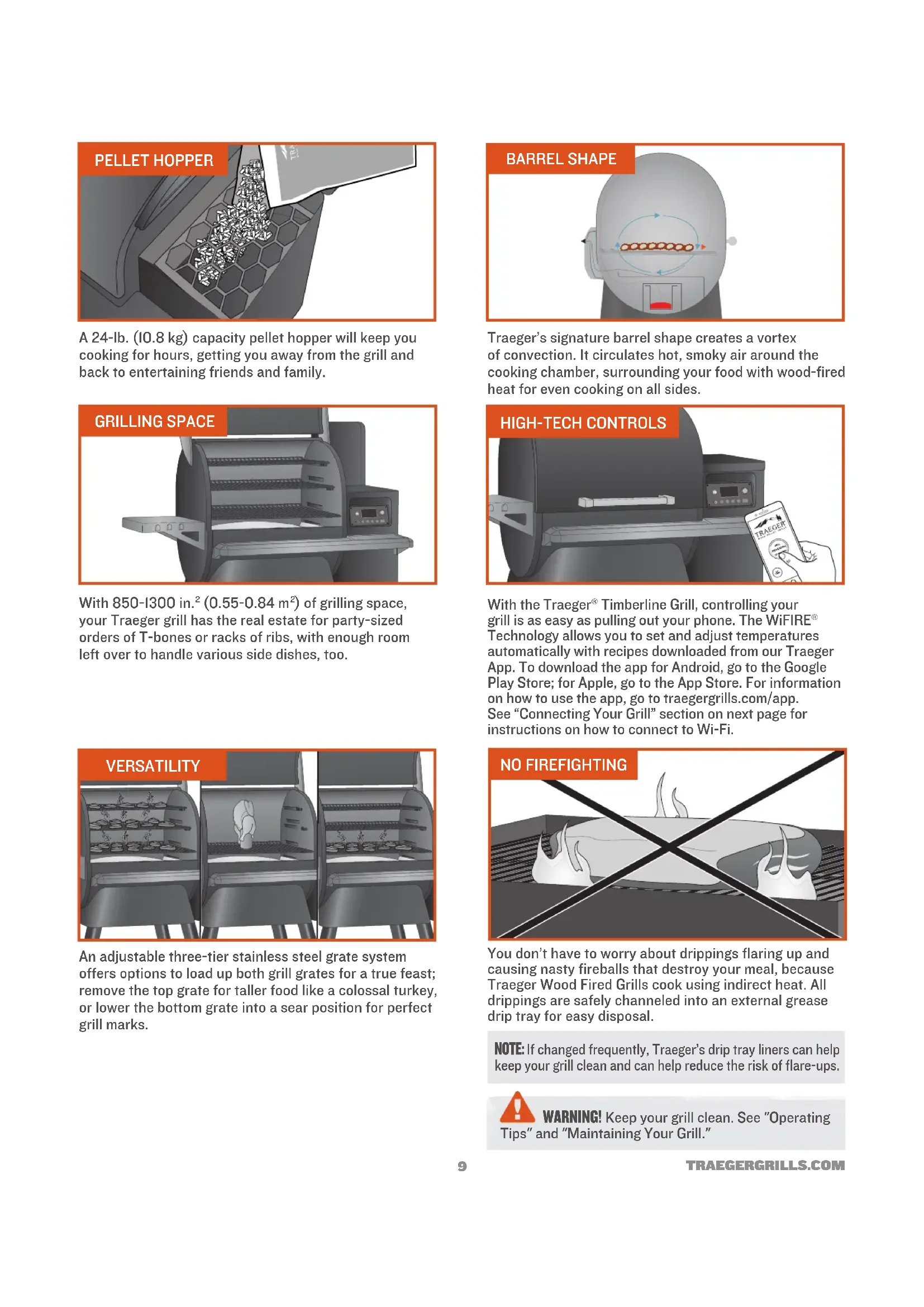
A 24-lb. (10.8 kg) capacity pellet hopper will keep you cooking for hours, getting you away from the grill and back to entertaining friends and family.
natural_image
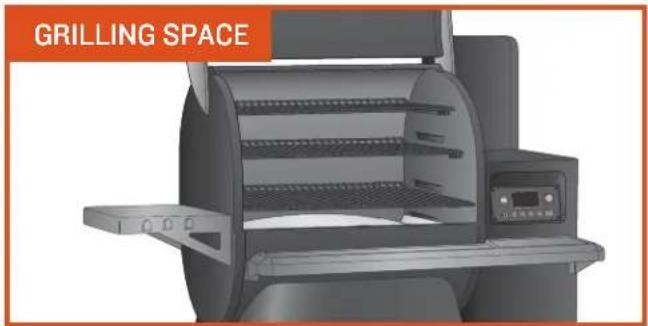
Exterior view of a grilling machine (no signage or text on the device itself)With 850-1300 in. 2 (0.55-0.84 m 2 ) of grilling space, your Traeger grill has the real estate for party-sized orders of T-bones or racks of ribs, with enough room left over to handle various side dishes, too.
natural_image
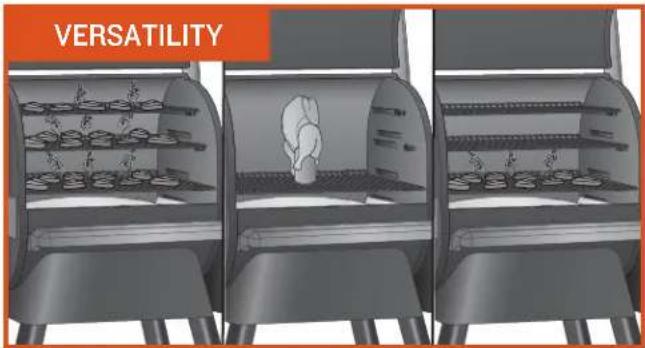
Three identical indoor kitchen units with shelves of food items, no visible text or symbols on the equipment.An adjustable three-tier stainless steel grate system offers options to load up both grill grates for a true feast; remove the top grate for taller food like a colossal turkey, or lower the bottom grate into a sear position for perfect grill marks.
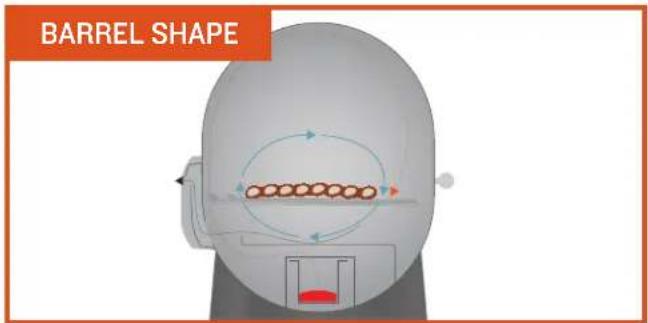
Traeger's signature barrel shape creates a vortex of convection. It circulates hot, smoky air around the cooking chamber, surrounding your food with wood-fired heat for even cooking on all sides.
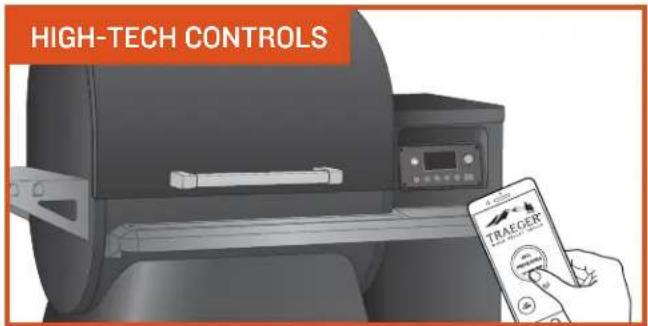
With the Traeger® Timberline Grill, controlling your grill is as easy as pulling out your phone. The WiFIRE® Technology allows you to set and adjust temperatures automatically with recipes downloaded from our Traeger App. To download the app for Android, go to the Google Play Store; for Apple, go to the App Store. For information on how to use the app, go to traegergrills.com/app. See "Connecting Your Grill" section on next page for instructions on how to connect to Wi-Fi.
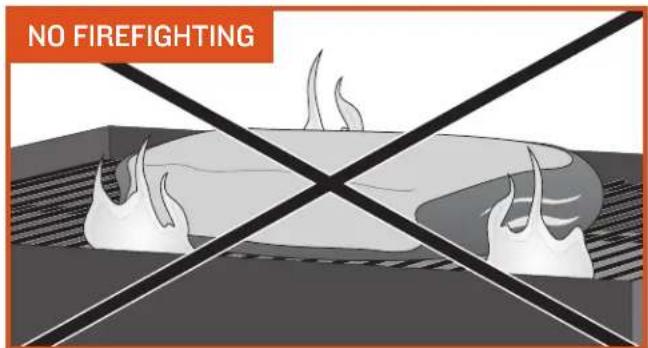
You don't have to worry about drippings flaring up and causing nasty fireballs that destroy your meal, because Traeger Wood Fired Grills cook using indirect heat. All drippings are safely channeled into an external grease drip tray for easy disposal.
NOTE: If changed frequently, Traeger's drip tray liners can help keep your grill clean and can help reduce the risk of flare-ups.

WARNING! Keep your grill clean. See "Operating and "Maintaining Your Grill."
GETTING TO KNOW YOUR GRILL (CONTINUED)
YOUR WIFIRE® ELECTRONIC CONTROLLER Your Traeger® Timberline Grill is equipped with a state-of-the-art Traeger Controller with WiFIRE® Technology that is Wi-Fi-capable. Before you begin using the grill, it will be helpful to familiarize yourself with the different features of the control panel.
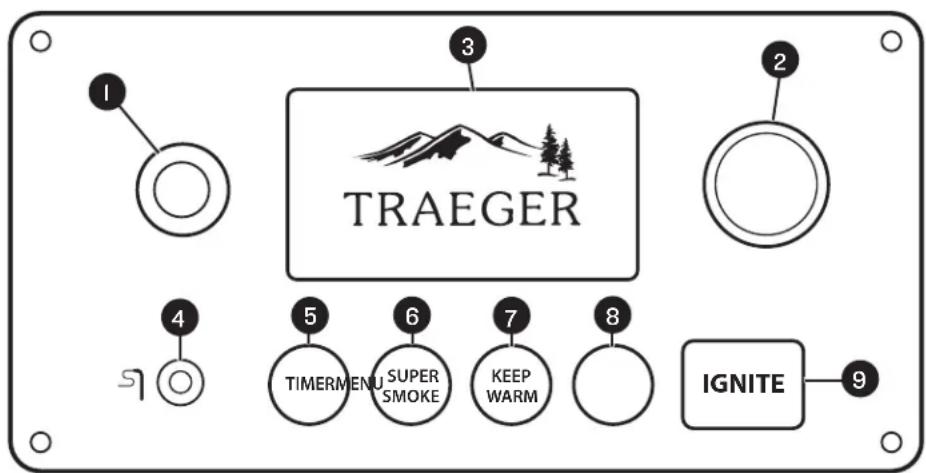
NOTE: Temperature fluctuations are normal for Traeger grills. Any significant fluctuation could be the result of wind, air temperature, improper use, or lack of grill maintenance.
1 STANDBY BUTTON
Use this button to turn on and off the electronic controller once the grill's Main Power switch (located on the back of the grill) has been turned ON (i). Press and hold for 3 seconds to initiate the shutdown cycle. Always run your grill through the full shutdown cycle after each cooking task. See "Maintaining Your Grill" for more information.
2 SELECTION DIAL
Rotate dial to move up and down through the displayed menu. Press the center of the dial to make a selection.
3 STATUS DISPLAY
Shows current temperature, status of cook program, cook time remaining, etc.
4 MEAT PROBE JACK
Plug the meat probe into the jack for probe cooking.
5 TIMER
The timer is for your convenience only; it does not affect grill operation. For example, if you need to baste your meat in 15 minutes, set the timer for 15 minutes. A tone will sound when the time is up.
6 SUPERSMOKE
Select SUPER SMOKE at any time during grilling when cook temperature is between 165°-225°F ( 74°-107°C ) to increase the amount of smoke released for additional smoky flavor.
7 KEEP WARM
This feature maintains the grill temperature at 165° F ( 74° C) to keep food warm without overcooking it.
8 MENU
From MENU, you can set up the meat probe and sync your grill with your home's Internet and settings.
9 IGNITE
Press IGNITE to start the grill.
CONNECTING YOUR GRILL
Follow these instructions to connect your grill to Wi-Fi. To learn more about WiFiRE ® , the Traeger app, and more ways to connect, go to traegergrills.com/app.
NOTES:
- Make sure your smart device is running the latest operating system.
- To connect your grill to Wi-Fi, your grill must be powered on. Make sure the Main Power switch is in the ON (1) position and the grill controller display is on the home screen.
I. Download the Traeger app at the Google Play store for Android or the App Store for Apple.
2. Ensure your smart device is connected to the Wi-Fi network to which you want your grill connected.
3. Open the Traeger app and follow the instructions.
TIPS:
- For best connectivity results, have your grill facing the direction of your Wi-Fi router, the grill's antenna pointing down, and ensure you have a strong Wi-Fi signal.
- A Wi-Fi extender can help improve your Wi-Fi strength.
TO BE USED ON INITIAL FIRING ONLY. In order to ensure proper operation of the grill, you must first prime the auger by allowing the auger tube to be "charged" with pellets.
natural_image
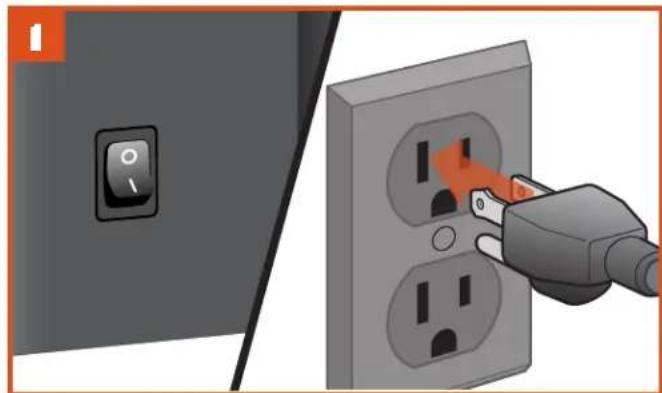
Illustration of a power plug inserting into an open socket (no text or symbols)PLUG APPEARANCE MAY VARY BY REGION.
With the Main Power switch in the OFF (0) position, plug the power cord into an appropriate grounded/earthed electrical outlet.
natural_image
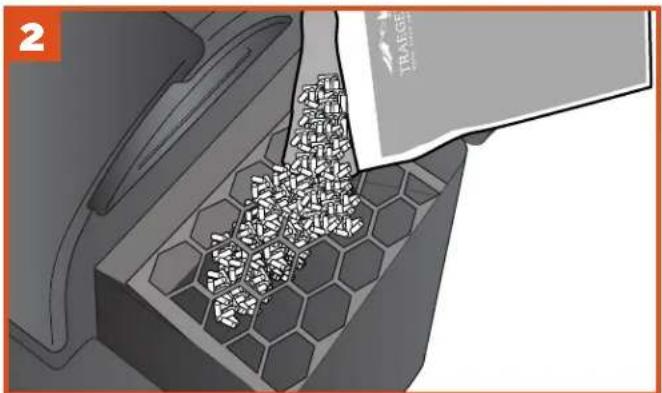
3D illustration of a mechanical component with hexagonal base and internal granular material, no text or symbols presentFill the hopper with TRAEGER® BRAND HARDWOOD PELLETS.
WARNING! Use ONLY TRAEGER® BRAND HARDWOOD PELLETS, which are specifically made to work in our grills. Never use heating fuel pellets in the grill.
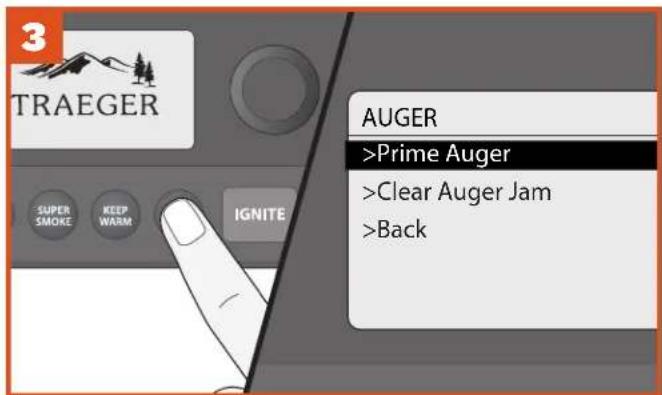
Press MENU to display the main menu. Turn the dial to select AUGER, then select Prime Auger.
The auger tube will take a few minutes to fill with pellets and begin dispensing into the firepot. Once the timer for the Prime Auger feature has completed, select Done.
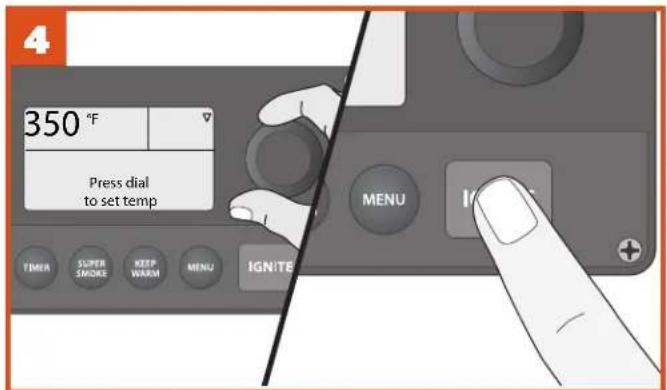
The home screen will display "Press dial to set temp." Turn the Selection dial clockwise to 350°F (177°C). Press IGNITE, close grill door, and run grill for 20 minutes once it has reached the set temperature.
NOTE: Whenever you're instructed to select or confirm a menu option, turn
the Selection dial to the desired option and press the center of the dial to lock in your selection.
SEASONING YOUR GRILL (CONTINUED)

natural_image
Solid orange horizontal bar with no text or symbols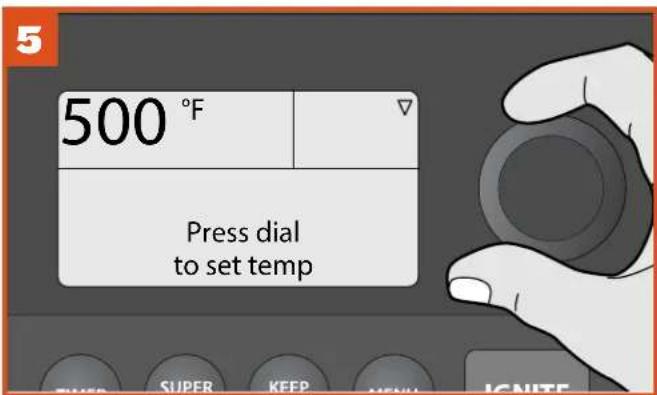
Adjust temperature to 500°F (260°C) and run grill for an additional 30 minutes.
NOTE: If the auger jams during use, allow grill to cool completely, then press MENU to display the main menu. Turn the dial to select AUGER, then select Clear Auger Jam. The auger will run backwards for 60 seconds to clear any jammed pellets.
natural_image
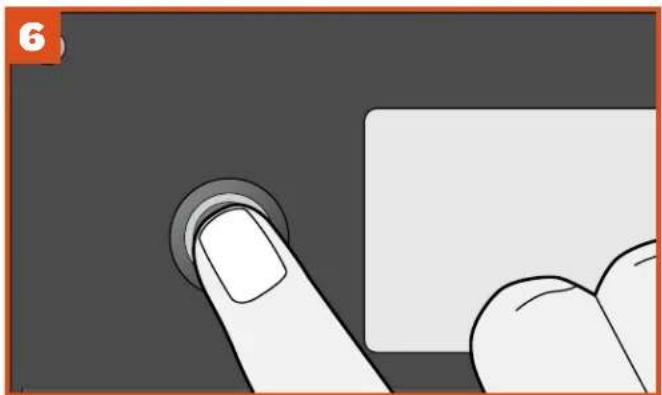
Close-up of a finger pressing a button on a white surface, no text or symbols visibleTurn off the grill by pressing and holding the Standby button for 3 seconds, initiating the shutdown cycle. When the full shutdown cycle finishes, seasoning of your grill is complete.
USING YOUR GRILL
YOU WILL NEED TO BEGIN WITH THESE STEPS EVERY TIME YOU USE YOUR GRILL.
natural_image
Illustration of a plug inserted into two socket outlets, showing the power switch and socket (no text or symbols present)PLUG APPEARANCE MAY VARY BY REGION.
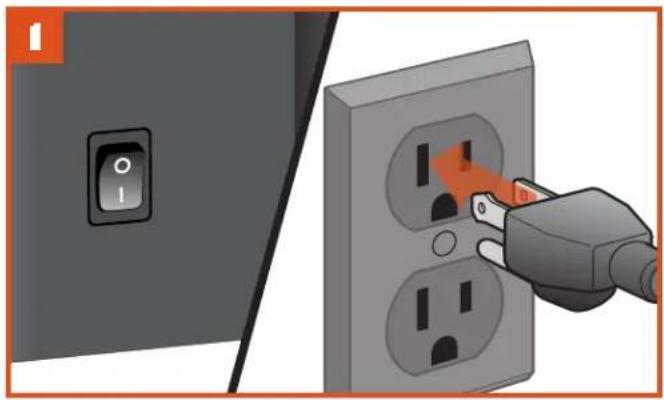
Plug the power cord into an appropriate grounded/earthed electrical outlet and flip Main Power switch to ON (I).
natural_image
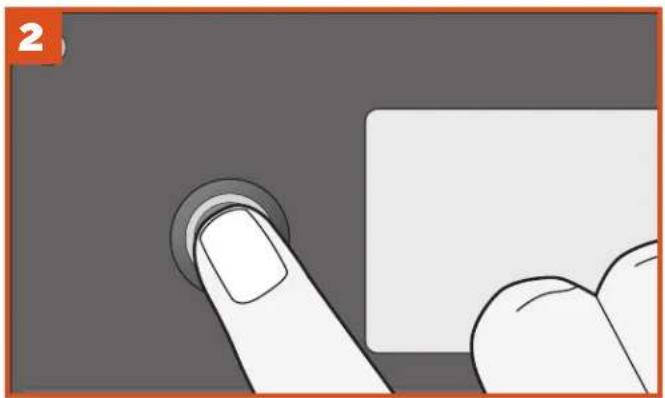
Illustration of a finger pressing a button on a white surface, no text or symbols presentPress the Standby button to wake the grill.

WARNING!
- When operating this grill, maintain a minimum clearance of 18 inches (45.7 cm) from grill to combustibles.
- Use ONLY TRAEGER® BRAND HARDWOOD PELLETS, which are specifically made to work in our grills. Never use heating fuel pellets in the grill.
NOTES:
- The Traeger App for your mobile device makes operating your WiFiRE® Electronic Controller even easier. To connect to your grill, download the Traeger App and follow the instructions. To learn more about WiFiRE®, the Traeger App, and more ways to connect, go to traegergrills.com/app.
- Whatever cook method you choose, your Traeger® Timberline Grill will always begin with an ignition and preheat cycle once you press IGNITE.
• After creating a Custom Cook program, those cycles will run automatically; you will not have to program them.
• Always run your grill through the full shutdown cycle after each cooking task. Press and hold the Standby button to initiate the shutdown cycle. - We recommend you clean the grease drip tray frequently to reduce the possibility of a grease fire. Please see "Maintaining Your Grill" on page 26 for more details.
CHOOSING A COOK METHOD
COOKING AT A SINGLE TEMPERATURE Use this method for simple recipes requiring a single cook cycle at a set temperature.

natural_image
Solid orange horizontal bar with no text or symbols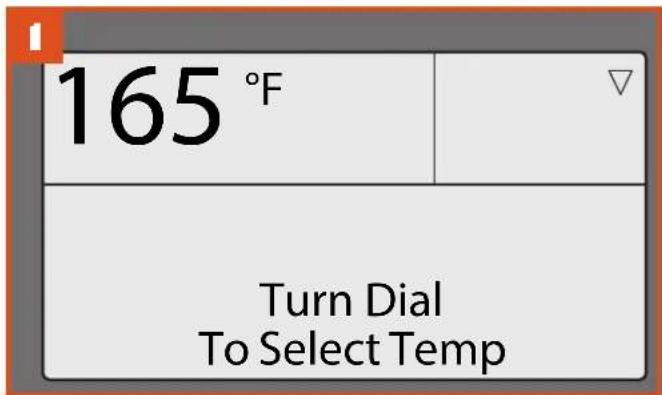
After pressing the Standby button, your grill's home screen defaults to the "Turn Dial To Select Temp" message. Cooking temperature can be set directly from this screen.
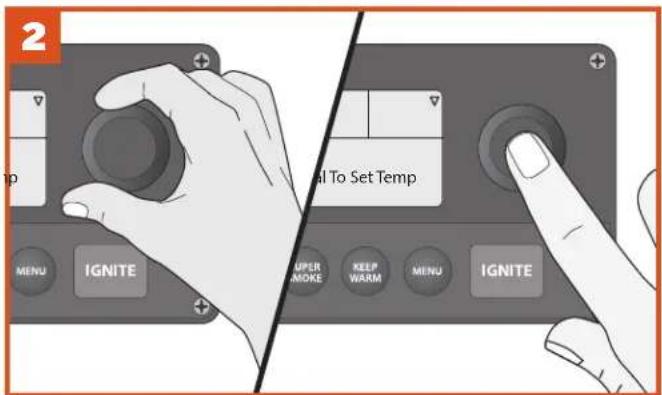
To select temperature, turn the Selection dial right or left; once the desired temperature is displayed, press the center of the dial to select.
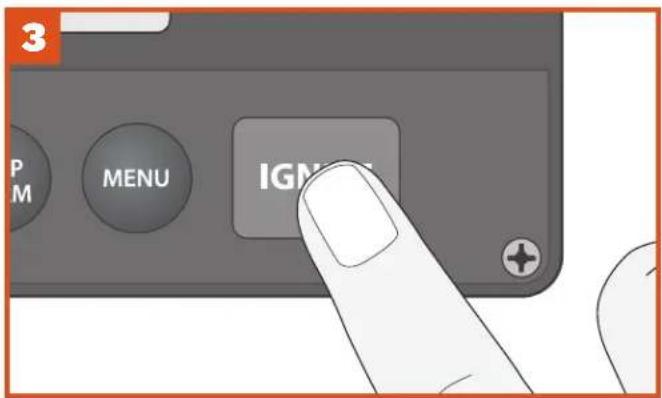
Press IGNITE. The automatic ignition and preheat cycle will begin.
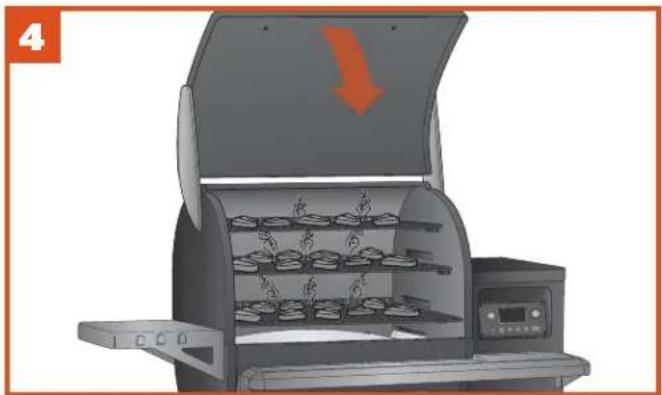
natural_image
Illustration of a portable oven with multiple food trays and a downward arrow indicating a drop (no text or symbols)Once preheating is complete, load food into the grill and close the grill door.
TIPS:
- It is recommended, but not necessary, to wait until the preheat cycle is complete before loading food into the grill.
- The grill door should be closed once the preheat cycle begins so that the grill can reach the desired set temperature.
• Some temperature fluctuations are normal for Traeger grills.
USING A PRESET CUSTOM COOK CYCLE
USING A PRESET CUSTOM COOK CYCLE Your Traeger® Timberline Grill comes with two of our favorite custom cook cycles already programmed: Beginner's Brisket and Chicken Challenge. Use your Traeger App to find hundreds of recipes to download directly to your grill. You must sync your grill to your home's Internet before you can begin downloading recipes.
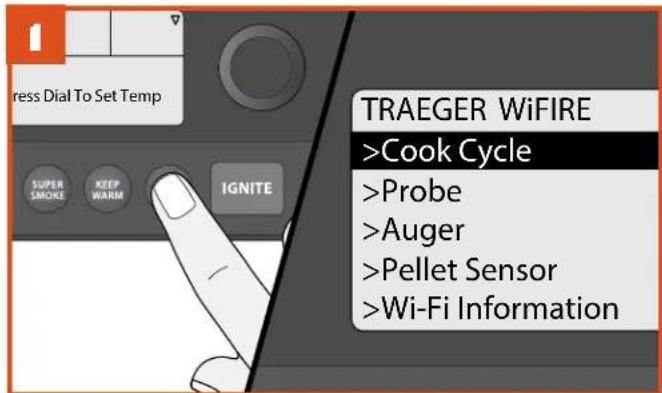
Once the home screen is displayed, press MENU. The full menu will now display several options. Select Cook Cycle.
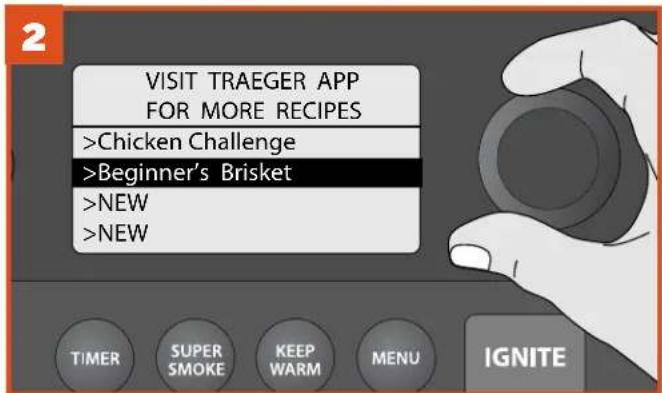
From the Cook Cycle screen, use the Selection dial to choose the recipe you want. Press the center of the dial to select.
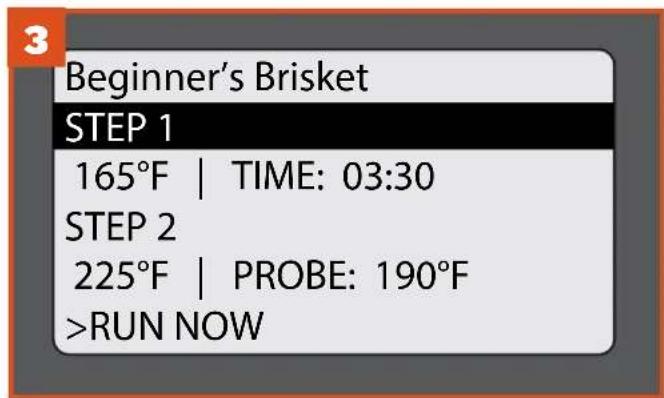
Once a custom cook cycle is selected, the included steps will display. Then, select one of four options: RUN NOW, EDIT, DELETE, or BACK to return to the previous menu.
TIP: If you're in the middle of programming a cook cycle and change your mind, press MENU repeatedly until you return to the main menu, and start over.
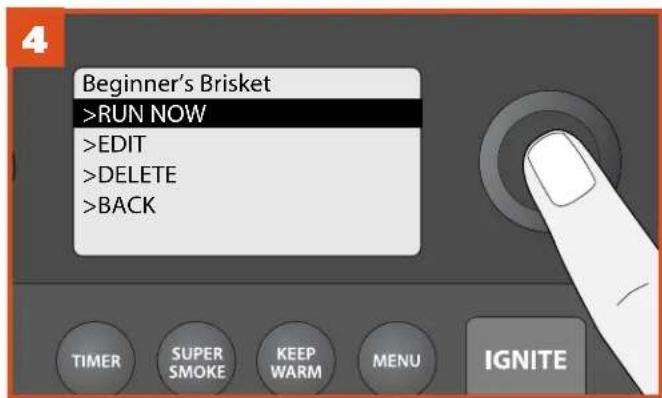
If you want to run the custom cook cycle exactly as-is, select RUN NOW.
NOTE: To edit or add steps, follow the instructions in "Creating a Custom Cook Cycle" on page 17.
USING A PRESET CUSTOM COOK CYCLE (continued)

natural_image
Solid orange horizontal bar with no text or symbols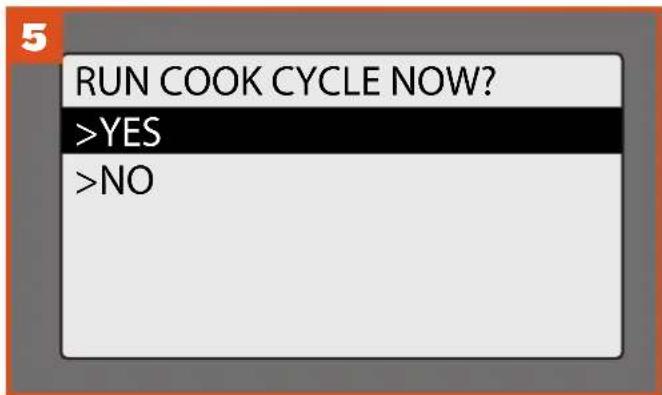
To RUN COOK CYCLE NOW, select YES at the prompt or NO to return to the previous screen.
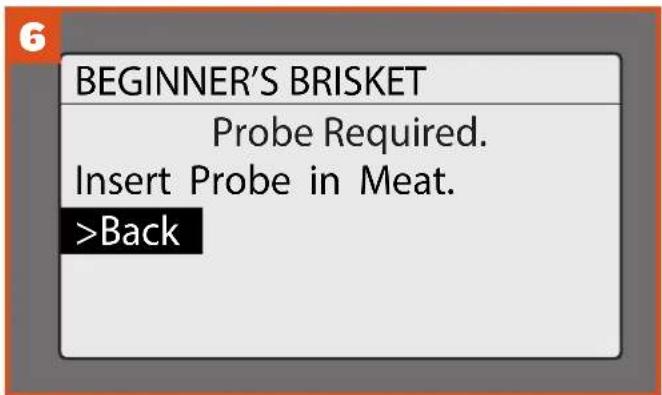
If the probe is required, you'll be instructed to insert the probe into your meat. Then, insert the probe plug into the jack on the controller. A tone will sound once the probe is recognized. To RUN COOK CYCLE NOW now, select YES at the prompt.
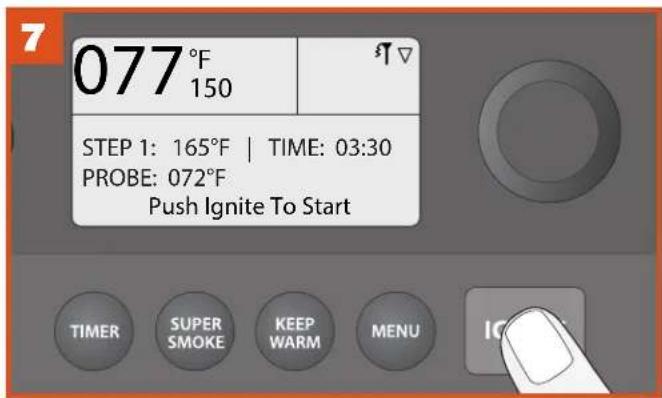
The display will now show the first step of your cook program. Press IGNITE to start.
natural_image
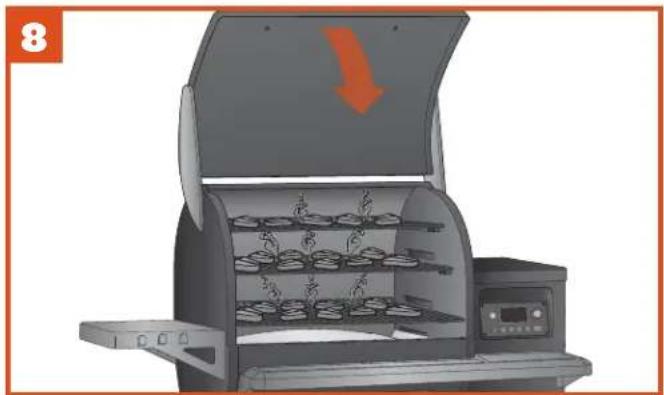
Illustration of a portable induction cooktop with open lid and tray, showing interior shelves and a downward arrow (no text or symbols)The automatic ignition and preheat cycle will begin. Once preheating is complete, load food into the grill and close the grill door.
NOTES:
- If the probe is not plugged in properly, the grill will beep three times.
- It is recommended, but not necessary, to wait until preheat cycle is complete before loading food into the grill.
- The grill door should be closed once the preheat cycle begins so that the grill can reach the desired set temperature quickly.
CREATING A CUSTOM COOK CYCLE
Use this method to create your own cook program, or to edit
an existing program.

natural_image
Solid orange horizontal bar with no text or symbols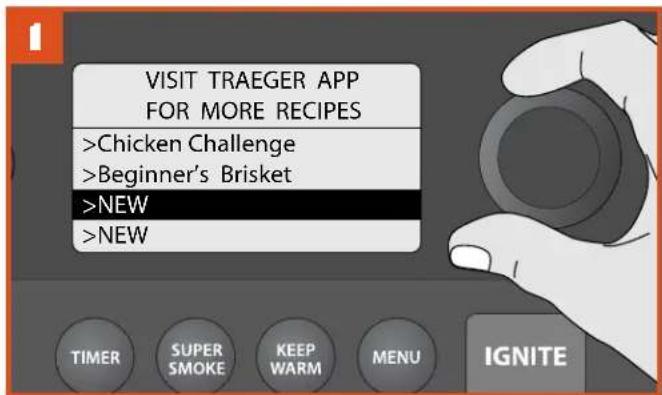
At the Cook Cycle menu, select NEW to display the Steps menu.
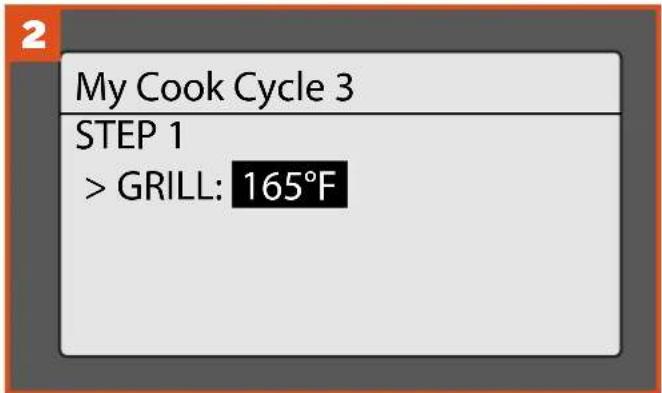
At Step I, a prompt will display to select a grill temperature (default temperature is 165° F [74°C]). Turn the Selection dial to the desired temperature and press the center of the dial to select.
NOTE: Custom cook cycles require a minimum of one step, with a maximum of four.
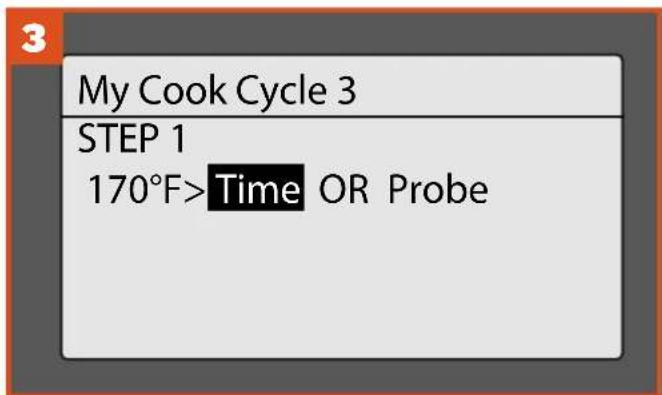
Once temperature is selected, choose either Time (to cook for a set time) or Probe (to cook until the internal meat temperature goal is reached).
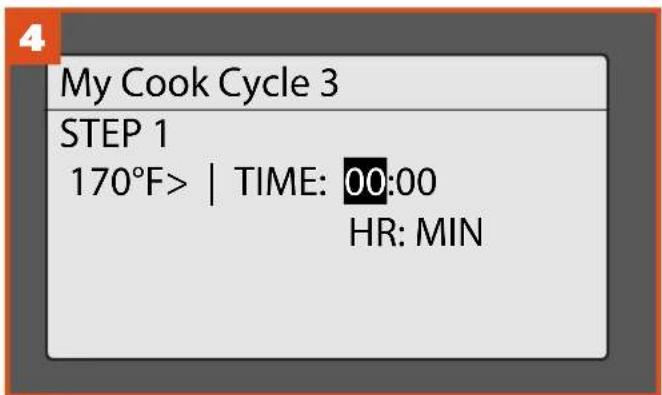
If the recipe calls for a specific number of hours at a set temperature, select TIME. To select hours, rotate the dial. Press to select and move to minutes. Rotate to choose minutes and press the dial to select and finish.
REMINDER: When using the Selection dial to choose options, remember to press the center of the dial to lock in your choice and move to the next menu item.

natural_image
Solid orange horizontal bar with no text or symbols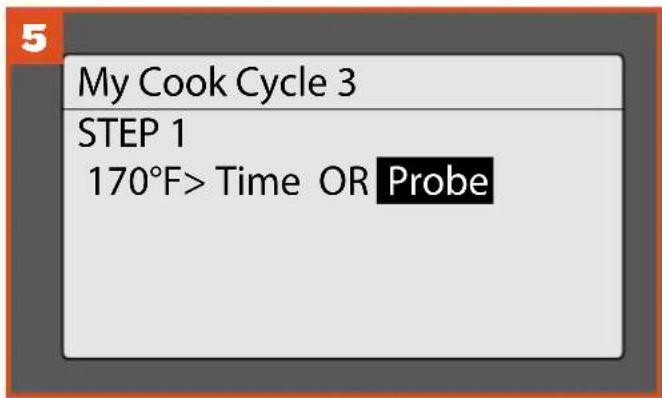
If the recipe calls for cooking the meat to a specific internal temperature, choose Probe. Use the Selection dial to select a goal temperature.
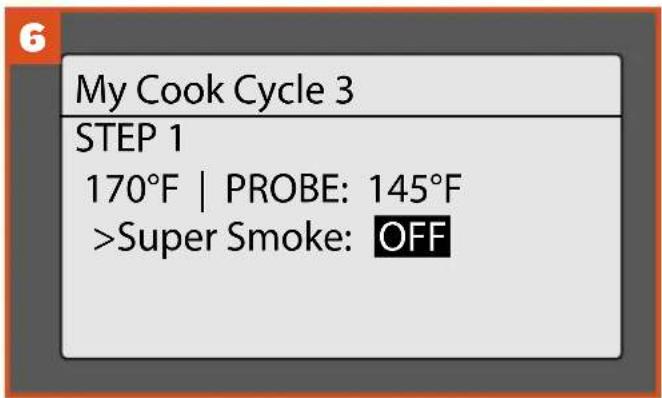
The option for adding Super Smoke to the step will display. To add Super Smoke, use the Selection dial to toggle from OFF (default) to ON. Otherwise, press the dial center to accept the default setting.
NOTE: Super Smoke can only be used when the grill temperature is between 165°-225°F ( 74°-107°C ).
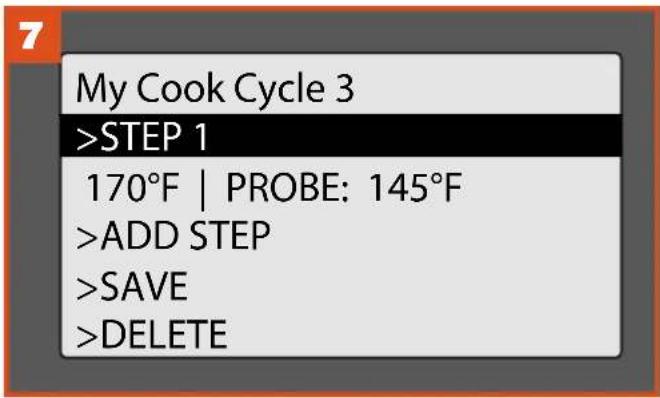
At this point you'll be returned to the Steps menu for your custom cook cycle. The step you just created will be saved automatically. You can add another step, save the cook program as-is, delete the program, or return to the Cook Cycle menu.
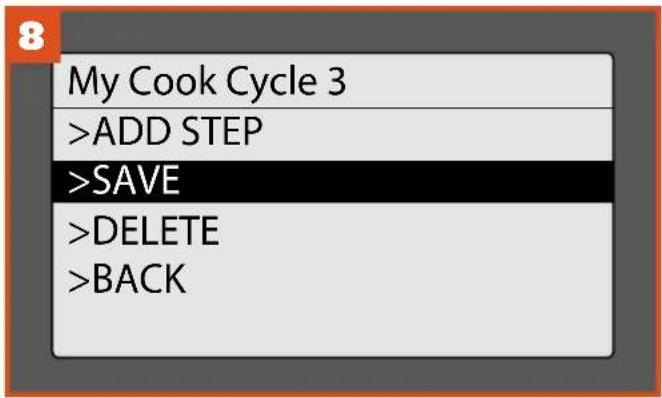
Once all steps are added, select SAVE. You will then be asked if you want to RUN COOK CYCLE NOW. If you select YES, you'll be taken back to the home screen and instructed to press IGNITE to start. If you select NO, you'll return to the Cook Cycle menu.
NOTE: There are a total of four memory slots for recipes on your grill. If you have four recipes already saved and wish to create a new one, you will need to delete one of the current recipes to make room for the new one.
COOKING WITH THE PROBE
Use these methods when your recipe specifies an internal goal temperature for your food.
If the grill is turned off:
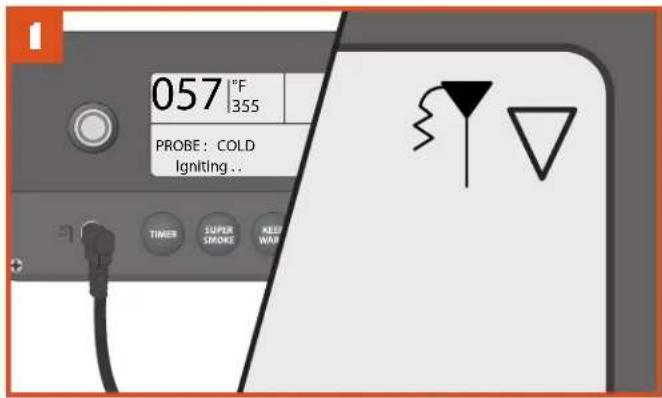
Plug the probe into the probe jack located on the WiFIRE® Controller. See "Using Your Grill" to turn on the grill. Once the grill is on, the controller will recognize the probe and the probe icon will light in the controller screen's upper-right corner.
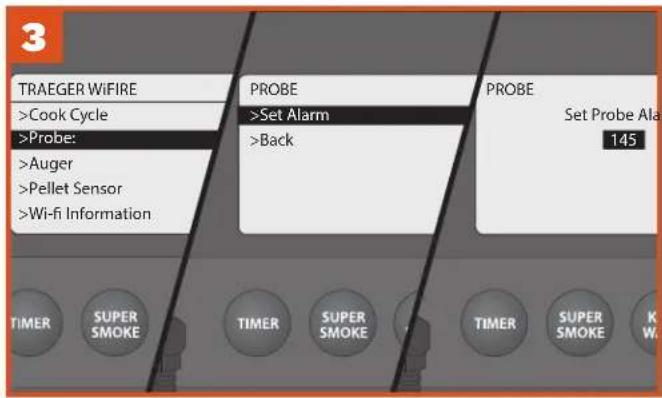
Press MENU; then scroll and select PROBE. You will be prompted to set a probe alarm for the internal goal temperature. Select SET ALARM. Then, at the Set Probe Alarm menu, use the Selection dial to choose the temperature goal for your meat.
NOTE: To calibrate the probe, see "Additional Control Functions" on page 21.
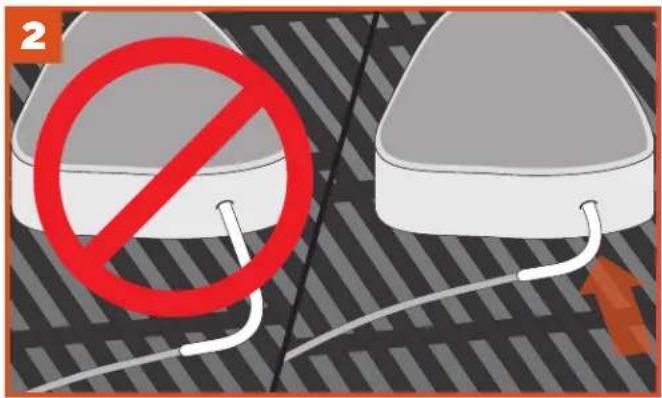
Once the grill is preheated to the desired temperature, load food into the grill. Feed the probe through the grommet on the side of the grill and insert the probe tip halfway into the thickest part of the meat—not in the fatty portion or touching bone.
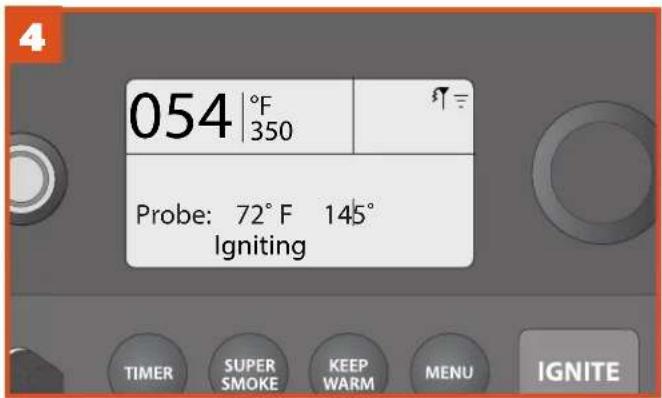
Once the probe alarm is set, the home screen will display the grill temperature, goal probe temperature, and grill status. A tone will sound when your meat reaches the set alarm temperature. If using the Traeger WiFIRE® app, you will receive a push notification on your connected smart device, along with a display of your grill's status throughout the cooking process.
If the grill is turned on:
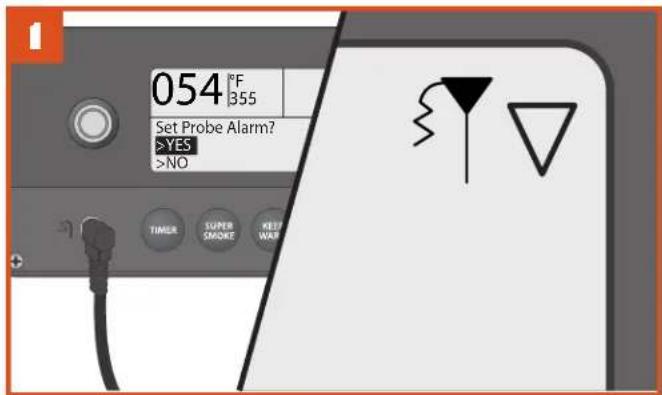
Plug the probe into the probe jack located on the WiFIRE® Controller. The controller will recognize the probe and the probe icon will light in the controller screen's upper-right corner. The display will ask if you want to set an alarm. Select YES.
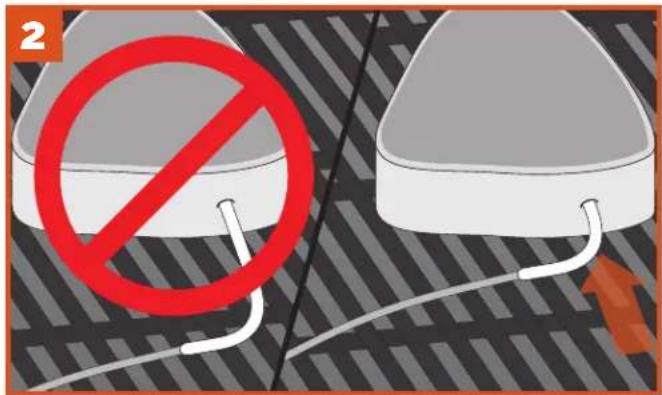
Rotate the dial to the desired food temperature. Press the dial center to select/confirm.
NOTE: To calibrate the probe, see "Additional Control Functions" on page 21.
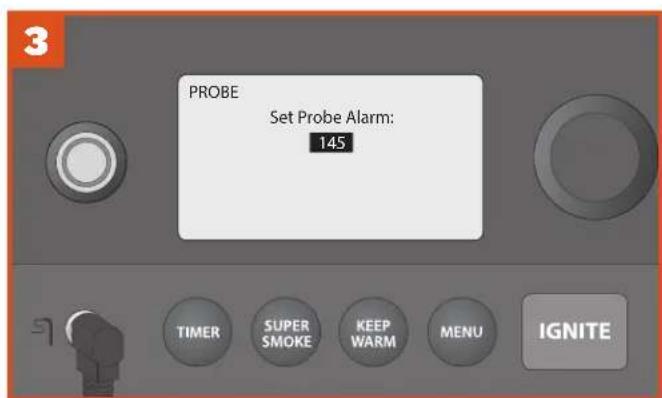
Once the grill is preheated to the desired temperature, load food into the grill. Feed the probe through the grommet on the side of the grill and insert the probe tip halfway into the thickest part of the meat—not in the fatty portion or touching bone.
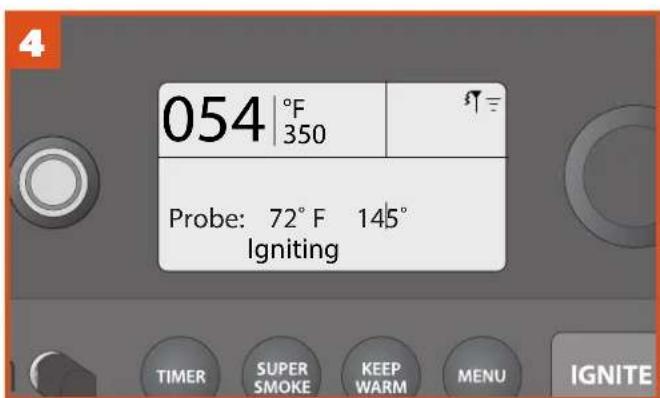
Once the probe alarm is set, the home screen will display the grill temperature, goal probe temperature, and grill status. A tone will sound when your meat reaches the set alarm temperature. If using the Traeger WiFIRE® app, you will receive a push notification on your connected smart device, along with a display of your grill's status throughout the cooking process.
ADDITIONAL CONTROL FUNCTIONS
SETTINGS Use the Settings menu to adjust display settings, clear notifications, access important product and contact information, and more.
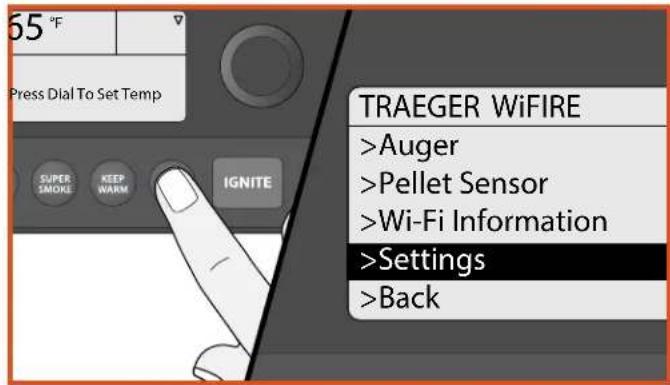
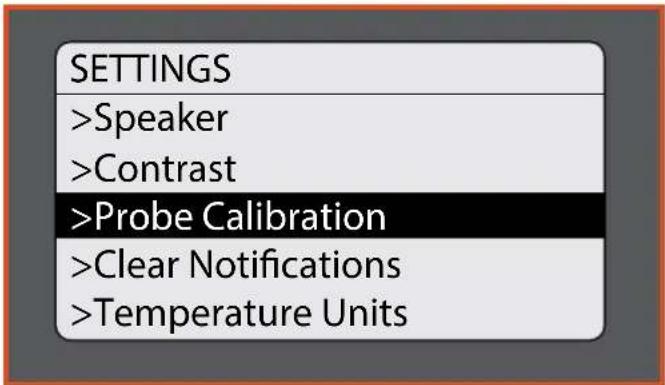
TO ACCESS THE SETTINGS MENU:
Turn grill on. Once the home screen is displayed, press MENU. The main menu will display several options. Turn the dial to highlight "Settings." Press the center of the dial to select.
To change a setting, turn the dial to select the desired setting. Press the center of the dial to confirm. Select BACK to return to the Settings menu.
SPEAKER
Turns the grill control speaker on or off. The selected setting will be indicated with a *.
CONTRAST
Rotate the dial to adjust the display contrast from 1 (high) to 5 (low). Default setting is 3. Press the center of the dial to confirm and return to the Settings menu.
PROBE CALIBRATION
There are two options under this setting:
- Calibrate Probe: Provides instructions on calibrating using an ice water bath. "Place probe in ice water for 1 minute before calibrating." is displayed.
- Probe Offset: Rotate the dial to adjust the probe temperature offset in I° increments, from -15°F to +15°F/-8°C to +8°C. The default setting is 0. Press the center of the dial to confirm and return to the Settings menu.
CLEAR NOTIFICATIONS
Use this function to clear error messages and notifications.
NOTE: Since an error will put the grill into Cool Down mode, the display will still show "Cooling Down" when you exit the Clear Notifications and Settings menus.
TEMPERATURE UNITS
Turn the dial to choose between degrees Fahrenheit (°F) and Celsius (°C). Press the center of the dial to confirm. The selected setting will be indicated with a *.
CUSTOMER SERVICE
Displays the Traeger WiFIRE ® dedicated customer service number.
LEARN MORE
Displays link nformation for the Traeger App and website.
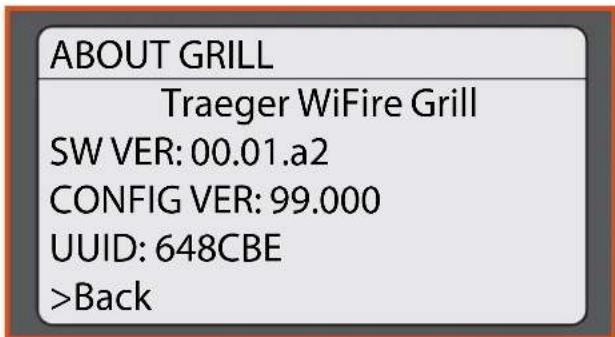
ABOUT GRILL
Provides important information about your grill, including model number and software version.
BACK
Return to the main menu.
HOPPER CLEAN-OUT
Your Traeger® Timberline Grill has a hopper clean-out system that allows you to quickly change from one pellet flavor to another without making a mess.

natural_image
Solid orange horizontal bar with no text or symbols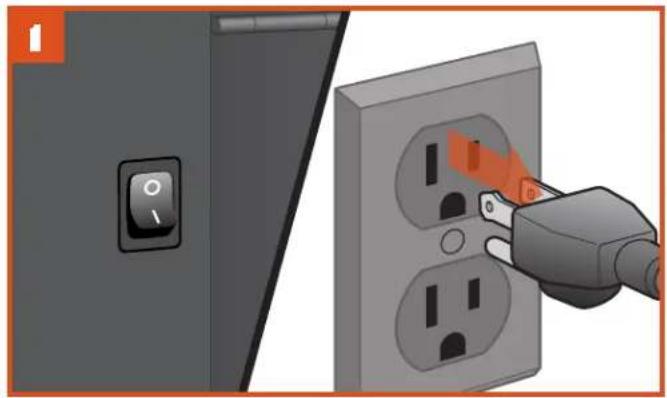
natural_image
Illustration of a switch and plug inserted into an electrical socket (no text or symbols)PLUG APPEARANCE MAY VARY BY REGION.
Turn the switch to OFF (0) and disconnect the power cord. If the grill is still hot, allow it to cool completely.
natural_image
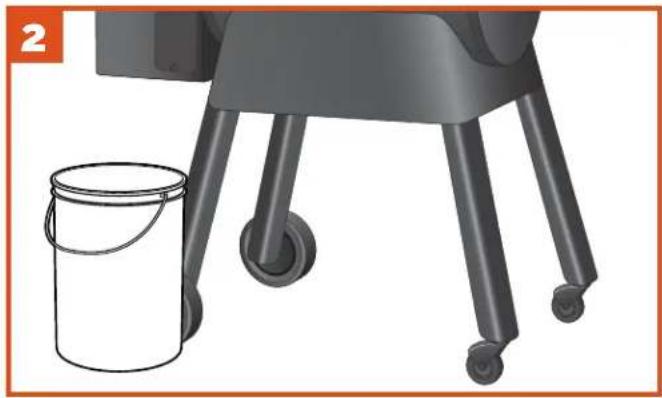
Illustration of a small bucket next to a large industrial robotic arm with wheels (no text or symbols)Place a container large enough to hold the discarded pellets under the pellet clean-out door.
TIP: A clean 5-gallon bucket works great!
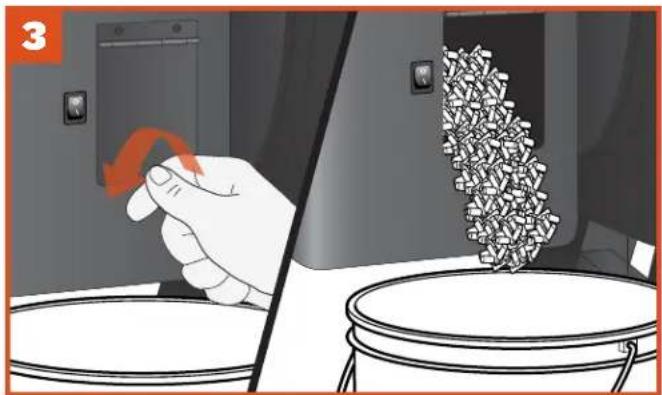
Unscrew the clean-out door fastener and open it. Pellets will empty into the container you've placed below. You might need a spatula or spoon to push the remaining pellets out of the hopper.
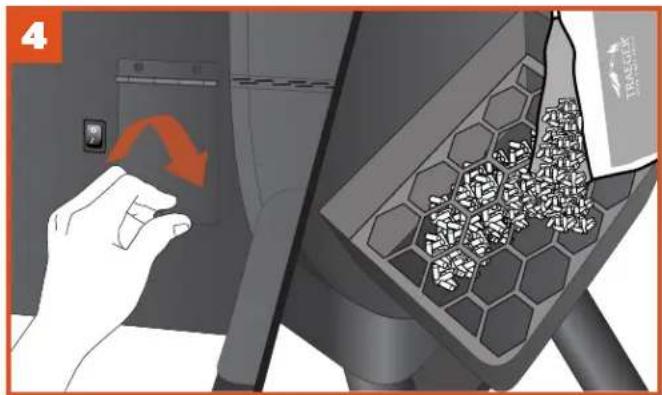
Once the hopper's empty, close the door, replace the fastener, and refill the hopper with a different flavor of TRAEGER® BRAND HARDWOOD PELLETS.

WARNING! Carefully empty out hopper soon after
grill use. Pellets may be very hot.
TIMBERLINE FEATURES
TRAEGER APP
Your Traeger ® Timberline Grill can be controlled remotely using the Traeger App. To learn more about WiFIRE ® , the Traeger App, and more ways to connect, go to traegergrills.com/app.
You will need a home Internet Wi-Fi connection to connect your Traeger® Timberline Grill to the Internet. It is required that your smartphone or tablet is running the latest iOS or Android operating system. If you leave the range of your home Wi-Fi network with your device, a data plan is required.
The Traeger App is also an easy way to search, download, and cook new recipes on your Traeger® Timberline Grill.

natural_image
Close-up of a food dish featuring braised ingredients like tomatoes and condiments, surrounded by herbs and meat (no visible text or symbols)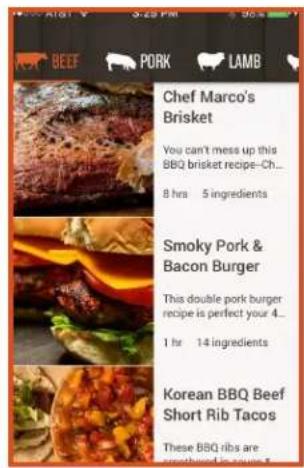
TIMER
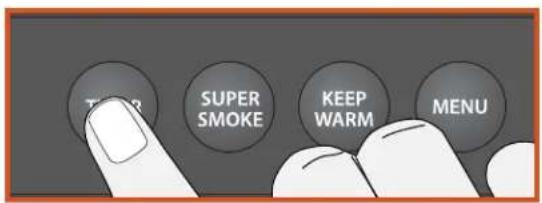
Your Traeger® Timberline Grill comes equipped with a convenient timer. The Timer function does not impact grill operation; you can use it to notify you of other needed steps during cooking, such as loading vegetables into the grill or basting your food.
To set the Timer:
- Press and hold TIMER for 3 seconds.
- Use the Selection dial to toggle between hours and minutes to set the time.
Once the dial is pressed after choosing the time, the Timer is set and you will be returned to the home screen.
To cancel the Timer:
I. Press and hold TIMER for 3 seconds.
2. You will see the options to Edit, Cancel, or go Back to the menu.
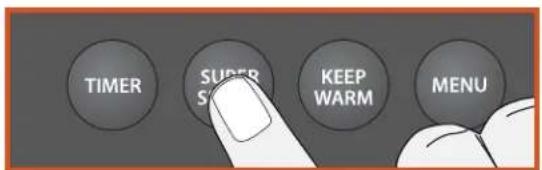
SUPER SMOKE OPTION
You can add more smoke flavor to your food by pressing SUPER SMOKE at any time during grilling. Press it again to cancel.
NOTE: Super Smoke can only be activated when grill temperature is between 165°–225°F (74°–107°C).
TIMBERLINE FEATURES (CONTINUED)
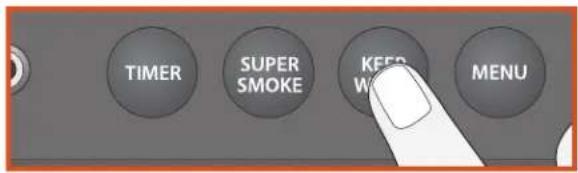
KEEP WARM FUNCTION
Keep Warm can be used to pause the cook cycle at any time during grilling and maintain the grill temperature at 165° F ( 74° C). Press the KEEP WARM button to activate the function. Press KEEP WARM again to resume cooking.
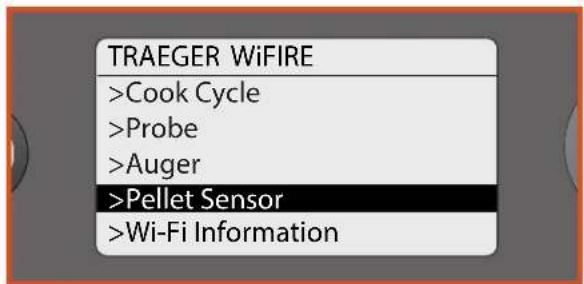
TRAEGER PELLET SENSOR
The Traeger Pellet Sensor monitors the supply of pellets. Once selected from the menu, it will display the current level of pellets as a percentage in increments of 5%.
If the Traeger Pellet Sensor is properly connected it will display "PELLET SENSOR Pellet Level: 100%." If the Traeger Pellet Sensor is not properly connected it will display "PELLET SENSOR Sensor Disconnected Pellet Level: 0%."
The Traeger Pellet Sensor allows you to check the status of your pellet level remotely using the Traeger App. This new system will send you push notifications (TPS Reports) and alarms on your smart device when your pellets are getting low, protecting your cook from running out of fuel.
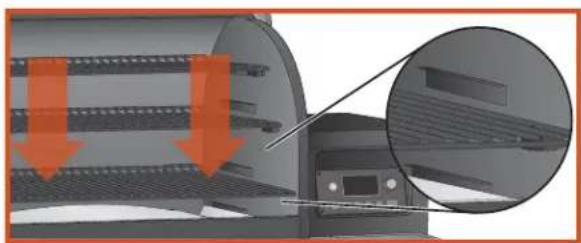
VERSATILE LOWER GRATE
You can change the placement of the bottom grill grate for two different cooking options: Sear Position and Smoke Position.
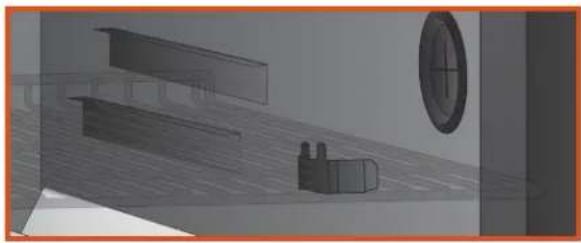
In Sear Position, the grill grate should be placed at the lowest point in the grill body cavity, resting on the lowest back brackets and the lip at the front. This ensures that the radiant heat from the grease drip tray is maximized and your food has sear marks.
For Smoke Position, place the grill grate on the higher front brackets, sliding it into the channel at the back. This will allow the smoke to fully circulate for convection cooking.
natural_image
Technical diagram of a mechanical assembly with highlighted components and arrows indicating motion (no text or symbols)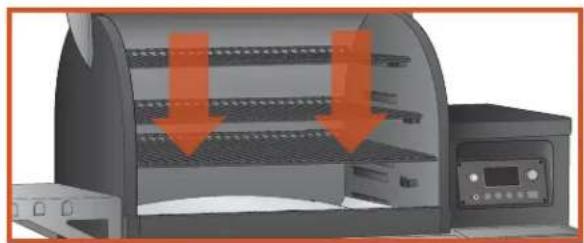
natural_image
Illustration of a portable kitchen appliance with orange arrows indicating cooling or drying process (no text or symbols)RACK STOP
Located at the front of the slider brackets for the bottom grate, the rack stop provides additional stability when accessing food. Simply slide the grate out until the crossbar catches in the rack stop, and you'll be able to flip burgers or baste ribs easily without the rack tipping.
NOTE: Only move the bottom grill grate; the top grill grate should remain in place since it does not slide.
natural_image
3D architectural rendering of a room interior with furniture and a circular window (no text or symbols)CUTTING BOARD
For added convenience, your Traeger® Timberline Grill includes a removable bamboo cutting board. Simply set the cutting board on top of the hopper and the magnetic base will hold it in place. For instructions on the proper maintenance and cleaning of your cutting board, see “Maintaining Your Grill” on page 27.
IMPORTANT: Do not leave the cutting board outside in the sun and rain. Exposure to high temperatures or excess moisture may cause the board to split or warp.
FOR CONSUMERS IN NORTH AMERICA:
IMPORTANT: In accordance with guidelines from the American Heart Association, as with many products containing magnets, it is recommended that those with implantable pacemakers/defibrillators should use care with the cutting board and keep their device 12 inches (30 cm) away from the board.
FOR CONSUMERS IN THE EUROPEAN UNION:
IMPORTANT: In accordance with guidelines from the medical device manufacturers, as with many products containing magnets, it is recommended that those with implantable pacemakers/defibrillators should use care with the cutting board and keep their device 12 inches (30 cm) away from the board.
GRILL COVER
Protect your Traeger® Timberline Grill with a premium custom cover, designed to withstand the elements. This durable grill cover is available for purchase at traegergrills.com.
MAINTAINING YOUR GRILL
1. CREOSOTE AND GREASE FORMATION AND REMOVAL
When wood pellets are burned slowly, they produce tar and other organic vapors that combine with expelled moisture to form creosote. The creosote vapors condense in the relatively cool exhaust vent of a slow-burning fire. As a result, creosote accumulates on the exhaust vent lining. When ignited, creosote makes an extremely hot fire. Airborne grease particles will travel through the cooking chamber, and some of this airborne grease will accumulate on the exhaust vent lining, similar to creosote, which could contribute to a fire.
Traeger's drip tray liners can help keep your grill clean and can help reduce the risk of flare-ups.
The Traeger Downdraft Exhaust should be inspected at least twice a year to determine when a creosote and/or grease buildup has occurred.
Also, grease drippings from the food will fall onto the grease drip tray, and then into the Traeger Grease Management System (TGMS). The TGMS is composed of a (A) grease trough, (B) grease chute, and (C) grease pan with pan liner (see below). Grease will accumulate in all of these locations.
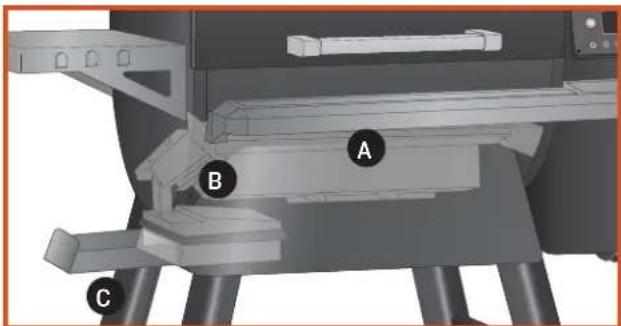
All components of the TGMS should be inspected before each use for signs of grease buildup.
When creosote or grease has accumulated, it should be removed to reduce the risk of fire.
Even if there is ample room in the grill, be cautious of loading excessive amounts of food that can release large quantities of flammable grease—for example, more than a pound of bacon—especially if the grill has not been well-maintained. If your previous cooks have produced large quantities of flammable grease, it is highly recommended that the grease be cleaned from the grill before using it again.
2. CLEANING GREASE FROM YOUR GRILL:
DANGER! Turn the switch OFF (O) and disconnect the power cord.
CAUTION! Accumulated grease is easier to clean off when the grill is still warm—not hot. Be careful not to burn yourself. Gloves are recommended.
Periodically clean the grease from the TGMS. If too much grease is allowed to build up in the grease channel or is allowed to plug the grease chute, a grease fire could result. We recommend cleaning these locations regularly.
To check the grease level:
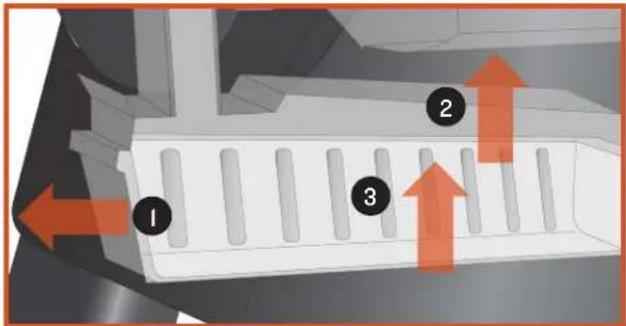
Dispose of and replace the pan liner:
(I) Slide out the grease pan until it hits its stops.
(2) Lift up to remove grease pan lid.
(3) Lift up grease pan liner.
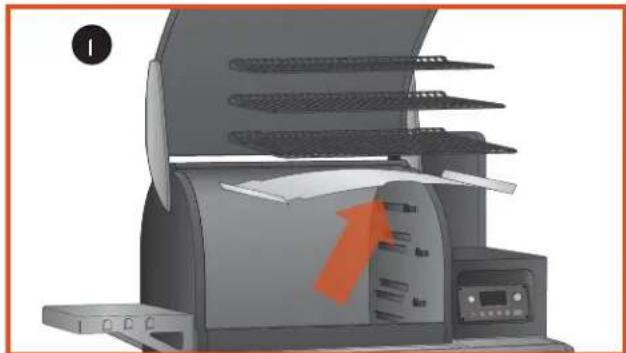
To clean the grease management system:
(I) Remove grill grates and drip tray from grill.
(2) Remove grease chute shield.
(3) Wipe down trough and chute with a paper towel. If grease is caked on, use a spoon or a similar utensil to scoop from trough and chute.
natural_image
Illustration of a printer with a paper airplane being opened, showing blade structure and orange arrow (no text or symbols)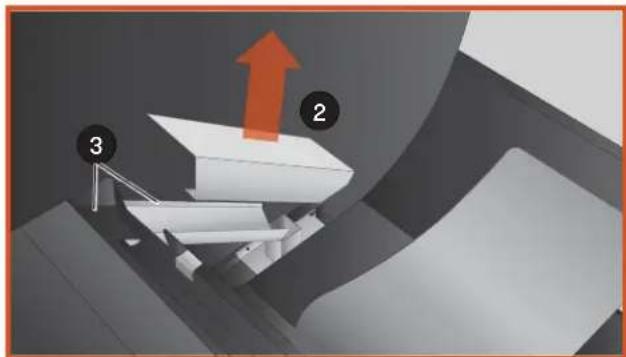
natural_image
3D diagram of a conveyor belt system with labeled components (no text or symbols)The grease pan comes with a preinstalled 5-pack of disposable aluminum liners. Replacement liner packs are available for purchase at traegergrills.com. Empty the grease pan as needed; frequency depends on the amount of use.
3. CLEANING OUTSIDE SURFACES:
DANGER! Turn the Main Power switch OFF (O) and disconnect the power cord.
Use a disposable rag or cloth dampened with warm, soapy water to wipe the grease from the outside of the grill. DO NOT use oven cleaner, abrasive cleansers, or abrasive cleaning pads on the outside grill surfaces.
4. OUTSIDE STORAGE:
CAUTION! If the grill is stored outside during the rainy season, care should be taken to ensure that water does not get into the pellet hopper. Wood pellets expand greatly when wet and will jam your auger. Always cover your grill when not in use with the Traeger grill cover. This custom-fit cover can be purchased at traegergrills.com.
5. CLEANING THE STAINLESS STEEL GRILL GRATES:
CAUTION! Cleaning the grill grates works best while they are still warm. Be careful not to burn yourself. We recommend keeping a long-handled cleaning brush near the grill. After removing your food, give the grill grate a quick brushing. It takes only a minute and it will be ready the next time you want to use the grill.
6. CLEANING THE ASH FROM INSIDE AND AROUND THE FIREPOT (EVERY 20 HOURS OF USE):
DANGER! Turn the Main Power switch OFF (O) and disconnect the power cord.
WARNING! Make sure that the grill is COLD before cleaning the ash.
WARNING! Disposal of ashes should be done only according to the following instructions.
Excess ash in the firepot may cause your fire to go out. The firepot should be inspected occasionally and cleaned to remove the ash buildup. Again, cleaning the ash from in and around the firepot should be done only when the grill is COLD.
Remove the grill grates, grease drip tray, and heat baffle to provide access to the firepot and the interior of the grill. Much of the ash outside of the firepot can be removed from the grill with a small metal fireplace shovel or other similar tool.
WARNING! A dedicated vacuum cleaner is the best way to remove ashes from the firepot, but this must be done with extreme care to avoid the risk of fire. Again,
cleaning the ash from the firepot should be done only when the grill is COLD.
A utility-type vacuum cleaner having a metal collection canister without a bag would be best for this task. However, almost any vacuum cleaner will work safely if this procedure is properly followed.
After ensuring that the ash in the firepot is COLD, vacuum the ash from the inside of the firepot.
a. If your vacuum cleaner is a bagless model, empty any previously accumulated debris from the collection chamber. Then vacuum the ash from the inside of the firepot. Once the firepot is clean, empty the collection chamber into the metal container described below without delay. Make sure that there is no remaining ash residue left in the collection chamber.
b. If your vacuum cleaner is a model that uses a disposable bag, install an unused bag in the machine. Then vacuum the ash from the inside of the firepot. Once the firepot is clean, remove the bag from the vacuum cleaner and place it in the metal container described below without delay.
7. DISPOSAL OF ASHES:
WARNING! Ashes should be placed in a metal container with a tight-fitting lid. The closed container of ashes should be placed on a noncombustible floor or on the ground, well away from all combustible materials, pending final disposal. When the ashes are disposed of by burial in soil or otherwise locally dispersed, they should be retained in the closed container until all cinders have cooled thoroughly.
8. CLEANING THE CUTTING BOARD:
Always thoroughly wash the cutting board after use.
To wash:
(I) Hand-wash only in warm, soapy water. DO NOT SOAK.
(2) Rinse with clean water.
(3) Air-dry.
IMPORTANT: Soaking the wooden cutting board in water or washing it in the dishwasher can damage the board.
NOTE: Avoid overexposure to sunlight to prevent warping.
- If the supply cord is damaged, it must be replaced by a special cord assembly available from the manufacturer or its service agent.
FREQUENTLY ASKED QUESTIONS
Following are frequently asked questions along with their answers:
| QUESTION ANSWER | |
| Why won't my grill ignite? | Verify power at the electrical outlet. If the power cord is connected to a GFCI (ground fault circuit interrupter), check and reset if necessary. Initiate start-up. If no ignition, see next answer. |
| DANGER! Turn the switch OFF (0) and disconnect the power cord. Remove the control and check the fuse on back. Replace the fuse if blown. Reinstall the control. | |
| Check the draft inducer fan and the auger drive motor for operation. If both are operating, the hot rod needs to be replaced. If one or both are not operating, contact Traeger's VIP-365 Customer Service (see page 35) for additional troubleshooting help or to place an order. | |
| Verify that there are pellets in the pellet hopper. If this is the initial firing or the grill has run out of pellets, allow sufficient time for the pellets to travel from the pellet hopper to the firepot (can take up to 7 minutes). | |
| Initiate start-up. See “Using Your Grill” on page I3. If there are still no pellets in the firepot, proceed to next answer. | |
| If the auger drive motor is operating (check the small fan blade on the back of the motor), the problem is in the digital control, which will need to be replaced. Contact your Traeger dealer or Traeger's VIP-365 Customer Service (see page 35) to place an order. | |
| Why are no pellets being delivered into the firepot? | If the auger drive motor is not operating but the draft inducer fan is operating, the problem is in the auger system, which will need to be checked: |
| With the switch OFF (0), locate the small fan blade on the back of the auger drive motor. | |
| CAUTION! While watching the fan blade, turn the switch ON (1). If the fan blade does not turn, turn the switch OFF (0). This indicates a defective auger drive motor, and it will need to be replaced. Contact your Traeger dealer or Traeger's VIP-365 Customer Service (see page 35) to place an order. | |
| If the fan blade turns a bit and then stops, continue watching and turn the switch OFF (0). If the fan blade unwinds slightly, this indicates a jam in the auger system, which will need to be cleared. | |
| DANGER! Turn the switch OFF (0) and disconnect the power cord. Remove the pellets from the pellet hopper. Check for foreign objects and wet or decomposed pellets, both of which can cause a jam in the auger system. The auger will need to be removed to clear a jam in the auger system. See “How do I remove the auger if it jams?” section on the following page. | |
| Why is the temperature of my grill fluctuating? | Temperature fluctuations are normal for Traeger grills. Any significant fluctuation could be the result of wind, air temperature, improper use, or lack of grill maintenance |
| How do I remove the auger if it jams? | DANGER! Turn the switch OFF (0) and disconnect the power cord. |
| CAUTION! If the grill is still hot, allow it to cool thoroughly. | |
| Remove any covers necessary to access the auger drive motor. | |
| Remove the screw connecting the auger drive motor shaft to the auger shaft and the screw retaining the auger bushing into the auger tube. | |
| With a small pipe wrench or locking pliers on the auger shaft, turn the auger counterclockwise. It will turn hard until it breaks free; then the auger will turn freely. | |
| Remove the auger and clean all pellets, ash, or foreign objects from the auger, auger tube, and firepot. (See instructions for proper handling and disposal of ash on page 27.) | |
| Sand the outside surfaces of the auger with medium grit sandpaper. Check the inside of the auger tube and sand it if needed. Vacuum the sanding grit out of the auger tube and firepot when finished. Check that the auger rotates freely. | |
| Reattach the auger shaft to the auger drive motor shaft. | |
| How do I protect my paint finish? | Use a protective cover on the grill to protect your paint finish. A Traeger grill cover is highly recommended. Covers are available from your Traeger dealer, or log onto our website, traegergrills.com. |
| Every 90 days, use a high-quality car wax on the outside surfaces of the grill. ONLY APPLY WAX TO A COLD GRILL. | |
| Where can I get a new part for my grill? | Check with your Traeger dealer. They may have the part in stock or can order the part for you. |
| Contact Traeger's VIP-365 Customer Service (see page 35) to place an order. | |
| In either case, please provide your name, phone number, address, model, and serial number of the grill (located on the label inside the hopper lid), along with the part identification number from the component diagram or parts list. | |
TROUBLESHOOTING
ERROR MESSAGES
Although rare, you may see an error or warning message display on your control panel. Please refer to the following chart for potential issues and how to resolve them:
| ERROR MESSAGE SOLUTION | |
| High Temp Error | This error will occur when the temperature in the grill reaches temperatures above 550°F (288°C) for more than 45 seconds. Let the grill cool, then turn off the grill. Clear out any remaining pellets from the firepot and restart your grill. If the problem persists, call customer service. |
| Low Temp Error | This error will occur if the temperature of the grill falls below 120°F (49°C) for 10 minutes, causing the grill to go into shutdown mode. To fix, remove any pellets from the firepot and add more pellets to the hopper. Turn the controller off and then on again and restart your grill. If the problem persists, call customer service. |
| Temp Sensor Out | This error will occur if the temperature of the grill is 695°F (368°C) or above for 10 seconds. This could be an adverse event. Allow the grill to cool down and restart the grill. If the problem persists, call customer service. |
| Failed to Ignite | This error will occur if the grill is out of pellets or the igniter did not light. Check to see if there are pellets in the hopper and clean out your firepot. If the problem persists, replace your igniter or call customer service. |
| Igniter Disconnect | This error occurs when the controller does not detect the igniter. Check to see if the igniter is connected and restart your grill. If the problem persists, replace your igniter or call customer service. |
| Fan Disconnected | This error occurs if the controller does not detect the fan. Make sure the fan is plugged in and restart your grill. If the problem persists, you may need to replace your fan or call customer service. |
| Auger Disconnected | This error occurs when the controller does not detect the auger motor. Check to see if the motor is plugged in and restart your grill. If the issue persists, replace your auger motor or call customer service. |
| Auger Overcurrent | This error occurs if the auger motor is damaged or jammed. Use the Clear Auger feature inside the control menu and restart your grill. If the problem continues, you may need to replace your auger motor or call customer service. |
| Low Temp Warning | This warning will occur if the grill has lost its fire and failed to recover. Check the pellets and restart the grill. |
| Ignition Warning (App Notification Only) | This warning will occur if the grill has not detected a successful ignition in the expected time. Check the pellets and restart the grill. |
| Low Ambient Temp | This warning will occur when the ambient temperature falls below -20°F (-29°C) for more than 30 seconds. Although the controller will still work, damage to the controller's display may have occurred. If the grill ignites, check to see if the display operates as expected. If the grill does not ignite, warm the grill and check to see if the display and controller operate as expected. If not, call customer service. |
| Probe Fell Out | This warning will occur if the probe is not fully inserted into the food. The message is triggered when the probe is above 220°F (104°C) while the grill is running. Reinsert the probe into your food as instructed on pages 19 and 20. |
| Bad Probe | This warning will occur if the controller detects a short circuit in the probe for 10 seconds. The probe will need to be replaced. To order a new probe, go to traegergrills.com. |
ERROR CLEARING
Errors are cleared with the Menu - Settings - Clear Notifications menu item. Since each error will send the grill into a cooldown, if an error is cleared while the grill is cooling down, the main screen will display “Cooling Down . . .” until the cooldown is complete. Note that some errors, like Temp Sensor Out, will trigger again even after clearing them. This is a sign that the conditions that caused the error have not changed. Power-cycling the grill will also clear any errors, as many users are accustomed to.
WiFiRE® PROBLEMS/QUESTIONS
| PROBLEM/QUESTION RECOMMENDED SOLUTION | |
| App is constantly showing“Lost Connection Attempting to Reconnect.” | Wi-Fi signal could be weak. Try moving the grill closer to the router or the router closer to the grill, or extending your wireless network. |
| Grill status in app displays as “Unknown.” | Try turning your grill off and on. |
| Try re-pairing network in the grill settings:1. Go to the Remote section of the app.2. Select the gear icon in the upper-right corner on the grill screen.3. Select “Re-Pair Network” under Grill Settings. | |
| Delete grill from the app and disconnect it from your Wi-Fi network:1. Go to the Remote section of the app.2. Select the gear icon in the upper-right corner on the grill screen.3. Select “Delete Grill” under Grill Settings.4. Re-pair the network under Grill Settings. | |
| I want to change/update the name of my grill. | 1. Go to the Remote section of the app.2. Select the gear icon in the upper-right corner on the grill screen.3. Select “Edit Grill Name” under Grill Settings. |
| How can I see how strong the Wi-Fi signal is on the grill? | 1. Go to the Remote section of the app.2. Select the gear icon in the upper-right corner on the grill screen.3. Select “Grill Settings,” then “Network Settings.”4. Wi-Fi strength will be displayed:Excellent: signal strength is >-50 dbGood: signal strength is -50 to -59 dbFair: signal strength is -60 to -69 dbPoor: signal strength is -70 to -79 dbUnusable: signal strength is < -80 db |
| Can I ignite my grill using the app? | For safety reasons, igniting your grill is not available through the app. |
| Can I shut down my grill using the app? | 1. Go to the Remote section of the app.2. Select the gear icon in the upper-right corner on the grill screen.3. Select “Shut Down Grill.” |
| It says my grill is already assigned to another account. What should I do? | Call customer service. |
| How do I delete a grill from my account? | 1. Go to the Remote section of the app.2. Select the gear icon in the upper-right corner on the grill screen.3. Select “Delete Grill” under Grill Settings. |
OPERATING TIPS
- You can change the temperature at any time during grilling to increase or decrease cooking temperature.
To change between Fahrenheit and Celsius:
Select Temperature Units from the Settings menu.
Turn the dial to choose between degrees FAHRENHEIT (°F) and CELSIUS (°C). Press the center of the dial to confirm. The selected setting will be indicated with a *. You will now see temperatures displayed in the format you've chosen.
-
WARNING! Your Traeger® Timberline Grill should never be moved while it is hot. If you are transporting your grill in a vehicle after cooking on it, make sure the fire is completely out and the grill is cold before placing it in any vehicle. Never put water into the firepot; it will jam the auger.
-
Your Traeger® Timberline Grill is designed to operate with the door closed. Cooking with the door open greatly lengthens your cooking time.
-
CAUTION! Never add pellets by hand to a hot firepot. This is dangerous and you may be seriously burned. If you run out of pellets and lose your fire while cooking, let the grill cool completely and start again with the "Hopper Clean-out" instructions on page 22.
-
CAUTION! Make sure the heat baffle is properly seated on its locating brackets. If not seated properly, direct heat and flame could come up out of the firepot and cause a grease fire in the grill.
-
Always take into account the type of food you are cooking.
- Thin foods need high heat and shorter cook times, while thicker foods need low heat and longer cook times.
• Vegetables take longer to cook than meats at the same cooking temperatures.
• Always check that the internal temperature of the meat that you are cooking reaches safe temperatures to eat.
- The Keep Warm function is not designed to properly cook your food.
- WARNING! If the fire in the firepot goes out while smoking and there are sufficient pellets still in the pellet hopper, it is important to follow these steps.
Failure to do so may cause a hazardous “overfiring” of your grill due to an excess of unburned pellets in the firepot.
- DANGER! Turn the Main Power switch at the back of the grill to OFF (0) and disconnect the power cord. Allow the grill to cool thoroughly. Open the door and remove all food, grill grates, grease drip tray, and heat baffle.
• WARNING! Smoke Hazard
A pellet overflow condition can occur during start-up, resulting in unusually thick, white smoke that lasts a long time. If this occurs, power down your grill with the Main Power switch and unplug. If this condition continues long enough, gases can build up from partial ignition and fully ignite, causing the lid to "burp." If this burp occurs and your grill has not been properly maintained as described in "Maintaining Your Grill" on pages 26-27, a grease fire could result. To remedy this condition, let the grill cool down completely, remove all internal components, and thoroughly clean all ash and pellets from the grill and firepot (see page 27, "Cleaning the Ash from Inside and Around the Firepot").
- WARNING! Remove all unburned pellets and ash from inside and around the firepot. (See instructions for proper handling and disposal of ash on page 27.)
- Before replacing the heat baffle, grease drip tray, and the grill grates, plug the power cord into an appropriate grounded/earthed electrical outlet and turn the switch ON (I). Pellets should fall into the firepot and the hot rod should begin to heat (it will start to turn red). CAUTION! Do not touch the hot rod.
- When flames start to come out of the firepot, turn the switch OFF (0). Let the grill cool down. Now you're ready to place the heat baffle, grease drip tray, grill grates, and food back into the grill.
8. CARBON MONOXIDE:
WARNING! Follow these guidelines to prevent this colorless, odorless gas from poisoning you, your family, your pets, or others.
Know the symptoms of carbon monoxide poisoning: headaches, dizziness, weakness, nausea, vomiting, sleepiness, and confusion. Carbon monoxide reduces the blood's ability to carry oxygen. Low blood oxygen levels can result in loss of consciousness and death.
See a doctor if you or others develop cold- or flu-like symptoms while cooking or in the vicinity of this appliance. Carbon monoxide poisoning, which can easily be mistaken for a cold or flu, is often detected too late.
Alcohol consumption and drug use increase the effects of carbon monoxide poisoning.
Carbon monoxide is especially toxic to mother and child during pregnancy, infants, the elderly, smokers, and people with blood or circulatory system problems, such as anemia or heart disease.
9. GREASE MANAGEMENT:
CAUTION! Grease fires are caused by improper maintenance of the grill and failing to clean the Traeger Grease Management System (TGMS) on a consistent basis (see “Maintaining Your Grill” on pages 26-27). In the unlikely event of a grease fire while cooking, turn the grill off and keep the door closed until the fire is completely out. Never keep the door open during a grease fire. If the fire does not go out, lightly sprinkle baking soda on the fire.
CAUTION! Be careful not to burn yourself. If this does not work, carefully remove the food from the grill and keep the door closed until the fire is completely out. Again, be careful not to burn yourself. When the grill is completely cool, remove all internal components. Clean any grease accumulation from the TGMS. Replace the grease drip tray and grill grates, restart the grill, and resume cooking.
Traeger's drip tray liners can help keep your grill clean and can help reduce the risk of flare-ups.
NOTES
SERVICE AND WARRANTY
TRAEGER'S LEGENDARY CUSTOMER SERVICE is the best out there.
If you have any questions about your Traeger grill or need tips on cooking your first Thanksgiving turkey, our seasoned experts have your back. We're here for you 365 days a year, including holidays, because we're cooks—not bankers.
For assistance with assembly or installation, parts, or customer service (English only, please), you can phone, e-mail, or write us at:
TRAEGER'S CUSTOMER SERVICE
Phone: I-844-9WiFiRE
6:00 a.m. - 8:00 p.m. MT
E-mail: service@traegergrills.com
TRAEGER PELLET GRILLS LLC
1215 E. Wilmington Ave.
Salt Lake City, UT 84106

3-YEAR LIMITED WARRANTY (U.S.A. ONLY)
Traeger Pellet Grills LLC warrants this barbecue grill against defects in material and workmanship under normal use and maintenance for a period of three (3) years from the date of original purchase.
Traeger Pellet Grills LLC will provide a replacement part for any part found to be defective. Original part(s) approved for return by Traeger's Parts Department must be returned prepaid.
This warranty does not include labor charges connected with the determination or replacement of defective parts, or freight charges to ship these parts.
Traeger Pellet Grills LLC shall not be liable under this or any implied warranty for incidental or consequential damages. This warranty gives the retail customer specific legal rights and the customer may have other rights which vary from state to state.
This warranty shall be void if the unit is not assembled or operated in accordance with the operation instructions provided with this unit; the unit is resold or traded to another owner; components, accessories, or fuels not compatible with the unit have been used; the unit has been used in a commercial or food service application; or the user has abused or otherwise failed to maintain the unit.
To process a warranty claim, Traeger Pellet Grills LLC may require proof of your date of purchase. You should retain your sales slip or invoice along with this certificate with your valuable documents.

WOOD FIRED GRILLS

WOOD FIRED GRILLS
LIVE FLAVOR FULL
UNLOCK THE FULL POWER OF YOUR GRILL
WITH THE TRAEGER APP
FOLLOW US @TRAEGERGRILLS

Traeger Pellet Grills LLC
1215 E. Wilmington Ave
Salt Lake City, UT 84106
traegergrills.com

TRAEGER®
WOOD FIRED GRILLS
MANUEL DE
L'UTILISATEUR
LE FAIT DE NE PAS MAINTENIR LES ESPACEMENTS REQUIS ENTRE LES MATÉRIAUX COMBUSTIBLES EST UNE DES CAUSES MAJEURES D'INCENDIES. IL EST EXTRÊMEMENT IMPORTANT QUE CE PRODUIT SOIT INSTALLÉ CONFORMÉMENT À CES INSTRUCTIONS.
IMPORTANT : CONSERVER POUR CONSULTATION FUTURE.
LIRE ATTENTIVEMENT.
TFB85WLE/WLEC
TFBOIWLE/WLEC
CONSIGNES DE SÉCURITÉ
LISEZ TOUTES LES INSTRUCTIONS AVANT D'ASSEMBLER ET D'UTILISER L'APPAREIL
natural_image
Close-up of a black cylindrical outdoor grill with visible smoke and flames, set against a blurred forest background (no text or symbols)
MOULINS DE TRAEGER
ET PROCÉDÉ DE PRODUCTION DES GRANULES
natural_image
3D rendering of a portable induction cooker with visible internal blades and control panel (no text or symbols)natural_image
Cross-sectional diagram of a fire system with flames and smoke, no text or symbols present7 KEEP WARM (MAINTIEN AU CHAUD)
natural_image
Illustration of a switch and plug inserted into two socket outlets (no text or symbols)L'APPARENCE DE LA FICHE PEUT DIFFÉRER SELON LA RÉGION.
natural_image
Diagram showing a container filled with granular material inside a hexagonal chamber, with a hand pouring liquid into it (no text or symbols present)Remplir la trémie de GRANULES DE BOIS TRAEGER®.
natural_image
Solid orange horizontal bar with no text or symbols
natural_image
Close-up of a finger pressing a button on a white surface, no text or symbols visiblenatural_image
Illustration of a power outlet plug inserting into two socket plugs, showing electrical switch (no text or symbols)L'APPARENCE DE LA FICHE PEUT DIFFÉRER SELON LA RÉGION.
natural_image
Close-up of a finger pressing a button on a white surface, no text or symbols visiblenatural_image
Solid orange horizontal bar with no text or symbols| 165 °F | |
| Turn Dial To Select Temp | |
natural_image
Illustration of a portable kitchen appliance with multiple food trays and a downward arrow indicating a drop (no text or symbols)natural_image
Solid orange horizontal bar with no text or symbols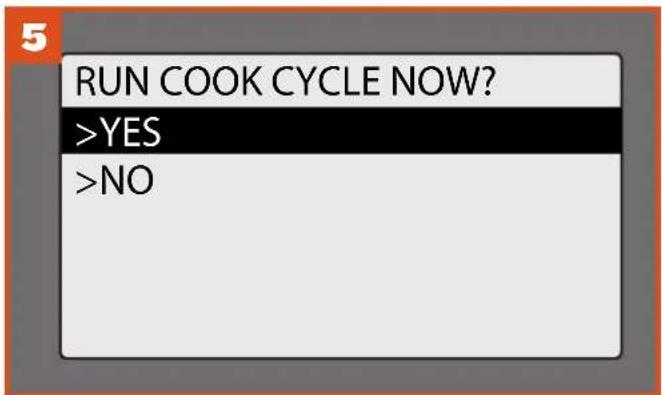
natural_image
Illustration of a portable induction cooktop with open lid and cooling rack (no text or symbols)natural_image
Solid orange horizontal bar with no text or symbols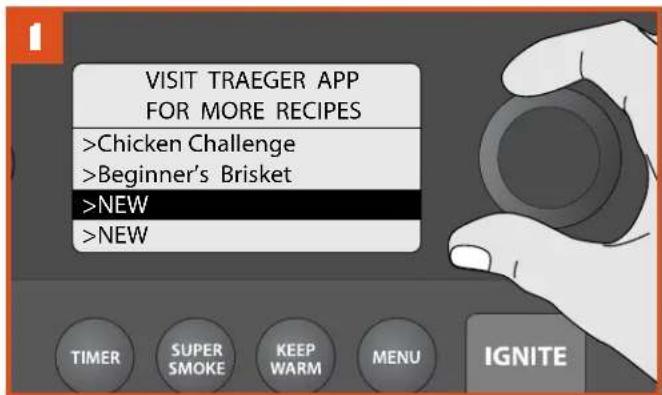
natural_image
Illustration of a switch and plug inserted into an electrical socket (no text or symbols)L'APPARENCE DE LA FICHE PEUT DIFFÉRER SELON LA RÉGION.
natural_image
Illustration of a small bucket next to a large industrial robotic arm with wheels (no text or symbols)natural_image
Illustration showing a hand holding a red object with an arrow, interacting with a container and a pile of granular material (no text or symbols)natural_image
Close-up of a food dish featuring braised eggplant, tomato sauce, and garnishes on a wooden table (no visible text or symbols)
TIMER (MINUTERIE)
OPTION SUPER SMOKE (PLUS DE FUMÉE)
FONCTION KEEP WARM (MAINTIEN AU CHAUD)
natural_image
Diagram showing a mechanical component with highlighted parts and arrows indicating motion (no text or symbols)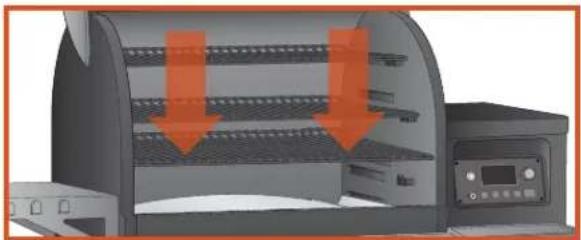
natural_image
3D rendering of a portable industrial machine with orange arrows indicating flow or movement (no text or symbols visible)BUTÉ DE GRILLE
natural_image
3D architectural rendering of a room with furniture and a circular window (no text or symbols)PLANCHE À DÉCOUPER
natural_image
Illustration of a printer with paper feed and orange arrow indicating print direction (no text or symbols)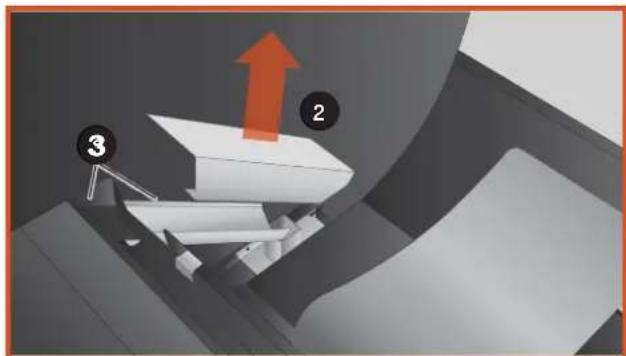
natural_image
3D diagram of a mechanical device with labeled components (2, 3) and an upward arrow, no readable text or symbols present.PROBLÈMES/QUESTIONS POUR LE WiFiRE®
1215 E. Wilmington Ave.
Salt Lake City, UT 84106

GARANTIE LIMITÉE DE 3 ANS (É.-U. SEULEMENT)
Traeger Pellet Grills LLC
1215 E. Wilmington Ave
Salt Lake City, UT 84106
traegergrills.com

TRAEGER®
WOOD FIRED GRILLS
MANUAL DEL PROPIETARIO
UNA DE LAS CAUSAS PRINCIPALES DE INCENDIOS ES NO RESPETAR LAS SEPARACIONES REQUERIDAS (ESPACIOS DE AIRE) ENTRE LOS MATERIALES COMBUSTIBLES. ES MUY IMPORTANTE INSTALAR ESTE PRODUCTO SOLO DE ACUERDO A ESTAS INSTRUCCIONES.
IMPORTANTE: CONSERVE PARA FUTURA REFERENCIA. LEA CUIDADOSAMENTE.
TFB85WLE/WLEC
TFBOIWLE/WLEC
CÓMO CONECTAR SU PARRILLA
natural_image
Illustration of a plug inserted into an electrical socket, showing the socket with orange tip (no text or symbols)natural_image
Diagram showing a material being poured into a hexagonal mold, with no visible text or symbols.natural_image
Solid orange horizontal bar with no text or symbols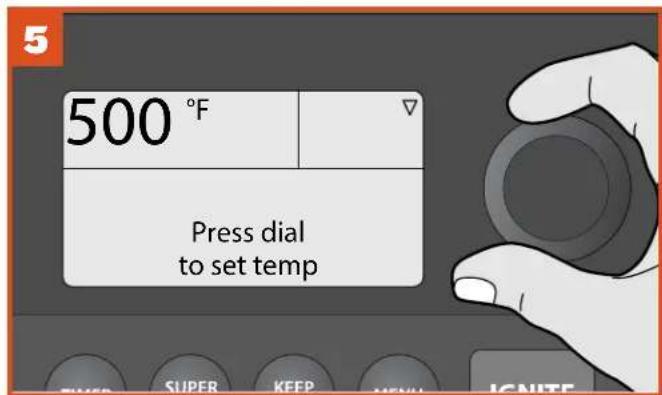
natural_image
Close-up of a finger pressing a button on a white surface, no text or symbols visiblenatural_image
Illustration of a power outlet plug inserting into an socket, showing electrical switch (no text or symbols)natural_image
Close-up of a finger pressing a button on a white surface, no text or symbols visible| 165°F | ▽ |
| Turn Dial To Select Temp | |
natural_image
Illustration of a portable oven with multiple food trays and a red downward arrow indicating a drop (no text or symbols)natural_image
Solid orange horizontal bar with no text or symbols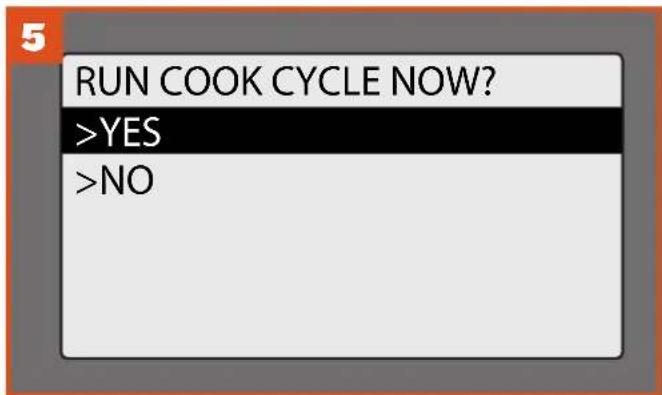
natural_image
Illustration of a portable induction cooktop with open lid and tray, showing interior shelves and a downward arrow (no text or symbols)natural_image
Solid orange horizontal bar with no text or symbols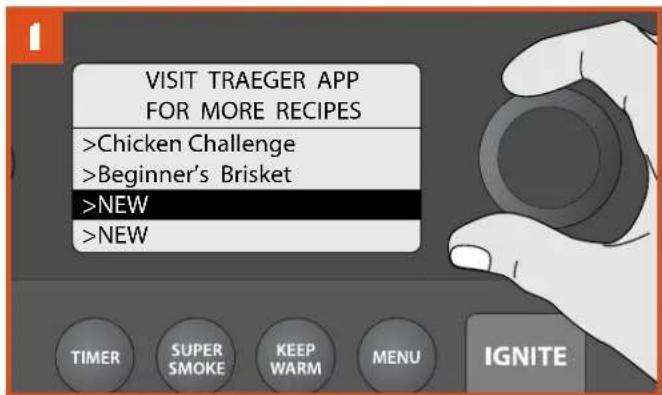
natural_image
Solid orange horizontal bar with no text or symbols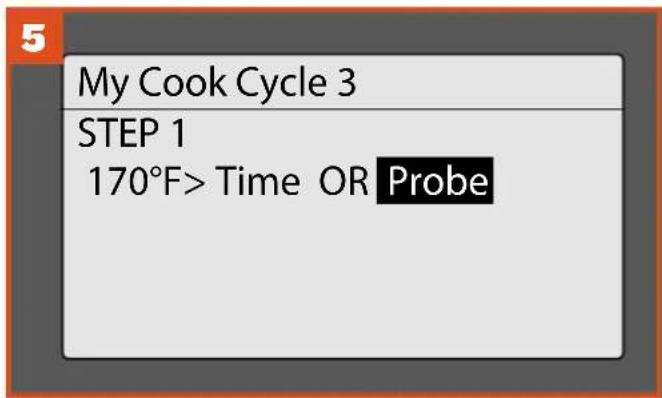
natural_image
Illustration of a switch and plug inserted into two socket outlets (no text or symbols)natural_image
Illustration of a small bucket next to a large industrial machine (no text or symbols visible)natural_image
Illustration showing a hand holding a red arrow next to a container with a pile of small objects, alongside a computer monitor (no text or symbols)natural_image
Close-up of a food dish featuring braised eggplant, tomato sauce, and garnishes on a table (no visible text or symbols)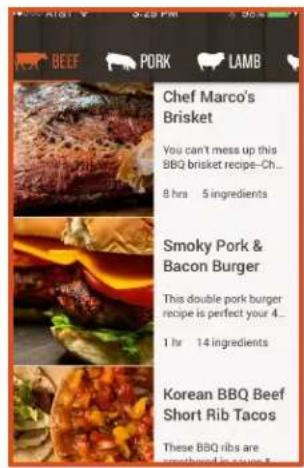
natural_image
Technical illustration of a mechanical assembly with highlighted components and arrows indicating motion (no text or symbols)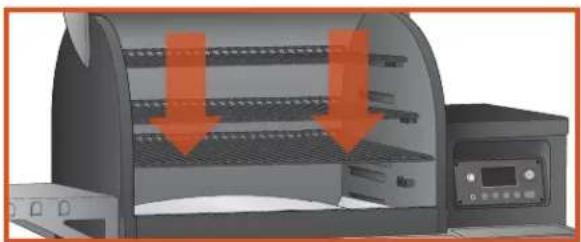
natural_image
3D rendering of a portable scanner with orange arrows indicating compression or cooling process (no text or symbols)SOPORTE DE REJILLA
natural_image
3D architectural rendering of a room interior with furniture and a circular window (no text or symbols)SUPERFICIE DE CORTE
natural_image
Illustration of a printer with a paper airplane being opened, showing blade structure and orange arrow (no text or symbols)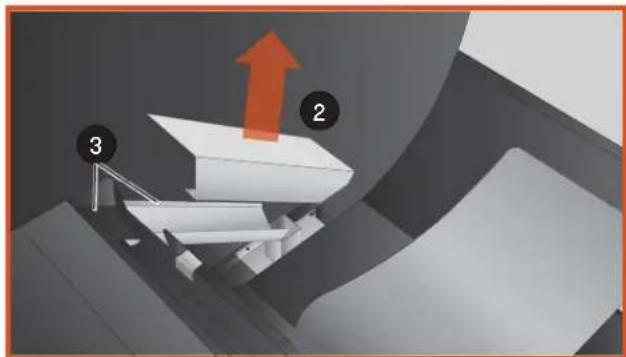
natural_image
3D diagram of a conveyor belt system with labeled components (no text or symbols)6:00 a.m. - 8:00 p.m. MT
Correo electrónico: service@traegergrills.com
TRAEGER PELLET GRILLS LLC
1215 E. Wilmington Ave.
Salt Lake City, UT 84106

Traeger Pellet Grills LLC
1215 E. Wilmington Ave.
Salt Lake City, UT 84106
traegergrills.com


- READ ALL INSTRUCTIONS BEFORE INSTALLING AND USING THE APPLIANCE
- IMPORTANT: READ CAREFULLY AND RETAIN FOR FUTURE REFERENCE.
- DANGER!
- For North American Consumers:
- For Consumers in the European Union:
- WARNING!
- Smoke Hazard
- Burn Hazard
- Fire Hazard
- Air Contaminant Hazard
- CAUTION!
- SAVE THESE INSTRUCTIONS
- LIVE FLAVOR FULL
- TABLE OF CONTENTS
- WHY TRAEGER WOOD PELLETS?
- 100% ALL-NATURAL HARDWOOD
- WOOD-FIRED TASTE & SMOKE SCIENCE
- USA
- TRAEGER-OWNED MILLS & PELLET PRODUCTION PROCESS
- GETTING TO KNOW YOUR GRILL
- GETTING TO KNOW YOUR GRILL (CONTINUED)
- STANDBY BUTTON
- SELECTION DIAL
- STATUS DISPLAY
- MEAT PROBE JACK
- TIMER
- SUPERSMOKE
- KEEP WARM
- MENU
- IGNITE
- CONNECTING YOUR GRILL
- NOTES:
- TIPS:
- SEASONING YOUR GRILL (CONTINUED)
- USING YOUR GRILL
- YOU WILL NEED TO BEGIN WITH THESE STEPS EVERY TIME YOU USE YOUR GRILL.
- CHOOSING A COOK METHOD
- USING A PRESET CUSTOM COOK CYCLE
- USING A PRESET CUSTOM COOK CYCLE (continued)
- CREATING A CUSTOM COOK CYCLE
- COOKING WITH THE PROBE
- If the grill is turned off:
- If the grill is turned on:
- ADDITIONAL CONTROL FUNCTIONS
- TO ACCESS THE SETTINGS MENU:
- SPEAKER
- CONTRAST
- PROBE CALIBRATION
- CLEAR NOTIFICATIONS
- TEMPERATURE UNITS
- CUSTOMER SERVICE
- LEARN MORE
- ABOUT GRILL
- BACK
- HOPPER CLEAN-OUT
- TIMBERLINE FEATURES
- TRAEGER APP
- TIMER
- To set the Timer:
- To cancel the Timer:
- SUPER SMOKE OPTION
- TIMBERLINE FEATURES (CONTINUED)
- KEEP WARM FUNCTION
- TRAEGER PELLET SENSOR
- VERSATILE LOWER GRATE
- RACK STOP
- CUTTING BOARD
- FOR CONSUMERS IN NORTH AMERICA:
- GRILL COVER
- MAINTAINING YOUR GRILL
- CREOSOTE AND GREASE FORMATION AND REMOVAL
- CLEANING GREASE FROM YOUR GRILL:
- To check the grease level:
- To clean the grease management system:
- CLEANING OUTSIDE SURFACES:
- OUTSIDE STORAGE:
- CLEANING THE STAINLESS STEEL GRILL GRATES:
- CLEANING THE ASH FROM INSIDE AND AROUND THE FIREPOT (EVERY 20 HOURS OF USE):
- DISPOSAL OF ASHES:
- CLEANING THE CUTTING BOARD:
- To wash:
- FREQUENTLY ASKED QUESTIONS
- TROUBLESHOOTING
- ERROR MESSAGES
- ERROR CLEARING
- OPERATING TIPS
- CARBON MONOXIDE:
- GREASE MANAGEMENT:
- NOTES
- SERVICE AND WARRANTY
- TRAEGER'S LEGENDARY CUSTOMER SERVICE is the best out there.
- TRAEGER'S CUSTOMER SERVICE
- TRAEGER PELLET GRILLS LLC
- 3-YEAR LIMITED WARRANTY (U.S.A. ONLY)
- TRAEGER®
- MANUEL DE
- L'UTILISATEUR
- CONSIGNES DE SÉCURITÉ
- LISEZ TOUTES LES INSTRUCTIONS AVANT D'ASSEMBLER ET D'UTILISER L'APPAREIL
- MOULINS DE TRAEGER
- ET PROCÉDÉ DE PRODUCTION DES GRANULES
- KEEP WARM (MAINTIEN AU CHAUD)
- TIMER (MINUTERIE)
- OPTION SUPER SMOKE (PLUS DE FUMÉE)
- FONCTION KEEP WARM (MAINTIEN AU CHAUD)
- BUTÉ DE GRILLE
- PLANCHE À DÉCOUPER
- PROBLÈMES/QUESTIONS POUR LE WiFiRE®
- GARANTIE LIMITÉE DE 3 ANS (É.-U. SEULEMENT)
- MANUAL DEL PROPIETARIO
- CÓMO CONECTAR SU PARRILLA
- SOPORTE DE REJILLA
- SUPERFICIE DE CORTE
Brand : TRAEGER
Model : Timberline 1300
Category : Barbecue