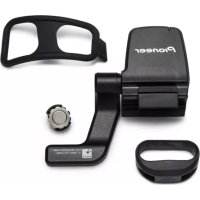
SGYCS500 - Speed and cadence sensor PIONEER - Free user manual and instructions
Find the device manual for free SGYCS500 PIONEER in PDF.


| Product Type | Speed and Cadence Sensor |
| Brand | Pioneer |
| Model | SGY-CS500 |
| Dimensions (main sensor) | Approx. 40 x 30 x 15 mm |
| Weight (main sensor) | Approx. 15 g |
| Power Supply | Lithium button cell CR2032 (3 V) |
| Estimated Battery Life | Approx. 3 years (1 hour per day) |
| Communication | ANT+ wireless (2.4 GHz) |
| Main Functions | Speed measurement (rear wheel) and cadence (crankset) |
| Water Resistance | Up to 6 m (19.7 ft) immersion |
| Operating Temperature | -10 °C to +60 °C |
| Operating Humidity | Less than 85% RH |
| Kit Contents | VC sensor, mounting bracket, cadence magnet, speed magnet (magnet, bracket, plate), mounting strap, fixing bands (×3), manual, warranty |
| Care and Cleaning | Wipe with a dry cloth; do not use detergents, benzene or thinner; do not use high-pressure cleaner |
| Battery Replacement | CR2032, open the cover with a coin, observe polarity (+ side up) |
| Certifications | ANT+ certified; compliant with Industry Canada CNR |
| Compatibility | Pioneer SGX-CA500 cyclometers or other ANT+ compatible devices |
Frequently Asked Questions - SGYCS500 PIONEER
User questions about SGYCS500 PIONEER
0 question about this device. Answer the ones you know or ask your own.
Ask a new question about this device
Download the instructions for your Speed and cadence sensor in PDF format for free! Find your manual SGYCS500 - PIONEER and take your electronic device back in hand. On this page are published all the documents necessary for the use of your device. SGYCS500 by PIONEER.
USER MANUAL SGYCS500 PIONEER
Speed & Cadence Sensor
SGY-CS500
For information on the Heart rate sensor, refer to the User's Manual of the Heart Rate Sensor SGY-HR500.
Part Names and Functions 14
Installation on Your Bike 15
Installing the Cadence Magnet. 15
Installing the Speed & Cadence Sensor 16
Installing the Speed Magnet 17
Fixing the Sensor 19
Installing and Removing the Battery 20
Troubleshooting 22
Specifications 23
Features
Trip Data Acquisition
This device acquires trip data like speed and cadence, and those data are displayed on the cyclocomputer.

This product is ANT+™ certified.
Visit http://www.thisisant.com/directory/ for a list of compatible products and apps.
Important Safety Information
Pioneer Speed & Cadence Sensor is not a medical device.
EN
Important Information About This Device
This device helps provide feedback about cycling. It is intended solely for recreational purposes. THE LIMITED WARRANTY PROVIDED WITH THIS DEVICE CONSTITUTES THE EXCLUSIVE WARRANTY FOR THE PRODUCT AND THE USER'S EXCLUSIVE REMEDIES. TO THE MAXIMUM EXTENT ALLOWED BY APPLICABLE LAW, ALL OTHER WARRANTYES, WHETHER EXPRESS, IMPLIED, OR STATUTORY, INCLUDING WITHOUT LIMITATION ANY WARRANTY OF MERCHANTABILITY OR FITNESS FOR A PARTICULAR PURPOSE, ARE HEREBY DISCLAIMED. IN NO EVENT WILL PIONEER, ITS AFFILIATES, OR THEIR RESPECTIVE EMPLOYEES, DIRECTORS, OR OFFICERS, BE LIABLE FOR ANY INDIRECT, INCIDENTAL, CONSEQUENTIAL, SPECIAL, PUNITIVE OR EXEMPLARY DAMAGES IN CONNECTION WITH THIS DEVICE, REGARDLESS OF THE THEORY OF LIABILITY AND EVEN IF SUCH DAMAGES ARE FORESEEABLE. BECAUSE SOME STATES OR JURISDICTIONS MAY NOT ALLOW LIMITATIONS ON THE DURATION OF IMPLIED WARRANTYES, OR LIMITATIONS ON OR EXCLUSIONS OF CONSEQUENTIAL OR INCIDENTAL DAMAGES, SOME OF THE ABOVE LIMITATIONS MAY NOT APPLY TO A USER DEPENDING ON HER, HIS, OR ITS STATE OF RESIDENCE.

WARNING
BEFORE BEGINNING OR· MODIFYING ANY EXERCISE ACTIVITY, ALWAYS CONSULT YOUR PHYSICIAN FIRST. IF YOU ARE USING A PACEMAKER OR ANY OTHER IMPLANTED DEVICE, CONSULT YOUR PHYSICIAN BEFORE USING A HEART RATE SENSOR.
THIS PRODUCT IS NOT A MEDICAL DEVICE, AND COULD EXPERIENCE INTERFERENCE FROM EXTERNAL ELECTRICAL SOURCES.

WARNING
Follow these guidelines as well to ensure safe Cycling:
Always use your best judgement, and ride in a safe manner. Do not become distracted by this device while riding, and always be fully aware of your surroundings.
Secure your bicycle in a safe place before replacing batteries as the bicycle could fall causing injury.
Upon replacing the battery, install the battery cover securely to ensure water resistance and prevent potential injury if the cover falls off.
Do not leave small parts such as screws or the battery in an area that infants and small children can reach to prevent accidental swallowing. If you think this may have happened, call 911 for a medical emergency.
Before riding, check that the Speed & Cadence sensor does not contact with a crank or spoke.
Before riding, check that the sensor and magnets are installed securely. Also check that the speed detector arm's screw is not loose, there are no cracks in the band, and the band's fixing tape is not coming off. Do not leave this device in places that are exposed to direct sunlight, high temperature, high humidity, or a lot of dust as it may cause the device to malfunction.
Never dismantle, refurbish, or repair this device or any attached parts as it could cause electrical shock or the device to malfunction.
Do not use this device if any unusual conditions exist such as penetration by a foreign object, water submersion, smoke is detected, or an unusual odor is detected. Stop using this device immediately and have it repaired.
Do not subject this device to extreme shock by riding on rough roads. Doing so could damage this device or cause it to malfunction.
This device communicates using ANT+ radio communication. Do not use in areas that forbid the use of electronic devices such as hospitals or airplanes as unintended interference from this device could cause serious accidents.

CAUTION
Do not put this device in water or. . wipe with detergents, chemical duster, or volatile compounds such as benzine or thinner as they may cause the device to malfunction.
Thoroughly remove any excess. bicycle lubricants or cleaners from this device as it could cause damage.
Avoid overly violent impacts on this device as it may cause it to malfunction.
Do not wash this device with a high pressure water sprayer as water may penetrate into this device causing it to malfunction.
Do not touch or deform the battery contacts. This could cause a faulty connection or short circuit.

WARNING
Batteries (batteries installed) must not be exposed to excessive heat such as sunshine, fire or the like.
"Perchlorate Material - special handling may apply.
See
www.dtsc.ca.gov/hazardouswaste/ perchlorate.
(Applicable to California, U.S.A.)

WARNING
STORE SMALL PARTS OUT OF REACH OF CHILDREN AND INFANTS. IF ACCIDENTALLY SWALLOWED, CONTACT A DOCTOR IMMEDIATELY.
Radio wave caution
This unit uses a 2.4 GHz radio wave frequency, which is a band used by other wireless systems (microwave ovens and cordless phones, etc.). In the event noise appears on your television image, there is the possibility this unit (including products supported by this unit) are causing signal interference with the antenna input connector of your television, video, satellite tuner, etc. In this event, increase the distance between the antenna input connector and this unit (including products supported by this unit).
[For American Users]
IMPORTANT NOTICE
KEEP WARRANTY CARD IN A SAFE PLACE FOR FUTURE REFERENCE.
This device must not be co-located or operated in conjunction with any other antenna or transmitter.
This device complies with part 15 of the FCC Rules. Operation is subject to the following two conditions: (1) This Equipment may not cause harmful interference, and (2) this device must accept any interference received, including interference that may cause undesired operation.
FCC Radiation Exposure Statement:
This equipment complies with FCC radiation exposure limits set forth for an uncontrolled environment and meets the FCC radio frequency (RF) Exposure Guidelines in Supplement C to OET65. This equipment has very low levels of RF energy that are deemed to comply without testing of specific absorption ratio (SAR).
Information to User
Alterations or modifications carried out without appropriate authorization may invalidate the user's right to operate the equipment.
WARNING: This product contains chemicals known to the State of California and other governmental entities to cause cancer and birth defects or other reproductive harm.
Wash hands after handling.
NOTE:
This equipment has been tested and found to comply with the limits for a Class B digital device, pursuant to Part 15 of the FCC Rules. These limits are designed to provide reasonable protection against harmful interference in a residential installation. This equipment generates, uses, and can radiate radio frequency energy and, if not installed and used in accordance with the instructions, may cause harmful interference to radio communications. However, there is no guarantee that interference will not occur in a particular installation. If this equipment does cause harmful interference to radio or television reception, which can be determined by turning the equipment off and on, the user is encouraged to try to correct the interference by one or more of the following measures:
Reorient or relocate the receiving antenna. -
Increase the separation between the equipment and receiver.
Connect the equipment into an outlet on a circuit different from that to which the -- receiver is connected.
Consult the dealer or an experienced radio/TV technician for help. -
[For Canadian Users]
This device complies with Industry Canada licence-exempt RSS standard(s). Operation is subject to the following two conditions: (1) this device may not cause interference, and (2) this device must accept any interference, including interference that may cause undesired operation of the device.
This equipment complies with IC radiation exposure limits set forth for an uncontrolled environment and meets RSS-102 of the IC radio frequency (RF) Exposure rules. This equipment has very low levels of RF energy that are deemed to comply without testing of specific absorption ratio (SAR).
The ANT+ antenna cannot be removed (or replaced) by user.
Operating Environment
Operating environment temperature and humidity:
-10°C to +60°C (+14°F to +140°F); less than 85%RH
Do not install this unit in a poorly ventilated area, or in locations exposed to high humidity or direct sunlight (or strong artificial light)
Before Use (Important)
Safety Precautions

DANGER
About this Device
Do not throw this device, strike it with a hammer or other object, or pierce this device in any way.
Do not use or leave this device in places where it will be exposed to extremely high temperatures, such as near a stove or fire.
Always keep this device out of the reach of infants and small children.

WARNING
About this Device
Do not use this device if it emits an unusual odor, heats up, changes color or shape, or if any other abnormalities occur during use.
Do not place this device in a microwave oven or expose it to high pressure, since the device may overheat, rupture, or ignite.
Keep the lithium battery out of the reach of children. Should the battery be swallowed, immediately consult a doctor.

CAUTION
Do not recharge, disassemble, heat or dispose of the battery in fire.
Use a CR2032 (3 V) lithium battery only. Never use other types of batteries with this unit.
Do not handle the battery with metallic tools.
Do not store the battery with metallic materials.
When disposing of used batteries, please comply with governmental regulations or environmental public institutions rules that apply in your country or area.
Always check carefully that you are. loading battery with its (+) and (-) poles facing in the proper directions.

CAUTION
About Water-resistance
Observe the following precautions in regard to this device's water-resistant.
Do not place the unit in water.
Do not expose the unit to a large amount of water.
Do not expose to rain for long periods of time.
Do not pour or place in warm water or water containing soap or detergent.
Do not use at or near the beach.
This could cause rust. If exposed to seawater, thoroughly wipe off the moisture immediately with a dry cloth.
If the rubber packing becomes soiled, wipe it clean with a dry, clean cloth.
- Do not open the battery cover in humid environments in which this device could get exposed to water.
If this device is exposed to a large amount of water or moisture, immediately wipe it down with a dry cloth.
Only open or close the battery cover after having completely wiped off any moisture. Be sure your hands are completely dry and you are in an environment where the unit will not get exposed to moisture again.
Over exposure or submersion in water may require servicing.
This device is water resistant to 6m Malfunctions due to water damage caused by improper use are not covered by the product warranty, even if they occur within the warranty period.
Depending on conditions of use, the water-resistant features are not necessarily guaranteed even during the warranty period.
Product Configuration
This product contains the following parts.
Speed & Cadence sensor (main unit, mounting holder)

Cadence magnet
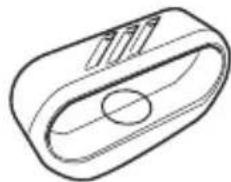
Speed magnet (magnet, holder, sheet)
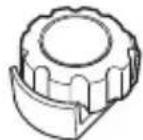
Sensor mounting band
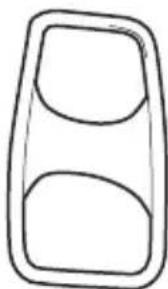
Fixing tape for the sensor - mounting band x 3
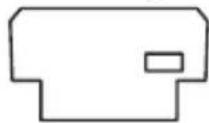
User's Manual (this manual) Warranty Card
Part Names and Functions
EN
Front View
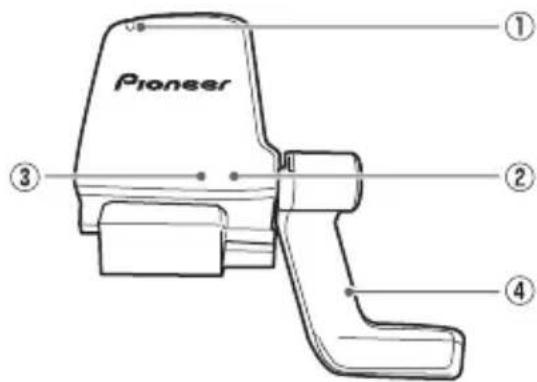
① Cadence sensor
Detects the cadence magnet installed on the crank.
② LED for cadence magnet detection
Blinks green when it detects the magnet just after the sensor is activated.
③ LED for speed magnet detection
Blinks red when it detects the magnet just after the sensor is activated.
Speed detector arm
Adjust the angle by turning the hex screw (2mm) (6).
Back View

⑤ Speed sensor
Detects the speed magnet installed on the spoke.
6 Hex screw for adjusting the angle of the arm
⑦ Battery cover
8 Mounting holder
Installation on Your Bike
Mount the Speed & Cadence sensor, cadence magnet, and speed magnet on your bike.
- Pairing with the cyclocomputer may not be possible due to the influence of the 2.4 GHz frequency band. If pairing fails, try again someplace where there is no interference from microwaves, radio waves, or wireless equipment.
Do not use magnets other than the enclosed ones.
Installing the Cadence Magnet
- Remove the pedal from the crank.
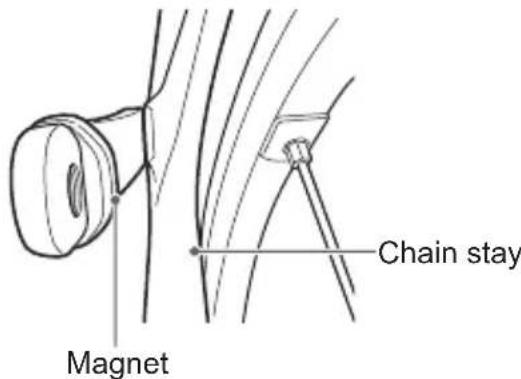
- Install the cadence magnet to the crank.
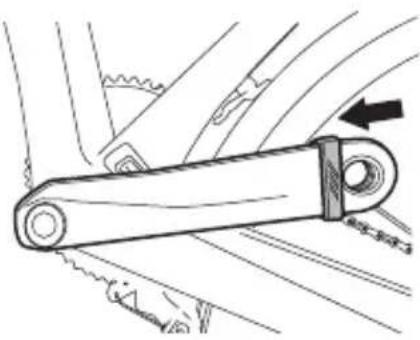
Install it so the magnet part is facing to the chain stay side.
The magnet can be installed to a crank that is from about 85mm up to 100mm in circumference.
Before installing, be sure your crank does not have an irregular shape that would prohibit secure installation.
Be careful not to get injured when installing the cadence magnet.
After installing the cadence magnet, confirm that it is not cracked. If it is cracked, do not use it.
Installing the Speed & Cadence Sensor
If you cannot install the Speed & Cadence sensor with the sensor mounting band, use the cable ties instead.
1. Temporarily mount the Speed & Cadence sensor on the chain stay.
Hook the band on the hook located on the back side of the sensor, and then put the band in the groove on the front side to temporarily mount the sensor on the chain stay.


The sensor can be installed to a chain stay that is from about 100mm up to 120mm in circumference. Before installing, be sure your chain stay does not have an irregular shape that would prohibit secure installation. Do not overly tighten the band as they may break.
2. Adjust the location of the Speed & Cadence sensor.
Adjust the sensor by tilting it so the center of the cadence magnet passes about 3mm from the sensor part (concave part) of the Speed & Cadence sensor when the crank is rotated.
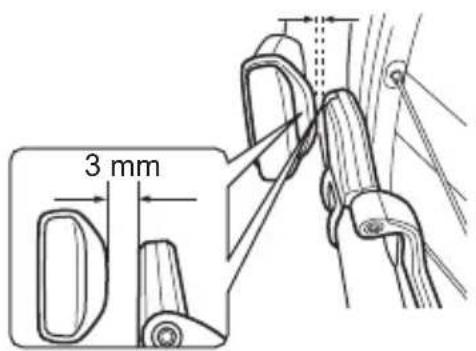
When the sensor detects the cadence magnet as the cranks are rotated, the LED blinks green every time it is detected, up to 10 times.
After blinking 10 times, the LED will not light even though the sensor detects the magnet. The LED starts blinking again if you re-install the sensor's battery or wait at least 20 minutes after the last time the sensor detects the magnet.
Installing the Speed Magnet
EN
- Loosen the screw of the speed magnet and remove the magnet part.
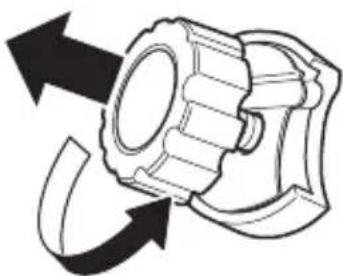
- Install the speed magnet to the spoke of the back wheel.
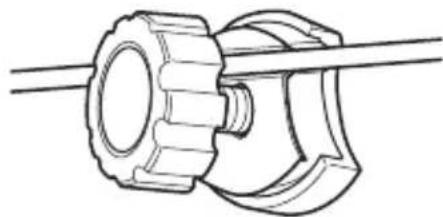
The magnet can be installed on a spoke that is from about 1.5mm up to 2.5mm in diameter.
Before installing, be sure your spoke does not have an irregular shape that would prohibit secure installation.
Installing the magnet may damage the spoke. Protect the spoke if you do not want to damage it.
Be careful not to lose the sheet and so on, when installing the magnet.
After installing the magnet, check that its screw has not been screwed in at an angle.
3. Adjust the angle of the speed detector arm.
Adjust the angle of the arm by turning the hex screw so the center of the speed magnet passes about 3mm from the sensor part (concave part) of the arm when the wheel is rotated.
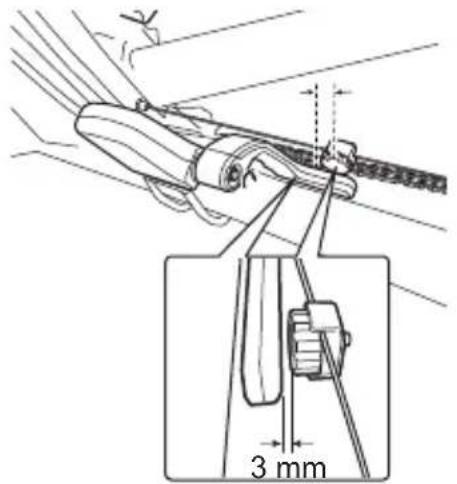
When the sensor detects the speed magnet as the wheel rotates, the LED blinks red up to 10 times each time it is detected.
Install the sensor so the arm does not interfere with the spokes. Do not move the arm beyond its range of motion (60^)

After blinking 10 times, the LED will not light even though the sensor detects the magnet. The LED starts blinking again if you re-install the sensor's battery or wait at least 20 minutes after the last time the sensor detects the magnet.
Speed is not detected until you • tighten the angle adjustment screw of the arm.
Fixing the Sensor
After installing the Speed & Cadence sensor, cadence magnet, and speed magnet, pair the sensor with the Cyclocomputer SGX-CA500 or other cyclocomputer, and confirm that the cadence is displayed with the rotation of the crank, and the speed is displayed with the rotation of the wheel. Refer to the Quick Start Guide of the Cyclocomputer SGX-CA500 or your cyclocomputer's owner manual for sensor pairing.
After confirming that the information from the Speed & Cadence sensor is displayed correctly, fix the band with the fixing tape for the sensor's band.
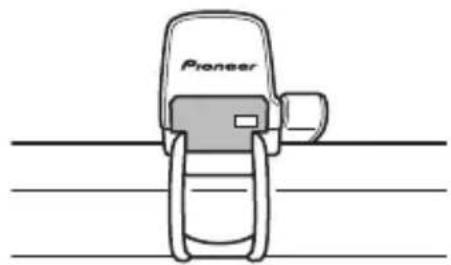
After fixing the Speed & Cadence sensor, install the pedal to the crank.
Be sure to use the fixing tape. If you do not use the fixing tape, the sensor's band may slip off and the sensor may fall off during a ride. Do not re-use the fixing tape. The used fixing tape may come off during a ride because its adhesion has decreased.
Securely fix the Speed & Cadence sensor to the chain stay so it does not fall towards the crank or spokes while riding.
Before riding, check that the sensor and magnets are installed securely. Also check that the speed detector arm's screw is not loose, there are no cracks in the band, and the band's fixing tape is not coming off.
For best results, keep the sensors and magnets free of mud, dust, or debris.
Installing and Removing the Battery
EN
The battery is pre-installed to this product. If the battery is almost empty (see page 22), replace the battery with new one.
1. Remove the battery cover of the Speed & Cadence sensor.
Turn the cover counterclockwise with a tool such as a coin or screwdriver, until it stops turning.

2. Remove the old battery.

3. Install the new battery (CR2032) and close the battery cover.
Insert the battery with its (-) side facing up and wait more than 3 seconds to remove it. Then insert it with its (+) side facing up. Doing this resets the sensor so it operates reliably.
Then turn the battery cover clockwise until it stops and is closed tightly.
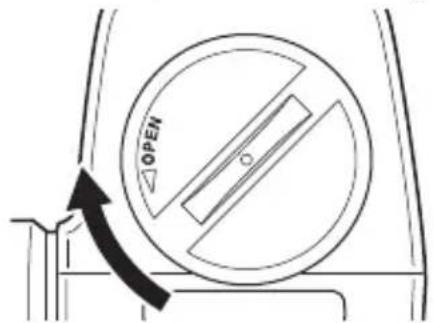
Be careful not to lose the rubber gaskets when removing the battery cover.
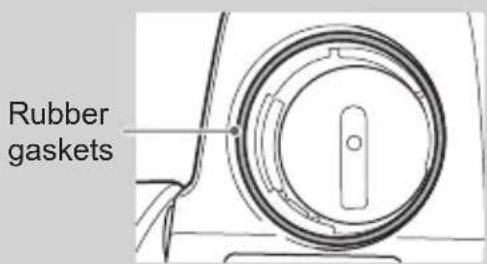
Be careful not to drop or lose the battery when installing it.
Do not use batteries other than CR2032.
Install the cover firmly to ensure water resistant performance.
If a mud or water is on the battery cover, wipe it off with a dry cloth before removing the cover. Do not touch the cover with wet hands.
When disposing of used batteries, please comply with governmental regulations or environmental public institutions rules that apply in your country or area.
Keep coin batteries out of reach of children.
Troubleshooting
EN
If you have problems with your device, check the following items. If a solution to your problem cannot be found here, contact your dealer.
Speed & Cadence sensor information is not displayed on the cyclocomputer. / I cannot pair the sensor with the cyclocomputer.
| Cause Solution | |
| Sensitivity of the sensor has become low due to dirt such as mud on the sensor or magnets. | Wipe off dirt from the sensor or magnets. |
| The battery is almost empty. Replace | the battery with a new one (see page 20). |
| (+) or (-) side of the battery is installed in the opposite side. | Install the battery in the proper side (see page 20). |
| The battery is not installed correctly. | Install the battery again (see page 20). |
| The sensor is not mounted correctly. | Confirm the position of the sensor and magnets, and the distance between them (see page 16, 17). |
| Pairing between the sensor and the cyclocomputer has not been done. | Check if the sensor is paired with the cyclocomputer. If not, pair them. Refer to the Quick Start Guide of the Cyclocomputer SGX-CA500 or your cyclocomputer's owner manual for sensor pairing. |
| Sensor has not been reset. Install the | battery with its (+) side down and wait more than 3 seconds, then remove the battery. The sensor is reset in this way. |
| Connection is not possible due to the influence of the 2.4 GHz frequency band. | Try pairing again someplace where there is no interference from microwaves, Wi-Fi such as a wireless LAN, or other wireless ANT equipment. |
Speed is not displayed.
| Cause Solution | |
| The screw of the speed detector arm is loose. | Tighten the screw of the speed detector arm so it is not loose. Speed is not detected if the screw is loose. |
Specifications
Weight: Speed & Cadence sensor:
About 24 g (0.053 lbs)
Dimensions: Speed & Cadence sensor:
36 mm(W) x 42 mm (H) x 16.5 mm(D)
(1.42 in.(W) x 1.65 in.(H) x 0.65 in.(D))
Water resistant: This device is water resistant to 6 m (19.7 ft).
Communications method (sensors): ANT+ wireless
Battery: CR2032
Operation temperature: -10 to 60^ (14 to 140^ )
Estimated usable period: About 3 years (at one hour per day of use)
ANT+ is a Wireless Personal Network protocol with very low power requirements using 2.4GHz frequency band.
For more information, visit http://www.thisisant.com/ Specifications and design are subject to change without notice.
- Illustrations used in this manual may be different from actual appearance.
Table des matieres
Fonctionnalités 24
This device complies with Industry Canada licence-exempt RSS standard(s). Operation is subject to the following two conditions: (1) this device may not cause interference, and (2) this device must accept any interference, including interference that may cause undesired operation of the device.
This equipment complies with IC radiation exposure limits set forth for an uncontrolled environment and meets RSS-102 of the IC radio frequency (RF) Exposure rules. This equipment has very low levels of RF energy that are deemed to comply without testing of specific absorption ratio (SAR).
The ANT+ antenna cannot be removed (or replaced) by user.
environ 24 g (0,053 lbs)
36 mm (I) × 42 mm (L) × 16,5 mm(P)
(1,42 in.(I) x 1,65 in.(L) x 0,65 in.(P))
http://www.pioneerelectronics.com http://www.pioneerelectronics.ca
PIONEER CORPORATION
1-1, Shin-ogura, Saiwai-ku, Kawasaki-shi, Kanagawa 212-0031, JAPAN
PIONEER ELECTRONICS (USA) INC.
P.O. Box 1540, Long Beach, California, 90801-1540, U.S.A.
TEL: (800) 421-1404
PIONEER ELECTRONICS OF CANADA INC.
340 Ferrier Street, Unit 2, Markham, Ontario, L3R 2Z5, Canada
TEL: 1-877-283-5901
TEL: 905-479-4411
©2014 PIONEER CORPORATION. All rights reserved.
5615N4630006R00
- Speed & Cadence Sensor
- SGY-CS500
- Features
- Trip Data Acquisition
- Important Safety Information
- Important Information About This Device
- WARNING
- CAUTION
- Radio wave caution
- [For American Users]
- IMPORTANT NOTICE
- FCC Radiation Exposure Statement:
- Information to User
- NOTE:
- [For Canadian Users]
- Operating Environment
- Before Use (Important)
- Safety Precautions
- DANGER
- About this Device
- About Water-resistance
- Product Configuration
- Part Names and Functions
- Front View
- Back View
- Installation on Your Bike
- Installing the Cadence Magnet
- Installing the Speed & Cadence Sensor
- Temporarily mount the Speed & Cadence sensor on the chain stay.
- Adjust the location of the Speed & Cadence sensor.
- Installing the Speed Magnet
- Adjust the angle of the speed detector arm.
- Fixing the Sensor
- Installing and Removing the Battery
- EN
- Remove the battery cover of the Speed & Cadence sensor.
- Remove the old battery.
- Install the new battery (CR2032) and close the battery cover.
- Troubleshooting
- Specifications
- Table des matieres
- http://www.pioneerelectronics.com http://www.pioneerelectronics.ca
- PIONEER CORPORATION
- PIONEER ELECTRONICS (USA) INC.
- PIONEER ELECTRONICS OF CANADA INC.
Brand : PIONEER
Model : SGYCS500
Category : Speed and cadence sensor