12.301232-18 - Car radio PIONEER - Free user manual and instructions
Find the device manual for free 12.301232-18 PIONEER in PDF.


Pick your language and provide your email: we'll send you a specifically translated version.
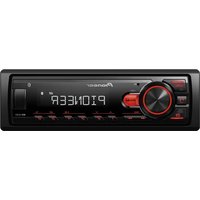
| Product Type | Car Radio |
| Brand | Pioneer |
| Model | 12.301232-18 |
| Mounting Size | 1-DIN (Single DIN) |
| Dimensions (W x H x D) | 178 x 50 x 160 mm |
| Weight | 1.0 kg |
| Power Supply | 12V DC (negative ground) |
| Max Power Output | 4 x 50 Watts |
| RMS Power Output | 4 x 22 Watts |
| Frequency Range (FM) | 87.5 - 108 MHz |
| Frequency Range (AM) | 530 - 1710 kHz |
| Audio Playback | CD, CD-R, CD-RW |
| Connectivity | Aux input (3.5mm), USB port |
| Audio Features | Bass, Treble, Balance, Fader |
| Display | LCD with backlight illumination |
| Tuner Features | RDS, PLL synthesizer |
| Faceplate | Detachable anti-theft face |
| Operating Temperature | -20°C to +60°C |
| Installation | ISO compatible connectors |
| Cleaning | Wipe with a soft dry cloth |
| Spare Parts & Reparability | Available through authorized service centers |
Frequently Asked Questions - 12.301232-18 PIONEER
How do I install this Pioneer car radio in my vehicle?
Connect the ISO connectors to your vehicle's wiring harness. Slide the unit into the 1-DIN mounting sleeve, then secure it by bending the metal tabs. Ensure the faceplate is locked before final placement.
What should I do if the radio does not power on?
Check the fuse and the wiring connections. Verify that the vehicle's ignition is on and the yellow (constant) and red (switched) power leads have proper voltage.
How can I connect my phone to play music?
Use the front AUX input or a USB cable connected to your phone. Select the AUX or USB source on the radio to enjoy audio playback.
How do I set the clock?
Press and hold the SRC button until the hour flashes, then rotate the volume knob to adjust. Press SRC again to set minutes.
What is the detachable face and how do I remove it?
The detachable face is an anti-theft feature. Press the RELEASE button and pull the face away from the chassis. Always carry it with you when leaving the vehicle.
How do I tune radio stations manually?
Press the BAND button to select FM or AM, then rotate the tuning knob or press the seek up/down buttons to find frequencies.
Why does the sound have poor quality?
Ensure speaker wires are properly connected and not shorted. Adjust bass, treble, balance, and fader to improve the audio. Check the antenna connection for radio static.
How do I clean the car radio?
Use a soft dry cloth to wipe the front panel and display. Avoid chemical cleaners and water to prevent damage.
Can I use this radio with steering wheel controls?
It requires an aftermarket steering wheel control adapter. Refer to your vehicle's compatibility and install the adapter between the radio and vehicle harness.
How do I adjust audio settings like bass and treble?
Press the AUDIO button repeatedly to select bass, treble, balance, or fader. Rotate the volume knob to adjust the selected setting.
User questions about 12.301232-18 PIONEER
0 question about this device. Answer the ones you know or ask your own.
Ask a new question about this device
No questions yet. Be the first to ask one.
Download the instructions for your Car radio in PDF format for free! Find your manual 12.301232-18 - PIONEER and take your electronic device back in hand. On this page are published all the documents necessary for the use of your device. 12.301232-18 by PIONEER.
USER MANUAL 12.301232-18 PIONEER
Manual assistant
Powered by Anthropic
Waiting for your message
Product information
Brand : PIONEER
Model : 12.301232-18
Category : Car radio