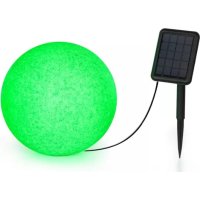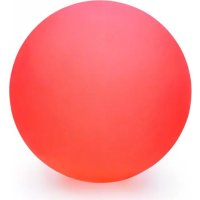
Loomy XL - Lighting Blumfeldt - Free user manual and instructions
Find the device manual for free Loomy XL Blumfeldt in PDF.



User questions about Loomy XL Blumfeldt
0 question about this device. Answer the ones you know or ask your own.
Ask a new question about this device
Download the instructions for your Lighting in PDF format for free! Find your manual Loomy XL - Blumfeldt and take your electronic device back in hand. On this page are published all the documents necessary for the use of your device. Loomy XL by Blumfeldt.
USER MANUAL Loomy XL Blumfeldt
Loomy L/XL & Shinecube
LED Seat Cube and Light Ball
Puff y esfera luminosa LED
natural_image
Abstract green circular logo with three curved segments (no text or symbols)
natural_image
Abstract green leaf-like graphic design on beige background (no text or symbols)
natural_image
Abstract green circular logo with three leaf-like shapes forming a Y-shape (no text or symbols)text_image
QR code image containing encoded data, no visible human-readable textINHALTSVERZEICHNIS
natural_image
Circular mechanical component with mounting holes and a rectangular slot, no text or symbols presentAm Gerät
natural_image
Symbol of a trash bin crossed with a diagonal line, no text or numbers presentCongratulations on purchasing this equipment. Please read this manual carefully and take care of the following hints to avoid damages. Any failure caused by ignoring the items and cautions mentioned in the instruction manual is not covered by our warranty and any liability. Scan the QR code to get access to the latest user manual and other information about the product:
text_image
QR code image containing encoded data, no visible human-readable textCONTENT
Safety Instructions 8
Operation 8
Hints on Disposal 10
TECHNICAL DATA
| Item number 10033731: Blumfeldt Loomy L | 10033730: Blumfeldt Loomy XL10033732: Blumfeldt Shinecube |
| Capacity (Li-Ion battery) 2400 mAh | |
| Remote control range 3 m |
DECLARATION OF CONFORMITY

Producer:
Chal-Tec GmbH, Wallstraße 16, 10179 Berlin, Germany.
This product is conform to the following European Directives:
2014/30/EU (EMC)
2014/35/EU (LVD)
2011/65/EU (RoHS)
SAFETY INSTRUCTIONS
- The remote control is not waterproof. Keep these devices away from water.
- You will increase the life of the battery if you recharge it immediately when it is empty.
- Do not place the unit near or on top of flammable materials.
OPERATION
Before the first operation
Note: Fully charge the batteries before using the unit for the first time.
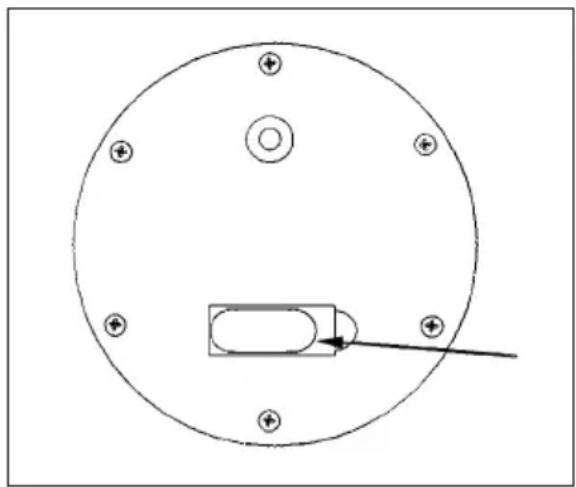
Connect the USB charging cable to the connector on the bottom of the device (see picture). The indicator light will turn red during charging. As soon as the device is fully charged, the control lamp lights up light blue.
natural_image
Simple line drawing of a circular component with six mounting holes and a rectangular slot, no text or symbols present.On the unit
- Turn it on: Briefly press the button on the bottom of the unit to turn on the light.
- Change color: Briefly press the button on the bottom of the unit to change color.
- Turn it off: Press and hold the button on the bottom of the unit for two seconds to turn off the light.
With the remote control
Note: If you are using the remote control for the first time, remove the protective film from the battery.
| IR transmitter | |
| Brightness adjustment | On/Off |
| Colour adjustment | Modes |
| Button Function | |
| ON Turn on the lights. | |
| OFF Switch off the light. | |
| Colour Select the desired colour from 16 colours. | |
| FLASH The light flashes slowly. | |
| STROBE The light flashes quickly. | |
| FADE The light flashes gently. | |
| SMOOTH The colours change smoothly. | |
HINTS ON DISPOSAL
natural_image
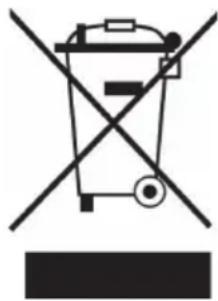
Symbol of a trash bin crossed with a diagonal line, no text or numbers presentAccording to the European waste regulation 2012/19/EU this symbol on the product or on its packaging indicates that this product may not be treated as household waste. Instead it should be taken to the appropriate collection point for the recycling of electrical and electronic equipment. By ensuring this product is disposed of correctly, you will help prevent potential negative consequences for the environment and human health, which could otherwise be caused by inappropriate waste handling of this product. For more detailed information about recycling of this product, please contact your local council or your household waste disposal service.
Your product contains batteries covered by the European Directive. 2006/66/EC, which cannot be dis-posed of with normal household waste. Please check local rules on separate collection of batteries. The correct disposal of batteries helps prevent potentially negative consequences on the environment and human health.
Estimado cliente:
text_image
QR code image containing encoded data, no visible human-readable textÍNDICE
natural_image
Circular mechanical component with mounting holes and a rectangular housing, no text or symbols presentEn el aparato
natural_image
Symbol of a trash bin crossed with a diagonal line, no text or numbers presenttext_image
QR code image containing encoded data, no visible human-readable textSOMMAIRE
DÉCLARATION DE CONFORMITÉ
text_image
CEFabricant :
Chal-Tec GmbH, Wallstraße 16, 10179 Berlin, Allemagne.