USER MANUAL AC185600ENFB ASPES
natural_image
Technical line drawing of a mechanical clamp or bracket assembly with a screwdriver (no text or symbols)
natural_image
Technical line drawing of a mechanical assembly with mounting bracket and rail support (no text or symbols)
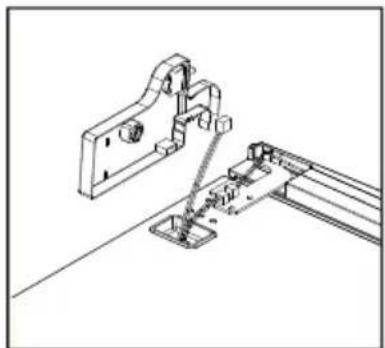
- Desatornille la bisagra superior
natural_image
Technical line drawing of a mechanical assembly with a screwdriver and base mount (no text or symbols)
natural_image
Simple line drawing of a device with a handle and connector, showing an arrow pointing to a small component (no text or symbols)
natural_image
Diagram of a mechanical device with a lever and base, showing a process step (no text or symbols)
natural_image
Technical line drawing of a mechanical bracket or support structure (no text or symbols)
natural_image
Simple line drawing of a metal frame or support structure with no text or symbols
natural_image
Technical line drawing of a screwdriver inserted into a bracket (no text or symbols)
natural_image
Technical line drawing of a mechanical assembly with a bracket and mounting holes (no text or symbols)
natural_image
Technical line drawing of a screwdriver inserted into a bracket (no text or symbols)
natural_image
Technical line drawing of a mechanical clamp or bracket assembly (no text or symbols)
natural_image
Pure mechanical diagram showing two symmetrical components with circular holes and a curved arrow, no text or symbols present.
natural_image
Technical line drawing of a mechanical frame or bracket with mounting feet (no text or symbols)
natural_image
Technical line drawing of a mechanical frame or bracket assembly (no text or symbols)
natural_image
Technical line drawing of a mechanical frame or bracket assembly (no text or symbols)
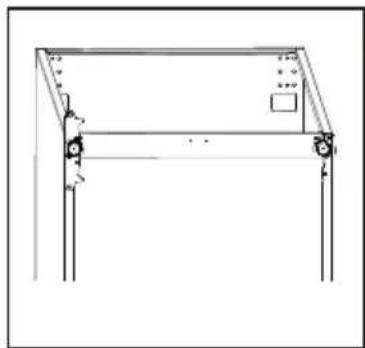
natural_image
Simple line drawing of a rectangular frame with vertical supports and a small square panel on top (no text or symbols)
natural_image
Line drawing of a rectangular electronic device with ports and a small labeled component (no text or symbols)
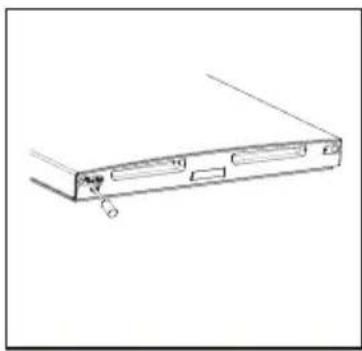
natural_image
Line drawing of a computer drive casing with ports and a clip, no text or symbols present
natural_image
Simple line drawing of a document with arrows indicating rotation or movement (no text or symbols)
natural_image
Technical line drawing of a mechanical clamp or lever assembly (no text or symbols)
natural_image
Technical line drawing of a screwdriver inserted into a bracket with mounting base (no text or symbols)
natural_image
Technical line drawing of a mechanical clamp or bracket assembly (no text or symbols)
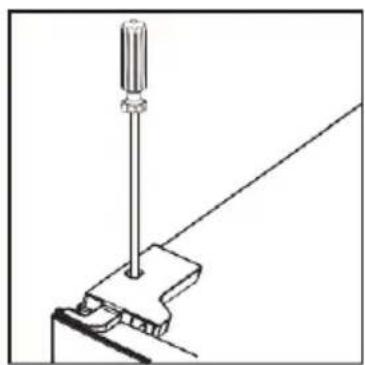
natural_image
Technical line drawing of a screwdriver inserted into a mechanical clamp (no text or symbols)
Panel de control
natural_image
Simple line drawing of a vertical oval shape with surrounding icons (no text or symbols)
Limpieza
Combi Fridge Freezer No-Frost
AC185600ENFB
www.aspes.es
aspes@sareteknika.es; 902 99 69 01 / 944 04 14 08
In the interest of your safety and to ensure the correct use, before installing and first using the appliance, read this user manual carefully, including its hints and warnings. To avoid unnecessary mistakes and accidents, it is important to ensure that all people using the appliance are thoroughly familiar with its operation and safetyfeatures. Save these instructions and make surethat they remain with the appliance if it is moved or so ld, so that everyone ne using it through its life will be properly informed on appliance use and safety.
For the safety of life and property keep the precautions of these user's instructions as the manufacturer is not responsible for damages caused by omission.
Children and vulnerable people safety
- This appliance can be used by children aged from 8 years and above and persons with reduced physical, sensory or mental capabilities or lack of experience and knowledge if they have been given super vision or instruction concerning use of the appliance in a safe way and understand the hazards involved.
- Children aged from 3 to 8 years are allowed to load and unload this appliance.
- Children should be supervised to ensure that they do not play with the appliance.
- Cleaning and user maintenance shall not be made by children unless they are aged from 8 years and above and supervised.
- Keep all packaging well away from children. There is risk of suffocation.

- If you are discarding the appliance pull the plug out of the socket, cut the connection cable (as close to the appliance as you can) and remove the door to prevent playing children to suffer electric shock or to close themselves into it.
- If this appliance featuring magnetic door seals is to replace an older appliance having a spring lock (latch) on the door or lid, be sure to make that spring lack unusable before you discard the old appliance. This will prevent it from becoming a death trap for a child.
General safety
⚠ WARNING! Keep ventilation openings, in the appliance enclosure or in the built-in structure, clear of obstruction.
⚠ WARNING! Do not use mechanical devices or other means to accelerate the defrosting process, other than those recommended by the manufacturer.
⚠ WARNING! Do not damage the refrigerant circuit.
WARNING! Do not use other electrical appliances (such as ice cream makers) inside of refrigerating appliances, unless they are approved for this purpose by the manufacture.
⚠ WARNING! Do not touch the light bulb if it has been on for a long period of time because it could be very hot. 1)
⚠ WARNING! When positioning the appliance, ensure the supply cord is not trapped or damaged.
WARNING! Do not locate multiple portable socket-outlets or portable power suppliers at the rear of the appliance.
- Do not store explosive substances such as aerosol cans with a flammable propellant in this appliance.
- The refrigerant isobutane (R-600a) is contained within the refrigerant circuit of the appliance, a natural gas with a high level of environmental compatibility, which is nevertheless flammable.
- During transportation and installation of the appliance, be certain that none of the components of the refrigerant circuit become damaged.
- avoid open flames and sources of ignition
- thoroughly ventilate the room in which the appliance is situated
- It is dangerous to alter the specifications or modify this product in any way. Any damage to the cord may cause a short circuit, fire and/or electric shock.
- This appliance is intended to be used in household applications.
⚠ WARNING! Any electrical components (plug, power cord, compressor and etc.) must be replaced by a certified service agent or qualified service personnel.
WARNING! The light bulb supplied with this appliance is a “special use lamp bulb” usable only with the appliance supplied. This “special use lamp” is not usable for domestic lighting ^1) .
• Power cord must not be lengthened.
- Make sure that the power plug is not squashed or damaged by the back of the appliance. A squashed or damaged power plug may overheat and cause a fire.
- Make sure that you can come to the mains plug of the appliance.
- Do not pull the mains cable.
- If the power plug socket is loose, do not insert the power plug. There is a risk of electric shock or fire.
- You must not operate the appliance without the lamp.
- This appliance is heavy. Care should be taken when moving it.
- Do not remove nor touch items from the freezer compartment if you hands are damp/wet, as this could cause skin abrasions or frost/freezer burns.
- Avoid prolonged exposure of the appliance to direct sunlight.
Daily use
- Do not put hot on the plastic parts in the appliance.
-
Do not place food products directly against the rear wall.
-
Frozen food must not be re-frozen once it has been thawed out. ^1)
- Store pre-packed frozen food in accordance with the frozen foodmanufacture8s instructions ^1 .
- Appliance's manufactures storage recommendations should be strictly adhered to. Refer to relevant instructions.
- Do not place carbonated of fizzy drinks in the freezer compartment as it creates pressure on the container, which may cause it to explode, resulting in damage to the appliance ^1) .
- Ice lollies can cause frost burns if consumed straight from the appliance. ^1)
• To avoid contamination of food, please respect the following instructions
- Opening the door for long periods can cause a significant increase of the temperature in the compartments of the appliance.
- Clean regularly surfaces that can come in contact with food and accessible drainage systems.
- Clean water tanks if they have not been used for 48h; flush the water system connected to a water supply if water has not been drawn for 5 days.
- Store raw meat and fish in suitable containers in the refrigerator, so that it is not in contact with or drip onto other food.
-
Two-star frozen-food compartments (if they are presented in the appliance) are suitable for storing pre-frozen food, storing or making ice-cream and making ice cubes.
-
One-, two- and three -star compartments (if they are presented in the appliance) are not suitable for the freezing of fresh food.
- If the appliance is left empty for long periods, switch off, defrost, clean, dry and leave the door open to prevent mount developing within the appliance.
Care and cleaning
- Before maintenance, switch off the appliance and disconnect the mains plug from the mains socket.
- Do not clean the appliance with metal objects.
- Do not use sharp objects to remove frost from the appliance. Use a plastic scraper. ^1)
- Regularly examine the drain in the refrigerator for defrosted water. If necessary, clean the drain.
If the drain is blocked, water will collect in to bottom of the appliance. ^2)
Installation
Important! For electrical connection carefully follow the instructions given in specific paragraphs.
- Unpack the appliance and check if there are damages on it. Do not connect the appliance if it is damaged. Report possible damages immediately to the place you bought it. In that case retain packing.

CE
- It is advisable to wait at least four hours before connecting the appliance to allow the oil to flow back in the compressor.
- Adequate air circulation should be around the appliance, lacking this leads to overheating. To achieve sufficient ventilation follow the instructions relevant to installation.
- Wherever possible the spacers of the product should be against a wall to avoid touching or catching warm parts (compressor, con-denser) to prevent possible burn.
- The appliance must not be located close to radiators or cookers.
- Make sure that the mains plug is accessible after the installation of the appliance.
Service
- Any electrical work required to do the servicing of the appliance should be carried out by a qualified electrician or competent person.
- This product must be serviced by an authorized Service Center, and only genuine spare parts must be used.
Energy saving
- Don't put hot food in the appliance;
- Don’t pack food close together as this prevents air circulating;
-
Make sure food don't touch the back of the compartment(s);
-
If electricity goes off, don't open the door(s);
- Don't open the door(s) frequently;
- Don't keep the door(s) open for too long time;
- Don't set the thermostat on exceeding cold temperatures;
- Some accessories, such as drawers, can be removed to get larger storage volume and lower energy consumption.
Environment Protection
This appliance does not contain gasses which could damage the ozone layer, in either its refrigerant circuit or insulation materials. The appliance shall not be discarded together with the urban refuse and rubbish. The insulation foam contains flammable gases: the appliance shall be disposed according to the appliance regulations to obtain from your local authorities. Avoid damaging the cooling unit, especially the heat exchanger.
The materials used on this appliancemarked by the symbol 🌐 a re recyclable.
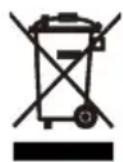
The symbol on the product or on its packaging indicates that this product may not be treated as household waste. Instead it should be taken to the appropriate collection point for the recycling of electrical and electronic equipment. By ensuring this product is disposed of correctly, you will help prevent potential negative consequences for the environment and human health,
which could otherwise be caused by inappropriate waste handling of this product. For more detailed information about recycling of this product, please contact your local council, your household waste disposal service or the shop where you purchased the product.
Packaging materials
The materials with the symbol are recyclable. Dispose the packaging in a suitable collection containers to recycle it.
Disposal of the appliance
- Disconnect the mains plug from the mains socket.
- Cut off the mains cable and discard it.
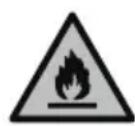
WARNING! During using, service and disposal the appliance, please pay attention to symbol similar as left side, which is located on rear of appliance (rear panel or compressor) and with yellow or orange color.
It's risk of fire warning symbol. There are flammable materials in refrigerant pipes and compressor.
Please be far away fire source during using, service and disposal.
This refrigerating appliance is only intended for domestic use.
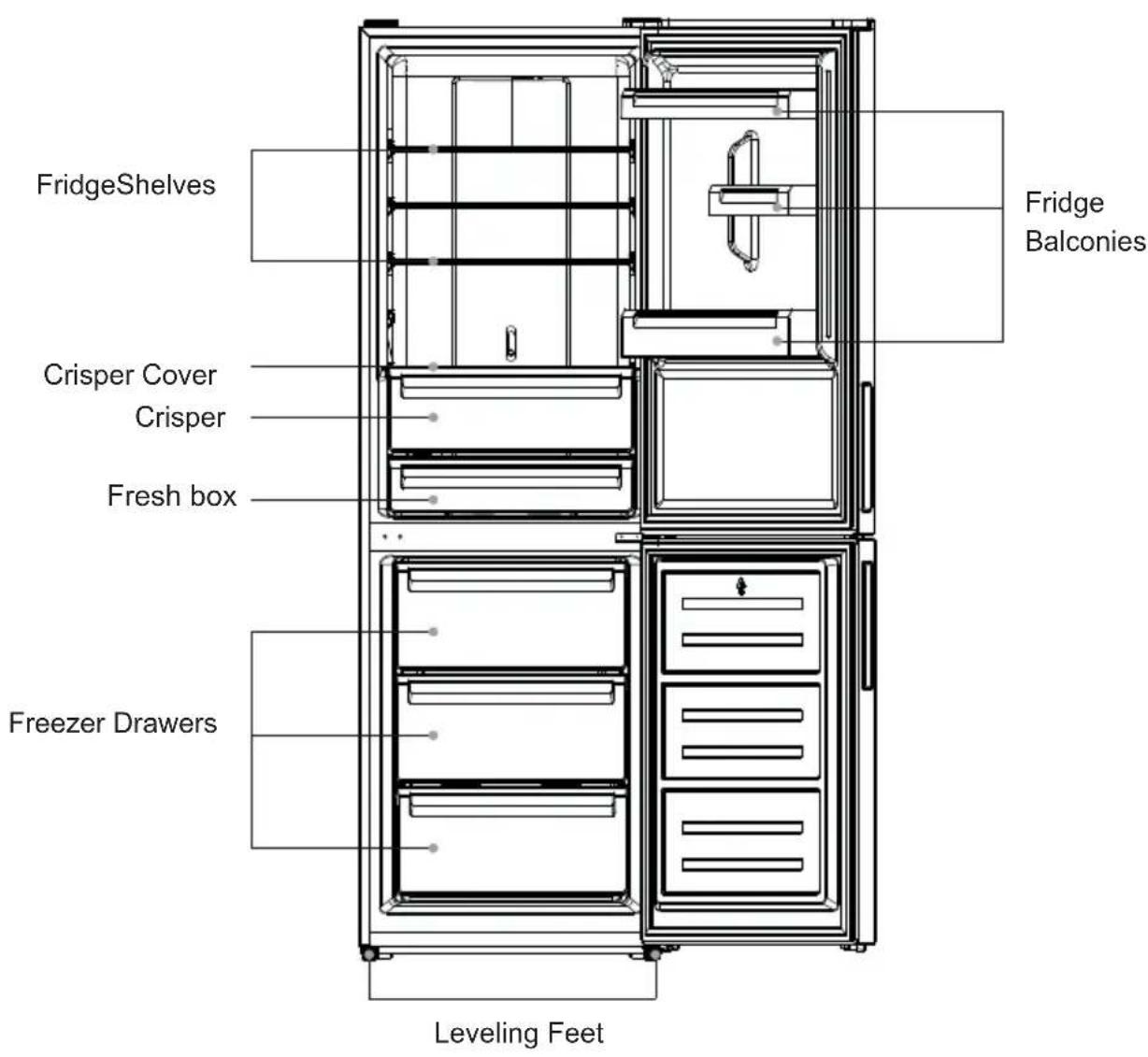
Note: Above picture is for reference only. Real appliance probably is different.
Space Requirement
- Select a location without direct exposure to sunlight;
- Select a location with enough space for the refrigerator doors to open easily;
- Select a location with level (or nearly level) flooring;
- Allow sufficient space to install the refrigerator on a flat surface;
- Allow clearance to the right, left, back and top when installing. This will help reduce power consumption and keep your energy bills lower.
- Keep at lest 50mm gap at two sides and back.
Positioning
Install this appliance at a location where the ambient temperature corresponds to the climate class indicated on the rating plate of the appliance:
| Climate class | Ambient temperature |
| SN | +10°C to +32°C |
| N | +16°C to +32°C |
| ST | +16°C to +38°C |
| T | +16°C to +43°C |
Location
The appliance should be installed well away from sources of heat such as radiators, boilers, direct sunlight etc. Ensure that air can circulate freely around the back of the cabinet. To ensure best performance, if the appliance is positioned below an overhanging wall unit, the minimum distance between the top of the cabinet and the wall unit must be at least 100 mm. Ideally, however, the appliance should not be positioned below overhanging wall units. Accurate leveling is ensured by one or more adjustable feet at the base of the cabinet.
Warning! It must be possible to disconnect the appliance from the mains power supply; the plug must therefore be easily accessible after installation.
Electrical connection
Before plugging in, ensure that the voltage and frequency shown on the rating plate correspond to your domestic power supply. The appliance must be earthed. The power supply cable plug is provided with a contact for this purpose. If the domestic power supply socket is not earthed, connect the appliance to a separate earth in compliance with current regulations, consulting a qualified electrician.
The manufacturer declines all responsibility if the above safety precautions are not observed.
This appliance complies with the E.E.C. Directives.
Door Reversibility
Before reversing the door, please be prepared below tools and material: straight screwdriver, cross screwdriver, spanner and the components included in the poly bag:
Left Door Hinge Cover x 1
Left Aid-Closer on Upper Door x 1
Left Aid-Closer on Lower DooLeft Top Hinge X1
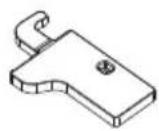
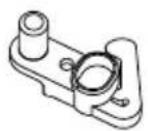
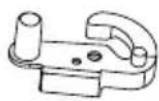
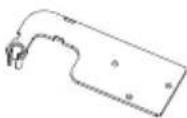
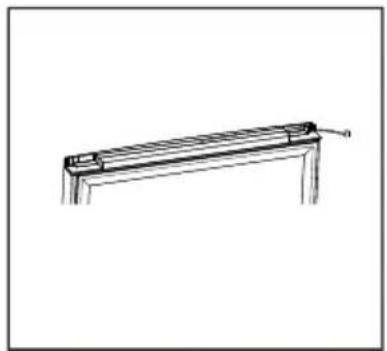
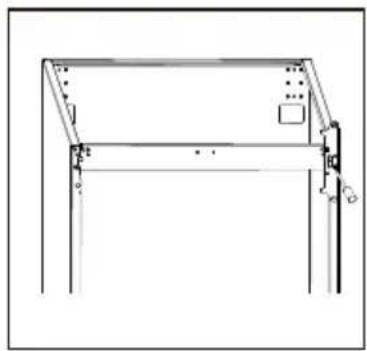
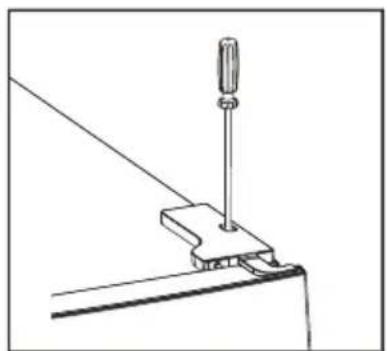
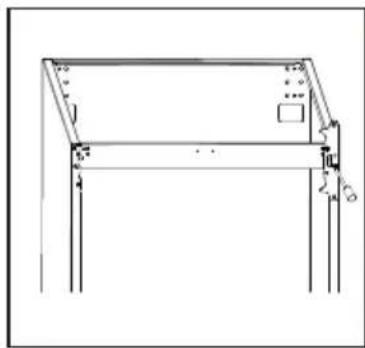
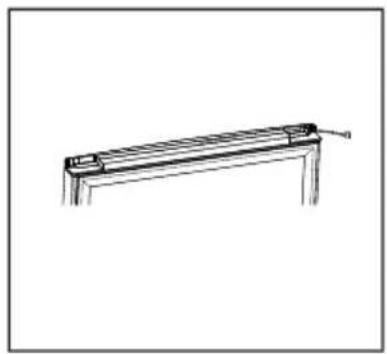
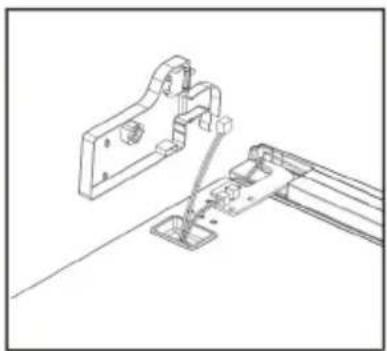
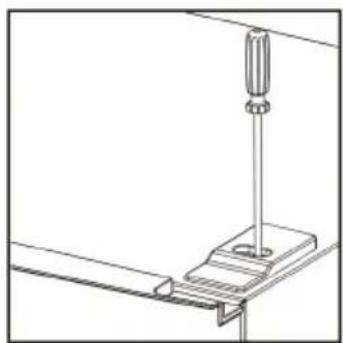
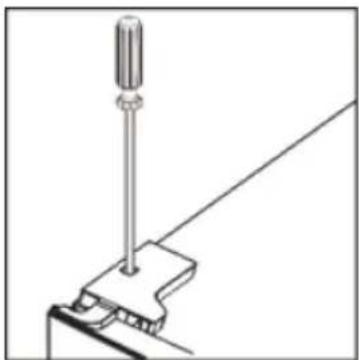
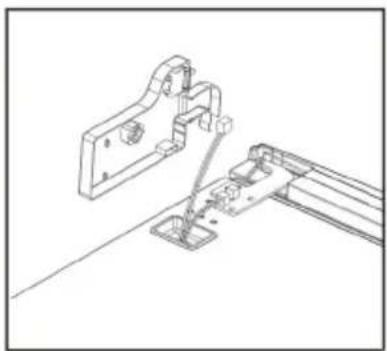
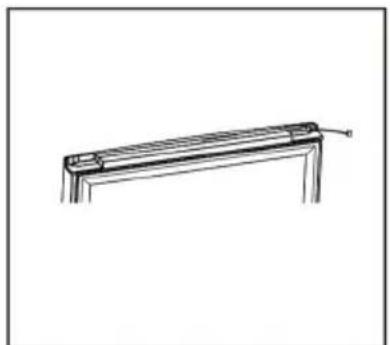
- Unscrew top hinge cover and disconnect connectors of door switch and harness.
natural_image
Simple line drawing of a screwdriver inserted into a clamp on a metal frame (no text or symbols)
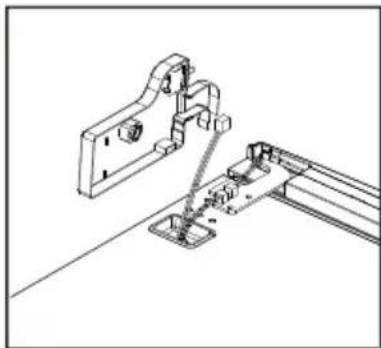
natural_image
Technical line drawing of a mechanical assembly with mounting bracket and railings (no text or symbols)
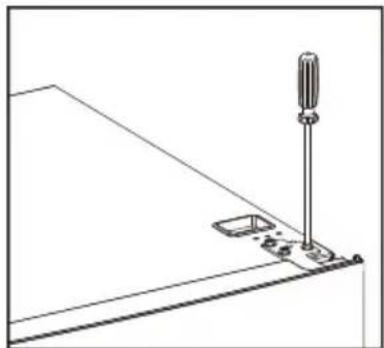
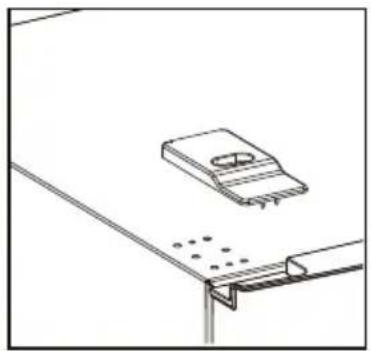
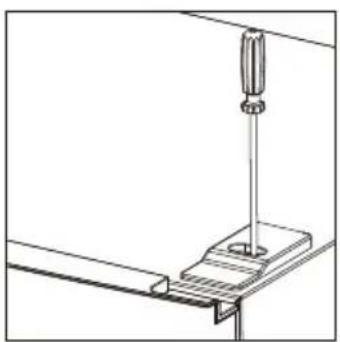
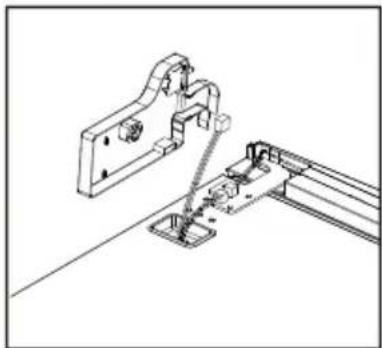
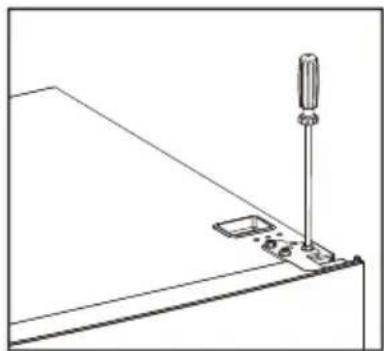
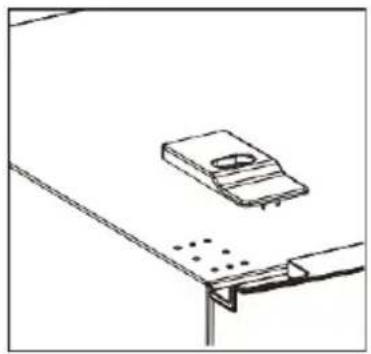
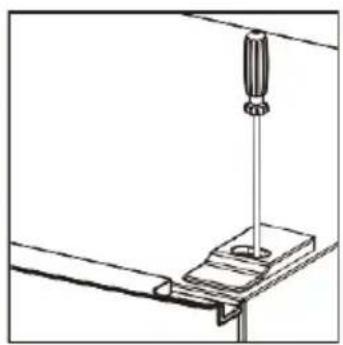
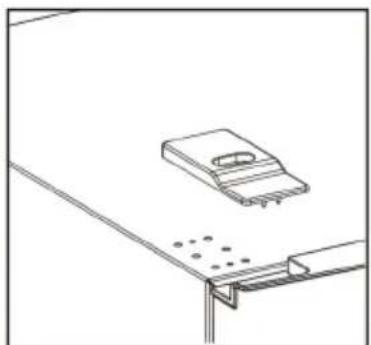
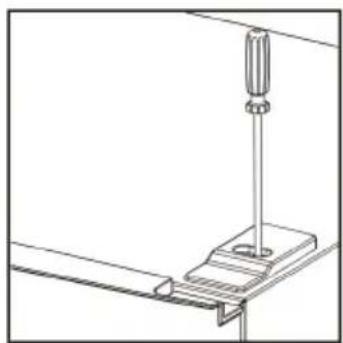
- Unscrew top hinge
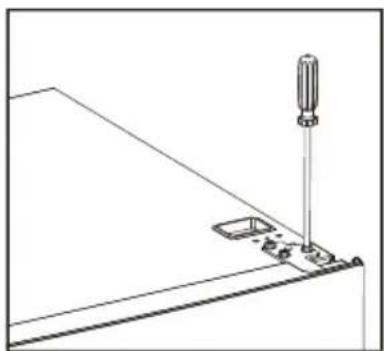
natural_image
Technical line drawing of a mechanical assembly with a screwdriver and base mount (no text or symbols)
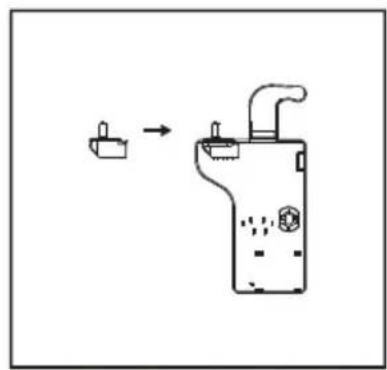
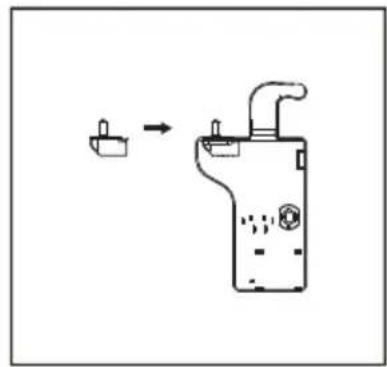
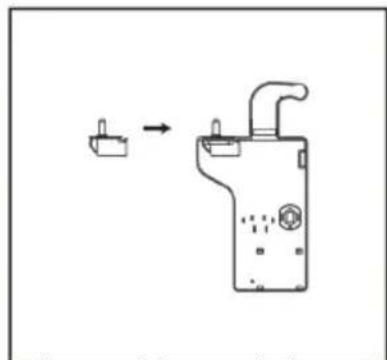
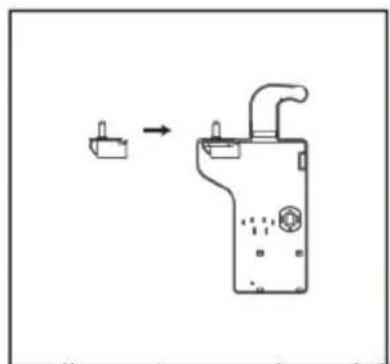
- Move door switch from right hinge cover to left hinge cover in accessory bag.
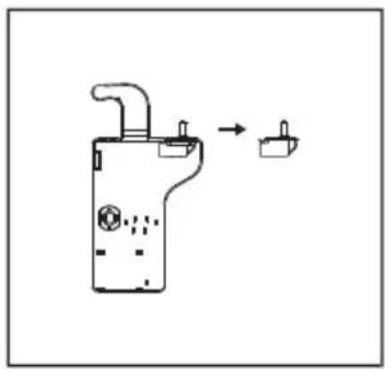
natural_image
Simple line drawing of a mechanical device with a handle and connector, connected to a small component (no text or symbols)
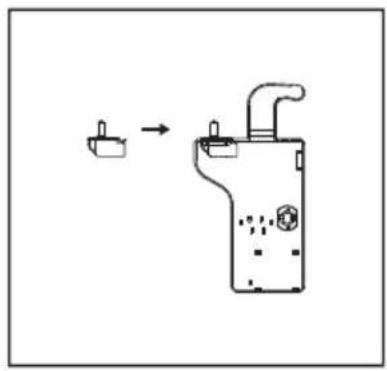
natural_image
Simple line drawing of a device with a handle and internal components, no text or symbols present
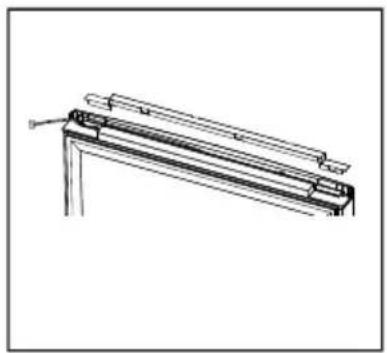
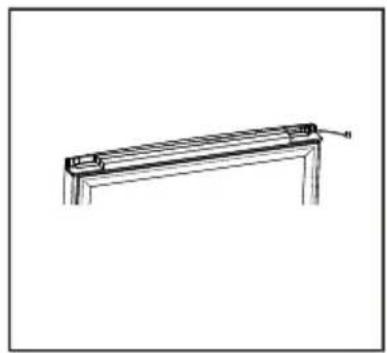
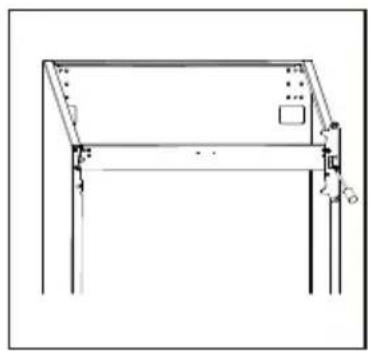
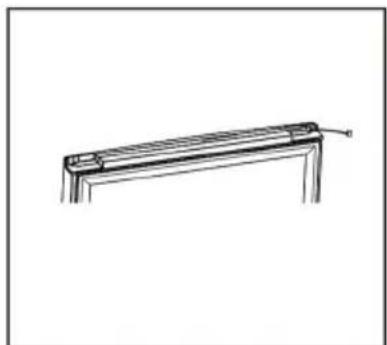
- Detach cover in top of upper door and move harness from right side to left side, then replace the cover.
natural_image
Technical line drawing of a mechanical bracket or frame assembly (no text or symbols)
natural_image
Simple line drawing of a metal frame with a support bracket and a label 'B' pointing to the side (no text or symbols on the frame itself)
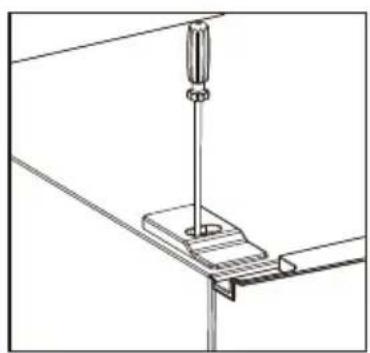
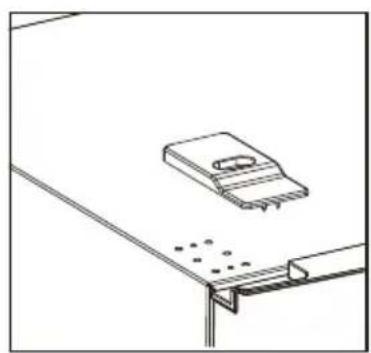
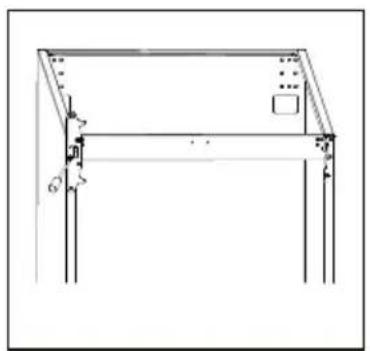
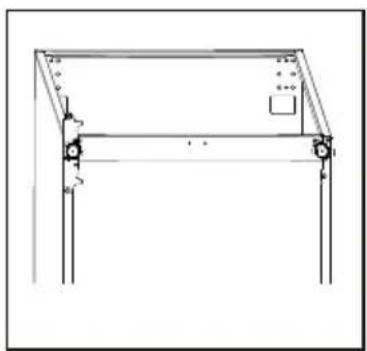
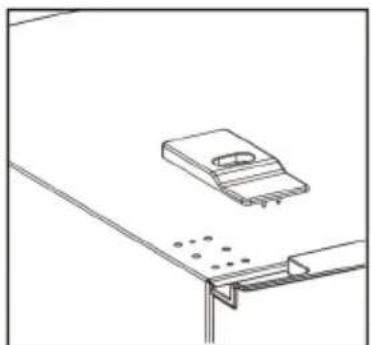
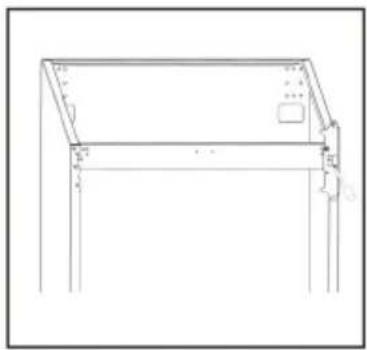
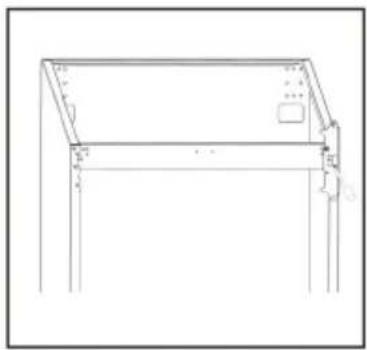
- Move top left cover to right side
natural_image
Technical line drawing of a mechanical assembly with a screwdriver inserted into a bracket (no text or symbols)
natural_image
Simple line drawing of a mechanical component with holes and a base plate (no text or symbols)
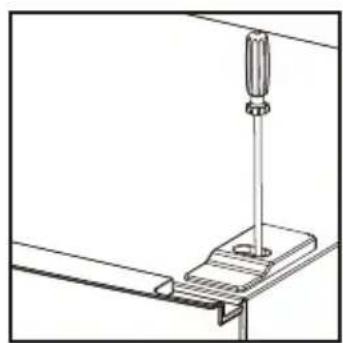
natural_image
Technical line drawing of a mechanical assembly with a screwdriver inserted into a bracket (no text or symbols)
- Take off the upper door, take out the screw from the middle hinge by cross screwdriver, then take off the lower door.
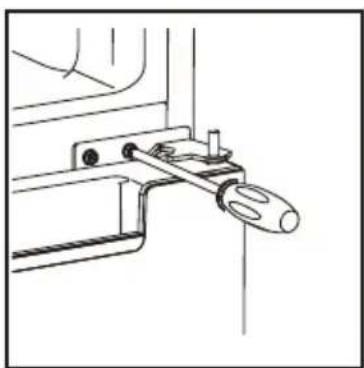
natural_image
Technical line drawing of a mechanical clamp or bracket assembly (no text or symbols)
- Move the hinge hole covers from left side to right side.
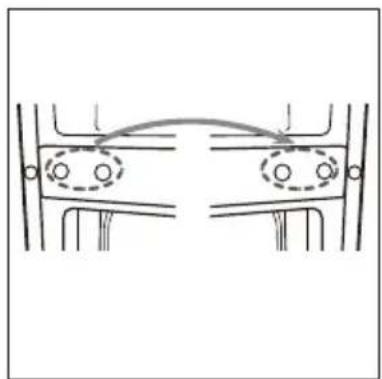
natural_image
Pure mechanical diagram showing two symmetrical components with circular features and directional arrows, no text or symbols present.
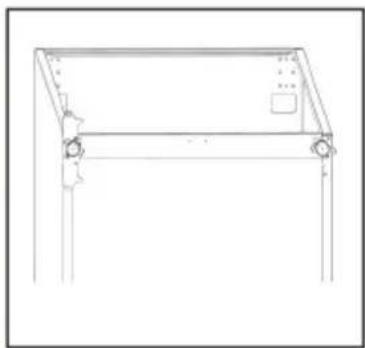
- Unscrew bottom hinge. Then remove the adjustable feet from both side.
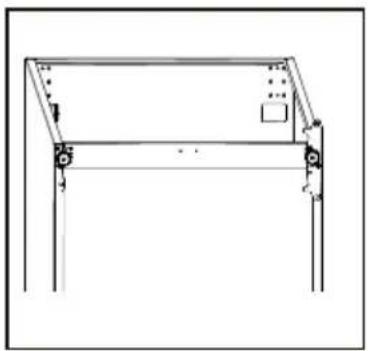
natural_image
Technical line drawing of a mechanical frame or bracket with mounting holes and a small inset panel (no text or symbols)
natural_image
Line drawing of a simple wooden table frame with legs and feet, no text or symbols present
- Unscrew and remove the bottom hinge pin, turn the bracket over and replace it.
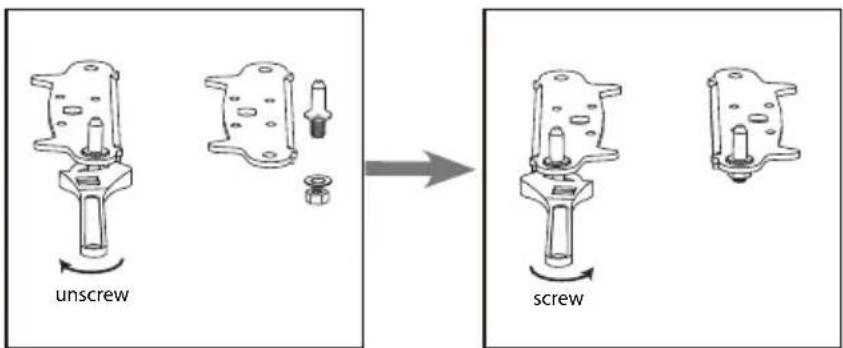
- Refit the bracket fitting the bottom hinge pin. Replace both adjustable feet.
natural_image
Technical line drawing of a structural frame with supports and a small inset panel (no text or symbols)
natural_image
Technical line drawing of a structural frame with mounting feet and support legs (no text or symbols)
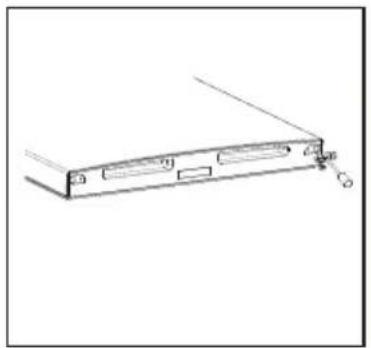
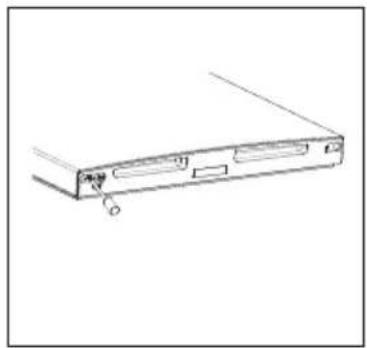
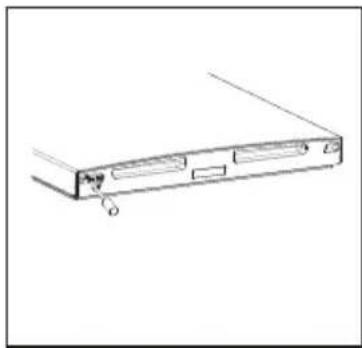
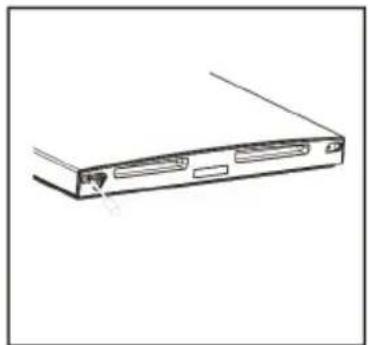
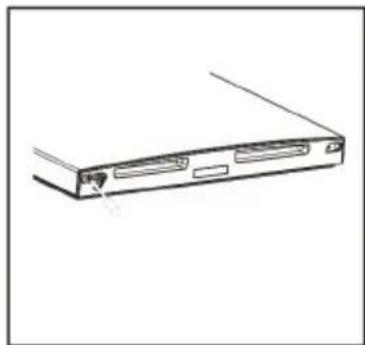
- Remove aid-closers from bottom of upper and lower doors, then take new aid-closers from accessory bag and install them to left side.
natural_image
Line drawing of a rectangular electronic device with ports and connectors (no text or symbols)
natural_image
Line drawing of a computer drive casing with ports and a clip, no text or symbols present
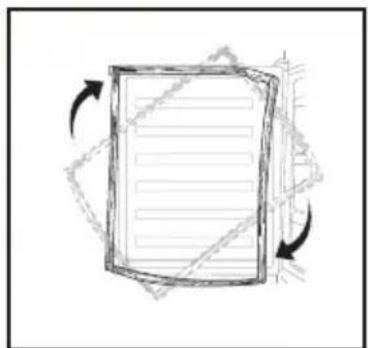
- Detach the Fridge and the Freezer door gaskets and then attach them after rotating.
natural_image
Simple line drawing of a document with arrows indicating rotation or movement (no text or symbols)
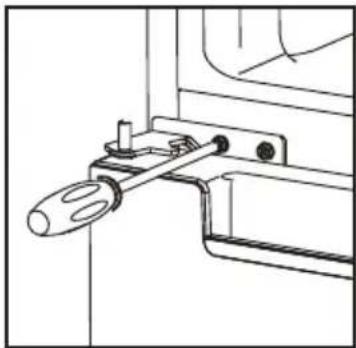
- Install the lower door, adjust and fix the middle hinge onto the cabinet.
natural_image
Technical line drawing of a mechanical clamp or bracket assembly (no text or symbols)
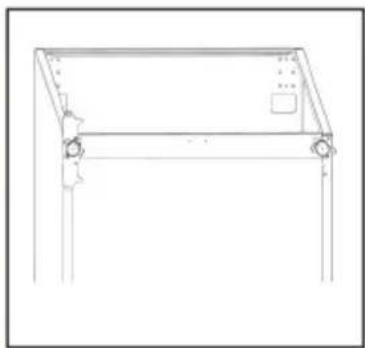
- Replace upper door, please ensure the door align with the cabinet to make sure door gasket seal the cabinet tightly. Then connect door with cabinet by left top hinge.
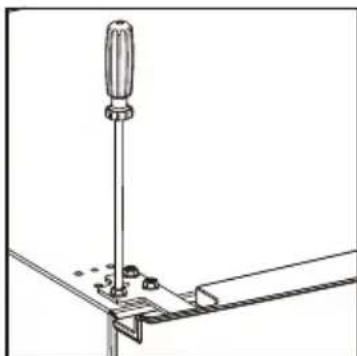
natural_image
Technical line drawing of a screwdriver inserted into a bracket (no text or symbols)
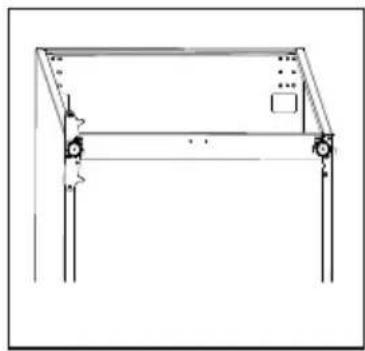
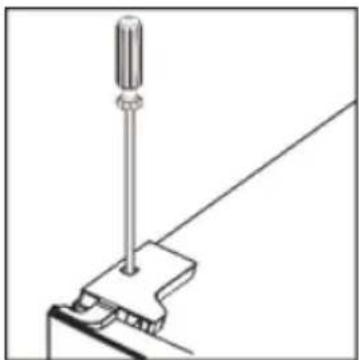
- Connect harnesses from door and cabinet. Then replace top hinge cover. Before screw the cover, connect terminals of door switch.
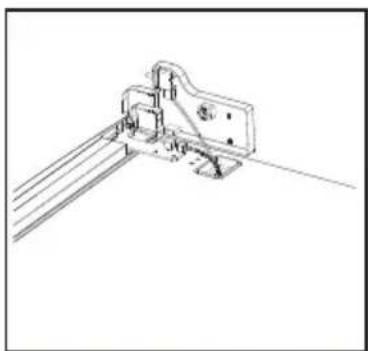
natural_image
Technical line drawing of a mechanical bracket assembly (no text or symbols)
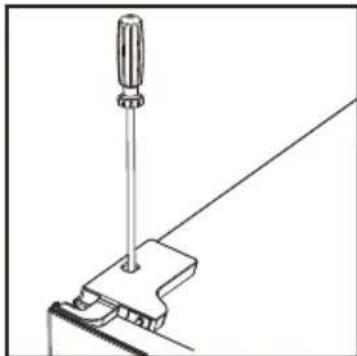
natural_image
Line drawing of a screwdriver holding a tool, with no text or symbols present
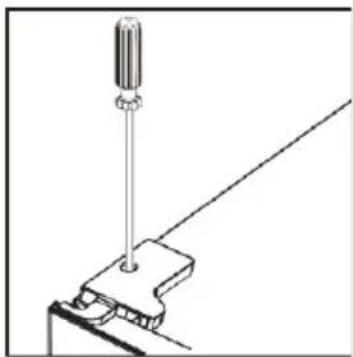
Install door external handle (if external handle is present)
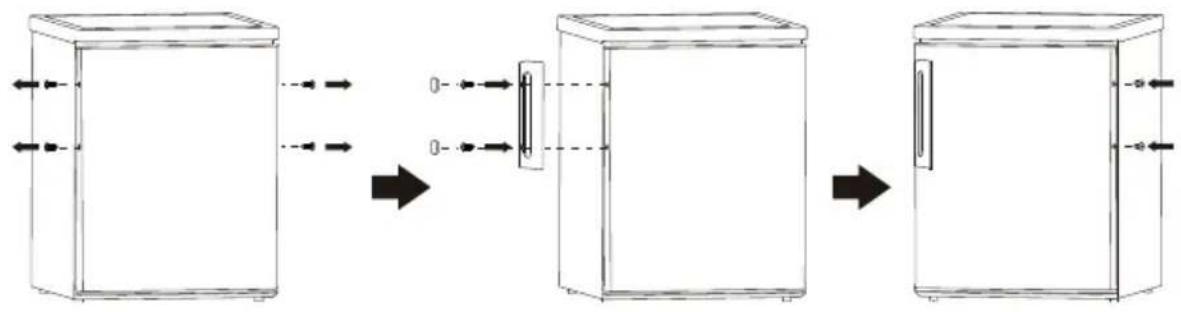
flowchart
graph LR
    A["Left Refrigerator"] --> B["Right Refrigerator"]
    B --> C["Left Dish with Box"]
    style A fill:#f9f,stroke:#333
    style B fill:#ccf,stroke:#333
    style C fill:#cfc,stroke:#333
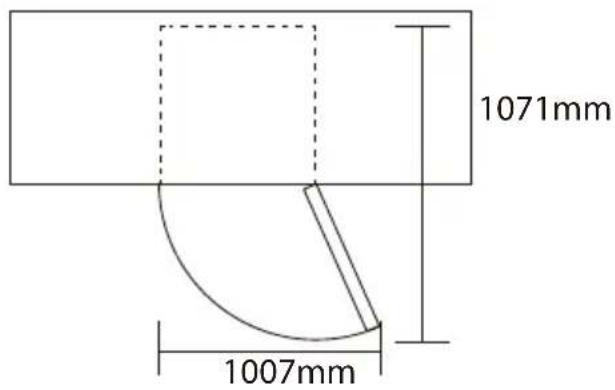
Space Requirement
- Keep enough space of door open.
- Keep at least 50mm gap at two sides.
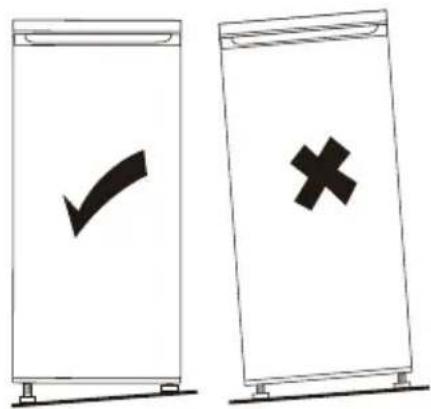
Levelling the unit
To do this adjust the two levelling feet at front of the unit.
If the unit is not level, the doors and magnetic seal alignments will not be covered properly.
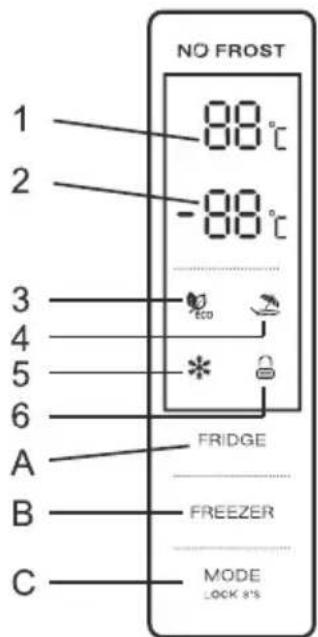
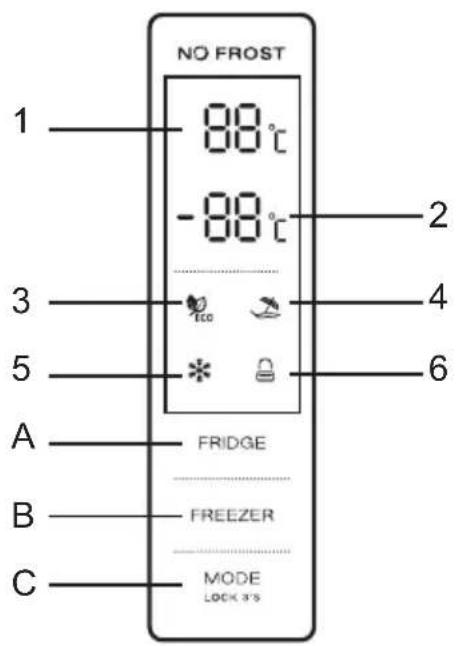
Using the Control Panel
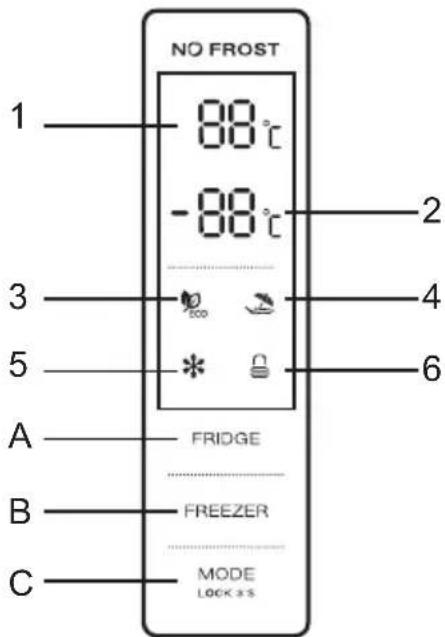
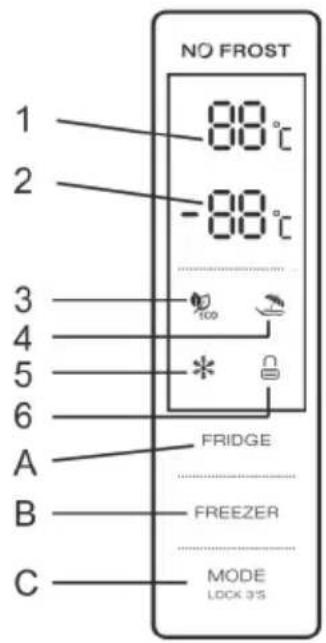
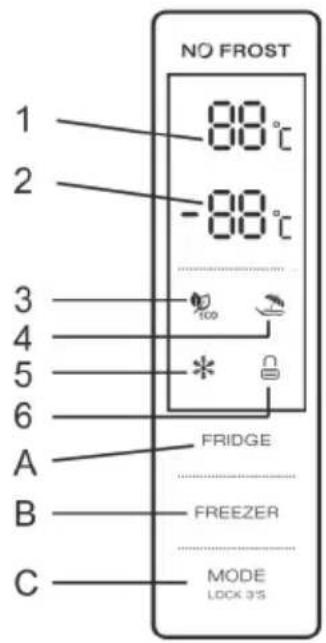
A. Temperature Control of Fridge Compartment
B. Temperature Control of Freezer Compartment
C.Mode/ Locking / Unlocking
1.2 LED DISPLAY
- Temperature of Fridge Comparment
- Temperature of Freezer Comparment
3.ECO Mode
4.Holiday Mode
- Super Mode
- Locking / Unlocking
a. The control panel is 100% lit up for 3 seconds, which operates exactly as per the setting (mode and temperature) before the poweroff. The system will be automatically locked 25 seconds after the last button operation. After locking, the light of the panel would be out 30 seconds after the last button operation.
b. Both preset temperatures of fridge compartment and freezer compartment would be shown on the display.
2.1 DISPLAY
2.1.1 The panel will be lit up for 2 minutes once the door of fridge compartment is opened.
2.1.2 The panel will be lit up by any button operation whereas the light would be out 2 minutes after the last operation.
2.1.3 Display during normal operation
Temperature Display of the Fridge Compartment: Indicating the temperature of the current setting.
Temperature Display of the Freezer Compartment: Indicating the temperature of the current setting.
3.1 Temperature Control of the Fridge Compartment
Temperature Control of the Fridge Compartment:
This button is workable both in User Defined Mode as well as Super Mode. After entering the temperature control of the fridge compartment, this button flashes.
By touching the key consecutively, the temperature would change in a circle of “2°C, 3°C, 4°C, 5°C, 6°C, 7°C, 8°C, after which 5-second flashing means the selection of temperature is settled.
3.2 Temperature Control of the Freezer Compartment
This button is workable both in User Defined Mode as well as Holiday Mode. After entering the temperature control of the freezer compartment, the button flashes.
By touching the button consecutively, the temperature would change in a circle from -14^ to -22^ , after which a 5-second flashing means the selection of temperature is settled.
3.3 Mode
By touching this button consecutively, the operation mode of the refrigerator will change in a circle of "ECO Mode-Holiday Mode-Super Mode-User Defined Mode. A 5-second flashing means the selection of temperature is settled.
Short beep after per press button
All buttons will only valid under unlock mode.
3.5 Lock / Unlock
Press MODE button and hold for 3 seconds to lock other two buttons, then the LOCK icon will be at lock situation after a beep.
To unlock, press MODE button and hold for 3 seconds, then LOCK icon will be at unlock situation after a beep. In unlock situation, all buttons are workable.
If no any operation in 25 seconds, the display will be locked automatically. Keep press "MODE" button to unlock the display.
4.0 ECO mode
Press MODE bottom to choose ECO mode. After 5 seconds of flash, ECO icon will keep bright and ECO mode is confirmed.
In ECO mode, the refrigerator will automatically set temperature of fridge compartment at 5^ C, as temperature of freezer compartment at -18^ C. Except MODE button, other buttons will not response any press.
Press MODE button to exit ECO mode.
4.1 Holiday Mode
Press MODE button to choose Holiday mode. After 5 seconds of flash, Holiday mode icon will keep bright and Holiday mode is confirmed.
In Holiday mode, temperature of fridge will be set at 17^ C. “FRIDGE” button will not response any press.
Press "MODE" button to exit Holiday mode.
4.2 Super mode
Press MODE button to select Super mode. And it will be confirmed after 5 seconds of flash of Super icon.
In Super mode, "FREEZER" button will not response any press.
To exit Super mode,
- Adjust mode by MODE button,
- Or after 50 hours of Super mode, the refrigerator will automatically stop it and enter to previous setting.
Helpful hint:
If you plan to freeze a large number food in one time, please set Super mode 24 hours ahead.
Warning:
In Super mode, the refrigerator will work hard. So the noise of refrigerator will be slightly higher than normal running.
5.0 Door Open Alarm
If fridge (upper) door keeps open for 90 seconds, periodical alarm will be arisen until the door is closed.
First use
Cleaning the interior
Before using the appliance for the first time, wash the interior and all internal accessories with lukewarm water and some neutral soap so as to remove the typical smell of a brand new product, then dry thoroughly.
Important! Do not use detergents or abrasive powders, as these will damage the finish.
Position different food in different compartments according to below table
| Refrigerator compartments | Type of food |
| Door or balconies of fridge compartment | ·Foods with natural preservatives, such as jams,juices, drinks, condiments.·Do not store perishable foods. |
| Crisper drawer (salad drawer) | ·Fruits, herbs and vegetables should be placed separately in the crisper bin.·Do not store bananas, onions, potatoes, garlic inthe refrigerator. |
| Fridge shelf – middle | ·Dairy products, eggs |
| Fridge shelf – top | ·Foods that do not need cooking, such as ready-to-eat foods, deli meats, leftovers. |
| Freezer drawer(s)/shelf | ·Foods for long-term storage.·Bottom drawer/shelf for raw meat, poultry, fish.·Middle drawer/shelf for frozen vegetables, chips.·Top drawer/shelf for ice cream, frozen fruit, frozen baked goods. |
Daily use
Freezing fresh food
- The freezer compartment is suitable for freezing fresh food and storing frozen and deep-frozen food for a long time.
- Place the fresh food to be frozen in the bottom compartment.
- The maximum amount of food that can be frozen in 24 hours is specified on the rating plate.
- The freezing process lasts 24 hours: during this period do not add other food to be frozen.
Storing frozen food
When first starting-up or after a period out of use. Before putting the product in the compartment let the appliance run at least 2 hours on the higher settings.
Important! In the event of accidental defrosting, for example the power has been off for longer than the value shown in the technical characteristics chart under "rising time", the defrosted food must be consumed quickly or cooked immediately and then re-frozen (after cooked).
Thawing
Deep-frozen or frozen food, prior to be used, can be thawed in the freezer compartment or at room temperature, depending on the time available for this operation.
Small pieces may even be cooked still frozen, directly from the freezer. In this case, cooking will take longer.
Helpful hints and tips
Hints for freezing
To help you make the most of the freezing process, here are some important hints:
- the maximum quantity of food which can be frozen in 24 hrs. is shown on the rating plate;
- the freezing process takes 24 hours. No further food to be frozen should be added during this period;
- only freeze top quality, fresh and thoroughly cleaned, foodstuffs;
- prepare food in small portions to enable it to be rapidly and completely frozen and to make it possible subsequently to thaw only the quantity required;
- wrap up the food in aluminium foil or polythene and make sure that the packages are airtight;
- do not allow fresh, unfrozen food to touch food which is already frozen, thus avoiding a rise in temperature of the latter;
- lean foods store better and longer than fatty ones; salt reduces the storage life of food;
- water ices, if consumed immediately after removal from the freezer compartment, can possibly cause the skin to be freeze burnt;
- it is advisable to show the freezing in date on each individual pack to enable you removal from the freezer compartment, can possibly cause the skin to be freeze burnt;
- it is advisable to show the freezing in date on each individual pack to enable you to keep tab of the storage time.
Hints for storage of frozen food
To obtain the best performance from this appliance, you should:
make sure that the commercially frozen foodstuffs were adequately stored by the retailer;
be sure that frozen foodstuffs are transferred from the food store to the freezer in the shortest possible time;
not open the door frequently or leave it open longer than absolutely necessary.
Once defrosted, food deteriorates rapidly and cannot be refrozen.
Do not exceed the storage period indicated by the food manufacture.
Hints for fresh food refrigeration
To obtain the best performance:
- Do not store warm food or evaporating liquids in the refrigerator
- Do cover or wrap the food, particularly if it has a strong flavour
Hints for refrigeration
Useful hints:
• Make (all types): wrap in polythene bags and place on the glass shelves above the vegetable drawer.
- For safety, store in this way only one or two days at the most.
- Cooked foods, cold dishes, etc....: these should be covered and may be placed on any shelf.
- Fruit and vegetables: these should be thoroughly cleaned and placed in the special drawer(s) provided.
- butter and cheese: these should be placed in special airtight containers or wrapped in aluminum foil or polythene bags to exclude as much air as possible.
- Milk bottle: these should have a cap and should be stored in the balconies on the door.
- Bananas, potatoes, onions and garlic, if not packed, must not be kept in the fridge.
Fresh Zone Temperature Control
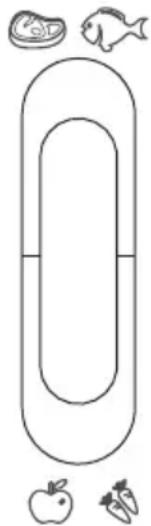
• Temperature of the fresh can be adjusted according to the type of storage food.
- Push the knob upward from the bottom, temperature in the fresh zone will be gradually decreased.
- When the knob is placed at the "CRISPER" position, the fresh zone can be functioned as a crisper zone and maintain the appropriate temperature and humidity for fruits and vegetable.
- When the knob is placed at the "FRESH" position, it is suitable for short-term storage of fish or other fresh food. The food will keep fresh but not frozen which makes it the best choice for storing fresh food.
- Tips: When you choose "FRESH" function, it is recommended to set the refrigerator temperature below 4^ and preserved lead-time no more than 3 days, in order to keep the best freshness.
FRESH
CONVERTER
natural_image
Simple line drawing of a vertical oval shape with surrounding icons: fish, plate, apple, and carrot (no text or symbols)
Cleaning
For hygienic reasons the appliance interior, including interior accessories, should be cleaned regularly.

Caution! The appliance may not be connected to the mains during cleaning. Danger of electrical shock! Before cleaning switch the appliance off and remove the plug from the mains, or switch off or turn out the circuit breaker or fuse. Never clean the appliance with a steam cleaner. Moisture could accumulate in electrical components, danger of electrical shock! Hot vapors can lead to the damage of plastic parts. The appliance must be dry before it is placed back into service.
Important! Ethereal oils and organic solvents can attack plastic parts, e.g. lemon juice or the juice form orange peel, butyric acid, cleanser that contain acetic acid.
- Do not allow such substances to come into contact the appliance parts.
- Do not use any abrasive cleaners
- Remove the food from the freezer. Store them in a cool place, well covered.
- Switch the appliance off and remove the plug from the mains, or switch off or turn out the circuit breaker of fuse.
- Clean the appliance and the interior accessories with a cloth and lukewarm water. After cleaning wipe with fresh water and rub dry.
•After everything is dry place appliance back into service.
Replace the lamp
The internal light is a LED type. To replace the lamp, please contact qualified technician.
Troubleshooting

Caution! Before troubleshooting, disconnect the power supply. Only a qualified electrician of competent person must do the troubleshooting that is not in this manual.
Important! There are some sounds during normal use (compressor, refrigerant circulation).
| Problem | Possible cause | Solution |
| Appliance dose not work | Mains plug is not plugged in or is loose | Insert mains plug. |
| Fuse has blown or is defective | Check fuse, replace if necessary. |
| Socket is defective | Mains malfunctions are to be corrected by an electrician. |
| Appliance freezes or cools too much | Temperature is set too cold or the appliance runs at Super modes. | Turn the temperature regulator to a warmer setting temporarily. |
| The food is not frozen enough. | Temperature is not properly adjusted. | Please look in the initial Temperature Setting section. |
| Door was open for an extended period. | Open the door only as long as necessary. |
| A large quantity of warm food was placed in the appliance within the last 24 hours. | Turn the temperature regulation to a colder setting temporarily. |
| The appliance is near a heat source. | Please look in the installation location section. |
| Heavy build up of frost on the door seal. | Door seal is not air tight. | Carefully warm the leaking sections of the door seal with a hair dryer (on a cool setting). At the same time shape the warmed door seal by hand such that it sits correctly. |
| Unusual noises | Appliance is not level. | Re-adjust the feet. |
| The appliance is touching the wall or other objects. | Move the appliance slightly. |
| A component, e.g. a pipe, on the rear of the appliance is touching another part of the appliance or the wall. | If necessary, carefully bend the component out of the way. |
| Side panel is hot | Condenser is inside the panel. | It's normal. |
If the malfunction shows again, contact the Service Center.
These data are necessary to help you quickly and correctly. Write the necessary data here, refer to the rating plate.
Manual Leaflet
This list provides all Eco-design requirements (following the (EU)2019/2019 Eco-design and (EU)2019/2016 Energy labelling), if the requirement is applicable to your product.
The refrigerating appliance is not intended to be used as a built-in appliance, unless specifically shown as such into its instruction manual.
The drawers, baskets and shelves should be kept in their current position unless otherwise specified in this document.
Doors and lids of the refrigeration appliance should be removed before disposal in the landfill, to avoid children or animals getting trapped inside.
Recommended setting:
Refrigerator compartment: +4°C
Freezer compartment: -18°C
FAST FREEZE
The use of this function is recommended when placing a very high quantity of food to be frozen in the freezer compartment. 24 hours before freezing fresh food, press the Fast Freeze button to activate the Fast Freeze function. When activated, the Fast Freeze indicator turns on. After 24 hours place the food to be frozen in the freezing zone of freezer compartment. The function is automatically disabled after 72 hours or
be used without the freezer drawers.
The quantity of fresh food that can be frozen in a specific time period is indicated on the rating plate. Load limits are determined by baskets, flaps, drawers, shelves etc. Make sure that these components can still close easily after loading.
To avoid food waste, please refer to the recommended setting and storage times found in the user manual.
The model information can be retrieved using the QR-Code reported in the energy label.
The label also includes the model identifier that can be used to consult the portal of the registry at
https://eprel.ec.europa.eu
This product contains a light source of energy efficiency class G (if present).
DISPOSAL OF PACKAGING AND PRODUCT.
Dispose of packaging in an environmentally-friendly manner. This appliance is labelled in accordance with European Directive 2012/19/EU concerning used electrical and electronic appliances (waste electrical and electronic equipment - WEEE). The guideline determines the frame work for the return and recycling of used appliances as applicable throughout to the EU.
PACKAGE INFORMATION: Packaging materials of the product are manufactured from recyclable materials in accordance with our National Environment Regulations. Do not dispose of the packaging materials together with the domestic or other wastes. Take them to the packaging material collection points designated by the local authorities.
. aspes
MANUAL DE INSTRUÇÕES
FRIGORÍFICO
AC185600ENFB
www.aspes.es
aspes@sareteknika.es; 902 99 69 01 / 944 04 14 08
natural_image
Technical line drawing of a screwdriver inserted into a bracket (no text or symbols)
natural_image
Technical line drawing of a mechanical assembly with mounting bracket and rail connection (no text or symbols)
- Desaparafuse a dobradiça superior
natural_image
Technical line drawing of a mechanical assembly with a screwdriver and base mount (no text or symbols)
natural_image
Simple line drawing of a device with a handle and two small components, no text or symbols present.
natural_image
Diagram of a device with a switch and internal components, showing an arrow indicating direction (no text or symbols present)
natural_image
Technical line drawing of a mechanical component or bracket (no text or symbols)
natural_image
Simple line drawing of a metal frame with a handle and base (no text or symbols)
natural_image
Technical line drawing of a mechanical clamp or bracket assembly (no text or symbols)
natural_image
Simple line drawing of a mechanical assembly with a bracket and pin (no text or symbols)
natural_image
Technical line drawing of a screwdriver inserted into a bracket (no text or symbols)
natural_image
Pure mechanical assembly diagram without any text, numbers, or symbols
natural_image
Pure mechanical diagram showing two symmetrical components with circular features and an arrow indicating direction (no text or symbols)
natural_image
Technical line drawing of a structural frame with mounting feet and supports (no text or symbols)
natural_image
Line drawing of a mechanical frame or enclosure with vertical supports and mounting holes (no text or symbols)
natural_image
Pure technical line drawing of a rectangular frame with supports and mounting holes (no text or symbols)
natural_image
Simple line drawing of a rectangular frame with vertical supports and mounting holes (no text or symbols)
natural_image
Line drawing of a computer monitor with an attached cable, showing no text or symbols
natural_image
Line drawing of a computer drive casing with ports and a label 'P' (no text or symbols on the diagram itself)
natural_image
Simple line drawing of a document with arrows indicating rotation around it (no text or symbols)
natural_image
Technical line drawing of a mechanical clamp or bracket assembly (no text or symbols)
natural_image
Technical line drawing of a screwdriver inserted into a bracket with a tool (no text or symbols)
natural_image
Technical line drawing of a mechanical bracket or clamp assembly (no text or symbols)
natural_image
Technical line drawing of a screwdriver inserted into a mechanical clamp (no text or symbols)
Painel de controlo
natural_image
Simple line drawing of a vertically oriented oval shape with icons for food, fish, apple, and carrot (no text or symbols)
Limpeza
natural_image
Simple line drawing of a trash bin with no text or symbols
natural_image
Technical line drawing of a mechanical clamp or bracket assembly with a screwdriver inserted (no text or symbols)
natural_image
Technical line drawing of a mechanical assembly with mounting bracket and rail support (no text or symbols)
natural_image
Technical line drawing of a mechanical assembly with a screwdriver and base mount (no text or symbols)
Installation
natural_image
Simple line drawing of a mechanical device with a handle and connector, connected to a small component (no text or symbols)
natural_image
Diagram of a device with a switch and internal components, showing an arrow indicating transformation (no text or symbols present)
natural_image
Technical line drawing of a mechanical component with no visible text or symbols
natural_image
Simple line drawing of a mechanical bracket or support structure (no text or symbols)
natural_image
Line drawing of a mechanical clamp or bracket assembly with a screwdriver inserted (no text or symbols)
natural_image
Technical line drawing of a mechanical bracket with mounting holes and a component (no text or symbols)
natural_image
Technical line drawing of a mechanical assembly with a screwdriver inserted into a bracket (no text or symbols)
natural_image
Technical line drawing of a mechanical clamp or bracket assembly (no text or symbols)
natural_image
Pure mechanical diagram showing two symmetrical components with dashed circular features, no text or symbols present
natural_image
Technical line drawing of a mechanical frame or bracket with mounting holes and a small inset detail (no text or symbols)
natural_image
Pure technical line drawing of a mechanical frame or bracket (no text or symbols)
natural_image
Simple line drawing of a rectangular frame with vertical supports and a small square cutout on the side (no text or symbols)
natural_image
Line drawing of a rectangular frame with mounting feet and a small square cutout on top (no text or symbols)
natural_image
Line drawing of a computer drive chassis (no text or symbols)
natural_image
Line drawing of a rectangular electronic device with slots and connectors (no text or symbols)
natural_image
Simple line drawing of a document with arrows indicating rotation around it (no text or symbols)
natural_image
Technical line drawing of a mechanical clamp or bracket assembly (no text or symbols)
natural_image
Technical line drawing of a screwdriver inserted into a bracket (no text or symbols)
natural_image
Technical line drawing of a mechanical clamp or bracket assembly (no text or symbols)
natural_image
Technical line drawing of a screwdriver inserted into a mechanical clamp (no text or symbols)
1.1 FONCTION DES BOUTONS
4.2 Mode Super Congélation (Super Freezing)
natural_image
Simple line drawing of a horizontal oval shape with surrounding icons: fish, plate, apple, and carrot (no text or symbols)
Nettoyage
natural_image
Simple line drawing of a trash bin with no text or symbols
natural_image
Technical line drawing of a mechanical clamp or bracket assembly with a screwdriver inserted (no text or symbols)
natural_image
Technical line drawing of a mechanical assembly with mounting bracket and bracket (no text or symbols)
natural_image
Pure technical line drawing of a mechanical assembly with no text or symbols
natural_image
Simple line drawing of a mechanical device with a handle and connector, showing an arrow pointing to a small component (no text or symbols)
natural_image
Diagram of a device with a switch and internal components, showing an arrow indicating direction (no text or symbols present)
natural_image
Technical line drawing of a mechanical component with no visible text or symbols
natural_image
Simple line drawing of a mechanical support or bracket (no text or symbols)
natural_image
Line drawing of a mechanical clamp or bracket assembly with a screwdriver inserted (no text or symbols)
natural_image
Line drawing of a mechanical assembly with a bracket and mounting holes (no text or symbols)
natural_image
Technical line drawing of a mechanical assembly with a screwdriver inserted into a bracket (no text or symbols)
natural_image
Technical line drawing of a mechanical clamp or bracket assembly (no text or symbols)
natural_image
Pure mechanical diagram showing two symmetrical components with dashed circular features, no text or symbols present
natural_image
Technical line drawing of a mechanical frame or bracket (no text or symbols)
natural_image
Pure technical line drawing of a mechanical frame or bracket (no text or symbols)
natural_image
Simple line drawing of a rectangular frame with vertical supports and a small square cutout on the side (no text or symbols)
natural_image
Line drawing of a rectangular frame with mounting feet and a small square component on top (no text or symbols)
natural_image
Line drawing of a computer drive chassis (no text or symbols)
natural_image
Line drawing of a computer drive chassis (no text or symbols)
natural_image
Abstract diagram of a document with arrows indicating rotational movement (no text or symbols)
natural_image
Technical line drawing of a mechanical clamp or bracket assembly (no text or symbols)
natural_image
Technical line drawing of a screwdriver inserted into a bracket (no text or symbols)
natural_image
Technical line drawing of a mechanical clamp or bracket assembly (no text or symbols)
natural_image
Technical line drawing of a screwdriver inserted into a mechanical clamp (no text or symbols)
natural_image
Simple line drawing of a horizontal oval shape with surrounding icons: fish, plate, apple, and carrot (no text or symbols)
Pulizia