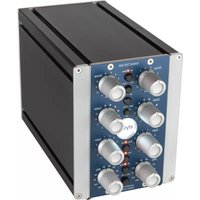
Xpressor NEO QUBE - Audio Compressor Elysia - Free user manual and instructions
Find the device manual for free Xpressor NEO QUBE Elysia in PDF.


| Product Type | Audio compressor in 500 API format with integrated chassis (QUBE) |
| Brand | Elysia |
| Model | Xpressor NEO QUBE |
| Dimensions (W × H × D) | 104 mm × 133 mm × 188 mm |
| Weight | 1.46 kg |
| Power supply | 125 mA at +/- 16 V DC (via 500 series rack or QUBE chassis) |
| Consumption | 125 mA |
| Bandwidth | <10 Hz - 400 kHz (-3.0 dB) |
| THD+N (0 dBu, Mix 0%) | 0.003 % |
| THD+N (0 dBu, Mix 100%) | 0.007 % |
| THD+N (+10 dBu, Mix 0%) | 0.003 % |
| THD+N (+10 dBu, Mix 100%) | 0.02 % |
| Noise level (A-weighted) | -91 dBu |
| Dynamic range | 112 dB |
| Maximum input level | +21 dBu |
| Maximum output level | +21 dBu |
| Input impedance | 10 kOhm |
| Output impedance | 68 Ohm |
| Main functions | Compression, Ratio (including negative ratios), Attack, Release, Threshold, Gain, Mix (parallel compression), Warm Mode, Auto Fast, Log Release, Gain Reduction Limiter (GRL), Sidechain Filter (SCF) |
| Connectors (inputs) | XLR and 6.3 mm jack balanced and unbalanced |
| Connectors (outputs) | XLR and 6.3 mm jack balanced and unbalanced |
| Maintenance and cleaning | Clean with a soft, dry cloth. Do not use liquids or abrasive products. |
| Safety | Observe mounting and connection precautions. Do not expose to moisture or rain. Disconnect before installation. Only qualified personnel should perform repairs. |
| Warranty | 2 years against defects in parts and labor from the date of purchase of new equipment. |
| Spare parts and repairability | Repairs only by elysia authorized personnel. Warranty valid in the country of purchase. |
| General information | Compliant with CE and RoHS directives. Made in Germany. |
Frequently Asked Questions - Xpressor NEO QUBE Elysia
User questions about Xpressor NEO QUBE Elysia
0 question about this device. Answer the ones you know or ask your own.
Ask a new question about this device
Download the instructions for your Audio Compressor in PDF format for free! Find your manual Xpressor NEO QUBE - Elysia and take your electronic device back in hand. On this page are published all the documents necessary for the use of your device. Xpressor NEO QUBE by Elysia.
USER MANUAL Xpressor NEO QUBE Elysia
Welcome to Compressor Wonderland!
First of all, we would like to thank you for picking the xpressor neo as your new dynamics tool - a very good choice indeed.
We believe this module is the most versatile stereo compressor available in API's 500 series format. With its many unique features taken from our flagship products, you not only get great compression, but an amount of control on processing which has yet to be experienced elsewhere.
No matter if you want to set and forget or plunge deep into the secrets of compression, the xpressor neo is for you. Its discrete audio path running in constant class-A mode provides a superior audio quality which combines a clear and open sound with a good lot of punch.
Stereo buss compression, processing single signals, approaching dynamics in creative ways – the xpressor neo shines in many different applications. Best of elysia? You got it!
Index
Controls 4
Connectors 6
Auto Fast 8
Log Release. 9
Warm Mode 10
Negative Ratios 11
Gain Reduction Limiter. 12
Technical Details 13
CE Conformity 13
Warranty Info 14
Legal Info. 15
Deutsches Handbuch. 16
Manuel François. 30
elysia
Compatibility
The xpressor neo is a module to be installed into an API 500 series compatible rack frame (not included if not elysia qube). It needs the power supply and the audio connectors provided by this frame and does not function stand alone.
The current consumption is 125 milliamperes at +/- 16 volts DC. This is actually more than many other 500 series modules consume as a result of the discrete class-A design of the xpressor's audio path.
Most API 500 compatible racks will meet this requirement without problems, but there might be a limitation of how many units can be installed in a single rack. In case of doubt please check with the manufacturer of your specific rack.
Installation
Just follow these easy steps to install the xpressor neo module:
- Switch your API 500 series compatible rack off and disconnect the power cable from mains.
- Insert the module into two free slots of your rack. Make sure both PCB connectors match with the rack connectors.
- Gently push the module in place - do not use any extensive force here!
- Tighten the front panel with four screws provided by your rack manufacturer.
- Connect your XLR audio cables (see page 6 for more info) and apply power to your rack or elysia qube.
And this is already it.
Have lots of fun with your xpressor neo!
Controls

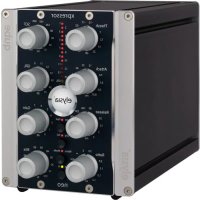
Threshold (Thresh): The operating point of the compressor. If the input level exceeds the value set with this controller, the compression process will start.
Attack: The transient response of the compressor. It determines the time the xpressor neo needs to reach 10 dB of gain reduction.
3 Release: The return phase of the compressor. It controls the period of time between the input signal falling below the threshold and the xpressor neo's return to unity gain.
Ratio: The relation between the input level and the output level. As a specialty of the xpressor neo, even negative ratios can be set here. (p. 11)
Hit It! Activates the xpressor neo (LED on) or deactivates it with a hardwire bypass (GR meter remains active).
elysia
Warm Mode: The xpressor neo offers a second switchable sound flavorbyalteringitsfrequency,harmonicsandtransient response. (p. 10)
Log Release (Log Rel): This alternative release focuses on the following course instead of the standard linear progress and results in a very gentle kind of compression. (p. 9)
Auto Fast: A semi-automation. This function shortens the attack time automatically on fast and loud signal impulses and then returns to the value set with the controller. (p. 8)
GRL LED: Indicates Gain Reduction Limiter activity. If this LED is on, incoming signals will be held at the GR limit instead of being compressed any further. (p. 12)
10 Gain Reduction Meter: The display for the gain reduction process. Shows the amount of compression measured in dB as an visual support for the acoustic events.
Sidechain Filter (SCF): A tunable low cut filter in the sidechain of the xpressor neo avoids overcompression and pumping when there is a lot of low end energy in the mix.
12 Gain Reduction Limiter (GRL):Restrictsthecontrolvoltage.This innovative limiter is not placed in the audio path as usual, but in the control circuit of the compressor. (p. 12)
13 Gain: Themake-upgainofthexpressorneo.Thiscontroller compensates for the loss in gain caused by the compression process.
14 Mix: The direct and the compressed signal can be blended in any desired relation by simply turning the mix controller. Onboard parallel compression!
Connectors (elysia qube)
1 Audio inputs
(XLR and 1 / 4'' phone jack)
2 Audio outputs
(XLR and 14 " phone jack)
3 Power switch
Please note that in stereo operation both channels are always processed by one single control voltage generated from a mix of both signals. This means you should only compress adequate stereo material like sum signals in this mode - dissimilar signals like a bass drum in one channel and a synth pad in the other will not give you the intended 'dual mono' results.
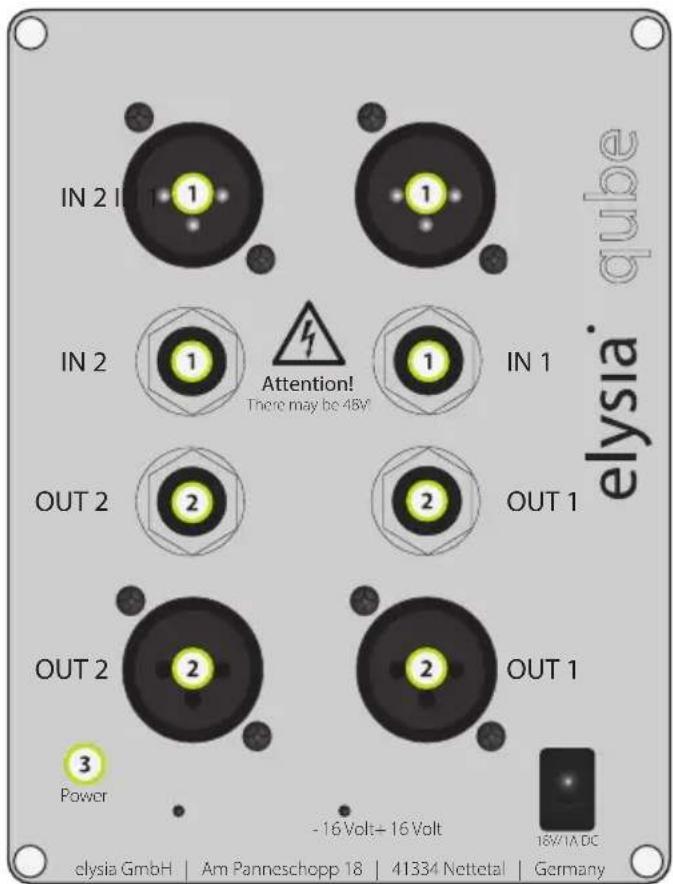
Mono operation: Connect either input and output 1 or 2 - both will work identically.
Stereo operation: Connect both inputs and outputs 1 and 2 - the choice which channel is left and which is right is up to you.
Inputs (+4dBu)
XLR balanced:
XLR unbalanced:
Jack balanced:
Jack unbalanced:
Pin 1: ground
Pin 1: ground
Sleeve: ground
Sleeve: ground
Pin 2: hot (+)
Pin 2: hot (+)
Tip: hot (+)
Tip: hot (+)
Pin 3: cold (-)
Pin 3: ground
Ring: cold (-)
Ring: ground
Outputs (+4dBu)
XLR balanced:
XLR unbalanced:
Jack balanced:
Jack unbalanced:
Pin 1: ground
Pin 1: ground
Sleeve: ground
Sleeve: ground
Pin 2: hot (+)
Pin 2: hot (+)
Tip: hot (+)
Tip: hot (+)
Pin 3: ground
Pin 3: idle
Ring: ground
Ring: idle
Precautions

WARNING: High Voltage
- Make sure to operate your API 500 series compatible rack at the specific mains voltage of your country.
- Replace rack frame fuse with the same type and value only.
- Your rack frame must be connected to ground.
- Do not use a damaged power cord.
- Never place containers with liquid on the rack.
- Do not expose this device to rain or moisture.
- Do not use this device near water.
Refer service to qualified service staff only.

CAUTION: Temperature
- Surfaces of the device may become hot during operation.
- Do not install this device near any heat source such as radiators, stoves or other heat sources.

CAUTION: Connecting & Mounting
- Never connect to the output of a power amplifier.
- Do not apply extensive force when installing this device.
- Use the device according to this manual only.

CAUTION: Humidity
- If this device is moved from a cold place to a warm room, condensation can occur inside the device. To avoid damaging the unit please allow it to reach room temperature before switching it on.
Auto Fast

The attack parameter is a crucial factor for the operation of a compressor. Choosing the right time setting is very important, but depending on the dynamic progress of the source material
this is a difficult task – no matter if single tracks or complete mixes are processed.
If a very short attack time is chosen, the compressor is able to catch the short peaks, but on the other hand the sustaining signal will also be processed, which might result in audible distortion. Longer settings reduce distortion significantly, but then the compressor is too slow for catching fast impulses.
This is where the Auto Fast function comes into play. If you set a longer attack and engage the Auto Fast mode, the attack time will be shortened automatically on fast and loud signal impulses. The compressor reduces the signal quickly and prevents it from slipping through.
Then the attack time directly and automatically returns to its original setting. In Auto Fast mode the compressor can be very fast, but only when it is really needed.
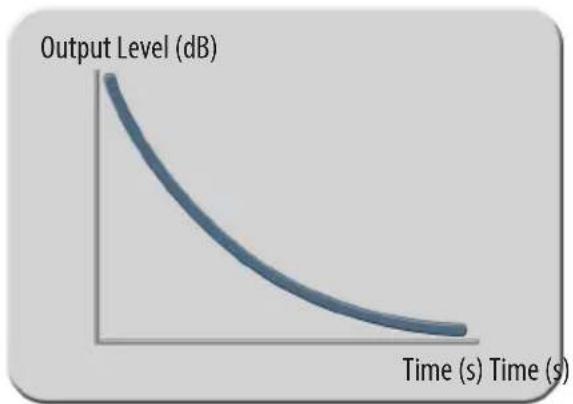
Attack phase without Auto Fast Attack phase with Auto Fast
Log Release

It is the time constants and especially the release parameter that decide if the processing of accompressor is obviouso
unobtrusive to the ear. As it is difficult to achieve perfect results for all kinds of different material with only one type of release curve, the xpressor neo offers two different options to choose from: logarithmic and linear.
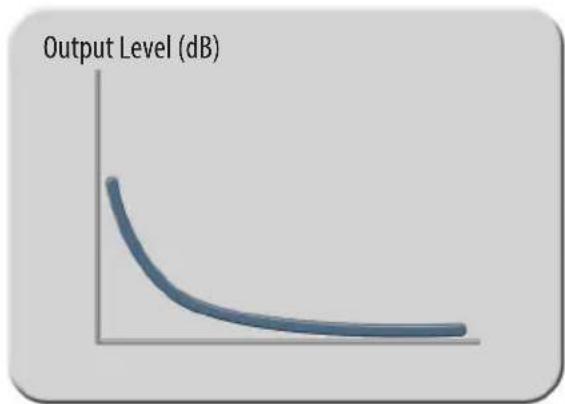
It is characteristic of a logarithmic release that the time constant shortens when the amount of gain reduction increases. The advantage of this behavior is that short and loud peaks (e.g. drums) have a fast release time, while the remaining material is processed with a slower release. Its smooth performance makes the Log Release especially useful for mastering and stereo buss compression.
The linear mode, however, has a straight release profile, without the slower tapering release characteristic of the Log mode. The linear mode is a good choice for more aggressive dynamics control of dry signals, and it is especially useful when you want to process signals which do not have a long decay period.
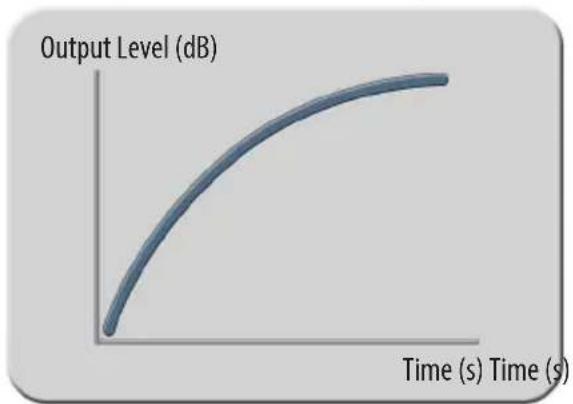
Logarithmic release progress Linear release progress

Warm Mode

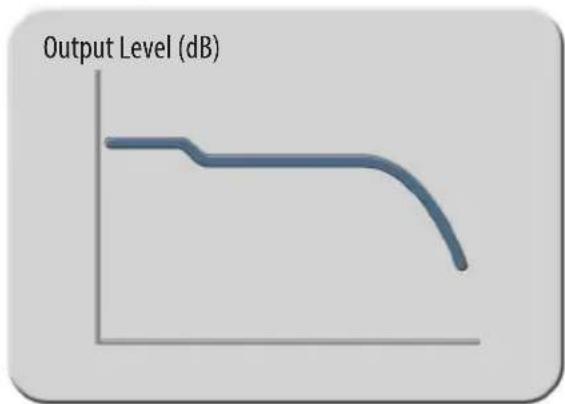
This function is basically a slew rate limiter that reduces the speed of the output amplifier stages. This affects the frequency spectrum, the harmonics and the transient response at the same
time.
Fast transients are slowed down a bit and the overall sound appears more round and merged. As this function influences the behavior of theoutputstages, the effectitcreateshasanimpactonthecomplete processing results of the compressor.
This way the xpressor neo offers two different sound characters at the push of a button: the powerful transparency of the discrete class-A circuitry and the saturated richness of the Warm Mode.
Now the choice is really up to you: For transparent compression and an even frequency response, just use the xpressor neo in standard mode. For a little bit more fat and juicy sound, hit the Warm Mode button and you are there!
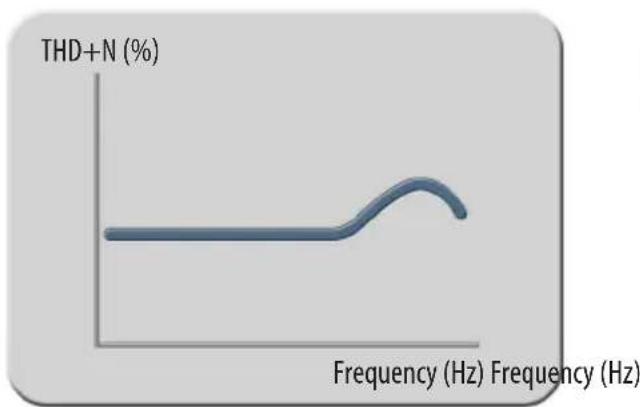
Added total harmonic distortion Modified frequency response
Negative Ratios

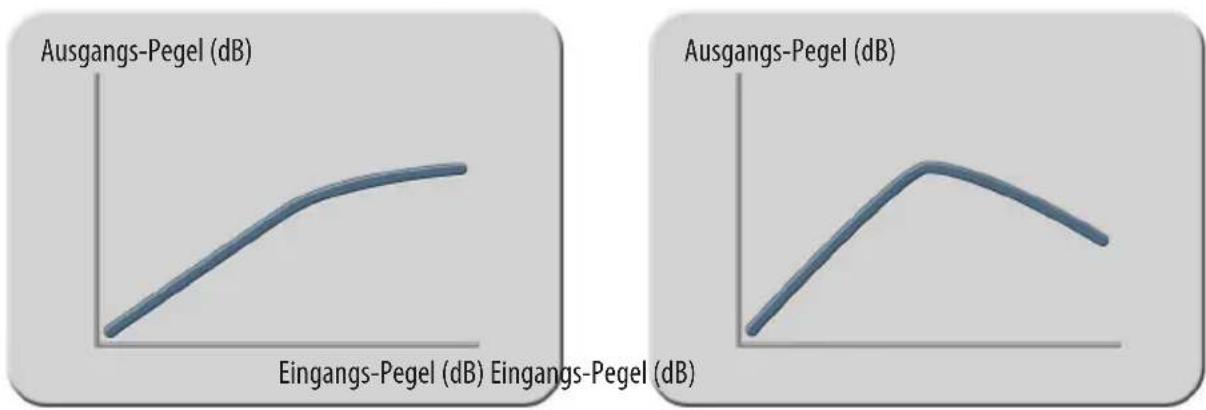
Negative ratios – what exactly does this mean? To get a better understanding of this function, it makes sense to realize what the ratio control of a 'normal' compressor does:
- 1:1 The signal remains linear, there is no compression process going on.
- 1:2 After crossing the threshold, an increase of 2dB at the input will be compressed to an increase of 1dB at the output.
- 1:∞ After crossing the threshold, the output signal is constantly held at the threshold level without reacting to further increases at the input (limiter).
At a negative ratio, the characteristic curve bends and returns back down after crossing the threshold. The louder the input signal, the lower the output signal – perfect for groovy compression effects.
To get a grip on the extreme 'destruction' this can cause, engaging the Gain Reduction Limiter is just the right idea.
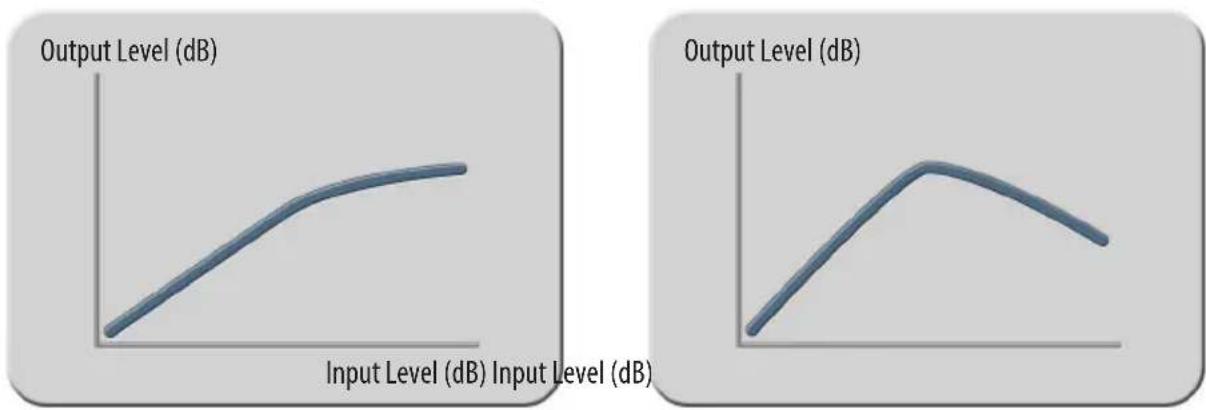
Standard compression ratio Negative compression ratio
Gain Reduction Limiter

A specialty of the xpressor neo is the Gain Reduction Limiter for the control voltage. This limiter is not placed in the audio path where you would usually find it, but in the control path of the
compressor instead.
When activated, it limits the control voltage according to the setting of the GR Limit controller. This means: No matter how high the input level might become – the amount of gain reduction will never exceed the value you have set.
Just think about the GRL as a second threshold controller: While the 'regular' threshold controller tells the compressor when to start working, the GRL controller tells it when to compress no further.
Loud parts in an arrangement can keep their dynamics, as they will not be compressed beyond the limit of the Gain Reduction Limiter.
Note: This function of the xpressor neo is always active and does not need a switch of its own.
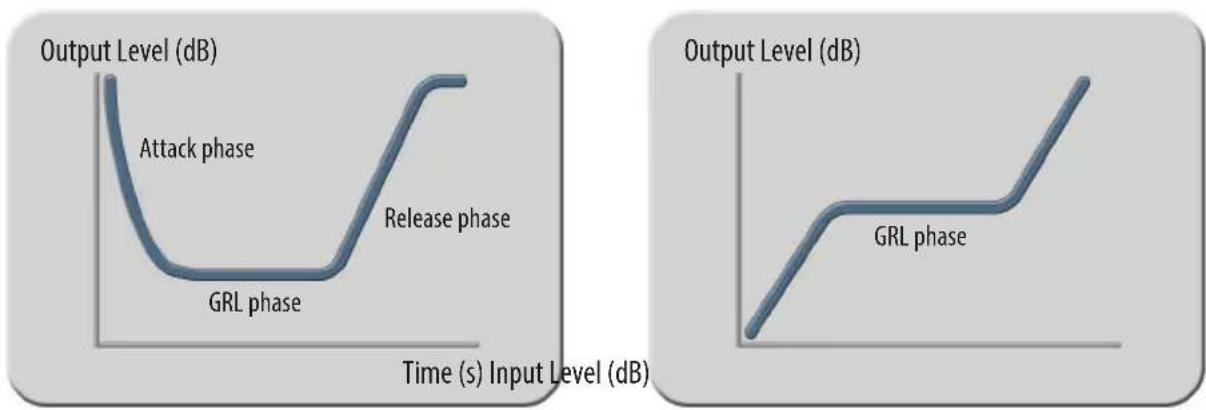
GRL compression progress GRL input to output ratio
Technical Details
Frequency response: < 10 Hz - 400kHz( -3.0 dB)
THD+N @ 0 dBu, 20 Hz - 22 kHz, Mix 0%: 0.003%
THD+N @ 0 dBu, 20 Hz - 22 kHz, Mix 100%: 0.007%
THD+N @ +10 dBu, 20 Hz - 22 kHz, Mix 0%: 0.003%
THD+N @ +10 dBu, 20 Hz - 22 kHz, Mix 100%: 0.02%
Noise floor, 20Hz - 20kHz (A-weighted): -91 dBu
Dynamic range, 20Hz - 22kHz : 112 dB
Maximum input level: +21 dBu
Maximum output level: +21 dBu
Input impedance: 10kOhm
Output impedance: 68 Ohm
Dimensions (elysia qube):
(WxHxD)4,09"×5,23"×7,4"
Weight (elysia qube with 500 Series Module):
3,2 lbs
CE Conformity

The conformity of this device to the EU directives is confirmed by the CE mark on the device.
This declaration becomes invalid by any unapproved modification of the device.
Nettetal, 01.11.2022 - Ruben Tilgner
Warranty Info
The xpressor neo is covered by a limited warranty for a period of 2 years against defects in parts and labor from the date of purchase. Natural wear is not covered by this warranty. Repairs or replacements will not extend the warranty period.
The warranty is given to the original purchaser only and is not transferable. elysia will only give warranty on products purchased through authorized elysia dealers. The warranty will only be valid in the country of the original purchase unless otherwise pre-authorized by elysia.
All warranties become void when the product has been damaged by misuse, accident, neglect, modification, tampering or unauthorized alteration by anyone other than elysia authorized service personnel.
The warrantor assumes no liability for property damage or any other incidental or consequential damage whatsoever which may result from failure of this product. Any and all warrantees of merchantability and fitness implied by law are limited to the duration of the expressed warranty.
elysia will not pay for express or overnight freight service or pay for shipments to locations outside Germany. All damages caused by transport are not covered by this warranty.
This warranty gives you specific legal rights and you may also have other rights which vary from state to state. Some of the above limitations may not apply to you.
elysia
Legal Info
The information in this document is subject to change without further notice and shall not be deemed as an obligation or warranty of any kind by the manufacturer. No warranties, express or implied, are made with regard to the quality, suitability or accuracy of this document.
The manufacturer reserves the right to change the contents of this document and/or the associated products at any time without the provision of prior notice. The manufacturer shall not be held liable for damages of any kind arising from the use, or the inability to use this product or its documentation.
The information in this document is subject to copyright. All rights, technical changes and errata are reserved. No part of this manual may be reproduced or transmitted in any form or for any purpose without the explicitly written permission of the copyright holders.
elysia and xpressor neo are registered trademarks of elysia GmbH. Other product and brand names contained in this document are used for identification purposes only. All registered trademarks, product designations or brand names used in this document are the property of their respective owners.

The product has been manufactured in compliance with the RoHS directive. The purpose of this directive of the European Union is the Restriction of Hazardous
Substances (RoHS) in electronic equipment in order to protect health and nature. Dispose separately!
Standard Ratio Negative Ratio
Gain Reduction Limiter

Gain Reduction Limiter 39
Sidechain externe 40
ATTENTION: Haute Tension
Gain Reduction Limiter