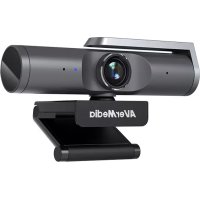
PW515 - Video conferencing system AVERMEDIA - Free user manual and instructions
Find the device manual for free PW515 AVERMEDIA in PDF.


| Product type | Video conferencing webcam |
| Brand | AVerMedia |
| Model | PW515 |
| Max resolution | 4K (requires USB 3.0) |
| Connectivity | USB Type-C (compatible with USB 2.0) |
| Microphone | Built-in |
| Smart features | Auto framing, hand gesture control |
| Privacy shutter | Yes |
| Mounting | Swivel clip/base, tripod mount |
| LED indicator | Solid blue (in use), off (power off) |
| Included software | Streaming Center, Assist Central Pro |
| Power | Via USB port |
| Approximate dimensions | 10 × 5 × 5 cm |
| Approximate weight | 150 g |
| Maintenance | Clean with a soft, dry cloth |
| Safety | Do not expose to moisture or extreme temperatures |
| Repairability | No spare parts available |
Frequently Asked Questions - PW515 AVERMEDIA
User questions about PW515 AVERMEDIA
0 question about this device. Answer the ones you know or ask your own.
Ask a new question about this device
Download the instructions for your Video conferencing system in PDF format for free! Find your manual PW515 - AVERMEDIA and take your electronic device back in hand. On this page are published all the documents necessary for the use of your device. PW515 by AVERMEDIA.
USER MANUAL PW515 AVERMEDIA
All pictures contained in this documentation are example images only. The images may vary depending on the product and software version. Information presented in this documentation has been carefully checked for reliability; however, no responsibility is assumed for inaccuracies. The information contained in this documentation is subject to change without notice.
Copyright and Trademark Information
© 2025 by AVerMedia Technologies, Inc. All rights reserved. No part of this publication, in whole or in part, may be reproduced, transmitted, transcribed, altered or translated into any language in any form by any means without the written permission of AVerMedia Technologies, Inc. Information and specification contained in this manual are subject to change without notice and do not represent a commitment on the part of AVerMedia.
For more information, please visit www.avermedia.com.
AVerMedia is trademark or registered trademark of AVerMedia Technologies, Inc.
Headquarters
Address No.135, Jian 1st Rd., Zhonghe Dist., New Taipei City 23585, Taiwan
Website www.avermedia.com
Support www.avermedia.com/support
Telephone +886-2-2226-3630
US Office
Address 754 Charcot Avenue, San Jose, CA 95131, United States
Website www.avermedia.com/us
Europe Office
Address An der Strusbek 9, 22926 Ahrensburg, Germany
國際總部
⚠️ Important Safety Instructions
- Read these instructions.
- Keep these instructions.
- Follow all instructions.
- Heed all warnings.
- Do not use the apparatus on uneven or unstable surfaces.
- Do not use this apparatus in a wet environment or near water.
- Unplug the apparatus before cleaning. Clean only with a dry cloth.
- Use in a well ventilated environment. Do not block any ventilation openings.
- Use the apparatus within ambient temperatures 32–104°F (0–40°C).
- Use power sources within the specified voltage range.
- Do not place heavy objects on the apparatus.
- Do not install near heat sources such as radiators or stoves.
- Do not defeat the safety purposes of the polarized or grounding-type plug.
- Protect the power cord from being walked on or pinched, particularly where the cord connects with plugs or adapters.
- Only use the attachments and accessories specified by the manufacturer.
- Unplug this apparatus during lightning or when unused for prolonged periods of time.
- Do not modify or disassemble the apparatus in any way.
- Refer all servicing to AVerMedia Customer Service.
- Do not dispose the apparatus as general household waste. Dispose in accordance with local environmental laws.
重要安全說明
These are what you'll find in the box:
PW515 USB Type-C to
Type-A Cable
Quick Start Guide
Parts and Ports
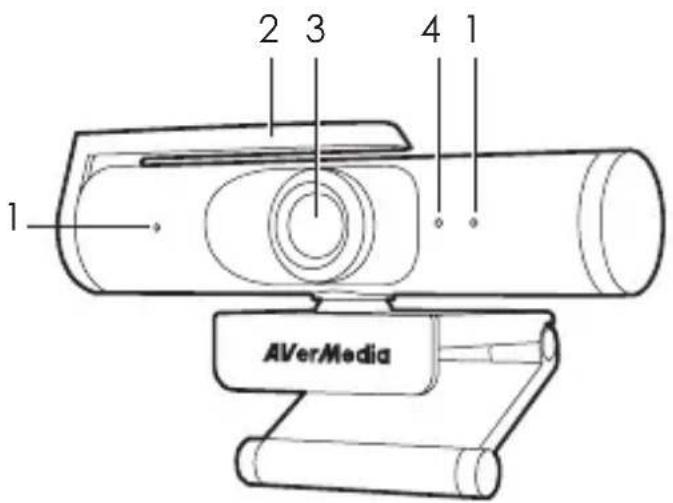
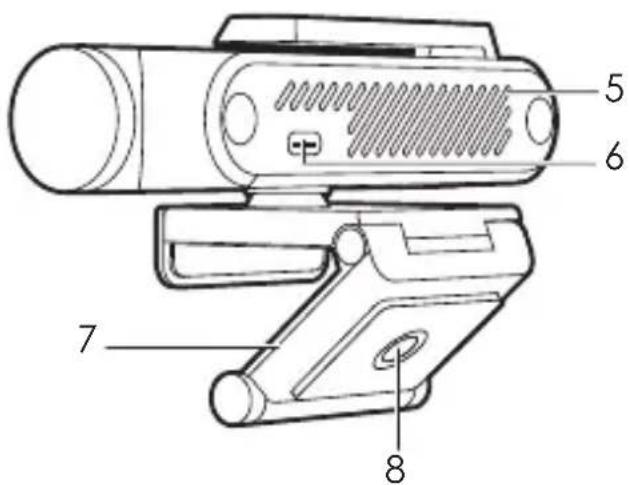
1 Microphone
2 Privacy Shutter
3 Lens
4 Power Indicator
Solid Blue: In Use
Off: Not in Use
5 Air Vents
6 USB Type-C Port
7 Clip/Base
8 Tripod Attachment
Installation
1
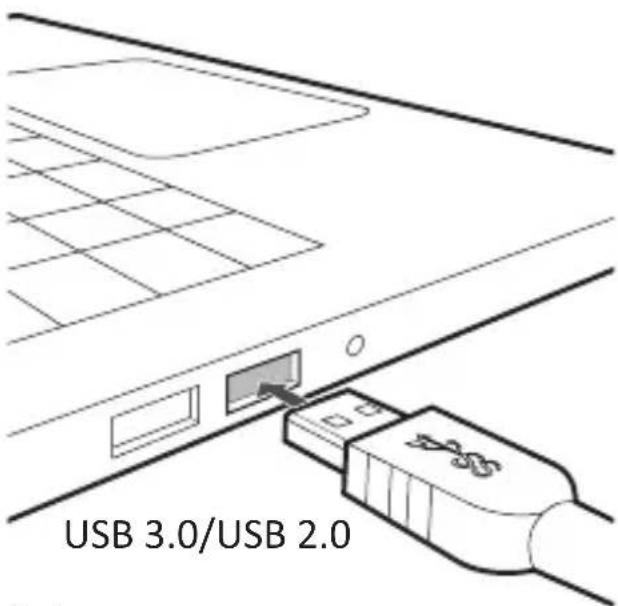
Note:
1. USB 3.0 is required for 4K recording.
2. PW515 also supports USB 2.0.
3
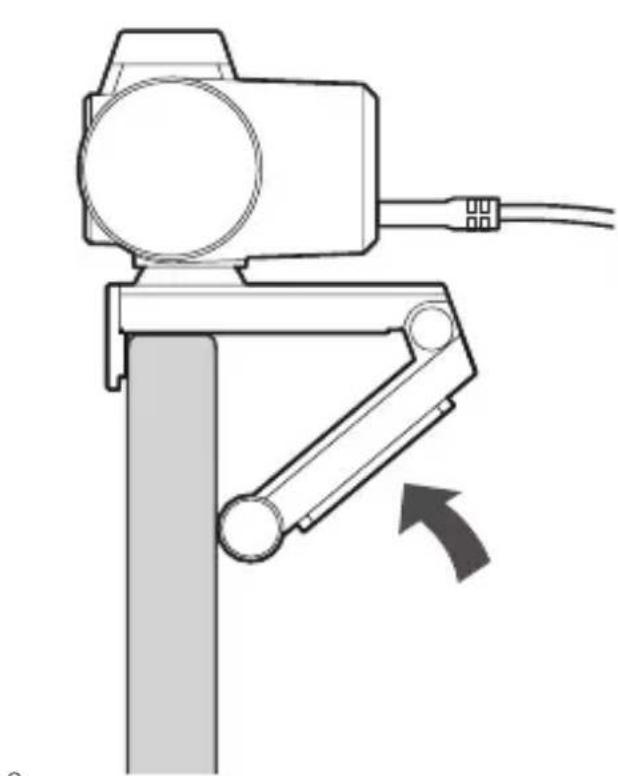
2
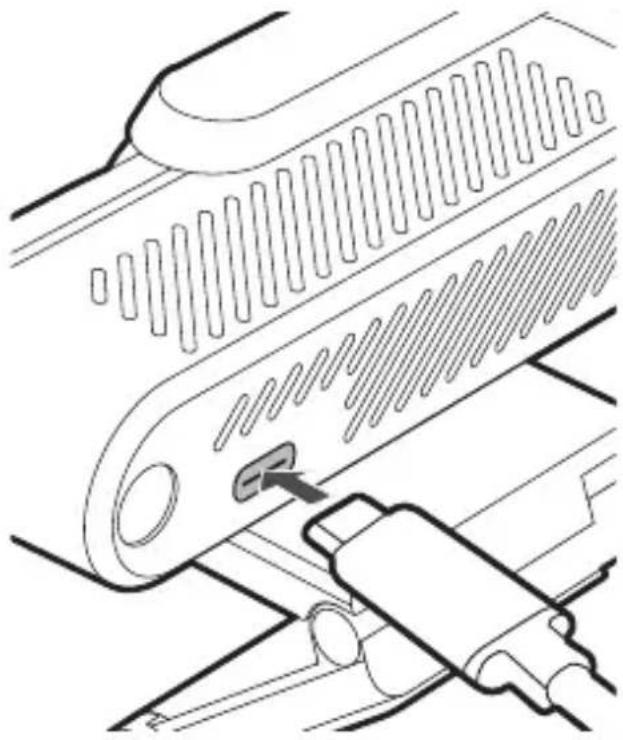
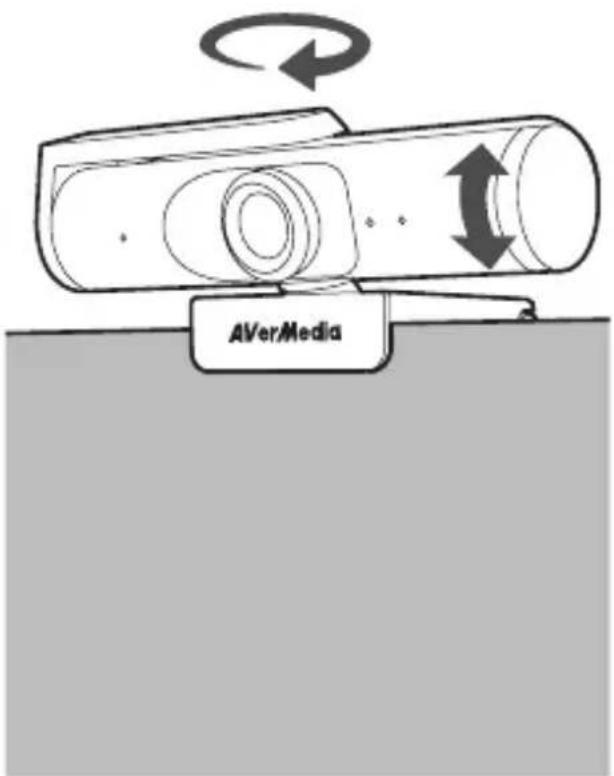
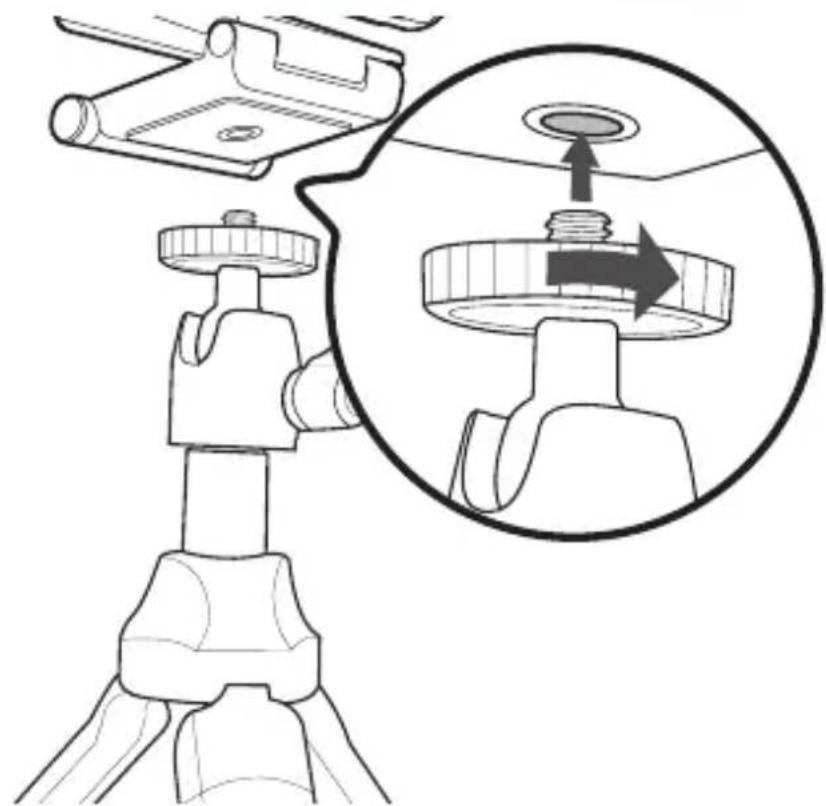
Installation (Tripod Not Included)
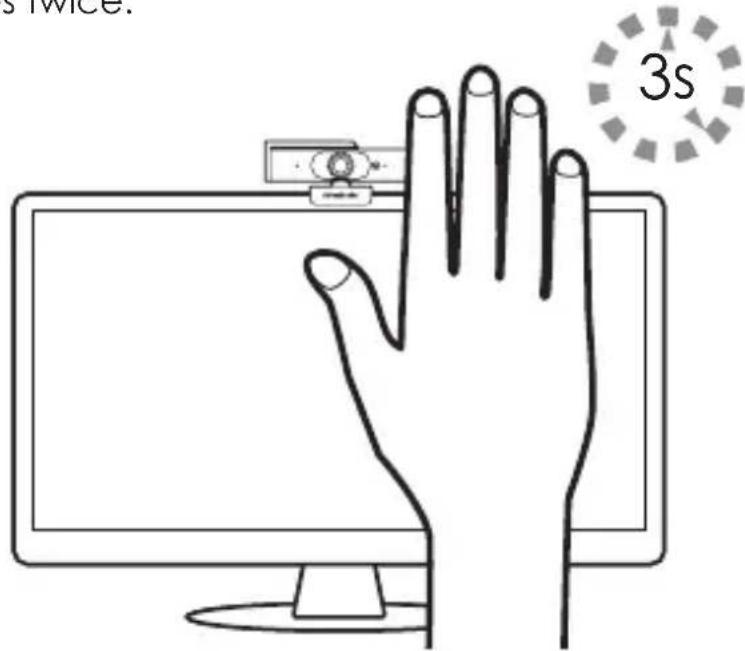
AI Framing: Gesture Control
This feature enables the webcam to automatically adjust and recenter the image when additional people enter its field of view. It can be turned on or off using a hand gesture—just hold up your hand with your palm facing the webcam for three seconds until the power indicator flashes twice.
Streaming Center & More Info
AVerMedia Streaming Center is a centralized control hub that combines streaming device controls, video adjustment and audio tuning into one powerful software. It streamlines users' workflow and makes live streaming a breeze.
For more information, visit
https://www.avermedia.com/product-detail/StreamingCenter.
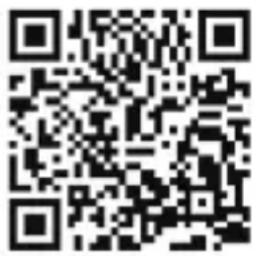
For more information about this webcam, scan the QR code.
Assist Central Pro
Assist Central Pro is a utility tool that helps detect the latest drivers, firmware, and application updates available for your connected AVer-Media devices. It also allows you to manage your devices by showing device information, controlling device settings, running troubleshooting, and more.
Download it from
https://www.avermedia.com/product-detail/PW515#download.
Specifications
Connection Type USB Type-C
Image Sensor Sony STARVIS 4K CMOS
Max. Resolution 3840 x 2160
Max. Frame Rate 30 fps (3840 x 2160), 60 fps (1920 x 1080)
Field of View 100° (diagonal)
F/#2.0
Focus Method (Lens Type) Autofocus
Microphone Type Dual built-in microphones
UVC Support Yes
Cable Length 2.0 m / 6.56 ft
Dimensions (W x D x H) 130 x 58.1 x 56.75 mm / 5.12 x 2.29 x 2.23 in
Weight 190 g / 6.70 oz
Note: Specifications are subject to change without prior notice. Please refer to our webpage for the latest details.
Deutsch
Verpackungsinhalt
https://www.avermedia.com/product-
detail/StreamingCenter.
Installation (Trépied non inclus)
Ai Cadrage
https://www.avermedia.com/product-detail/PW515#download.
Español
Dentro de la caja
https://www.avermedia.com/product-detail/StreamingCenter.
https://www.avermedia.com/product-
detail/StreamingCenter
Assist Central Pro
https://www.avermedia.com/product-detail/
StreamingCenter
에서 확인하세요.
Assist Central Pro
https://www.avermedia.com/product-detail/PW515#download.에서 다운로드하세요.
ภาษาไทย
ภายในกล่อง
สึงของนกล่อง:
https://www.avermedia.com/product-detail/PW515#download.
日本語
パッケージ内容物
Federal Communications Commission Statement Class B
This device complies with Part 15 of the FCC Rules. Operation is subject to the following two conditions: (1) this device may not cause harmful interference, and (2) this device must accept any interference received, including interference that may cause undesired operation.
NOTE - This equipment has been tested and found to comply with the limits for a Class B digital device, pursuant to Part 15 of the FCC Rules. These limits are designed to provide reasonable protection against harmful interference in a residential installation. This equipment generates, uses and can radiate radio frequency energy and, if not installed and used in accordance with the instructions, may cause harmful interference to radio communications. However, there is no guarantee that interference will not occur in a particular installation. If this equipment does cause harmful interference to radio or television reception, which can be determined by tuning the equipment off and on, the user is encouraged to try to correct the interference by one or more of the following measures:
- Reorient or relocate the receiving antenna.
- Increase the separation between the equipment and receiver.
- Connect the equipment into an outlet on a circuit different from that to which the receiver is connected.
- Consult the dealer or an experienced radio/television technician for help.
CAUTION ON MODIFICATIONS - To comply with the limits for the Class B digital device, pursuant to Part 15 of the FCC Rules, this device must be installed in computer equipment certified to comply with the Class B limits. All cables used to connect the computer and peripherals must be shielded and grounded. Operation with non-certified computers or non-shielded cables may result in interference to radio or television reception.
Changes and modifications not expressly approved by the manufacturer or registrant of the equipment can void your authority to operate the equipment under Federal Communications Commission rules.

European Community Compliance Statement Class B
This product is herewith confirmed to comply with the requirements set out in the Council Directives on the approximation of the laws of the Member States relating to Electromagnetic Compatibility Directive (EMC) 2014/30/EU.
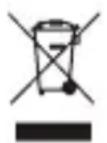
Waste Electrical and Electronic Equipment Directive
The mark of crossed-out wheeled bin indicates that this product must not be disposed of with your other household waste. Instead, you need to dispose of the waste equipment by handing it over to a designated collection point for the recycling of waste electrical and electronic equipment. For more information about where to drop off your waste equipment for recycling, please contact your household waste disposal service or the shop where you purchased the product.
CAN ICES-3(B)/NMB-3(B)
Canada - Canada Industry Canada (IC) Labelling Requirements
Every manufacturer or importer shall ensure import or before offering for sale, as appropriate, that each unit of the type that they offer for sale bears, in a location convenient for inspection, a permanent label or marking containing (in French and English), the following statement:
ICES-003 (Interference - Causing Equipment Standards)
"This class B digital apparatus complies with Canadian ICES-003."
Technical Regulations of the Customs Union
TR CU 020/2011

Regulatory Compliance Mark
MSIP Class B Statement (Korea)
Class B (For Home Use Broadcasting & Communication Equipment): This equipment is home use (Class B) electromagnetic wave suitability equipment and tobe used mainly at home and it can be used in all areas.

D33183
RoHS
BSMI Registration of Product Certification (Taiwan)
- COPYRIGHT AND TRADEMARK INFORMATION
- HEADQUARTERS
- US OFFICE
- EUROPE OFFICE
- 國際總部
- ⚠️ IMPORTANT SAFETY INSTRUCTIONS
- 重要安全說明
- PARTS AND PORTS
- INSTALLATION
- INSTALLATION (TRIPOD NOT INCLUDED)
- AI FRAMING: GESTURE CONTROL
- STREAMING CENTER & MORE INFO
- ASSIST CENTRAL PRO
- SPECIFICATIONS
- DEUTSCH
- VERPACKUNGSINHALT
- INSTALLATION (TRÉPIED NON INCLUS)
- AI CADRAGE
- ESPAÑOL
- DENTRO DE LA CAJA
- ภาษาไทย
- ภายในกล่อง
- สึงของนกล่อง
- 日本語
- パッケージ内容物
- FEDERAL COMMUNICATIONS COMMISSION STATEMENT CLASS B
- EUROPEAN COMMUNITY COMPLIANCE STATEMENT CLASS B
- WASTE ELECTRICAL AND ELECTRONIC EQUIPMENT DIRECTIVE
- CAN ICES-3(B)/NMB-3(B)
- MSIP CLASS B STATEMENT (KOREA)
- BSMI REGISTRATION OF PRODUCT CERTIFICATION (TAIWAN)
Brand : AVERMEDIA
Model : PW515
Category : Video conferencing system