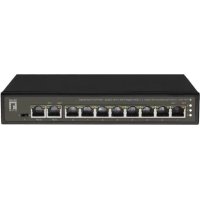
FGP1031 - Switch LEVELONE - Free user manual and instructions
Find the device manual for free FGP1031 LEVELONE in PDF.


User questions about FGP1031 LEVELONE
0 question about this device. Answer the ones you know or ask your own.
Ask a new question about this device
Download the instructions for your Switch in PDF format for free! Find your manual FGP1031 - LEVELONE and take your electronic device back in hand. On this page are published all the documents necessary for the use of your device. FGP1031 by LEVELONE.
USER MANUAL FGP1031 LEVELONE
natural_image
Abstract geometric pattern composed of blue squares forming a stylized 'N' shape (no text or symbols)levelone®
Quick Installation Guide
English
Deutsch
Français
Español
Nederlands
Dansk
Italiano
Ελληνικά
Português
Svenska
Slovenščina
繁體中文
Русский
Polski
CE
CE marking is a certification mark that indicates conformity with health, safety, and environmental protection standards for products sold within the European Economic Area (EEA). The CE marking is also found on products sold outside the EEA that have been manufactured to EEA standards. This makes the CE marking recognizable worldwide even to people who are not familiar with the European Economic Area.

WEEE is waste electrical and electronic equipment. It is end-of-life electrical and electronic equipment and covers virtually everything with a plug or battery. ... The EC introduced the WEEE Directive in 2002 to address the environmental impacts of unwanted electrical and electronic equipment at end-of-life disposal.
Package Content
text_image
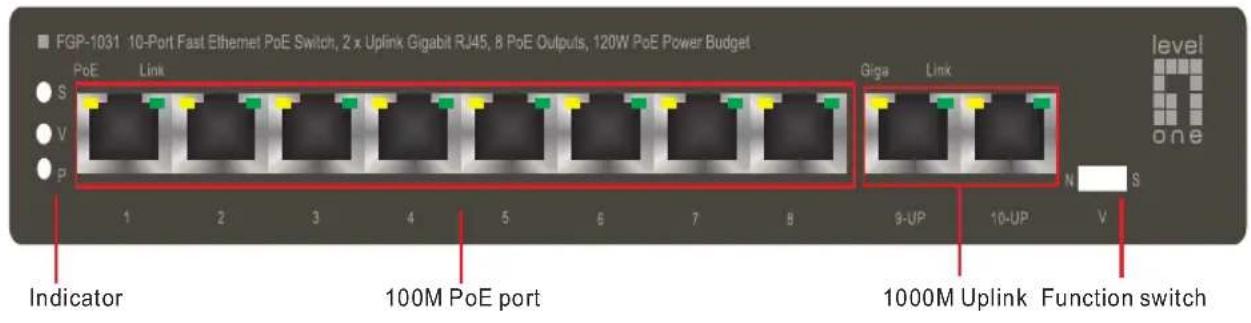
FGP-1031 10-Port Fast Ethernet PoE Switch, 2 x Uplink Gigabit RJ45, 8 PoE Outputs, 120W PoE Power Budget PoE Link S V P 1 2 3 4 5 6 7 8 Indicator 100M PoE port Giga Link 9-UP 10-UP V level one 1000M Uplink Function switchFunction Switch
| Mark Mode | Description | |
| N | Standard Normal | All ports communicate freely, adapting to common data transmission environment |
| V | Port Isolation | Switch to VLAN mode; downlink isolating from each other, uploads and downloads data through uplink; suppress network failure like broadcast storm and virus attack |
| S | Super Mode | Downlink speed limitation: 10M (Ultral-far transmission: 250 meters) |
Indicator
| Indicator | Status | Description | |
| Power LED:P | Always ON | Normal | |
| Always OFF | Power Unconnected | ||
| Flashes | Port circuit or current over-loaded | ||
| Port Isolation LED: V | Always ON | Port Isolation mode ON | |
| Super Mode LED: S | Always ON | Super mode ON | |
| PoE LED | Orange | Always ON | Powered equipments connected and power supply normally |
| Always OFF | No powered equipments connected or no power supply | ||
| Green | Always ON | Network signal communicated | |
| Always OFF | Network signal not communicated | ||
ENGLISH
Installation
text_image
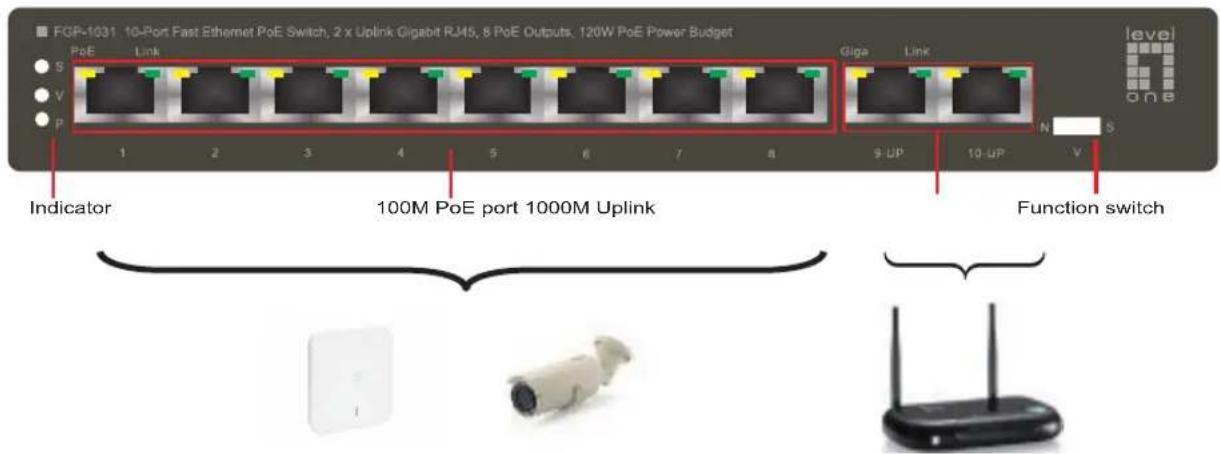
FGP-1031 10-Port Fast Ethernet PoE Switch, 2 x Uplink Gigabit RJ45, 8 PoE Outputs, 120W PoE Power Budget Indicator 100M PoE port 1000M Uplink Giga Link 9-UP 10-UP N S Function switchFunction Switch
| Mark Mode | Description | |
| N | Standard Normal | All ports communicate freely, adapting to common data transmission environment |
| V | Port Isolation | Switch to VLAN mode; downlink isolating from each other, uploads and downloads data through uplink; suppress network failure like broadcast storm and virus attack |
| S | Super Mode | Downlink speed limitation: 10M (Ultral-far transmission: 250 meters) |
Indicator
| Indicator | Status | Description | |
| Power LED:P | Always ON | Normal | |
| Always OFF | Power Unconnected | ||
| Flashes | Port circuit or current over-loaded | ||
| Port Isolation LED: V | Always ON | Port Isolation mode ON | |
| Super Mode LED: S | Always ON | Super mode ON | |
| PoE LED | Orange | Always ON | Powered equipments connected and power supply normally |
| Always OFF | No powered equipments connected or no power supply | ||
| Green | Always ON | Network signal communicated | |
| Always OFF | Network signal not communicated | ||
Connecting Equipment
Step1. Inspect the Power Adapter carefully, and make sure that it is properly connected to a power source.
Step2. Plug-in the Power Adapter to the Switch.
Step3. Connect your network devices with the switch by using Ethernet cable. (e.g. Cat-5e)
Deutsch
Installation
text_image
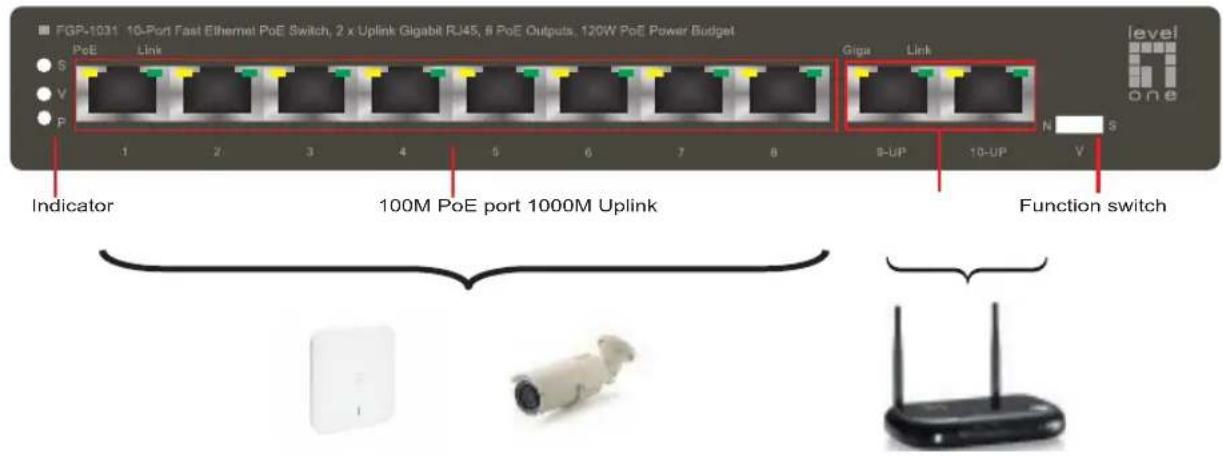
FGP-1031 10-Port Fast Ethernet PoE Switch, 2 x Uplink Gigabit RJ45, 8 PoE Outputs, 120W PoE Power Budget PeE Link S V P 1 2 3 4 5 6 7 8 Indicator Giga Link 9-UP 10-UP N S Function switch 100M PoE port 1000M UplinkFunction Switch
| Mark Mode | Description | |
| N | Standard Normal | All ports communicate freely, adapting to common data transmission environment |
| V | Port Isolation | Switch to VLAN mode; downlink isolating from each other, uploads and downloads data through uplink; suppress network failure like broadcast storm and virus attack |
| S | Super Mode | Downlink speed limitation: 10M (Ultral-far transmission: 250 meters) |
Indicator
| Indicator | Status | Description | |
| Power LED:P | Always ON | Normal | |
| Always OFF | Power Unconnected | ||
| Flashes | Port circuit or current over-loaded | ||
| Port Isolation LED: V | Always ON | Port Isolation mode ON | |
| Super Mode LED: S | Always ON | Super mode ON | |
| PoE LED | Orange | Always ON | Powered equipments connected and power supply normally |
| Always OFF | No powered equipments connected or no power supply | ||
| Green | Always ON | Network signal communicated | |
| Always OFF | Network signal not communicated | ||
| Mark Mode | Description | |
| N | Standard Normal | All ports communicate freely, adapting to common data transmission environment |
| V | Port Isolation | Switch to VLAN mode; downlink isolating from each other, uploads and downloads data through uplink; suppress network failure like broadcast storm and virus attack |
| S | Super Mode | Downlink speed limitation: 10M (Ultral-far transmission: 250 meters) |
Indicator
| Indicator | Status | Description | |
| Power LED:P | Always ON | Normal | |
| Always OFF | Power Unconnected | ||
| Flashes | Port circuit or current over-loaded | ||
| Port Isolation LED: V | Always ON | Port Isolation mode ON | |
| Super Mode LED: S | Always ON | Super mode ON | |
| PoE LED | Orange | Always ON | Powered equipments connected and power supply normally |
| Always OFF | No powered equipments connected or no power supply | ||
| Green | Always ON | Network signal communicated | |
| Always OFF | Network signal not communicated | ||
| Mark Mode | Description | |
| N | Standard Normal | All ports communicate freely, adapting to common data transmission environment |
| V | Port Isolation | Switch to VLAN mode; downlink isolating from each other, uploads and downloads data through uplink; suppress network failure like broadcast storm and virus attack |
| S | Super Mode | Downlink speed limitation:10M(Ultral-far transmission:250 meters) |
Indicator
| Indicator | Status | Description | |
| Power LED:P | Always ON | Normal | |
| Always OFF | Power Unconnected | ||
| Flashes | Port circuit or current over-loaded | ||
| Port Isolation LED: V | Always ON | Port Isolation mode ON | |
| Super Mode LED: S | Always ON | Super mode ON | |
| PoE LED | Orange | Always ON | Powered equipments connected and power supply normally |
| Always OFF | No powered equipments connected or no power supply | ||
| Green | Always ON | Network signal communicated | |
| Always OFF | Network signal not communicated | ||
| Mark Mode | Description | |
| N | Standard Normal | All ports communicate freely, adapting to common data transmission environment |
| V | Port Isolation | Switch to VLAN mode; downlink isolating from each other, uploads and downloads data through uplink; suppress network failure like broadcast storm and virus attack |
| S | Super Mode | Downlink speed limitation: 10M (Ultral-far transmission: 250 meters) |
Indicator
| Indicator | Status | Description | |
| Power LED:P | Always ON | Normal | |
| Always OFF | Power Unconnected | ||
| Flashes | Port circuit or cunrent over-loaded | ||
| Port Isolation LED: V | Always ON | Port Isolation mode ON | |
| Super Mode LED: S | Always ON | Super mode ON | |
| PoE LED | Orange | Always ON | Powered equipments connected and power supply narmally |
| Always OFF | No powered equipments connected or no power supply | ||
| Green | Always ON | Network signal communicated | |
| Always OFF | Network signal not communicated | ||
| Mark Mode | Description | |
| N | Standard Normal | All ports communicate freely, adapting to common data transmission environment |
| V | Port Isolation | Switch to VLAN mode; downlink isolating from each other, uploads and downloads data through uplink; suppress network failure like broadcast storm and virus attack |
| S | Super Mode | Downlink speed limitation: 10M (Ultral-far transmission: 250 meters) |
Indicator
| Indicator | Status | Description | |
| Power LED:P | Always ON | Normal | |
| Always OFF | Power Unconnected | ||
| Flashes | Port circuit or current over-loaded | ||
| Port Isolation LED: V | Always ON | Port Isolation mode ON | |
| Super Mode LED: S | Always ON | Super mode ON | |
| PoE LED | Orange | Always ON | Powered equipments connected and power supply normally |
| Always OFF | No powered equipments connected or no power supply | ||
| Green | Always ON | Network signal communicated | |
| Always OFF | Network signal not communicated | ||
| Mark Mode | Description | |
| N | Standard Normal | All ports communicate freely, adapting to common data transmission environment |
| V | Port Isolation | Switch to VLAN mode; downlink isolating from each other, uploads and downloads data through uplink; suppress network failure like broadcast storm and virus attack |
| S | Super Mode | Downlink speed limitation:10M(Ultral-far transmission:250 meters) |
Indicator
| Indicator | Status | Description | |
| Power LED:P | Always ON | Normal | |
| Always OFF | Power Unconnected | ||
| Flashes | Port circuit or current over-loaded | ||
| Port Isolation LED: V | Always ON | Port Isolation mode ON | |
| Super Mode LED: S | Always ON | Super mode ON | |
| PoE LED | Orange | Always ON | Powered equipments connected and power supply normally |
| Always OFF | No powered equipments connected or no power supply | ||
| Green | Always ON | Network signal communicated | |
| Always OFF | Network signal not communicated | ||
| Mark Mode | Description | |
| N | Standard Normal | All ports communicate freely, adapting to common data transmission environment |
| V | Port Isolation | Switch to VLAN mode; downlink isolating from each other, uploads and downloads data through uplink; suppress network failure like broadcast storm and virus attack |
| S | Super Mode | Downlink speed limitation: 10M (Ultral-far transmission: 250 meters) |
Indicator
| Indicator | Status | Description | |
| Power LED:P | Always ON | Normal | |
| Always OFF | Power Unconnected | ||
| Flashes | Port circuit or cunrent over-loaded | ||
| Port Isolation LED: V | Always ON | Port Isolation mode ON | |
| Super Mode LED: S | Always ON | Super mode ON | |
| PoE LED | Orange | Always ON | Powered equipments connected and power supply narmally |
| Always OFF | No powered equipments connected or no power supply | ||
| Green | Always ON | Network signal communicated | |
| Always OFF | Network signal not communicated | ||
| Mark Mode | Description | |
| N | Standard Normal | All ports communicate freely, adapting to common data transmission environment |
| V | Port Isolation | Switch to VLAN mode; downlink isolating from each other, uploads and downloads data through uplink; suppress network failure like broadcast storm and virus attack |
| S | Super Mode | Downlink speed limitation: 10M (Ultral-far transmission: 250 meters) |
Indicator
| Indicator | Status | Description | |
| Power LED:P | Always ON | Normal | |
| Always OFF | Power Unconnected | ||
| Flashes | Port circuit or current over-loaded | ||
| Port Isolation LED: V | Always ON | Port Isolation mode ON | |
| Super Mode LED: S | Always ON | Super mode ON | |
| PoE LED | Orange | Always ON | Powered equipments connected and power supply normally |
| Always OFF | No powered equipments connected or no power supply | ||
| Green | Always ON | Network signal communicated | |
| Always OFF | Network signal not communicated | ||
| Mark Mode | Description | |
| N | Standard Normal | All ports communicate freely, adapting to common data transmission environment |
| V | Port Isolation | Switch to VLAN mode; downlink isolating from each other, uploads and downloads data through uplink; suppress network failure like broadcast storm and virus attack |
| S | Super Mode | Downlink speed limitation: 10M (Ultral-far transmission: 250 meters) |
Indicator
| Indicator | Status | Description | |
| Power LED:P | Always ON | Normal | |
| Always OFF | Power Unconnected | ||
| Flashes | Port circuit or cunrrrent over-loaded | ||
| Port Isolation LED: V | Always ON | Port Isolation mode ON | |
| Super Mode LED: S | Always ON | Super mode ON | |
| PoE LED | Orange | Always ON | Powered equipments connected and power supply narmally |
| Always OFF | No powered equipments connected or no power supply | ||
| Green | Always ON | Network signal communicated | |
| Always OFF | Network signal not communicated | ||
Ansluter enheter
| Mark Mode | Description | |
| N | Standard Normal | All ports communicate freely, adapting to common data transmission environment |
| V | Port Isolation | Switch to VLAN mode; downlink isolating from each other, uploads and downloads data through uplink; suppress network failure like broadcast storm and virus attack |
| S | Super Mode | Downlink speed limitation:10M(Ultral-far transmission:250 meters) |
Indicator
| Indicator | Status | Description | |
| Power LED:P | Always ON | Normal | |
| Always OFF | Power Unconnected | ||
| Flashes | Port circuit or current over-loaded | ||
| Port Isolation LED: V | Always ON | Port Isolation mode ON | |
| Super Mode LED: S | Always ON | Super mode ON | |
| PoE LED | Orange | Always ON | Powered equipments connected and power supply normally |
| Always OFF | No powered equipments connected or no power supply | ||
| Green | Always ON | Network signal communicated | |
| Always OFF | Network signal not communicated | ||
Povezovanje
Korak1. PreveriteuEčeEjeEnapajalniEadapterEpravilnoEpovezanEvEelektričnoEomrežjeć
Korak2. PriključiteEnapajalniEkabelEvEstikaloć
Korak3. PovežiteEvašeEomrežneEnapraveEzEuporabo mrežnegaEkablaEPnpréEwatepey.
硬體安裝
text_image
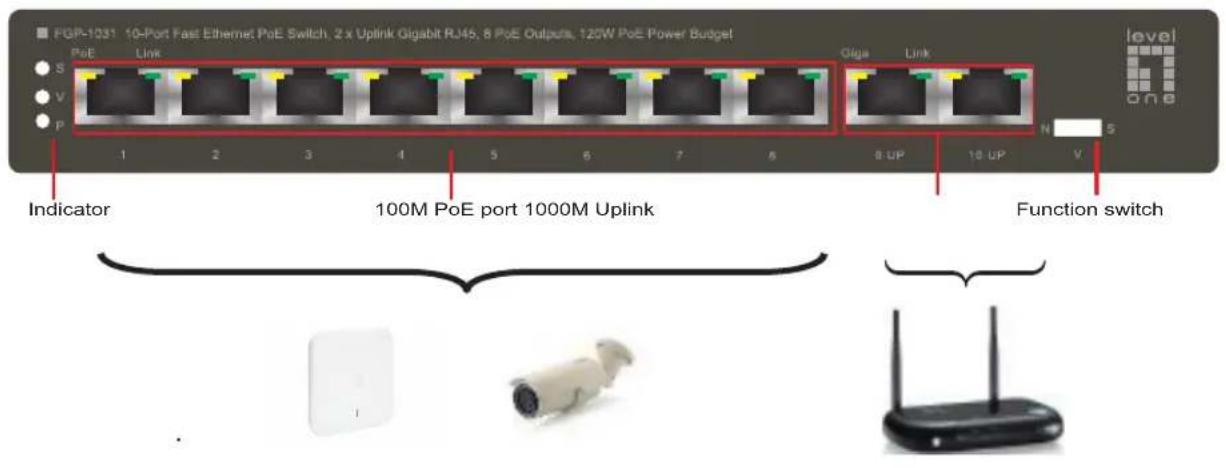
FGP-1031 10-Port Fast Ethernet PoE Switch, 2 x Uplink Gigabit RJ45, 8 PoE Outputs, 120W PoE Power Budget PeE Link S V P 1 2 3 4 5 6 7 8 9 10 UP 11 UP N 5 Indicator 100M PoE port 1000M Uplink Function switchFunction Switch
| Mark Mode | Description | |
| N | Standard Normal | All ports communicate freely, adapting to common data transmission environment |
| V | Port Isolation | Switch to VLAN mode; downlink isolating from each other, uploads and downloads data through uplink; suppress network failure like broadcast storm and virus attack |
| S | Super Mode | Downlink speed limitation: 10M (Ultral-far transmission: 250 meters) |
Indicator
| Indicator | Status | Description | |
| Power LED:P | Always ON | Normal | |
| Always OFF | Power Unconnected | ||
| Flashes | Port circuit or current over-loaded | ||
| Port Isolation LED: V | Always ON | Port Isolation mode ON | |
| Super Mode LED: S | Always ON | Super mode ON | |
| PoE LED | Orange | Always ON | Powered equipments connected and power supply normally |
| Always OFF | No powered equipments connected or no power supply | ||
| Green | Always ON | Network signal communicated | |
| Always OFF | Network signal not communicated | ||
連結網路裝置
| Mark Mode | Description | |
| N | Standard Normal | All ports communicate freely, adapting to common data transmission environment |
| V | Port Isolation | Switch to VLAN mode; downlink isolating from each other, uploads and downloads data through uplink; suppress network failure like broadcast storm and virus attack |
| S | Super Mode | Downlink speed limitation: 10M(Ultral-far transmission: 250 meters) |
Indicator
| Indicator | Status | Description | |
| Power LED:P | Always ON | Normal | |
| Always OFF | Power Unconnected | ||
| Flashes | Port circuit or cunrrrent over-loaded | ||
| Port Isolation LED: V | Always ON | Port Isolation mode ON | |
| Super Mode LED: S | Always ON | Super mode ON | |
| PoE LED | Orange | Always ON | Powered equipments connected and power supply narmally |
| Always OFF | No powered equipments connected or no power supply | ||
| Green | Always ON | Network signal communicated | |
| Always OFF | Network signal not communicated | ||
| Mark Mode | Description | |
| N | Standard Normal | All ports communicate freely, adapting to common data transmission environment |
| V | Port Isolation | Switch to VLAN mode; downlink isolating from each other, uploads and downloads data through uplink; suppress network failure like broadcast storm and virus attack |
| S | Super Mode | Downlink speed limitation: 10M (Ultral-far transmission: 250 meters) |
Indicator
| Indicator | Status | Description | |
| Power LED:P | Always ON | Normal | |
| Always OFF | Power Unconnected | ||
| Flashes | Port circuit or current over-loaded | ||
| Port Isolation LED: V | Always ON | Port Isolation mode ON | |
| Super Mode LED: S | Always ON | Super mode ON | |
| PoE LED | Orange | Always ON | Powered equipments connected and power supply normally |
| Always OFF | No powered equipments connected or no power supply | ||
| Green | Always ON | Network signal communicated | |
| Always OFF | Network signal not communicated | ||