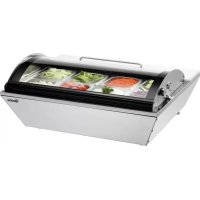
700211G - Refrigerator BARTSCHER - Free user manual and instructions
Find the device manual for free 700211G BARTSCHER in PDF.



| Product Type | Refrigerated display cabinet |
| Brand | Bartscher |
| Model | 700211G |
| Capacity | 67 liters |
| Dimensions (W x D x H) | 765 x 610 x 320 mm |
| Net weight | 24.8 kg |
| Electrical supply | 230 V ~ 50 Hz, 70 W |
| Refrigerant | R600a |
| Temperature range | 0 °C to 10 °C |
| Cooling type | Static |
| Defrost | Automatic (4 times/24h) + manual |
| Materials | Stainless steel cabinet, safety glass lid |
| Number of included GN pans | 8 GN 1/6 pans (depth 100 mm) |
| Included accessories | 3 dividers (360 x 30 mm) |
| Display and controls | Digital temperature control, LED display, ON/OFF switch |
| Intended use | Refrigeration of food in professional catering |
| Maintenance and cleaning | Clean with hot water and food-safe disinfectant; do not use direct water jet |
| Safety | Unplug before cleaning; do not use if cable is damaged; avoid heat sources |
| Repairability | Repairs by an authorized professional only |
Frequently Asked Questions - 700211G BARTSCHER
User questions about 700211G BARTSCHER
0 question about this device. Answer the ones you know or ask your own.
Ask a new question about this device
Download the instructions for your Refrigerator in PDF format for free! Find your manual 700211G - BARTSCHER and take your electronic device back in hand. On this page are published all the documents necessary for the use of your device. 700211G by BARTSCHER.
USER MANUAL 700211G BARTSCHER
natural_image
Exterior view of a stainless steel kitchen appliance with multiple circular cavities and a curved lid (no text or symbols visible)700211G
Bedienungsanleitung
Kuhlauslagevitrine 67L
Seite 1 bis 18
D/A/CH
Instruction manual
Refrigerated display cabinet 67L
from page 19 to 36
GB/UK
Mode d'emploi
of the original instruction manual
Table of contents
1. Safety 20
1.1 Safety instructions 20
1.2 Key to symbols 21
1.3 Hazard sources 22
1.4 Proper use....24
2. General information 25
2.1 Liability and Warrantees 25
2.2 Copyright protection 25
2.3 Declaration of conformity 25
3. Transport, packaging and storage.... 26
3.1 Delivery check 26
3.2 Packaging....26
3.3 Storage 26
4. Technical data 27
4.1 Overview of parts 27
4.2 Technical specification 29
5. Installation and operation.... 30
5.1 Positioning and connection....30
5.2 Operation....32
6. Cleaning 34
7. Possible Malfunctions .... 35
8. Waste disposal 36
Bartscher GmbH
Read these instructions before using and keep them available at all times!
This instruction manual contains information about the installation, operation and maintenance of the device and should be consulted as an important source of information and reference guide.
Awareness of the safety instructions and instructions for use in this manual will ensure the safe and correct use of the device.
In addition to the information given here, you should comply with any local Health and safety Controls and generally applicable safety regulations.
The instruction manual forms part of the product and should be kept near the device and easily accessible for anyone carrying out the installation, servicing, maintenance or cleaning.
1. Safety
This device is designed in accordance with the presently applicable technological standards. However, the device can pose a danger if handled improperly and inappropriately.
All persons using the device must follow the recommendations and instructions in this manual.
1.1 Safety instructions
- Do not use the device in case it does not function properly, has been damaged or dropped.
- Only a qualified technician and using original spare parts and accessories should carry out repairs and maintenance of the device. Do not attempt to repair the device yourself.
- Do not use any accessory or spare parts that have not been recommended by the manufacturer. These can be dangerous for the user or lead to damages of the device or personal injury, and further, the warranty expires.
- To prevent hazards and to ensure optimum efficiency, no modifications or alterations to the device that are not explicitly approved by the manufacturer may be undertaken.
- Never allow the power cable to come into contact with heat sources or sharp edges. The power cable should not hang over the side of the working surface. Ensure that no one can step on or trip over the cable.
- The power cable must not be folded, bent or tangled, and must always remain fully unrolled.
- Never place the device or other objects on the power cable.
- Do not lay the cable over carpets or heat insulations. Do not cover the cable. Keep away the cable from operating range and do not dunk it into water.
- Inspect the power cable regularly for damage. Never use the device if the cable is damaged. If the power cable is damaged, have an authorised service center or qualified electrician replace it.
• Children should be observed to ensure that they are not playing with the device. - Do not move or tilt the device when in operation.
- Only use the device indoors.
1.2 Key to symbols
In this manual, symbols are used to highlight important safety instructions and any advice relating to the device. The instructions should be followed very carefully to avoid any risk of accident, personal injury or material damage.

WARNING!
This symbol highlights hazards which could lead to injury.
To avoid them please follow the instructions very carefully and proceed with particular attention in these cases.

WARNING!
This symbol highlights dangerous situations which could lead to injury or death.
To avoid them please follow the instructions very carefully and proceed with particular attention in these cases.

CAUTION!
This symbol highlights dangerous situations which could lead to light injuries, or damage, malfunction, and/or destruction of the device.
To avoid them please follow the instructions very carefully and proceed with particular attention in these cases.
NOTE!
This symbol highlights recommendations and information aimed for effective and trouble-free device operation.
1.3 Hazard sources

DANGER!
Electric shock hazard!
To avoid the hazard results please follow the safety instructions below.
Do not use the machine in case of incorrect operation, damages or dropping on the floor. When the cable is damaged it should be replaced by the service company or qualified electrician in order to avoid the hazards.
The supply cable must be disconnected from the socket only by pulling the plug.
➢ Never carry or lift the device by the supply cable.
In any case do not open the device housing. In case of electrical or mechanical modifications the electric shock hazard will occur.
➢ Never immerse the plug in water or other liquids.
➢ Never operate the device with moist hands or standing on wet floor.
Remove the plug from its socket:
- when the device is not used,
- in case of anomalies during operation,
- before cleaning.

DANGER!
Suffocation hazard!
➢ Prevent access of children to the package materials like plastic bags and foamed polystyrene elements.

WARNING!
Burn hazard!
To avoid the hazard results please follow the safety instructions below.
During normal operation the compressor surface may be hot. Do not touch it with bare hands.

WARNING!
Fire or explosion hazard!
In case of improper operation there is the fire or explosion hazard due to ignition of the device content.
To avoid the hazard results please follow the safety instructions below.
Do not store the flammable or explosive substances in the device, like ether, kerosene, or glues.
Do not clean the device with use of flammable liquids. The released vapours may cause fire or explosion.
Do not store gasoline or other flammable substances in the vicinity of the device. The vapours may cause fire or explosion.
Do not store the explosive objects in the device, like cans with explosive work substances.
Do not allow for the cooling circuit damages.
1.4 Proper use

CAUTION!
The device has been designed and manufactured for the industrial use and should be operated only by the qualified personnel of the restaurants, canteens, hospitals, and similar places.
The operational safety of the device is assured only in case of proper use, according to the operation manual.
All technical activities like installation and maintenance must be performed by the qualified service personnel only.
The refrigerated display cabinet is designed for food cooling only.
Do not use the refrigerated display cabinet for the:
- storage of flammable substances or explosive materials, for example ether, petroleum, or advesives;
- storage of medicinal products or preserved blood products.

CAUTION!
Any use going beyond the intended purpose and/or any different use of the device is forbidden and is not considered as conventional.
Any claims against the manufacturer or his authorized representative as a consequence of experiencing damages resulting from unconventional use are impossible.
The operator is liable for all damages resulting from inappropriate use.
2. General information 2.1 Liability and Warrantees
All the information and instructions in this manual take into account standard safety regulations, current levels of technical engineering as well as the expertise and experience we have developed over the years.
The instruction manual was translated with all due care and attention. However, we do not accept liability for any translation errors. The German version of this instruction manual is definitive.
If the delivery consists of a special model, the actual scope of delivery may differ from the descriptions and illustrations in this manual. This is also the case for special orders or when the device has been modified in line with new technology.

CAUTION!
Read this manual carefully and thoroughly before any operation of the device, and especially before turning it on!
Manufacturer is not liable for any damages or faults caused by:
- violation of advice concerning operation and cleaning;
- use other than designed;
- alterations made by user;
- use of inadequate spare parts.
We reserve the right to make technical changes for purposes of developing and improving the useful properties.
2.2 Copyright protection
The instruction manual including any texts, drawings, images or other illustrations is copyright. No part of this publication may be reproduced, transmitted or used in any form or by any means without permission in writing from the manufacturer. Any person who commits any unauthorized act in relation to this publication shall be liable to claims for damages. All rights reserved.
NOTE!
The contents, texts, drawings, pictures and any other illustrations are copyright and subject to other protection rights. Any person unlawfully using this publication is liable to criminal prosecution.
2.3 Declaration of conformity

The device complies with the current standards and directives of the EU. We certify this in the EC declaration of conformity. If required we will be glad to send you the according declaration of conformity.
3. Transport, packaging and storage
3.1 Delivery check
Please check the delivery upon completeness and transport damage immediately after receipt. In case of visible damage do not accept or accept the delivery with reservation only.
Note the extent of damage on the carrier's bill of delivery. Trigger off the complaint. Hidden damages should be reclaimed immediately after notice, as claims for damages can only be asserted within the effective period for complaints.
3.2 Packaging
Please do not throw away the covering carton of your device as it might be useful for storage purposes, when moving or, in case of damages, when the device must be sent back to a repair center. The outer and inner packing material should be removed completely from the device before installation.
NOTE!
If you liked to dispose the packing, consider the regulations applicable in your country. Supply re-usable packing materials to the recycling.
Please inspect the device upon completeness. In case any part is missing please contact our customer service center immediately.
3.3 Storage
Keep the package closed until installation and under consideration of the outside indicated positioning- and storage markings.
Packages should be stored under consideration of the following:
- Do not store outdoors.
- Keep it dry and dust-free.
- Do not expose it to aggressive media.
- Do not expose it to direct sunlight.
- Avoid mechanical shocks and vibration.
- In case of longer storage (> 3 months) make sure you check the state of the packaging and the parts regularly. If required refresh or renew.
4. Technical data 4.1 Overview of parts
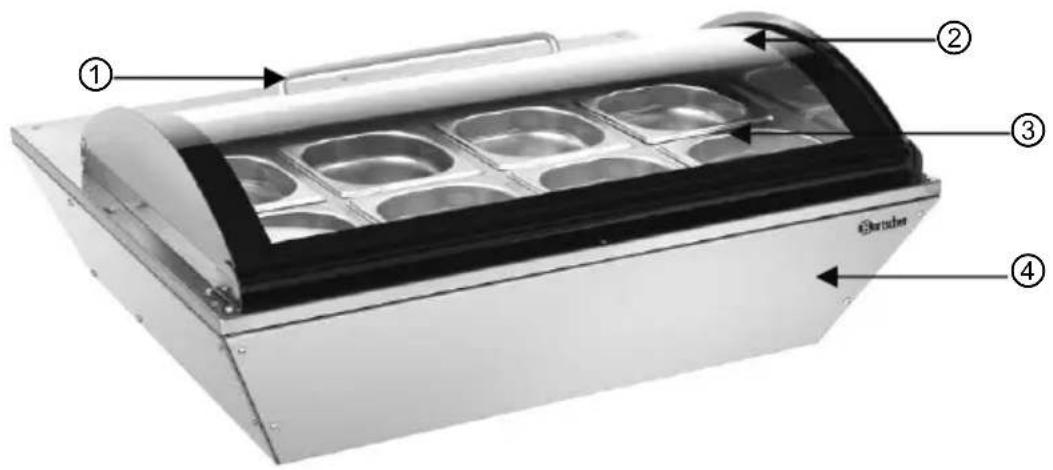
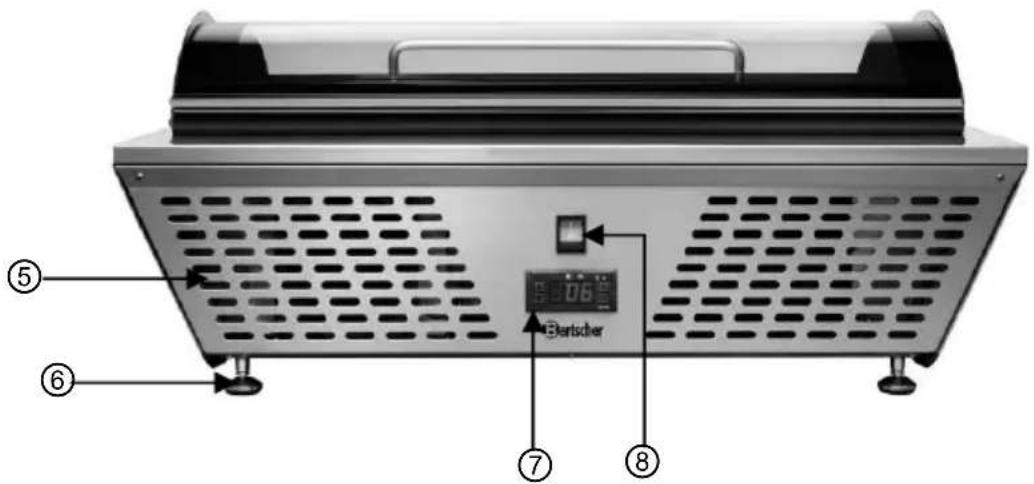
Service side view
① Glass cover handle
② Glass cover
③ GN containers
④ Body
⑤ Vents
⑥ Feet
⑦ Digital temperature control
⑧ ON/OFF switch
Digital temperature control
The temperature control is located at the service side of the unit.
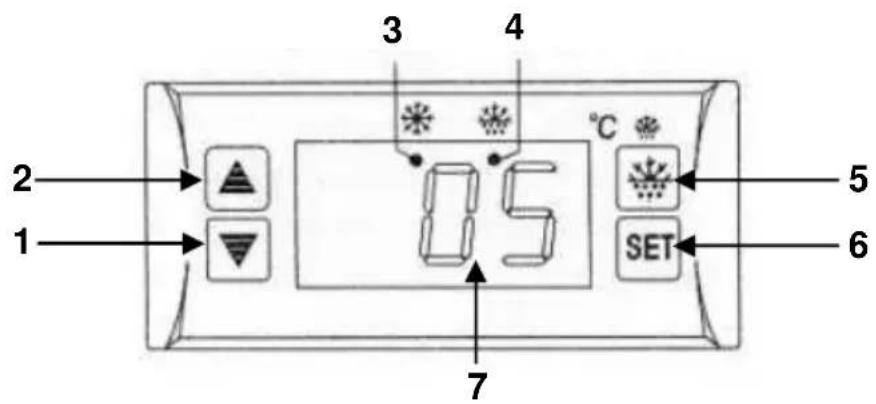
1 Temperature decrease button
2 Temperature increase button
3 LCD cooling indicator
4 LCD defrost indicator
5 Manual defrost button
6 Adjust/save setting (SET) button
7 Digital display
LCD Indicators

LCD cooling indicator:
The light on indicates cooling, it is off when the temperature inside the cabinet remains constant, and flashes for delayed start.

LCD defrost indicator:
The light on indicates defrosting, it is off when defrosting has finished, and flashes for delayed defrosting.
4.2 Technical specification
| Item | Refrigerated display cabinet 67L with 8 GN containers 1/6GN |
| Code-No.: | 700211G |
| Features: thermostatic cooling, automatic defrost function | |
| Material: stainless steel body, glass cover, safety glass | |
| Volume: 67 litres | |
| Refrigerant: R600a | |
| Operating temperature: 0 °C – 10 °C | |
| Supply power: 70 W / 230 V~ 50 Hz | |
| Dimentions: W 765 x D 610 x H 320 mm | |
| Weight: 24.8 kg | |
| Accessories: | 3 bridges: length 360 mm, width 30 mm;8 GN containers 1/6 GN, depth 100 mm |
We reserve the right to make technical changes!
5. Installation and operation
5.1 Positioning and connection
Positioning
- Before the operation unpack the device and remove all package material and protective foil from the device and equipment.

CAUTION!
➢ Never remove the rating plate and any warning signs from the device.
- Position the device in safe place of load capacity sufficient for weight of the device with full content.
- Never place the device on the flammable surfaces.
- In order to avoid the compressor damages do not tilt the device during positioning or transport by more than 45°.
- Do not place the device in the vicinity of open fire, electric ovens, heating furnaces, or other heat sources like direct sunlight. High temperature may damage the device surface and may impact the cooling capacity and energy consumption.
- During the device installation keep in mind that the environment temperature should not be lower than 0 °C and higher than 32 °C.
- Position the device in such way that free air circulation is assured. Remain distance of at least 10 cm from the walls and other objects.
- Never cover the ventilation holes of the device.
- Do not place the device in places of high air humidity. The excessive humidity may damage the device.
- Do not bore holes or install other objects in the device.
- Do not place any heavy objects on the device.
Connection

DANGER! Electric shock hazard!
The device can cause injuries due to improper installation!
Before installation and connecting the local power grid specification should be compared with that of the device (see rating plate). Connect the device only in case of compliance!
Connect the device only to properly installed single socket with protective terminal.
Do not disconnect the supply cable by pulling it, always pull the plug.
- Before use position the device and leave it for at least 2 hours before connecting to the power supply.
• After a power outage or after removing the plug from its socket do not connect the device to a power source for at least 5 minutes. - The electrical circuit in the socket must be secured to at least 16A. Only connect the device directly to the wall socket; do not use any extension cords or power strips.
- Position the device in such way that the plug is easily accessible for quick disconnecting when required.
5.2 Operation
Preparation
- Before you start using the unit read the instruction manual to know the unit and its accessories.
- Before you start using the unit clean it thoroughly following the instructions in point 6.2 "Cleaning".
- Shut the glass cover.
- Plug in the unit to the correct, single socket. Turn the unit on with ON/OFF switch (set at "I").
- The digital display will show the set temperature and the LED cooling indicator will light.
- You should place the food in the refrigerated cabinet only when the unit reaches its operational cooling parameters.
Set the required temperature (required value)
- Optimal temperature is set as default and corresponds to the operational temperature inside the refrigerated cabinet between 0 °C and 10 °C.
• To set or change the required value:
➢ press, and the set value starts flashing on the digital display;
increase or decrease the temperature as required with or buttons;
save the set temperature with button.
NOTE!
Unless you press any button in the 10 following seconds the digital display shows the temperature inside the refrigerated cabinet.
The displayed temperature is the value measured in the close proximity to the temperature probe and serves controlling the cooling.
Automatic defrost
The unit is automatically defrosted 4 times in 24 hours.
Manual defrost
In the case of reduced cooling capacity, for example when the glass cover remains open for a long time, the manual defrost is recommended. To start defrosting press

button and hold it for 6 seconds.
The LCD indicator “*” for defrosting will light.
Designated GN containers
- You can use the following GN containers with the unit:
- 1 x 1/1 GN + 1 x 1/3 GN, depth 100 mm (with a bridge in between)
- 8 x 1/6 GN, depth 100 mm (with 3 bridges in between)
Cooling food products
- When the temperature inside the unit reaches the set value the LED cooling indicator goes off and you can place the food products inside the unit.
You should not place any hot food in the refrigerated cabinet. The food should cool down to the ambient temperature first.
- First prepare the food products and place them in the suitable GN containers.
- Shut the glass cover right after you have placed the food products in to limit the loss of the cooled air inside the refrigerated cabinet.
- Shut the glass cover when you have taken out the required food products.
- In the case you plan not to use the unit for some time you should turn it off (set the ON/OFF switch at „O“) and disconnect from the power supply (unplug!).
6. Cleaning

CAUTION!
Disconnect the unit from the power supply (unplug!) before cleaning.
The unit is not designed to be rinsed with running water and you should not use the pressured water to clean it! Be careful and do not let the water into the unit.
- Clean the refrigerated cabinet regularly.
- Open the glass cover, remove the GN containers with the food products from the refrigerated cabinet and store them in a refrigerator.
- Regularly clean the inner side of the refrigerated cabinet and glass cover using warm water and food safe desinfectant. Use soft clothes only. Rinse with clean water to completely remove any remains of the cleaning agent. Thoroughly dry the cleaned areas.
- Careful! In the lower part of the unit there is a rubber drain hose locked with the plug. If condensed water or cleaning water collects in the area with the GN containers when the unit operates, you can remove the water with the drain hose to any suitable container. Re-lock the hose with the rubber plug afterwards.
- Clean the outer surface of the body and glass cover with a damp cloth and mild cleaning agent, and dry thoroughly.
- Clean the used GN containers with warm water and food safe desinfectant. Thoroughly rinse the GN containers with clean water and dry them well.
- Never use aggressive or coarse cleansing agents, for example scouring powder, alcohol containing agents, solvents, that might damage the surface of the unit.
7. Possible Malfunctions
In the case of malfunction consult the following table before you call the service or contact the seller.
| Problem | Cause | Solution |
| No cooling | The plug is not placed in the socket.Failure of the power supply fuse.No power supply.Failure of the temperature control. | Plug into the socket correctly.Verify the power supply.Verify the power supply.Contact the seller. |
| Not sufficient cooling capacity | Direct sun exposure or there are sources of heat in the close proximity to the unit.Wrong air circulation in the unit.The glass cover not completely shut or stays open for too long. | Move the unit further from the sources of heat.Make sure there is enough room between the unit and the walls or other objects.Completely shut the glass cover and shorten the time when it stays open. |
| Loud sounds when operating | The unit is not placed on the even surface.The unit is too close to the walls or other objects. | Place the unit on the even surface.Make sure there is enough room between the unit and the walls or other objects. |
| Cooling does not turn off automatically | The glass cover stayed open for too long. | Shorten the time when the glass cover stays open. |
In the case you are unable to solve the problems:
- disconnect the unit from the power supply (unplug!),
- do not open the body,
- call the service or contact the seller.
The following do not indicate failure:
- Sound of flowing water. The sound you can hear when the unit works normally. The sound is created by the refrigerant circulating in the system.
- Water condensation on the outer glass walls is normal at higher humidity. Condensed water should be collected with a soft and dry cloth.
8. Waste disposal
Discarding old devices
At the end of its service life the discarded device has to be disposed in accordance with the national regulations. It is advisable to contact a company which is specialized in waste disposal, or just contact the local disposal service in your community.

WARNING!
To exclude any abuse and the dangers involved make the waste device unfit for use before disposal. For that purpose disconnect device from mains supply and remove mains connection cable from the device.

CAUTION!
For the disposal of the device please consider and act according to the national and local rules and regulations.
Bartscher GmbH
4.2 Indications techniques

- of the original instruction manual
- Table of contents
- Safety 20
- General information 25
- Transport, packaging and storage.... 26
- Technical data 27
- Installation and operation.... 30
- Cleaning 34
- Possible Malfunctions .... 35
- Waste disposal 36
- Read these instructions before using and keep them available at all times!
- Safety
- Safety instructions
- Key to symbols
- WARNING!
- CAUTION!
- NOTE!
- Hazard sources
- DANGER!
- Electric shock hazard!
- Suffocation hazard!
- Burn hazard!
- Fire or explosion hazard!
- Proper use
- General information 2.1 Liability and Warrantees
- Copyright protection
- Declaration of conformity
- Transport, packaging and storage
- Delivery check
- Packaging
- Storage
- Technical data 4.1 Overview of parts
- Digital temperature control
- LCD Indicators
- LCD cooling indicator:
- LCD defrost indicator:
- Technical specification
- Installation and operation
- Positioning and connection
- Positioning
- Connection
- DANGER! Electric shock hazard!
- Operation
- Preparation
- Set the required temperature (required value)
- Automatic defrost
- Manual defrost
- Designated GN containers
- Cooling food products
- Cleaning
- Possible Malfunctions
- In the case you are unable to solve the problems:
- The following do not indicate failure:
- Waste disposal
- Discarding old devices
- Indications techniques
Brand : BARTSCHER
Model : 700211G
Category : Refrigerator