X370H37015 - Power bank Neoxeo - Free user manual and instructions
Find the device manual for free X370H37015 Neoxeo in PDF.


User questions about X370H37015 Neoxeo
0 question about this device. Answer the ones you know or ask your own.
Ask a new question about this device
Download the instructions for your Power bank in PDF format for free! Find your manual X370H37015 - Neoxeo and take your electronic device back in hand. On this page are published all the documents necessary for the use of your device. X370H37015 by Neoxeo.
USER MANUAL X370H37015 Neoxeo
English See details of Warranty in English section.
The warranty conditions are as follow:
- a warranty of 2 years from the date of purchase is extended to this product. In the event of a warranty claim, the date of purchase must be proven by presenting proof of purchase or the invoice.
- During the warranty period, any hidden defects are automatically covered at no charge by the warranty.
- The following are not covered by the warranty:
A: any damages due to improper use, for example, failure to observe the operating instructions.
B: any damages due to reconditioning or repairs made by the purchaser or by unauthorised third parties.
C: any parts subject to normal wear, such as batteries.
- We assume no liability for consequential damages caused directly or indirectly by the device, including when the damage caused to the device is covered by the warranty.
Never open or repair the device yourself. Do not use this device in a damp environment. Clean the device using a dry cloth.
This product is in compliance with the essential requirements and other relevant provisions of applicable EU directives. The declaration of conformity [DoC] is available upon request by sending a request to the address given at the end of Instruction Manual.
Thank you to have chosen the NEOXEO quality. This product has been created by our professional team and according to the European regulation. For a better use of your new device, we recommend you to read carefully this user manual and keep it for record.
Safety Precautions
Warning! Make sure that all users who operate this product read and follow this Instruction Guide. Failure to read and follow the safety information before using and installing may result in serious or fatal injury and / or property damage.
- This product is suitable for use only with USB - Compatible and plug type compatible devices. Using this product with the other electronic devices may result in serious or fatal injury and / or property damage.
- To avoid potential property damage, disconnect input power to this product when it is not in use.
- Do not operate this product near a heat source or heat vent, or in direct sunlight. The adaptor should be used in temperature between 5 - 35 degrees Celsius.
- Keep this product dry. Direct contact of this product to moisture may lead to electrical shock, causing serious or fatal injury and / or property damage.
- To Keep away from children, this is not a toy.
- Use this unit only for its designed use according to this instruction manual.
- Unplug this unit during lightning storm.
Technical specification
- Battery type: Lithium-ion
Power Capacity: 2200mAh -
Input: 5V/1A
Output:5V/1A -
Charging 4 LEDs indicator [0-25; 25-50; 50-75; 75-100]
- Included:1 micro USB cable 25cm for recharge powerbank
Weight: 70g
Product dimension: 22 [D] × 22 [W] × 110 [L] mm
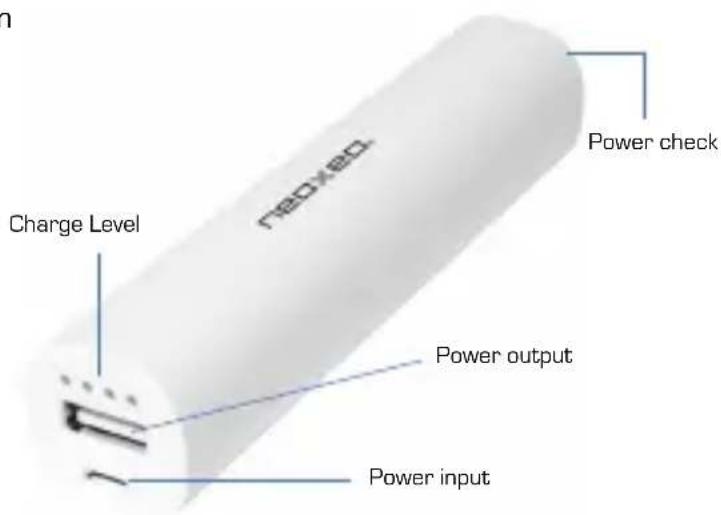
Product View Description
Charging your powerbank [Charging mode]
You should charge your powerbank via USB DC 5.0V adaptor.
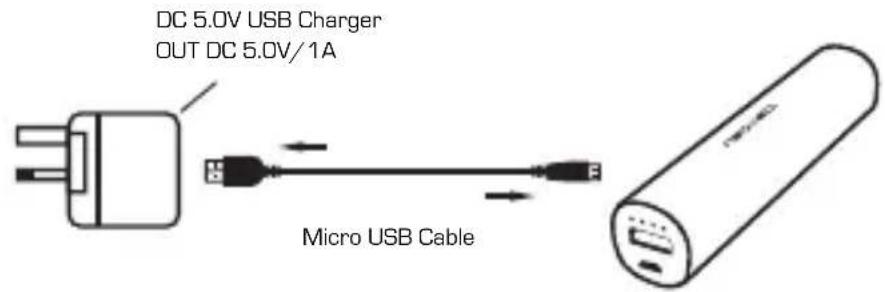
- Connect the micro USB connector of the cable to the power input of powerbank.
- Connect the USB connector of cable to the USB port of Wall/Car adaptor.
- When the powerbank is in charging mode a blue LED light flashes on the LED power capacity indicator.
- The 4 LED indocator will flash one after the others.
- Once all 4 LEDs are lighted, the charging process is finished.
Remark: The powerbank will switch into low current charging mode when its capacity reaches 90% , so the 4th LED indicator will flash longer.
Testing charging level of your powerbank
You can get the charge level of your Powerbank when pressing the button located on its bottom end. When pressing the button, the blue LED will light up. Each LED represents 25% of the total charge. i.e if 3 Blue LEDs light up it means the charge of the battery is still between 50% and 75% approx.
Charging your digital device with your powerbank.
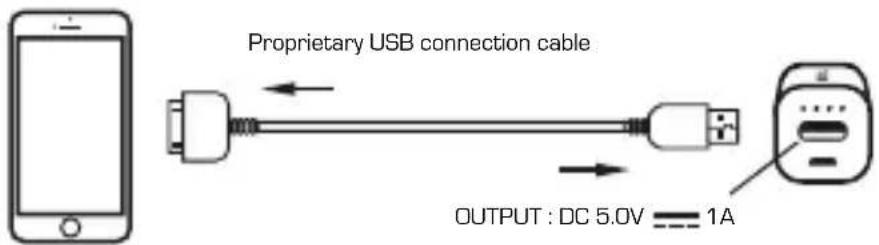
- Use the proprietary USB charging cable which has been sold with your digital device. i.e 3D pins or lightning USB cable for Apple, Samsung 30 pins or micro usb , etc...
- If your device is compatible with micro USB connector you can alternatively use the supplied cable.
- Connect the USB-A connector of the charging cable to the USB output of the Powerbank.
- Connect the relevant connector to your device. (at the other end of your charging cable)
- The charge will start automatically
Charging tip :
Switching off your device during charging, which is not mandatory, will provide a better "re-fuel" efficiency.
The fully charge capability is depends on your digital device power capacity
Maintenance
Keep your power bank operating to the fullest potential, by following the below steps:
- Re-charge your power bank when only one LED lights up during capacity check.
- Re-charge your power bank once every three months when it is not in use.
- Keep the power bank away from any moist environment and corrosive material.
- Never wash the power bank with any chemicals, soaps or detergents.
"Apple" is a trademark of Apple Inc., registered in the U.S. and other countries
"Samsung" is a trademark of SAMSUNG in the U.S. or other countries.
DISCLAIMER
Updates to hardware components are made regularly. Therefore some of the instruction, specifications and pictures in this documentation may differ slightly from your particular situation.
All items described in this guide for illustration purposes only and may not apply to particular situation. No legal right or entitlements may be obtained from the description made in this manual.
Disposal
As such we urge you to follow the correct disposal procedure for the product, packaging materials and if applicable, accessories and batteries. This will help conserve natural resources and ensure that the materials are recycled in a manner that protects health and the environment.
You must follow laws and regulations about disposal. Waste electrical products and batteries must be disposed of separately from household waste when the product reaches the end of its life.
Contact the store where you bought the product and your local authority to learn about disposal and recycling. The batteries must be disposed of at your local recycling point. See the operating instructions to find out how to remove the batteries for disposal.
We apologise for any inconvenience caused by minor inconsistencies in the operating instructions, which may occur as a result of product improvement and development.

The symbol means that the unit complies with European safety and electrical interference directives

neoxeo
NeoXeo-LFP UK Enterprise House, Roysdale Way Euroway
Trading Estate Bradford, West Yorkshire - BD4 6SE
Email: sales@ufpuk.com
CONDITIONS DE GARANTIE
Specifications Techniques
- Type de pile : Lithium-ion
Capacite: 2200 mAh - Entrée:5V/1A
Sortie:5V/1A