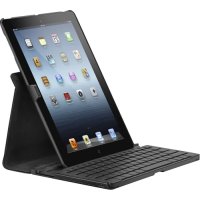
THZ192DE - Stapler TARGUS - Free user manual and instructions
Find the device manual for free THZ192DE TARGUS in PDF.


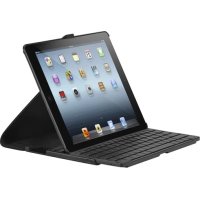
| Product Type | Bluetooth Keyboard Case for iPad Air |
| Model | THZ192DE |
| Brand | Targus |
| Compatibility | iPad Air (1st generation) |
| Dimensions (approx.) | 25 x 19 x 2 cm |
| Weight (approx.) | 500 g |
| Material | Plastic and fabric |
| Battery type | Rechargeable lithium-ion |
| Battery life | Approximately 90 hours |
| Charging time | Approximately 2 hours |
| Bluetooth range | Up to 10 meters |
| Bluetooth version | 3.0 |
| Power supply | USB port (mini USB cable included) |
| Main features | Backlit keyboard? No ; multi-function keys (home, search, volume, etc.) |
| Power saving mode | Auto sleep after 10 minutes of inactivity |
| Care and cleaning | Wipe with a soft, dry cloth; do not use abrasive products |
| Safety | Avoid exposure to water and excessive heat |
| Spare parts and repairability | Parts not available individually; built-in battery not user-replaceable |
| General information | Designed for mobile use; comes with charging cable and user guide |
Frequently Asked Questions - THZ192DE TARGUS
User questions about THZ192DE TARGUS
0 question about this device. Answer the ones you know or ask your own.
Ask a new question about this device
Download the instructions for your Stapler in PDF format for free! Find your manual THZ192DE - TARGUS and take your electronic device back in hand. On this page are published all the documents necessary for the use of your device. THZ192DE by TARGUS.
USER MANUAL THZ192DE TARGUS
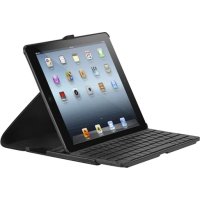
Thank you for your purchase of the Versavu™ Keyboard Case for iPad® Air This keyboard uses Bluetooth technology which provides a seamless connection up to 33 feet (10 m) away This keyboard is compatible with iPadAir Its compact size is ideal for portability and travel
Contents
• Versavu Keyboard and Case
- Micro USB Charging cable
- User Guide
System Requirements
Hardware
- iPad ^® Air
Establishing the Connection: iPad® Air
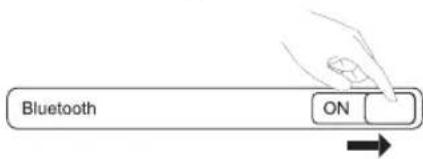
1 Switch ON the Bluetooth function of your iPadAir
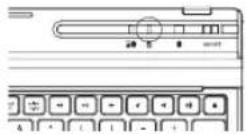
2 Switch ON the Bluetooth Keyboard, press the Bluetooth button on your keyboard Blue LED will be blinking
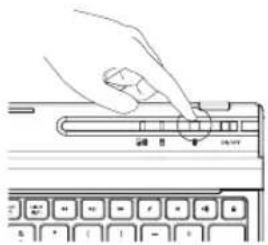
natural_image
Hand pressing a button on a computer keyboard (no text or symbols visible)3 Once the Targus Bluetooth 3 0 Keyboard is listed as a found device in the Bluetooth menu on the iPad Air, tap on the name and you will be prompted to enter a code as shown
Bluetooth Pairing Request
Enter the code "XXXX" on "Targus Bluetooth 3 0 Keyboard", followed by the return or enter key
Cancel
4 Enter the code shown on the pop up message, followed by the enter key
5 After pairing, the iPadAir will show the status "Connected"
6 Targus Bluetooth 3 0 Keyboard is now connected with your iPAir
Note: To optimize the battery life of your iPad ^® Air make sure that the iPad ^® Air Cover Lock/ Unlock option in the settings menus is set to OFF This will keep the iPad ^® Air from being accidentally awoken by a key press during transit
Power Saving Mode
The Versavu Keyboard will go to sleep mode after it is abandoned for 10 minutes. To optimize the keyboard battery life, we recommend that you turn it off when not in use.
Targus Versavu™ Keyboard Case for iPad® Air
Charging the Keyboard
natural_image
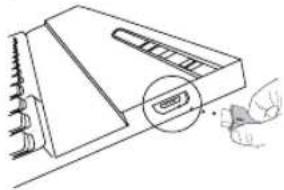
Line drawing of a device with a magnified inset showing a button or connector (no text or symbols)1 Connect the wireless keyboard to any USB outlet including a computer or iPad Air Charger via the supplied USB cable The Charging indicator light in yellow when charging
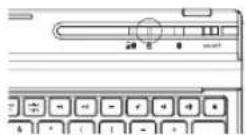
2 Charging is complete when the charging indicator turn in blue A full charge will take approximately 2 hours to complete
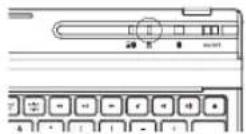
Battery Life Indicator / Bluetooth Connection Light
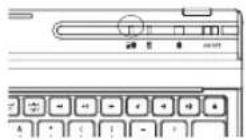
• This light will blink in blue when the keyboard switched to the Bluetooth Connection mode
- This Light will blink twice every second when the power level drops below 15%
- Keyboard will shut down when power level is below 10%
• The battery will provide approximately 90 hours of use on a full battery charge
Illustrate Key legend functions
| [86G3] | Function |
| Home | |
 | Search |
| App display | |
| Show and hide the Keyboard on your display | |
 | Copy |
| Paste | |
 | |
| [STYK] | Cut |
| select | Selects all text |
| [CZSW] | |
| select | Extend text selection one character to the left of the cursor |
| [46HO] | |
| right | Extend text selection one character to the right of the cursor |
 | |
| Rewind or go to previous song, movie or slideshow | |
| [6OTD] | Play or pause songs, movies or slideshows |
| -- | |
| Fast forward or go to next song, movie or slideshow | |
| [2CZZ] | Mute the sound on the iPad® Air |
| Decrease volume on the iPad® Air | |
| Increase volume on the iPad® Air | |
| Lock you display | |
| Language shift |

Einführung
natural_image
Hand pressing a button on a keyboard (no text or symbols visible)natural_image
Line drawing of a device with a magnified inset showing a USB cable (no text or symbols)Targus Versavu™ Keyboard Case for iPad® Air
natural_image
Hand pressing a button on a computer keyboard (no text or symbols visible)natural_image
Diagram of a device with a magnified inset showing a button labeled 'USB' (no text or symbols present)Targus Versavu™ Keyboard Case for iPad® 5th Generation
Esittely
Establishing the Connection: iPad® Air
natural_image
Line drawing of a device with a magnified inset showing a button or connector (no text or symbols)Targus Versavu™ Keyboard Case for iPad® 5th Generation
natural_image
Illustration of a hand pressing a button on a computer keyboard (no text or symbols visible)natural_image
Line drawing of a device with a magnified inset showing a small component (no text or symbols)Targus Versavu™ Keyboard Case for iPad® Air
natural_image
Hand pressing a button on a computer keyboard (no text or symbols visible)natural_image
Line drawing of a device with a hand inserting a button labeled 'USB' (no text or symbols on the device itself)1 Koble det trådløse tastaturet til en innebygd USB-port på datamaskinen eller bruk iPad ^4 Air-laderen med USB-kabel
natural_image
Hand pressing a button on a computer keyboard (no text or symbols visible)natural_image
Line drawing of a device with a magnified inset showing a button labeled 'USB' and a hand holding a mouse (no text or symbols present)For technical questions, please visit:
| • Denmark: | +45 35 25 87 51 (English) |
| • Finland: | +358 922948016 (English) |
| • France: | 01-6453-9151 (French) |
| • Germany: | 0211-6579-1151 (German) |
| • Norway: | +4722577729 (English) |
| • Sweden: | 08-751-4058 (English) |
| • Switzerland: | +41 (0) 44 212 0007 (French or German) |
| • UK: | 020-7744-0330 (English) |
Product Registration
Targus recommends that you register your Targus accessory shortly after purchasing it Go to:
http://www.targus.com/registration.asp
You will need to provide your full name, email address, country of residence and product information
TWO YEAR WARRANTY
1 Targus warrants to the original purchaser that its products are free from defects in materials and workmanship for two years. This warranty is limited to defects, materials and workmanship 2 The benefits to the consumer given by the warranty are in addition to other rights and remedies of the consumer under law in relation to the goods to which the warranty relates 3 The warranty is given by Targus Europe Ltd., 5 New Square, Bedfont Lakes Business Park, Feltham, Middlesex TW14 8HA, United Kingdom. 4. The purchaser must provide the purchaser's name, contact telephone number, the Targus model number on the product, date and place of purchase with receipt for purchase if required and describe the fault condition 5 Wha Targus must do:- (i) Targus will provide the purchaser with store return information or a return authorisation so that the purchaser may return the product for warranty inspection, (ii) If after inspection Targus finds the product is defective in materials or workmanship, Targus shall replace (or repair) the defective product at the discretion of Targus and ship the product from Targus warehouse at its expense within three business days (Monday to Friday excluding public holidays) of receiving the returned goods. If the product is no longer available Targus reserves the right to replace with the nearest corresponding product of no lesser quality, (iii) Targus will bear the cost of return delivery to the purchaser regardless of the inspection test result. The purchaser must bear the cost of the delivery to Targus. There is no charge for inspection. 6 Our goods come with guarantees that cannot be excluded under the Australian Consumer Law. You are entitled to a replacement or refund for a major failure and for compensation for any other reasonable foreseeable loss or damage. You are also entitled to have the goods repaired or replaced if the goods fail to be of acceptable quality and the failure does not amount to a major failure. 7 Please note: (i) Features and specifications of all Targus products are subject to change without notification, (ii) In some instances: Goods presented for repair may be replaced by refurbished goods of the same type rather than being repaired. Refurbished parts may be used to repair the goods, (iii) If goods accepted for repair retain user-generated data: During the process of repair some or all of your stored data may be lost. Please ensure that you have saved this data elsewhere prior to repair
Regulatory Compliance
This device complies with Part 15 of the FCC Rules Operation is subject to the following two conditions: (1) This device may not cause harmful interference, and (2) This device must accept any interference received, including interference that may cause undesired operation
FCC Statement
Tested to Comply
This equipment has been tested and found to comply with the limits of a Class B digital device, pursuant to Part 15 of the FCC Rules. These limits are designed to provide reasonable protection against harmful interference in a residential installation. This equipment generates, uses, and can radiate radio frequency energy and if not installed and used in accordance with the instructions, may cause harmful interference to radio communications. However, there is no guarantee that interference will not occur in a particular installation. If this equipment does cause harmful interference to radio or television reception, which can be determined by turning the equipment off and on, the user is encouraged to try to correct the interference by one or more of the following measures:
Targus Versavu™ Keyboard Case for iPad® Air
• Reorient or relocate the receiving antenna;
- Increase the separation between the equipment and receiver;
- Connect the equipment into an outlet on a circuit different from that to which the receiver is connected;
- Consult the dealer or an experienced radio/TV technician for help
Changes or modifications not authorized by the party responsible for compliance could void the user's authority to operate this product
Declaration of Conformity
Hereby, Targus, declares that this device is in compliance with the essential requirements and other relevant provisions of Directive 1999/5/EC
Battery Warning
You are cautioned that changes or modifications not expressly approved by the party responsible for compliance could void your authority to operate the equipment
CAUTION: AVOID PROLONGED USE OF THE KEYBOARD WITHOUT BREAKS
Take regular breaks and keep a good posture Consult your physician promptly if you notice any lost of motion or pain in your wrist when using the keyboard
RF exposure warning
The equipment complies with FCC RF exposure limits set forth for an uncontrolled environment
The equipment must not be co-located or operating in conjunction with any other antenna or transmitter

This symbol on the product or in the instructions means that your electrical and electronic equipment should be disposed at the end its life separately from your household waste. There are separate collection system for recycling in the EU. For more information, please contact the local authority or your retailer where you purchased the product

bar
| Category | Value | |---|---| | Category 1 | 100 | | Category 2 | 100 | | Category 3 | 100 | | Category 4 | 100 | | Category 5 | 100 | | Category 6 | 100 | | Category 7 | 100 | | Category 8 | 100 | | Category 9 | 100 | | Category 10 | 100 | | Category 11 | 100 | | Category 12 | 100 | | Category 13 | 100 | | Category 14 | 100 | | Category 15 | 100 | | Category 16 | 100 | | Category 17 | 100 | | Category 18 | 100 | | Category 19 | 100 | | Category 20 | 100 | | Category 21 | 100 | | Category 22 | 100 | | Category 23 | 100 | | Category 24 | 100 | | Category 25 | 100 | | Category 26 | 100 | | Category 27 | 100 | | Category 28 | 100 | | Category 29 | 100 | | Category 30 | 100 | | Category 31 | 100 | | Category 32 | 100 | | Category 33 | 100 | | Category 34 | 100 | | Category 35 | 100 | | Category 36 | 100 | | Category 37 | 100 | | Category 38 | 100 | | Category 39 | 100 | | Category 40 | 100 | | Category 41 | 100 | | Category 42 | 100 | | Category 43 | 100 | | Category 44 | 100 | | Category 45 | 100 | | Category 46 | 100 | | Category 47 | 100 | | Category 48 | 100 | | Category 49 | 100 | | Category 50 | 100 | | Category 51 | 100 | | Category 52 | 100 | | Category 53 | 100 | | Category 54 | 100 | | Category 55 | 100 | | Category 56 | 100 | | Category 57 | 100 | | Category 58 | 100 | | Category 59 | 100 | | Category 60 | 100 | | Category 61 | 100 | | Category 62 | 100 | | Category 63 | 100 | | Category 64 | 100 | | Category 65 | 100 | | Category 66 | 100 | | Category 67 | 100 | | Category 68 | 100 | | Category 69 | 100 | | Category 70 | 100 | | Category 71 | 100 | | Category 72 | 100 | | Category 73 | 100 | | Category 74 | 100 | | Category 75 | 100 | | Category 76 | 100 | | Category 77 | 100 | | Category 78 | 100 | | Category 79 | 100 | | Category 80 | 100 | | Category 81 | 100 | | Category 82 | 100 | | Category 83 | 100 | | Category 84 | 100 | | Category 85 | 100 | | Category 86 | 100 | | Category 87 | 100 | | Category 88 | 100 | | Category 89 | 100 | | Category 90 | 100 | | Category 91 | 100 | | Category 92 | 100 | | Category 93 | 100 | | Category 94 | 100 | | Category 95 | 100 | | Category 96 | 100 | | Category 97 | 100 | | Category 98 | 100 | | Category 99 | 100 | | Total (Total) |2 YEARS LIMITED WARRANTY: We pride ourselves on the quality of our products. For complete warranty details and a list of our worldwide offices, please visit www.targus.com
Features and specifications are subject to change without notice. Bluetooth is a registered trademark of Bluetooth SIG, Inc Apple and iPad are trademarks of Apple Inc , registered in the U S and other countries trademarks and registered trademarks are the property of their respective owners ©2014 Targus Group International, Inc
All

Bluetooth
QD ID:B018080


FCC ID: OXM000052



- Contents
- System Requirements
- Hardware
- Establishing the Connection: iPad® Air
- Bluetooth Pairing Request
- Cancel
- Power Saving Mode
- Targus Versavu™ Keyboard Case for iPad® Air
- Charging the Keyboard
- Battery Life Indicator / Bluetooth Connection Light
- Einführung
- Targus Versavu™ Keyboard Case for iPad® 5th Generation
- Esittely
- Product Registration
- TWO YEAR WARRANTY
- Regulatory Compliance
- FCC Statement
- Tested to Comply
- Declaration of Conformity
- Battery Warning
- RF exposure warning
Brand : TARGUS
Model : THZ192DE
Category : Stapler