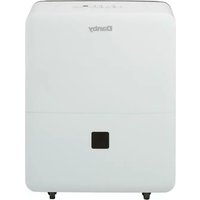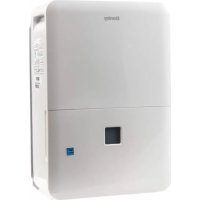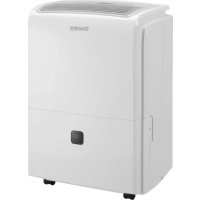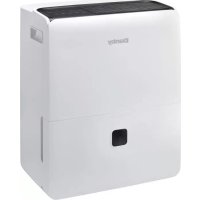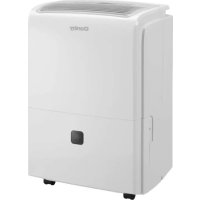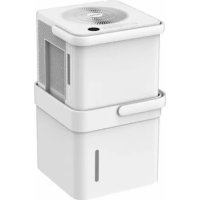
DDR050BCWDB - Dehumidifier DANBY - Free user manual and instructions
Find the device manual for free DDR050BCWDB DANBY in PDF.


User questions about DDR050BCWDB DANBY
0 question about this device. Answer the ones you know or ask your own.
Ask a new question about this device
Download the instructions for your Dehumidifier in PDF format for free! Find your manual DDR050BCWDB - DANBY and take your electronic device back in hand. On this page are published all the documents necessary for the use of your device. DDR050BCWDB by DANBY.
USER MANUAL DDR050BCWDB DANBY
Owner's Manual. 1-14
DÉSHUMIDIFICATEUR
Welcome to the Danby family.
We are proud of our quality products and we believe in dependable service. We suggest that you read this owner's manual before plugging in your new appliance as it contains important operation information, safety information, troubleshooting, and maintenance tips to ensure the reliability and longevity of your appliance.
You are entitled to the warranty coverage as described in the owner's manual provided with your new appliance.
- Please write down your appliance information below. You must keep the original proof of purchase receipt to validate and receive warranty services.
- Register your product online and receive a FREE 2 MONTH WARRANTY EXTENSION after fi lling out a product survey, at www.danby.com/support/product-registration/
Model Number:
Serial Number:
Date of Purchase:
Need Help?
- Read your Owner's Manual for installation help, troubleshooting, and maintenance assistance.
- Visit www.Danby.com to access self-service tools, FAQs and much more by searching your model number in the search bar.
- For the Quickest Customer Service, please fill out the web form at www.danby.com/ support. Your submission will go directly to an expert on your particular appliance. Our average response times are between 20 minutes and 2 hours, during EST business hours.
- Call 1-800-263-2629 - please note that during peak hours, hold times can exceed one hour.

Important Safety Information READ AND FOLLOW ALL SAFETY INSTRUCTIONS
SAFETY REQUIREMENTS
This appliance is not intended for use by persons (including children) whose physical, sensory or mental capabilities may be different or reduced, or who lack experience or knowledge, unless such persons receive supervision or training to operate the appliance by a person responsible for their safety.
Children should be supervised to ensure that they do not play with the appliance.
To avoid risk of electric shock, do not operate this dehumidifi er in an area that is likely to accumulate standing water. If this condition develops, disconnect the power supply before stepping into the water.
Do not store or use combustible materials such as gasoline or other flammable vapors or liquids in the vicinity of this or any other appliance.
Do not insert fingers or other objects into grills or openings in the appliance.
Do not cover or block the intake and exhaust openings.
Do not operate the appliance without the fi Iter installed.
Do not operate the appliance near heat sources.
This appliance is intended for indoor, residential applications only. Do not use this dehumidifi er outdoors. Do not use this dehumidifi er for commercial or industrial applications.
GROUNDING INSTRUCTIONS
This appliance must be grounded. Grounding reduces the risk of electrical shock by providing an escape wire for the electrical current.
This appliance has a cord that has a grounding wire with a 3-prong plug. The power cord must be plugged into an outlet that is properly grounded. If the outlet is a 2-prong wall outlet, it must be replaced with a properly grounded 3-prong wall outlet. The serial rating plate indicates the voltage and frequency the appliance is designed for.
WARNING - Improper use of the grounding plug can result in a risk of electric shock. Consult a qualified electrician or service agent if the grounding instructions are not completely understood, or if doubt exists as to whether the appliance is properly grounded.
Do not connect the appliance to extension cords, adapters or together with another appliance in the same wall outlet.
Do not splice the power cord. Do not under any circumstances cut or remove the third ground prong from the power cord.
If the power supply cord is damaged, it must be replaced by the manufacturer, its service agent or similar qualifi ed person in order to avoid hazard.
INSTALLATION INSTRUCTIONS
ASSEMBLY
- Remove all packaging.
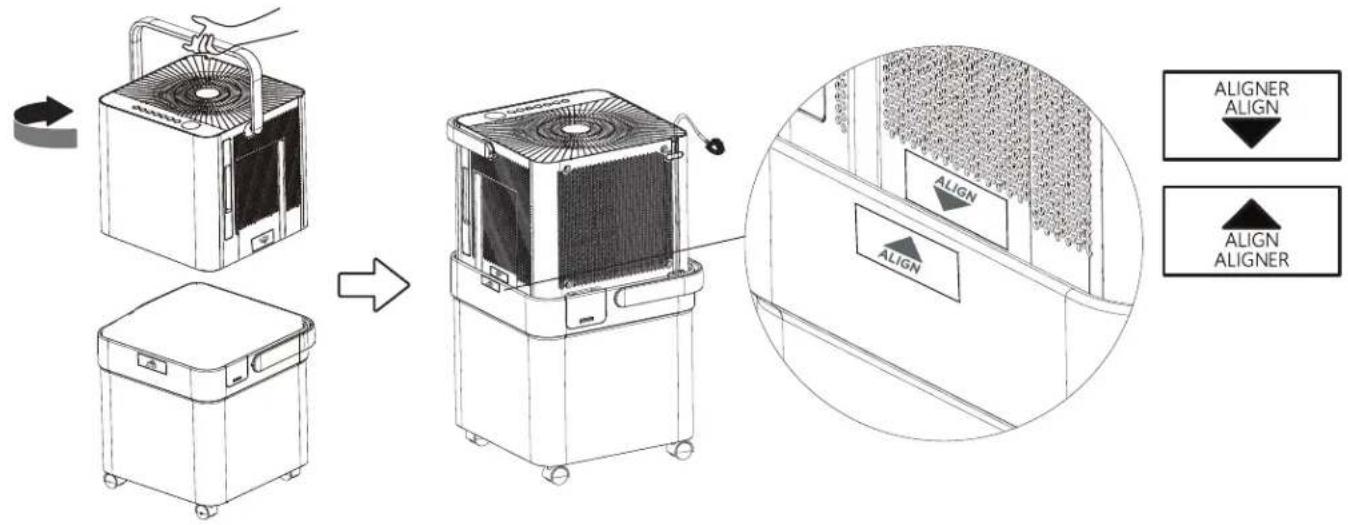
- Lift the dehumidifi er by the handle, pull out the power cable and rotate the dehumidifi er 90 degrees clockwise.
- Place the dehumidifi er onto the water bucket according to the "ALIGN" labels and press down gently until it clicks into place.
CASTER INSTALLATION
- Slide the four casters into the slots on the bottom of the dehumidifi er.
- Press down on the caster lock to secure the caster.

- To remove the casters, lift up the caster lock with a screwdriver and then slide the caster out.

OPERATING INSTRUCTIONS
FEATURES
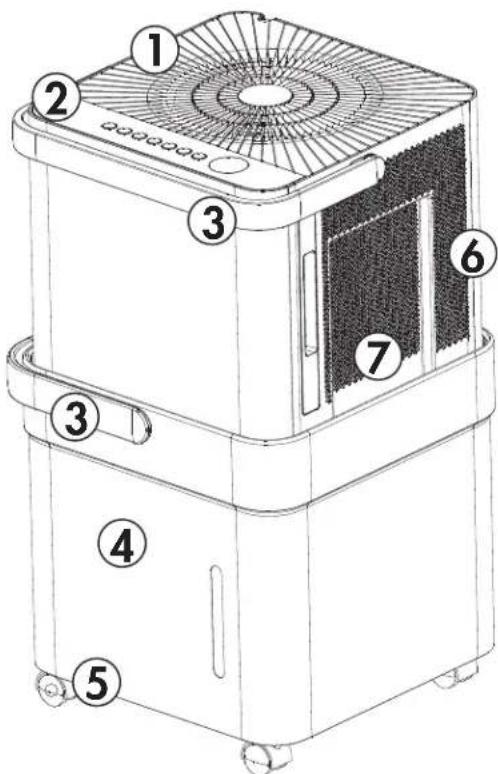
- Air outlet
- Control panel
- Handle
- Water bucket
- Casters
- Air intake
- Air filter (behind the grill)
DEFAULT SETTING
The default setting is continuous mode and high fan speed. This means that when the dehumidifi er is plugged in for the first time it will run in continuous mode with the fan speed set to high.
Press the mode button to change the mode, if desired. Press the humidity adjust buttons to set the desired humidity. Ensure that the set humidity is lower than the ambient humidity.
OPERATION
- Place the dehumidifi er on a smooth, level floor that is strong enough to support the appliance with a full bucket of water.
- Do not place the dehumidifi er on carpeting as this can block air flow around the appliance. Do not force casters to move over carpeting as the appliance can become unbalanced and spill water.
- To maintain efficiency, operate the appliance in an enclosed area. Keep nearby doors and windows closed.
- Maintain a minimum clearance of 40~cm (16 inches) around the air outlets and 20~cm (8 inches) on other sides of the appliance to allow for proper air circulation.
The recommended ambient operating temperature is between 5^ (41^) and 32^ (90^) . Low ambient operating temperatures can cause frost to form on the internal coils which may affect performance. - Any time the appliance is placed on its back or side, it must be allowed to stand upright for 6 hours before plugging in to avoid damage to internal components.
- For optimal performance, ensure that the humidity setting is 10% lower than the ambient humidity. It is normal for the ambient humidity to vary up to 5% above or below the set humidity.
It is recommended in normal conditions to set the humidity between 40 - 45% .
It is normal for the dehumidifi er to exhaust warm air.
CONTROL PANEL
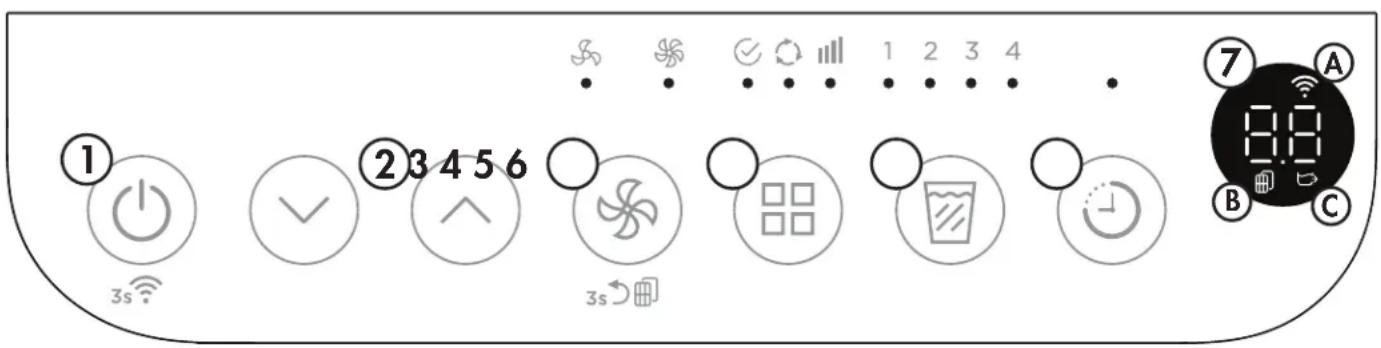
1. Power button:
- Press to turn the dehumidifi er on or off.
-
Press and hold for 3 seconds to activate the wireless connection.
-
Humidity adjust buttons: The humidity level can be set within a range of 35% to 85% relative humidity in 5% increments. For drier air, set to a lower percentage value. For more damp air, set a higher percentage value.
3. Fan button:
- Press to select normal or high fan speed.
-
After 250 hours of operation, the filter light indicator will illuminate on the display. Clean the filter and then press and hold the fan button for 3 seconds to reset the fi lter indicator.
-
Mode button: Press the mode button to select the desired mode.
-
Set mode: the humidity level and fan speed can be set manually by the user.
- Continuous mode: the dehumidifier will run continuously. The humidity level cannot be adjusted. The fan speed can be adjusted.
- Max mode: the dehumidifier will run continuously. The humidity level cannot be adjusted. The fan speed will be set to high and cannot be adjusted.
5. Fill level button:
-
Press the fi ll level button to choose the bucket capacity: 1, 2, 3 or 4.
-
Timer button: Press to set the timer.
7. Display:
- Shows the set humidity level between 35% to 85% relative humidity while setting, then shows the ambient humidity in a range of 30% to 90% relative humidity with an accuracy of ± 5% .
- Displays the timer settings.
- Shows all error codes.
A. Indicator will illuminate when the wireless connection is active.
B. Indicator will illuminate when the fi Iter needs to be cleaned.
C. Indicator will illuminate when the dehumidifi er is being used without the bucket installed.
OPERATING INSTRUCTIONS
TIMER
The timer can be used to set the dehumidifi er to turn off or on after a set period of time.
Auto Off
- When the dehumidifi er is turned on, press the timer button to activate the auto off timer.
- Press the humidity adjust buttons to change the set time in 0.5 hour increments up to 10 hours and then in 1 hour increments up to 24 hours.
Auto On
- When the dehumidifi er is turned off, press the timer button to activate the auto on timer.
- Press the humidity adjust buttons to change the set time in 0.5 hour increments up to 10 hours and then in 1 hour increments up to 24 hours.
The auto on and auto off timers can be used at the same time by first setting one and then the other.
The timer will not cycle the dehumidifi er on and off indefinitely. The auto on and auto off timers will function one time and then the dehumidifi er will return to regular functioning.
Turning the dehumidifi er on or off at any time or changing the timer setting to 0.0 will cancel the timer settings. The P2 bucket full bucket error code will also cancel the timer setting.
WIRELESS CONNECTION
This appliance can be controlled with a wireless application on your wireless device.
Visit https://www.danby.com/support/#apps to download the application and learn about its operation.
WATER REMOVAL
1. Water Bucket
The dehumidifi er will automatically collect condensed water in the water bucket. When the bucket is full, the compressor and fan will turn off and the full bucket indicator light will turn on. The display will show "P2".
To empty the bucket, lift the dehumidifi er handle and separate the body from the water tank. Put the dehumidifi er body on a fl at, solid surface. Empty the bucket but be cautious when moving the bucket, it will be full and can be heavy.
The dehumidifi er will resume functioning when the body is reconnected to the water bucket.
OPERATING INSTRUCTIONS
2. Continuous Drain
Water can be removed using the continuous drain with either the provided drain hose or a standard garden hose.
The provided clear plastic drain hose is 2 feet (0.6 m) long. If there is no available drain within range of the dehumidifi er, a garden hose can be attached instead. Please note, the garden hose should be no longer than 6 feet (1.8 m). If the drain hose is too long water may not drain completely which can lead to stagnant water and mildew build up inside the hose.
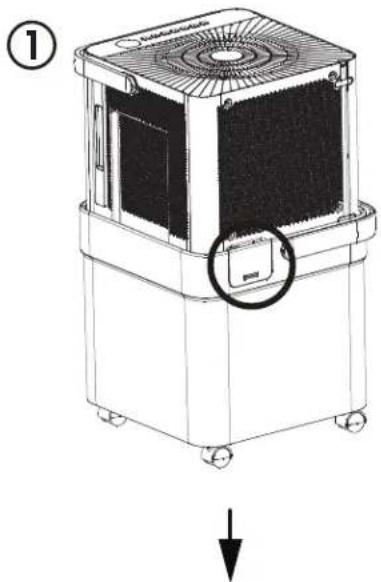
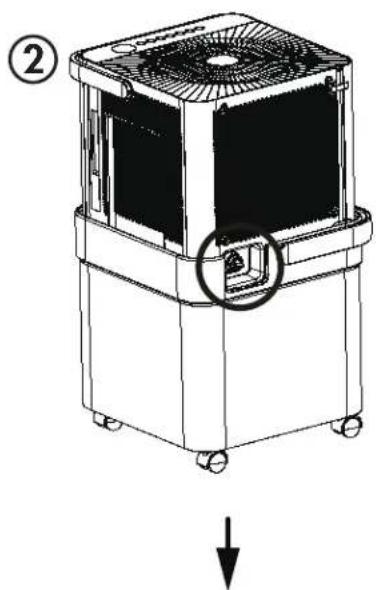
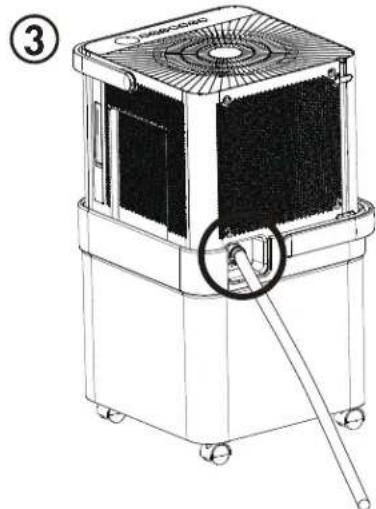
To attach to continuous drain hose:
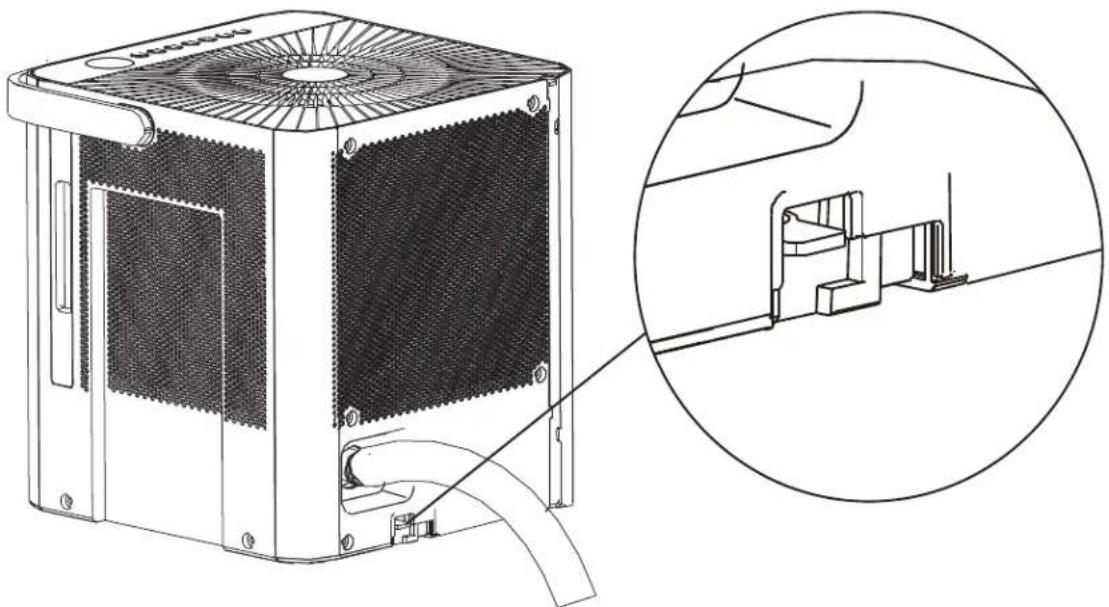
- Remove the cover located on the back of the water bucket.
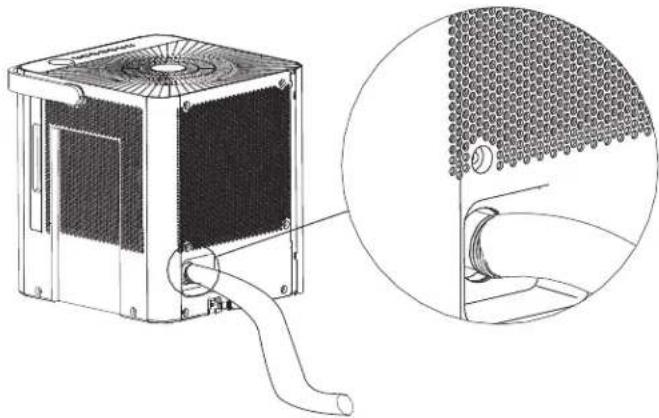
- Remove the plug from the continuous drain outlet and attach the desired hose.
- Direct the other end of the hose to a bucket or floor drain.
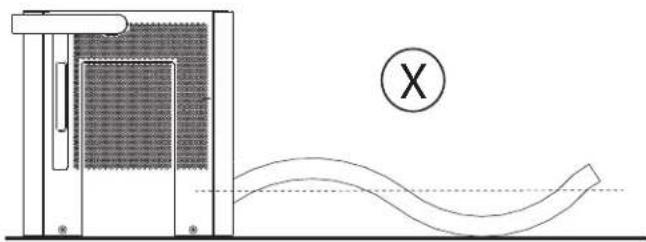
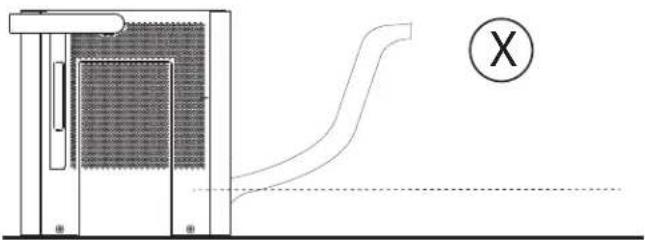
Ensure that the hose is not bent and goes straight down from the back of the appliance. The continuous drain is only activated by gravity so any bends or upward motion in the hose will stop the water from draining.
OPERATING INSTRUCTIONS
BUCKETLESS MODE
The dehumidifi er can be used without the bucket installed. This means the dehumidifi er will continue to remove water from the air and will not check if the bucket is installed.
Do not use bucketless mode without a drain hose attached. Ensure that the hose is securely connected before turning on the dehumidifi er. Direct the other end of the drain hose to a place with unlimited capacity such as a sink or floor drain. Directing the drain hose to a place with limited capacity could cause the water to overflow.
To turn on bucketless mode:
- Connect the drain hose to the dehumidifi er.
- Connect the dehumidifier to a power source. Do not install the water bucket.
- "Eb" will show on the display.
- Press and hold the fi ll level button and the up button at the same time for 3 seconds to set the dehumidifi er to run without the bucket.
- The bucketless indicator will illuminate on the display.
To turn off bucketless mode:
- Press and hold the fi ll level button and the up button at the same time for three seconds.
- Turn off the dehumidifi er. Ensure the bucket is installed before turning it back on again.
Important note: there is a micro switch on the bottom of the dehumidifi er that engages with the bucket. Bucketless mode may be automatically turned off if this switch is pressed. Ensure that the space is clear and that you do not touch the micro switch.
OPERATING INSTRUCTIONS
BUCKETLESS DRAIN
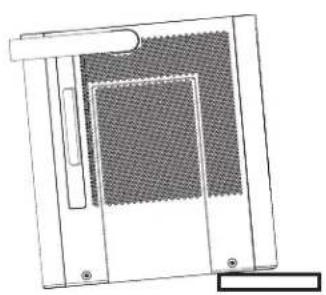
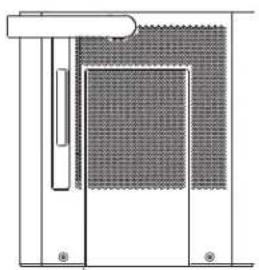
Ensure that the dehumidifi er is placed on a fl at, level surface to prevent toppling or sliding. The tilt angle needs to be less than 1 degree.
There is no drain pump in this dehumidifi er, the drain operates through gravity. The drain hose must angle down from the back of the dehumidifi er at least 10cm or more. The hose cannot lie fl at or be angled upward.
X
V
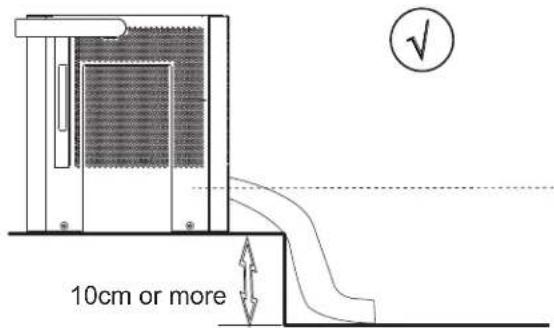
Ensure that the drain hose is properly connected before turning on bucketless mode.
CARE & MAINTENANCE
CLEANING
To avoid possible electric shock, ensure that the appliance is unplugged before performing any cleaning or maintenance.
The outside of the appliance can be wiped clean with a soft cloth or with a lukewarm, damp cloth if necessary.
Do not use gasoline, benzene, thinner or any other chemicals to clean this appliance as these substances can cause damage to the finish and deformation of plastic parts.
Never pour water directly onto the appliance as this will cause deterioration of electrical components and wiring insulation.
Ensure that the drain ports on the back of the appliance are free of dirt and calcium build up.
AIR FILTER
The air fi liter should be cleaned approximately every 2 weeks. The air fi liter may require more frequent cleaning if there is significant dander or fur in the air.
Every 250 hours or approximately every ten days, the fi liter indicator light on the control panel will illuminate as a reminder to clean the fi liter. Follow the steps below to clean the fi liter and return the appliance to normal functioning.
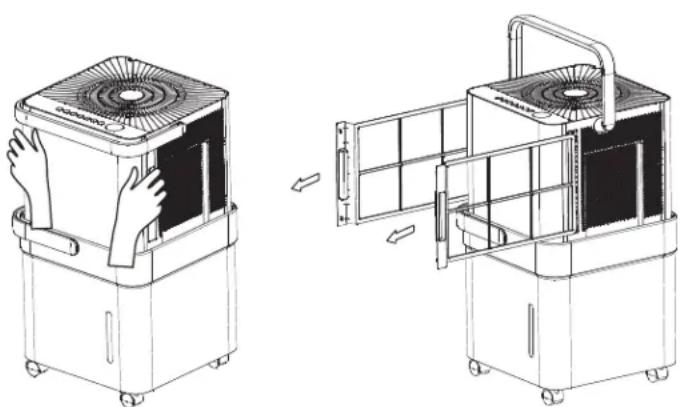
- The air fi lters are located behind the two side grills. Grip the side handles and pull gently forward to remove them.
- Use a vacuum cleaner with a soft brush attachment to remove any large debris or dust build up from the air fi tter.
- Wash the filter in lukewarm, soapy water, below 40^ (104^) , or use a neutral cleaning agent.
- Rinse the fiiter with clean water and dry thoroughly before reinstalling in the appliance.
- Press and hold the fan button for 3 seconds to reset the filter indicator.
Note: Do not operate the appliance without the air fi liter installed. Do not place the fi liters in a dishwasher.
CARE & MAINTENANCE
ERROR CODES
If the display panel shows any of the below error codes, unplug the dehumidifi er, let it stand for 5-10 minutes and then plug it back in. If the error persists, call for service.
EH60 - room temperature sensor error
EH61 - evaporator sensor error
EH0b - display board or master control board communication error
P2 - bucket is full
Eb - bucket is not installed
POWER FAILURE
In the event of a power failure or if the appliance is unplugged, it will resume normal functioning when power is restored. The mode and fan speed will resume at the settings chosen before the power failure.
AUTO DEFROST
When frost builds up on the evaporator coils, the compressor will cycle off and the fan will continue to run until the frost melts. The dehumidifi er may emit the sound of running water. This is the refrigerant moving through the coils and is normal.
END OF SEASON CARE
Unplug the dehumidifi er and ensure the fi liter is clean. Ensure the bucket is empty and then allow both the bucket and the dehumidifi er to dry completely before storing for the off season.
It could take a few days for water inside the dehumidifi er to completely evaporate. Wipe the bucket with a dry cloth and ensure the drain has been emptied to speed up this process Store the dehumidifi er covered in a dry location.
DISPOSAL
This appliance may not be treated as regular household waste, it should be taken to the appropriate waste collection point for recycling of electrical components. Check for local regulatory compliance regarding approved and safe disposal of this appliance.
FREQUENTLY ASKED QUESTIONS
What is the best humidity setting?
The recommend humidity setting is 40 - 45% .
Is the air that comes out of the dehumidifi er supposed to be hot?
Yes, usually this air feels warm.
Why isn't the dehumidifi er collecting any water?
There may not be enough humidity in your environment or the relative humidity might be set higher than ambient humidity.
Does the fan run continuously?
In continuous mode and max mode the fan will run continuously.
In a manual setting the fan will cycle on and off.
Can I use an extension cord?
No, the dehumidifi er is built to operate using the power cord provided.
Does the timer cycle on and off forever?
The on and off timers can be used at the same time however, they will only cycle one time and then resume normal functioning.
How do I hook up my direct drain?
Use the provided drain hose or purchase a garden hose. See page 7 for more information.
Does the fi liter light turn on when it is dirty?
The filter light turns on automatically after about 250 hours of use even if the filter is clean. Clean the filter and then hold the fan button for 3 seconds to turn the fi lter light off.
TROUBLESHOOTING
Appliance will not operate
- Plug is not fully inserted into the wall outlet
- Blown fuse or circuit breaker
- Ambient humidity is lower than the set humidity
- Bucket is full or is not in the proper position
Insuffi cients dehumidifying
Air filter is dirty
- Blocked air flow
- Appliance size is too small for application
- Ambient humidity is lower than the set humidity
Noise
Air filter is dirty
- Bucket is not in proper position
- Floor surface is not level
Odors
- Formation of mold or mildew on internal wet surfaces
- Place an algaecide tablet in the water bucket
Water on floor
- Hose connection is loose
- Drain cover has been removed
Frost build up
- When ambient temperature is below 5^ (41^) frost may form
- Switch the appliance to fan only mode until the frost melts
FCC WIRELESS REQUIREMENTS
This equipment has been tested and found to comply with the limits for a Class B digital device, pursuant to Part 15 of the FCC Rules. These limits are designed to provide reasonable protection against harmful interference in a residential installation. This equipment generates, uses and can radiate radio frequency energy and, if not installed and used in accordance with the instructions, may cause harmful interference to radio communications. However, there is no guarantee that interference will not occur in a particular installation.
If this equipment does cause harmful interference to radio or television reception, which can be determined by turning the equipment off and on, the user is encouraged to try to correct the interference by one or more of the following measures:
- Reorient or relocate the receiving antenna
- Increase the separation between the equipment and receiver
- Connect the equipment into an outlet on a circuit different from that to which the receiver is connected
- Consult the dealer or an experienced radio/TV technician for help
Changes or modifi cations not approved by the party responsible for FCC and Industry Canada compliance could void the user's authority to operate the equipment. This appliance complies with Part 15 of the FCC Rules and license-exempt RSS standards.
Operation is subject to the following conditions:
- This device may not cause interference.
- This device must accept any interference received, including interference that may cause undesired operation.
This equipment complies with FCC RF and IC RSS-102 radiation exposure limits set forth for an uncontrolled environment. This equipment should be installed and operated with minimum distance 20cm (8 inches) between the radiator and your body.
This device complies with RSS-247 of Industry Canada. Operation is subject to the condition that this device does not cause harmful interference.
This device complies with Canadian CAN ICES-3 (B) / NMB-3 (B)
This device contains:
FCC ID: 2ADQOMDNA21
IC: 12575A-MDNA21
LIMITED "IN HOME" WARRANTY
This quality product is warranted to be free from manufacturer's defects in material and workmanship, provided that the unit is used under the normal operating conditions intended by the manufacturer.
This warranty is available only to the person to whom the unit was originally sold by Danby Products Limited (Canada) or Danby Products Inc. (U.S.A.) (hereafter "Danby") or by an authorized distributor of Danby, and is non-transferrable.
TERMS OF WARRANTY
Plastic parts are warranted for thirty (30) days from the date of purchase, with no extensions provided.
First 24 months During the first twenty four (24) months, any functional parts of this product found to be defective, will be repaired or replaced, at warrantor's option, at no charge to the original purchaser.
To obtain service Contact the dealer where the unit was purchased, or contact the nearest authorized Danby service depot, where service must be performed by a qualified service technician. If service is performed on the unit by anyone other than an authorized service depot, all obligations of Danby under this warranty shall be void.
Boundaries of Danby reserves the right to limit the boundaries of "In Home Service" to the proximity of an authorized service depot. Any appliance requiring service outside the limited boundaries of "In Home Service", will be the consumer's responsibility to transport at their own expense to the original point of purchase or a service depot for repair. If the appliance is installed in a location that is 100 kilometers (62 miles) or more from the nearest service center, it must be delivered to the nearest authorized Danby Service Depot by the purchaser.
Transportation charges to and from the service location are not protected by this warranty and are the responsibility of the purchaser.
Nothing within this warranty shall imply that Danby will be responsible or liable for any spoilage or damage to food or other contents of this appliance, whether due to any defect of the appliance, or its use, whether proper or improper.
EXCLUSIONS
Save as herein provided, by Danby, there are no other warranties, conditions, representations or guarantees, express or implied, made or intended by Danby or its authorized distributors and all other warranties, conditions, representations or guarantees, including any warranties, conditions, representations or guarantees under any Sale of Goods Act or like legislation or statute is hereby expressly excluded. Save as herein provided, Danby shall not be responsible for any damages to persons or property, including the unit itself, howsoever caused or any consequential damages arising from the malfunction of the unit and by the purchase of the unit, the purchaser does hereby agree to indemnify and hold harmless Danby from any claim for damages to persons or property caused by the unit.
GENERAL PROVISIONS
No warranty or insurance herein contained or set out shall apply when damage or repair is caused by any of the following:
1) Power failure.
2) Damage in transit or when moving the appliance.
3) Improper power supply such as low voltage, defective house wiring or inadequate fuses.
4) Accident, alteration, abuse or misuse of the appliance such as inadequate air circulation in the room or abnormal operating conditions (ie. extremely high or low room temperature).
5) Use for commercial or industrial purposes (i.e. If the appliance is not installed in a domestic residence).
6) Fire, water damage, theft, war, riot, hostility, acts of God such as hurricanes, floods etc.
7) Service calls resulting in customer education.
8) Improper Installation (ie. Building-in of a free standing appliance or using an appliance outdoors that is not approved for outdoor application, including but not limited to: garages, patios, porches or anywhere that is not properly insulated or climate controlled).
Proof of purchase date will be required for warranty claims; retain bills of sale. In the event that warranty service is required, present the proof of purchase to our authorized service depot.
Warranty Service In Home
Danby Products Limited
PO Box 1778, Guelph, Ontario, Canada N1H 6Z9
Telephone: [519] 837-0920 FAX: [519] 837-0449
1-800-263-2629 04/17
Danby Products Inc.
PO Box 669, Findlay, Ohio, U.S.A. 45840
Telephone: (419) 425-8627 FAX: (419) 425-8629
QUESTIONS FREQUEMMENT POSÉES
Comment raccorder mon drain direct?
Danby Products Limited
PO Box 1778, Guelph, Ontario, Canada N1H 6Z9
Telephone: (519) 837-0920 Télécopieur: (519) 837-0449
1-800-263-2629
02/18
PO Box 669, Findlay, Ohio, U.S.A. 45840
Telephone: (419) 425-8627 Telecopieur: (419) 425-8629
Danby Products Limited
PO Box 1778, Guelph, Ontario, Canada N1H 6Z9
Telephone: [519] 837-0920 FAX: [519] 837-0449
1-800-263-2629
04/17
DanbyProductsInc.
PO Box 669, Findlay, Ohio, U.S.A. 45840
Telephone: (419) 425-8627 FAX: (419) 425-8629
Danby Products Limited, Guelph, ON, Canada N1H 6Z9 Danby Products Inc., Findlay, Ohio, USA 45840
Trademarks of Danby Products Limited and/or its subsidiaries
Marques de commerce de Danby Products Limited et / ou de ses filiales
* Marcas commerciales de Danby Products Limited y / o sus subsidiaries