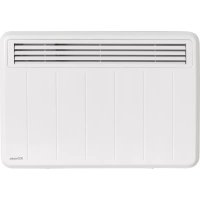
PLX075E - Heating DIMPLEX - Free user manual and instructions
Find the device manual for free PLX075E DIMPLEX in PDF.



| Product type | Wall-mounted electric heater |
| Brand / Model | Dimplex PLX075E |
| Dimensions (W x H x D) | 620 x 430 x 108 mm |
| Weight | 6.2 kg |
| Power supply | 230-240 V~, 1/N/PE |
| Rated power | 0.75 kW |
| Minimum power | 0.75 kW |
| Maximum continuous power | 0.75 kW |
| Standby consumption | 0.5 W |
| Protection rating | IP24 (splash-proof) |
| Control type | Touch electronic with display and weekly programming |
| Main functions | Manual mode, timer mode, frost protection (7 °C), countdown timer, adaptive start, window detection, key lock |
| Temperature range | 7 °C to 26 °C (extendable up to 32 °C) |
| Installation | Horizontal wall mounting, original bracket included |
| Maintenance and cleaning | Soft damp cloth, vacuum cleaner for dusting |
| Safety | Overload limiter, open window detection, automatic shutdown in case of overheating |
| Clock battery | CR2032, 3 V (replaceable) |
| Warranty | 2 years according to conditions |
Frequently Asked Questions - PLX075E DIMPLEX
User questions about PLX075E DIMPLEX
0 question about this device. Answer the ones you know or ask your own.
Ask a new question about this device
Download the instructions for your Heating in PDF format for free! Find your manual PLX075E - DIMPLEX and take your electronic device back in hand. On this page are published all the documents necessary for the use of your device. PLX075E by DIMPLEX.
USER MANUAL PLX075E DIMPLEX
1. Notes for the user
NOTE
Dear customer,
Keep these instructions in a safe place and pass them on to any future owners.
To ensure safe operation, the device may only be operated in accordance with the information in these operating instructions. Please carefully follow all information provided in these instructions.
ATTENTION!
This device can be used by children aged 8 and over and by persons with limited physical, sensory or mental aptitude, providing they are supervised or have been instructed in the safe use of the device and understand the associated potential dangers. Children must not play with the device. Cleaning and user maintenance may not be carried out by children without supervision.
ATTENTION!
Children younger than 3 years of age must be kept away unless they are supervised constantly.
ATTENTION!
Children between the ages of 3 and 8 may switch the device on and off if they are supervised or have been instructed in the safe use of the device and have understood the resulting dangers, providing that the device is positioned or installed in its normal place of use.
ATTENTION!
Children between the ages of 3 and 8 may not switch on the device, clean the device or carry out maintenance.
ATTENTION!
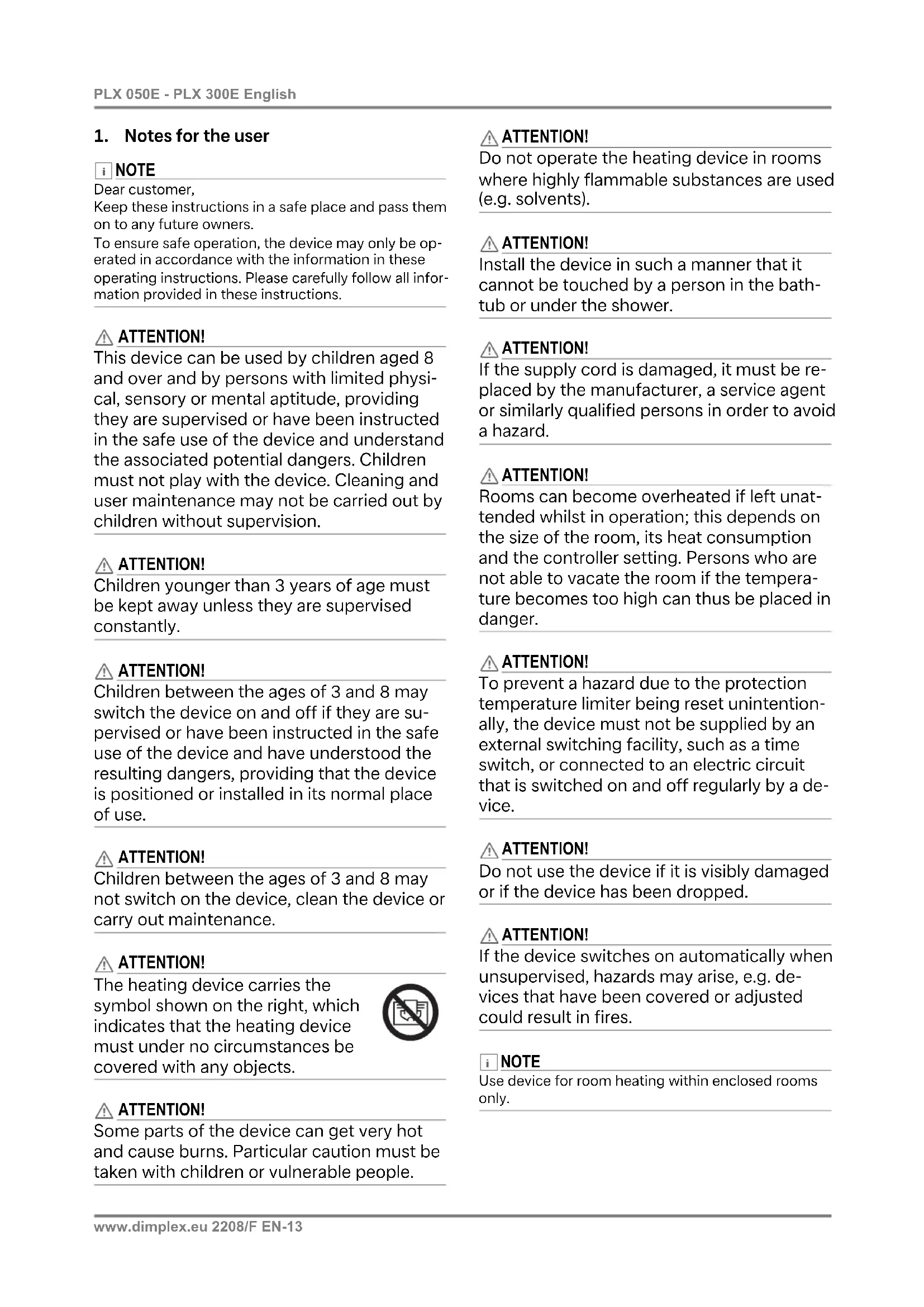
The heating device carries the symbol shown on the right, which indicates that the heating device must under no circumstances be covered with any objects.

ATTENTION!
Some parts of the device can get very hot and cause burns. Particular caution must be taken with children or vulnerable people.
ATTENTION!
Do not operate the heating device in rooms where highly flammable substances are used (e.g. solvents).
ATTENTION!
Install the device in such a manner that it cannot be touched by a person in the bathtub or under the shower.
ATTENTION!
If the supply cord is damaged, it must be replaced by the manufacturer, a service agent or similarly qualified persons in order to avoid a hazard.
ATTENTION!
Rooms can become overheated if left unattended whilst in operation; this depends on the size of the room, its heat consumption and the controller setting. Persons who are not able to vacate the room if the temperature becomes too high can thus be placed in danger.
ATTENTION!
To prevent a hazard due to the protection temperature limiter being reset unintentionally, the device must not be supplied by an external switching facility, such as a time switch, or connected to an electric circuit that is switched on and off regularly by a device.
ATTENTION!
Do not use the device if it is visibly damaged or if the device has been dropped.
ATTENTION!
If the device switches on automatically when unsupervised, hazards may arise, e.g. devices that have been covered or adjusted could result in fires.
NOTE
Use device for room heating within enclosed rooms only.
2. Assembly, installation, minimum clearance
ATTENTION!
Do not install the device directly below a wall socket.
The minimum clearances must be observed.
In addition, a clearance of 500mm is to be maintained in front of the unit.
The heating device must be aligned horizontally and installed on a vertical wall (see illustration).
All dimensions in mm.
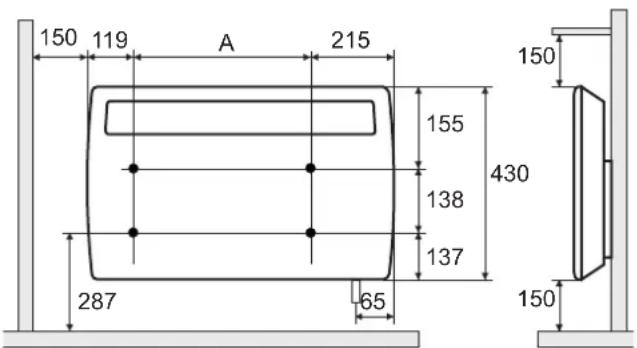
| Model Drilling dimension A | |
| PLX 050E 116 mm | |
| PLX 075E, PLX 100E 286 mm | |
| PLX 150E 356 mm | |
| PLX 200E, PLX 300E 526 mm |
During assembly, the safety area must be complied with according to the current installation regulations.
The socket or supply connection socket must be accessible after installation.
Make sure that the inflow and outflow of air at the top and bottom of the device are unimpeded.
i NOTE
Installation on wooden walls is permissible.
2.1 Wall mounting

NOTE
The original wall bracket supplied on the rear of the device must be used!

NOTE
Look out for electric cables or pipework in the wall when drilling.
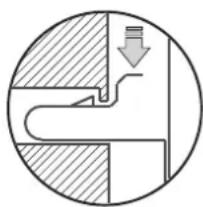
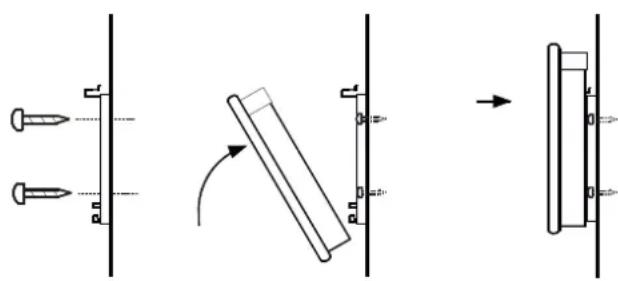
Remove the wall bracket from the rear side of the device. To do this, press both springs down.
Drill the fastening holes.
Screw the wall bracket securely to the wall.
- Hook the device in the bottom slots of the wall bracket.
- Fold the device up and engage in the springs to lock.
3. Electrical connection
The voltage specified on the type plate must match the line voltage.
The cable must not be in contact with the casing.
It is recommended that a separate circuit be provided for the power supply.
PLX 050E - PLX 200E
Insert the plug in the socket. The plug must always be accessible in case of emergencies.
PLX 300E
The device must only be installed and repaired by a qualified electrician in accordance with the applicable safety regulations. Heating device must be earthed!
Connection may only take place on securely routed cables!
A disconnecting device with a contact opening of at least 3mm at each pole (e.g. circuit breaker) must be provided in the permanently installed wiring.
4. Control description
4.1 Control unit
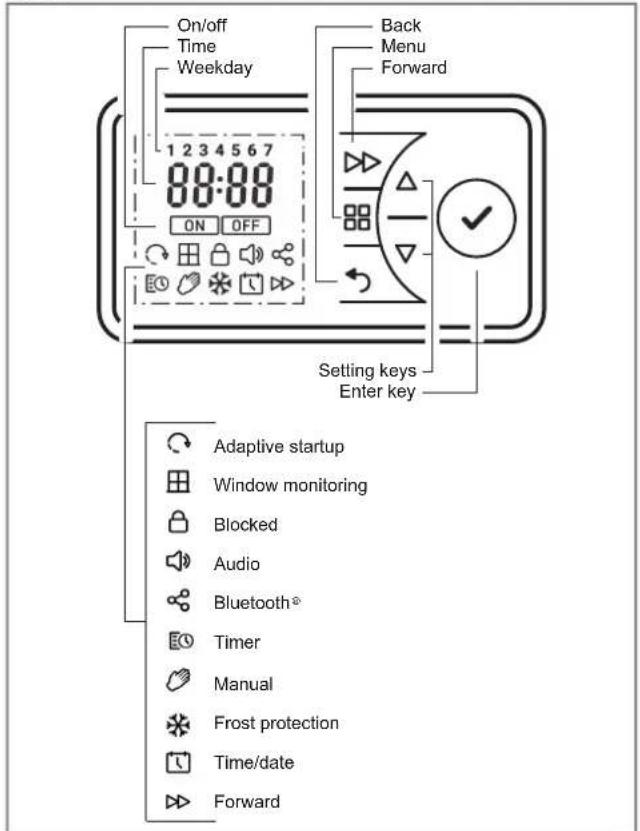
The heating device is equipped with a configurable electronic control, consisting of a display and six touch screen keys. The control unit is located on the top on the right. All settings can be selected using the six keys on the user interface.
The set functions and values are shown on the display.
4.2 Key functions
MAIN MENU
Setting date and time
Timer week program
Manual operation
Frost protection mode
BACK
Return to the previous program item
Keys
Used to navigate through the menu and to change the setting values.
ENTER
Saving settings.
FORWARD
Special functions such as switching to the next programme item in timer mode or activating the run-back timer.
4.3 Display
The display lights up when this key is activated. If no changes are made for a prolonged period, the display switches off. If no key is pressed, the display returns to the main menu after 30 seconds.
When the ENTER key is pressed, the 4-digit device PIN and a possible Bluetooth connection are shown (currently without function).
4.4 Battery change
NOTE
The control includes a real-time clock with calendar function. The clock has a button cell battery (type CR2032, 3V), which supplies the clock with power in the event of a power failure.
The battery compartment is located on the rear side of the control unit.
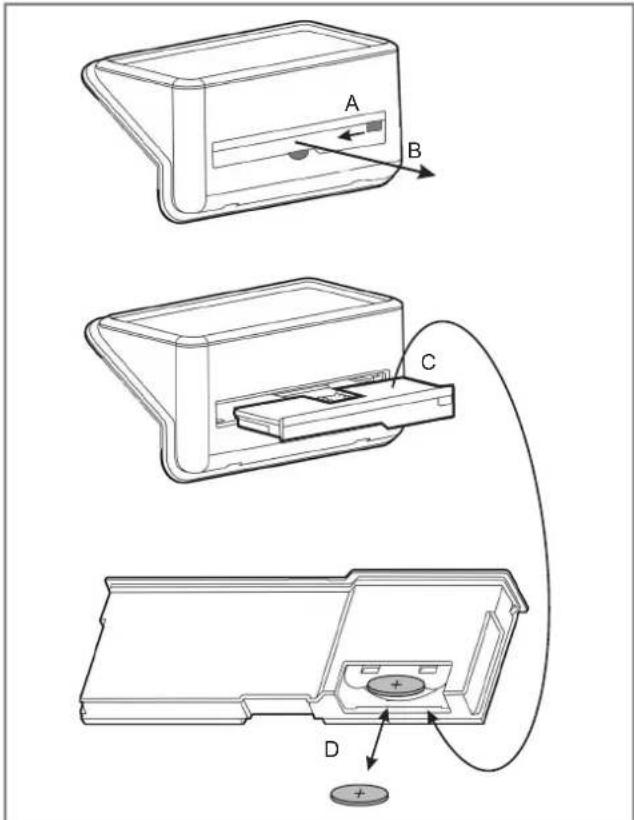
Unlock the battery compartment (A) and pull it out (B).
The battery is located on the rear side (C).
Pull out the button cell and replace it (D). Observe the correct polarity (+ pole as shown).
- Carry out assembly in reverse order.
4.5 Possible operating modes
4.5.1 Timer week program
Up to four heating program (on/off) can be set for each weekday. A room temperature can be specified for each heating program.
TIMER symbol is shown in the display.
4.5.2 Manual operation
Manual specification of the room temperature.
MANUAL symbol is shown in the display.
4.5.3 Frost protection
Specified frost protection temperature of 7^
FROST symbol is shown in the display.
NOTE
The room temperature can be changed with the or
keys in all operating modes.
In the timer program, this change is only carried out
for the current time program.
4.6 Commissioning
4.6.1 Setting the date and time
The control includes a real-time clock with calendar function.
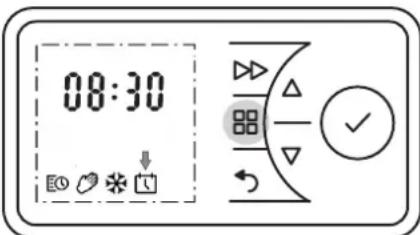
The date and time are set with the following steps:
Press the MENU key.
Press or to select the DATE & TIME symbol. The symbol flashes.
Press the ENTER key. The time flashes.
Press the ENTER key again. The hours display flashes.
Use or to set the hours. Press the ENTER key. The minutes display flashes.
Use or to set the minutes. Press the ENTER key. The time flashes.
Press the ENTER key again. The time is saved and the display DAY & MONTH flashes.
Use or to set the day. Press the ENTER key. The month display flashes.
Use or to set the month. Press the ENTER key. YEAR display flashes.
Use or to set the year. Press the ENTER key. The date is saved.
- Confirm the BACK key to return to the main display.
4.7 Operation
4.7.1 Switching heating operation on/off
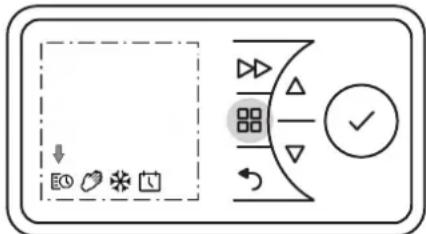
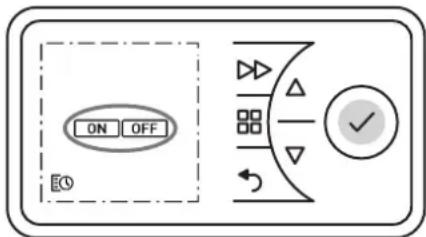
Switching heating operation on
Press the MAIN MENU key.
Press or to select the MANUAL or TIMER symbol. The ON symbol flashes.
Press the ENTER key Heating operation on.
Switching heating operation off
Press the MAIN MENU key.
The TIMER symbol flashes.
Press the ENTER key. The ON symbol flashes.
Press or to select the OFF symbol. The OFF symbol flashes.
Press the ENTER key Heating operation off.
4.7.2 Timer week program
NOTE
It is advisable to use the timer operating mode to reduce the operating costs. Using the device in manual heating operation can result in increased operating costs.
The timer is pre-programmed at the factory. Four time blocks are available per day, which can be adapted individually for each weekday.
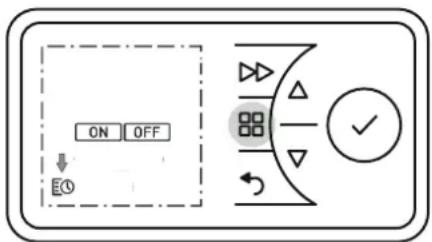
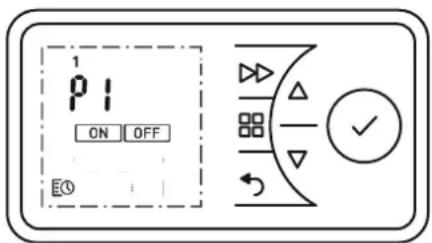
To change these profiles, carry out the following steps:
Press the MENU key. The TIMER symbol flashes.
Press the ENTER key. The ON symbol flashes.
Press or to select the TIMER symbol. The TIMER symbol flashes. Press the ENTER key.
Select a weekday.
1 = Monday 5 = Friday
2 = Tuesday 6 = Saturday
3 = Wednesday 7 = Sunday
4 = Thursday
Use or to select the day. Press the ENTER key. P1 (Program 1) flashes.
Press the ENTER key. Switch-on time flashes.
Press the ENTER key. The hours display flashes.
Use or to set the hours. Press the ENTER key. The minutes display flashes.
Use or to set the minutes. Press the ENTER key. Room temperature flashes.
Use or to set the temperature. Press the ENTER key. Switch-off time flashes.
Press the ENTER key. The hours display flashes.
Use or to set the hours. Press the ENTER key. The minutes display flashes.
Use or to set the minutes. Press the ENTER key. P2 (Program 2) flashes.
The programs P2, P3 and P4 can be set in the same way.
To copy the newly set programs P1 - P4 to other days, press ENTER. The COPY display flashes.
Press the ENTER key. The COPY display appears permanently. The weekday flashes.
Press or to select more weekdays. Confirm each one with the ENTER key.
The selected weekdays are shown at the top edge of the display.
To finish, press or to select COPY. The COPY display flashes.
Press the ENTER key. The settings are saved. The ON symbol flashes.
- Confirm the BACK key to return to the standard display.
4.7.3 Manual operation
NOTE
The timer week program is deactivated in manual operation.
The room temperature specification takes place manually.
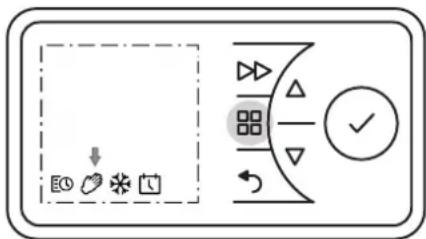
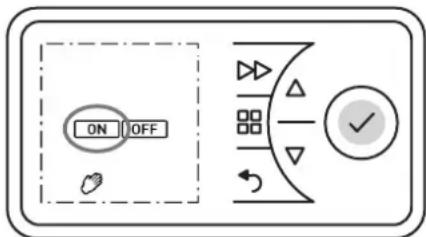
Press the MENU key.
Press or to select the MANUAL symbol. The MANUAL symbol flashes. Press the ENTER key.
The ON symbol flashes. Press the ENTER key.
Use or to set the room temperature.
4.7.4 Frost protection
Specification of a frost protection temperature of 7^ for the following 24 hours.
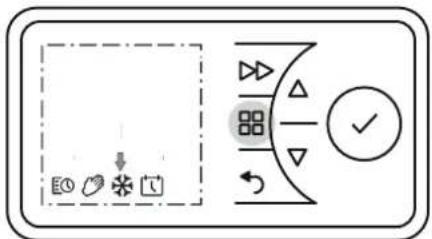
Press the MENU key.
Press or to select the FROST symbol. The FROST symbol flashes. Press the ENTER key. FROST symbol and temperature 7^ are displayed.
4.7.5 Runback timer
The runback timer enables the user to activate a one-off, time-limited heating program.
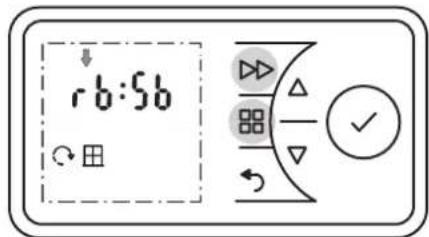
Press the MENU key. The TIMER symbol flashes.
Press the ENTER key. The ON symbol flashes.
Press or to select the OFF symbol. The OFF symbol flashes.
Press the ENTER key Heating operation off.
Press the FORWARD key. Heating operation takes place for 30 minutes (factory setting).
Where necessary, change the room temperature with or .
To end prematurely, switch off the heating device.
Heating duration runback timer
The maximum heating duration, limited to 2 hours at the factory and adjustable in four stages of 30 minutes each, can be changed as shown in the table.
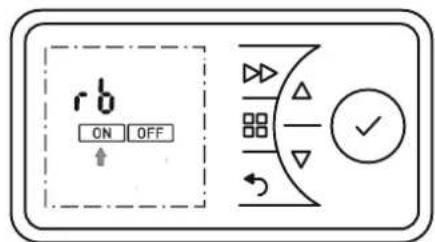
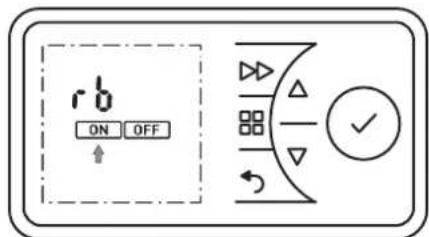
Press and hold the MENU key and the FORWARD key for five seconds.
rb display flashes.
Press the ENTER key. The ON symbol flashes.
Press the ENTER key. The heating duration program flashes. For variants, see table, left column (factory setting 2 h).
Press or to select the desired heating duration program. Press the ENTER key. The room temperature flashes.
Use or to set the room temperature and confirm with ENTER.
- Confirm the BACK key to return to the standard display.
| Heating duration program | Press the FORWARD key: | |||
| 1 time 2 | times 3 times | times 4 times | ||
| 30 minutes 00 | 15:00:20 | 00:25 00:30 | ||
| 01:00 h 00:15 | 00:30 00:45 | 01:00 | ||
| 01:30 h 00:15 | 00:30 01:00 | 01:30 | ||
| 02:00 h (factory) | 00:30 01:00 | 01:30 | 02:00 | |
| 04:00 h 01:00 | 02:00 03:00 | 04:00 | ||
| 06:00 h 01:30 | 03:00 04:30 | 06:00 | ||
| 08:00 h 02:00 | 04:00 06:00 | 08:00 | ||
4.7.6 Minimum room temperature
This function can be used to ensure that a minimum room temperature is specified even during OFF times, for example in timer mode (week program).
NOTE
The specification also applies for the runback timer function. Frost protection mode has priority.
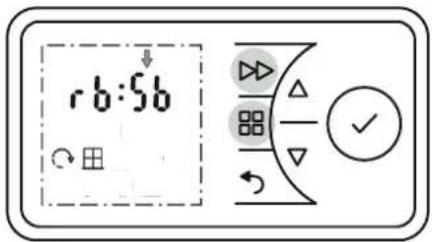
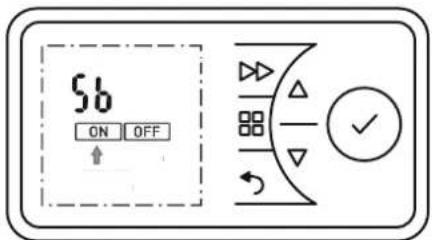
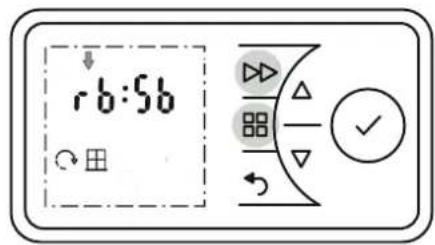
Press and hold the MENU key and the FORWARD key for five seconds. rb display flashes.
Press the key The display Sb flashes.
Press the ENTER key. The ON symbol flashes.
Press the ENTER key. The minimum room temperature (factory setting 16^ C) flashes.
Use or to set the minimum room temperature and confirm with ENTER.
Confirm the BACK key to return to the standard display.
4.7.7 Adaptive start-up
This function guarantees that the set room temperature is reached precisely at the start of the switch-on time, e.g. in conjunction with a time program.
Example:
In the timer menu, a set room temperature of 22^ is specified. The current room temperature is 17^ . The heating device switches on early so that the specified room temperature of 22^ is reached by 07:00.
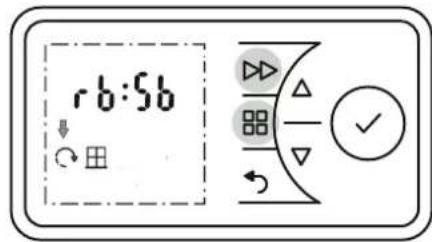
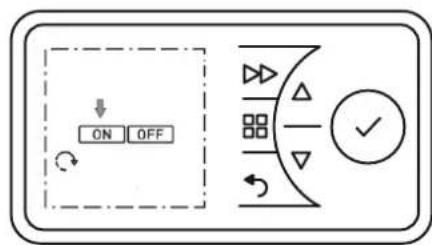
Press and hold the MENU key and the FORWARD key for five seconds.
rb display flashes.
Press or to select the ADAPTIVE START symbol. The symbol flashes.
Press the ENTER key.
Press or to select ON or OFF to switch the function on or off.
- Confirm the BACK key to return to the standard display.
4.8 Options
4.8.1 Switching summer/winter time
The clock switches between summer and winter time automatically. This function can be deactivated or activated manually.
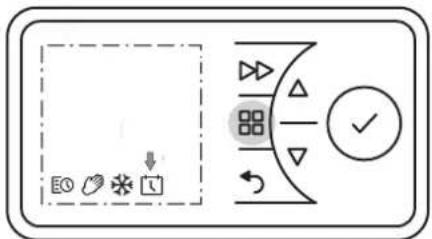
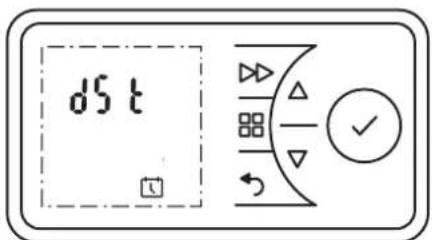
Press the MENU key. The TIMER symbol flashes.
Press or to select the DATE & TIME symbol. The symbol flashes.
Press the ENTER key. The current time flashes.
Press the key The display dSt flashes.
Press the ENTER key. The ON symbol flashes.
Press or to select ON or OFF to switch the function on or off.
Confirm with ENTER.
- Confirm the BACK key to return to the standard display.
4.8.2 Audio key
Feedback tone when a key is confirmed.
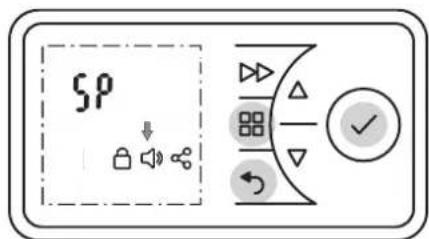
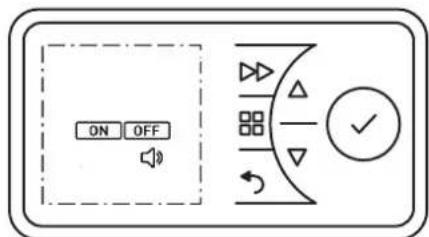
Press and hold the MENU key, the BACK key and the ENTER key for five seconds.
SP display flashes.
Press or to select the SOUND symbol. The symbol flashes.
Press the ENTER key.
Press or to select ON or OFF to switch the function on or off.
Confirm the BACK key to return to the standard display.
4.8.3 Temperature unit, maximum temperature
Two functions can be set in this menu:
Temperature unit display
Display can be set to degrees Celsius or degrees Fahrenheit.
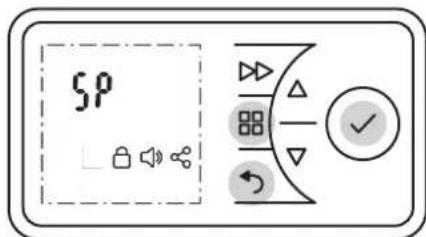
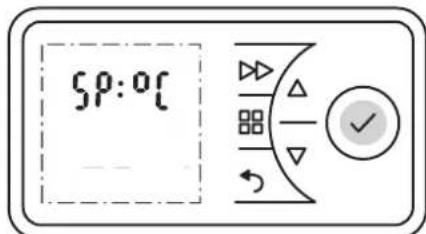
Press and hold the MENU key, the BACK key and the ENTER key for five seconds.
SP display flashes.
Press the ENTER key. ^ C display flashes.
Press or to select ^ C or ^ F
NOTE
^ C is most widely used in most European countries.
Maximum temperature
Define an adjustable maximum temperature.
Press the ENTER key. Maximum temperature display flashes
Press or to specify the maximum temperature.
Confirm with ENTER.
Confirm the BACK key to return to the standard display.
4.8.4 Key lock
This function can be used to lock the operating elements.
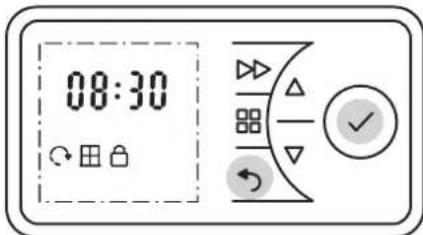
Press and hold the BACK key and the ENTER key for three seconds.
The LOCKED symbol appears in the display.
To unlock, press and hold the BACK key and the ENTER key again for three seconds.
NOTE
No settings can be made if the key lock is activated.
4.8.5 Restricting functions
The functions, runback timer and the adjustment of the values for the minimum or maximum temperature can be locked with a code.
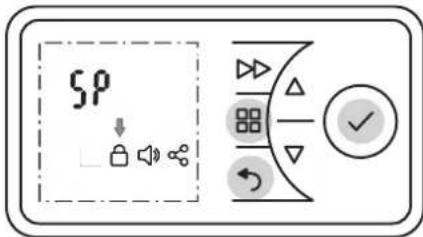
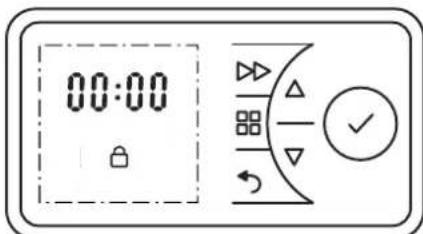
The lock is carried out by defining and entering a four-digit code.
Press and hold the MENU key, the BACK key and the ENTER key for 10 seconds. SP display flashes.
Press or to select the KEY LOCK symbol.
Confirm with ENTER. The first digit flashes.
Press or to set the first digit of the number code between 0 and 9.
Press the ENTER key.
Set digits 2, 3 and 4 of the number code in the same way.
Press the ENTER key. The functions runback timer (rb) and minimum/maximum temperature (SP) are locked.
Confirm the BACK key to return to the standard display.
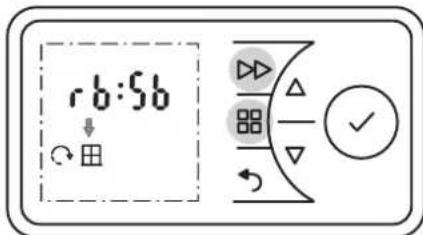
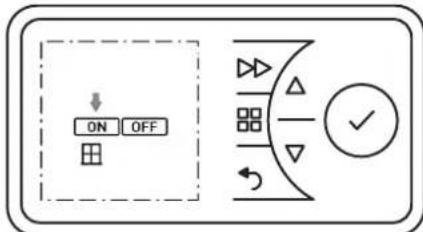
4.8.6 Window monitoring
The room heating device is equipped with a monitoring function that detects whether unnecessary energy is being consumed due to an open window. In this case, the heating device reduces the heat output. The WINDOW MONITORING function is activated at the factory.
NOTE
The controller may read sudden temperature decreases in drafty or poor insulated environments as well as if the heater is undersized for the room. In this case the feature should be disabled.
This function can be activated or deactivated as follows:
Press and hold the MENU key and the FORWARD key for five seconds.
rb display flashes.
Press or to select the WINDOW symbol. The symbol flashes.
Press the ENTER key. The ON symbol flashes.
Press or to select the ON or OFF symbol. The symbol flashes.
Press the ENTER key.
Confirm the BACK key to return to the standard display.
4.8.7 Reset to factory settings
Reset sets all settings made by the user to the pre-set factory settings.
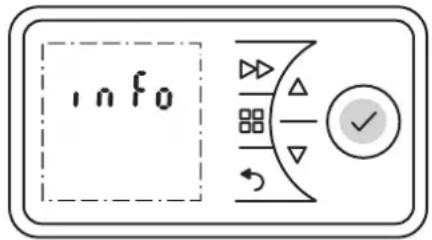
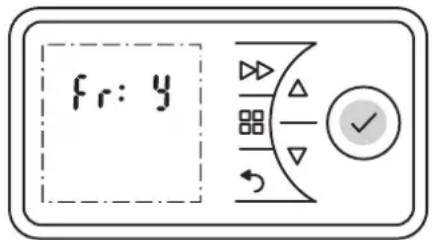
Press and hold the ENTER key for five seconds. INFO display flashes.
Press or to select the Fr display. The symbol flashes.
Press the ENTER key. Display N (= no) flashes.
Press or to select the Y display. The symbol flashes.
Press the ENTER key. All values are reset to factory settings.
Set the time and date.
4.8.8 Increasing the set point
The room heating device is delivered from the factory with an adjustable temperature range of 7^ to 26^ . The upper limit value can be increased (max. 32^ ) or lowered as required.
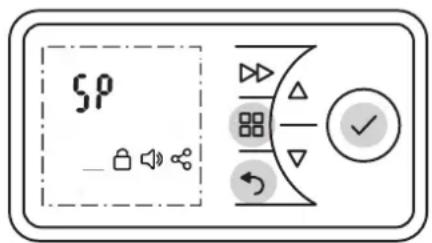
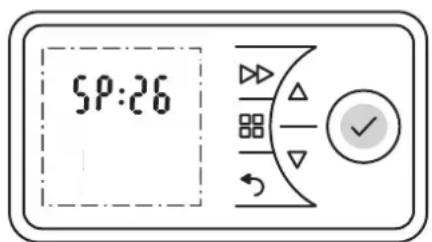
Press and hold the MENU key, the BACK key and the ENTER key for five seconds.
SP display flashes.
Press the ENTER key. ^ C display flashes.
Press the ENTER key. Display 26 (limit value set at the factory) flashes.
Press or to increase or lower the desired limit value.
Press the ENTER key.
- Confirm the BACK key to return to the standard display.
4.8.9 Service information
NOTE
This information is exclusively for service technicians.
The following information can be displayed:
UI number Service number display
CC number: Service number electronics
ID number: Service number heating device
Press and hold the ENTER key for five seconds. INFO display flashes.
Press or to select the display Ui, CC or id.
- Confirm the BACK key twice to return to the standard display.
NOTE
Display id is a code with 12 digits.
The first 4 digits are shown on level 1.
Press or to select the next level (2, 3).
5. Overload protector
For your safety, the heating device is equipped with an overload protector. If the air circulation is interrupted (e.g. due to the air grille being covered or closed), the device switches off automatically.
In this case, the power supply to the heating device should be disconnected for a few minutes (disconnect the plug, switch off the fuse) to allow the device to cool down sufficiently.
Before recommissioning the device, remove the reasons for the overload protector being triggered.
6. Maintenance
The device must be disconnected from the mains and allowed to cool down before maintenance.
Clean the outside of the device using a soft, damp cloth. Do not use scouring powder or furniture polish as this may damage the surface.
Dust which gathers inside the device can be removed from the outside using a vacuum cleaner.
7. Faults
If Err appears on the display, there is a fault.
| Display Meaning Measurements | ||
| Err1 Temperature sensor defect. | Contact our service | |
| Err2 Window detection operated. | Close window. Delete error message. If necessary deactivate the function, see section 4.8.6 | |
| Err3 Heating device too hot. | See chapter 5. Delete error message. | |
| Err4 Ambient temperature exceeded. | Notify the factory after-sales service. | |
| Err9 Loss of time. Delete error message. Re-enter time. | ||
| Err10 Heating element defective. | Notify the factory after-sales service. | |
How to delete the error message
Press button ENTER for ten seconds. Display Err disappears.
The heater is ready for operation.
If error recurs, notify the factory after-sales service.
8. Warranty
This product is supplied with a two-year warranty according to our terms of guarantee.
9. Recycling
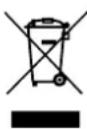
Do not dispose of the device with general household waste. Take the device to the available collection points at the end of its service life.
10. Technical data
| Unit type | PLX 050E, PLX 075E | PLX 100E, PLX 150E | PLX 200E, PLX 250E/300E | |
| Nominal voltage | 1/N/PE, 230 - 240 V~ | |||
| Degree of protection | IP24, splash-proof | |||
| Dimensions (W x H x D) | 450 x 430 x 108 mm, 620 x 430 x 108 mm | 620 x 430 x 108 mm, 690 x 430 x 108 mm | 860 x 430 x 108 mm, 860 x 430 x 143 mm | |
| Weight | 4.8 kg, 6.2 kg | 6.2 kg, 6.6 kg | 8.0 kg, 8.6 kg | |
| Heat output | ||||
| Nominal heat output | Pnom | 0.5 kW, 0.75 kW | 1.0 kW, 1.5 kW | 2.0 kW, 3.0 kW |
| Minimum heat output (guide value) | Pmin | 0.5 kW, 0.75 kW | 1.0 kW, 1.5 kW | 2.0 kW, 3.0 kW |
| Maximum continuous heat output | Pmax, C | 0.5 kW, 0.75 kW | 1.0 kW, 1.5 kW | 2.0 kW, 3.0 kW |
| Intrinsic consumption | ||||
| With nominal heat output | eImax | 0.0 W 0.0 | W 0.0 W | |
| With minimum heat output | eImin | 0.0 W 0.0 | W 0.0 W | |
| In standby state | eISB | 0.5 W 0.5 | W 0.5 W | |
| Regulator for heat output | ||||
| Electronic room temperature controller with week program, window monitoring, adaptive control of the heating start and operating time limit | ||||
2. Montage, installation, distances minimales
ATTENTION!
- Notes for the user
- NOTE
- ATTENTION!
- Assembly, installation, minimum clearance
- i NOTE
- Wall mounting
- Electrical connection
- PLX 050E - PLX 200E
- PLX 300E
- Control description
- Control unit
- Key functions
- MAIN MENU
- BACK
- Keys
- ENTER
- FORWARD
- Display
- Battery change
- Possible operating modes
- Timer week program
- Manual operation
- Frost protection
- Commissioning
- Setting the date and time
- Operation
- Switching heating operation on/off
- Switching heating operation on
- Switching heating operation off
- Timer week program
- Manual operation
- Frost protection
- Runback timer
- Heating duration runback timer
- Minimum room temperature
- Adaptive start-up
- Example:
- Options
- Switching summer/winter time
- Audio key
- Temperature unit, maximum temperature
- Temperature unit display
- Maximum temperature
- Key lock
- Restricting functions
- Window monitoring
- Reset to factory settings
- Increasing the set point
- Service information
- Overload protector
- Maintenance
- Faults
- How to delete the error message
- Warranty
- Recycling
- Technical data
- Montage, installation, distances minimales
Brand : DIMPLEX
Model : PLX075E
Category : Heating