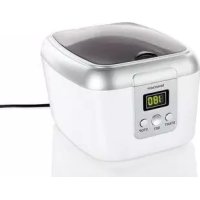
SUR 46 B1 - Ultrasonic cleaner Livarno Lux - Free user manual and instructions
Find the device manual for free SUR 46 B1 Livarno Lux in PDF.


| Product Type | Ultrasonic Cleaner |
| Brand | Livarno Lux |
| Model | SUR 46 B1 |
| Mains Voltage | 220-240 V ~ 50 Hz |
| Power | 50 W |
| Protection Class | II |
| Tank Material | Stainless Steel |
| Max. Fill Level | Indicated by the MAX mark inside the tank |
| Programmable Cleaning Times | 90, 180, 300, 480, 600 seconds |
| Included Accessories | Basket, shaft with spacer ring, bracelet holder |
| Intended Use | Gentle cleaning of jewelry, glasses, CD/DVDs, dentures, razor heads, etc. |
| Unsuitable Items | Wood, leather, horn, tortoiseshell, contact lenses, scratched surfaces, silver-plated fashion jewelry |
| Safety | Automatic shut-off at end of cycle; do not use without water; let cool down after 5 consecutive cycles |
| Maintenance | Empty and wipe the tank after each use with a soft cloth; do not use abrasive products |
| Warranty | 3 years (subject to warranty conditions) |
Frequently Asked Questions - SUR 46 B1 Livarno Lux
User questions about SUR 46 B1 Livarno Lux
0 question about this device. Answer the ones you know or ask your own.
Ask a new question about this device
Download the instructions for your Ultrasonic cleaner in PDF format for free! Find your manual SUR 46 B1 - Livarno Lux and take your electronic device back in hand. On this page are published all the documents necessary for the use of your device. SUR 46 B1 by Livarno Lux.
USER MANUAL SUR 46 B1 Livarno Lux
SILVER CREST®
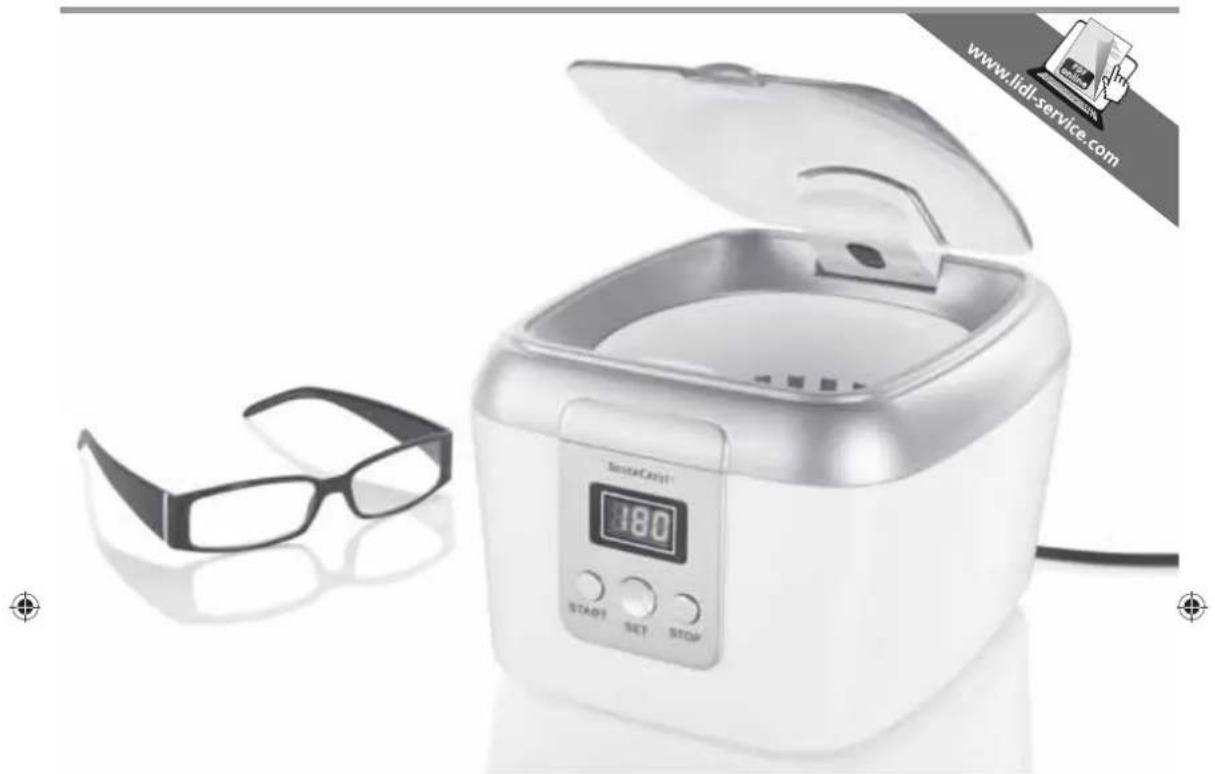
ULTRASCHALL-REINIGUNGSGERÄT SUR 46 B1
DE AT CH
ULTRASCHALL-
REINIGUNGSGERÄT
Bedienungsanleitung
IT CH
PULITORE AD ULTRASUONI
Operating instructions
FR CH

Inhalt
1 support de bracelet 10
- Intended purpose 43
- Safety information 43
- Items supplied 45
- How to use 45
- Operation 45
5.1 Describing the functioning of the ultrasonic cleaning process.... 45
5.2 Unsuited for being cleaned by ultrasound 45
5.3 Examples of use.... 46
5.4 Cleaning process.... 47
-
Cleaning 48
-
Storage 48
- Disposal 48
- Problem-solving 49
- Technical specifications 49
- Warranty of the HOYER Handel GmbH 49
Overview
1 M A X Marking of the maximum filling level
2 Stainless steel tank
3 Power LED is lit during the cleaning process
4 Transparent lid
5 Power cable with mains plug
6 Display
7 S T O P Off button interrupting the cleaning process early
8 SET Setting the cleaning period (180, 300, 480, 600, 090 seconds)
9 START On button starting the cleaning process
10 Bracelet holder
11 Basket inset for small parts
12 Spindle for no more than 2 CDs/DVDs (with spacer ring)
Thank you for your trust!
Congratulations on your new ultrasonic cleaner.
For a safe handling of the device and in order to get to know the entire scope of features:
• Thoroughly read these operating instructions prior to initial commissioning.
- Above all, observe the safety instructions!
- The device should only be used as described in these operating instructions.
- Keep these operating instructions for reference.
- If you pass the device on to someone else, please include these instructions.
We hope you enjoy your new ultrasonic cleaner!
1. Intended purpose
The ultrasonic cleaner is provided for a careful and thorough cleaning of e. g. jewellery, eyeglasses, CDs/DVDs, dentures, shaving heads and more.
The device is designed for use in private households. The device must only be used indoors.
This device must not be used for commercial purposes.
Foreseeable misuse
WARNING! Risk of material damage!
Not all objects may be cleaned with the device (see "Unsuited for being cleaned by ultrasound" on page 5).
2. Safety information
Warnings
If necessary, the following warnings will be used in these operating instructions:

DANGER! High risk: failure to observe this warning may result in injury to life and limb.
WARNING! Moderate risk: failure to observe this warning may result in injury or serious material damage.
CAUTION: low risk: failure to observe this warning may result in minor injury or material damage.
NOTE: circumstances and specifics that must be observed when handling the device.

DANGER for children
- Packing materials are not children's toys. Children should not be allowed to play with the plastic bags. There is a risk of suffocation.



- This device is not designed to be used by people (including children) with limited physical, sensory or mental capabilities or people without adequate experience and/or understanding unless they are supervised by someone responsible for their safety or are instructed by them on how to use the device.
• Children must be supervised to ensure that they do not play with the device. - Keep the device out of the reach of children.

DANGER of electric shock due to moisture
- Protect the appliance from moisture, water drops and water spray: failure to observe this instruction may result in an electrical shock hazard.
- The device, the power cable and the mains plug must not be immersed in water or any other liquids.
- If liquids enter the inside of the device, pull the mains plug immediately. Have the device checked before reusing.
- Never touch the device and mains plug with wet hands.
- The stainless steel tank must not be filled with water above the MAX marking, otherwise it may overflow during the cleaning process.

DANGER of electric shock
- Do not use the device if the device or the power cable has any visible damage, or if the device has previously been dropped.
-
Only connect the mains plug to a properly installed and easily accessible wall socket whose voltage corresponds to the specifications on the rating label. The wall socket must continue to be easily accessible after the device is plugged in.
-
Ensure that the power cable cannot be damaged by sharp edges or hot points. Do not wrap the power cable around the device.
- When using the device, ensure that the power cable cannot be trapped or crushed.
- When removing the mains plug, always pull the plug and never the cable.
- Disconnect the mains plug from the wall socket...
... if there is a fault,
... when you are not using the device,
... before you clean the device, and
... during thunderstorms.
• To avoid any risk, do not make modifications to the device. You also must not replace the power cable yourself. Repairs must be carried out by a specialist workshop or the Service Centre. - This device is not intended to be operated using an external timer clock or a separate remote control system.
- Do not clean objects whose surfaces show scratches, since these scratches may deepen during the ultrasonic treatment.

DANGER by ultrasonic waves
- Do not touch the inside of the stainless steel tank or the cleaning fluid during the cleaning process: Ultrasonic waves may cause injury to health.
WARNING! Risk of material damage!
• Always use the basket inset for small parts to prevent scratches on the parts and the stainless steel tank. If several parts are located in the cleaning fluid during the cleaning process, these must not be in contact to prevent scratches!
- Do not clean objects whose surfaces show scratches, since these scratches may deepen during the ultrasonic treatment.




- Do not use corrosive cleaning agents, ammonia, bleach or strongly perfumed cleaning agents for cleaning in this device.
- The device is fitted with non-slip silicon feet. Because furniture can be coated with a wide variety of varnishes and plastics, and treated with various care products, the possibility cannot be excluded that some of these substances have ingredients that may attack and soften the silicon feet. If necessary, place a non-slip mat under the device.
- Once you have used the device five times in a row, stop the cleaning process and leave it to cool to room temperature.
- Never use the device without water, this may damage the device.
- Place the device on a stable, flat surface.
- Do not place the device and its accessories on or near surfaces, which are or may become hot, e. g. heating panels.
- Only use the original accessories.
- Do not use corrosive or abrasive cleaners to clean the device.
3. Items supplied
1 ultrasonic cleaner
1 basket inset 11
1 bracelet holder 10
1 spindle with spacer ring 12
1 set of operating instructions
4. How to use
- Remove all packing material.
- Remove the protective foil from the display 6.
- Check to ensure that all accessories and the device are undamaged.
- Place the device on a stable, flat surface.
5. Operation
5.1 Describing the functioning of the ultrasonic cleaning process
The ultrasonic field building up in the cleaning fluid during the operation generates waves with a positive and negative pressure in quick succession. On the surface of the objects to be cleaned, these waves generate air bubbles bursting quickly. This process affects the surfaces of the objects to be cleaned mechanically and thus loosens and removes dirt and other adhesions but is also able to deepen already existing scratches.
5.2 Unsuited for being cleaned by ultrasound
Basically the following is unsuitable to be cleaned by ultrasound ...
... objects consisting of or including wood, leather, horn, tortoise shell or fabric,
... contact lenses,
... materials with damages or a scratched surface,
... special types of fashion jewellery such as silver-plated fashion jewellery.




5.3 Examples of use
Jewellery / metal parts
WARNING! Risk of material damage!
- Do not clean objects whose surfaces show scratches, since these scratches may deepen during the ultrasonic treatment.
- The device is unsuited for cleaning delicate or porous stones such as pearls, mother-of-pearl or corals, opal, turquoise, azurite, malachite, tiger eye and similar gems. Ask the jewellery salesman if the jewellery may be cleaned with ultrasound and if necessary, with cleaning additives.
- Screws and loosely fastened fittings may come off during the cleaning process. Do not clean these objects more than once a month and only briefly (for a maximum of 90 seconds).
- Do not clean any mechanical watches in this device. The precision can be affected.
- The device is suitable for cleaning gold/silver jewellery and jewellery made from other metals such as necklaces, rings, bracelets as well as metal cutlery, coins, insignia, metallic equipment parts, etc.
• Figure A: Place small objects such as rings in the basket inset 11. In order to prevent scratches, the objects should not come in contact with one another. Since the basket inset absorbs ultrasonic waves, the effectiveness decreases and several cleaning processes may be required.
• Figure B: In order to clean metal bracelets of watertight watches, fasten the watch on the bracelet holder 10 so the watch case is at the top.
Eyeglasses / magnifying glasses
WARNING! Risk of material damage!
- Do not clean objects whose surfaces show scratches, since these scratches may deepen during the ultrasonic treatment.
- All optical glasses may be cleaned in the ultrasound bath for a maximum of 90 seconds.
- Never clean polycarbonate lenses (plastic) in an ultrasound bath. Ask your optician for the material of the lenses.
- Screws and loosely fastened fittings may come off during the cleaning process. Do not clean the objects more than once a month and only briefly (for a maximum of 90 seconds).
- The device is unsuited for cleaning eye-glass frames made from sensitive materials such as horn or tortoise shell.
- Position the eyeglasses in the basket inset 11 with the lenses up so they will not be scratched.
CDs/DVDs
WARNING! Risk of material damage!
- Do not clean objects whose surfaces show scratches, since these scratches may deepen during the ultrasonic treatment.
- Do not clean CDs/DVDs more than once and only briefly (90 seconds).
- Clean CDs/DVDs only with water without cleaning additives: dishwashing detergents may remove the label.
- Secure data on CDs/DVDs prior to the cleaning process.
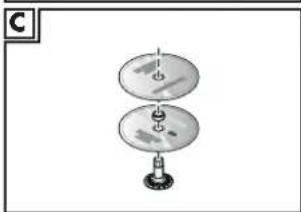
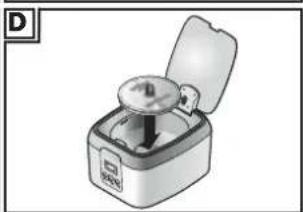
- Figures C+D: Place one CD/DVD on the spindle 12. Use the spacer ring if you wish to clean 2 CDs/DVDs simultaneously.
Toiletries / writing utensils
You can use the ultrasonic cleaner to clean dentures/braces, shaving heads of electric razors, razor blades and similar toiletries. The device is also suited for cleaning e.g. tips of fountain pens, sleeves of ballpoint pens and printer nozzles.
5.4 Cleaning process

DANGER of electric shock!
- Only connect the device to an easily accessible wall socket whose voltage corresponds to the specifications on the rating label. The wall socket must continue to be easily accessible after the device is plugged in.
- Pull the mains plug 5 out from the wall socket after every use.

DANGER by ultrasonic waves!
Do not touch the inside of the stainless steel tank or the cleaning fluid during the cleaning process: ultrasonic waves may cause injury to health.
WARNING! Risk of material damage!
- Never use the device without water, since this may damage it.
- Once you have used the device five times in a row, stop the cleaning process and leave it to cool to room temperature.
- An extended cleaning period and repeated cleaning may cause loosely fastened fittings, labels or decoration at objects as well as other parts, which are not fixed such as screws of eyeglass frames, to come off during the cleaning process.
- Adding dishwashing detergent may cause the removal/dissolution of labels and adhesives.
- Open the lid 4.
-
Fill the stainless steel tank 2 with cleaning fluid. The cleaning fluid must cover the parts to be cleaned. However, the maximum filling level MAX 1 must not even be exceeded with the objects in place. A suitable cleaning fluid is usually cold, clean tap water. The cleaning effect can be intensified by adding dishwashing detergent (please observe manufacturer's information). Do not use corrosive cleaning agents, ammonia, bleach or strongly perfumed cleaning agents.
-
Place the objects to be cleaned in the ultrasonic cleaner. Use the insets.
-
Close lid 4.
-
The device is switched on when the mains plug is connected. Connect the mains plug 5 with a wall socket. The display 6 shows 180.
-
Press the button SET 8 repeatedly until the requested cleaning period appears on the display (180, 300, 480, 600, 090 seconds) - depending on the degree of staining. 090 seconds: recommended for minor staining and objects such as eyeglasses 180 seconds: standard time for normal staining 300 seconds: recommended for the initial cleaning with the ultrasonic cleaner 480 seconds: recommended for the initial cleaning if several objects are cleaned simultaneously 600 seconds: recommended for severe staining.
-
Press the button START 9 to start the cleaning process. The power LED 3 is lit blue and the seconds are counted down on the display. During the cleaning process, a buzzing / humming can be heard.

- After the requested cleaning period has elapsed, the power LED 3 goes off and the display shows 000. By pressing the button STOP 7, you are able to interrupt the cleaning process earlier at any time.
Press ...
... the button START 9, to continue with the cleaning process for the remaining cleaning period.
... the button SET 8, to set the requested cleaning period and start the cleaning process by pressing the button START 9.
-
The device is switched off when the mains plug is disconnected. The display goes off.
-
Open the lid 4 and remove the cleaned objects.
-
Dry the cleaned objects with a soft cloth and repolish shiny surfaces, if necessary.
-
Drain the cleaning fluid.
NOTE: if necessary after the cleaning process, change the cleaning fluid to achieve a more thorough clean.
6. Cleaning

DANGER of electric shock!
Pull the mains plug out of the wall socket before you clean the device.
WARNING! Risk of material damage!
Do not use any astringent or abrasive cleaning agents.
Ultrasonic device
- Drain the cleaning fluid after each cleaning process.
- In order to prevent lime residues and soiled rims, wipe the stainless steel tank and the outer surface of the device with a soft, slightly damp cloth.
Accessories
- Clean the insets with a soft, slightly damp cloth.
7. Storage

DANGER for children!
Keep the ultrasonic cleaner out of the reach of children.
- Allow the device to cool down before you put it away.
- Clean and dry all parts, before putting the device away.
8. Disposal
The symbol showing a wheelie bin crossed through indicates that the product requires separate refuse collection in the European Union. This applies to the product and all accessories marked
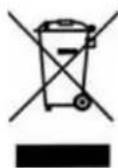
with this symbol. Products identified with this symbol may not be discarded with normal household waste, but must be taken to a collection point for recycling electric and electronic appliances. Recycling helps to reduce the consumption of raw materials and protect the environment.
Packaging
When disposing of the packaging, make sure you comply with the environmental regulations applicable in your country.





9. Problem-solving
If your device fails to function as required, please try this checklist first. Perhaps there is only a minor problem, and you can solve it yourself.

DANGER of electric shock! Do not attempt to repair the device yourself under any circumstances.
| Fault | Possible causes/Action |
| No function | Has the device been connected to the power supply? Check the connection. |
| Objects are not clean after the cleaning process. | Is a sufficient amount of water in the stainless steel tank 2? Are the objects covered by water?Has a cleaner been added?Is the concentration of the cleaner strong enough?Has a basket inset 11 been used during the cleaning process?Is the cleaning period sufficient?Has the cleaning fluid been changed? |
10. Technical specifications
| Model: SUR 46 B1 | |
| Mains voltage: 220-240 V ~ 50 Hz | |
| Protection class: II | |
| Power rating: 50 W | |
Subject to technical modification.
CE
11. Warranty of the HOYER Handel GmbH
Dear Customer, your device is provided with a 3 year warranty starting with the purchase date. In the event of product defects, you are entitled to statutory rights against the vendor. These statutory rights are not restricted by our warranty presented in the following.
Warranty conditions
The warranty period starts with the purchase date. Please keep the original purchase receipt in a safe place. This document is required to verify the purchase. If within three years from the purchase date of this product a material or factory defect occurs, the product will be repaired or replaced by us – at our discretion – free of charge to you. This warranty implies that within the period of three years the defective device and the purchase receipt are presented, including a brief written description of the defect and the time it occurred. If the defect is covered by our warranty, the repaired or a new product will be returned to you. No new warranty period starts with a repair or replacement of the product.
Warranty period and statutory claims for defects
The warranty period is not extended when the warranty has been claimed. This also applies to replaced and repaired parts. Any damages and defects already existing at the time of purchase must be reported immediately upon unpacking. Repairs arising after the expiration of the warranty period are subject to a charge.
Warranty coverage
The device was produced carefully according to strict quality guidelines and tested diligently prior to delivery.
The warranty applies to material or factory defects. This warranty does not include product parts that are subject to standard wear and therefore can be considered wear parts; the same applies to damages at fragile parts, e.g. switches, rechargeable batteries or parts made of glass.
This warranty expires if the product is damaged, not used as intended or not serviced. For the proper operation of the product, all instructions listed in the operating instructions must be observed carefully. Any form of use and handling that is advised against in the operating instructions or warned against must always be avoided.
The product is only intended for private and not for commercial use. In the case of incorrect and improper treatment, use of force and interventions not performed by our authorised Service Centre, the warranty shall cease.
Handling in case of a warranty claim
In order to ensure prompt processing of your matter, please observe the following notes:
- Please keep the article number
IAN: 76041 and the purchase receipt as a purchase verification for all inquiries.
- If faulty operation or other defects occur, first contact the Service Centre listed in the following by telephone or email.
- Then, you are able to send a product reported as defective free of charge to the service address specified to you, including the purchase receipt and the information on the defect and when it occurred.

Please visit www.lidl-service.com to download this and many other manuals, product videos and software.

Service Centre
GB Service Great Britain
Tel.: 0871 5000 720 (£ 0.10/Min.)
E-Mail: hoyer@lidl.co.uk
IE Service Ireland
Tel.: 1890 930 034
(0,08 EUR/Min., (peak))
(0,06 EUR/Min., (off peak))
E-Mail: hoyer@lidl.ie
IAN: 76041
Supplier
Please note that the following address is no service address. First contact the aforementioned Service Centre.
HOYER Handel GmbH
Kühnehöfe 5
22761 Hamburg
Germany


HOYER HANDEL GMBH
Kühnehöfe 5
D-22761 Hamburg
- ULTRASCHALL-REINIGUNGSGERÄT SUR 46 B1
- INHALT
- OVERVIEW
- THANK YOU FOR YOUR TRUST
- INTENDED PURPOSE
- FORESEEABLE MISUSE
- WARNING! RISK OF MATERIAL DAMAGE
- SAFETY INFORMATION
- WARNINGS
- DANGER FOR CHILDREN
- DANGER OF ELECTRIC SHOCK DUE TO MOISTURE
- DANGER OF ELECTRIC SHOCK
- DANGER BY ULTRASONIC WAVES
- ITEMS SUPPLIED
- HOW TO USE
- OPERATION
- 5.1 DESCRIBING THE FUNCTIONING OF THE ULTRASONIC CLEANING PROCESS
- 5.2 UNSUITED FOR BEING CLEANED BY ULTRASOUND
- 5.3 EXAMPLES OF USE
- JEWELLERY / METAL PARTS
- EYEGLASSES / MAGNIFYING GLASSES
- CDS/DVDS
- TOILETRIES / WRITING UTENSILS
- 5.4 CLEANING PROCESS
- CLEANING
- ULTRASONIC DEVICE
- ACCESSORIES
- STORAGE
- DISPOSAL
- PACKAGING
- PROBLEM-SOLVING
- TECHNICAL SPECIFICATIONS
- CE
- WARRANTY OF THE HOYER HANDEL GMBH
- WARRANTY CONDITIONS
- WARRANTY PERIOD AND STATUTORY CLAIMS FOR DEFECTS
- WARRANTY COVERAGE
- HANDLING IN CASE OF A WARRANTY CLAIM
- SERVICE CENTRE
- IAN: 76041
- SUPPLIER
- HOYER HANDEL GMBH
Brand : Livarno Lux
Model : SUR 46 B1
Category : Ultrasonic cleaner