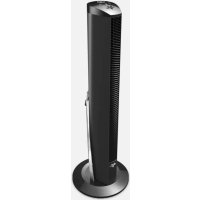
OSCR37 - Fan Vornado - Free user manual and instructions
Find the device manual for free OSCR37 Vornado in PDF.


| Product type | Tower fan on base |
| Power supply | 120 V, 60 Hz, 2.5 A |
| Number of speeds | 4 settings: Turbo, High, Medium, Low |
| Timer | 3, 6, 9 or 12 hours (delayed shut-off) |
| Compatibility | Amazon Alexa, WiFi 2.4 GHz |
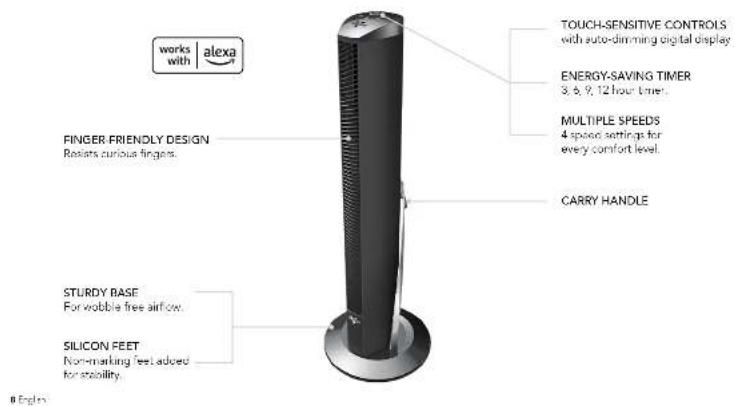
| Main functions | Oscillation, touch controls, digital display, carrying handle, silicone pads, child-safe design |
| Maintenance and cleaning | Unplug before cleaning. Vacuum with brush and soft cloth. Do not use chemicals. |
| Safety | Polarized plug, 2.5 A 125 V fuse, overload protection (DDFT) |
| Spare parts and repairability | Replacement fuse (contact Vornado). Do not open the housing, return to an authorized center. |
| General information | Brand Vornado, model OSCR37, manufactured by Vornado Air LLC, Andover, KS |
Frequently Asked Questions - OSCR37 Vornado
User questions about OSCR37 Vornado
0 question about this device. Answer the ones you know or ask your own.
Ask a new question about this device
Download the instructions for your Fan in PDF format for free! Find your manual OSCR37 - Vornado and take your electronic device back in hand. On this page are published all the documents necessary for the use of your device. OSCR37 by Vornado.
USER MANUAL OSCR37 Vornado

model OSCR37 AE
TOWER CIRCULATOR OWNER'S GUIDE
GUÍA DEL PROPIETARIO DEL VENTILADO TORRE
GUIDE DE L'UTILISATEUR DU VENTILATEUR TOUR POUR TOUTE LA PIECE
READ AND SAVE THESE INSTRUCTIONS
LEER Y GUARDAR ESTAS INSTRUCCIONES LISEZ ET CONSERVEZ CES INSTRUCTIONS
vornado.com
works with alexa
We expect this product to be perfect.
If it is not, we will make it right.
vornado.com
800-234-0604
help@vornado.com
CONTENTS
Important Safety Instructions....4 Troubleshooting....14
Features 8 Warranty 15
Base Assembly 9
How To Use 10
Getting Started....11
Using Alexa....12
Cleaning....13
READ AND SAVE THESE INSTRUCTIONS
IMPORTANT SAFETY INSTRUCTIONS
This owner's guides and any additional inserts are considered part of the product. They contain important information about safety, use and disposal. Before using the product, please familiarize yourself with all operating and safety instructions. Please keep all documents for future reference and pass these documents on, together with the product, to any future owner. See www.vorrade.com/circulators-manuals to view, download and print the most current version of these instructions.
INTENDED USE: This product is intended to circulate the air in indoor living spaces only in the United States and Canada. This product is not intended for commercial or industrial use. The manufacturer assumes no responsibility for damage or injury due to unauthorized use or product modification. Failure to follow these directions will void the product warranty.
WARNING: Risk to Children and Impaired Persons
Supervision is required during the installation, operation, cleaning and maintenance of this product by children 12 years of age and younger and anyone with reduced physical, sensory or mental capabilities. Children should be supervised to ensure that they do not play with the appliance, its parts and packaging material.
INSTALLATION WARNING—To reduce risk of fire, electrical shock and injury to persons, observe the following:
Place this product away from curtains, draperies, tablecloths and other fabrics, since they may be drawn into the product, damage the motor and/or cause a fire.
No part of this product (the appliance, power cord, plug, packaging,
4 Englen
etc.) should be placed near furnaces, fireplaces, stoves or other high temperature heat sources. Do not use this product in a window, on an uneven or unstable surface, or near water.
The appliance, power supply, power cord and plug cannot come into contact with water. Do not use this product on wet surfaces. Do not use this product in a bathtub or shower or position product where it may fall into a bathtub, laundry, swimming pool or other water container. Do not use this product outdoors or expose it to weather or elements.
Do not run cord under carpeting. Do not cover cord with throw rugs, runners, or similar coverings. Do not route cord under furniture or appliances. Arrange cord away from traffic area and where it will not be tripped over. The cord should not hang over edges of counters or be placed where it can be crimped or closed in doors. Place spolience near an easily accessible outlet so the product can be unplugged quickly during an emergency.
SAFE USE WARNING—To reduce risk of fire, electrical shock and injury to persons, observe the following:
WARNING: To reduce likelihood of circuit overload, fire and electric shock, do not operate with a solid state speed device, such as a dimmer control switch.
Do not operate any Ian with a damaged core or plug. Discard Ian or return to an authorized service facility for examination and/or repair.
Do not operate unit if the unit has been dropped or damaged. Do not use this product if it has a damaged cord or plug. To avoid risk of electrical shock, do not attempt to repair or replace parts. Only original replacement parts may be used. If the power cord is damaged, it must be replaced by the manufacturer, its service agent, or similarly qualified persons in order to avoid a hazard.
Contact Vomado Consumer Service at 1-80D 234-0504 (phone) or consumerservice@vomado.com (email) for further instructions about replacement and repair.
Before plugging power cord into electrical outlet, be sure that all electrical information on the rating label, including voltage, is compatible with your outlet's power supply.
DO NOT OR STAND ON PRODUCT. Never use the cord as a handle or otherwise yank, strain or stretch the power cord.
While the product is plugged in, do not insert or allow foreign objects to enter any input or output opening as this may cause risk of electric shock or fire, or damage the product.
A loose fit between wall outlet (receptacle) and plug may cause overheating and distortion of the plug. Discontinue use of the product in this outlet. Contact a qualified electrician to replace loose or worn outlets.
This appliance has a polarized plug (one blade is wider than the other.) To reduce the risk of electric shock, this plug is intended to fit in a polarized outlet only one way. If the plug does not fit fully in the outlet, reverse the plug. If it still does not fit, contact a qualified electrician. Do not attempt to defeat this safety feature.
Before moving, repositioning, servicing, cleaning and when not in use, use the product controls to turn off the power and then unplug. Always unplug device to avoid possible injury due to remote activation of the product. To disconnect from outlet, grasp and pull only the plug. Also, power off and unplug if the product will be left unattended for an extended period of time or during electrical storms.
SERVICING WARNING—To reduce risk of fire, electrical shock and injury to persons, observe the following:
Always unplug device before servicing or cleaning to avoid possible injury due to remote activation of the product.
- Clean your product regularly, only as is instructed in this manual. Prior to cleaning, turn off the power on your product and unplug. Do not use gasoline, thinners, solvents, ammonias or other chemicals for cleaning. Refer to the CLEANING instructions provided.
- Do not open appliance housing while product is plugged in. To avoid risk of shock, all service and/or repairs must be done by a Vornado Authorized Service Center.
- This product employs overload protection (fuse). A blow fuse indicates an overload or short-circuit situation. If the fuse blows, uppling the product from the outlet. Replace the fuse as per the user servicing instructions (follow product marking for proper fuse rating) and check the product. If the replacement fuse blows, a short-circuit may be present and the product should be discarded or returned to an authorized service facility for examination and/or repair.
User Servicing Instructions
-
Using the product controls, turn off the appliance.
-
Grasp the plug (not the core) and disconnect from the outlet.
- Risk of Fire. Replace fuse only with 2.5 Amp, 125 Volt fuse as approved by Vornado Consumer Service. For an authorized
replacement fuse, please contact Vornado Consumer Service. 4. Once the replacement is received, use a small flat-head screwdriver to slice open the fuse cover (located on the plug) (See Fig. A, next page).
- Remove fuse by using the screwdriver to gently lift each end of the fuse (See Fig. B, next page).
- Install the replacement fuse by using the screwdriver to gently
push each metal end of the fuse into the receptacle one at a time. Do not push on the center of the fuse—it is fragile and may break.
-
Slide the fuse cover closed using the screwdriver. When closed, the cover should fit completely in the plug. No part of the cover should stick out (See Fig. Cl.
-
Plug your appliance into the outlet and turn the power on.
- If the replacement fuse blows, a short-circuit may be present and the product should be discarded or returned to an authorized service facility for examination and/or repair.
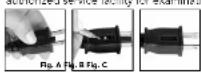
Risk of fire. Do not replace attachment plug. Contains a safety device (Fuse, AFCI, LCD) that should not be removed. Discard product if the attachment plug is damaged.
FCC Compliance Statement
This device complies with Part 15 of the FCC Rules. Operation is subject to the following two conditions: (1) This device may not cause harmful interference, and (2) this device must accept any interference received, including interference that may cause undesired operation.
NOTE: This equipment has been tested and found to comply with the limits for a Class B digital device, pursuant to Part 15 of the FCC Rules. These limits are designed to provide reasonable protection against harmful interference in a residential installation. This equipment generates, uses and can radiate radic frequency energy and, if not installed and used in accordance with the instructions, may cause
harmful interference to radio communications. However, there is no guarantee that interference will not occur in a particular installation. If this equipment does cause harmful interference to radio or television reception, which can be determined by turning the equipment off and on, the user is encouraged to try to correct the interference by one or more of the following measures:
Reorient or relocate the receiving antenna.
Increase the separation between the equipment and receiver,
Connect the equipment into an outlet on a circuit different from that
to which the receiver is connected.
Contact Vorradic Customers Service of Dealer or an experienced radio/TV technician for help.
This Class B digital apparatus complies with Canadian ICES-003.
Changes or modifications not expressly approved by the party responsible for compliance could void the user's authority to operate the equipment.
This device contains license exempt transmitter(s)/receiver(s) that comply with Innovation, Science and Economic Development Canada's license exempt RSS(s). Operation is subject to the following two conditions:
(1) This device may not cause interference. (2) This device must accept any interference, including interference that may cause undesired operation of the device.
RF Exposure Statement: This equipment complies with FCC/ISED radiation exposure limits set forth for an uncontrolled environment. This equipment should be installed and operated with minimum distance 20cm between the radiator and your body.
Supplier's FCC Declaration of Conformity
Responsible Party: Vornado Air LLC
Mailing Address: 415 E. 13th St., Andover, KS 67002
Contact: www.vornado.com
SAVE THESE INSTRUCTIONS
FEATURES
BASE ASSEMBLY
Screwdriver required.
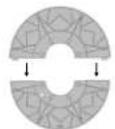
- Assemble the two base halves together, pressing the two halves together until flush. You should hear a slight click when fully connected.
- Assemble the base to the bottom of the tower. There is an alignment pin (A) located on the bottom of the tower and an alignment recess (B) located on the base. An arrow on bottom of base indicates alignment recess location. To ensure correct assembly, position base onto bottom of tower with (A) and (B) aligned. Take care that power card is routed through hole on base before moving to next step in assembly.
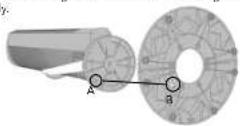
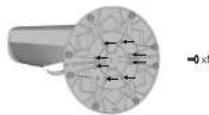
- Attach base to tower using 8 screws provided.
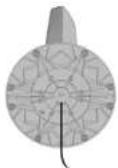
- Route the power cord through cord path located on bottom of base.
HOW TO USE
Before use, check appliance for visible damage. DO NOT USE THIS TOWER if there is evidence of damage. If any damage is found, contact Vornado Air LLC at 1-830-234-0604.
-
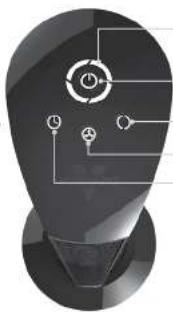
Touch Do power on
-
Select desired speed by pressing ✿ Speed is indicated by number of lights illuminated:
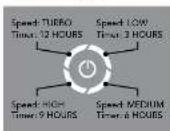
- Press ① to activate timer. The ⑨ and Indicator Lights will turn orange to indicate timer adjustment mode. While in this mode, select amount of time in three-hour intervals by pressing ⑩. After a few seconds, the flashing orange Indicator Lights will turn white, indicating you have left
timer adjustment mode.
The ① will continue to glow orange to indicate the timer is set.
-
To adjust timer setting, order ①
-
To cancel timer, cycle through the timer settings until off. You can also press and hold ① for 4 seconds. The indicator lights will flash, indicating the timer is off. When timer is off, the ② will no longer glow orange.
-
Press (1) to turn oscillation on and off
You can also control the product with Amazon Alexa. See GETTING STARTED and USING ALEXA for instructions.
natural_image
Abstract 3D rendering of a light bulb-shaped object with internal geometric lines (no text or symbols)SPEED/TIMER INDICATOR LIGHTS
POWER ON/OFF
OSCILLATION()
FAN SPEED
TIMER
NOTE: Your tower fan is equipped with a photocetector sensor. The brightness of the control display will automatically adjust based upon the amount of light detected in the room.
10 English
GETTING STARTED
Before product setup, download or update the Amazon Alexa app from your mobile device's app store and ensure your phone is connected to your 2.4 GHz WIFI network.
- Plug your Vornado OSCR37 AF into an electrical outlet
- Open the Alexa app and top the MORE icon to add a device. Follow the on-screen instructions. If prompted by the app, scan the 2D barcode located on the product
- Once successfully connected, a message will appear in the Amazon Alexa app and the power button on your OSCR37 AE will be illuminated blue. Your fan is ready to use.
FACTORY RESET: If for any reason, there is a problem with your product or you wish to disconnect the product from your network you can reset it to factory settings. Simply press and hold the POWER and TIMER buttons for 10-15 seconds or until the entire control panel begins to flash. To reconnect your Vornado OSCR37 AL, follow steps above.
USING ALEXA
Once connected to Amazon Alexa, your OSCI37 AE can be controlled via your voice with any Alexa Echo device or the Alexa App on your phone. To control your product, use simple voice controls like:
'Alexa, tum ON/OFF the fan.'
* Alexa, set speed on the fan to TURBO / HIGH / MEDIUM / LOW.*
* Alexa, INCREASE / DECREASE the speed on the fan
"Alexa, START/STOP oscillation." or "Alexa, turn oscillation on the far ON/OFF."
"Alexa, set turn off time 3/6/9/12 hours
"Alexa, set turn off time OFF.
You can also use the Amazon Alexa app as a remote control for your OSCR37 AF. See info for details.
You can unplug fan from wall to immediately disconnect from Alexa device control. Follow FACTORY RESET instructions (page 10) to permanently disconnect device from network, if needed.
12 English
CLEANING
WARNING: Always unplug device before servicing or cleaning to avoid possible injury due to remote activation of the product.
Because your tower moves a substantial amount of air, it will need regular cleaning. If service is required, return your tower to Vornado (see WARRANTY for instructions).
WARNING: To reduce the risk of electrical shock and injury to persons, unplug the tower before cleaning.
-
Unplug tower before cleaning.
-
Use the brush attachment on your household vacuum cleaner to vacuum any accumulated dust off the tower.
-
Wipe down the entire tower with a soft cloth.
Note: Do not use gasoline, thinners, solvents or other chemicals for cleaning. The motor is permanently lubricated and requires no oiling.
TROUBLESHOOTING
POSSIBLE CAUSE AND SOLUTIONPROBLEM
The unit fails to power on.
Unit is not plugged in. Plug Power Cord into electric outlet.
Ensure unit fan speed setting is selected.
Plug fuse has blown. Replace fuse (See USER SERVICING INSTRUCTIONS).
Unit is damaged or in need of repair. Cease usage and upplug. Contact Consumer Service for assistance.
The outlet is worn or damaged. Try another outlet or contact a qualified electrician,
Airflow is weak or slow.
Unit set to a low speed setting. Adjust to a higher speed setting.
Airflow is blocked. Remove obstruction
Adjust direction of airflow towards the user.
GFCI has tripped.
Under certain conditions, it is possible for a reset GFCI (Ground Fault Circuit Interrupter) outlet to trip when the user is changing speeds on a Vomado circulator. In this event, change to an outlet that is not connected to a GFCI device. It could also indicate a weak or defective GFCI outlet. Contact a qualified electrician to check the GFCI outlet.
Cannot connect unit to my Amazon Alexa account.
You might be connected to a 5 GHz WiFi network. Disconnect and reconnect to a 2.4 GHz network and try the setup again.
Your WiFi signal might not be strong enough. Move closer to your WiFi router and try the setup again.
14 Englen

WARRANTY
We expect this product to be perfect. If you're not satisfied with this product, let us know.
We're Here To Help
800.234.0604
vornado.com
help@vornado.com
Vornado Air LLC ("Versanta") was able to be original consumer or purchase this Vornado® Whole Room Circulator ("prod.)" is free from defects in material wearsmishes for a position at first 50 years from the sale and purchase. If any such class is described within the warranty per ton, Vornado, at its decoration, will repair or replace the Product at no cost.
For warranty service Call 1-800-297-640/ email help/Withdrawn.com to obtain a Warranty Authorization [RAT]. Please have or include your Product name number and act of number, so well as your name address, city, state, trip code, e-mail, and phone number when contacting the mode for warranty service. To file a contact or warranty claim, see variations can/contact us
After receiving the BA form, ship your Product to: Vornado Air LLC Atrn. Warranty & Repair 415 East 13 in Street Auditor, KS 67002. For your conventions, please have your mail number and sent number when contacting Vozone with service request ca. to assure proper handling, packages must be clearly marked with the BA number. Packages not clearly marked with the BA number may be relevant at the receiving desk. Please allow 1-7 weeks for report and return of your product after the product is received.
Repairs not covered by the warranty or outside the warranty period will require a loss to cover the cost of material, labor, handling and shipping.
This warranty does not apply to defects resulting from abuse of the product, modification, alteration, maintaining, improper maintenance, commercial use or repair or disposal of the Products by persons can then terminate, damage which occurs in ship present or are at oblasts to acts of God. Improper product use, which includes using an external device that

Designed, engmented and augmented, Android, 15
at least towards the voltage at frequency of electricity, or shipping a warning amount to a country not restricted for you will more call war instead. Any unauthorized product materials, liquid water, manufactured paper unit, or use of non-prepared unencured products and other products that are used in the U.S. or local currency or product warranties. The procurement warranty will be honored only on mode that is being sold or publicly intended. REPAIR OR REPLACEMENT AS PROVIDED UNDER THIS WARRANTY IS THE EXCLUDING ORDER OF THE COCONVER WORKING SHALL NOT BE USED IN ANY OTHER COMPRIMATE BY THE ORDER OF ANY UMLDER AND WILL BEAMINARY ON THIS PRODUCT. LUXED TO THE UCLIN PROHIBITED BY APPS, CAPE LAW, ANY IMP. BY WARRANTY OF MERCANTALITY OR FIDINGS FOR A PARTICIPAL AR PURPOSE ON THIS PRODUCT IS LIMITED IN THIS DOCUMENT. This warranty is not limited to any liability whatsoever arising from any loss or expense on or limitation of incidents, or cause legal damage or violation; or shall limitations on how long an implied war only fails, so the above limit others or causes may not apply to you. This warranty gives your specific legal rights, and you may have own rights that any person or any member shall not assume an responsibility or damage caused by failure to follow those instructions to improper use. Any such products will terminate the product warranty.
All company names and product names are trademarks of their respective owners. © All rights reserved. All technical information, data, and instructions for the installation, connection, and operation contained in these instructions for use correspond to the latest available information at time of printing. The contents of this manuscript may differ slightly from the actual product. Observing any conditional equipments.
© 2023 Nomex Air LLC Andover, KS A/C102 Specifications subject to charge without action Vomaxo® (S. distors) period by Nomex Air LLC
Direction postal: 415 E. 13th St., Andover, KS 6702
natural_image
Abstract 3D rendering of a stylized human head with circular and rectangular cutouts, no text or symbols presentLUCES INDICADORAS DE VELOCIDAD/ TEMPORIZADOR
ENCENDIDO/APAGADO
Pensley, Jr., 1960, 2018, 10: U.S.A.
natural_image
Abstract 3D rendering of a dark, symmetrical object with internal geometric lines and control points (no text or symbols)VOYANTS DE VITESSE/ MINUTERIE MARCHE/ARRÊT
OSCILLATION () RÉGLAGE DE VITESSE * MINUTERIE ©
CAUSE POSSIBLE ET SOLUTIONPROBLÈME
Corruption, must be part of the technical effects in E.U.
415 East 13th Street, Andover, Kansas 67002
800.234.0604 | vornado.com
CL3-0786 RB, V00
- TOWER CIRCULATOR OWNER'S GUIDE
- READ AND SAVE THESE INSTRUCTIONS
- We expect this product to be perfect.
- If it is not, we will make it right.
- CONTENTS
- IMPORTANT SAFETY INSTRUCTIONS
- WARNING: Risk to Children and Impaired Persons
- INSTALLATION WARNING—To reduce risk of fire, electrical shock and injury to persons, observe the following:
- SAFE USE WARNING—To reduce risk of fire, electrical shock and injury to persons, observe the following:
- SERVICING WARNING—To reduce risk of fire, electrical shock and injury to persons, observe the following:
- User Servicing Instructions
- FCC Compliance Statement
- SAVE THESE INSTRUCTIONS
- Engln
- BASE ASSEMBLY
- HOW TO USE
- GETTING STARTED
- USING ALEXA
- CLEANING
- TROUBLESHOOTING
- POSSIBLE CAUSE AND SOLUTIONPROBLEM
- WARRANTY
- CAUSE POSSIBLE ET SOLUTIONPROBLÈME
Brand : Vornado
Model : OSCR37
Category : Fan