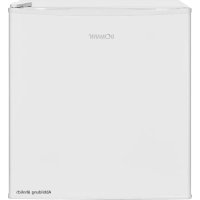
KB 7245 - Fridge BOMANN - Free user manual and instructions
Find the device manual for free KB 7245 BOMANN in PDF.



| Product type | Refrigerator |
| Brand | Bomann |
| Model | KB 7245 |
| Dimensions (H x W x D) | 50.0 x 44.5 x 46.8 cm |
| Net weight | 14.0 kg |
| Supply voltage | 220-240 V~ / 50 Hz |
| Power consumption | 60 W |
| Rated current | 0.6 A |
| Climate class | SN/N/ST/T (10 °C to 43 °C) |
| Refrigerant | Isobutane (R600a) |
| Recommended center temperature | 4 to 7 °C |
| Ice compartment | Yes (temperature down to -4 °C) |
| Number of glass shelves supplied | 1 |
| Door shelves supplied | 2 |
| Water collection tray | Yes |
| Door reversibility possible | Yes (from right to left) |
| Adjustable thermostat | Yes (MIN to MAX levels) |
| Adjustable front feet | Yes |
| Defrost | Manual (unplug and wait for melting) |
| Interior cleaning | Warm water and mild detergent |
| Replaceable door seal | Yes |
| Intended use | Domestic and similar (office kitchens, farms, etc.) |
| QR code on energy label | Yes (for additional information) |
Frequently Asked Questions - KB 7245 BOMANN
User questions about KB 7245 BOMANN
0 question about this device. Answer the ones you know or ask your own.
Ask a new question about this device
Download the instructions for your Fridge in PDF format for free! Find your manual KB 7245 - BOMANN and take your electronic device back in hand. On this page are published all the documents necessary for the use of your device. KB 7245 by BOMANN.
USER MANUAL KB 7245 BOMANN
natural_image
White refrigerator with open door and side compartments, showing front and interior views (no text or symbols visible)Special safety information for this unit.. Page 17
Transport and packaging...... Page 18
Appliance equipment...... Page 19
Installation...... Page 19
Startup / Operation...... Page 20
Cleaning and maintenance...... Page 23
Troubleshooting...... Page 24
Technical data...... Page 24
Disposal...... Page 25
NEDERLANDS
Inhoud
Inleiding.... Pagina 26
Algemene opmerkingen.... Pagina 26
natural_image
Illustration of hands holding a tablet with a curved arrow indicating rotation (no text or symbols)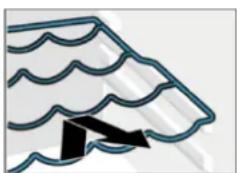
natural_image
Simple line drawing of a waving awning with wavy roof lines and a black arrow pointing to the down (no text or symbols)natural_image
Simple line drawing of a mechanical device with arrows indicating motion or force direction (no text or symbols)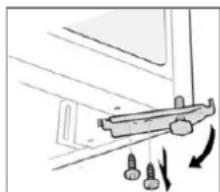
natural_image
Diagram of a mechanical assembly with bolts and motion arrows indicating movement (no text or symbols)Thank you for choosing our product. We hope you will enjoy using the appliance.
Symbols in these instructions for use
Important information for your safety is specially marked. It is essential to comply with these instructions to avoid accidents and prevent damage.

WARNING:
This warns you of dangers to your health and indicates possible injury risks.

CAUTION:
This refers to possible hazards to the machine or other objects.

NOTE: This highlights tips and information.
General notes

Read the operating instructions very carefully before putting the appliance into operation and keep the instructions including the warranty and the receipt. If you give this appliance to other people, also pass on the operating instructions.
i NOTE:
- Due to constant product modifications, your appliance may differ slightly from these operating instructions; Functions and methods of use remain unchanged.
- The illustrations in these operating instructions may differ from the original appliance.
- The appliance is designed exclusively for private use and for the envisaged purpose. This appliance is not fit for commercial use.
- The appliance is only to be used as described in the user manual. Do not use the appliance for any
other purpose. Any other use is not intended and can result in damages or personal injuries.
- This appliance is not intended to be used as a built-in appliance.
- Do not use it outdoors. Keep it away from sources of heat, direct sunlight and humidity.
- When not in use, for cleaning, user maintenance works or with disruption, switch off the appliance and disconnect the plug (pull the plug itself, not the lead) or turn off the fuse.
- The appliance and if possible the mains lead have to be checked regularly for signs of damage. If damage is found the appliance must not be used.
- For safety reasons, alterations or modifications of the appliance are prohibited.
- To ensure your children's safety, please keep all packaging (plastic bags, boxes, polystyrene etc.) out of their reach.

WARNING:
Do not allow small children to play with the foil. There is a danger of suffocation!
Special safety information for this unit
- This unit is intended to be used in household and similar applications such as
- staff kitchen areas in shops, offices and other working environments;
- farm houses and by clients in hotels, motels and other residential type environments;
- bed and breakfast type environments;
- catering and similar non-retail applications.

WARNING:
- Keep ventilation openings, in the appliance enclosure or in the built-in structure, clear of obstruction.
- Do not use mechanical devices or other means to accelerate the defrosting process (if necessary), except those described in this manual (depending on the model included the scope of delivery).
- Do not damage the refrigerant circuit.
- Do not operate any electrical devices inside the appliance.
- Do not store explosive substances such as aerosol containers with flammable propellant in the appliance.
- This appliance can be used by children aged from 8 years and above and persons with reduced physical, sensory or mental capabilities or lack of experience and knowledge if they have been given supervision or instruction concerning use of the appliance in a safe way and understand the hazards involved.
• Children shall not play with the appliance.
- Cleaning and user maintenance shall not be made by children unless they are older 8 years and supervised.
- NOTE: Children aged from 3 to 8 years are allowed to load and unload refrigerating appliances.
- When positioning the appliance, ensure the supply cord is not trapped or damaged.
- Do not locate multiple portable socket-outlets or portable power supplies at the rear of the appliance.
- Do not try to repair the appliance on your own. Always contact an authorized technician. To avoid the exposure to danger, always have faulty cable be replaced only by the manufacturer, by our customer service or by qualified person and with a cable of the same type.
- Use the provided collection points of electrical equipment for the disposal of the appliance.
Coolant

WARNING: Risk of fire / flammable
materials
The coolant circuit of this unit contains the refrigerant Isobutane (R600a), a natural gas that is flammable and of high environmental compatibility. Make sure no parts of the coolant circuit get damaged during transport and installation of the appliance.
If the coolant circuit is damaged:
- avoid any open flames or ignition source,
- disconnect the plug,
- thoroughly air the room in which the appliance is installed and
- contact an authorized technician.
Transport and packaging
Transport the appliance
Transport the appliance, if possible, in vertical position. Otherwise, it is absolutely necessary to allow the appliance standing upright for a few hours before installation "Prior to first use". Protect the appliance during transport against weather influences.
Unpacking the appliance
- Remove the appliance from its packaging.
- Remove all packaging material, such as foils, filler and cardboard packaging.
Dispose of packaging materials that are no longer required in accordance with the locally applicable regulations. - To prevent hazards, check the appliance for any transport damage.
- In case of damage, do not put the appliance into operation. Contact your distributor.
iNOTE:
Production residue or dust may have collected on the appliance. We recommend cleaning the appliance according to chapter "Cleaning and maintenance".
Appliance equipment
Appliance overview
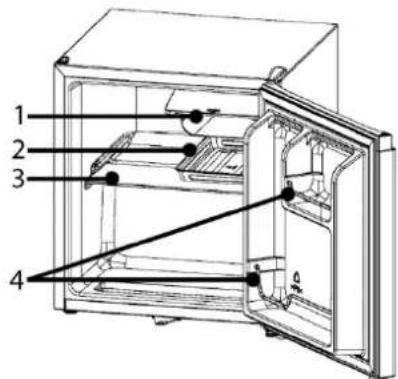
1 Ice compartment
3 Glass shelf
2 Condensation collection tray
4 Door storage with brackets
Delivery scope
1x glass shelf, 2x door compartment bracket, 1x condensation collection tray
Installation
Conditions for the installation location
- Good ventilation is required around the appliance to dissipate the heat properly and to guarantee efficient cooling operation at low power consumption. Enough clearance is necessary.
- Gap to the back approx. 50 \~ 70 mm, to the side walls and above the appliance each approx. min. 100 mm;
-
Place the appliance so that the appliance door can open without being impeded.
-
Only install at a location with an ambient temperature suitable for the climate class of the appliance. The climate class can be found under "Technical data" and on the rating label located in the interior or on the appliance rear.
- Place the appliance on a steady and safe surface. If the appliance is not horizontally leveled, adjust the feet accordingly.
-
Avoid the installation:
-
near heaters, next to a stove, direct sunlight or any other heat sources;
- at locations with high humidity (e.g. outdoors, bathroom), as metal parts would be susceptible to corrosion under such circumstances;
- near volatile or flammable materials (e.g. gas, fuel, alcohol, paint, etc.), in rooms which may have poor air circulation (e.g. garages).
- Do not expose the appliance any weather.
Leveling the appliance
Slight unevenness in the floor can be leveled out using the front feet.
Check whether the appliance is leveled horizontally. If the appliance is not in balance, the feet must be adjusted.
Electrical connection
WARNING:
- The installation to the mains supply must conform to the local standards and regulations.
- Improper connection may cause to an electric shock!
- Do not modify the appliance plug. If the plug does not fit properly to the outlet, let install a proper outlet by an authorized specialist.
-
The accessibility of the power plug must be ensured to disconnect the appliance from the power supply in case of emergency.
-
Make sure that the voltage supply matches the specifications on the rating label before connecting.
- Connect the mains cable to a properly installed and earthed wall outlet.
- If the plug after installation is not accessible, a corresponding disconnect device must be available to meet the relevant safety regulations.
Reverse the door opening
If required, the door opening can be moved from the right (supplied condition) to the left side.
WARNING:
When replacing the door stop, the appliance must be disconnected from the power supply first.
i NOTE:
You possibly need: screw wrench, Phillips screw-driver as well as a thin-blade screwdriver.
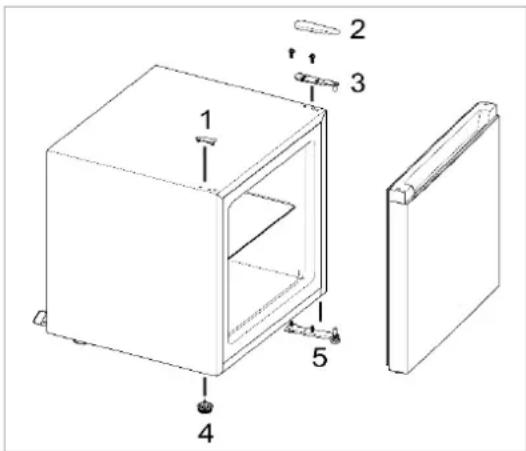
- Remove the blind cap (1) and the hinge cover (2).
- Disassemble the door hinge (3). Lift out the appliance door and place it safely to the side.
- Tilt the appliance slightly backwards and block it in this position. Unscrew the stand (4) and disassemble the door hinge (5).
- Relocate and fasten the door hinge (5). Screw in the stand (4) accordingly.
- Replace the appliance upright. P lace the appliance door and fix it in the intended position. Relocate the fasten the door hinge (3).
- Replace the hinge cover (2) and move the blind cap (1) into the exposed hole.
Check if the door is aligned vertically and horizontally optimally so that the smooth opening and closing of the door is guaranteed.
Startup / Operation
Prior to first use
CAUTION:
After transport, the appliance should be left standing upright for four hours before connecting to the power supply. Nonobservance could lead to malfunction of the cooling system and causes an appliance breakdown.
Clean the appliance interior including all accessory parts. Consider the instructions which we provide in the chapter "Cleaning and maintenance".
Starting the appliance
- Connect the appliance to the power supply.
- Set the operating conditions. See also the following sections.
Settings
Position [OFF] means that the appliance is in the switched-off state. Turn the temperature control clockwise from this position, the appliance switches on automatically.
The power levels control the different values of the internal temperature.
| Power level | |
| MIN | lowest level,warmest internal temperature |
| MED | medium level,optimal operating temperature |
| MAX* | highest level,coldest internal temperature |
*Beware of high setting because the maximum level may already mean "freezing point".
Basically, the temperature changes depending on the ambient temperature (place of installation), the frequency of opening the door and the equipment.
For initial operation, first set the lowest possible internal temperature (= highest power level) until the appliance has reached the desired operating temperature. It is recommended to reset to a medium power level afterwards, then you can easily make any temperature correction.
Recommendation, for optimized food storage and to avoid food waste, a medium power level is generally best. A high power level also increases energy consumption.
The recommended temperature in the center of the appliance is approx. 4\~7 degrees. If the temperature in the center is correct, the different zones usually also have the correct temperature.
Equipment
Note that the equipment varies depending on the appliance type.
The various shelves or drawers can be removed for individual storage. Practical also for cleaning purposes.
i NOTE:
For the most efficient use of energy, place all shelves/drawers in their original positions.
Removing / inserting the shelves
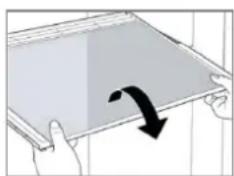
- To remove, open the unit door completely, lift the shelf, if necessary, slant slightly and pull it out to the front.
natural_image
Illustration of hands holding a tablet with a curved arrow indicating rotation (no text or symbols)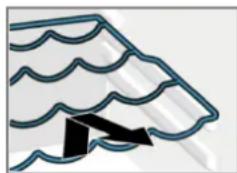
natural_image
Simple line drawing of a roof awning with wavy roof lines and a black arrow pointing to the base (no text or symbols)- Safely reinsert the shelf and push it in until the stop is reached.
Storing food
i NOTE: Recommendation!
To guarantee that the temperature is low enough, you should pre-cool the appliance a few times before initial loading foods.
CAUTION:
Always pay attention to the storage instructions on the sales packaging.
Always store food covered or packed to prevent drying-out and transfer of odor or taste onto other food items. You may pack the food with e.g.
• Polyethylene plastic bags or foil
- Plastic bowl with lid
• Special plastic cover with elastic strip
- Aluminum foil
To avoid contamination of food, respect the following instructions:
- Opening the door for long periods can cause a significant increase of the temperature in the compartments of the appliance.
- Clean regularly surfaces that can come in contact with food and accessible drainage systems (see "Cleaning and maintenance").
- Store raw meat and fish in suitable containers in the refrigerator, so that it is not in contact with or drip onto other food.
- Two-star ^** frozen-food compartments are suitable for storing pre-frozen food, storing or making ice-cream and making ice cubes.
- One- *, two- ** or three-star *** compartments are not suitable for the freezing of fresh food.
- If the appliance is out of use for long period, follow the instructions under "Switching off".
Temperature zones and storage recommendations The optimal cooling temperature is around 4\~7 degrees for the central area of the cooling.
Different cooling zones are created by the air circulation. Regardless of the power level, cold air drops off.
- The coldest zone is on the cooling rear wall and in the lower cooling part. Recommended for storing perishable foods such as meat, fish and sausages at around 2\~3 degrees.
- About that it becomes less cold. For dairy products such as yoghurt, cheese and co., the center of the cooling is just the right temperature at around 4\~7 degrees.
- Well-packed leftovers or preserves needs less cooling. The upper cooling part at around 6\~8 degrees could be the right place.
- The cooling door is one of the warmest locations. The upper racks are good location for food that needs moderate cooling, such as butter and eggs. There is space for drinks in the lower door racks.
- The vegetable box (depending on model) is suitable for fruit and vegetables at a temperature of around 8 degrees, depending on the cooling temperature. To ensure that delicate fruits and vegetables feel good, a glass shelf above avoids the falling cold.
Freezer compartment
The freezer compartment allows you to store already frozen food at a temperature up to -4^ C for a short time. In addition, observe the recommended storage times on the sales packaging.
Operating noise
| Type of sound | Cause |
| Mumbling | Compressor during its operation |
| Liquid sounds | Circulation of the refrigerant |
| Click sounds | The temperature control turns the compressor on or off |
| Disturbing noises | Vibration of the shelves or cooling coils |
Switching off
To switch off the appliance turn the temperature control to the off state.
If the appliance is out of use for long periods:
- Remove the appliance content.
- Disconnect the appliance from the power supply.
- Defrost (model dependent) and clean the appliance thoroughly (see "Cleaning and maintenance").
- Leave open the appliance door to avoid formation of mold and unpleased odors.
Tips for energy saving
- Disconnect the appliance from the power supply if it isn't in use.
- Do not install the appliance near stoves, heaters or other heat sources. In case of higher ambient temperatures, the compressor will run more frequently and longer.
- Ensure enough ventilation at the bottom and rear side. Never block ventilation openings.
- Place all shelves, racks or drawers (depending on the model) in their original position.
- Adjust the temperature not colder than necessary.
- Allow warm food to cool before placing it in the appliance.
- Open the unit door only as necessary.
- Defrost the unit regularly (model dependent).
- The seal of the appliance door must be completely intact, so that the door closes properly.
Cleaning and maintenance
WARNING:
- Always disconnect the appliance from the power supply before cleaning and user maintenance.
- Do not use steam cleaners for cleaning the appliance; moisture could enter electrical components. Risk of electric shock! Hot steam could damage the plastic parts.
- The unit must be dry before restarting operation.
CAUTION:
- Do not use a wire brush or other sharp, abrasive items.
- Do not use any acidic or abrasive detergents.
- Do not damage the refrigerant circuit.
Cleaning the appliance including interior
To keep dirt and germs at bay, clean the appliance regularly!
- First clear out the contents of the appliance and store it in a cool place. Remove all moving parts such as shelves and drawers.
- Clean the interior of the appliance, the exterior surfaces and the accessories with lukewarm water and a mild cleaning agent; or with a clean, damp microfiber cloth without cleaning agent.
- After everything has dried thoroughly, you can put the appliance back into operation.
- Depending on the model: At least once a year, wipe off the dust that has accumulated on the rear wall of the unit and on the condenser (metal grille). Use a soft brush or a vacuum cleaner for this purpose.
Cleaning / replacing the door seal
Regularly check the seal for dirt, damage and air tightness!
Checking the seal for air tightness
- Clamp a thin piece of paper at various points for testing. The paper must be equally difficult to pull through at all points.
Cleaning the gasket
- Clean the gasket with clear water only!
- CAUTION, grease and oil makes the seal porous and brittle. Wipe up grease or oil immediately with a damp, clean cloth.
Replacing the seal
- Remove the contents of the appliance and, if necessary, defrost the unit. Pay attention to how the old gasket is attached. Most gaskets are only plugged in.
- Remove the worn gasket rubber by removing it from the groove. Carefully clean the appliance door and the groove below the rubber and remove any adhesive residue.
- Attach the new rubber. If necessary, heat the rubber seal with a hair dryer or hot water and shape it by hand. Start pressing the gasket in one corner and then press it around the door into the groove provided for this purpose.
- Continue to check the seal regularly for dirt and damage!
Defrosting
CAUTION:
Never use metal objects (e.g. knives) to remove ice from the evaporator. Otherwise, it can be damaged.
To achieve better cooling and to save energy, defrost the appliance regularly!
- To start the defrosting process, disconnect the appliance from the power supply.
- Remove the food items and keep covered at a cool location.
- When the ice has melted, wipe the condensate away and dry the appliance interior.
- Then you may restart the appliance by connecting the plug and turning the temperature control.
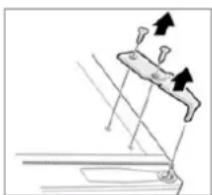
Replacing the door hinge
If the appliance door starts to stutter, crack or jam when you open it, it is probably due to a worn or damaged hinge.
It is recommended to replace all door hinges at the same time, otherwise the next repair will soon be beckoning.
- Remove the contents of the appliance and the movable interior parts.
- Tilt the appliance backwards and block it in this position to prevent the door from sliding out.
natural_image
Diagram of a mechanical device with arrows indicating motion or force direction (no text or symbols)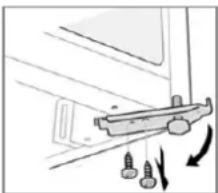
natural_image
Diagram of a mechanical assembly with screws and directional arrows indicating motion (no text or symbols)- Loosen the hinge cover as described under “Reversing the door opening” and disassemble the upper door hinge.
- Turn out the stand and disassemble the lower door hinge.
- The respective hinge assembly is carried out in reverse order.
- Open and close the appliance door for a test run, readjust the hinges if necessary. In any case, make sure that the door fits tightly and accurately.
Troubleshooting
Before you contact an authorized specialist
Problem / cause / action
Appliance is not working properly or at all
- Check the power supply / temperature setting / ambient temperature.
- Unblock the ventilation openings, install the appliance freely.
Problem / cause / action
Loading is too warm
- Check the temperature setting / ambient temperature.
- A large quantity of warm food has been stored in the unit in the last 24 hours.
- The appliance door is not closed properly, check the door seal.
Loud noise during operation
- Check that the appliance is level.
- See "Operating noise".
Water on the appliance bottom - Check the temperature setting.
iNOTE:
If a problem persists after following the steps above, contact your trader or an authorized technician.
Technical data
Climate class SN/N/ST/T: this appliance is intended to be used at ambient temperature ranging from 10^ C to 43^ C.
Electrical connection....
Power voltage: 220-240 V\~ / 50 Hz
Rated power: 60 W
Rated current: 0.6 A
Dimension H x W x D / weight.....
Appliance size: 50.0 x 44.5 x 46.8 cm
Net weight: ....approx. 14.0 kg
For more information about the product, scan the QR code on the supplied energy label and/or visit the official website of the product data bank:
https://eprel.ec.europa.eu
The right to make technical and design modifications during continuous product development remains reserved.
This appliance has been tested according to all relevant current CE guidelines, such as electromagnetic
compatibility and low voltage directives, and has been constructed in accordance with the latest safety regulations.
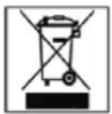
Disposal
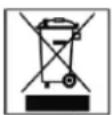
Meaning of the "Dustbin" symbol
Protect our environment; do not dispose of electrical equipment in the domestic waste.
Please return any electrical equipment that you will no longer use to the collection points provided for their disposal.
This helps avoid the potential effects of incorrect disposal on the environment and human health.
This will contribute to the recycling and other forms of reutilization of electrical and electronic equipment.
Information concerning where these can be disposed of can be obtained from your local authority. Your dealer and contractual partner is also obliged to take back the old appliance free of charge.

WARNING:
Remove or disable any existing snap and bolt locks if you take the unit out of operation or dispose it.
Inleiding
natural_image
Illustration of hands holding a tablet with a curved arrow indicating rotation (no text or symbols)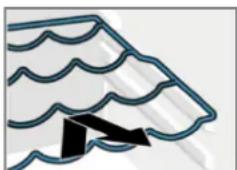
natural_image
Simple line drawing of a stylized roof or awning with wavy lines and a black arrow pointing to the base (no text or symbols)natural_image
Diagram of a mechanical device with arrows indicating motion or force direction (no text or symbols)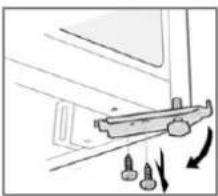
natural_image
Diagram of a mechanical component with arrows indicating motion or force (no text or symbols)natural_image
Illustration of a hand holding a tablet with a curved arrow indicating rotation (no text or symbols)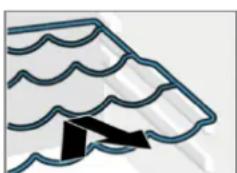
natural_image
Simple line drawing of a stylized roof or awning with wavy lines and a black arrow pointing to the base (no text or symbols)natural_image
Diagram of a mechanical device with arrows indicating motion or force direction (no text or symbols)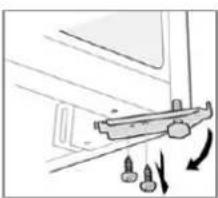
natural_image
Diagram of a mechanical component with arrows indicating motion or force (no text or symbols)natural_image
Illustration of hands holding a tablet with a curved arrow indicating rotation (no text or symbols)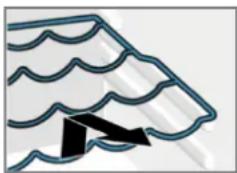
natural_image
Abstract line drawing of a stylized roof or window with wavy lines and a black arrow (no text or symbols)Masa netto: ....ok. 14,0 kg
CTC Clatronic Sp. z o.o
Ul. Brzeska 1
45-960 Opole
Usuwanie

- NEDERLANDS
- Inhoud
- WARNING:
- CAUTION:
- General notes
- i NOTE:
- Special safety information for this unit
- Coolant
- WARNING: Risk of fire / flammable
- materials
- If the coolant circuit is damaged:
- Transport and packaging
- Transport the appliance
- Unpacking the appliance
- iNOTE:
- Appliance equipment
- Appliance overview
- Delivery scope
- Installation
- Conditions for the installation location
- Leveling the appliance
- Electrical connection
- Reverse the door opening
- Startup / Operation
- Prior to first use
- Starting the appliance
- Settings
- Equipment
- Removing / inserting the shelves
- Storing food
- i NOTE: Recommendation!
- To avoid contamination of food, respect the following instructions:
- Freezer compartment
- Switching off
- Tips for energy saving
- Cleaning and maintenance
- Cleaning the appliance including interior
- Cleaning / replacing the door seal
- Checking the seal for air tightness
- Cleaning the gasket
- Replacing the seal
- Defrosting
- Replacing the door hinge
- Troubleshooting
- Problem / cause / action
- Technical data
- https://eprel.ec.europa.eu
- Disposal
- Inleiding
- Usuwanie
Brand : BOMANN
Model : KB 7245
Category : Fridge