
RIG 700HD - Earphones Nacon - Free user manual and instructions
Find the device manual for free RIG 700HD Nacon in PDF.



User questions about RIG 700HD Nacon
0 question about this device. Answer the ones you know or ask your own.
Ask a new question about this device
Download the instructions for your Earphones in PDF format for free! Find your manual RIG 700HD - Nacon and take your electronic device back in hand. On this page are published all the documents necessary for the use of your device. RIG 700HD by Nacon.
USER MANUAL RIG 700HD Nacon
Adjust mic monitoring
Support 8
Fit
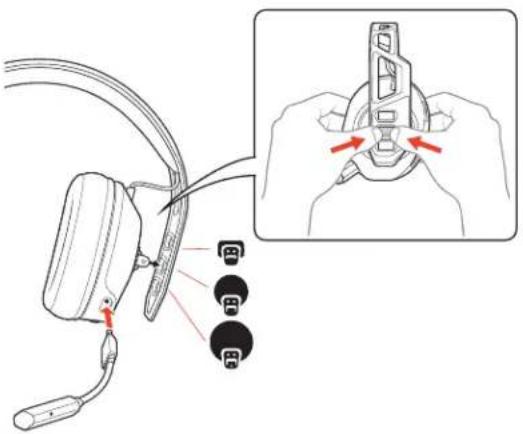
Your headset components easily snap into the headset frame to configure the best fit and sound. The headband adjusts to three sizes (small, medium, large) by moving the earcups. To remove an earcup, press the earcup to detach it from the headband.
text_image
Diagram showing cable connector insertion with labeled pins and a magnified view of the connector's adjustment mechanism.NOTE Headband style may vary.
Setup and basics
Your adapter comes pre-paired to your headset. After you adjust and charge your headset and configure your adapter, power on your headset and it's ready to go.
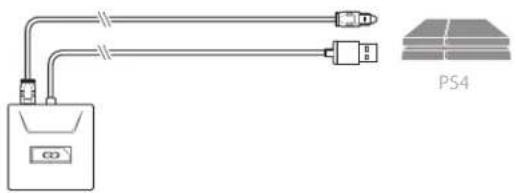
Setup PS4
PS4
1 Connect your adapter to your system.
natural_image
Pure electrical circuit lines without any symbols
2 Power on your PS4 and Check for updates
3 To adjust system audio settings, check your console user guide.
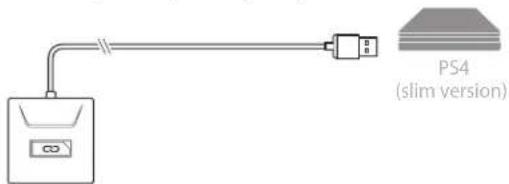
PS4 (slim version)
1 Connect your adapter to your system.
text_image
PS4 (slim version)
2 Power on your PS4 and Check for updates
3 To adjust system audio settings, check your console user guide.
Setup Xbox One
1 Connect your adapter to your system.
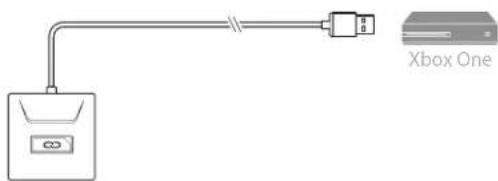
text_image
Xbox One
NOTE Ensure the switch on the back of the adapter is set to your preference: console or PC.
2 Power on your Xbox One and Check for updates
3 To adjust system audio settings, check your console user guide.
Setup PC 1 Connect your adapter to your system.
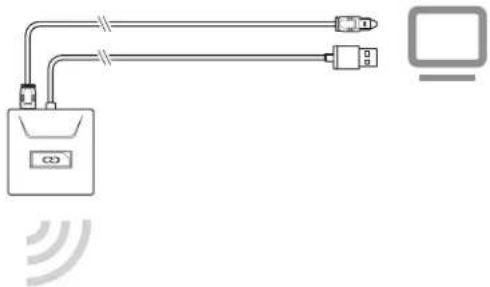
natural_image
Pure electrical circuit lines without any symbolsIMPORTANT Optical cable connection is only for RIG 700HD and RIG 700HS.
2 RIG 700HX only: Ensure the switch on the back of the adapter is set to «PC.»
Charge It takes 2 hours to fully charge the headset. The headset LED turns off once charging is complete.
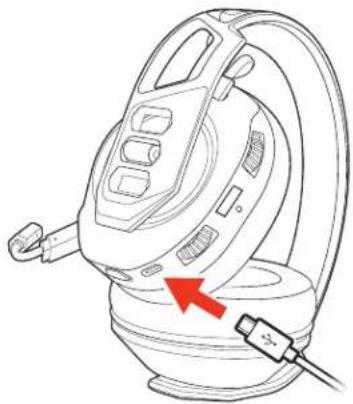
natural_image
Line drawing of a steam iron with a red arrow pointing to the base (no text or symbols)Power on or off Press the Power button for 2 seconds until you hear "power on" or «power off.»
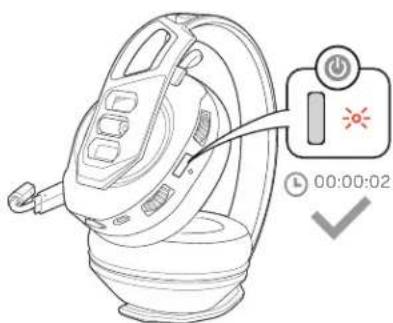
text_image
Diagram of a device with a switch and power button, showing time and duration settingsAdjust volume 1 To increase or decrease the game and chat volume, adjust the top headset dial.
2 To increase or decrease the master volume, adjust the bottom headset dial.
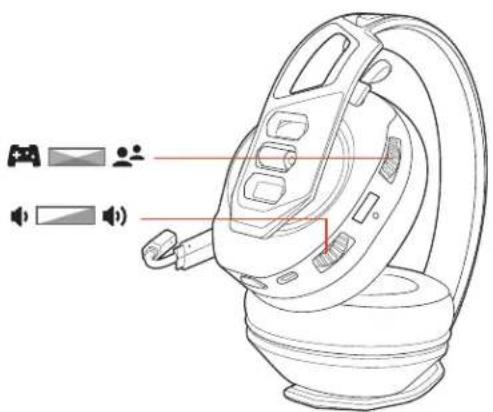
natural_image
Line drawing of a washing machine with control panel and indicator lights (no text or symbols)IMPORTANT For the PS4 (slim version), set the top headset dial in the middle; game and chat remain balanced. Use the bottom headset dial to increase or decrease the master volume.
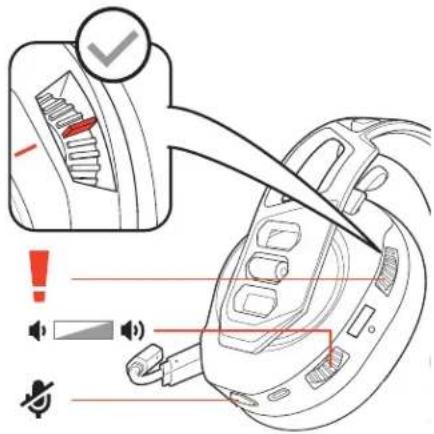
text_image
Diagram illustrating the installation of a steam iron with warning labels and sound wave indicators.Mute
Tap the Mute button to mute or unmute your headset.
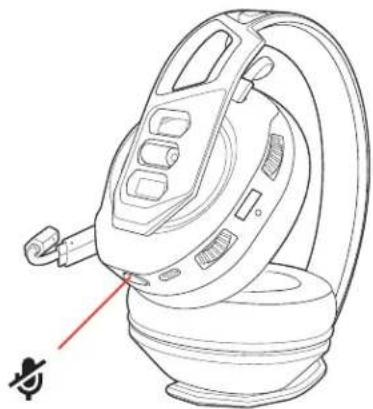
natural_image
Line drawing of a mechanical device with a red pointer and a small symbol below (no text or labels)Adjust mic monitoring
Press and hold the Mute button to cycle through mic monitoring levels. Mic monitoring lets you hear your own voice in the headset.
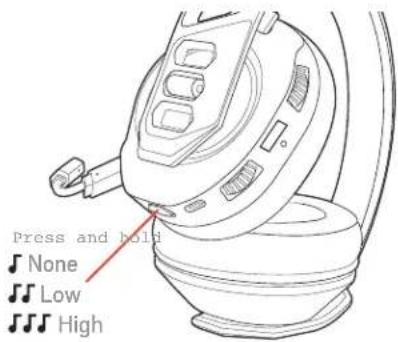
text_image
Press and hold None Low HighPress and hold the Mute button and hear Mic monitoring level
| one | tone | None |
| two | tones | Low |
| three | tones | High |
Support
NEED MORE HELP?
www.nacongaming.com

nacon
NACONG GAMING, Inc
10400 NE 4 ^th Street, Suite 500,
Bellevue, WA 98004 USA
(+1) 800-617-0174
Headquarter
NACON
©2020 NACON. NACON and RIG are trademarks of NACON, registered in the US and other countries. «PlayStation» and «DUALSHOCK» are registered trademarks of Sony Interactive Entertainment Inc. All rights reserved. All other trademarks are the property of their respective owners.
Patents pending.
214554-06 (06.20)
RIG
Série RIG 700
Guide d'utilisation
FR
Sommaire
Ajustement 11
text_image
Diagram showing cable connector insertion with labeled pins and a magnified view of the connector's adjustment mechanism.natural_image
Pure electrical circuit lines without any symbols
text_image
PS4 (slim version)
natural_image
Pure electrical circuit lines without any symbolsnatural_image
Line drawing of a mechanical device with a red arrow pointing to a component (no text or symbols present)text_image
Diagram of a device with a switch and timer, showing time setting 00:00:02Régler le volume
natural_image
Line drawing of a mechanical device with labeled components and indicator lights (no text or symbols)text_image
Diagram illustrating the use of a vacuum cleaner with warning labels and sound wave indicatorsMode discrétion
natural_image
Line drawing of a steam iron device with a red pointer indicating the handle (no text or symbols present)text_image
Press and hold None Low Hightext_image
Diagram showing cable connector insertion with labeled pins and a magnified view of the connector's adjustment mechanism.natural_image
Pure electrical circuit lines without any symbols
text_image
PS4 (slim version)
natural_image
Pure electrical circuit lines without any symbolsnatural_image
Line drawing of a steam iron with a red arrow pointing to the handle (no text or symbols)text_image
Diagram of a device with a control panel and timer, showing status indicators for activation or reset.natural_image
Line drawing of a portable air conditioner unit with indicator lights and speaker symbols (no text or labels)text_image
Diagram illustrating the installation of a steam iron with warning labels and sound wave indicators.Stummschalten
natural_image
Line drawing of a hair iron shaver with a red pointer indicating the tip (no text or symbols present)text_image
Press and hold None Low Hightext_image
Diagram showing cable connector insertion with labeled pins and a magnified view of the connector's adjustment mechanism.natural_image
Pure electrical circuit lines without any symbols
text_image
PS4 (slim version)
natural_image
Pure electrical circuit lines without any symbolsnatural_image
Line drawing of a mechanical device with a red arrow pointing to a cable or connector (no text or symbols present)text_image
Diagram of a device with a power button and switch, showing time and date settingsVolume aanpassen
natural_image
Line drawing of a portable air conditioner with indicator lights and control buttons (no text or symbols)text_image
Diagram illustrating the installation of a steam iron with warning labels and component placementMute
natural_image
Line drawing of a steam iron with a red pointer indicating the base (no text or symbols present)text_image
Press and hold None Low Hightext_image
Diagram showing cable connector insertion with labeled pins and a magnified view of the connector's adjustment mechanism.natural_image
Pure electrical circuit lines without any symbols
text_image
PS4 (slim version)
natural_image
Pure electrical circuit lines without any symbolsnatural_image
Line drawing of a steam iron with a red arrow pointing to the base (no text or symbols)Encendido y apagado
text_image
Diagram of a device with a switch and timer, showing a circular button labeled '00:00:02' and a checkmark.Ajustar el volumen
natural_image
Line drawing of a mechanical device with labeled components and indicator lights (no text or symbols)text_image
Diagram illustrating a device's electrical switch mechanism with warning labels and speaker iconsSilencio
natural_image
Line drawing of a hairless iron shaver with a red pointer indicating the tip (no text or symbols present)text_image
Press and hold None Low Hightext_image
Diagram showing cable connector insertion with labeled pins and a magnified view of the connector's adjustment mechanism.natural_image
Pure electrical circuit lines without any symbols
text_image
PS4 (slim version)
natural_image
Pure electrical circuit lines without any symbolsnatural_image
Line drawing of a steam iron with a red arrow pointing to the base (no text or symbols)text_image
Diagram of a device with a switch and power button, showing time and clock settingsRegolare il volume
natural_image
Line drawing of a device with labeled components and indicator lights (no text or symbols)text_image
Diagram illustrating the installation of a steam iron with warning labels and sound wave indicators.natural_image
Line drawing of a steam iron device with a red pointer indicating the handle (no text or symbols present)text_image
Press and hold None Low Hightext_image
Diagram showing cable connector adjustment with labeled pins and a magnified view of the connector's adjustment mechanism.natural_image
Pure electrical circuit lines without any symbols
text_image
PS4 (slim version)
natural_image
Pure electrical circuit lines without any symbolsnatural_image
Line drawing of a mechanical device with a red arrow pointing to a component (no text or symbols present)Ligar ou desligar
text_image
Diagram of a device with a power button and switch, showing time and date settingsAjustar o volume
natural_image
Line drawing of a portable air conditioner with indicator lights and control buttons (no text or symbols)text_image
Diagram illustrating the installation of a steam iron with warning labels and component placementCorte de som
natural_image
Line drawing of a steam iron with a red pointer indicating the base (no text or symbols present)text_image
Press and hold None Low Hightext_image
Diagram showing cable connector insertion with labeled ports and red directional arrows indicating movement or adjustment.text_image
PS4 (slim version)natural_image
Pure electrical circuit lines without any symbolsnatural_image
Line drawing of a mechanical device with a red arrow pointing to a component (no text or symbols present)natural_image
Line drawing of a portable air conditioner unit with a control panel and timer (no text or symbols on the device itself)natural_image
Line drawing of a device with labeled buttons and indicators (no text or symbols present)text_image
Diagram illustrating the installation of a steam iron with warning labels and sound wave indicators.Отключить микрофон
natural_image
Line drawing of a washing machine with a red pointer indicating force application (no text or symbols)text_image
Press and hold None Low Hightext_image
Diagram showing cable connector insertion with labeled pins and a magnified view of the connector being adjusted.natural_image
Pure electrical circuit lines without any symbols
text_image
PS4 (slim version)
natural_image
Pure electrical circuit lines without any symbols
natural_image
Line drawing of a steam iron with a red arrow pointing to the component (no text or symbols)natural_image
Line drawing of a mechanical device with labeled components and indicator lights (no text or symbols)text_image
Diagram illustrating the installation of a steam fan with warning labels and sound wave indicators.natural_image
Line drawing of a steam iron device with a red pointer indicating the tip (no text or symbols present)マイク モニターの調整
text_image
Press and hold ♩ None ♩ Low ♩ Hightext_image
Diagram showing cable connector insertion with labeled pins and a magnified view of the connector's adjustment mechanism.text_image
PS4 (slim version)
natural_image
Pure electrical circuit lines without any symbols
natural_image
Line drawing of a steam iron with a red arrow pointing to the base (no text or symbols)natural_image
Line drawing of a mechanical device with a control panel and indicator lights, no text or symbols present.natural_image
Line drawing of a portable air conditioner unit with indicator lights and speaker symbols (no text or labels)text_image
Diagram illustrating the installation of a steam fan with warning labels and component iconsnatural_image
Line drawing of a steam iron with a red pointer indicating the base (no text or symbols present)마이크 감지 조정
text_image
Press and hold None Low Hightext_image
Diagram showing cable connector insertion with labeled pins and a magnified view of the connector being adjusted.注头带佩戴方式可能有所不同。
设置与基本用法
text_image
PS4 (slim version)natural_image
Pure electrical circuit lines without any symbols
natural_image
Line drawing of a steam iron with a red arrow pointing to the base (no text or symbols)text_image
Diagram of a device with a switch and timer, showing time setting and status indicatorsnatural_image
Line drawing of a portable air conditioner unit with indicator lights and speaker symbols (no text or labels)text_image
Diagram illustrating the use of a device to adjust its interior components, with warning symbols and speaker icons.natural_image
Line drawing of a steam iron with a red pointer indicating the base (no text or symbols present)调整麦克风监控
text_image
Press and hold ♩ None ♩ Low ♩ Hightext_image
Diagram showing cable connector insertion with labeled pins and a magnified view of the connector being adjusted.附註頭帶樣式可能各有不同。
設定與基本功能
text_image
PS4 (slim version)natural_image
Pure electrical circuit lines without any symbols
natural_image
Line drawing of a steam iron with a red arrow pointing to the base (no text or symbols)natural_image
Line drawing of a mechanical device with a control panel and indicator lights, no text or symbols present.natural_image
Line drawing of a portable air conditioner unit with indicator lights and speaker symbols (no text or labels)text_image
Diagram illustrating the installation of a steam fan with warning labels and component iconsnatural_image
Line drawing of a steam iron with a red pointer indicating the base (no text or symbols present)調整麥克風監聽