CT 2020IN - Cooker Rommelsbacher - Free user manual and instructions
Find the device manual for free CT 2020IN Rommelsbacher in PDF.


User questions about CT 2020IN Rommelsbacher
0 question about this device. Answer the ones you know or ask your own.
Ask a new question about this device
Download the instructions for your Cooker in PDF format for free! Find your manual CT 2020IN - Rommelsbacher and take your electronic device back in hand. On this page are published all the documents necessary for the use of your device. CT 2020IN by Rommelsbacher.
USER MANUAL CT 2020IN Rommelsbacher
GB instruction manual 24
FR Mode d'emploi 42
Einleitung

Disposal/recycling 26
General notes for cooking with induction 26
Advantages of induction cooking 26
Selecting pots and pans 26
Important notes 26
For your safety 27
General safety advices 27
Safety advices for using the appliance 28
Prior to initial use 29
Getting acquainted with your appliance 30
30
Residual heat indicator 30
Pot recognition 31
Cooling fan 31
Operating time limitation 31
Priority regulation 31
Operating the appliance 32
"Standby" mode 32
Switching-on the appliance 32
Cooking in "power level" mode 33
Cooking in "temperature level" mode 34
Changeover between "power/temperature level" mode 36
Setting the operating time (timer) 36
Setting the operating time (timer) - reset function 37
Activate/deactivate the key lock 37
Switching-off the appliance 37
Switching-off the appliance permanently 38
Cleaning and maintenance 38
Error codes 39
Extended product information in accordance with the EU regulation 66/2014 (EnEV) 40
F Mode d'emploi 42
Introduction

We are pleased you decided in favour of this superior induction cooking plate and thank you for your confidence. Its easy operation and wide range of applications will certainly fit you with enthusiasm as well. To make sure you can enjoy using this appliance for a long time, please
read the following notes carefully and observe them. Keep this instruction manual safely. Hand out all documents to third persons when passing on the appliance. Thank you very much.
Intended use
The appliance is designed to be used in the household and similar areas, like for example:
- staff kitchens in shops, offi ces and other small commercial areas,
- agricultural holdings,
- by guests in hotels, motels, bed & breakfast and further similar living environments.
Other uses or modifications of the appliance are not intended and may constitute considerable risks of accident. For damage arising from any improper use, the manufacturer does not assume liability.
The appliance is designed for warming, heating and preparing food. The appliance is not designed for commercial use.
Technical data
Only connect the appliance to an isolated ground receptacle installed according to regulations.
The rated voltage must comply with the details on the rating label. Only connect to alternating current.
Model: CT 2020/IN CT 3420/IN
Nominal voltage: 220-240 V~ 50/60 Hz 220-240 V~ 50/60 Hz
Nominal power: 2000 W 3400 W (left: 2000 W, right: 1400 W)
Standby power consumption: < 1W < 1W
Protection class: II II
Number of cooking zones: 1 2
Size of cooking zone: ca. 120 - 260 mm Ø ca. 120 - 260 mm Ø each
Resilience of glass plate: max. 10kg max. 10kg per cooking zone
Scope of supply
Check the perfect condition of the product immediately after unpacking.
Packing material
Do not simply throw the packing material away but recycle it.
Deliver paper, cardboard and corrugated cardboard packing to collecting facilities.
Also put plastic packing material and foils into the intended collecting basins.

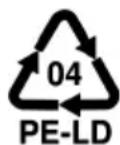


In the examples for the plastic marking:
PE stands for polyethylene, the code figure 02 for PE-HD, 04 for PE-LD, PP for polypropylene, PS for polystyrene.
General notes for cooking with induction
Cooking with induction is based upon a heating principle that is completely different from cooking on conventional cooktops: The heat is generated straight in the pot bottom by eddy currents. The cooktop itself is not heated, but only the bottom of the cooking vessel. Consequently, the usual heat losses are avoided and the efficiency of the energy expended is optimized.
Advantages of induction cooking
- As the pot bottom is heated instantaneously, induction cooking is very energy-saving (saves up to 50% in comparison with other cooking methods).
- The induction cooktop generates or interrupts the heat supply immediately after the activation of the control. This efficient energy utilisation allows for an exact control of the heat supply and is furthermore time-saving in the cooking process.
- A further amount of time is saved on account of the extreme speed by which energy is available after switch-on. No waiting times! For instance, when heating 2 l of water you will be 60% quicker than you are on conventional cooktops!
- Induction cooking provides for extra safety: Even when the cooking utensils are removed from the cooktop without having turned it off, the heating process is interrupted automatically. In case a cloth or another combustible material should be placed on the cooktop by accident, it cannot burn even if the cooktop has been activated. After the cooking process, nothing but the residual heat emitted by the pot is noticeable on the glass ceramic plate.
- The cooking surface is very easy to clean. As it is not heated directly, leftovers cannot scorch. Neither do you have to wait for it to cool before cleaning.
Selecting pots and pans
- Suitable: any flat-bottomed (12 - 26 cm in diameter) cooking utensils made of iron, such as enamelled pots, pots made of cast iron or of magnetic stainless steel. The very short response times to setting changes (short pre-heating time, quick dosable searing) are at thick pot bottoms only possible to a limited extent.
- Unsuitable: any cooking utensils consisting of aluminium, copper, glass or ceramic, as well as any pots having a pot diameter of less than 12cm .
Tip: Check by means of a magnet whether the pot bottom is suitable. If the magnet clings to the outside of the pot bottom, the vessel is qualified for induction cooking.
Important notes
- Only use pots or pans suitable for induction cooking, i. e. cooking utensils that are made of ferromagnetic material. Always keep the glass ceramic surface and the pot bottom clean and dry.
- Do not leave any food in aluminium foil on the glass ceramic surface, nor cutlery, pot lids or other objects made of metal as those might become hot.
-
Never use oven sprays or stain-removers for cleaning! Special cleaning agents for the glass plate are available on the market.
-
Avoid scratches on the glass plate caused by pointed or sharp objects. Protect the glass plate against breakage by falling objects.
For your safety

WARNING: Read all safety advices and instructions. Non-observance of the safety advices and instructions may cause electric shock, fire and/or bad injuries!
General safety advices
- Children from the age of 8 and persons not having the knowledge or experience in operating the appliance or having handicaps of physical, sensorial or mental nature must not operate the appliance without supervision or instruction by a person, responsible for their safety. Never leave the appliance unattended during operation.
Children must not play with the appliance. - Always keep children under 8 years away from the product and the power cord.
- Children from the age of 8 must be supervised when cleaning or maintaining the appliance.
- Packing material like e.g. foil bags should be kept away from children.
- Prior to each use, check the appliance and the accessories for soundness. It must not be operated if it has been dropped or shows visible damage. In these cases, the power supply must be disconnected and the appliance has to be checked by a specialist.
- Do not at all operate this unit with an external timer or a separate telecontrol system.
- When laying the power cord, make sure that no one can get entangled or stumble over it in order to avoid that the appliance is pulled down accidentally.
- Keep the power cord away from hot surfaces, sharp edges and mechanical forces. Check the power cord regularly for damage and deteriorations. Damaged or entangled cords increase the risk of an electric shock.
- Do not misuse the power cord for unplugging the appliance! To unplug the appliance pull the plug and not the cord.
-
Never immerse the appliance, the base unit, power cord and power plug in water for cleaning. Make sure no steam or water can infiltrate the underside.
-
Do not store the appliance outside or in wet rooms.
- This electrical appliance complies with the relevant safety standards. In case of signs of damage to the appliance, the power cord, the sealing or the glass plate, unplug the appliance immediately. Repairs may be effected by authorised specialist shops only. Improper repairs may result in considerable dangers for the user.
- Improper use and non-observance of the instruction manual will void all warranty claims.
Safety advices for using the appliance

- CAUTION! This appliance complies with the standards for safety and electromagnetic compatibility. Nonetheless, persons with heart pacemakers should keep away from induction cooking plates! We cannot verify that every heart pacemaker available on the market complies with the current standards for safety and electromagnetic compatibility respectively and that there is no interference caused that might affect the correct operation of the pacemaker.
- There may also be malfunctions of other appliances, such as hearing aids.
- ATTENTION! Hazard of fire! Overheated fats and oils can inflame. Therefore, food containing fats and oils may only be prepared under supervision.
- ATTENTION! Hazard of fire! Do not operate the appliance in the vicinity of or below curtains, wall cupboards or other combustible materials.
- ATTENTION! Hazard of fire! This appliance is not qualified for installation.
- ATTENTION! Hazard of fire! do not use this unit as a tray and do not cover it during operation!
- ATTENTION! Hazard of burns! The glass plate might be still hot because of lost heat from the cooking pots.
- The integrated overheating protection ensures that the cooking zone can not overheat even if operated continuously. If cracks, fissures or breakage is caused and if it may be assumed that safe operation is no longer possible, immediately turn off the appliance and disconnect the power plug.
- Do not handle the appliance with wet hands!
- The following must be observed when setting up the appliance:
o Place the appliance beyond children's reach.
o Place the appliance on a heat resistant, stable and even non-metallic surface (no varnished tables and working surfaces, no table cloths etc.)!
o Do not operate the appliance near to other sources of heat (oven, gas flame etc.) as well as in explosive environments, where inflammable liquids or gases are located!
o The space above the appliance has to be kept free, the distance to all walls must be at least 10cm . Unhindered air supply has to be ensured. Otherwise, the appliance and/or pieces of furniture may be damaged.
o Do not operate the appliance below wall cupboards, overhanging shelves or close to moisture-sensitive objects. Unhindered air supply has to be ensured.
o Stay 1 m away from appliances being sensitive to electromagnetic fields (e.g. screens, watches, electronic appliances and magnetic record carriers).
- Do not transport the appliance in hot condition.
- For a permanent and safe switch-off, pull the power plug from the socket after each use.
Prior to initial use
Wipe the appliance prior to the initial use with a damp cloth and dry it thoroughly. For more information, please refer to "Cleaning and maintenance".
Getting acquainted with your appliance
Touch control sensors
- The appliance is equipped with touch control sensors which grant an easy and convenient handling.
- Touching the "Lock" - "Timer" - "Function" - "ON/OFF" with your finger is always confirmed by a signal tone. Touching the other sensors "+" - "-" and the "Slider touch" area is not confirmed by a signal tone.
NOTE: Always keep the control panel clean and dry. Do not touch it with fingers wet and do not use it as a shelf of deposit as this might lead to malfunctions.
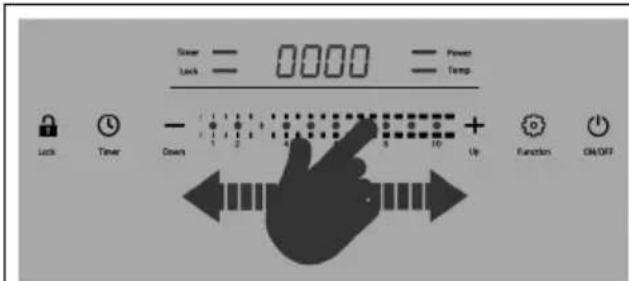
"Slider touch" area
After placing a finger in the "Slider touch" area, the setting can be individually modifi ed by moving the finger back and forth.
- By placing a finger directly on a specific spot in the "Slider touch" area, the desired change in the setting can be implemented directly.
IMPORTANT:
By placing a finger in the "Slider touch" area only the power levels "1, 2, 4, 6, 8, 10" or the temperature levels "60, 80, 100, 140, 180, 220^ can be selected directly. The setting of the intermediate levels "3, 5, 7, 9" or "90, 120, 160, 200^ can be selected by placing a finger directly on a specific spot in the "Slider touch" area or via the sensors "+" or "-".
NOTE: The "Slider touch" area is only intended for changing the power and temperature levels.
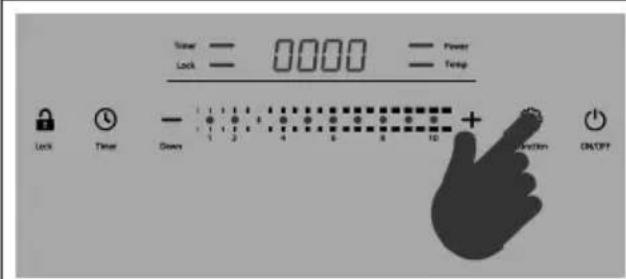
Touch sensors
- By tapping directly on a sensor outside of the "Slider touch" area all other functions can be selected.
- By briefly tapping the "+" or "-" sensors with a finger, both the power and temperature levels as well as the runtime settings can be modified step by step.
Residual heat indicator
Each cooking zone is equipped with a residual heat indicator, which shows whether the cooking zone is still hot.
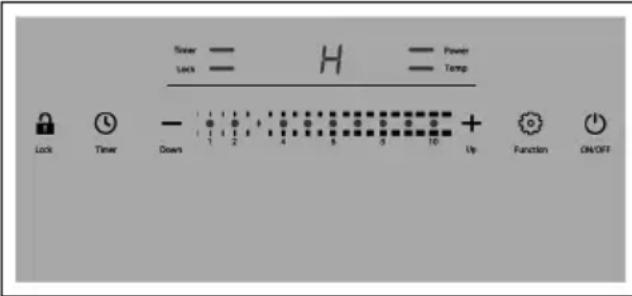
- Once the temperature of the cooking zone has reached a value of more than 80^ due to the waste heat emitted by the pot, the display shows "H" after switching off the appliance.
- As soon as the temperature has dropped below 80^ or when the appliance is disconnected from the mains, the "H" in the display expires.
Pot recognition
Each cooking zone features a sensor, which recognizes whether there is a vessel on the cooking zone.
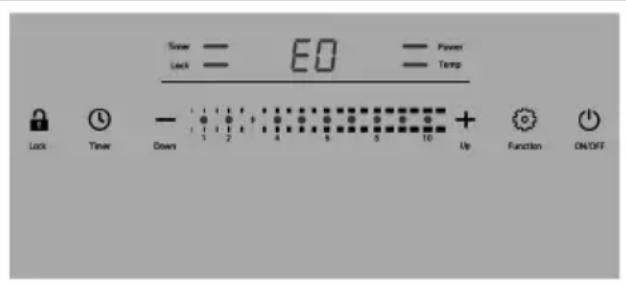
When switching on
- If no suitable vessel is recognized on the cooking zone after switch-on, the display shows "E0" and an alternate warning signal sounds.
- If no pot is recognized within 60 seconds, the appliance switches automatically into the "Standby" mode.
During operation
- If a pot is removed from the cooking zone during operation, the display shows "E0" and an alternate warning signal sounds.
- If a pot is replaced within 60 seconds, the cooking process is continued at the last set level and a runtime continues, if it has been pre-set before.
- If no pot is recognized within 60 seconds, the appliance switches automatically to the "Standby" mode.
Cooling fan
After switch-on an inside fan starts working, which cools the interior components of the appliance in order to prevent the appliance from overheating. It is normal for the fan to continue running in "Standby" mode after a long operation time.
Operating time limitation
- The operating time limitation will cause the cooktop to switch automatically in the "Standby" mode if the settings have not been changed for a period of 2 hours. This happens independently of the respectively set level.
- After an automatic switch-off, the cooking plate can be switched on once again and the maximum operating time will be active again.
- In case the operating time (timer) is set for a period of more than 2 hours, this setting takes priority. The appliance switches off automatically after the set time has elapsed.
Priority regulation
The control of the appliance can be switched to "Standby" mode with the relevant main switch "ON/OFF" at any time during operation, also if other sensors are still activated.
Operating the appliance

WARNING: Read all safety advices and instructions! Non-observance of the safety advices and instructions may cause electric shock, fire and/or bad injuries!
"Standby" mode
| • Connect the power plug to a properly installed and suffi ciently fused power socket. • There is a short check of the electronics. The display shows all available indications fl ashing up. | |
| • Once the check of the electronics is fi nished, this is confi rmed by a signal tone and the display shows "OFF". • The control is in "Standby" mode. |
Switching-on the appliance
| ·Place a suitable cookware in the middle of the cooking zone. ·For switching-on touch the main switch "ON/OFF". ·Tapping on the sensor is confi rmed by a signal tone and the display shows "00". ·Now decide on the cooking mode you would like to work with (either "power level" or "temperature level" mode). NOTE: If there is no further activation within 60 seconds after switch-on, the control will switch back to the "Standby" mode. |
Cooking in "power level" mode (perfect for boiling water or for steaming)
IMPORTANT: By placing a finger in the "Slider touch" area only the power levels "1, 2, 4, 6, 8, 10" can be selected directly.
The setting of the intermediate levels "3, 5, 7, 9" can be selected by placing a finger directly on a specific spot in the "Slider touch" area or via the sensors "+" or "-".
| Tap the "Function" sensor once. The appliance automatically switches to power level "06". Tapping the sensor is confi rmed by a signal tone, while the display shows "06" and the pilot lamp "Power" is lit continuously. NOTE: In case the appliance had not been separated from the power supply after its previous use the display shows the last set power level as a suggestion. | |
| By placing a fi nger on the "Slider touch" area and moving the fi nger to the right, the power can be increased up to level "10". NOTE: For further possibilities of modifying the settings, please refer to point "Touch Control" sensors. | |
| By placing a fi nger on the "Slider touch" area and moving the fi nger to the left, the power can be reduced down to level "01". NOTE: For further possibilities of modifying the settings, please refer to point "Touch Control" sensors. |
- By default the "power level" mode is displayed by the fi gures "01" to "10". By simultaneously touching the "+" and "-" sensors for 3 seconds the display switches over to show the power values instead of the power levels; this means for example that "100" is displayed instead of "01" and "800" instead of "06", etc. This format is valid until the user will set it back. The selected display format remains saved also after switch-off. Only after pulling the power plug or a cut-off from the power supply, there is a reset of the control to the default format with the fi gures "01" to "10".
The values indicated below are reference values and apply to standard steel pots with 20cm
| CT 2020/IN CT 342 | 0/IN - left side CT 3420/IN | - right side | |
| level 01 100 W | 100 W 100 W | ||
| level 02 200 W | 200 W 200 W | ||
| level 03 350 W | 350 W 300 W | ||
| level 04 500 W | 500 W 400 W | ||
| level 05 650 W | 650 W 500 W | ||
| level 06 800 W | 800 W 600 W | ||
| level 07 1000 W | 1000 W 700 W | ||
| level 08 1250 W | 1250 W 900 W | ||
| level 09 1500 W | 1500 W 1100 W | ||
| level 10 2000 W | 2000 W 1400 W |
NOTE: A sensor in the centre of the cooking zone checks the temperature at the bottom of the cookware. The regulation will only function properly if the cookware covers this area. The cookware should have a flat and not too thick bottom to ensure a good heat transfer. The maximum tolerable temperature for the "power level" mode is 200^ .
Cooking in "temperature level" mode (perfect for roasting, grilling or frying)
IMPORTANT: By placing a finger in the "Slider touch" area only the temperature levels "60, 80, 100, 140, 180, 220 °C" can be selected directly.
The setting of the intermediate levels "90, 120, 160, 200^ " can be selected by placing a finger directly on a specific spot in the "Slider touch" area or via the sensors "+" or "-".
Cooking small food quantities
- Induction technology with its quick and direct heat transfer may cause a short-term overheating of small food quantities to be cooked. Thus, we recommend for heating small quantities to start with "power level" mode at a low power level (01 - 03), and to switch over to the desired temperature level after a few minutes.
Cooking large food quantities
-
In the upper performance range of the "temperature level" mode the power output is reduced. So in order to avoid long heating-up sequences, we recommend for heating bigger quantities (>1500ml) to start with "power level" mode at a high level (09 - 10) and to switch over to the desired temperature level after a few minutes.
-
The smart combination of both cooking modes allows for a comfortable exploitation of all advantages induction cooking provides.
| • Tap the “Function” sensor twice. • The appliance automatically switches to temperature level “120 °C”. • Tapping on the sensor is confi rmed by a signal tone, while the display shows “120” and the pilot lamp “Temp” is lit continuously. NOTE: In case the appliance had not been separated from the power supply after its previous use, the display shows the last set temperature level as a suggestion. | |
| • By placing a fi nger on the “Slider touch” area and moving the fi nger to the right, the temperature can be increased up to max. 220 °C. NOTE: For further possibilities of modifying the settings, please refer to point “Touch Control sensors”. | |
| • By placing a fi nger on the „Slider touch“ area and moving the fi nger to the left, the temperature can be reduced down to 60 °C. NOTE: For further possibilities of modifying the settings, please refer to point “Touch Control sensors”. |
The values indicated below are reference values and apply to standard steel pots of 20cm
| level 01 | 60 °C | level 04 | 100 °C | level 07 | 160 °C | level 10 | 220 °C |
| level 02 | 80 °C | level 05 | 120 °C | level 08 | 180 °C | ||
| level 03 | 90 °C | level 06 | 140 °C | level 09 | 200 °C |
NOTE: A sensor in the centre of the cooking zone checks the temperature at the bottom of the cookware. The regulation will only function properly if the cookware covers this area. The cookware should have a fl at and not too thick bottom to ensure a good heat transfer. The maximum tolerable temperature for the "temperature level" mode is 220^ .
Changeover between "power level" and "temperature level" mode
- You may change at any time from the "power level" mode to the "temperature level" mode and vice versa. The last selected setting of the respective function is stored.
| ·During operation in “power level” mode touch the sensor “Function” for a changeover to “temperature level” mode. ·Tapping the sensor is confirmed with a signal tone. | |
| ·During operation in “temperature level” mode touch the sensor “Function” for a changeover to “power level” mode. ·Tapping the sensor is confirmed with a signal tone. |
Setting the operating time (Timer) - from 1 up to 180 minutes
- The timer can be activated in the "power level" mode as well as in the "temperature level" mode.
| For activating the setting of the operating time, touch the „Timer“ sensor. The appliance automatically switches into the “Timer” mode. Tapping the sensor is confirmed by a signal tone, while the display shows “0:00” and the pilot light “Timer” is lit continuously. | • For activating the setting of the operating time, touch the „Timer“ sensor. • The appliance automatically switches into the “Timer” mode. • Tapping the sensor is confirmed by a signal tone, while the display shows “0:00” and the pilot light “Timer” is lit continuously. |
| 300 300 300 300 300 300 300 300 300 300 300 300 300 300 300 300 300 300 300 300 300 300 300 300 300 300 | • By touching the "+" sensor you can increase the operating time at 1-minute intervals up to 3 hours (180 minutes). • By continuously touching the "+" sensor you can increase the operating time in 10-minute intervals. NOTE: If there is no further activation within 5 seconds after activating the operating time, the control will switch back to the normal cooking mode without timer. |
| • By touching the "-" sensor, you can reduce the operating time in 1-minute intervals. • By continuously touching the "-" sensor, you can reduce the operating time in 10-minute intervals. NOTE: Starting with the "-" sensor, the display commences with "3:00" (180 minutes). By touching this sensor again you can reduce the operating time. |
- On the display you see the adjusted operating time e.g. "1:15" (1 hour, 15 minutes). About 5 seconds after setting the timer, the display switches back to the initial function. When touching the senor "timer" again, the display shows the active remaining operation time for approximately 5 seconds; now you can adjust the timer once again. The pilot lamp "Timer" indicates that the operating time is active.
- Once the set time has elapsed there is a short signal tone and the control automatically switches over to "Standby" mode. The display shows either "H" or "OFF".
NOTE: A modification of the power or temperature level does not influence the set operating time.
Setting the operating time (timer) - reset function
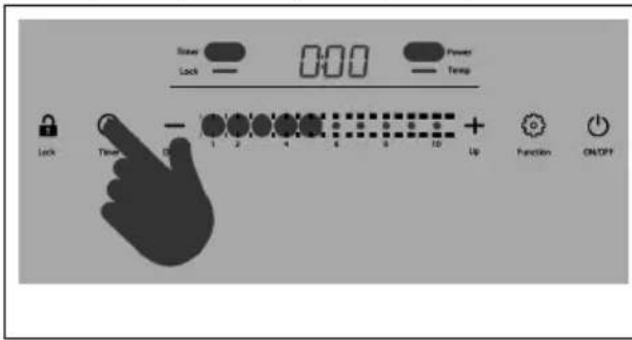
- Tap the "timer" sensor for 3 seconds for deactivating the operating time mode.
- Tapping the sensor is confirmed by a signal tone and the timer display gets reset to the value "0:00".
- The setting of the operating time is no longer active.
NOTE: In this case there will be no automatic switch-off and the appliance keeps on working.
Activate/deactivate the key lock (Lock)
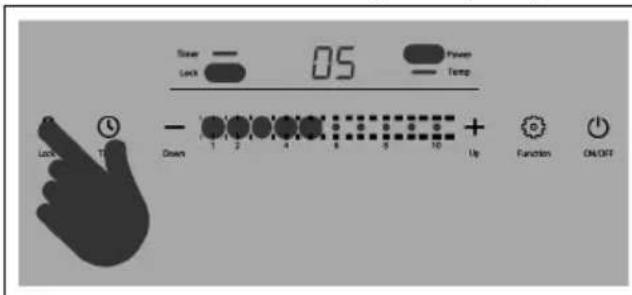
- To activate the key lock, tap and hold the "Lock" sensor for 3 seconds.
- Tapping the sensor is confirmed by a signal tone and the pilot lamp "Lock" is lit continuously.
NOTE: All sensors - except the "ON/OFF" sensor - are locked against unintentional operation now.
- To deactivate the key lock, tap the "Lock" sensor again and hold it for 3 seconds.
- Touching the sensor is confirmed by a signal tone and the pilot lamp "Lock" expires.
Switching-off the appliance
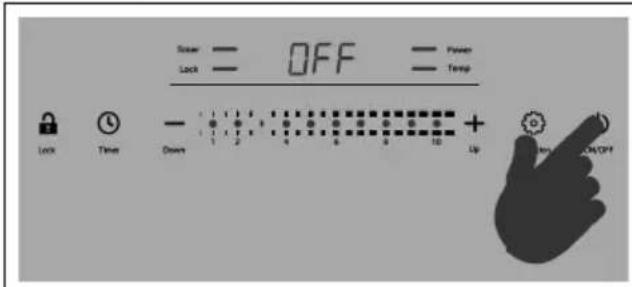
- For switching-off touch the main switch "ON/OFF".
- Touching the sensor is confirmed by a signal tone.
The display shows:
o "OFF" - in case the temperature on the hob is below 80^, due to the waste heat of the pot.
o "H" - in case the temperature on the hob is above 80^, due to the waste heat of the pot. Once the temperature has sunk below 80^, the display shows "OFF".
- Now, the control is in "Standby" mode.
NOTE: The fan is still running in mode „Standby“, which is normal after a long operation time.
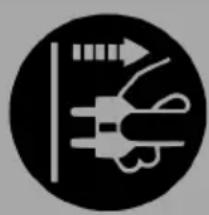
- To switch off the appliance permanently and safely, unplug the power plug from the power socket after each use.
Cleaning and maintenance

ATTENTION: Hazard of injuries and/or burns!
- Before cleaning, always disconnect the appliance from the power supply!
- Never immerse the appliance, power cord and power plug into water or clean under running water!
-
Allow the appliance to cool down before cleaning!
-
Remove any coarse residues from the glass ceramic plate by means of a special glass scraper, which is available in the specialised trade and in household equipment shops.
- Following that clean the cold glass surface with a damp cloth and some dishwater and wipe it dry with a clean cloth or kitchen tissue. There are suitable cleaning agents for glass ceramic cooktops available on the market with which the whole glass surface is treated by means of a kitchen tissue until there is no soiling visible anymore.
- Never immerse the appliance into water and do not use steam jet appliances.
- Make sure no water or steam may infi ltrate the appliance from below.
- Never use abrasives, steel wool or sharp, scratchy objects.
- If there is any dirt visible in the area of the ventilation slots, remove it from the outside by means of a vacuum cleaner.
Error codes
- The electronic control features several internal monitoring functions.
- If an error occurs, the power supply will be switched-off and an error code will appear on the display. In addition, there is a signal tone during the first 60 seconds.
Error code table:
| E0 Pot recognition: Each cooking zone features a sensor, which recognizes whether there is a vessel on the cooking zone. If no suitable vessel is recognized on the cooking zone after switch-on, the display will show “E0”. Self-help: Place a pot on the cooking zone within 60 seconds; otherwise the electronics will switch the unit into the “Standby” mode. (Also refer to point “Getting acquainted with your appliance”) | |
| E1 Electronic error: A short-circuit has occurred in an electronic circuit of the appliance. Self-help: Not possible – the appliance must be forwarded to the customer service at any rate. | |
| E2 Temperature sensor: The temperature sensor below the glass ceramic plate provides an undue value. Self-help: Allow the appliance to stand for a while in order to adjust to the ambient temperature. | |
| E3 Electronic control of over-voltage: An Error has occurred in an electronic circuit of the appliance due to excessively high voltage (>270 V~). Self-help: Make sure the appliance is connected to the voltage indicated on the rating label. | |
| E4 Electronic control of under-voltage: An error has occurred in an electronic circuit of the appliance due to excessively low voltage (<160 V~). Self-help: Make sure the appliance is connected to the voltage indicated on the rating label. | |
| E5 Overheating protection (“power level” mode): During the “power level” mode the temperature on the cooktop exceeds the maximum tolerable value of 200 °C (e.g. due to hot oil or fat or an empty pot or any other metal object while the appliance is switched on). Self-help: Eliminate the cause of overheating. Once the cooktop has cooled, the appliance can be put into operation again. Afterwards, use the “temperature level” mode for constant temperatures above 200 °C. | |
| E6 Inside temperature: The inside of the appliance is too warm (e.g. due to hindered air supply, blocked or defective fan or excessive ambient temperature). Self-help: Clean the ventilation holes or remove any impurities that might be there, improve the ventilation. | |
| NOTE: For all displayed error codes, except of “E0”, it is necessary to manually reset the control by pulling the power plug or separating the unit from the power supply. |
Extended product information in accordance with the EU regulation 66/2014 (Energy Saving Regulations)
Table
| Model identification CT 2020/IN CT 3420/IN | |
| Hob type free standing free standing | |
| Number of cooking zones 1 2 | |
| Heating technology induction heater induction heater | |
| Diameter 12 – 26 cm 12 – 26 cm each | |
| Energy consumption of the cooking zone, kg each | 195 Wh/kg 195 Wh/kg each |
| Energy consumption of complete cooking hob, kg each | 195 Wh/kg 195 Wh/kg |
Test procedure
- The product was tested according to the test standard DIN EN 60350-2: Household electric cooking appliances - Part 2: Hobs - Methods for measuring performance
User information - Saving energy and resources
Tips for energy saving:
- Use cookware suitable for induction.
- Both, cooking zone and pot bottom must be clean and free of residues, in order to guarantee the best possible heat transfer.
- Always place the cookware on the cooking zone before switching the appliance on.
- Position the cookware in the middle of the cooking zone.
- Do not use cookware with a diameter below 12 cm .
- When heating water, only heat the amount you actually require.
- During cooking, it is recommended to cover the cookware with a lid, if possible.
- Switch off the cooking zone in time and use the residual heat for keeping warm, melting, etc.