DV8721NCA - Blu-ray player LG - Free user manual and instructions
Find the device manual for free DV8721NCA LG in PDF.


User questions about DV8721NCA LG
0 question about this device. Answer the ones you know or ask your own.
Ask a new question about this device
Download the instructions for your Blu-ray player in PDF format for free! Find your manual DV8721NCA - LG and take your electronic device back in hand. On this page are published all the documents necessary for the use of your device. DV8721NCA by LG.
USER MANUAL DV8721NCA LG
Before connecting, operating or adjusting this product, please read this instruction booklet carefully and completely.
CAUTION
RISK OF ELECTRIC SHOCK DO NOT OPEN

Warning: To reduce the risk of electric shock, do not remove the cover or back of this product. There are no user-serviceable parts inside. Refer servicing to qualified service personnel.

Warning: To reduce the risk of fire or electric shock, do not expose this product to dripping or splashing water, rain, or moisture. Do not place objects filled with water such as vases, on the product.
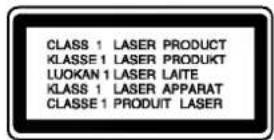

Warning: This digital video disc player employs a laser system. Use of controls, adjustments, or the performance of procedures other than those specified herein may result in hazardous radiation exposure.

Warning: To prevent direct exposure to laser beam, do not open the enclosure. Visible laser radiation when open.

Warning: Never stare directly into the laser beam.

Caution: Do not install this product in a confined space such as a book case or similar unit.
FCC WARNING: This equipment may generate or use radio frequency energy. Changes or modifications to this equipment may cause harmful interference unless the modifications are expressly approved in the instruction manual. The user could lose the authority to operate this equipment if an unauthorized change or modification is made.
REGULATORY INFORMATION: FCC Part 15
This product has been tested and found to comply with the limits for a Class B digital device, pursuant to Part 15 of the FCC Rules. These limits are designed to provide reasonable protection against harmful interference when the product is operated in a residential installation. This product generates, uses, and can radiate radio frequency energy and, if not installed and used in accordance with the instruction manual, may cause harmful interference to radio communications. However, there is no guarantee that interference will not occur in a particular installation. If this product does cause harmful interference to radio or TV reception, which can be determined by turning the product off and on, the user is encouraged to try to correct the interference by one or more of the following measures:
Reorient or relocate the receiving antenna.
- Increase the separation between the product and receiver.
- Connect the product into an outlet on a circuit different from that to which the receiver is connected.
- Consult the dealer or an experienced radio/TV technician for help.
SERIAL NUMBER:
Locate the serial number on the back of the unit. This number is only used on this unit. You should write in requested information below and retain this guide as a permanent record of your purchase.
Model No.
Serial No.
Date of Purchase
Contents
Introduction 4
Symbol used in this Manual 4
About the Symbol Display 4
Notes on Discs 4
Handling Discs 4
Storing Discs 4
Cleaning Discs 4
Types of Playable Discs 5
Regional code 5
Disc-related terms 6
Front Panel 7
Display Window 7
Remote Control 8
Remote Control Operation 8
Remote Control Battery Installation 8
Installation and Setup 9
Setting up the Player 9
DVD Player Connections 9
Video and Audio Connections to Your TV . .9
Audio Connection to Your TV 9
Audio Connection to Optional Equipment .10
On-Screen Display 11
Playback Status/Restrictions 11
Initial Settings 12
General Operation 12
LANGUAGE 12
- Menu Language 12
- Disc Audio / Subtitle / Menu 12
DISPLAY 13
TV Aspect 13
-Display Mode 13
Progressive Scan 13
AUDIO 14
- Dolby Digital / DTS / MPEG 14
Sample Freq. (Frequency) 14
Dynamic Range Control (DRC) 14
Vocal 14
OTHERS 14
PBC 14
- Auto Play 14
B.L.E. 14
LOCK (Parental Control) 15
Rating 15
- Password (Security Code) 15
Country Code 15
Operation 16
Playing a DVD or Video CD 16
Playback Setup 16
General Features 16
Moving to another TITLE 16
Moving to another CHAPTER/TRACK 16
Search 16
Changing the Audio Channel 16
Still Picture and Frame-by-Frame Playback 17
Slow Motion 17
Random 17
Repeat A-B 17
Repeat 17
3D Surround 17
Time Search 17
Zoom 18
Marker Search 18
Special DVD Features 18
Checking the contents of DVD discs: Menus .18
Title Menu 18
Disc Menu 18
Camera Angle 18
Changing the Audio Language 18
Subtitles 18
Playing an Audio CD or MP3/WMA Disc 19
Audio CD and MP3/WMA Disc Features .20
Pause 20
Moving to another Track 20
Repeat Track/All/Off 20
Search 20
Random 20
Repeat A-B 20
3D Surround 20
Programmed Playback 21
Repeat Programmed Tracks 21
Erasing a Track from Program List 21
Erasing the Complete Program List 21
Viewing a JPEG Disc 22
Slide Show 22
Still Picture 22
Moving to another File 22
Zoom 22
To rotate picture 22
To listen to music watching picture 22
Playing a DVD VR format Disc 23
Maintenance and Service 23
Additional Features 24
Last Scene Memory 24
Screen Saver 24
Reference 25
Controlling VCRs, Cable Boxes
(DBS) and TVs 25
Language Codes 26
Country Codes 26
Troubleshooting 27
Specifications 27
Introduction
To ensure proper use of this product, please read this owner's manual carefully and retain for future reference.
This manual provides information on the operation and maintenance of your DVD player. Should the unit require service, contact an authorized service location.
Symbol Used in this Manual

The lightning flash symbol alerts you to the presence of dangerous voltage within the product enclosure that may constitute a risk of electric shock.

The exclamation point alerts you to the presence of important operating and maintenance / servicing instructions.

Indicates hazards likely to cause harm to the unit itself or other material damage.
Note:
Indicates special notes and operating features.
Tip:
Indicates tips and hints for making the task easier.
A section whose title has one of the following symbols is applicable only to the disc represented by the symbol.

DVD and finalized DVD±R/RW

Video CDs

Audio CDs

MP3 Discs

WMA Discs

JPEG Discs
About the Symbol Display
" " may appear on your TV display during operation and indicates that the function explained in this owner's manual is not available on that specific DVD video disc.
Notes on Discs
Handling Discs
Do not touch the playback side of the disc. Hold the disc by the edges so that fingerprints do not get on the surface. Never stick paper or tape on the disc.


Storing Discs
After playing, store the disc in its case. Do not expose the disc to direct sunlight or sources of heat and never leave it in a parked car exposed to direct sunlight.
Cleaning Discs
Fingerprints and dust on the disc can cause poor picture quality and sound distortion. Before playing, clean the disc with a clean cloth. Wipe the disc from the center out.
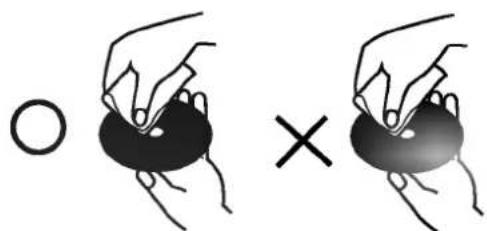
Do not use strong solvents such as alcohol, benzine, thinner, commercially available cleaners, or anti-static spray intended for older vinyl records.
Types of Playable Discs
| DVD VIDEO* | DVD (8 cm / 12 cm disc) |
| COMPACT DISC DIGITAL VIDE | Video CD (VCD) (8 cm / 12 cm disc) |
| COMPACT DISC DIGITAL AUDIO | Audio CD (8 cm / 12 cm disc) |
In addition, this unit plays DVD -R, DVD +R, DVD -RW, DVD +RW, Kodak Picture CDs, SVCD, and CD-R / CD-RW that contains audio titles, MP3, WMA, and/or JPEG files.

This indicates a product feature that is capable of playing DVD-RW discs recorded with Video Recording format.
Notes:
- Depending on the conditions of the recording equipment or the CD-R/RW (or DVD -R, DVD +R, DVD -RW, DVD +RW) disc itself, some CD-R/RW (or DVD -R, DVD +R, DVD -RW, DVD +RW) discs cannot be played on the unit.
- Do not attach any seal or label to either side (the labeled side or the recorded side) of a disc.
- Do not use irregularly shaped CDs (e.g., heart-shaped or octagonal) since they may result in malfunctions.
Notes on DVDs and Video CDs
Some playback operations of DVDs and Video CDs may be intentionally programmed by software manufacturers. This unit plays DVDs and Video CDs according to disc content designed by the software manufacturer, therefore some playback features may not be available or other functions may be added.
Manufactured under license from Dolby Laboratories. "Dolby", "Pro Logic", and the double-D symbol are trademarks of Dolby Laboratories.
DTS and DTS Digital Out are trademarks of Digital Theater Systems, Inc.
Regional code
This DVD player is designed and manufactured for playback of region "1" encoded DVD software. This unit can play only DVD discs labeled "1" or "ALL".

Notes on Regional Codes
- Most DVD discs have a globe with one or more numbers in it clearly visible on the cover. This number must match your DVD player's regional code or the disc cannot play.
If you try to play a DVD with a different region code from your player, the message "Check Regional Code" appears on the TV screen.
Notes on Copyrights:
It is forbidden by law to copy, broadcast, show, broadcast via cable, play in public, or rent copyrighted material without permission. This product features the copy protection function developed by Macrovision. Copy protection signals are recorded on some discs. When recording and playing the pictures of these discs picture noise will appear. This product incorporates copyright protection technology that is protected by method claims of certain U.S. patents and other intellectual property rights owned by Macrovision Corporation and other rights owners. Use of this copyright protection technology must be authorized by Macrovision Corporation, and is intended for home and other limited viewing uses only unless otherwise authorized by Macrovision Corporation. Reverse engineering or disassembly is prohibited.
Disc-related terms
DVD ±R/DVD ±RW
DVD -R and DVD +R are two different standards for recordable DVD drives and discs. This format allows information to be recorded onto the DVD disc only once. DVD +RW and DVD -RW are two standards for re-writeable media, meaning the DVD content can be erased and re-recorded. Single-sided discs can hold 4.38 Gigabytes and double-sided discs hold twice as much. There are no dual layer single sided recordable discs.
VCD (Video CD)
A VCD holds up to 74 minutes (650 MB disc) or 80 minutes (700 MB disc) of MPEG-1 full-motion video along with quality stereo sound.
MPEG
MPEG is an international standard for video and audio compression. MPEG-1 is used in encoding video for VCD and provides for multichannel surround sound coding such as PCM, Dolby Digital, DTS and MPEG audio.
MP3
MP3 is a popular compression format used for digital audio files that yields very high near-CD quality.
WMA
Windows media audio file. A type of coding / decoding developed by Microsoft Corp.
JPEG
Joint Pictures Expert Group. JPEG is a compressed file format that allows you to save images with no limit on the number of colors.
PBC:Playback Control (Video CD only)
Playback control is available for Video CD (VCD) version 2.0 disc formats. PBC allows you to interact with the system via menus, search functions, or other typical computer-like operations. Moreover, still pictures of high resolution can be played if they are included in the disc. Video CDs not equipped with PBC (Version 1.1) operate in the same way as audio CDs.
Title (DVD only)
A title is generally a distinct section of a DVD disc. For example the main feature could be title 1, a documentary describing how the film was made could be title 2, and cast interviews could be title 3. Each title is assigned a reference number enabling you to locate it easily.
Chapter (DVD only)
A chapter is a segment of a title such as a scene in a film or one interview in a series. Each chapter is assigned a chapter number, enabling you to locate the chapter you want. Depending on the disc, chapters may not be recorded.
Scene (VCD)
On a video CD with PBC (playback control) functions, moving pictures and still pictures are divided into sections called "scenes". Each scene is displayed in the menu screen and assigned a scene number, enabling you to locate the scene you want. A scene is composed of one or several tracks.
Track
A distinct element of audiovisual information, such as the picture or sound track for a specific language (DVD), or a musical piece on a video or audio CD. Each track is assigned a track number, enabling you to locate the track you want. DVD discs allow one track of video (with multiple angles) and several tracks of audio.
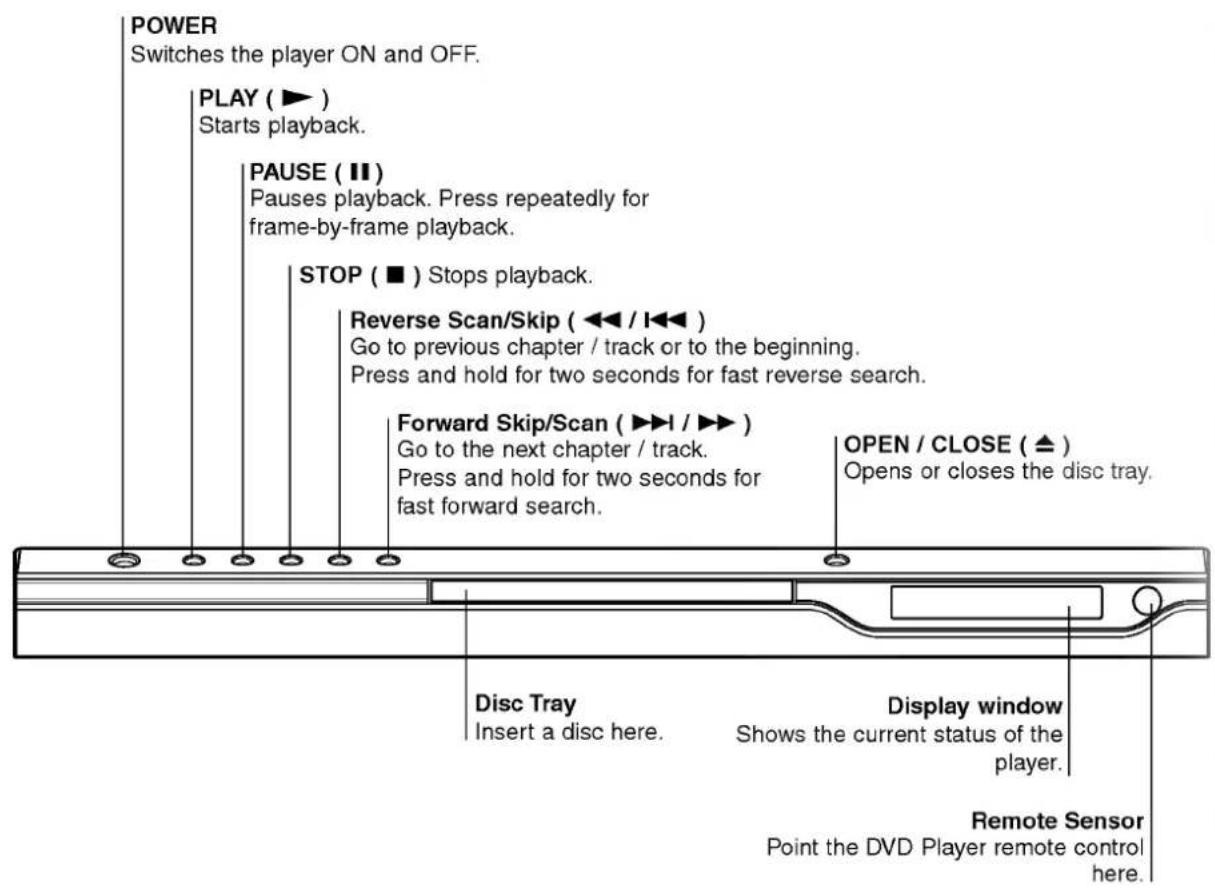
Front Panel
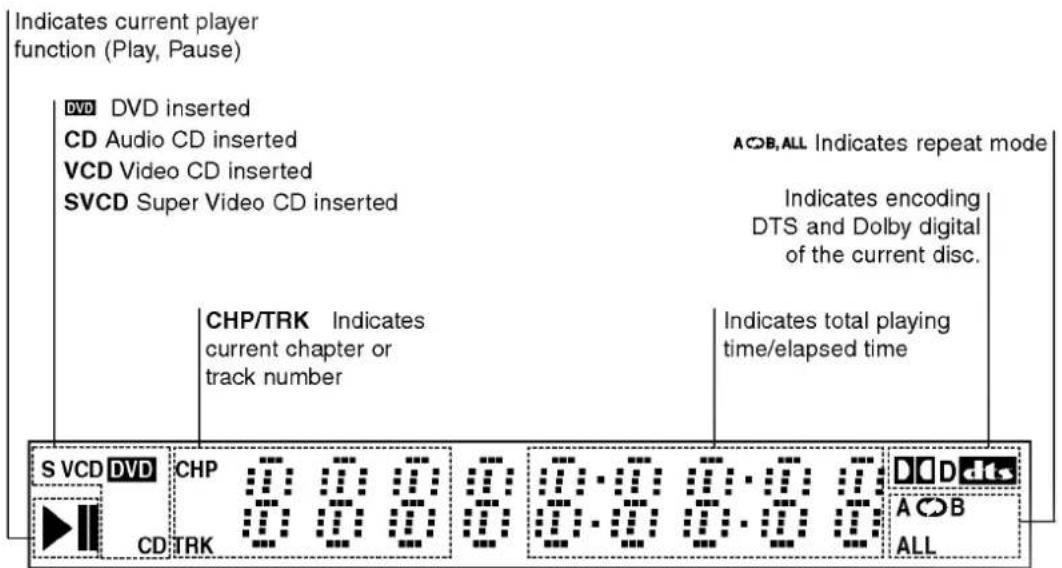
Display Window
Remote Control
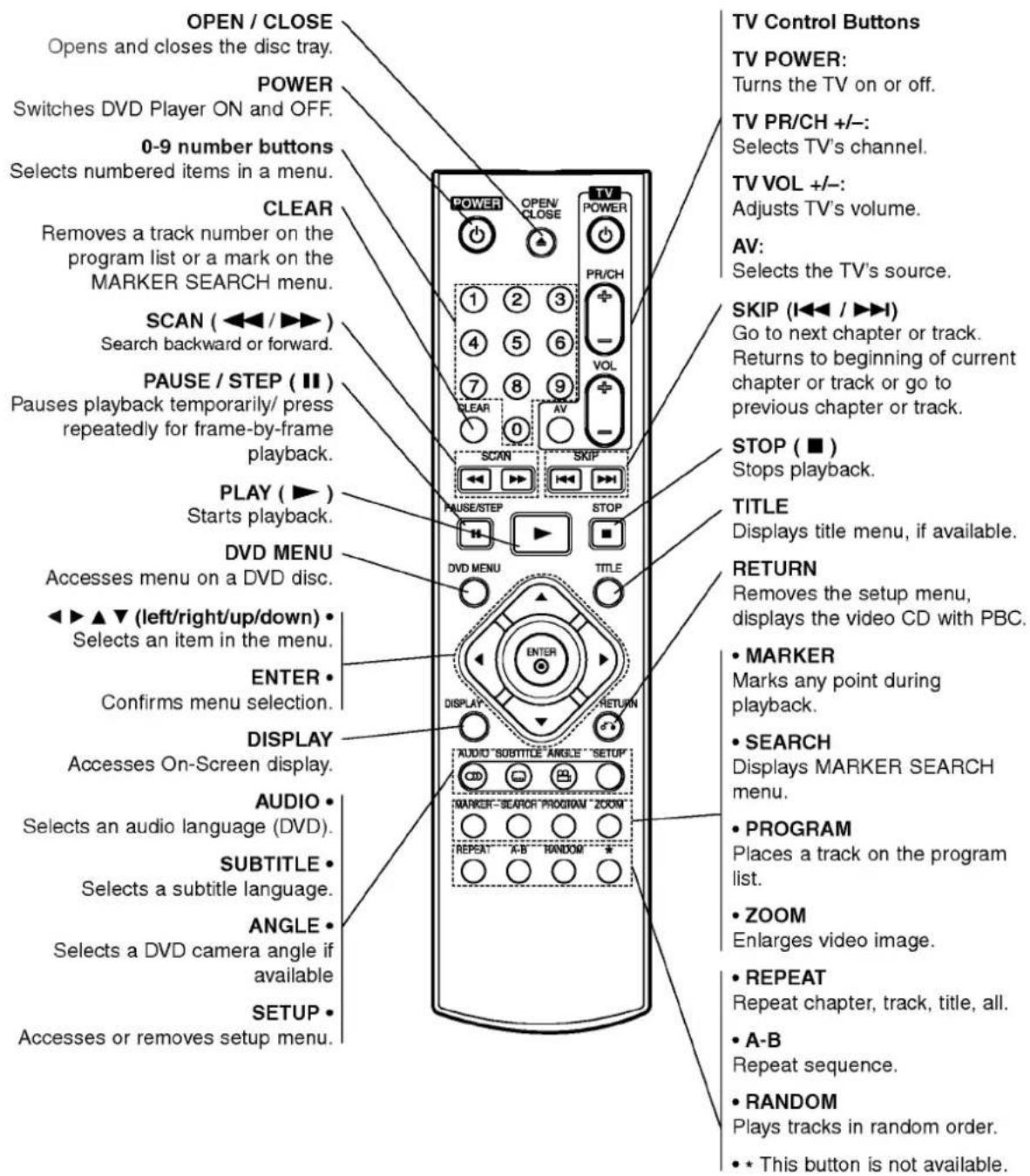
Remote Control Operation
Point the remote control at the remote sensor and press the buttons.

Do not mix old and new batteries and never mix different types of batteries such as standard, alkaline, etc.
Remote Control Battery installation
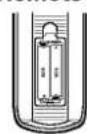
Detach the battery cover on the rear of the remote control, and insert two batteries (size AAA) with and aligned correctly.
Installation and Setup
Setting up the Player
The picture and sound of a nearby TV, VCR, or radio may be distorted during playback. If this occurs, position the player away from the TV, VCR, or radio, or turn off the unit after removing the disc.
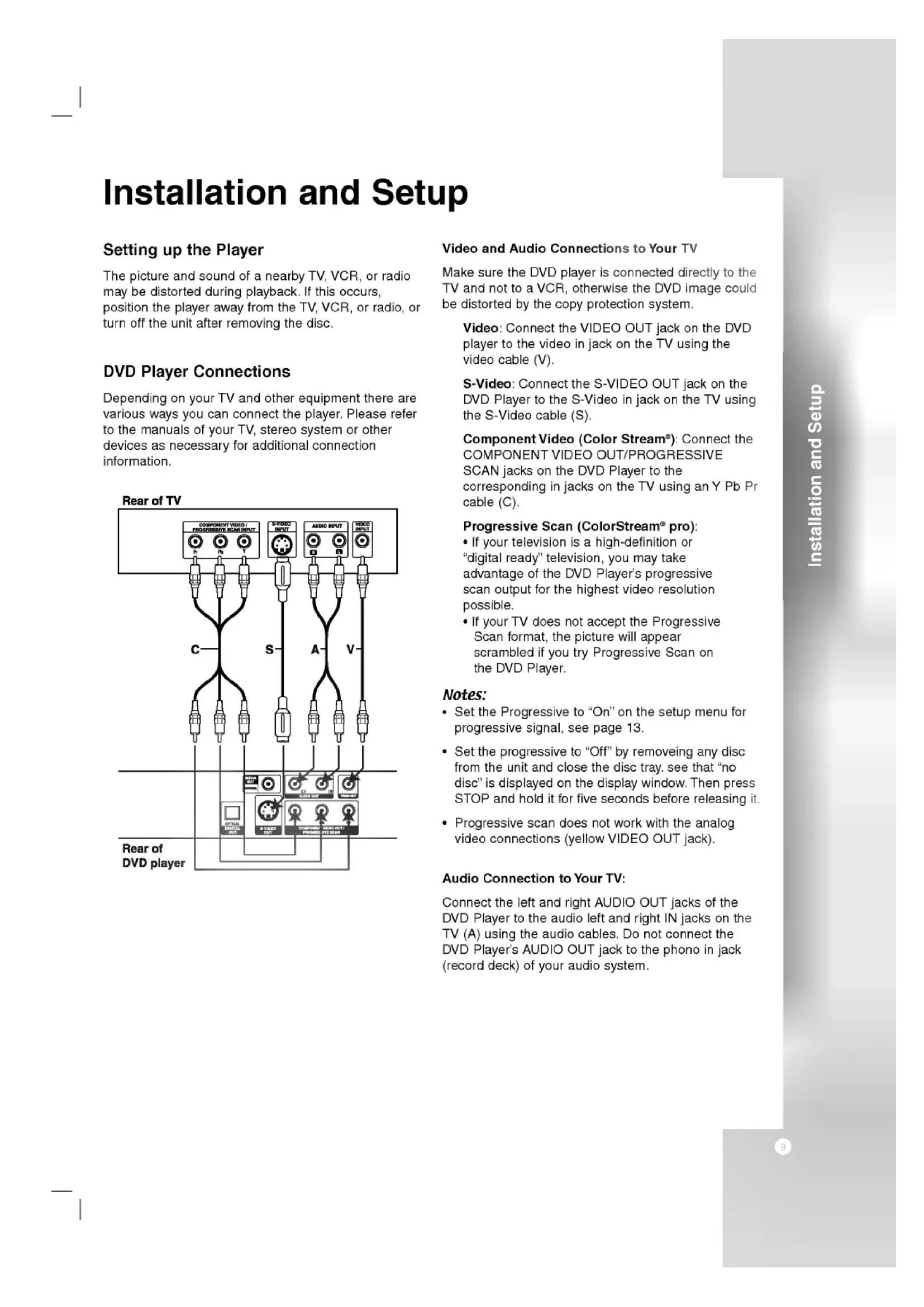
DVD Player Connections
Depending on your TV and other equipment there are various ways you can connect the player. Please refer to the manuals of your TV, stereo system or other devices as necessary for additional connection information.
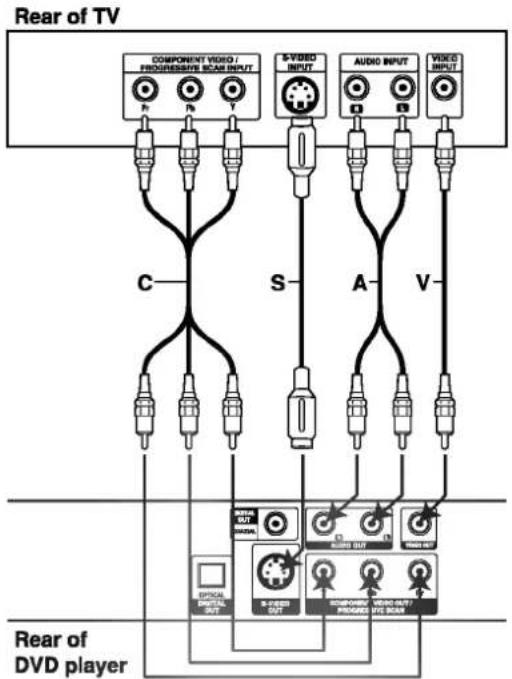
Video and Audio Connections to Your TV
Make sure the DVD player is connected directly to the TV and not to a VCR, otherwise the DVD image could be distorted by the copy protection system.
Video: Connect the VIDEO OUT jack on the DVD player to the video in jack on the TV using the video cable (V).
S-Video: Connect the S-VIDEO OUT jack on the DVD Player to the S-Video in jack on the TV using the S-Video cable (S).
Component Video (Color Stream): Connect the COMPONENT VIDEO OUT/PROGRESSIVE SCAN jacks on the DVD Player to the corresponding in jacks on the TV using an Y Pb Pr cable (C).
Progressive Scan (ColorStream® pro):
If your television is a high-definition or "digital ready" television, you may take advantage of the DVD Player's progressive scan output for the highest video resolution possible.
- If your TV does not accept the Progressive Scan format, the picture will appear scrambled if you try Progressive Scan on the DVD Player.
Notes:
- Set the Progressive to "On" on the setup menu for progressive signal, see page 13.
- Set the progressive to "Off" by removing any disc from the unit and close the disc tray. See that "no disc" is displayed on the display window. Then press STOP and hold it for five seconds before releasing it.
- Progressive scan does not work with the analog video connections (yellowVIDEO OUT jack).
Audio Connection to Your TV:
Connect the left and right AUDIO OUT jacks of the DVD Player to the audio left and right IN jacks on the TV (A) using the audio cables. Do not connect the DVD Player's AUDIO OUT jack to the phono in jack (record deck) of your audio system.
Audio Connection to Optional Equipment
Connect the DVD player to your optional equipment for audio output.
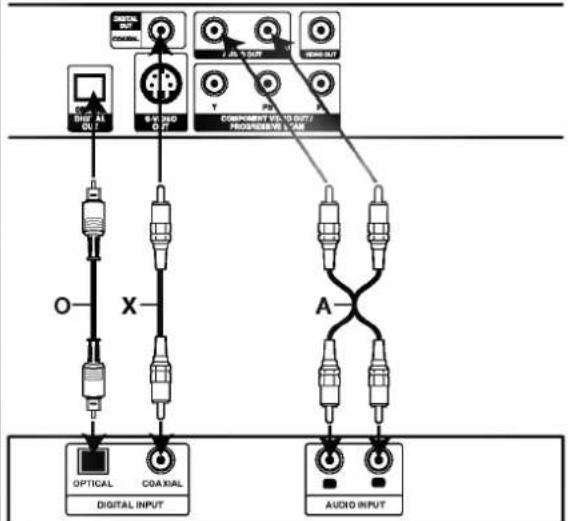
Rear of DVD player
Amplifier (Receiver)
Amplifier equipped with 2-channel analog stereo or Dolby Pro Logic II / Pro Logic: Connect the left and right AUDIO OUT jacks on the DVD player to the audio left and right IN jacks on your amplifier, receiver, or stereo system, using the audio cables (A).
Amplifier equipped with 2-channel digital stereo (PCM) or audio / video receiver equipped with a multi-channel decoder (Dolby Digital™, MPEG 2, or DTS): Connect one of the DVD Player's DIGITAL AUDIO OUT jacks (OPTICAL O or COAXIAL X) to the corresponding in jack on your amplifier. Use an optional digital (optical O or coaxial X) audio cable.
Digital Multi-channel sound
A digital multi-channel connection provides the best sound quality. For this you need a multi-channel audio / video receiver that supports one or more of the audio formats supported by your DVD player such as MPEG 2, Dolby Digital and DTS. Check the receiver manual and the logos on the front of the receiver.
Notes:
- If the audio format of the digital output does not match the capabilities of your receiver, the receiver produces a strong, distorted sound or no sound at all.
- Six Channel Digital Surround Sound via a digital connection can only be obtained if your receiver is equipped with a Digital Multi-channel decoder.
To see the audio format of the current DVD in the on-screen display, press AUDIO.
On-Screen Display
You can display the general playback status on the TV screen. Some items can be changed using the menu. To use the on-screen display:
- Press DISPLAY during playback.
- Press / to select an item. The selected item is highlighted.
- Press / to change the setting. You can also use the number buttons if appropriate (e.g. inputting the title number). For some functions, press ENTER to execute the setting.
Notes:
Some discs may not provide all of the features shown below.
If no button is pressed for 10 seconds, the on-screen display disappears.
Playback Status/Restrictions
Repeat title
Repeat sequence
Enter a Marker
Marker Search menu

Resume play from this point

Action prohibited or not available
Example: On-Screen Display during playing DVD Video
| Items | Selection Method | |
| Title Number | 1/3 | / ▲, Numbers ENTER |
| Chapter Number | 1/12 | / ▲, Numbers ENTER |
| Time search | 0:20:09 | Numbers, ENTER |
| Audio language and Digital Audio Output mode | 1 ENG 0DD 3/2.1 | / ▲ or AUDIO |
| Subtitle language | 1 ENG | / ▲ or SUBTITLE |
| Angle | 1/3 | / ▲ or ANGLE |
| Sound | 3D SUR | / ▲ |
Example: On-Screen Display during playing VCD
| Items | Selection Method | |
| Track Number (or PBC mode) | 1/3 | / ▲, Numbers ENTER |
| Time search | 0:20:09 | Numbers ENTER |
| Audio Channel | Stereo | / ▲ or AUDIO |
| Sound | 3D SUR | / ▲ |
Initial Settings
By using the Setup menu, you can make various adjustments to items such as picture and sound. You can also set a language for the subtitles and the Setup menu, among other things. For details on each Setup menu item, see pages 12 to 15.
To display and exit the Menu:
Press SETUP to display the menu. A second press of SETUP will take you back to initial screen.
To go to the next level:
Press on the remote control.
To go back to the previous level:
Press on the remote control.
General Operation
- Press SETUP. The Setup menu appears.
- Use / to select the desired option then press to move to the second level. The screen shows the current setting for the selected item, as well as alternate setting(s).
- Use / to select the second desired option then press to move to the third level.
- Use / to select the desired setting then press ENTER to confirm your selection. Some items require additional steps.
- Press SETUP, RETURN, or PLAY to exit the Setup menu.
LANGUAGE
Menu Language
Select a language for the Setup menu and on-screen display.
Disc Audio / Subtitle / Menu
Select the language you prefer for the audio track (disc audio), subtitles, and the disc menu.
Original: Refers to the original language in which the disc was recorded.
Other: To select another language, press number buttons then ENTER to enter the corresponding 4-digit number according to the language code list in the reference chapter. If you enter the wrong language code, press CLEAR.
DISPLAY
TV Aspect

4:3: Select when a standard 4:3 TV is connected.
16:9: Select when a 16:9 wide TV is connected.
Display Mode

Display Mode setting works only when the TV Aspect mode is set to "4:3".
Letterbox: Displays a wide picture with bands on the upper and lower portions of the screen.
Panscan: Automatically displays the wide picture on the entire screen and cuts off the portions that do not fit.
Progressive Scan

Progressive Scan Video provides the highest quality pictures with less flickering.
If you are using the Component Video jacks for connection to a TV or monitor that is compatible with a progressive scan signal, set Progressive Scan to On.
To Turn ON progressive scan:
Connect component out of the DVD to the input of your monitor/television, set your television or monitor to Component Input.
- Select "Progressive Scan" on the DISPLAY menu then press
-
Select "On" using the / buttons.
-
Press ENTER to confirm your selection. The confirm menu will appear.
Notes:
At this point the only video displaying is Component video. If your screen goes to a black screen, your television/display may not be compatible to progressive scan.
In this case the player will time out after 10-12 seconds if no other keys are pressed. After the unit times out, the player will automatically return to standard format, and your picture will return.
- When the confirm menu appears on your screen Cancel is highlighted as default. Use the / buttons to highlight Enter.
- Pressing ENTER will set the player to Progressive scan mode.
Caution:
Once the setting for progressive scan output is entered, an image will only be visible on a progressive scan compatible TV or monitor. If you set Progressive Scan to On in error, you must reset the unit. First, remove the disc in the DVD Player. Next, press STOP (■) again and hold it for five seconds before releasing it. The video output will be restored to the standard setting, and a picture will once again be visible on a conventional analog TV or monitor.
AUDIO
Each DVD disc has a variety of audio output options. Set the player's AUDIO options according to the type of audio system you use.
Dolby Digital / DTS / MPEG
Bitstream: Select "Bitstream" if you connect the DVD Player's DIGITAL OUT jack to an amplifier or other equipment with a Dolby Digital, DTS or MPEG decoder.
PCM (for Dolby Digital / MPEG): Select when connected to a two-channel digital stereo amplifier. DVDs encoded in Dolby Digital or MPEG will be automatically downmixed to two-channel PCM audio.
Off (for DTS): If you select "Off", the DTS signal is not output through the DIGITAL OUT jack.
Sample Freq. (Frequency)
If your receiver or amplifier is NOT capable of handling 96 kHz signals, select 48 kHz. When this choice is made, this unit automatically converts any 96 kHz signals to 48 kHz so your system can decode them.
If your receiver or amplifier is capable of handling 96 kHz signals, select 96 kHz. When this choice is made, this unit passes each type of signal through without any further processing.
Check the documentation for your amplifier to verify its capabilities.
Dynamic Range Control (DRC)
With the DVD format, you can hear a program's soundtrack in the most accurate and realistic presentation possible, thanks to digital audio technology. However, you may wish to compress the dynamic range of the audio output (the difference between the loudest sounds and the quietest ones). This allows you to listen to a movie at a lower volume without losing clarity of sound. Set DRC to On for this effect.
Vocal
Set to On only when a multi-channel karaoke DVD is playing. The karaoke channels on the disc mix into normal stereo sound.
OTHERS
The PBC, Auto Play and B.L.E. settings can be changed.
PBC
SetPlaybackControl(PBC)toOnorOff.
On: Video CDs with PBC are played according to the PBC.
Off: Video CDs with PBC are played the same way as Audio CDs.
Auto Play

You can set up the DVD Player so a DVD disc automatically starts playing whenever the DVD is inserted.
If Auto Play mode is set to On, this DVD player will search for title that has the longest playback time and then play back the title automatically.
On: Auto Play function is active.
Off: Auto Play function is not active.
Note:
The Auto Play function may not work for some DVDs.
B.L.E. (Black Level Expansion)
To select the black level of playback pictures. Set your preference and monitor's ability.
On: Expanded grey scale. (0 IRE cut off)
Off: Standard grey scale. (7.5 IRE cut off)
LOCK (Parental Control)
Rating

Some movies contain scenes that may not be suitable for children to view. Many of these discs contain parental control information that applies to the complete disc or to certain scenes on the disc. Movies and scenes are rated from 1 to 8, depending on the country. Some discs offer more suitable scenes as an alternative.
The parental control feature allows you to block access to scenes below the rating you input, thereby preventing your children from being able to view material you believe is unsuitable.
- Select "Rating" on the LOCK menu then press
- To access the Rating, Password and Country Code features, you must input the 4-digit security code you created. If you have not yet entered a security code you are prompted to do so.
Input a 4-digit code and press ENTER. Enter it again and press ENTER to verify. If you make a mistake before pressing ENTER, press CLEAR.
- Select a rating from 1 to 8 using the / buttons.
Rating 1-8: Rating one (1) has the most restrictions and rating eight (8) is the least restrictive.
Unlock
If you select unlock, parental control is not active and the disc plays in full.
Note:
If you set a rating for the player, all disc scenes with the same rating or lower are played. Higher rated scenes are not played unless an alternate scene is available on the disc. The alternative must have the same rating or a lower one. If no suitable alternative is found, playback stops. You must enter the 4-digit password or change the rating level in order to play the disc.
- Press ENTER to confirm your rating selection, then press SETUP to exit the menu.
Password (Security Code)
You can enter or change password.
- Select Password on the LOCK menu then press
- Follow step 2 as shown left (Rating). "Change" or "New" is highlighted.
- Enter the new 4-digit code, then press ENTER. Input it again to verify.
- Press SETUP to exit the menu.
If you forget your Security Code
If you forget your security code you can clear it using the following steps:
- Press SETUP to display the Setup menu.
- Input the 6-digit number "210499" and the security code is cleared.
- Enter a new code as described above.
Country Code
Enter the code of the country/area whose standards were used to rate the DVD video disc, based on the list in the reference chapter.
- Select "Country Code" on the LOCK menu then press.
- Follow step 2 as shown left (Rating).
- Select the first character using / buttons.
- Shift the cursor using button and select the second character using / buttons.
- Press ENTER to confirm your country code selection.
Operation
Playing a DVD or Video CD
Playback Setup
- Turn on the TV and select the video input source connected to the DVD player.
- Turn on the audio system (if applicable) and select the input source connected to the DVD player.
- Press OPEN/CLOSE to open the disc tray and load your chosen disc in the tray, with the playback side down.
- Press OPEN/CLOSE to close the tray. Playback starts automatically. If playback does not start, press PLAY.
In some cases, the disc menu might appear instead:
DVD
Use the buttons to select the title/chapter you want to view, then press ENTER to start. Press TITLE or DVD MENU to return to the menu screen.
VCD
Use the number buttons to select the track you want to view and press RETURN to return to the menu screen. Menu settings and operating procedures may differ. Follow the instructions on the each menu screen. You also may set PBC to Off (See "PBC" on page 14).
Notes:
If parental control is set and the disc is not within the rating settings you must input the password. (See "Lock Menu" on page 15.)
- DVDs may have a region code. Your player does not play discs that have a region code different from your player. The region code for this player is 1 (one).
General Features
Note:
Unless stated otherwise, all operations described use the remote control. Some features may also be available on the Setup menu.
Moving to another TITLE DVD
When a disc has more than one title, you can move to another title. Press DISPLAY while playback is stopped then the appropriate number (0-9) or use / to move to another title.
You can play any title by inputting its number while playback is stopped.
Moving to another CHAPTER/TRACK
DVD VCD
When a title on a disc has more than one chapter or a disc has more than one track, you can move to another chapter/track as follows:
- Press SKIP or briefly during playback to select the next chapter/track or to return to the beginning of the current chapter/track.
- Press SKIP twice briefly to step back to the previous chapter/track.
To go directly to any chapter during DVD playback, press DISPLAY and press / to select the chapter/track icon. Then, input the chapter/track number or use / .
Search
DVD VCD
- Press SCAN (or) during playback.
- Press SCAN (or ) repeatedly to select the required speed.
DVD; X2, X4, X16 or X100
Video CD; X2, X4 or X8
3. To exit SEARCH mode, press PLAY.
Changing the Audio Channel VCD
Press AUDIO repeatedly during playback to hear a different audio channel (Stereo, Left, or Right).
Still Picture and Frame-by-Frame Playback
DVD VCD
- Press PAUSE/STEP on the remote control during playback. Advance the picture frame-by-frame by pressing PAUSE/STEP repeatedly.
- To exit still motion mode, press PLAY.
Slow Motion DVD VCD
- Press PAUSE/STEP (I) during playback. The DVD player will now go into PAUSE mode.
- Use the SCAN (or) to select the required speed: 1/16, 1/8, 1/4, or 1/2 (backward), or 1/16, 1/8, 1/4, or 1/2 (forward). With a Video CD, the Slow speed changes: 1/16, 1/8, 1/4 or 1/2 (forward).
- To exit Slow Motion mode, press PLAY (▶).
Note: Slow motion playback in reverse is not possible with Video CDs.
Random VCD Karaoke DVD
- Press RANDOM during playback. The unit automatically begins random playback and RANDOM appears on the menu screen.
- Press RANDOM again to normal.
Tip:
By pressing SKIP during random playback, the unit selects another title (track) and resumes random playback.
Note:
On a Video CD with PBC, You must set PBC to Off on the setup menu to use the repeat function (See "PBC" on page 14).
Repeat A-B DVD VCD
To repeat a sequence.
- Press A-B at your chosen starting point. "A-" appears briefly on the TV screen.
- Press A-B again at your chosen end point. "A - B" appears briefly on the TV screen and the repeat sequence begins.
- Press A-B again to cancel.
Repeat DVD VCD
You can play a title/chapter/all/track on a disc.
Press REPEAT during playback to select a desired repeat mode.
DVD Video Discs - Repeat Chapter/Title/Off
Chapter: repeats the current chapter.
- Title: repeats the current title.
- Off : does not play repeatedly.
Video CDs - Repeat Track/All/Off
- Track: repeats the current track
- All: repeats all the tracks on a disc.
- Off : does not play repeatedly.
Notes:
- On a Video CD with PBC, you must set PBC to Off on the setup menu to use the repeat function (See "PBC" on page 14).
- If you press SKIP (▶▶) once during Repeat Chapter (Track) playback, the repeat playback cancels.
3D Surround DVD VCD
To produce a 3D surround effect that simulates multi-channel audio from two stereo speakers (instead of the five+ speakers normally required for multi-channel audio from a home theater system).
- Press DISPLAY during playback.
- Use or to select the sound option. The sound option will be highlighted.
- Use or to select "3D SUR". To turn off the 3D Surround effect, select "Normal".
Time Search DVD VCD
To start playing at any chosen time on the disc:
- Press DISPLAY during playback. The time search box shows the elapsed playing time.
- Press / to select the time clock icon and "----appears.
- Input the required start time in hours, minutes, and seconds from left to right. If you enter the wrong numbers, press CLEAR to remove the numbers you entered. Then input the correct numbers.
- Press ENTER to confirm. Playback starts from the selected time.
Zoom DVD VCD
Use zoom to enlarge the video image.
- Press ZOOM during playback or still playback to activate the Zoom function. The square frame appears briefly in the right bottom of the picture.
- Each press of the ZOOM button changes the TV screen in the sequence: 400% size 1600% size normal size
- Use the buttons to move through the zoomed picture.
- To resume normal playback, press ZOOM or CLEAR button repeatedly.
Note:
Zoom may not work on some DVDs.
Marker Search DVD VCD
To enter a Marker
You can start playback from up to nine memorized points. To enter a marker, press MARKER at the desired point on the disc. The Marker icon appears on the TV screen briefly. Repeat to enter up to nine markers.
To Recall or Clear a Marked Scene
- During disc playback, press SEARCH. The marker search menu appears on the screen.
- Within 10 seconds, press / to select a marker number that you want to recall or clear.
- Press ENTER and playback starts from the marked scene. Or, Press CLEAR and the marker number is erased from the list.
- You can play any marker by inputting its number on the marker search menu.
Special DVD Features
Checking the contents of DVD discs: Menus DVDs may offer menus that allow you to access special features. To use the disc menu, press DVD MENU. Input the corresponding number or use the buttons to highlight your selection. Then press ENTER.
Title Menu DVD
- Press TITLE. If the current title has a menu, the menu appears on the screen. Otherwise, the disc menu may appear.
- The menu offers features such as camera angles, spoken language and subtitle options, and chapters for the title.
- Press TITLE to exit.
Disc Menu DVD
Press DVD MENU and the disc menu is displayed. Press DVD MENU again to exit.
Camera Angle DVD
If the disc contains scenes recorded at different camera angles, you can change to a different camera angle during playback. Press ANGLE repeatedly during playback to select a desired angle. Note that the number of the current angle appears on the display.
Tip:
The angle indicator will blink on the display window during scenes recorded at different angles as an indication that angle switching is possible.
Changing the Audio Language DVD
Press AUDIO repeatedly during playback to hear a different audio language or audio track. With DVD-RW discs recorded in VR mode that have both a main and a Bilingual audio channel, you can switch between Main (L), Bilingual (R), or a mix of both (Main + Bilingual) by pressing AUDIO.
Subtitles DVD
Press SUBTITLE repeatedly during playback to see the different subtitle languages.
Playing an Audio CD or MP3/WMA Disc
The DVD player can play MP3/WMA formatted recordings on CD-ROM, CD-R, or CD-RW discs.
Audio CD
Once you insert an audio CD a menu appears on the TV screen. Press / to select a track then press PLAY or ENTER and playback starts.

MP3/WMA
-
Press / to select a folder, and press ENTER to see the folder contents.
-
Press / to select a track then press PLAY or ENTER. Playback starts.
Note:
Displays path of track from the disc on the TV screen.
Tip:
- If you are in a file list on the MP3/WMA menu and want to return to the Folder list, use the / to highlight , and press ENTER.
- Press and hold / to go to the next / previous page.
- On a CD with MP3/WMA and JPEG you can switch MP3/WMA and JPEG. Press TITLE and MP3/WMA or JPEG word on top of the menu is highlighted.
MP3/WMA disc compatibility with this player is limited as follows:
- Sampling frequency: within 8 - 48 kHz (MP3), within 22 - 48kHz (WMA)
- Bit rate: within 32 - 320kbps (MP3), 40 - 192kbps (WMA)
- The player cannot read an MP3/WMA file that has a file extension other than ".mp3" /".wma".
CD-R physical format should be ISO 9660
If you record MP3 / WMA files using software that cannot create a file system (eg. Direct-CD) it is impossible to playback MP3 / WMA files. We recommend that you use Easy-CD Creator, which creates an ISO 9660 file system. - File names should have a maximum of 8 letters and must incorporate an .mp3 or .wma extension.
They should not contain special letters such as / ?* : < > Ietc.
The total number of files on the disc should be less than 999.
This DVD player requires discs and recordings to meet certain technical standards in order to achieve optimal playback quality. Pre-recorded DVDs are automatically set to these standards. There are many different types of recordable disc formats (including CD-R containing MP3 or WMA files) and these require certain pre-existing conditions (see above) to ensure compatible playback.
Customers should note that permission is required in order to download MP3 / WMA files and music from the Internet. Our company has no right to grant such permission. Permission should always be sought from the copyright owner.
Audio CD and MP3 / WMA Disc Features
Pause CD MP3 WMA
- Press PAUSE/STEP during playback.
- To return to playback, press PLAY, ENTER or press PAUSE/STEP again.
Moving to another Track CD MP3 WMA
- Press SKIP (I or ) briefly during playback to go to the next track or to return to the beginning of the current track.
- Press SKIP twice briefly to go back to the previous track.
- You can play any track by inputting its number.
Repeat Track/All/Off CD MP3 WMA
You can play a track/all on a disc.
- Press REPEAT when playing a disc. The repeat icon appears.
-
Press REPEAT to select a desired repeat mode.
-
Track: repeats the current track
- All: repeats all the tracks on a disc.
- Off(No display): does not play repeatedly.
Note:
If you press SKIP (▶) once during Repeat Track playback, the repeat playback cancels.
Search CD MP3 WMA
- Press SCAN (or) during playback.
- Press SCAN (or repeatedly to select the required speed: X2, X4, X8 backward or forward.
- To exit SEARCH mode, press PLAY.
Random CD
- Press RANDOM during playback. Random Playback begins immediately and RANDOM appears on the menu screen.
- To return to normal playback, press RANDOM repeatedly until RANDOM disappears from the menu screen.
Tip:
By pressing SKIP during random playback, the unit selects another track and resumes random playback.
Repeat A-B CD
- To repeat a sequence during disc playback press A-B at your chosen starting point. The Repeat icon and "A" appear on the menu screen.
- Press A-B again at your chosen end point. The Repeat icon and "A-B" appear on the menu screen, and the sequence begins to play repeatedly.
- To exit the sequence and return to normal play, press A-B again. The Repeat icon disappears from the menu screen.
3D Surround C
To produce a 3D surround effect that simulates multi-channel audio from two stereo speakers (instead of the five+ speakers normally required for multi-channel audio from a home theater system).
- Press AUDIO during playback. "3D SUR" appears on the menu screen.
- To return to normal playback, press AUDIO repeatedly until "3D SUR" disappears from the menu screen.
Programmed Playback
The program function enables you to store your favorite tracks from any disc in the player memory. A program can contain 99 tracks (Audio CD) or 999 tracks (MP3/WMA).
- Insert a disc.
Audio CD and MP3/WMA Discs:
Audio CD or MP3/WMA menu appears as below.
Audio CD Menu
MP3/WMA Menu
Video CD: Press PROGRAM while playback is stopped. The program menu appears. Press RETURN to exit the menu.
Note:
On a Video CD with PBC, you must set PBC to Off on the setup menu to use the programmed playback (See "PBC" on page 14).
Video CD Menu
- Select a track on the List.
- Press PROGRAM. Or, select "a" icon then ENTER to place the selected track on the Program list. Repeat to place additional tracks on the list.
You can add all tracks in the disc. Select " 一 " icon then press ENTER.
-
Select the track you want to start playing on the Program list. Press and hold / to move to the next / previous page.
-
Press PLAY or ENTER to start. Playback begins in the order in which you programmed the tracks and "PROG." appears on the display window. Playback stops after all of the tracks on the Program list have played once.
Repeat Programmed Tracks
You can play a title/chapter/all/track on a disc.
- Press REPEAT when playing a disc. The repeat icon appears.
-
Press REPEAT to select a desired repeat mode.
-
Track: repeats the current track
- All: repeats all the tracks on programmed list.
- Off(No display): does not play repeatedly.
Note:
If you press SKIP (▶I) once during Repeat Track playback, the repeat playback cancels.
Erasing a Track from Program List
- Use to select the track that you wish to erase from the Program list.
- Press CLEAR. Or, select "n" icon then Press ENTER to place the selected track on the Program list. Repeat to erase additional tracks on the list.
Erasing the Complete Program List
Select " 品 ", then press ENTER. The complete Program for the disc is erased.
Note:
The programs are also cleared when the disc is removed.
Viewing a JPEG Disc
Using this DVD Player you can view Kodak PICTURE CDs and discs with JPEG files.
- Insert a disc and close the tray. The PHOTO menu appears on the TV screen.
- Press / to select a folder, and press ENTER. A list of files in the folder appears. If you are in a file list and want to return to the previous Folder list, use the / buttons on the remote to highlight and press ENTER.
- If you want to view a particular file, press / to highlight a file and press ENTER or PLAY. Slide Show starts from the selected file if Speed option is not Off. While viewing a file, you can press STOP to move to the previous menu (PHOTO menu).
Tip:
- Press and hold / to go to the next / previous page.
- There are four Slide Speed options: (Fast), (Normal), (Slow) and II (Off). Use to highlight the Speed. Then, use / to select the option you want to use then press ENTER.
- On a disc with MP3/WMA and JPEG you can switch MP3/WMA and JPEG. Press TITLE and MP3/WMA or JPEG word on top of the menu is highlighted.
- Press RETURN, information of file is hidden.
Slide Show
Use ▲▼ ▲▶ to highlight the (Slide Show) then press ENTER.
Still Picture
- Press PAUSE/STEP during slide show. The player will now go into PAUSE mode.
- To return to the slide show, press PLAY or press PAUSE/STEP again.
Moving to another File

Press SKIP (or) or cursor (or) once while viewing a picture to advance to the next or previous file.
Zoom

Use zoom to enlarge the photo image. (see 18 page)
To rotate picture
Press / during showing a picture to rotate the picture clockwise or counter clockwise.
To listen to MP3 music watching picture

You can display files while listening to MP3 music files recorded on the same disc.
- Insert the disc containing the two types of file in the player.
- Press TITLE to display PHOTO menu.
- Press / to select a photo file.
- Use to select icon then press ENTER. Playback starts. The playback will continue until STOP is pressed.
Tip:
When MP3 and picture are included in the same disc, you can listen only MP3 music during watching picture.
JPEG disc compatibility with this player is limited as follows:
Depending upon the size and number of JPEG files, it could take a long time for the DVD player to read the disc's contents. If you don't see an on-screen display after several minutes, some of the files may be too large — reduce the resolution of the JPEG files to less than 5M pixels as 2760 × 2048 pixels and burn another disc.
The total number of files and folders on the disc should be less than 999.
Some discs may be incompatible due to a different recording format or the condition of disc.
- Ensure that all the selected files have the "jpg" extensions when copying into the CD layout.
- If the files have ".jpeg" or ".jpeg" extensions, please rename them as ".jpg" file.
- File names without“.jpg” extension will not be able to be read by this DVD player. Even though the files are shown as JPEG image files in Windows Explorer.
Playing a DVD VR format Disc
This unit will play DVD-R/RW discs recorded using the DVD-Video format that have been finalized using a DVD-recorder.
-
This unit will play DVD-RW discs recorded using the Video Recording (VR) format.
-
Insert a disc and close the tray. The TITLE LIST menu appears on the TV screen.
- Press / to select a track then press PLAY or ENTER and playback starts.
Note:
- Unfinalized DVD-R/RW discs cannot be played in this player.
- Some DVD-VR disc are made with CPRM data by DVD REORDER. Player does not support these kinds of discs and display the "CHECK DISC".
What is 'CPRM'?
CPRM is a copy protection system (with scramble system) only allowing the recording of 'copy once' broadcast programs. CPRM stands for Content Protection for Recordable Media.
This player is CPRM compatible, which means that you can record copy-once broadcast programs, but you cannot then make a copy of those recordings. CPRM recordings can only be made on DVD-RW discs formatted in VR mode, and CPRM recordings can only be played on players that are specifically compatible with CPRM.
Maintenance and Service
Refer to the information in this chapter before contacting a service technician.
Handling the Unit
When shipping the unit
Please save the original shipping carton and packing materials. If you need to ship the unit, for maximum protection, re-pack the unit as it was originally packed at the factory.
Keeping the exterior surfaces clean
- Do not use volatile liquids such as insecticide spray near the unit.
- Do not leave rubber or plastic products in contact with the unit for a long period of time, since they leave marks on the surface.
Cleaning the unit
To clean the player, use a soft, dry cloth. If the surfaces are extremely dirty, use a soft cloth lightly moistened with a mild detergent solution.
Do not use strong solvents such as alcohol, benzine, or thinner, as these might damage the surface of the unit.
Maintaining the Unit
The DVD player is a high-tech, precision device. If the optical pick-up lens and disc drive parts are dirty or worn, the picture quality could be diminished.
Depending on the operating environment, regular inspection and maintenance are recommended after every 1,000 hours of use.
For details, please contact your nearest authorized service center.
Additional Features
Last Scene Memory
DVD CD VCD
This player memorizes last scene from the last disc that is viewed. The last scene remains in memory even if you remove the disc from the player or switch off the player. If you load a disc that has the scene memorized, the scene is automatically recalled.
Note:
This player does not memorize the scene of a disc if you switch off the player before commencing to play the disc.
Screen Saver
The screen saver appears when you leave the DVD player in Stop mode for about five minutes. If the Screen Saver is displayed for five minutes, the DVD Player automatically turns itself off.
Reference
This chapter includes important reference information to help you set your DVD player.
Controlling TVs
Your remote control operates the common features of most, but not all, models and brands of IR (infrared) controlled TVs.
1 In the chart, find the code corresponding to your brand of operational device.
2 While holding down the TV POWER button, press 2 number buttons (0 - 9) to enter the code.
Some manufacturers have more than one code number. If the remote control does not operate the TV after setting a code number, try a different code.
Buttons used to operate the TV
POWER, Number (0 - 9), AV (TV INPUT), PR/CH (Channel) +/-, and VOL (Volume) +/- buttons on the remote control are activated.
Note:
Due to the variety of codes used by manufacturers, our company cannot guarantee this remote control will operate with every model of the brands listed.
| MBR CODES BY BRAND | ||
| TV Brand Name Codes | TV Brand Name Codes | |
| ADMIRAL | 16,33,37,44,45 | MONTGOMERY 01.06.08,09, |
| AIWA | 70 | WARE 23,24,32,33,34 |
| AKAI | 01 | NEG 01,08 |
| AMARK | 09 | NOBLEX 07 |
| AOC | 01 | PACKARD BELL 43 |
| BELL & HOWELL | 33 | PANASONIC 07,11,13,25,35,36 |
| BROKSONIC | 18,19 | PHILCO 01.06.07,08,09, |
| CANDLE | 51 | 15,38,43,58 |
| CCE | 07 | PHILIPS 06,07,43,61,62,65 |
| CENTURION | 08 | FIONEER 30 |
| CINERAL | 43 | PORTLAND 09 |
| CITIZEN | 49,50,51,52,53,54,55 | FROSCAN 03,37,44 |
| CORONADO | 09 | QUASAR 11,13 |
| CROWN | 09 | RADIO SHACK 16,17,23 |
| CURTIS MATHES | 01,03,06,33,35,37,44 | RCA 01,03,37,44,69 |
| DAEWOO | 16,38,39,40,41,42,43 | REALISTIC 16,17,23 |
| DAYTRON | 01,08 | SAMPO 08 |
| EMERSON | 01,09,16,17,18,19 | SAMSONG 01,08,09,25,68 |
| FISHER | 28,29 | SANYO 28,29 |
| FUNAI | 46,47 | SCOTT 01,08 |
| GENERAL ELECTRIC | 03,10,11,13,37,44 | SEARS 09,25,26,27,28,29 |
| GRADIENTE | 01,56,57,63,67 | SEMP 64 |
| HITACHI | 09,14,15,43 | SHARP 09,22,23,24,60,66 |
| JC PENNEY | 01,08,10,27,35 | SIGNATURE 2000 01,06,08,09,10, |
| JVC | 20,21,63,67 | 23,24,33,34 |
| KIOTE | 43 | SONY 12,62 |
| KMC | 09 | SOUNDESIGN 51 |
| KTV | 01,08,09,31 | SYLVANIA 01,04,05,06,07, |
| LG (GOLDSTAR) | 01,07,08,09,35,39,40 | 08,35,51 |
| LOGGENET | 33 | SYMPHONIC 46,47 |
| LOGIK | 33 | TATUNG 11 |
| LXI | 09,24,25,26,27,28,29 | TEKNIKA 07,09,16,33,51 |
| MAGNAVOX | 01,02,04,05,06, | TELERENT 09,33 |
| 07,08,09,20, | THOMSON 69 | |
| 34,35,43,51,61,62,65 | YORX 08 | |
| MAJIESTIC | 33 | TOSHIBA 01,25,26,27,64 |
| MARANTZ | 01,32 | WARES 01,06,08,09,10,33,34 |
| MEMOREX | 33 | XR1000 48 |
| MGA/MITSUBISHI | 01,08,32,34 | ZENITH 02,33,59 |
Language Codes
Use this list to input your desired language for the following initial settings:
Disc Audio, Disc Subtitle, Disc Menu.
| Language | Code | Language | Code | Language | Code | Language | Code |
| Abkhazian | 6566 | Fiji | 7074 | Lingala | 7678 | Singhalese | 8373 |
| Afar | 6565 | Finnish | 7073 | Lithuanian | 7684 | Slovak | 8375 |
| Afrikaans | 6570 | French | 7082 | Macedonian | 7775 | Slovenian | 8376 |
| Albanian | 8381 | Frisian | 7089 | Malagasy | 7771 | Somali | 8379 |
| Ameharic | 6577 | Galician | 7176 | Malay | 7783 | Spanish | 6983 |
| Arabic | 6582 | Georgian | 7565 | Malayalam | 7776 | Sudanese | 8385 |
| Armenian | 7289 | German | 6869 | Maltese | 7784 | Swahili | 8387 |
| Assamese | 6583 | Greek | 6976 | Maori | 7773 | Swedish | 8386 |
| Aymara | 6588 | Greenlandic | 7576 | Marathi | 7782 | Tagalog | 8476 |
| Azerbaijani | 6590 | Guarani | 7178 | Moldavian | 7779 | Tajik | 8471 |
| Bashkir | 6665 | Gujarati | 7185 | Mongolian | 7778 | Tamil | 8465 |
| Basque | 6985 | Hausa | 7265 | Nauru | 7865 | Tatar | 8484 |
| Bengali; Bangla | 6678 | Hebrew | 7387 | Nepali | 7869 | Telugu | 8469 |
| Bhutani | 6890 | Hindi | 7273 | Norwegian | 7879 | Thai | 8472 |
| Bihari | 6672 | Hungarian | 7285 | Oriya | 7982 | Tibetan | 6679 |
| Breton | 6682 | Icelandic | 7383 | Panjabi | 8065 | Tigrinya | 8473 |
| Bulgarian | 6671 | Indonesian | 7378 | Pashto, Pushto | 8083 | Tonga | 8479 |
| Burmese | 7789 | Interlingua | 7365 | Persian | 7065 | Turkish | 8482 |
| Byelorussian | 6669 | Irish | 7165 | Polish | 8076 | Turkmen | 8475 |
| Cambodian | 7577 | Italian | 7384 | Portuguese | 8084 | Twi | 8487 |
| Catalan | 6765 | Japanese | 7465 | Quechua | 8185 | Ukrainian | 8575 |
| Chinese | 9072 | Javanese | 7487 | Rhaeto-Romance | 8277 | Urdu | 8582 |
| Corsican | 6779 | Kannada | 7578 | Rumanian | 8279 | Uzbek | 8590 |
| Croatian | 7282 | Kashmiri | 7583 | Russian | 8285 | Vietnamese | 8673 |
| Czech | 6783 | Kazakh | 7575 | Samoan | 8377 | Volapuk | 8679 |
| Danish | 6865 | Kirghiz | 7589 | Sanskrit | 8365 | Welsh | 6789 |
| Dutch | 7876 | Korean | 7579 | Scotts Gaelic | 7168 | Wolof | 8779 |
| English | 6978 | Kurdish | 7585 | Serbian | 8382 | Xhosa | 8872 |
| Esperanto | 6979 | Laothian | 7679 | Serbo-Croatian | 8372 | Yiddish | 7473 |
| Estonian | 6984 | Latin | 7665 | Shona | 8378 | Yoruba | 8979 |
| Faroeese | 7079 | Latvian, Lettish | 7686 | Sindhi | 8368 | Zulu | 9085 |
Country Codes
Choose a country code from this list.
| Country | Code | Country | Code | Country | Code | Country | Code |
| Afghanistan | AF | Ethiopia | ET | Malaysia | MY | Saudi Arabia | SA |
| Argentina | AR | Fiji | FJ | Maldives | MV | Senegal | SN |
| Australia | AU | Finland | FI | Mexico | MX | Singapore | SG |
| Austria | AT | France | FR | Monaco | MC | Slovak Republic | SK |
| Belgium | BE | Germany | DE | Mongolia | MN | Slovenia | SI |
| Bhutan | BT | Great Britain | GB | Morocco | MA | South Africa | ZA |
| Bolivia | BO | Greece | GR | Nepal | NP | South Korea | KR |
| Brazil | BR | Greenland | GL | Netherlands | NL | Spain | ES |
| Cambodia | KH | Islands | HM | Netherlands Antilles | AN | Sri Lanka | LK |
| Canada | CA | Hong Kong | HK | New Zealand | NZ | Sweden | SE |
| Chile | CL | Hungary | HU | Nigeria | NG | Switzerland | CH |
| China | CN | India | IN | Norway | NO | Taiwan | TW |
| Colombia | CO | Indonesia | ID | Oman | OM | Thailand | TH |
| Congo | CG | Israel | IL | Pakistan | PK | Turkey | TR |
| Costa Rica | CR | Italy | IT | Panama | PA | Uganda | UG |
| Croatia | HR | Jamaica | JM | Paraguay | PY | Ukraine | UA |
| Czech Republic | CZ | Japan | JP | Philippines | PH | United States | US |
| Denmark | DK | Kenya | KE | Poland | PL | Uruguay | UY |
| Ecuador | EC | Kuwait | KW | Portugal | PT | Uzbekistan | UZ |
| Egypt | EG | Libya | LY | Romania | RO | Vietnam | VN |
| El Salvador | SV | Luxembourg | LU | Russian Federation | RU | Zimbabwe | ZW |
Troubleshooting
| Symptom | Possible Cause | Correction |
| No power. | ·The power cord is disconnected. | ·Plug the power cord into the wall outlet securely. |
| The power is on, but the DVD player does not work. | ·No disc is inserted. | ·Insert a disc.(Check that the DVD or audio CD indicator in the display window is lit.) |
| No picture. | ·The TV is not set to receive DVD signal output. | ·Select the appropriate video input mode on the TV. |
| ·The video cable is not connected securely. | ·Connect the video cable securely. | |
| No sound. | ·The equipment connected with the audio cable is not set to receive DVD signal output. | ·Select the correct input mode of the audio receiver so you can listen to the sound from the DVD player. |
| ·The power of the equipment connected with the audio cable is turned off. | ·Turn on the equipment connected with the audio cable. | |
| ·The AUDIO options are set to the wrong position. | ·Set the Digital Audio Output to the correct position, then turn on the DVD player again by pressing POWER. | |
| The DVD player does not start playback. | ·An unplayable disc is inserted. | ·Insert a playable disc.(Check the disc type, color system, and regional code.) |
| ·The rating level is set. | ·Cancel the rating function or change the rating level. | |
| The remote control does not work properly. | ·The remote control is not pointed at the remote sensor on the DVD player. | ·Point the remote control at the remote sensor of the DVD player. |
| ·The remote control is too far from the DVD player. | ·Operate the remote control closer to the DVD player. |
Specifications
General
Power requirements: AC 120 V, 60 Hz
Power consumption: 12W
Dimensions (Approx.):
430 × 39 × 242 mm( W × H × D) without foot
Weight (Approx.): 2.2 kg
Operating temperature:
5°C to 35°C (41°F to 95°F)
Operating humidity: 5% to 90%
Outputs
VIDEO OUT:
1 Vp-p 75 Ω, sync negative, RCA jack x 1
S-VIDEO OUT:
(Y) 1.0 V (p-p), 75 Ω, negative sync, Mini DIN 4-pin x 1
(C) 0.3V (p-p) 75Ω
COMPONENTVIDEOOUT:
(Y) 1.0V (p-p), 75 , negative sync, RCA jack x 1
(Pb)/(Pr) 0.7 V (p-p), 75 Ω, RCA jack x 2
AUDIO OUT:
2.0 Vrms (1 KHz, 0 dB), 600 Ω, RCA jack (L, R) x 1
DIGITAL OUT (COAXIAL):
0.5 V (p-p), 75 Ω, RCA jack x 1
DIGITAL OUT (OPTICAL):
3.0 V (p-p), 75 Ω, Optical connector x 1
System
Laser:
Semiconductor laser, wavelength 650 nm
Signal system: NTSC
Frequency response:
DVD (PCM 96 kHz): 8 Hz to 44 kHz
DVD (PCM 48 kHz): 8 Hz to 22 kHz
CD: 8 Hz to 20 kHz
Signal-to-noise ratio:
More than 100 dB (ANALOG OUT connectors only)
Harmonic distortion: Less than 0.008%
Dynamic range:
More than 90 dB (DVD/CD)
Accessories
Video cable (1), Audio cable (1), Remote control (1),
Batteries (2)
Note:
Design and specifications are subject to change prior notice.
P/NO:3834RD0017Y
LECTEUR DVD MANUEL D'UTILISATION
MODELE:LGD415








Balayage progressif (ColorStream pro):
Dimensions (Approx.):
430 x 39 x 242 mm (larg. x haut. x prof.) sans les mesures imperiales
Poids (Approx.): 2.2 kg
DIGITAL OUT (COAXIAL):
0.5 V (p-p), 75 Ω, RCA jack x 1
DIGITAL OUT (OPTIQUE):