
LGT505 - Cellphone LG - Free user manual and instructions
Find the device manual for free LGT505 LG in PDF.
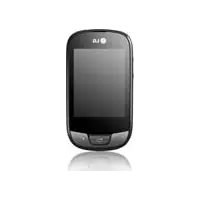



| Product Type | Touchscreen mobile phone |
| Brand | LG |
| Model | LGT505 |
| Network | GSM 850 / E-GSM 900 / DCS 1800 / PCS 1900 (Quad Band) |
| Connectivity | Wi-Fi 802.11 b/g/n, Bluetooth 2.1, USB 2.0 |
| Display | Resistive touchscreen, 3.2 inches, 240 x 400 pixels |
| Camera | 2 megapixels, fixed focus |
| Video recording | CIF resolution (352 x 288), 15 frames per second |
| Battery | Lithium-ion, 950 mAh, removable |
| Talk time | Up to 5 hours |
| Standby time | Up to 400 hours |
| Internal memory | 50 MB |
| External memory | microSD card up to 16 GB |
| Dimensions (H x L x D) | 106 x 56 x 12 mm |
| Weight | 100 g (with battery) |
| Maintenance and cleaning | Wipe with a soft, dry cloth. Do not use abrasive products. |
| Safety | Avoid shocks, humidity and extreme temperatures. Use only LG-approved accessories. |
| Spare parts and repairability | Removable battery. Accessible SIM card. Repair by qualified technician only. |
| General information | User guide available for download. Complies with SAR directive (maximum value 0.836 W/kg at ear). |
Frequently Asked Questions - LGT505 LG
User questions about LGT505 LG
0 question about this device. Answer the ones you know or ask your own.
Ask a new question about this device
Download the instructions for your Cellphone in PDF format for free! Find your manual LGT505 - LG and take your electronic device back in hand. On this page are published all the documents necessary for the use of your device. LGT505 by LG.
USER MANUAL LGT505 LG
Pair with another Bluetooth device immediately
Declaration of Conformity

LG Electronics
Supplier Details
Name
LG Electronics Inc.
Address
LG Twin Tower 20, Yeouido-dong, Yeongdeungpo-gu, Seoul, Korea 150-721
Product Details
Product Name
GSM 850 / E-GSM 900 / DCS 1800 / PCS 1900 Quad Band Terminal Equipment
Model Name
LG-T505
Trade Name
LG
Applicable Standards Details
R&TTE Directive 1999/5/EC
EN301489-01v1.8.1/EN301489-07v1.3.1/EN301489-17v2.1.1
EN 300 328 v1.7.1
EN 60950-1:2006+A11:2009
EN 50360:2001/AC:2006
EN 62209-1:2006/EN 62209-2:2010
EN 301 511 v9.0.2
Supplementary Information
The conformity to the above standards is verified by the following Notified Body (BABT)
BABT, Forsyth House, Churchfield Road, Walton-on-Thames, Surrey, KT12 2TD, United Kingdom
Notified Body Identification Number: 0168
Declaration
hereby declare under our sole responsibility
that the product mentioned above to which this
Declaration relates complies with the above mentioned
standards, regulation and directives
LG Electronics Inc. - EU Representative
Veluwezoom 15, 1327 AE Almere, The Netherlands
Name Issued Date
Doo Haeng Lee / Director 28, Apr, 2011

Signature of representative
Details Standard applications
R&TTE Directive 1999/5/EC
EN301489-01v1.8.1/EN301489-07v1.3.1/EN301489-17v2.1.1
EN 300 328 v1.7.1
EN 60950-1:2006+A11:2009
EN 50360:2001/AC:2006
EN 62209-1:2006/EN 62209-2:2010
EN301511v9.0.2
BABT, Forsyth House, Churchfield Road, Walton-on-Thames, Surrey, KT12 2TD, United Kingdom
Notified Body Identification Number: 0168
Declaration
LG Electronics Inc. - EU Representative
Veluwezoom 15, 1327 AE Almere, The Netherlands
Name Date of publication
Some of the contents in this manual may differ from your phone depending on the software of the phone or your service provider.
Installing the SIM card and the handset battery
Installing the SIM Card
When you subscribe to a cellular network, you are provided with a plug-in SIM card loaded with your subscription details, such as your PIN, any optional services available and many others.
Important!
The plug-in SIM card and its contacts can be easily damaged by scratches or bending, so be careful when handling, inserting or removing the card.
Keep all SIM cards out of the reach of small children.
Illustrations
Always switch the device off and disconnect the charger before removing the battery.
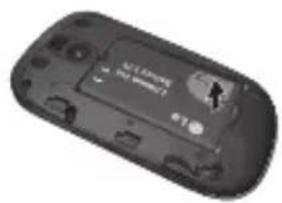
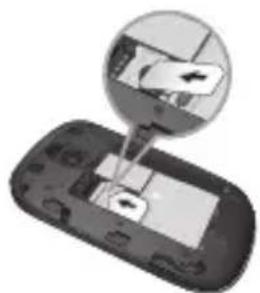
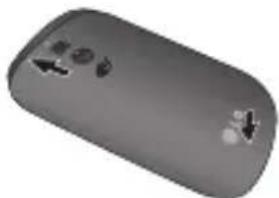
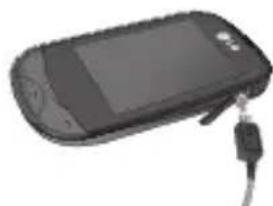
1. Remove the back cover. 2. Lift the battery away. 3. Insert the SIM card. 4. Insert the battery pack. 5. Attach the back cover. 6. Charge the battery.
Phone Components
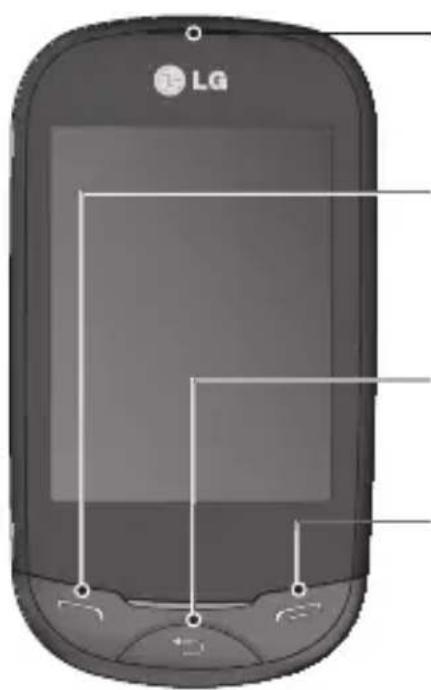
Earpiece
Call key
Dials a phone number and answers incoming calls.
Back key
Go back to a previous screen.
End key

Volume keys
- When the screen is at the Home screen: Ring tone and touch tone volume. During a call: Earpiece volume.
- Down volume key: Press and hold to activate/deactivate Silent mode.
Power/Lock key
- Short press to turn on/off the screen.
- Long press for power on/off.
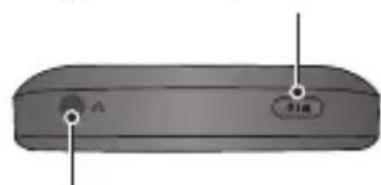
Handsfree or Stereo earphone connector
Using your touch screen
Touch screen tips
To select an item, touch the centre of the icon. - Do not press too hard. The touchscreen is sensitive enough to pick up a light, firm touch. - Use the tip of your finger to touch the option you require. Be careful not to touch any other keys. - Whenever your LG-T505 is not in use, it will return to the lock screen.
Control the touch screen
The controls on the LG-T505 touch screen change dynamically depending on the task you are carrying out.
Opening Applications
To open any application, simply touch its icon.
Scrolling
Drag from side to side to scroll. On some screens, such as the call history list, you can also scroll up or down.
Camera
Taking a quick photo
1 Touch Camera menu. 2 When the camera has focused on your subject, touch the icon on the right-center of the screen to take a photo.
TIP: To switch between camera mode and video mode, slide up or down on the camera or video icon located on the center-right of the viewfinder.
After taking a photo
Your captured photo will appear on the screen.
The following options are available.
Touch
Upload - Touch to upload the photo.
Send via - Touch to send the photo as a Message, E-mail, or via Bluetooth.
Set as - Touch to set as Homescreen wallpaper, Lockscreen wallpaper, or Contacts image.
Edit - Touch to edit the photo.

Touch to delete the image.

Touch to take another photo immediately.

Touch to view a gallery of your saved photos.
Video camera
Making a quick video
To switch between camera mode and video mode, slide up or down on the camera or video icon located on the right center of the viewfinder.
1 Holding the phone horizontally, point the lens towards the subject of the video. 2 Press the red dot. 3 REC will appear at the bottom of the viewfinder with a timer at the bottom showing the length of the video. 4 To pause the video, touch and resume by selecting 5 Touch on screen.


- PAIR WITH ANOTHER BLUETOOTH DEVICE IMMEDIATELY
- DECLARATION OF CONFORMITY
- SUPPLIER DETAILS
- PRODUCT DETAILS
- APPLICABLE STANDARDS DETAILS
- SUPPLEMENTARY INFORMATION
- DECLARATION
- DETAILS STANDARD APPLICATIONS
- INSTALLING THE SIM CARD AND THE HANDSET BATTERY
- INSTALLING THE SIM CARD
- IMPORTANT
- ILLUSTRATIONS
- PHONE COMPONENTS
- EARPIECE
- CALL KEY
- BACK KEY
- END KEY
- VOLUME KEYS
- POWER/LOCK KEY
- HANDSFREE OR STEREO EARPHONE CONNECTOR
- USING YOUR TOUCH SCREEN
- TOUCH SCREEN TIPS
- CONTROL THE TOUCH SCREEN
- OPENING APPLICATIONS
- SCROLLING
- CAMERA
- TAKING A QUICK PHOTO
- AFTER TAKING A PHOTO
- VIDEO CAMERA
- MAKING A QUICK VIDEO
Brand : LG
Model : LGT505
Category : Cellphone