
KG291I - Cellphone LG - Free user manual and instructions
Find the device manual for free KG291I LG in PDF.


| Type of Product | Mobile phone |
| Brand | LG |
| Model | KG291I |
| Dimensions | 105 x 45 x 15 mm (approx) |
| Weight | 100 g (approx) |
| Display | 2.0-inch TFT, 176 x 220 pixels |
| Camera | 1.3 MP rear camera |
| Battery | Removable Li-Ion 1000 mAh |
| Standby Time | Up to 300 hours |
| Talk Time | Up to 3 hours |
| Memory | Up to 1000 contacts, microSD slot |
| Connectivity | GSM 900/1800, GPRS, Bluetooth |
| Messaging | SMS, EMS, MMS |
| Features | Speakerphone, alarm, calculator, converter |
| SIM Card | Standard SIM |
| Port | Proprietary charging and data port |
| Maintenance and Cleaning | Wipe with a soft, dry cloth |
| Safety | Use only approved batteries and chargers |
| Spare Parts and Reparability | Back cover and battery are user-replaceable; other repairs by service experts |
| General Information | Manual includes complete operating instructions |
Frequently Asked Questions - KG291I LG
User questions about KG291I LG
0 question about this device. Answer the ones you know or ask your own.
Ask a new question about this device
Download the instructions for your Cellphone in PDF format for free! Find your manual KG291I - LG and take your electronic device back in hand. On this page are published all the documents necessary for the use of your device. KG291I by LG.
USER MANUAL KG291I LG
KG291 i-model
MANUALE D'USO
이비 히미니아이터만 망가
CE 0168
Bluetooth QD ID B012822
KG291 i-mode Manuale d'uso - Italiano

Inserimento scheda SIM

Nota
AVVERTIMENTO!
2. Periferiche associate
Auricolare
Nota
Declaration of Conformity

LG Electronics
Burgshire
Name
LG Electronics Inc
Address
LG Twin Tower 20, Yeoukdo-dong, Yeongdeungpo-gu Seoul, Korea 150-721
Product Development
Product Name
E-GSM 900 / DCS 1800 / PCS 1900 Tri Band Terminal Equipment
Model Name
KG291 I-mode
Trade Name
LG
CE 0168
App Store Store Deli
RATTE Directive 1999/5/EC
EN 301 489-01 v1.8.1(2005) / EN 301 489-07 v1.3.1(2005) / EN 301 489-17 v1.2.1(2002)
EN 60950-1:2001
EN 60360/EN 50361:2001
EN 301 511 V9.0.2
EN 300 328 V1.6.1 (2004-11)
[Unreadable]
The conformity to above standards is verified by BABT.
The quick brown fox jumps over the lazy dog.
I hereby declare under our sole responsibility that the product mentioned above to which this declaration relates complies with the above mentioned standards and Directives.
LG Electronics Logistics and Services B.V.
Veluwezoom 15, 1327 AE Almere, The Netherlands
Tel:+31-36-547-8940, e-mail:seokim@lge.com
Name
Issued Date
Jin Seog, Kim / Director
- August, 2007

Signature of representative
HOW TO USE QUICK REFERENCE GUIDE
Cut out Quick Reference Guide bound to this manual along the cutout line and fold as illustrated below.
How to cut
Cut out Quick Reference Guide along the cutout line. You can place a scale on the cutoff line and cut as illustrated below.
- Be careful not to cut yourself when using scissors.
How to fold
Fold Quick Reference Guide along the perforated line so that the cover faces upwards as illustrated below.


KG291 i-mode QUICK REFERENCE GUIDE
WELCOME AND THANK YOU FOR CHOOSING LG MOBILE PHONE
For more details, please refer to the User Guide.
Part of the phone

- Earpiece
- Main screen
- Left soft key/Right soft key
- Side keys
- Alpha numeric keys
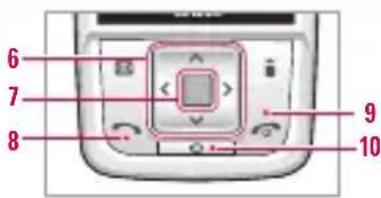
- Navigation keys
In standby mode:
Briefly: List of Profiles
Briefly: List of My stuff
Briefly: Messages pop-up (Hold down: Activate/Deactivate Vibrate mode)
Briefly: List of Contacts
In menu: scroll up & down
7. Confirm key
8. Send key
9. End/Power Key
10. Clear key
Entering Text
Using the T9 mode
The T9 predictive text input mode lets you enter words easily with a minimum number of key presses.
As you press each key, the phone begins to display the characters that it thinks you are typing based on the built-in dictionary.
You can also add new words in the dictionary.
As new words are added, the word changes to reflect the most likely candidate from the dictionary. You can turn the T9 mode on or off, and change the T9 language by holding down the ( ) key.
Example: Press 4 mm 6 mm 6 mm 3 mm to type Good.
Using the ABC mode
Use the 2 to 9 keys to enter your text.
Using the 123 (Number) mode
The 123 mode enables you to enter numbers in a text message (a telephone number, for example). Press the keys corresponding to the required digits before manually switching back to the appropriate text entry mode.
Using the Symbol Mode
The symbol mode enables you to enter various symbols or special characters. To enter a symbol, Options → Add → Symbol.
Use the navigation and numeric keys to select the desired symbol and press the [OK] key.
Sending SMS/MMS
You can write and edit a message containing a combination of text, image, video and audio.
- Enter the New message menu by pressing the left soft key .B
- If you want to write a new message, select Text or Multimedia.
- To make text input easier, use T9.
- After you complete the message, to select the required option, press the left soft key .B
MP3 player
- All songs: You can view all the music files stored in the phone/external memory.
- My playlist: You can create your own playlists by choosing tracks from the All tracks menu list.
- Settings: You can set MP3 player options such as the type of Shuffle, Repeat, Equalizer and Player skin.
Using the Camera
- Select Multimedia menu from the list of main menu.
Select Camera and the screen will now become the viewfinder. If you want to reach this menu directly, press
for a few seconds.
2. Focus on the subject to capture the image, and then press the key.
3. If you want to save it, press the □ key.
- Still shot: 320X240, 640X480, 1280X960
- Multishot: 1 shot, 3 shots, 6 shots

To take a picture with a side camera key
- Press and hold [] for a few seconds.
- You can enter to camera capture mode directly.
Using the Video Camera
- Select Video camera menu.
- To start recording press [As soon as it starts to record a timer will be displayed.
- Press the to end the recording and this will now be saved.
Using the Voice Recorder
In this feature you can record over 10 voice memos, up to a maximum of 60 seconds each.
Using the Bluetooth
Bluetooth enables compatible mobile devices, peripherals and computers that are in close proximity to communicate directly with each other without wires. This handset supports built-in Bluetooth connectivity, which makes it possible to connect them with compatible Bluetooth headsets, computer applications and so on.
FM radio
You can search radio stations and enjoy listening to the radio. Connect the FM Radio headset into headset jack on the right side of the phone to activate this menu.
- Press the corresponding number key of a channel to store the currently selected radio station into.
- After presetting radio channels, you can listen to other channel by pressing the corresponding number key (short press)
- You can access the following option menus by pressing the left soft key [Options].
Note
- We recommend that Bluetooth visibility be set to Hide after configuration or device pairing. For incoming files via Bluetooth regardless of paired devices, you can choose to accept or reject the connection, after checking the sender details.
- Supported Bluetooth software(Bluetooth stacks) for DUN : - WIDCOMM Bluetooth for Windows 1.4 and 3.0

- KG291 I-MODE MANUALE D'USO - ITALIANO
- NOTA
- AVVERTIMENTO
- PERIFERICHE ASSOCIATE
- AURICOLARE
- DECLARATION OF CONFORMITY
- BURGSHIRE
- PRODUCT DEVELOPMENT
- APP STORE STORE DELI
- [UNREADABLE]
- THE QUICK BROWN FOX JUMPS OVER THE LAZY DOG
- HOW TO USE QUICK REFERENCE GUIDE
- HOW TO CUT
- HOW TO FOLD
- KG291 I-MODE QUICK REFERENCE GUIDE
- PART OF THE PHONE
- ENTERING TEXT
- USING THE T9 MODE
- USING THE ABC MODE
- USING THE 123 (NUMBER) MODE
- USING THE SYMBOL MODE
- SENDING SMS/MMS
- MP3 PLAYER
- USING THE CAMERA
- TO TAKE A PICTURE WITH A SIDE CAMERA KEY
- USING THE VIDEO CAMERA
- USING THE VOICE RECORDER
- USING THE BLUETOOTH
- FM RADIO
- NOTE
Brand : LG
Model : KG291I
Category : Cellphone