GAM57SLIDS4 - Motherboard GIGABYTE - Free user manual and instructions
Find the device manual for free GAM57SLIDS4 GIGABYTE in PDF.


User questions about GAM57SLIDS4 GIGABYTE
0 question about this device. Answer the ones you know or ask your own.
Ask a new question about this device
Download the instructions for your Motherboard in PDF format for free! Find your manual GAM57SLIDS4 - GIGABYTE and take your electronic device back in hand. On this page are published all the documents necessary for the use of your device. GAM57SLIDS4 by GIGABYTE.
USER MANUAL GAM57SLIDS4 GIGABYTE
DECLARATION OF CONFORMITY
Per FCC Part 2 Section 2.1077(a)
declare that the product description of the apparatus, system, installation to which it is
GA-M57SLI-DS4
(reference to the specification under which conformity is declared) in accordance with 89/356 EFC-EMC Directive.

Responsible Party Name: G. B. T. INC. (USA)
Address: 17358 Railroad Street
City of Industry, CA 91748
Phone/Fax No: (818) 854-9338/ (818) 854-9339
hereby declares that the product
Product Name: Motherboard
Model Number: GA-M57SLI-DS4
Conforms to the following specifications:
FCC Part 15, Subpart B, Section 15.107(a) and Section 15.109
(a),Class B Digital Device
Supplementary Information:
This device complies with part 15 of the FCC Rules. Operation is
subject to the following two conditions: (1) This device may not
cause harmful and (2) this device must accept any inference received,
including that may cause undesired opera
Representative Person's Name: ERIC LU
Signature: Eric Lu
Date: Jan. 10, 2007
版权
© 2006 GIGA-BYTE TECHNOLOGY CO., LTD. All rights reserved.
1-6 SL建Sable Link Interface)
,可擴充連結介面系統
NVIDIA nForce 570-SLI NVIDIA 接兩張支援
F11: Save CMOS to BIOS
F12: Load CMOS from BIOS
Integrated Peripherals (整合週邊設定
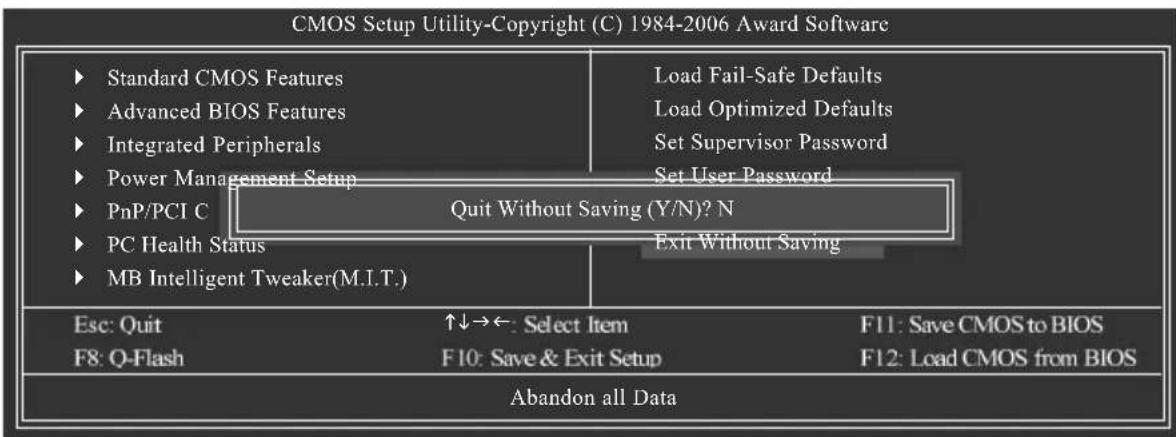
Exit Without Saving (SAVEUP) 程式
| CMOS Setup Utility-Copyright (C) 1984-2006 Award Software Standard CMOS Features | ||
| Date (mm:dd:yy) Time (hh:mm:ss) | Mon, Dec 25 2006 22:31:24 | Item Help Menu Level |
| IDE Channel 0 Master | [None] | |
| IDE Channel 0 Slave [None] | ||
| IDE Channel 2 Master | [None] | |
| IDE Channel 3 Master | [None] | |
| IDE Channel 4 Master | [None] | |
| IDE Channel 5 Master | [None] | |
| IDE Channel 6 Master | [None] | |
| IDE Channel 7 Master | [None] | |
| Drive A [1.44M, 3.5"] | ||
| Drive B | [None] | |
| Floppy 3 Mode Support | [Disabled] | |
| Halt On | [All, But Keyboard] | |
| Base Memory | 640K | |
| Extended Memory | 511M | |
| ↑↓→←: Move Enter: Select +/-/PU/PD: Value F10: Save ESC: Exit F1: General Help F5: Previous Values F6: Fail-Safe Defaults F7: Optimized Defaults | ||
Date (mm:dd:yy) (日/期) (hh:mm:ss) () 時間設定
IDE Channel 2/3/4/5/6/7 Master (SATA IDE 設備參數設定)
ESC: Exit F1: General Help
F5: Previous Values
F6: Fail-Safe Defaults
F7: Optimized Defaults
AMD K8 Cool&Quiet control
| CMOS Setup Utility-Copyright (C) 1984-2006 Award Software Integrated Peripherals | ||
| ◆ Serial-ATA RAID Config [Press Enter] On-Chip IDE Channel0 [Enabled] On-Chip MAC Lan [Auto] NV Serial-ATA Controller [All Enabled] IDE Prefetch Moed [Enabled] Onboard Audio Function [Auto] ◆ SMART LAN [Press Enter] Onboard 1394 [Enabled] Onboard LAN Boot ROM [Disabled] Onboard Serial Port 1 [3F8/IRQ4] Onboard Parallel Port [378/IRQ7] Parallel Port Mode [SPP] x ECP Mode Use DMA 3 On-Chip USB [V1.1+V2.0] USB Keyboard Support [Disabled] USB Mouse Support [Disabled] Legacy USB storage detect [Enabled] | Item Help Menu Level◆ | |
| ↑↓→←: Move Enter: Select +/-/PU/PD: Value F10: Save ESC: Exit F1: General Help F5: Previous Values F6: Fail-Safe Defaults F7: Optimized Defaults | ||
Serial-ATA RAID Config
| CMOS Setup Utility-Copyright (C) 1984-2006 Award Software Serial-ATA RAID Config | ||
| NV SATA RAID function [Disabled] x NV SATA 1 Primary RAID Enabled x NV SATA 1 Secondary RAID Enabled x NV SATA 2 Primary RAID Enabled x NV SATA 2 Secondary RAID Enabled x NV SATA 3 Primary RAID Enabled x NV SATA 3 Secondary RAID Enabled | Item Help Menu Level | |
| ↑↓→←: Move Enter: Select +/-/PU/PD: Value F10: Save ESC: Exit F1: General Help F5: Previous Values F6: Fail-Safe Defaults F7: Optimized Defaults | ||
NV SATA 1 Secondary RAID
NV SATA 2 Secondary RAID
NV SATA 3 Secondary RAID
NV Serial-ATA Controller
Onboard Parallel Port (内建並列插座)
USB Mouse Support(支援USB規格滑鼠
Legacy USB storage detect
| CMOS Setup Utility-Copyright (C) 1984-2006 Award Software Power Management Setup | |||||
| ACPI Suspend Type | [S1(POS)] | Item Help | |||
| Soft-Off by Power button | [Instant-Off] | Menu Level↑ | |||
| PME Event Wake Up | [Enabled] | ||||
| Modem Ring On | [Enabled] | ||||
| USB Resume from Suspend | [Disabled] | ||||
| Power-On by Alarm | [Disabled] | ||||
| x Day of Month Alarm | Everyday | ||||
| x Time (hh:mm:ss) Alarm | 0:0:0 | ||||
| Power On By Mouse | [Disabled] | ||||
| Power On By Keyboard | [Disabled] | ||||
| x KB Power ON Password Enter | |||||
| AC BACK Function | [Soft-Off] | ||||
| ↑↓→←: Move Enter: Select +/-/PU/PD: Value F10: Save ESC: Exit F1: General Help F5: Previous Values F6: Fail-Safe Defaults F7: Optimized Defaults | |||||
Power On By Keyboard (鍵盤開機功能
CPU Warning Temperature (CPU 温度警告
CPU Frequency (MHz) (CPU 頻率選擇
2-9 Load Optimized Defaults (Optimized)
預設值
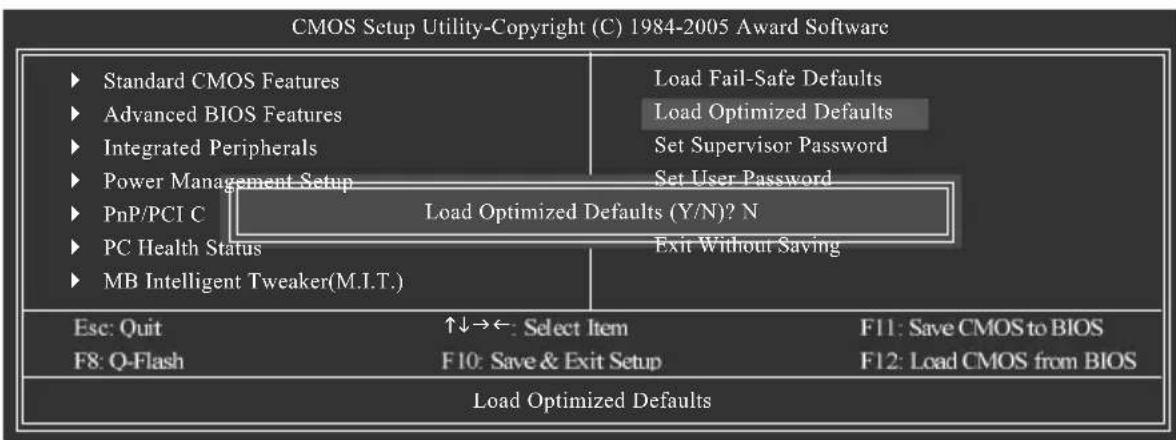
Standard CMOS Features
Advanced BIOS Features
Integrated Peripherals
Power Management Setup
PnP/PCITC Enter Password:
PC Health Status Exit Without Saving
MB Intelligent Tweaker(M.I.T.)
Esc: Quit
F8:Q-Flash
↑↓→← Select Item
F10: Save & Exit Setup
F11: Save CMOS to BIOS
F12: Load CMOS from BIOS
Change/Set/Disable Password
2-11 Save & Exit Setup (S#P)
並儲存設定結果
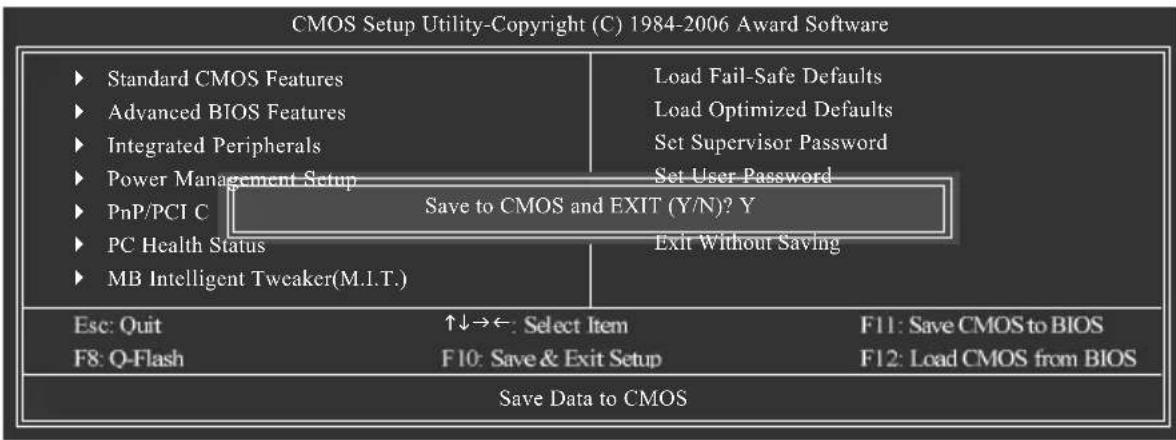
2-12 Exit Without Saving (SMP)
但不儲存設定結果
- Intel x86 platform
- 64M bytes memory
- VESA supported VGA cards
使用方法:
利用CD-ROM执行及開機畫面 功能
CMOS Setup Utility-Copyright (C) 1984-2006 Award Software Integrated Peripherals
| Serial-ATA RAID Config | [Press Enter] | Item Help |
| On-Chip IDE Channel10 | [Enabled] | Menu Level |
| On-Chip MAC Lan [Auto] | ||
| NV Serial-ATA Controller | [All Enabled] | |
| IDE Prefetch Mood | [Enabled] | |
| Onboard Audio Function | [Auto] | |
| SMART LAN | [Press Enter] | |
| Onboard 1394 | [Enabled] | |
| Onboard LAN Boot ROM | [Disabled] | |
| Onboard Serial Port 1 | [3F8/IRQ4] | |
| Onboard Parallel Port | [378/IRQ7] | |
| Parallel Port Mode | [SPP] | |
| ECP Mode Use DMA | 3 | |
| On-Chip USB | [V1.1+V2.0] | |
| USB Keyboard Support | [Disabled] | |
| USB Mouse Support | [Disabled] | |
| Legacy USB storage detect | [Enabled] | |
| ↑↓→←: Move Enter: Select +/-/PU/PD: Value F10: Save ESC: Exit F1: General Help F5: Previous Values F6: Fail-Safe Defaults F7: Optimized Defaults | ||
图1
| NV SATA RAID function | [Enabled] | Item Help | |
| NV SATA 1 Primary RAID | [Enabled] | Menu Level | |
| NV SATA 1 Secondary RAID [Enabled] | |||
| NV SATA 2 Primary RAID | [Enabled] | ||
| NV SATA 2 Secondary RAID [Enabled] | |||
| NV SATA 3 Primary RAID | [Enabled] | ||
| NV SATA 3 Secondary RAID [Enabled] | |||
| ↑↓→←: Move Enter: Select +/-/PU/PD: Value F10: Save ESC: Exit F1: General Help F5: Previous Values F6: Fail-Safe Defaults F7: Optimized Defaults | |||

圖2
Press F10 to enter RAID setup utility ...
圖4
步骤2:
按
您可以按
選擇RAID模式)
G.B.T. TECHNOLOGY TRADING GMBH
Representative Office Of GIGA-BYTE Technology Co., Ltd.
in CZECH REPUBLIC
網址:http://www.gigabyte.cz
- 土耳其
Representative Office Of GIGA-BYTE Technology Co., Ltd.
in TURKEY
Moscow Representative Office Of GIGA-BYTE Technology Co., Ltd.
Office of GIGA-BYTE TECHNOLOGY Co., Ltd. in POLAND
Representative Office Of GIGA-BYTE Technology Co., Ltd. in Romania
Representative Office Of GIGA-BYTE Technology Co., Ltd. in SERBIA & MONTENEGRO
Management Methods on Control of Pollution from Electronic Information Products
(China RoHS Declaration)