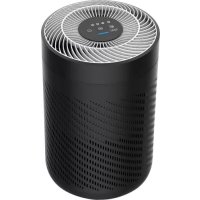
Pure Air - Air purifier Fuave - Free user manual and instructions
Find the device manual for free Pure Air Fuave in PDF.


User questions about Pure Air Fuave
0 question about this device. Answer the ones you know or ask your own.
Ask a new question about this device
Download the instructions for your Air purifier in PDF format for free! Find your manual Pure Air - Fuave and take your electronic device back in hand. On this page are published all the documents necessary for the use of your device. Pure Air by Fuave.
USER MANUAL Pure Air Fuave
natural_image
Close-up of a cylindrical battery with a grid pattern and metallic top (no visible text or symbols)Pure luchtreiniger Purificateur d'air Pure Air Pure Air Luftreiniger
INHOUD
Aandachtspunten 01
Productoverzicht 03
text_image
Technical diagram of a cylindrical device with numbered components, showing internal structure and external assembly.natural_image
Diagram of a portable device with a cylindrical container and a grid-patterned casing, showing no text or symbols.natural_image
Line drawing of a portable device with a cylindrical container and a grid-patterned lid, no text or symbols present.INSTRUCTIES VOOR FUNCTIES
Points for attention 13
Product overview 15
Function instruction.... 18
Cleaning and maintenance 20
Troubleshooting 22
POINTS FOR ATTENTION
Before using, please read this user manual carefully and keep it for future reference.

WARNING
- To avoid electric shock and fire, do not allow water, liquid or any flammable detergent to get into the product.
- Do not spray any flammable materials such as pesticides or perfumes around the product.
- Before connecting the power supply, please check whether the voltage of the product is consistent with the local power supply voltage.
- If the power cord is damaged, in order to avoid danger, it must be replaced by professional staff.
- Please stop using it if the plug, power cord or product is damaged.
- Keep the air inlet/outlet free from being blocked.
- People with physical or mental disability, or without relevant experiences and skills (including children) should use it under guidance and instructions.
- This product can not replace normal ventilation, daily dust collection or oil pumping when cooking.
- Ensure the product socket is well connected with a plug. If not, the plug will be hot.
- Do not place any items above the product.
- Be sure to place and use the product on a firm, flat and horizontal surface.

WARNING
- Leave at least 30 cm of space on the back and sides of the product, and at least 50 cm of space above the product when using.
- Do not place the product under the air conditioner to prevent condensation water dropping into the product.
- Ensure both the filter and the back cover are properly installed before connecting to power.
- Please use the filter specially designed for this product.
- Do not take the filter as fuel or similar purposes to avoid irreversible harm.
- Do not use hard objects to strike the products, especially the air outlet and air inlet.
- Do not insert fingers or other things into the air outlet/inlet to prevent physical damage or trouble.
- Do not use this product when you are using an indoor spray repellent, or in a place filled with grease, flammable gas or chemical fumes.
- Ensure the product is unplugged before moving, cleaning, maintaining and replacing the filter.
PRODUCT OVERVIEW
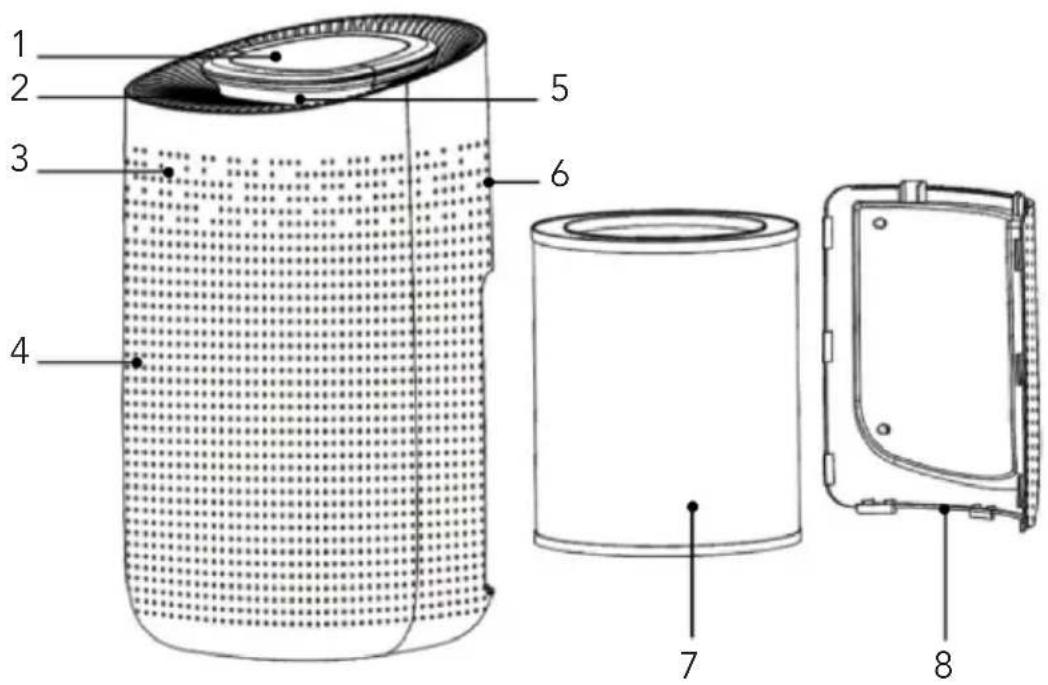
Components
text_image
Technical diagram of a cylindrical device with numbered components, showing internal structure and exterior view.- Control Panel
- Air Outlet
- Body
- Air Inlet
- Light Box
- Air quality sensor
- Filter
- Back cover
text_image
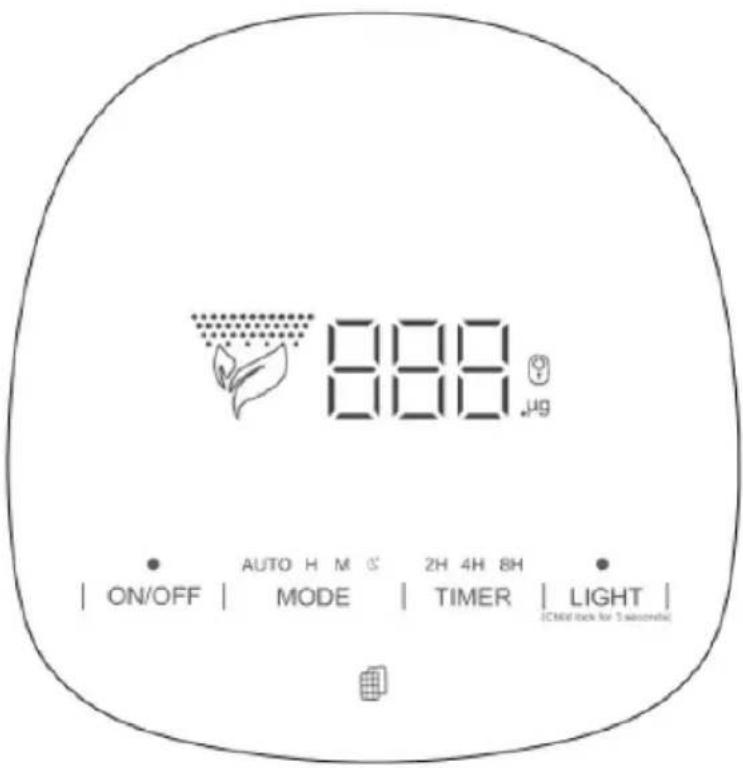
888 μg AUTO H M G 2H 4H 8H ON/OFF | MODE | TIMER | LIGHT | (CMID back for 5 second)On/Off
Power Button
Mode
Wind Speed Button
Light
Light/Child lock Button
Timer
Timer Button

Filter Button
Specifications
| Model no. Max | |
| Size L270* W303* H497 mm | |
| Input AC100-240V 50/60HZ | |
| Power 50W | |
| Noise W56dB | |
| Coverage area <50m | |
| Weight 4.6KG |
Remove filter package
Before using, please remove the package of the filter.
Ensure the machine is unplugged before removing or installing the filter.
- Press the red circle switch to take out the back cover.
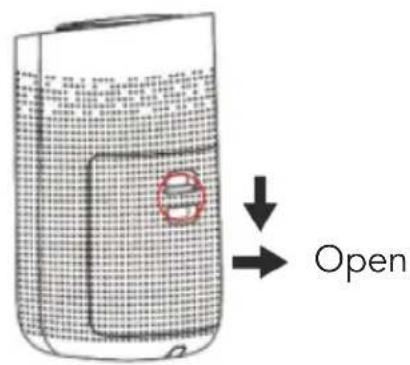
text_image
Open- Remove the packaging of the new filter.
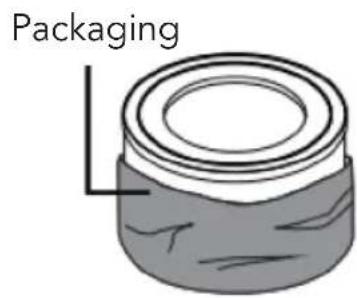
text_image
Packaging- Press the red circle switch button to close the back cover.
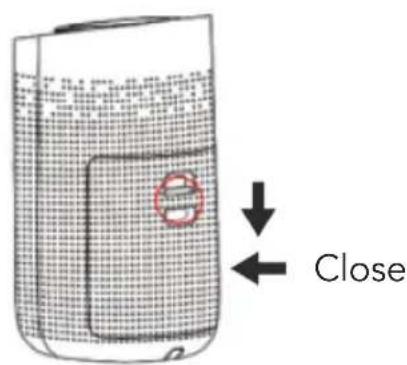
text_image
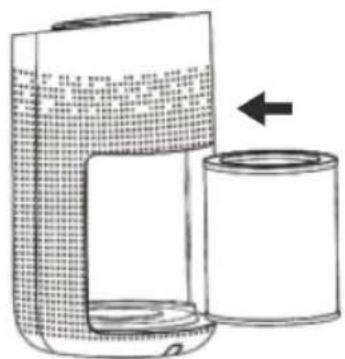
Close- Remove the filter from the machine.
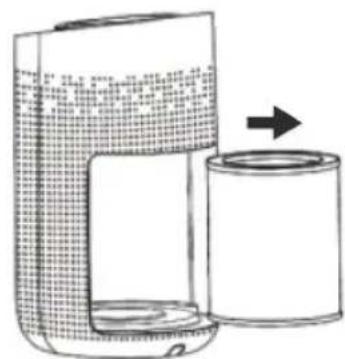
natural_image
Diagram of a portable device with a cylindrical container and a grid-patterned casing, showing internal components and an arrow indicating direction (no text or symbols present)- Put the filter into the machine.
natural_image
Line drawing of a portable device with a cylindrical container and a grid-patterned top panel, no text or symbols present.FUNCTION INSTRUCTION
Connect the power, all indicators will be on for 1 second and then off. After that, the machine will be in standby mode.
Power Button
- Press the power button, the machine turns on at mid default mode. Meanwhile, the buzzer rings once and the indicator will be on.
- Press again to turn off the machine. All the lights will be off, and the machine will be in standby mode.
Wind Speed Button
Press the Wind Speed Button to adjust the wind speed among the circulation of Auto-H-M-S grade. The buzzer will ring once and the indicator will be on.
When the machine is in auto mode, the wind speed will be adjusted according to the air quality, and the light box will display different colors. When the air quality is poor, the wind speed is automatically adjusted to the high mode, and the light box will display a red color; When the air quality is normal, the wind speed is automatically adjusted to the mid mode, and the light box will display a yellow color; When the air quality is excellent, the wind speed is automatically adjusted to the sleep mode, and the light box will display a blue color.
Timer
- Press the Timer Button to set the timer among the circulation of 2H, 4H and 8H. Every time you press the the button, the buzzer rings for one time, and the corresponding indicator will be on.
- The machine begins to count down. When the time is up, the machine will stop working and all lights will be off, and the machine will be in standby mode.
Light / Child lock Button
Press the Light Button, the indicator will be on. Every time you press it, the buzzer will ring once, and the light will be changed to Soft / Standard / Off mode.
Press the Light/Child lock button for 3 seconds to start the Child lock function, the indicator will be on. Press again for 3 seconds, the buzzer will ring for one time, then the indicator will be off to unlock this function.

NOTE
- Any functions cannot be operated in the mode of Child lock function unless you unlock it.
Filter Button
Reminder of Replacing Filter
When the machine detects the filter is saturated after running for 2200 hours, the filter indicator light will keep flashing in red. Press the Filter Button for 7 seconds to stop flashing and to reset after installing a new filter.
CLEANING AND MAINTENANCE
Maintenance

NOTICE
- Ensure the machine is unplugged before maintenance.
- Do not immerse the air purifier into water or any liquid. Do not use abrasive, corrosive or flammable cleansers (such as bleach or alcohol) to clean any part of the unit.
- Clean the filter regularly. Do not wash or reuse the filter.
- Ensure the machine is unplugged before replacing the filter.
- Please sterilize the filter under sunlight regularly.
- Do not use a vacuum cleaner to clean the filter or wash it directly.
Cleaning & Storage
- Ensure the machine is power-off and unplugged.
- Take out the filter to clean any dust from the surface of it.
- Use a soft cloth with neutral cleanser to clean away any dust or debris from the surface of the machine.
- After the filter is dried, install it into the air purifier to restart.
- If you do not use the machine for a long time, ensure the machine is dryout, put on the dust cover bag and place it in a cool and well-ventilated place.
- To ensure a good performance of the machine, please turn on the machine for a few minutes from time to time.

ATTENTION
- Please don't drop any water into the machine when cleaning the air outlet.
TROUBLESHOOTING
| Situation Reason | |
| Not working • Is it plugged into a power socket?Is there a power outage?Is the home leakage switch or fuse cut off?Is the filter replacing indicator flashing? | |
| Poor performance • Is there any dust on the surface or primary filter?Is there any obstacle blocking the air inlet/outlet? | |
| Significant noise • Is there anything stuck on the fan in the air outlet?Is the machine tilted?Please set a lower grade of wind speed if the noise is too loud, or set a lower grade of wind speed when using it in the bedroom at night. | |
| Bad smell • When using it for the first time, it is normal for a smell to come out of the machine. The machine will give a smell when the filter is dusty. Please clean or replace the filter.If a burning smell comes from the machine, please unplug the machine and contact customer service. | |
| The reminder of replacing the filter is still flashing after replacing the filter | • Please press the filter button for 7 seconds to reset the machine and the new filter will start. |

ATTENTION
- If the above FAQ can not solve your problems and you need maintenance, please contact the supplier or after sales service center. Please do not disassemble the machine by yourself.
TABLE DES MATIÈRES
Conseils 25