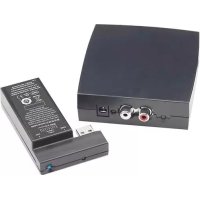
Defiance WT - Network card / adapter Paradigm - Free user manual and instructions
Find the device manual for free Defiance WT Paradigm in PDF.


| Brand | Paradigm |
| Model | Defiance WT |
| Product Type | Wireless adapter for subwoofer |
| Power Supply | Power adapter DYS618-150100-K: input 100-240 V~, 50/60 Hz, 0.5 A max; output 15 V DC, 1.0 A |
| Operating Frequency | 2405 – 2477 MHz |
| Maximum Transmitter Power | 10 dBm |
| Connection | Line-Level input from Sub/LFE output or Pre-Out/Front-Out; receiver plugs into the subwoofer's wireless module port |
| Range | Up to 20 m (estimated) |
| Standby Power Consumption | Approximately 0.5 W (estimated) |
| Materials | ABS plastic, electronic components |
| Warranty | 1 year against defects in materials and workmanship |
| Compatibility | Paradigm Defiance subwoofers with wireless module port |
| LED Indicators | Transmitter: off (standby), solid on (transmitting), slow flashing (waiting for pairing), fast flashing (searching for receiver). Receiver: off (no power), solid on (receiving power), slow flashing (waiting for pairing), fast flashing (searching for transmitter) |
| Maintenance | Clean with a dry cloth; do not use liquid or abrasive products |
| Safety | Maintain ventilation distances (20-30 cm); do not expose to water, heat, or open flames; use only recommended accessories |
| Replacement Parts | Power adapter available from Paradigm customer service |
| Certifications | CE, FCC, IC; compliant with EU directives: Low Voltage, EMC, RED, Ecodesign, WEEE, RoHS2, REACH |
| Weight | Approximately 150 g (estimated) |
| Dimensions (approx.) | Transmitter: 100 x 60 x 25 mm; receiver: 80 x 50 x 20 mm |
Frequently Asked Questions - Defiance WT Paradigm
User questions about Defiance WT Paradigm
0 question about this device. Answer the ones you know or ask your own.
Ask a new question about this device
Download the instructions for your Network card / adapter in PDF format for free! Find your manual Defiance WT - Paradigm and take your electronic device back in hand. On this page are published all the documents necessary for the use of your device. Defiance WT by Paradigm.
USER MANUAL Defiance WT Paradigm
DEFIANCE SUBWOOFER
WT
natural_image
Technical line drawing of two rectangular electronic components with mounting holes and internal slots (no text or symbols)The exclamation point within an equilateral triangle is intended to alert the user to the presence of important operating and maintenance (servicing) instructions in the literature accompanying the appliance.
IMPORTANT SAFETY INSTRUCTIONS
- Read these instructions.
- Keep these instructions.
- Heed all warnings.
- Follow all instructions.
- Do not use this apparatus near water.
-
Clean only with dry cloth.
-
Do not block any ventilation openings. Install in accordance with the manufacturer's instructions.
-
Do not install near any heat sources such as radiators, heat registers, stoves, or other apparatus (including amplifiers) that produce heat.
-
Do not defeat the safety purpose of the polarized or grounding type plug. A polarized plug has two blades with one wider than the other. A grounding type plug has two blades and a third grounding prong. The wide blade or the third prong are provided for your safety. If the provided plug does not fit into your outlet, consult an electrician for replacement of the obsolete outlet.
-
Protect the power cord from being walked on or pinched, particularly at plugs, convenience receptacles, and the point where they exit from the apparatus.
-
Only use attachments/accessories specified by the manufacturer.
-
Usually with the cart, stand, tripod, bracket,
or table specified by the manufacturer, or sold with the apparatus. When a cart is used, use caution when moving the cart/apparatus combination to avoid injury from tip-over. - Unplug this apparatus during lightning storms or when unused for long periods of time.
- Refer all servicing to qualified service personnel. Servicing is required when the apparatus has been damaged in any way, such as power-supply cord or plug is damaged, liquid has been spilled or objects have fallen into the apparatus, the apparatus has been exposed to rain or moisture, does not operate normally, or has been dropped.
- Maintain a minimum of 20-30cm distance around the apparatus for sufficient ventilation;
- The ventilation should not be impeded by covering the ventilation openings with items, such as newspapers, tablecloths, curtains, etc.;
- No naked flame sources, such as candles, should be placed on the apparatus;
- Apparatus may be used in tropical climates.

EU COMPLIANCE INFORMATION
Hereby, SVI Holdings (US), Inc.'s declares that this Defiance WT is in compliance with the essential requirements and other relevant provisions of the following EU Compliance Directive Information.
-
Conforms to European Union Low Voltage Directive 2014/35/EU;
• European Union EMC Directive 2014/30/EU;
• European Union Radio Equipment Directive (RED) 2014/53/EU.
• European Union Eco-Design Directive 2009/125/EC;
• European Union WEEE Directive 2012/19/EU; -
European Union Restriction of Hazardous Substances Recast (RoHS2) Directive 2011/65/EU;
- European Union Registration, Evaluation, Authorization and Restriction of Chemicals (REACH) Directive 2006/121/EC;
- You may obtain a free copy of the Declaration of Conformity by contacting your dealer, distributor, or SVI Holdings (US), Inc.'s worldwide headquarters. Contact information can be found here: www.paradigm.com.
INDUSTRY CANADA (IC) COMPLIANCE NOTICE
This device complies with Industry Canada licence-exempt RSS standard(s). Operation is subject to the following two conditions:
(1) this device may not cause interference, and
(2) this device must accept any interference, including interference that may cause undesired operation of the device.
Any changes or modifications not expressly approved by the party responsible for compliance could void the user's authority to operate the equipment.
This equipment complies with IC radiation exposure limits set forth for an uncontrolled environment.

Contains FCC ID: NKR-SWA12 and IC: 4441A-SWA12
This device complies with part 15 of the FCC Rules. Operation is subject to the following two
conditions: (1) This device may not cause harmful interference, and (2) this device must accept any interference received, including interference that may cause undesired operation.
Per FCC regulation 47 CFR 15.21: Changes or modifications not expressly approved by the party responsible for compliance could void the user's authority to operate the equipment.
NOTE: This equipment has been tested and found to comply with the limits for a Class B digital device, pursuant to part 15 of the FCC Rules. These limits are designed to provide reasonable protection against harmful interference in a residential installation. This equipment generates uses and can radiate radio frequency energy and, if not installed and used in accordance with the instructions, may cause harmful
interference to radio communications. However, there is no guarantee that interference will not occur in a particular installation. If this equipment does cause harmful interference to radio or television reception, which can be determined by turning the equipment off and on, the user is encouraged to try to correct the interference by one or more of the following measures:
– Reorient or relocate the receiving antenna.
- Increase the separation between the equipment and receiver.
- Connect the equipment into an outlet on a circuit different from that to which the receiver is connected.
- Consult the dealer or an experienced radio/TV technician for help.

In accordance with the European Union WEEE (Waste Electrical and Electronic Equipment) directive effective August 13, 2005, we would like to notify you that this product may contain regulated materials which upon disposal, according to the
WEEE directive, require special reuse and recycling processing. For this reason Paradigm Electronics Inc. has arranged with our distributors in European Union member nations to collect and recycle this product at no cost to you.
To find your local distributor contact the dealer from whom you purchased this product, email support@paradigm.com or visit the distributor locator at www.paradigm.com.
Please note, only this product itself falls under the WEEE directive. When disposing of packaging and other related shipping materials we encourage you to recycle these items through the normal channels.

WARNING! Do not use your Defiance WT outside of the country of original sale — voltage requirements vary by country. Improper voltage can cause damage that will be potentially expensive to repair. The Defiance WT is shipped to authorized Paradigm distributors with the correct power supply for use in the country of intended sale. A list of authorized distributors can be accessed at www.paradigm.com or by e-mailing support@paradigm.com
ADAPTER
Manufacturer: Dongguan Dongsong Electronic Co., Ltd;
Model: DYS618-150100-K
Input: 100-240V\~50/60Hz 0.5A MAX
Output: 15VDC, 1.0A
SPECIFICATIONS
Frequency Range: 2405 – 2477 MHz
Max. Transmitter Power: 10 dBm
CONNECTION
Connecting the Wireless Receiver
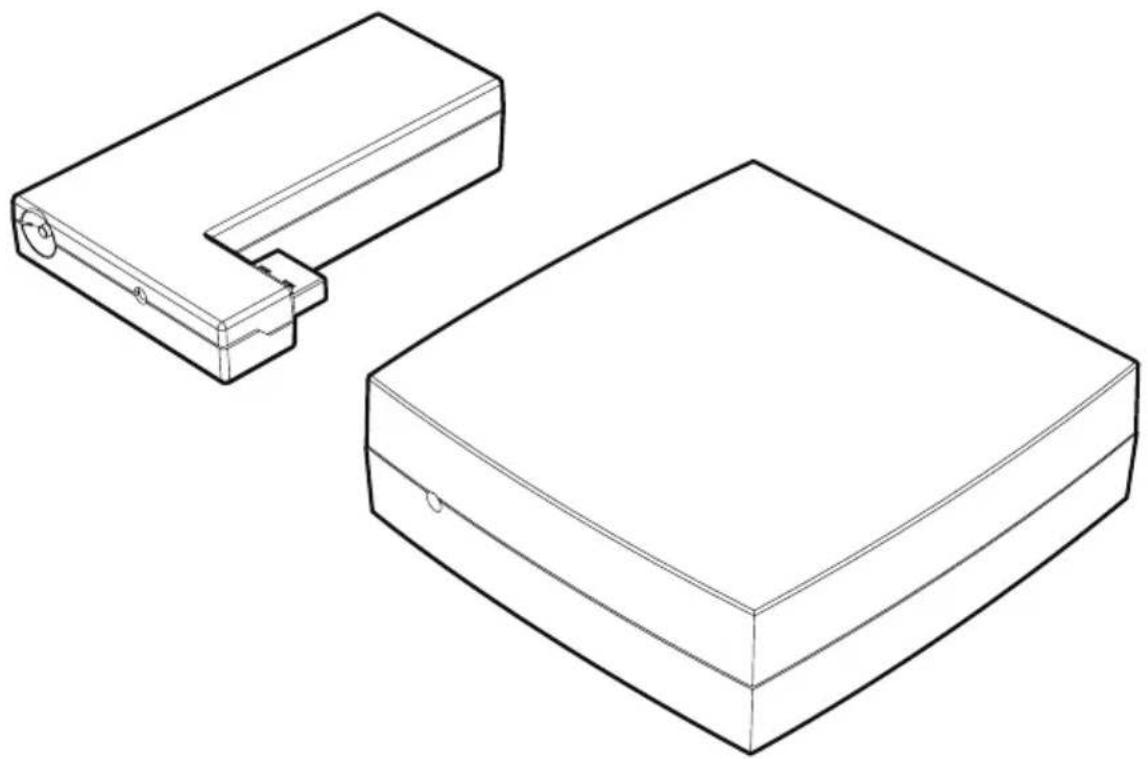
To install the Defiance WT wireless receiver, slide it into the Wireless Module Connection port on the back of the subwoofer. See Fig.1a and Fig. 1b.
Connecting the Wireless Transmitter
Connection to the Defiance WT Wireless transmitter can be made in either of two ways:
1. Line-Level Input From Sub/LFE Output
Follow the instructions for this connection option in the following section of the Defiance Subwoofer Owners Manual: "Connecting the Defiance WT Wireless Transmitter".
2. Line-Level Input From Pre-Out/Front-Out Without High-Pass Output from Sub
Follow the instructions for this connection option in the following section of the Defiance Subwoofer Owners Manual: "Connecting the Defiance WT Wireless Transmitter".
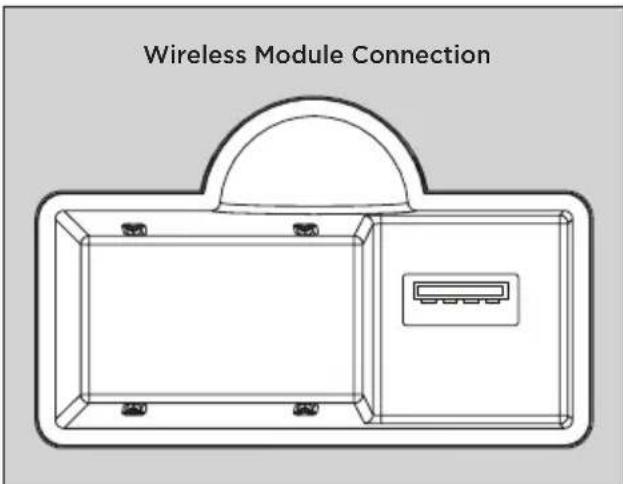
Fig. 1a Defiance WT wireless module receptacle, located on subwoofer.

natural_image
Technical line drawing of a mechanical component with an arrow indicating direction (no text or symbols present)Fig. 1b Defiance WT wireless receiver installation.
TRANSMITTER/ RECEIVER SYNC
This Defiance WT Wireless System is shipped already paired. To re-sync the wireless system:
- Verify the subwoofer is powered on and that the subwoofer's status light is red or white.
- If this Wireless Transmitter's power cord is plugged in, unplug it for 10 seconds.
-
Plug in the Wireless Transmitter's power cord.
-
Plug the Wireless Receiver into the "Wireless Module Connection" input on the back of the subwoofer (see diagram above).
- Wait until the status lights start flashing on both the Wireless Receiver and the Wireless Transmitter.
- Push the Wireless Receiver's sync button for 5 seconds.
- Push and hold the Wireless Transmitter's sync button until the Wireless Receiver's status light turns solid.
STATUS LEDS AND POWER
The Defiance WT wireless transmitter shuts down to save power after about 20 minutes. When the wireless transmitter shuts down, the wireless receiver will also shutdown shortly thereafter.
Defiance WT Wireless Transmitter LED (front) Status:
- No light: standby.
- Solid light: transmitting wireless signals.
- Flashing slowly: waiting to be synchronized.
- Flashing fast: searching for the wireless receiver (after sync button has been pressed).
Defiance WT Wireless Transmitter LED (back) Status:
- Off: no power
- On: receiving power
Defiance WT Wireless Receiver LED (front) Status:
- Off: standby or subwoofer is unpowered.
- On: wireless audio being received.
- Flashing slowly: waiting to be synchronized.
- Flashing fast: searching for wireless transmitter (after sync button has been pressed).
LIMITED WARRANTY
Paradigm® Defiance WT is warranted to be and remain free of manufacturing and/or material defects for a period of one (1) year from the date of the original retail purchase. Within this specified period, repair, replacement or adjustment of parts for manufacturing and/or material defects will be free of charge.
Thermal or mechanical abuse/misuse is not covered under warranty.
Limitations:
- Warranty begins on date of original retail purchase from an Authorized Paradigm® Dealer only. It is not transferable;
- Warranty applies to product in normal home use only. If the product is subjected to any of the conditions outlined in the next section, warranty is void;
- Warranty does not apply if the product is used in professional or commercial applications.
Warranty is Void if:
- The product has been abused (intentionally or accidentally);
- The product has been used in conjunction with unsuitable or faulty equipment;
- The product has been subjected to damaging signals, derangement in transport, mechanical damage or any abnormal conditions;
- The product (including cabinet) has been tampered with or damaged by an unauthorized service facility;
- The serial number has been removed or defaced.
What You Are Responsible For:
- Provide normal/reasonable operating care and maintenance;
- Provide or pay for transportation charges for product to service facility;
- Provide proof of purchase (your sales receipt given at time of purchase from your Authorized Paradigm® Dealer).
Should servicing be required, contact your nearest Authorized Paradigm® Reference Dealer, Paradigm Electronics Inc., or Import Distributor (outside the U.S. and Canada) to arrange, bring in or ship prepaid any defective unit. Visit our website at www.paradigm.com for more information.
Paradigm Electronics Inc. reserves the right to improve the design of any product without assuming any obligation to modify any product previously manufactured.
This warranty is in lieu of all other warranties expressed or implied, of merchantability, fitness for any particular purpose and may not be extended or enlarged by anyone. In no event shall Paradigm Electronics Inc., their agents, or representatives be responsible for any incidental or consequential damages. Some jurisdictions do not allow limitation of incidental or consequential damages, so this exclusion may not apply to you.
Retain this manual and your sales receipt for proof of warranty term and proof of purchase.

CONFORMITÉ D'INDUSTRIE CANADA (IC)
Manufacture : Dongguan Dongsong Electronic Co., Ltd;
natural_image
Technical diagram of a mechanical component with an arrow indicating direction, showing internal structure and mounting points (no text or symbols present)Installation du module sans fil Defiance WT.
SYNCHRONISATION TRANSMETTEUR/ RECEPTEUR
natural_image
Technical diagram of a mechanical component with an arrow indicating direction, showing internal components and mounting points (no text or symbols present)Defiance WT无线模块安装方式
发射器/接受器同步
Paradigm Electronics Inc., 205 Annagem Blvd., Mississauga, ON, L5T 2V1, Canada SVI Holdings (US) Inc., 2101 Delaware Street, Lawrence, Kansas, 66046, USA tel/tél/电话 905-564-1994 www.paradigm.com
- DEFIANCE SUBWOOFER
- WT
- The exclamation point within an equilateral triangle is intended to alert the user to the presence of important operating and maintenance (servicing) instructions in the literature accompanying the appliance.
- IMPORTANT SAFETY INSTRUCTIONS
- EU COMPLIANCE INFORMATION
- INDUSTRY CANADA (IC) COMPLIANCE NOTICE
- ADAPTER
- SPECIFICATIONS
- CONNECTION
- Connecting the Wireless Receiver
- Connecting the Wireless Transmitter
- Line-Level Input From Sub/LFE Output
- Line-Level Input From Pre-Out/Front-Out Without High-Pass Output from Sub
- TRANSMITTER/ RECEIVER SYNC
- This Defiance WT Wireless System is shipped already paired. To re-sync the wireless system:
- STATUS LEDS AND POWER
- Defiance WT Wireless Transmitter LED (front) Status:
- Defiance WT Wireless Transmitter LED (back) Status:
- Defiance WT Wireless Receiver LED (front) Status:
- LIMITED WARRANTY
- Limitations:
- Warranty is Void if:
- What You Are Responsible For:
- CONFORMITÉ D'INDUSTRIE CANADA (IC)
- SYNCHRONISATION TRANSMETTEUR/ RECEPTEUR
- 发射器/接受器同步
Brand : Paradigm
Model : Defiance WT
Category : Network card / adapter