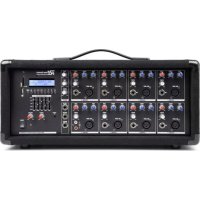
PDMC805A - DJ Equipment Power Dynamics - Free user manual and instructions
Find the device manual for free PDMC805A Power Dynamics in PDF.



| Product type | Amplified mixing console with media player and rechargeable battery |
| Power supply | 220-240 V AC / 50 Hz, fuse 10-16 A |
| Battery | Rechargeable lead-acid battery, recharge every 3 months if not used for extended periods |
| Audio inputs | 2 balanced XLR microphone inputs, 2 unbalanced 6.35 mm jack line inputs, 1 3.5 mm jack line input, 1 RCA Tape input |
| Audio outputs | 1 6.35 mm jack line output, 1 Sub output (120 Hz low-pass filter) 6.35 mm jack, 1 RCA Record output, 2 speaker outputs (A and B) |
| Speaker impedance | 4-8 ohms for 1 speaker, 8-16 ohms for 4 speakers |
| Wireless connectivity | Built-in Bluetooth, range approx. 10 m without obstacles |
| Media player | USB port and SD card reader, MP3 and WMA compatibility, Play/Stop, Next/Previous, Repeat, preset equalizer |
| Effects | Built-in delay with level, time and repeat controls |
| Equalization | Bass and treble controls per channel, preset equalizer |
| Controls | Channel level, Master level, Tape level, Delay level, Ground Lift switch |
| Temperature range | 5 °C to 35 °C (indoor use only) |
| Approximate dimensions | 430 x 250 x 100 mm |
| Approximate weight | 7.5 kg |
| Maintenance and cleaning | Use a dry cloth, no chemicals |
| Safety | Do not open the casing, do not expose to moisture, disconnect before maintenance, repairs by qualified technician |
| Spare parts and repairability | Use only original parts, replacement fuse of same type |
Frequently Asked Questions - PDMC805A Power Dynamics
User questions about PDMC805A Power Dynamics
0 question about this device. Answer the ones you know or ask your own.
Ask a new question about this device
Download the instructions for your DJ Equipment in PDF format for free! Find your manual PDMC805A - Power Dynamics and take your electronic device back in hand. On this page are published all the documents necessary for the use of your device. PDMC805A by Power Dynamics.
USER MANUAL PDMC805A Power Dynamics
Power Dynamics Professional Audio
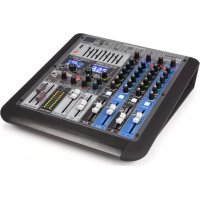
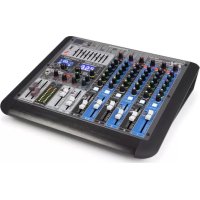
PDM-C405A / PDM-C805A Mixer with Amplifier
Ref. nr.: 171.157; 171.159
INSTRUCTION MANUAL GEBRUKSAANWIJZING BEDIENUNGSANLEITUNG MANUAL DE INSTRUCTIONS MANUEL D'INSTRUCTIONS INSTRUKCJA OBSLUGI
Congratulations to the purchase of this Power Dynamics product. Please read this manual thoroughly prior to using the unit in order to benefit fully from all features.
Read the manual prior to using the unit. Follow the instructions in order not to invalidate the warranty. Take all precautions to avoid fire and/or electrical shock. Repairs must only be carried out by a qualified technician in order to avoid electrical shock. Keep the manual for future reference.
- Prior to using the unit, please ask advice from a specialist. When the unit is switched on for the first time, some smell may occur. This is normal and will disappear after a while.
- The unit contains voltage carrying parts. Therefore do NOT open the housing.
- Do not place metal objects or pour liquids into the unit. This may cause electrical shock and malfunction.
- Do not place the unit near heat sources such as radiators, etc. Do not place the unit on a vibrating surface. Do not cover the ventilation holes.
- The unit is not suitable for continuous use.
- Be careful with the mains lead and do not damage it. A faulty or damaged mains lead can cause electrical shock and malfunction.
- When unplugging the unit from a mains outlet, always pull the plug, never the lead.
- Do not plug or unplug the unit with wet hands.
- If the plug and/or the mains lead are damaged, they need to be replaced by a qualified technician.
- If the unit is damaged to such an extent that internal parts are visible, do NOT plug the unit into a mains outlet and DO NOT switch the unit on. Contact your dealer. Do NOT connect the unit to a rheostat or dimmer.
- To avoid fire and shock hazard, do not expose the unit to rain and moisture.
- All repairs should be carried out by a qualified technician only.
- Connect the unit to an earthed mains outlet (220-240Vac/50Hz) protected by a 10-16A fuse.
- During a thunderstorm or if the unit will not be used for a longer period of time, unplug it from the mains. The rule is: Unplug it from the mains when not in use.
- If the unit has not been used for a longer period of time, condensation may occur. Let the unit reach room temperature before you switch it on. Never use the unit in humid rooms or outdoors.
-
To prevent accidents in companies, you must follow the applicable guide lines and follow the instructions.
-
Do not repeatedly switch the fixture on and off. This shortens the life time.
- Keep the unit out of the reach of children. Do not leave the unit unattended.
- Do not use cleaning sprays to clean switches. The residues of these sprays cause deposits of dust and grease. In case of malfunction, always seek advice from a specialist.
- Do not force the controls.
- This unit is with speaker inside which can cause magnetic field. Keep this unit at least 60cm away from computer or TV.
- This unit is with built-in lead-acid rechargeable battery. Please recharge the battery every 3 months if you are not going to use the unit for a long period of time. Or the battery may be damaged.
- If the battery is damaged please replace with same specifications battery. And dispose the damaged battery environment friendly.
- If the unit has fallen, always have it checked by a qualified technician before you switch the unit on again.
- Do not use chemicals to clean the unit. They damage the varnish. Only clean the unit with a dry cloth.
- Keep away from electronic equipment that may cause interference.
- Only use original spares for repairs, otherwise serious damage and/or dangerous radiation may occur.
- Switch the unit off prior to unplugging it from the mains and/or other equipment. Unplug all leads and cables prior to moving the unit.
- Make sure that the mains lead cannot be damaged when people walk on it. Check the mains lead before every use for damages and faults!
- The mains voltage is 220-240Vac/50Hz. Check if power outlet match. If you travel, make sure that the mains voltage of the country is suitable for this unit.
- Keep the original packing material so that you can transport the unit in safe conditions.

This mark attracts the attention of the user to high voltages that are present inside the housing and that are of sufficient magnitude to cause a shock hazard.

This mark attracts the attention of the user to important instructions that are contained in the manual and that he should read and adhere to.
The unit has been certified CE. It is prohibited to make any changes to the unit. They would invalidate the CE certificate and their guarantee!
NOTE: To make sure that the unit will function normally, it must be used in rooms with a temperature between 5°C / 41°F and 35°C / 95°F .

Electric products must not be put into household waste. Please bring them to a recycling centre. Ask your local authorities or your dealer about the way to proceed. The specifications are typical. The actual values can slightly change from one unit to the other. Specifications can be changed without prior notice.
Do not attempt to make any repairs yourself. This would invalid your warranty. Do not make any changes to the unit. This would also invalid your warranty. The warranty is not applicable in case of accidents or damages caused by inappropriate use or disrespect of the warnings contained in this manual. Power Dynamics cannot be held responsible for personal injuries caused by a disrespect of the safety recommendations and warnings. This is also applicable to all damages in whatever form.
CAUTION! Immediately upon receiving the product, carefully unpack the carton, check the contents to ensure that all parts are present, and have been received in good condition. Notify the shipper immediately and retain packing material for inspection if any parts appear damage from shipping or the package itself shows signs of mishandling. Save the package and all packing materials. In the event that the product must be returned to the factory, it is important that the product be returned in the original factory box and packing.
If the device has been exposed to drastic temperature fluctuation (e.g. after transportation), do not switch it on immediately. The arising condensation water might damage your device. Leave the device switched off until it has reached room temperature.
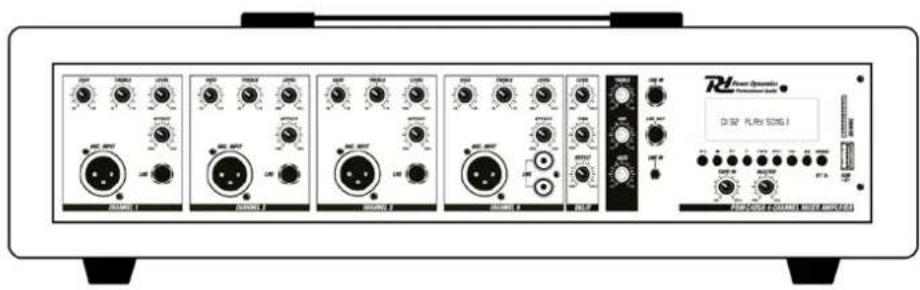
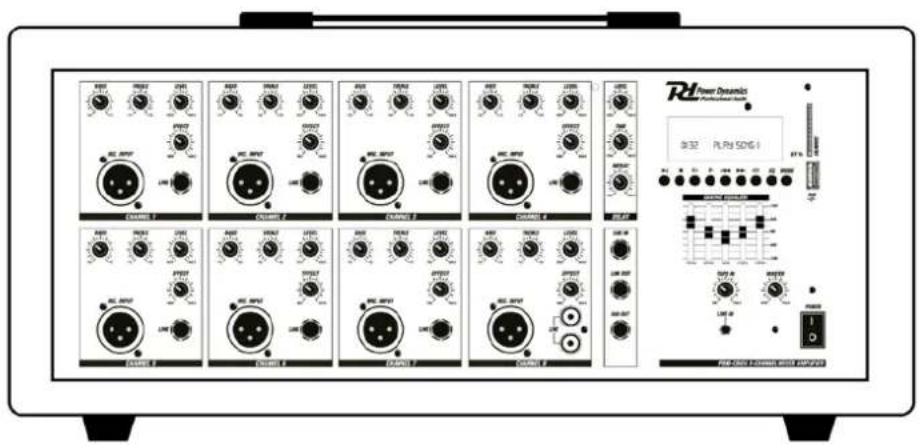
FRONTPANEL
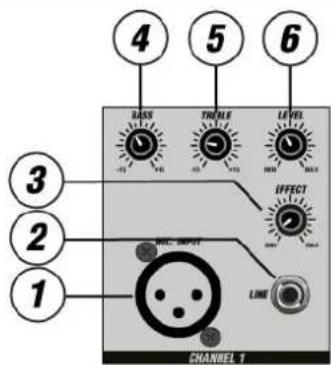
- Microphone Input
Balanced XLR input jack.
- Line Input
Unbalanced 6.3mm (1 / 4 ) jack line input.
- Effect Level
Adjust the signal level which will be sent to the built-in delay.
- Bass
Adjust high low tone control of each channel.
- Treble
Adjust high tone control of each channel.
- Level
Adjust the level control of each channel.
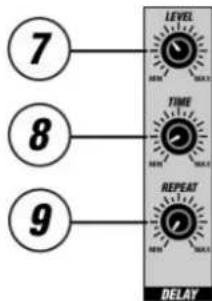
- Delay Level
Adjust the mix level of the effect sound.
- Delay Time
Adjust the time interval of the delays.
- Delay Repeat
Adjust the rate of the delays.
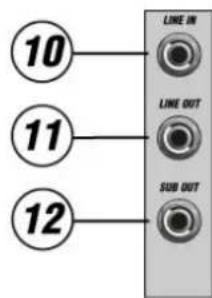
- Line Input
Unbalanced 6.3mm (1/4 ) jack line input.
- Line Output
Unbalanced 6.3mm (1 / 4 ) jack line output.
- Sub Output (171.159 only)
Unbalanced 6.3mm (1/4") jack line output. This output will send signal under 120Hz to your active subwoofer.
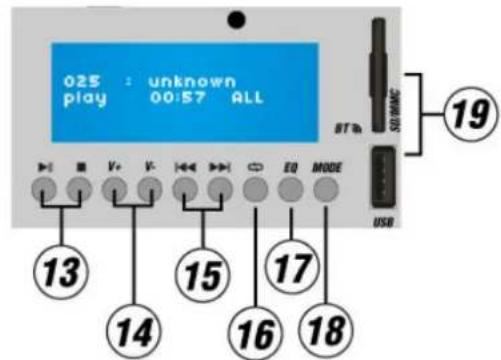
- Play / Stop Button
Press this button for play or stop the title.
- Volume Button
Press this button to increase or decrease the MP3 volume.
- Next / Previous Button
Press this button for title selection (short actuation) and fast forward/reverse (long actuation).
- Repeat Button
Press key for repeating of single track or all tracks.
- Equalizer Button
Press this button to select a pre-program equalizer setting.
18.ModeButton
Press the button to select BT/USB/SD function.
- USB/SD Slot
Connect your SD/card or USB devices to this slot to play music with MP3 or WMA format
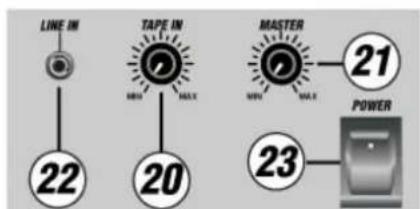
- Tape Input Level
Adjust the level control of tape input.
- Master Volume
Adjust the overall output level.
- Line Input
Unbalanced 3.5mm (1/8") jack line input. Signal from external device can be added to the main output.
- Power Switch
Press this switch to turns the power mixer ON/OFF.
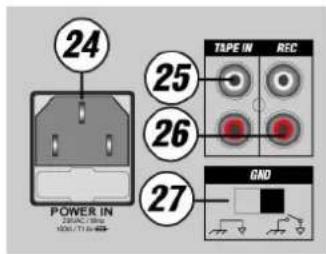
24. Power Input
Connect the included power cord to the AC input connector before switch on the power.
25. Tape Input
Connect an external device with this RCA input. Signal from external device can be added to the main output.
26. Record Output
Connect an external device with this RCA output for recording from the main output.
27. Ground Lift Switch
Switch between chassis ground and floating ground.
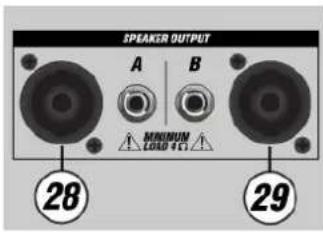
28. Speaker output A
Connect external passive speaker with one of the speaker connectors.
29. Speaker output B
Connect external passive speaker with one of the speaker connectors.
Note: When using 4 speakers at the same time, use 8~16Ohm speaker. When using one speaker only, use 4~8Ohm speaker.
CONNECT BT-DEVICE

- Set the search function on of the BT device you want to play the music. See the operating instructions for that device..
- Press the "MODE" button and activate BT-function of media player.
- Find on your BT-device "Power Dynamics" and make the connection.
If password is required, you can enter "0000".
Attention: The BT distance is approx. 10 meter without any barrier.
REPLACING THE FUSE
If the fuse is defective, replace the fuse with a fuse of the same type and value. Before replacing the fuse, unplug mains lead.
Procedure:
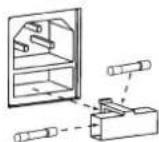
Step 1: Open the fuse holder on the rear panel with a fitting screwdriver.
Step 2: Remove the old fuse from the fuse holder.
Step 3: Install the new fuse in the fuse holder.
Step 4: Replace the fuse holder in the housing.
- Next / Previous Toets
- Taste Next / Previous
REEMPLACEMENT DU FUSIBLE
| PDM-C405A | PDM-C805A | |
| Ref.nr: | 171.157 | 171.159 |
| Rated voltage: | 110-240V AC 50-60Hz | |
| Rated power: | 150 Watt | |
| Delay time: | 140-342ms | |
| Graphic equalizer: | 3-bands Bass, treble, mid | 5-bands 100Hz, 500Hz, 1Khz, 2.5Khz, 10Khz +/- 12dB |
| Frequency response: | 20HZ-20Khz +1db/-3db | |
| Input impedance: | Microphone XLR 2K Ohm Balanced Jack 6.3mm 1K Ohm Unbalanced Line 10K Ohm Tape In 47K Ohm | |
| Channels: | 4 | 8 |
| Dimensions: | 475x230x140mm | 475x230x220mm |
| Weight: | 6.5Kg | 7,45Kg |
The specifications are typical. The actual values can slightly change from one unit to the other. Specifications can be changed without prior notice.

tronios
Sound & Light

Declaration of Conformity
Manufacturer: TRONIOS BV
Product Description:
PDM-C405A 4-Channel mixer with amplifier
PDM-C805A 8-Channel mixer with amplifier
Trade Name: POWER DYNAMICS
Regulatory Requirement: EN 60065:2014
EN 55013:2001+A1:2003+A2:2006
EN 61000-3-2:2006+A1:2009+A2:2009
EN 61000-3-3:2008
EN 55020:2007
I hereby declare that the product meets the requirements stated in Directives 2014/35/EU and 2014/30/EU and conforms to the above mentioned Declarations.
Almelo,
18-05-2017
Name : M. Velders
Signature :

Specifications and design are subject to change without prior notice..
www.tronios.com
Copyright © 2017 by TRONIOS the Netherlands
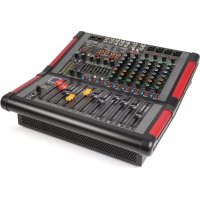
Brand : Power Dynamics
Model : PDMC805A
Category : DJ Equipment