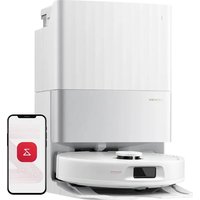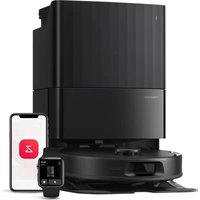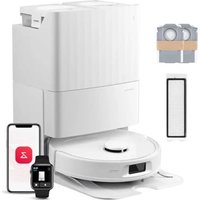
C1 - Robot vacuum ROBOROCK - Free user manual and instructions
Find the device manual for free C1 ROBOROCK in PDF.


User questions about C1 ROBOROCK
0 question about this device. Answer the ones you know or ask your own.
Ask a new question about this device
Download the instructions for your Robot vacuum in PDF format for free! Find your manual C1 - ROBOROCK and take your electronic device back in hand. On this page are published all the documents necessary for the use of your device. C1 by ROBOROCK.
USER MANUAL C1 ROBOROCK
User Manual of Xiaowa Robotic Vacuum Cleaner
Please read this user manual carefully before use and keep it well for future reference
Xiaowa

Safety Information
IMPORTANT SAFETY INSTRUCTIONS
When using an electrical appliance, basic precautions should always be followed, including the following: READ ALL INSTRUCTIONS BEFORE USING (THISAPPLIANCE), Failure to follow the warnings and instructions may result in electric shock, fire and/or serious injury.
WARNING
To reduce the risk of fire, electric shock, or injury:
- Do not use outdoors or on wet surfaces
Do not allow to be used as a toy. Close attention is necessary when used by or near children, pets or plants.
- Use only as described in this manual. Use only manufacturer's recommended attachments
Do not use with damaged cord or plug. If appliance is not working as it should, has been dropped, damaged, left outdoors, or dropped into water, return it to a service center.
- Do not pull or carry by cord, use cord as a handle, close a door on cord, or pull cord around sharp edges or corners.
- Do not run appliance over cord. Keep cord away from heated surfaces.
- Do not unplug by pulling on cord. To unplug, grasp the plug, not the cord.
- Do not handle charger, including charger plug, and charger terminals with wet hands
- Do not put any object into openings. Do not use with any opening blocked; keep free of dust, lint, hair, and anything that may reduce air flow.
- Keep hair, loose clothing, fingers, and all parts of body away from openings and moving parts.
Do not use to pick up flammable or combustible liquids, such as gasoline, or use in areas where they may be present.
Do not pick up anything that is burning or smoking, such as cigarettes, matches, or hot ashes.
- Do not use without dust bag.
- Prevent unintentional starting. Ensure the switch is in the off-position before connecting to battery pack, picking up or carrying the appliance. Carrying the appliance with your finger on the switch or energizing appliance that have the switch on invites accidents.
Safety Information
- For use only with xiaowa CDZ03RR or CDZ04RR charger. Recharge only with the charger specified by the manufacturer. A charger that is suitable for one type of battery pack may create a risk of fire when used with another battery pack.
- Use appliances only with specifically designated battery packs. Use of any other battery packs may create a risk of injury and fire.
- Under abusive conditions, liquid may be ejected from the battery; avoid contact. If contact accidentally occurs, flush with water. If liquid contacts eyes, additionally seek medical help. Liquid ejected from the battery may cause irritation or burns.
- Do not use a battery pack or appliance that is damaged or modified. Damaged or modified batteries may exhibit unpredictable behavior resulting in fire, explosion or risk of injury.
- Do not expose a battery pack or appliance to fire or excessive temperature. Exposure to fire or temperature above 130^ may cause explosion.
- Follow all charging instructions and do not charge the battery pack or appliance outside of the temperature range specified in the instructions. Charging improperly or at temperatures outside of the specified range may damage the battery and increase the risk of fire.
- Have servicing performed by a qualified repair person using only identical replacement parts. This will ensure that the safety of the product is maintained.
Do not modify or attempt to repair the appliance or the battery pack except as indicated in the instructions for use and care. - Place the cords from other appliances out of the area to be cleaned.
- Do not operate the vacuum in a room where an infant or child is sleeping.
Do not operate the vacuum in an area where there are lit candles or fragile objects on thefloor to be cleaned. - Do not operate the vacuum in a room that has lit candles on furniture that the vacuum may accidentally hit or bump into.
- Do not allow children to sit on the vacuum.
Safety Information
- Do not use the vacuum cleaner on a wet surface.
Risk Of Injury. Brush May Start Unexpectedly.Disconnect the main Brush Before Cleaning or Servicing.
- Do not use the product when the temperature is higher than 40^ or lower than 4^ , or there is any liquid or sticky substance on the floor
SAVE THESE INSTRUCTIONS
Household use only
IMPORTANT MESURES DE SCURIT
| Compliance Information | |
| Product Name Robotic Vacuum Cleaner with Dock Charger | |
| Produce Model | Robotic Vacuum Cleaner Model: C1***** ( can be 0 to 9, A to Z, a to z, "-", "_", "\\",""/" or blank, for marketing purpose.) Dock Charger Model: CDZ03RR, CDZ04RR |
| Compliance Statement | This device complies with part 15 of the FCC Rules. Operation is subject to the following two conditions: (1) This device may not cause harmful interference, and (2) this device must accept any interference received, including interference that may cause undesired operation |
| Correspondence of the responsible party in USA | |
| Company Roborock Technology Co. | |
| Address 108 West 13th Street, Wilmington, Delaware 19801. | |
| Email support@roborock.com | |
Warning:
Any changes or modifications to this unit not expressly approved by the party responsible for compliance could void the user's authority to operate the equipment.
Changes or modifications not expressly approved by the party responsible for compliance could void the user's authority to operate the equipment.
This equipment has been tested and found to comply with the limits for a Class B digital device, pursuant to part 15 of the FCC Rules. These limits are designed to provide reasonable protection against harmful interference in a residential installation. This equipment generates uses and can radiate radio frequency energy and, if not installed and used in accordance with the instructions, may cause harmful interference to radio communications. However, there is no guarantee that interference will not occur in a particular installation. If this equipment does cause harmful interference to radio or television reception, which can be determined by turning the equipment off and on, the user is encouraged to try to correct the interference by one or more of the following measures:
—Reorient or relocate the receiving antenna.
—Increase the separation between the equipment and receiver.
- Connect the equipment into an outlet on a circuit different from that to which the receiver is connected.
—Consult the dealer or an experienced radio/TV technician for help.
MPE Requirements
To satisfy FCC / IC RF exposure requirements, a separation distance of 20cm or more should be maintained between the antenna of this device and persons during device operation.
To ensure compliance, operations at closer than this distance is not recommended.
Battery and Charging
* Please keep the dock charger away from heat (such as heating plates)
- The battery must be removed from the appliance before it is scrapped
- The appliance must be disconnected from the supply mains when removing the battery
The battery is to be disposed of safely. Please do not discard waste batteries. Leave them to a professional recycling organization
- Do not wipe or clean the chargers shrapnel with a piece of wet cloth or wet hands
· Please make sure the cleaner is powered off in shipment and original packaging is advised
* If left unused for a long period, please store the cleaner in a cool and dry place after having it fully charged and switched off, charge it at least every three months to avoid the battery being over discharged
- Please do not use the product when the temperature is higher than 40^ or lower than 4^ , or there is any liquid or sticky substance on the floor
| Battery pack charging temperature | 4℃~40℃ @Max Charging Current:0.5C | ||
| Battery pack using temperature | 4℃~40℃ @Max Discharge Current:0.5C | ||
| Battery pack storage temperature | Storage(1 month) | -20℃~60℃@Less than 70% RH | If the battery pack store at 25℃Cover the 3 months period, it should be recharged. |
| Long Storage(3 months) | -20℃~45℃@Less than 70% RH | ||
| Long Storage(1 year) | -20℃~20℃@Less than 70% RH | ||
Introduction
Machine
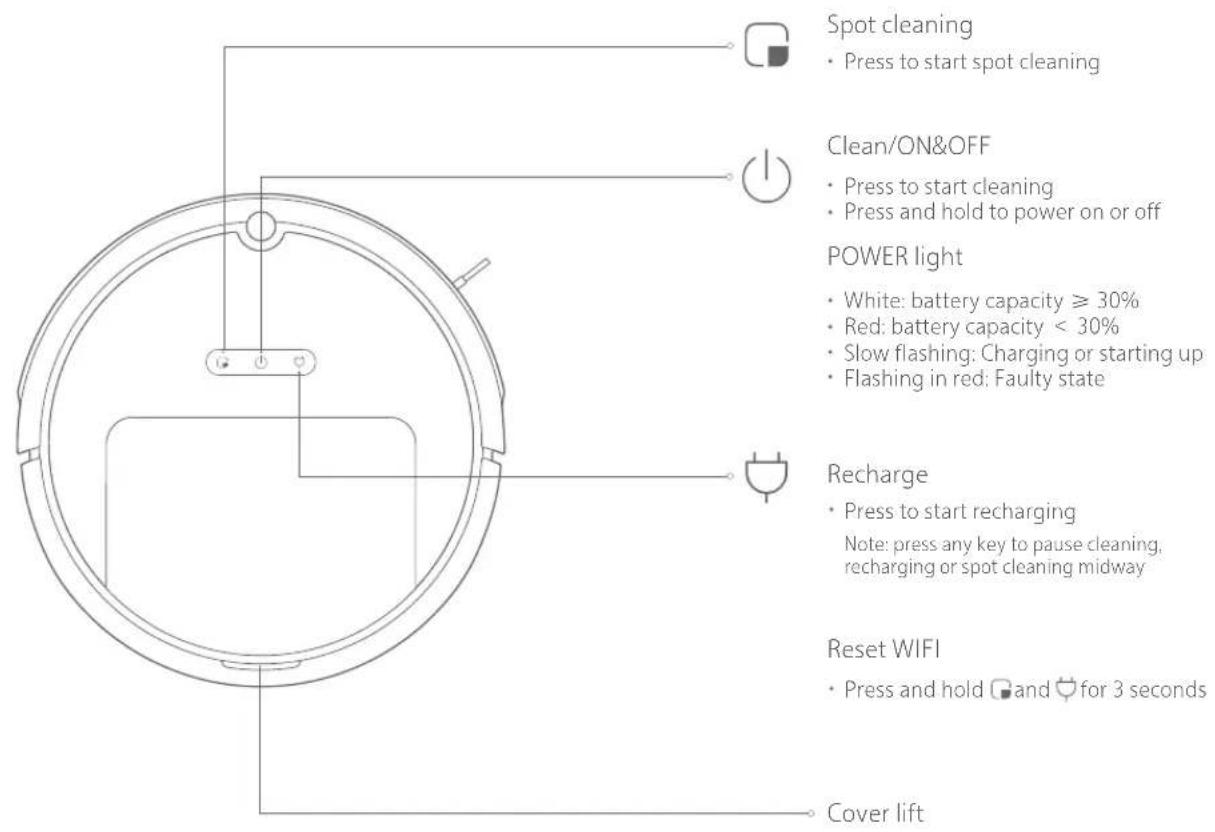
Introduction
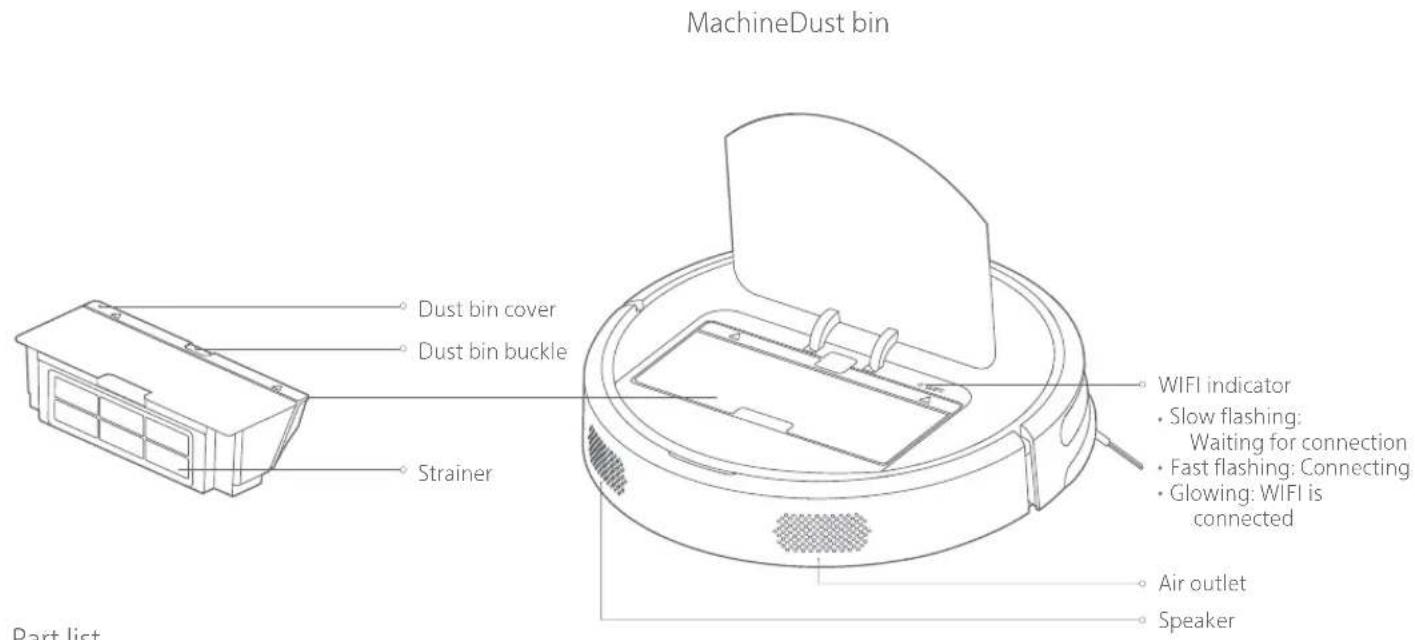
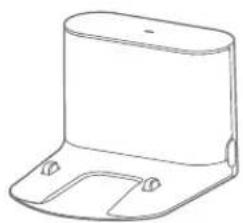
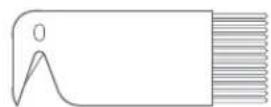
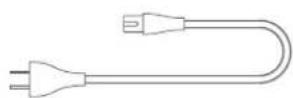
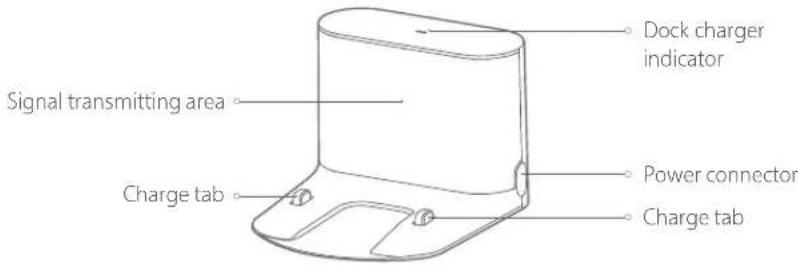
Dock charger Main brush cleaning tool Power cable
Introduction
Machine and sensor
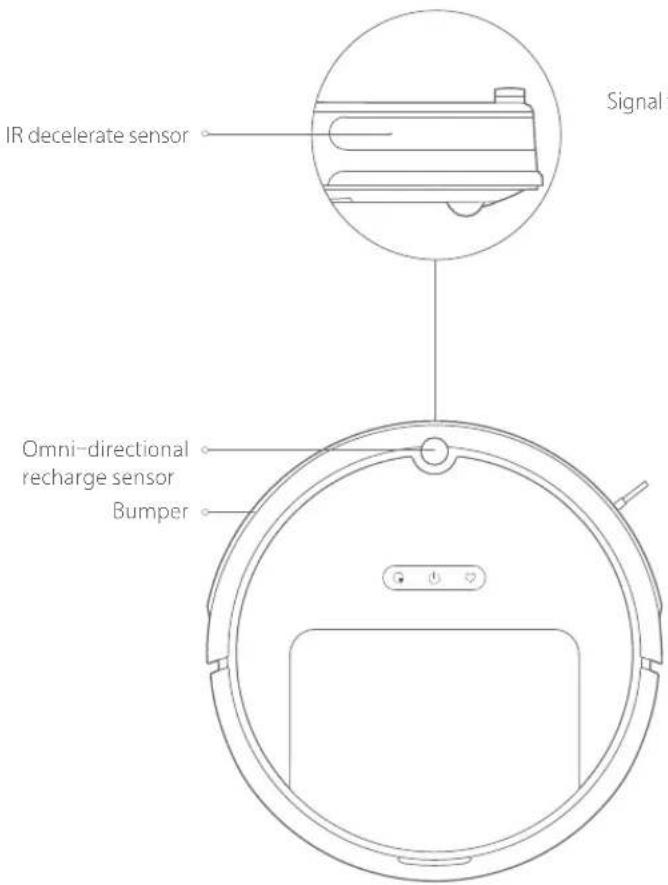
Dock charger
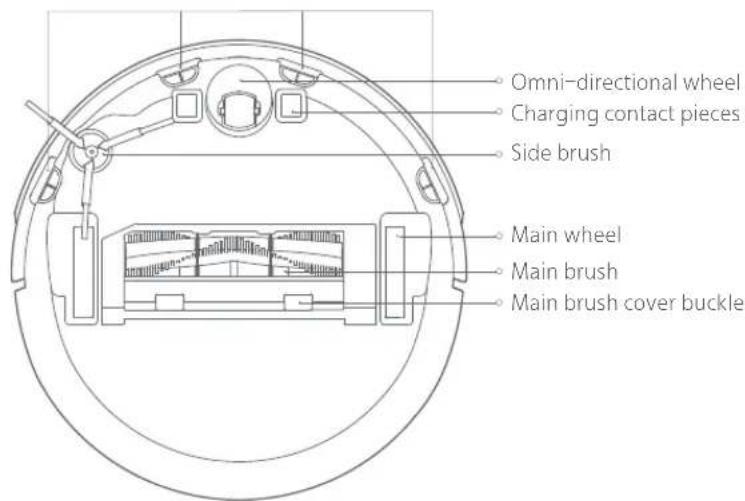
Cliff Sensor
Installation
1 Connect the power cable and use a cable tie to fix excess wires
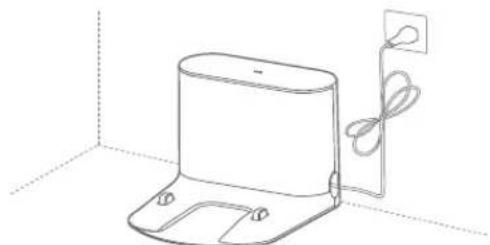
Notes:
- The power cable, when being vertical to the floor, may be dragged by the machine body, thereby resulting in displacement or disconnection of the dock charger
The dock charger indicator is normally on when the dock charger is electrified, and off when the dock charger works
2 Place the dock charger against a wall on a level floor and connect it to the power supply
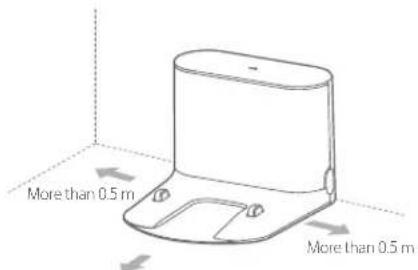
More than 15m
Notes:
- Ensure that 0.5m or above in two sides and 1.5m in the front are retained for the dock charger
Do not place the dock charger near a stairway or virtual wall - Placing the dock charger on an open area of your living room will improve the cleaning efficiency
3 Power on and charge
Press and hold the key to power on, wait until the power light is normally on, and then dock the machine body to the dock charger for charging
The machine is equipped with a built-in high performance lithium-ion rechargeable battery pack. To maintain battery performance, please keep the machine charged for normal use
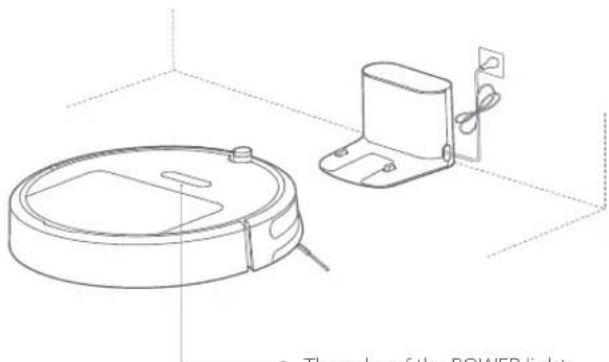
The color of the POWER light
indicates the battery level
White: battery capacity ≥slant 30%
Red: battery capacity < 30%
Note: The machine may not be powered on when the battery is low.
Please directly dock the machine body to the dock charger
Connect your mobile phone client (this can be skipped)4
Installation
The product is compatible with Mi Home intelligent platform and could be controlled by Mi Home app. It supports the MIUI system and can be interconnected with other Mi Home intelligent products
Quick Setup
① Download App
Search "Mi Home" in App store/Google play or scan the QR code below to download and install the Mi Home app.

② Add Device
Go to "My Device" page of Mi Home app and tap "+" on the top right corner of the page to add a device. You could find newly added device on "My Device" list
③ Reset WIFI
If anything is wrong with WIFI connection, you could try to reset WIFI to default.
Open upper cover to check the WIFI indicator status next to reset button. Press and hold the key and key until you hear the voice "Reset WIFI". The resetting is completed when the WIFI indicator starts to flash slowly and the cleaner will enter a pending connection state.
Installation
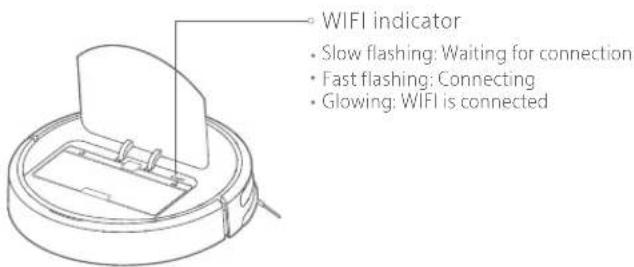
Note: When your mobile phone fails to connect to the machine, please refer to "User Manual" - "Reset WiFi"
Start cleaning5
When the power light changes from white breathing flash to normally on, charging completes. Press the key or use your mobile phone client to start cleaning
Routine Maintenance
Main brush Clean weekly
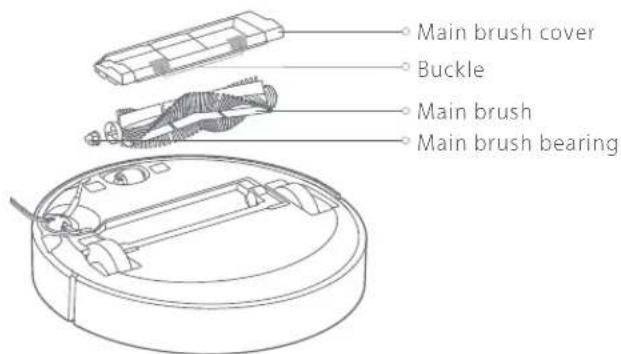
- Flip the machine over and push the buckle to remove the main brush cover
- Lift the main brush up and clean its bearing
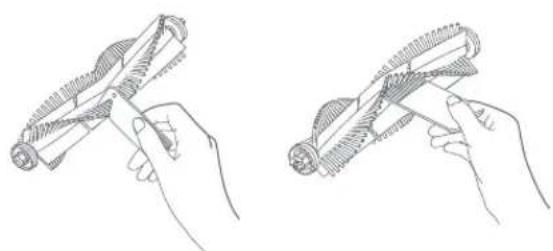
- Use the supplied main brush cleaning tool to cut off hair entangled onto the main brush
- Reinstall the main brush and clamp tightly the buckle on the main brush cover
Note: It is recommended to replace the main brush every 6-12 months to ensure the cleaning effect
Routine Maintenance
Use of main brush cleaning tool
Dust bin and strainer *Clean weekly
- Remove the top cover of the machine and press the dust bin buckle to lift up and remove the dust bin
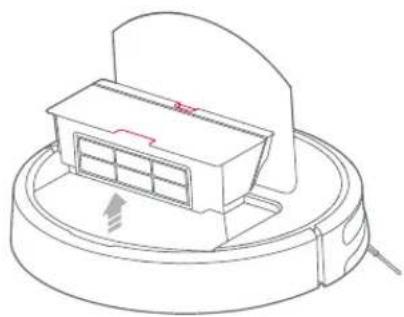
- Open the dust bin cover as indicated by arrow
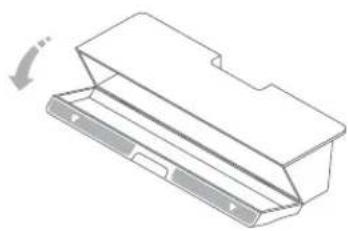
- Turn the dust bin over and pour waste out of it
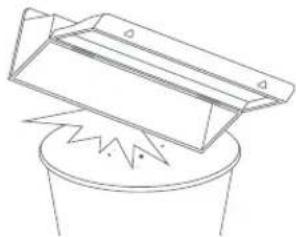
Note: To avoid the strainer being blocked, pour waste out while tapping the dust bin lightly
Routine Maintenance
Do not wash the strainer with water; otherwise, the cleaning effect may be affected due to blocking of the strainer
Note: It is recommended to replace the strainer every 3 months to ensure the cleaning effect
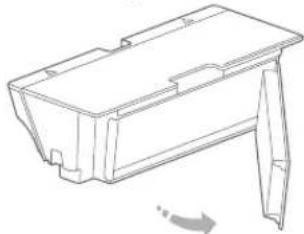
Please remove and replace the strainer as shown in the figure.
Side brush ^ 念 Clean monthly
- Flip the machine over to remove the fixing screw on the side brush
- Remove and clean the side brush
- Reinstall the side brush and tighten the screw
Note: It is recommended to replace the side brush every 3-6 months to ensure the cleaning effect
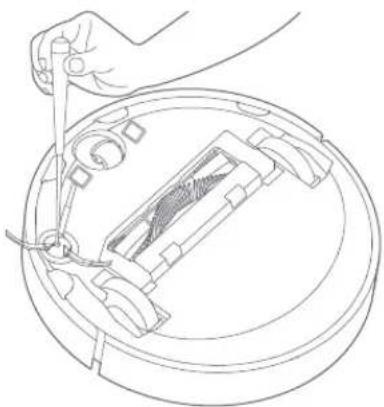
Battery
The machine is internally provided with a high performance lithium-ion rechargeable battery pack. To maintain battery performance, please keep the machine charged in normal use
Note: If the machine is left unused for a prolonged period of time, please power it off before storage and charge it at least every 3 months to avoid degradation due to over-discharge
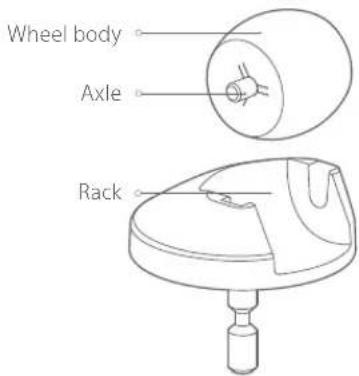
Omni-directional wheel *Clean monthly
- Flip the machine over and lift the omni-directional wheel up
- Remove hair and dirt on the wheel body and axle
- Reinstall the wheel body and press tightly
Note: flush it with tap water and reinstall after drying.
Routine Maintenance
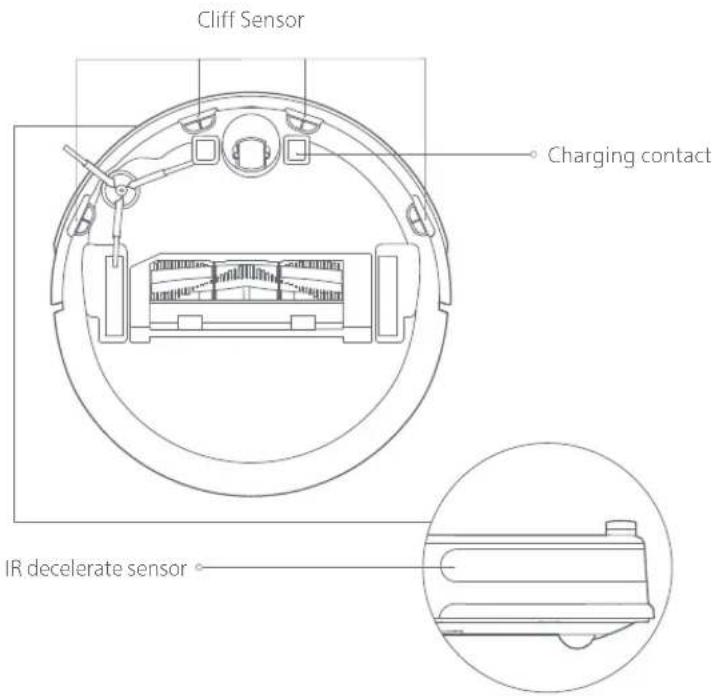
Machine sensor *Clean monthly
Use soft dry cloth to wipe and clean each sensor, including:
- Four diff sensors on the bottom of the machine
- IR decelerate sensor in front of the machine
- Charging contact on the bottom of the machine
Dock charger *Clean monthly
Use soft dry cloth to clean the charging contact of the dock charger
Firmware update
You can use your mobile phone client to update firmware for the machine. Please connect it to the dock charger and ensure that the battery capacity is more than 20% before update. The power indicator is fast flashing in white during firmware update
Reset system
When pressing keys makes no response or the machine cannot be shut down, please try to reset the system by pressing the key; the machine will be restarted automatically after resetting
Basic parameters
Machine
| Name Specs Name Specs | |
| Model | C1*****( can be 0 to 9, A to Z, a to z, "-", "_", "\", "/" or blank, for marketing purpose.) |
| Outline Dimension | 353x350x90.5mm |
| Battery | 14.4V/2600mAh lithium battery |
| Weight | About 3.0kg |
| Wireless connection | WIFI Smart Connect |
| Voltage rating | 14.4VDC |
| Power rating | 50W |
Dock charger
| Model CDZ03RR or CDZ04RR | |
| Outline Dimension | 151x130x98mm |
| Power rating | 42W |
| Input rating | 100-240VAC |
| Output rating | 20VDC 1.8A |
| Frequency rating | 50-60Hz |
Xiaowa Model Comparison
| Xiaowa Lite Xiaowa Xiaowa Plus | |||
| Model ( can be 0 to 9, A to Z, to z. "-", "-", "-", "/" or blank, for marketing purpose.) | Xiaowa C1 **** | Xiaowa E2 **** | Xiaowa E3 **** |
| Cleaning method | |||
| Wet mopping function | No mopping | Sweeping + mopping | Sweeping + mopping |
| Navigation method | Adaptive random navigation | Inertial navigation route planning | Inertial navigation route planning |
| Automatic recharge | ✓✓ | ✓ | |
| Cleaning capacity | |||
| Obstacle clearance height 2.0cm 2.0cm 2.0cm | |||
| Max suction 1600Pa 1800Pa 2000Pa | |||
| Dust bin capacity 640 ml 640 ml | |||
| Max run time 60 minutes 90 minutes 150 minutes | |||
| Battery capacity 2600mAh 2600mAh 5200mAh | |||
| Extended app functions | |||
| Cleaning map | No map | Pixel map Pixel map | |
| Timer cleaning | ✓✓ | ✓ | |
| Smart home interconnection | ✓✓ | ✓ | |
| Carpet Boost | ✓✓ | ✓ | |
| Hardware system | |||
| Fall prevention | ✓✓ | ✓ | |
| Washable strainer | ✓ | ✓ | |
| Moistureproof mat | ✓ | ✓ | |
Troubleshooting
| No.Problem Type | Solution | |
| 1 | Unable to power on | The battery level is low. Please put the machine back onto the dock charger to charge it before use.Ambient temperature is too low or too high.Please use the machine in 4-40°C. |
| 2Unable to charge | The dock charger is not plugged in. Please confirm the two ends of the power cable are properly plugged.Contact is poor. Please clean the contact tab on the dock charger and the charging contact on the machine.Please confirm whether the charging indicator is on. | |
| 3Unable to recharge | There are too many obstacles near the dock charger. Please place it in an open area.The machine is too far from the dock charger. Please put it near the dock charger. | |
| 4 | Slow charging speed | 1. When used at high or low temperatures, the machine will automatically reduce the charging speed so as to extend battery life.2. The charging contact areas may be dirty. Please use a dry cloth to clean such areas. |
| 5 | Too short cleaning time or too long recharging time | Place the dock charger on an open area (living room, for example), rather than a confined space or a place where excessive obstacles exist. |
| 6 | Abnormal behavior | Please power off and on the machine. |
| 7Noise during cleaning | The main brush, side brush or main wheel may be stuck with foreign matters.Please clean them off after powering off. | |
| 8Cleanng capacity decreased or dust dropped out | The dust bin is full. Please empty it.The strainer is blocked. Please clean it.The main brush is stuck with foreign matters. Please clean them off. | |
| 9 | Unable to connect to WIFI | WiFi signal is poor. Please make sure that the machine is in an area with good WiFi signal reception.Abnormal WiFi connection: Please reset WIFI and download the latest mobile app to retry connecting. |
| 10 | Timer cleaning not working | The battery level is low. Time cleaning can start only if the battery level is above 30%. |
| 11 | Is the battery being drained if the machine sits on the dock charger? | The battery usage is extremely low when the machine sits on the dock charger to maintain an optimal battery performance. |
| 12 | Do I need to charge the battery for at least 16 hours for the first three uses? | The lithium battery has no memory effect, so it's okay to just fully charge it. |
Regular Maintenance
To keep Roborock running at peak performance, perform the care procedures according to the following frequency.If you notice Roborock picking up less debris from your floor, then empty the dust bin, clean the filter and clean main brushes
| Robot PartCare Frequency | Replacement Frequency | |
| Dust Bin | Once per week | - |
| StrainerOnce per week | Every 3 months | |
| Side BrushOnce per month | Every 3-6 months | |
| Main BrushOnce per week (twice per week in homes with pets) | Every 6-12 months | |
| Once per monthOmni-directional wheel | - | |
Note: Roborock manufactures various accessory parts and assemblies. More details of accessory parts by visiting www.roborock.com or contact Roborock Customer Care for more information.
When the cleaner is on the charging dock, hold and press "Recharge" for 10 seconds until you hear a "Ding-dong" sound, and Holiday mode will be activated.
In this mode, the LED indicator will dim, functions that has nothing to do with charging such as cleaning, recharging and remote control via WFI will be disabled, and the cleaner will enter low power consumption mode to maintain optimal battery performance.
After Holiday mode is activated, you can disable it by holding and pressing "Recharge" for 10 seconds until the LED indicator brightens.

Robotic Vacuum Cleaner
Manufacturer: Beijing Roborock Technology Co., Ltd.
Product Model: C1xxxxxxxx can be 0 to 9, A to Z, a to z, " ", " ", "\", " / or blank, for marketing purpose.)
Address of Manufacturer: Floor 6, Suite 6016, 6017, 6018, Building C, Kangjian Baosheng Plaza.
No.8 Heiquan Road, Haidian District, Beijing, P.R. CHINA
For more product information, please visit our website: www.roborock.com
For after-sales support, please email our after-sales service team:
US/Non-Europe Support: support@roborock.com
Europe Support support@roborock-eu.com