
AP12RT - Air conditioner LG - Free user manual and instructions
Find the device manual for free AP12RT LG in PDF.
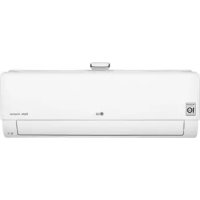



| Product type | Wall-mounted split air conditioner |
| Brand | LG |
| Model | AP12RT |
| Installation type | Wall mounting |
| Refrigerant | R32 |
| Cooling capacity | 12000 BTU/h (3.5 kW) |
| Heating capacity | 12000 BTU/h (3.5 kW) |
| Power supply | 230 V ~ 50 Hz |
| Main functions | Cooling, heating, dehumidification, ventilation, Jet mode, Silence mode, auto cleaning, air purification (ionizer), timer, sleep, energy control, energy display, smart diagnosis, Wi-Fi compatibility (LG ThinQ) |
| Filter type | Micro-dust filter, triple filter (optional), PM1.0 sensor |
| Remote control | Wireless with display |
| Auto restart | Yes |
| Safety | Refrigerant leak detection, automatic stop in case of anomaly, overheat protection, mandatory grounding |
| Remote control batteries | 2 AAA batteries (1.5 V) |
Frequently Asked Questions - AP12RT LG
User questions about AP12RT LG
0 question about this device. Answer the ones you know or ask your own.
Ask a new question about this device
Download the instructions for your Air conditioner in PDF format for free! Find your manual AP12RT - LG and take your electronic device back in hand. On this page are published all the documents necessary for the use of your device. AP12RT by LG.
USER MANUAL AP12RT LG
Read this owner's manual thoroughly before operating the appliance and keep it handy for reference at all times.
TYPE: WALL MOUNTED
Original instruction
EN ENGLISH
PL POLISH
CZ CZECH
SK SLOVAK
LT LITHUANIAN
MK MACEDONIAN
FR FRENCH
HU HUNGARIAN
ET ESTONIAN
SL SLOVENIAN
GA IRISH
SQ ALBANIAN
EL ΕΛΛΗΝΙΚΑ
BG БЪЛГАРСКИ
MT MALTI
LV LATVIEŠU
SR SRPSKI
BS BOSANSKI
NL NEDERLANDS
HR HRVATSKI
RO ROMÂNĂ
MFL69780815
Rev.02_072621
LG Electronics Inc. Single Point of Contact (EU/UK) & EU Importer:
LG Electronics European Shared Service Center B.V.
Krijgsman 1, 1186 DM Amstelveen, The Netherlands
This manual may contain images or content different from the model you purchased. This manual is subject to revision by the manufacturer.
SAFETY INSTRUCTIONS ....3
IMPORTANT SAFETY INSTRUCTIONS ....4
OPERATION 11
Notes for Operation....11
Parts and Functions....11
Wireless Remote Control 12
Restarting the Air Conditioner Automatically....17
Using the Mode Function 17
Using the Jet Mode Function 20
Using the Fan Speed Function....21
Using the Air Flow Direction Function 21
Setting the On/Off Timer 22
Using the Sleep Function (Optional)....23
Using the Simple Timer Function (Optional) 23
Using the Energy Display Function (Optional) 24
Using the Light Off Function (Optional)....24
Using the Comfort Air Function (Optional) 24
Using the Energy Control Function (Optional) 25
How to Use Air Purification....25
Checking Overall Cleanliness 26
Using Special Functions....28
SMART FUNCTIONS....29
LG ThinQ Application 29
Smart Diagnosis....31
MAINTENANCE....32
Replace and Clean the Micro Dust Filter 34
Replace the Triple Filter (Optional) 35
Clean the PM1.0 Sensor 36
TROUBLESHOOTING....37
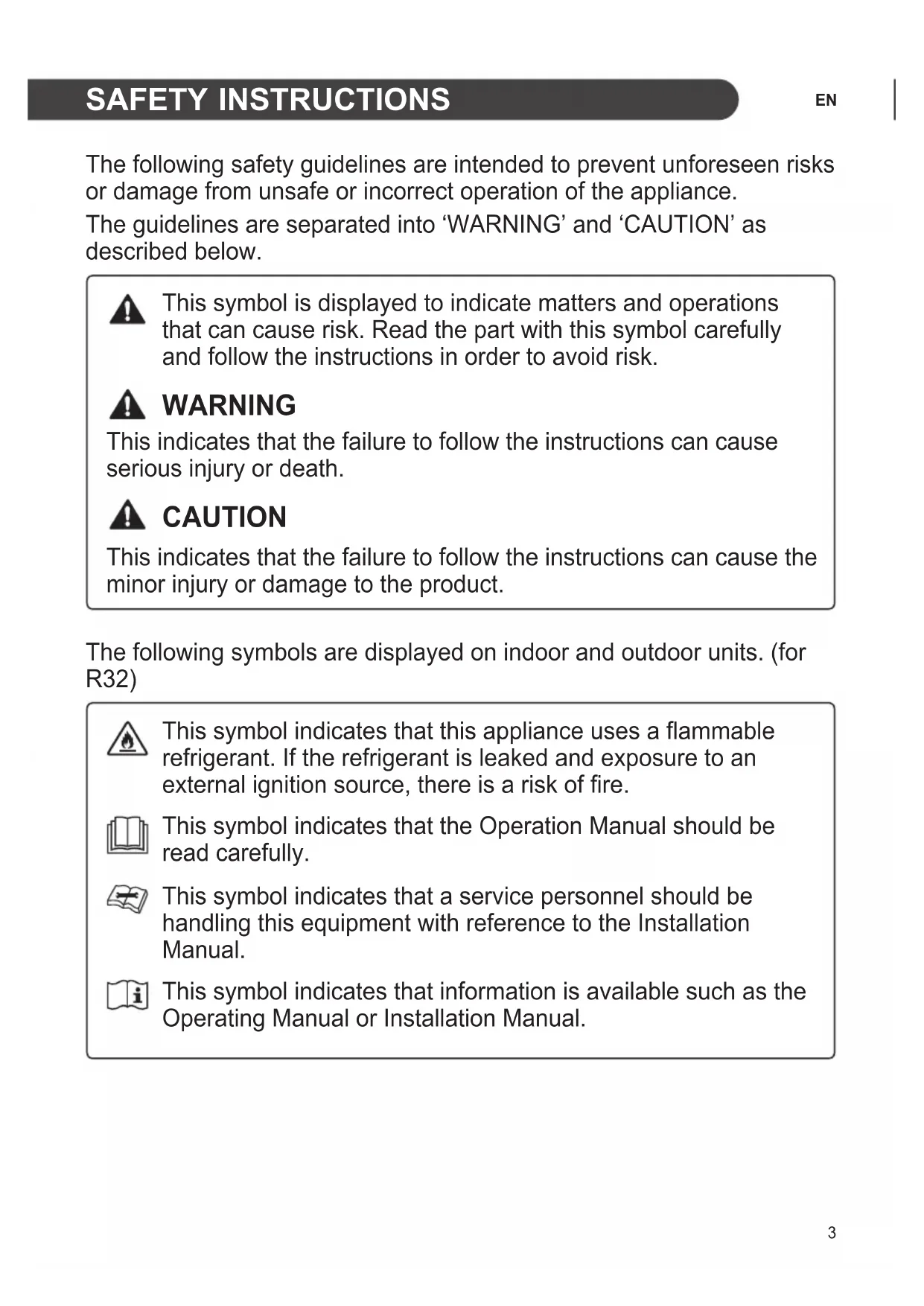
The following safety guidelines are intended to prevent unforeseen risks or damage from unsafe or incorrect operation of the appliance.
The guidelines are separated into 'WARNING' and 'CAUTION' as described below.

This symbol is displayed to indicate matters and operations that can cause risk. Read the part with this symbol carefully and follow the instructions in order to avoid risk.

WARNING
This indicates that the failure to follow the instructions can cause serious injury or death.

CAUTION
This indicates that the failure to follow the instructions can cause minor injury or damage to the product.
The following symbols are displayed on indoor and outdoor units. (for R32)

This symbol indicates that this appliance uses a flammable refrigerant. If the refrigerant is leaked and exposed to an external ignition source, there is a risk of fire.

This symbol indicates that the Operation Manual should be read carefully.

This symbol indicates that a service personnel should be handling this equipment with reference to the Installation Manual.

This symbol indicates that information is available such as the Operating Manual or Installation Manual.
IMPORTANT SAFETY INSTRUCTIONS

WARNING
To reduce the risk of explosion, fire, death, electric shock, injury or scalding to persons when using this product, follow basic precautions, including the following:
Children in the Household
This appliance is not intended for use by persons (including children) with reduced physical, sensory or mental capabilities, or lack of experience and knowledge, unless they have been given supervision or instruction concerning use of the appliance by a person responsible for their safety. Children should be supervised to ensure that they do not play with the appliance.
For use in Europe:
This appliance can be used by children aged from 8 years and above and persons with reduced physical, sensory or mental capabilities or lack of experience and knowledge if they have been given supervision or instruction concerning use of the appliance in a safe way and understand the hazards involved. Children shall not play with the appliance. Cleaning and user maintenance shall not be made by children without supervision.
Installation
- Do not install the air conditioner on an unstable surface or in a place where there is danger of it falling.
- Contact an authorized service center when installing or relocating the air conditioner. • Install the panel and the cover of the control box safely.
- Do not install the air conditioner in a place where flammable liquids or gases such as gasoline, propane, paint thinner, etc., are stored.
- Make sure that the pipe and the power cable connecting the indoor and outdoor units are not pulled too tight when installing the air conditioner.
- Use standard circuit breaker and fuse that conform to the rating of the air conditioner.
- Do not input air or gas into the system except with the specific refrigerant.
- Use non-flammable gas (nitrogen) to check for leak and to purge air; using compressed air or flammable gas may cause fire or explosion.
- The indoor/outdoor wiring connections must be secured tightly, and the cable should be routed properly so that there is no force pulling the cable from the connection terminals. Improper or loose connections can cause heat generation or fire.
- Install dedicated electric outlet and circuit breaker before using the air conditioner.
- Do not connect the ground wire to a gas pipe, a lightning rod, or a telephone ground wire.
- Keep any required ventilation openings clear of obstruction. (for R32)
- Means for disconnection must be incorporated in the fixed wiring in accordance with the wiring rules.
- Do not install the unit in potentially explosive atmospheres.
Operation
- Be sure to use only those parts listed in the service parts list. Never attempt to modify the equipment.
- Make sure that children do not climb on or hit the outdoor unit.
- Dispose of the batteries in a place where there is no danger of fire.
- Use only the refrigerant specified on the air conditioner label.
- Cut off the power supply if there is any noise, smell, or smoke coming from the air conditioner.
- Do not leave flammable substances such as gasoline, benzene, or thinner near the air conditioner.
- Contact an authorized service center when the air conditioner is submerged by flood waters.
- Do not use the air conditioner for an extended period of time in a small place without proper ventilation.
- In the event of a gas leak (such as Freon, propane gas, LP gas, etc.) ventilate sufficiently before using the air conditioner again.
- To clean the interior, contact an authorized service center or dealer. Using harsh detergents may cause corrosion or damage to the unit.
- Be sure to ventilate sufficiently when the air conditioner and a heating appliance such as a heater are used simultaneously.
- Do not block the inlet or outlet of air flow.
- Do not insert hands or other objects through the air inlet or outlet while the air conditioner is operating.
- Make sure that the power cable is neither dirty, loose, nor broken.
- Never touch, operate, or repair the air conditioner with wet hands.
- Do not place any objects on the power cable.
- Do not place a heater or other heating appliances near the power cable.
- Do not modify or extend the power cable. Scratches or peeling insulation on the power cables may result in fire or electric shock, and should be replaced.
- Cut off the power supply immediately in the event of a blackout or a thunderstorm.
• Take care to ensure that power cable could not be pulled out or damaged during operation. - Do not touch refrigerant pipe, water pipe and any internal parts while the unit is operating or immediately after operation.
Maintenance
- Do not clean the appliance by spraying water directly onto the product.
- Before cleaning or performing maintenance, disconnect the power supply and wait until the fan stops.
Technical Safety
• Installation or repairs made by unauthorized persons can pose hazards to you and others. - Any person who is involved with working on or breaking into a refrigerant circuit should hold a current valid certificate from an industry-accredited assessment authority, which authorizes their competence to handle refrigerants safely in accordance with an industry recognized assessment specification. (for R32) - Servicing shall only be performed as recommended by the equipment manufacturer. Maintenance and repair requiring the assistance of other skilled personnel shall be carried out under the supervision of the person competent in the use of flammable refrigerants. (for R32) - The information contained in the manual is intended for use by a qualified service technician who is familiar with the safety procedures and equipped with the proper tools and test instruments. - Failure to read and follow all instructions in this manual can result in equipment malfunction, property damage, personal injury and/or death.
- The appliance shall be installed in accordance with national wiring regulations.
- When the power cord is to be replaced, the replacement work shall be performed by authorized personnel using only genuine replacement parts.
- This appliance must be properly grounded to minimize risk of electric shock.
- Do not cut or remove the grounding prong from the power plug.
- Attaching the earth wire to the power outlet cover screw does not ground the appliance unless the cover screw is metal, uninsulated, and the power outlet is grounded through house wiring.
- If you have any doubt whether the air conditioner is properly grounded, have the power outlet and circuit checked by a qualified electrician.
- The refrigerant and insulation blowing gas used in the appliance require special disposal procedures. Consult a service agent or a similarly qualified person before disposing of them.
- If the supply cord is damaged, it must be replaced by the manufacturer, its service agent or similarly qualified person in order to avoid a hazard.
- The appliance shall be stored in a well-ventilated area where the room size corresponds to the room area as specified for operation. (for R32)
- The appliance shall be stored in a room without continuously operating open flames (for example an operating gas appliance) and ignition sources (for example an operating electric heater). (for R32)
- The appliance shall be stored so as to prevent mechanical damage from occurring. (for R32)

CAUTION
To reduce the risk of minor injury to persons, malfunction, or damage to the product or property when using this product, follow basic precautions, including the following:
Installation
- Do not install the air conditioner in an area where it is directly exposed to sea wind (salt spray).
- Install the drain hose properly for the smooth drainage of water condensation. Exercise caution when unpacking or installing the air conditioner.
- Do not touch the leaking refrigerant during installation or repair.
- Transport the air conditioner with two or more people or use a forklift.
- Install the outdoor unit such that it is protected from direct sunlight. Do not place the indoor unit in a place where it is directly exposed to sunlight via the windows.
- Safely dispose of packing materials such as screws, nails, plastic bags, or batteries using proper packaging after installation or repair.
- Install the air conditioner in a place where the noise from the outdoor unit or the exhaust fumes will not inconvenience the neighbors. Failure to do so may result in conflict with the neighbors.
Operation
Remove the batteries if the remote control is not to be used for an extended period of time.
- Make sure that the filter is installed before operating the air conditioner.
- Be sure to check if there is a refrigerant leak after installing or repairing the air conditioner.
- Do not place any object on the air conditioner.
- Never mix different types of batteries, or old and new batteries for the remote control.
- Do not let the air conditioner run for a long time when humidity is very high or when a door or a window has been left open.
- Stop using the remote control if there is a fluid leak in the battery. If your clothes or skin are exposed to the leaking battery fluid, wash off with clean water.
- Do not expose people, animals, or plants to the cold or hot wind from the air conditioner for extended periods of time.
- If the leaking battery fluid has been swallowed, rinse the inside of the mouth thoroughly and consult a doctor.
- Do not drink the water drained from the air conditioner.
- Do not use the product for special purposes, such as preserving foods, works of art, and etc. It is an air conditioner for consumer purposes, not a precision refrigeration system. There is risk of damage or loss of property.
- Do not recharge or disassemble the batteries.
Maintenance
- Never touch the metal parts of the air conditioner when removing the micro dust filter.
- Use a sturdy stool or ladder when cleaning, maintaining, or repairing the air conditioner at a height.
- Never use strong cleaning agents or solvents when cleaning the air conditioner or spray water. Use a smooth cloth.
Notes for Operation
Suggestion for Energy Saving
- Do not over-cool the space. This may be harmful for your health and may consume more electricity.
- Block sunlight with blinds or curtains while you are operating the air conditioner.
- Keep doors or windows closed tightly while you are operating the air conditioner.
- Adjust the direction of the air flow vertically or horizontally to circulate indoor air. • Speed up the fan to cool or warm indoor air quickly, within a short period of time.
- Open windows regularly for ventilation. The indoor air quality may deteriorate if the air conditioner is used for long durations.
- Clean the micro dust filter once a month, or more, if necessary. Dust and impurities collected in the micro dust filter may block the air flow or reduce the unit performance.
Parts and Functions
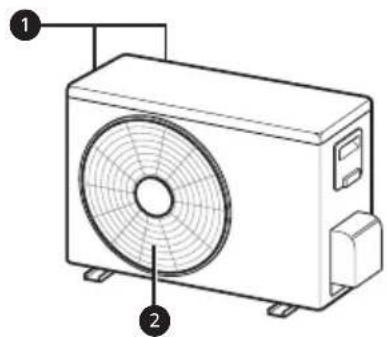
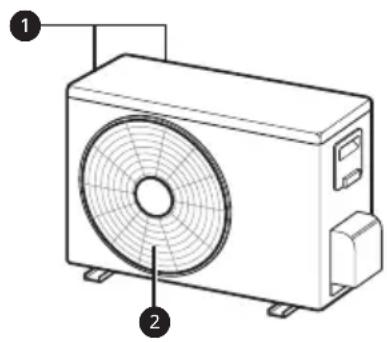
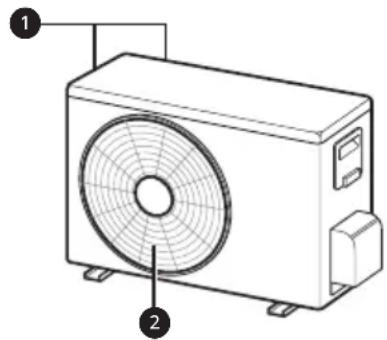
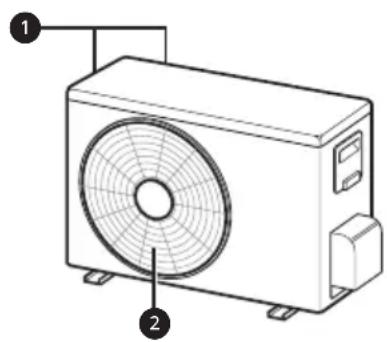
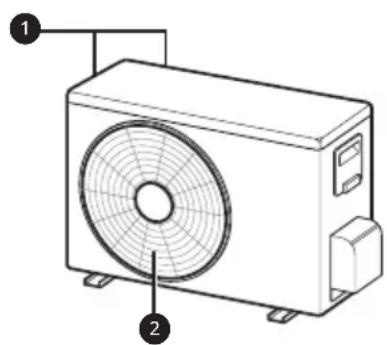
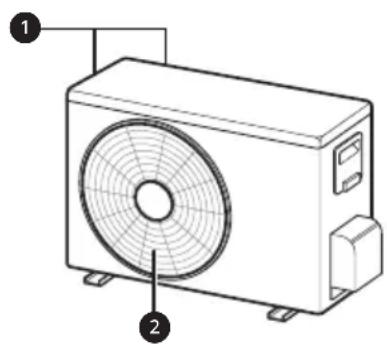
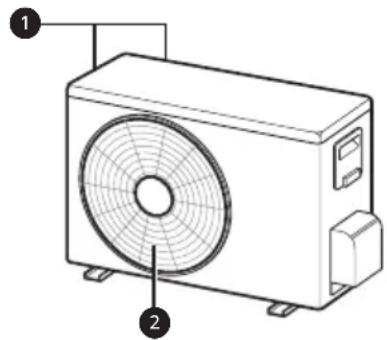
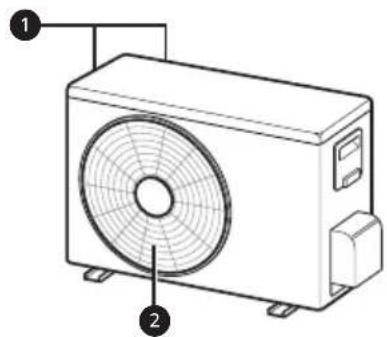
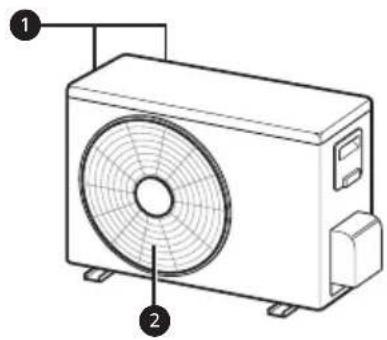
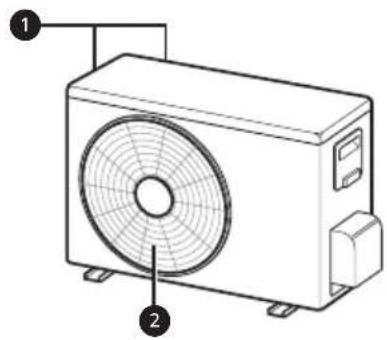
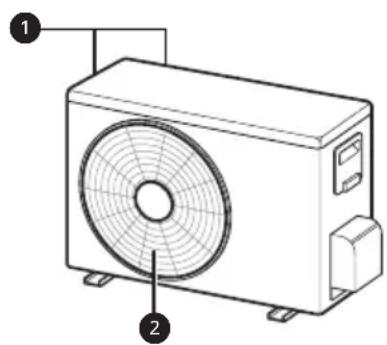
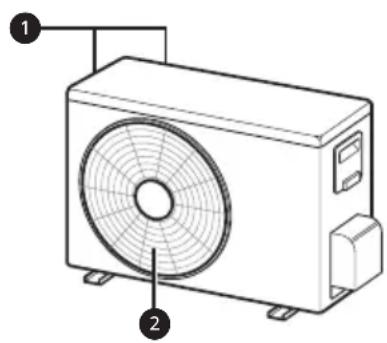
Indoor Unit Outdoor Unit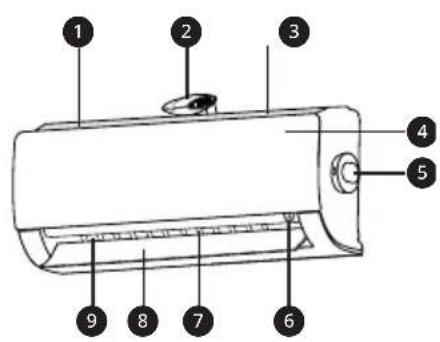
1 Air Filter + Micro Dust Filter 2 Ionizer 3 Air Intake 4 Front Cover 5 PM1.0 Sensor 6 On/Off Button 7 Air Deflector (Vertical Louver) 8 Air Deflector (Horizontal Vane) 9 Air Outlet
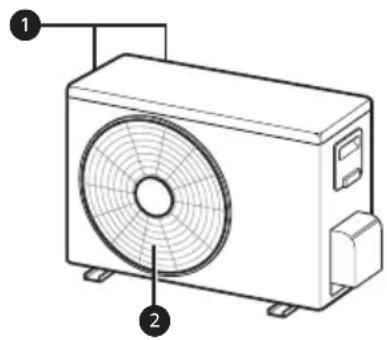
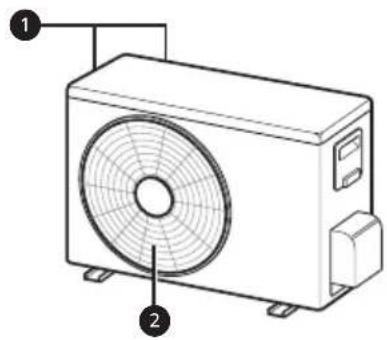
1 Air Intake Vents
2 Air Outlet Vents
NOTE
- The number and location of operation lamps may vary according to the model of the air conditioner.
- The feature may be changed according to the type of model.
Wireless Remote Control
Inserting Batteries
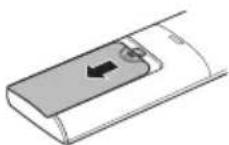
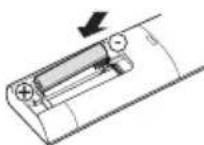
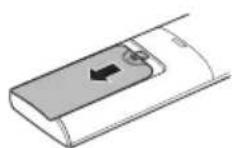
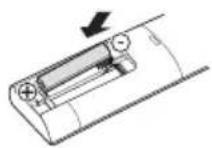
If the display screen of the remote control begins to fade, replace the batteries. Insert AAA (1.5 V) batteries before using the remote control.
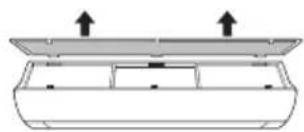
1 Remove the battery cover.
2 Insert the new batteries and make sure that the + and - terminals of the batteries are installed correctly.
Installing the Remote Control Holder
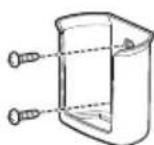
To protect the remote control, install the holder where there is no direct sunlight.
1 Choose a safe and easily accessible location.
2 Fix the holder by fastening 2 screws firmly with a screwdriver.
Operating Method
Point the remote control towards the signal receiver at the right side of the air conditioner to operate it.

NOTE
- The remote control may operate other electronic devices if it is directed towards them. Make sure to point the remote control towards the air conditioner signal receiver.
- For proper operation, use a soft cloth to clean the signal transmitter and receiver.
- In case of a function not provided in the product, no buzzer sound occurs from the product when a button for such function on the remote control is pressed except for Air Flow Direction (SWING), Energy Display (○), Air Purification function (
Setting the Current Time
1 Insert batteries.
- The icon below blinks at the bottom of the display screen.
AM 12:00
2 Press or button to select the minutes. 3 Press SET/CANCEL button to finish.
NOTE
- The On/Off Timer is available after setting the current time.
Operating the Air Conditioner without the Remote Control
You can use the ON/OFF button of the indoor unit to operate the air conditioner when the remote control is unavailable.
1 Open the front cover (Type 2) or horizontal vane (Type 1). 2 Press the ON/OFF button.
Type 1

Type 2
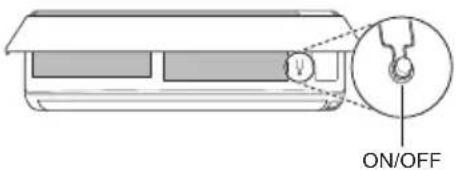
NOTE
- The stepping motor may be broken, if the horizontal vane opens rapidly. • The fan speed is set to high.
- The feature may be changed according to the type of model.
- The temperature cannot be altered when using this emergency ON/OFF button.
- For cooling-only models, the temperature is set to 22 °C
- For cooling & heating models, the temperature is set from 22 °C to 24 °C
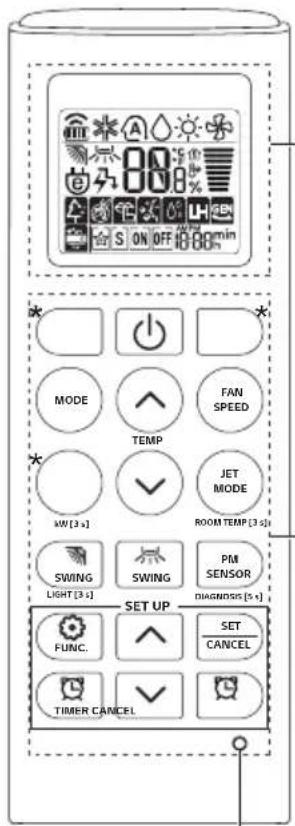
Using Wireless Remote Control
You can operate the air conditioner more conveniently with the remote control.
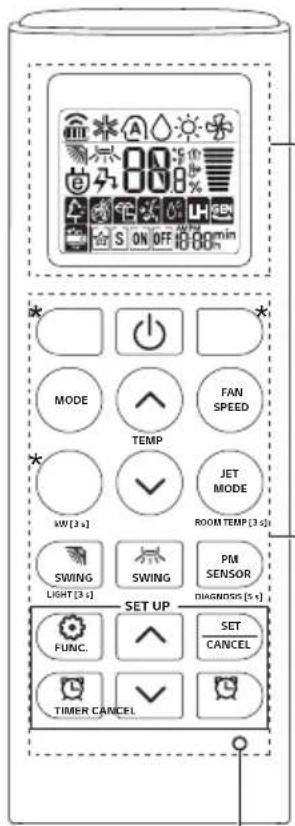
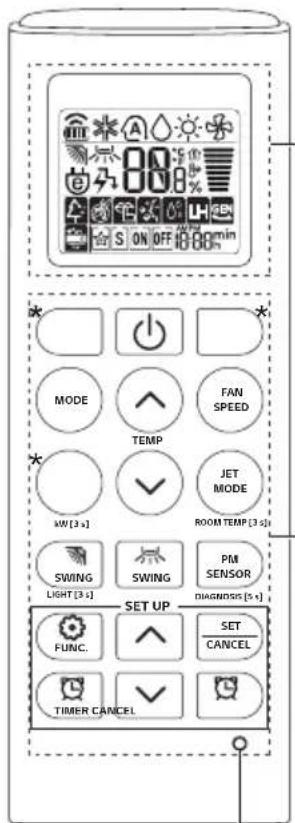
| 1Button | 2Display Screen | Description | Available Function | |
| Single Split | Multi | |||
| - | To turn on/off the air conditioner. | O | O | |
| 88° | To adjust the desired room temperature in cooling, heating or auto changeover mode. | O | O | |
| MODE | * | To select the cooling mode. | O | O |
| To select the heating mode. | O | O | ||
| To select the dehumidification mode. | O | O | ||
| To select the fan mode. | O O | |||
| To select the auto changeover/auto operation mode. | O | O | ||
| JET MODE | Po | To change room temperature quickly. | O | O |
| FAN SPEED | To adjust the fan speed. | O | O | |
| To adjust the air flow direction vertically or horizontally. | O | O | ||
NOTE
- * Buttons may be changed according to the model type.
- When connected to the Multi Outdoor unit, the Energy Display, Energy Control, Silent, and Smart Diagnosis functions may not be supported.
![2 * MODE FAN SPEED TEMP JET MODE KW [3 s] ROOM TEMP [3 s] SWING SWING PM SENSOR LIGHT [3 s] DIAGNOSIS [5 s] SET UP FUNC. SET CANCEL TIMER CANCEL RESET](/content/2026/03/547089/images/b48da15efe3077f60cb17cf0fda9a57f02c94d39a3bc9b239379b88add022293.jpg)
| 1Button | 2Display Screen | Description | Available Function | |
| Single Split | Multi | |||
 |  | To turn on/off air conditioner automatically at desired time. | O | O |
| SET/CANCEL | - | To set/cancel the special functions and timer. | O | O |
 | - | To cancel the timer settings. | O | O |
 | - | To adjust time. O O | ||
| LIGHT [3 s] | - | To set the brightness of the display on the indoor unit. | O | O |
| ROOM TEMP [3 s] |  | To display the room temperature. | O | O |
| *COMFORT AIR |  | To adjust the air flow to deflect wind. | O | O |
| kW [3 s] | - | To set whether or not to display information regarding energy. | O | X |
| *ENERGY CTRL |  | To bring the effect of the power saving. | O | X |
| DIAGNOSIS [5 s] | - | To conveniently check maintenance information of a product. | O | X |
| PM SENSOR | - | To check indoor dust status. | O | O |
| *AIR PURIFY | - | The lon generator uses millions of ions to help improve indoor air quality. | O | O |
2
 |  | Description | Available Function | |
| Single Split | Multi | |||
 |  | To reduce noise from outdoor units. | O | X |
| [K730] | To remove moisture generated inside the indoor unit. | O | O | |
| RESET - | To initialize the remote control settings. | O | O | |
NOTE
- Some functions may not be supported, depending on the model.
- * Buttons may be changed according to the model type.
- Press the SET/CANCEL button to operate the selected function.
RESET
Restarting the Air Conditioner Automatically
When the air conditioner is turned on again after a power failure, this function restores the previous settings.
Disabling Auto Restart
1. Open the front cover (Type 2) or horizontal vane (Type 1).
2. Press and hold the ON/OFF button for 6 seconds. The unit will beep twice and the lamp will blink twice 4 times.
- To re-enable the function, press and hold the ON/OFF button for 6 seconds. The unit will beep twice and the lamp will blink 4 times.
Type 1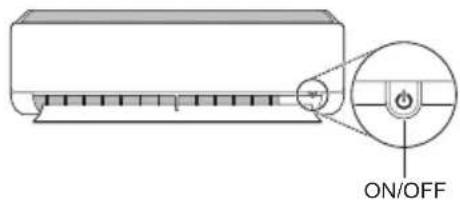
Type 2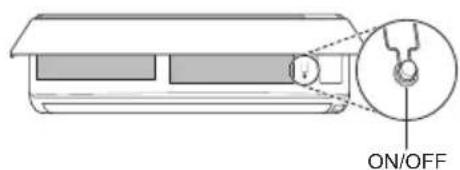
NOTE
- The feature may vary depending on the model type.
- If you press and hold the ON/OFF button for 3–5 seconds instead of 6 seconds, the unit will switch to test operation. In test operation, the unit blows strong cooling air for 18 minutes and then returns to factory default settings.
Using the Mode Function
This function allows you to select the desired function.
![graph TD A["★ Cooling Mode"] --> B["A️ Auto Changeover Mode / Auto Operation(AI) Mode"] B --> C["○ Dehumidification Mode"] C --> D["● Heating Mode"] D --> E["◆ Fan Mode"]](/content/2026/03/547089/images/35c5841897295d1f51afce10b16296dcd1a16c1184efd41731e58d3d7b2bd6e0.jpg)
Cooling Mode
1. Turn the appliance on.
2. Press the MODE button repeatedly to select Cooling Mode.
• ✱ is displayed on the display screen.
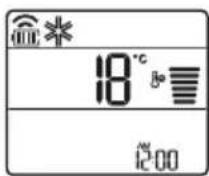
3. Press the or button to set the desired temperature.
Auto Operation (Artificial Intelligence)
Multi Model
In this operation mode, the system is automatically operated by the electronic controls.
1 Turn the appliance on.
2 Press MODE button repeatedly to select the Auto Operation.
• A is displayed on the display screen.
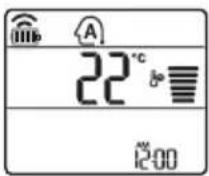
3 Press or button to set the desired temperature.
4 Press FAN SPEED button to adjust the fan speed.
Auto Changeover Mode
Single Split Model
This mode changes the mode automatically to maintain the set temperature at ±2°C
1 Turn the appliance on.
2 Press MODE button repeatedly to select the Auto Changeover Mode.
• A is displayed on the display screen.
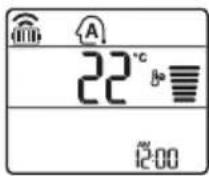
3 Press or button to set the desired temperature.
4 Press FAN SPEED button to adjust the fan speed.
Dehumidification Mode
This mode removes excess moisture from a highly humid environment or during the rainy season, in order to prevent mildew from setting in. This mode adjusts the room temperature and the fan speed automatically to maintain the optimal level of humidity.
1 Turn the appliance on.
2 Press MODE button repeatedly to select the Dehumidification Mode.
- is displayed on the display screen.
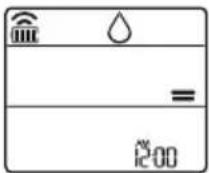
NOTE
- In this mode you cannot adjust the room temperature, it is adjusted automatically.
- The room temperature is not displayed on the display screen.
- In the dehumidification mode, compressor and indoor fan may not operate when the room temperature is below 24 °C
Heating Mode
1 Turn the appliance on.
2 Press MODE button repeatedly to select the Heating Mode.
- is displayed on the display screen.
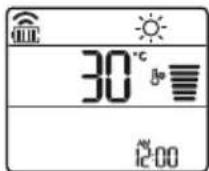
3 Press or button to set the desired temperature.
NOTE
• will be displayed on the indoor unit when defrosting is operating. • Furthermore, this indication will be displayed on the indoor unit:
- When preheating is operating.
- When the room temperature has reached the set temperature.
Fan Mode
This mode only circulates the indoor air without changing the room temperature.
1 Turn the appliance on.
2 Press MODE button repeatedly to select the Fan Mode.
• is displayed on the display screen.
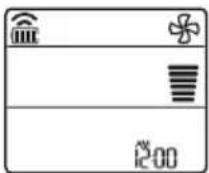
3 Press FAN SPEED button to adjust the fan speed.
NOTE
- On will be displayed on the indoor unit when fan mode is operating.
Using the Jet Mode Function
Changing Room Temperature Quickly
This function allows you to cool indoor air quickly during the summer or warm it quickly during winter.
- The Jet Mode function is available with Cooling, Heating and Dehumidification Mode.
1 Turn the appliance on.
2 Press MODE button repeatedly to select the desired mode.
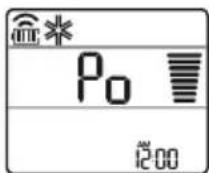
3 Press JET MODE button.
- P0 is displayed on the display screen.
NOTE
- Jet Heating Mode is not available on some models.
- In Jet Cooling Mode, strong air blows out for 30 minutes.
- After 30 minutes later, setting temperature is maintaining 18° C If you want to change the temperature, Press or button to set the desired temperature.
- In Jet Heating Mode, strong air blows out for 30 minutes.
- After 30 minutes later, setting temperature is maintaining 30°C If you want to change the temperature, Press or button to set the desired temperature.
- This function may operate differently from the remote control display.
Using the Fan Speed Function
Adjusting the Fan Speed
- Press FAN SPEED button repeatedly to adjust the fan speed.
| Display Screen Speed | |
 | High |
 | Medium - High |
 | Medium |
 | Medium - Low |
 | Low |
| - Natural Wind | |
NOTE
- The fan speed of Natural Wind adjusts automatically.
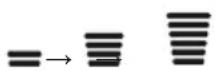
- The fan speed icons are displayed on some indoor units.

- On some models, the indoor unit display is shown for only 5 seconds and then returns to the set temperature.
Using the Air Flow Direction Function
This function adjusts the direction of the air flow vertically (horizontally).
- Press the SWING button repeatedly and select the desired direction.
- Select () to adjust the direction of the air flow automatically.
NOTE
- Adjusting the air flow direction horizontally may not be supported, depending on the model.
- Adjusting the air deflector arbitrarily may cause product failure.
- If you restart the air conditioner, it starts to operate with the previously set direction of air flow, so the air deflector may not match the icon displayed on the remote control. When this occurs, press the SWING button to adjust the direction of the air flow again.
- This function may operate differently from the remote control display.
Setting the On/Off Timer
This function sets the air conditioner to turn on/off automatically at the desired time.
The On/Off Timer can be set together.
Setting the On Timer
1 Press TIMER button repeatedly.
- The icon below blinks at the bottom of the display screen.
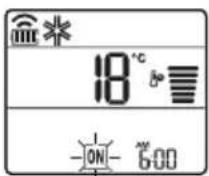
2 Press or button to select the minutes.
3 Press SET/CANCEL button to finish.
- After setting the timer, current time and ON icon are displayed on the display screen indicating that the desired time is set.
Canceling the On Timer
1 Press TIMER button repeatedly.
- The icon below blinks at the bottom of the display screen.
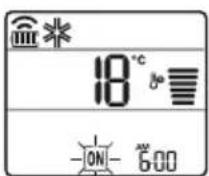
2 Press SET/CANCEL button to cancel the setting.
Setting the Off Timer
1 Press TIMER button repeatedly.
- The icon below blinks at the bottom of the display screen.
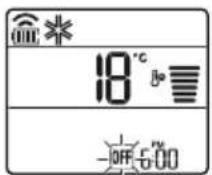
2 Press or button to select the minutes.
3 Press SET/CANCEL button to finish.
• After setting the timer, current time and OFF icon are displayed on the display screen indicating that the desired time is set.
NOTE
- This function is disabled when you set Simple Timer.
Canceling the Off Timer
1 Press TIMER button repeatedly.
- The icon below blinks at the bottom of the display screen.
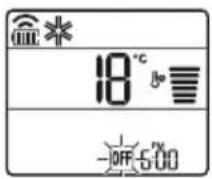
2 Press SET/CANCEL button to cancel the setting.
Canceling the Timer Setting
- Press CANCEL button to cancel all timer settings.
Using the Sleep Function (Optional)
This function turns off the air conditioner automatically when you go to sleep.
1 Turn the appliance on.
2 Press TIMER button repeatedly.
- The icon below blinks at the bottom of the display screen.
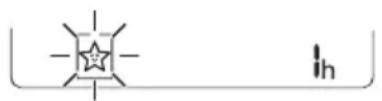
3 Press or button to select the hour (up to 7 hours).
4 Press SET/CANCEL button to finish.
• [is] displayed on the display screen.
NOTE
- \$ displayed on some indoor units.
- Indoor unit display is shown from 1H to 7H, which is displayed for only 5 seconds and then returns to the setting temperature.
- In the Cooling and Dehumidification Mode, the temperature increases by 1 °C after 30 minutes and an additional 1 °C after another 30 minutes for a more comfortable sleep.
- The temperature increases up to 2 °C from the preset temperature.
- Although the remark for fan speed on the display screen may be changed, the fan speed is adjusted automatically.
Using the Simple Timer Function (Optional)
This function turns off the air conditioner automatically when you go to sleep.
1 Turn the appliance on. 2 Press TIMER button repeatedly.
- The icon below blinks at the bottom of the display screen.
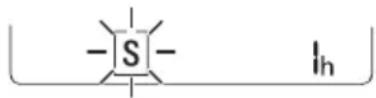
3 Press or button to select the hour (up to 7 hours). 4 Press SET/CANCEL button to finish.
- [S] displayed on the display screen.
NOTE
- This function is disabled when you set Off Timer.
Using the Energy Display Function (Optional)
This function displays the amount of electricity generated on the indoor display as the product operates.
Display the Current Energy Usage
1 Turn the appliance on.
2 Press the kW [3 s] button and hold it for about 3 seconds.
- The instantaneous power consumption (88) is displayed for a while on some indoor units.
NOTE
- The unit of the displayed value is kW.
- It is not displayed on the wireless remote control.
- If it is more than 99 kW, which is the range of expression, maintain it as 99 kW.
- Display wattage under 10 kW with 0.1 kW unit, and display one over 10 kW with 1 kW unit.
- The actual power may differ from the power displayed.
- When connected to the Multi Outdoor unit, this function may not be supported.
Using the Light Off Function (Optional)
Display Screen Brightness
You can set the brightness of the indoor unit display screen.
- Press and hold the SWING LIGHT button for about 3 seconds.
NOTE
- Turn on/off the display screen.
Using the Comfort Air Function (Optional)
Comfort Vane Operation
This function conveniently sets the vane to a preset position to deflect the supply air away from blowing directly onto the occupants in the room.
1. Turn the appliance on.
2. Press the COMFORT AIR button repeatedly and select the desired direction.
• or is displayed on the display screen.
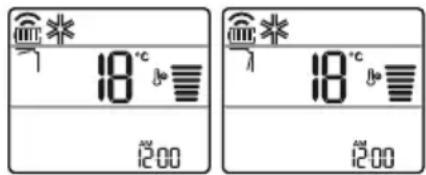
NOTE
- or is displayed on some indoor units.
- This function is disabled when you press the MODE or JET MODE button.
- This function is disabled and auto swing of vertical direction is set up when you press the button.
- When this function is off, the horizontal vane operates automatically depending on the set mode.

Using the Energy Control Function (Optional)
1 Turn the appliance on.
2 Press ENERGY CTRL button.
- Press ENERGY CTRL button repeatedly to select each step.
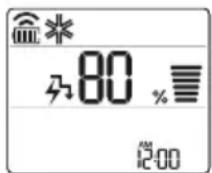
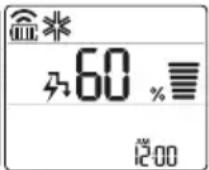
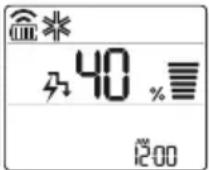
| 1 step 2 step 3 step |
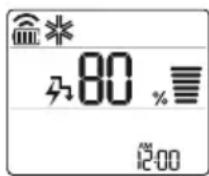
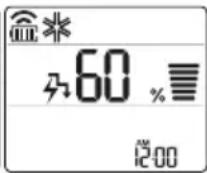
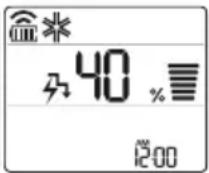
NOTE
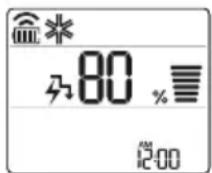
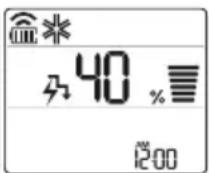
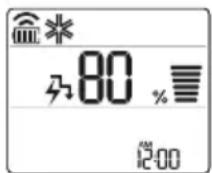
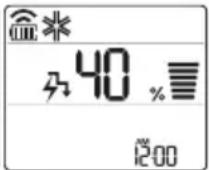
- 1 step: The power input is decreased by 20% compared to rated power input. -80 is displayed on the display screen.
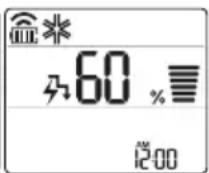
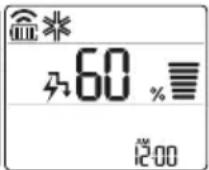
- 2 step: The power input is decreased by 40% compared to rated power input. -60 is displayed on the display screen.
- 3 step (Optional): The power input is decreased by 60% compared to rated power input. 40 is displayed on the display screen.
- L (1 step), LL (2 step) is displayed on some indoor units.
- This function is available with Cooling Mode.
- Capacity may decrease when Energy Control mode is selected.
- Desired temperature is displayed about 5 seconds if you press FAN SPEED, or button.
- Room temperature is displayed about 5 seconds if you press 🟢 JET MODE button for 3 seconds. ROOM TEMP I3 s
- When connected to the Multi Outdoor unit, this function may not be supported.
How to Use Air Purification
Ionizer and air purification filter make the indoor air pleasant.
- Press AIR PURIFY button to start the air purification operation.
is displayed on the display screen.
Using Air Purification During Operation Modes
- During cooling, dehumidification, heating or auto changeover operation, if you press AIR PURIFY button, you can use air purification operation at the same time.
- During air purification operation, if you press MODE button, you can use cooling, dehumidification, heating or auto changeover operation at the same time.
Smart Air Purification
- Dust sensor detects the indoor air contamination level, and if overall cleanliness is Orange (Bad) or more, it automatically starts air purification operation. When overall cleanliness reaches Green (Good), air purification operation stops. If you do not want smart air purification operation, clear by pressing AIR PURIFY button. Until you turn off the product and turn on again, air purification operation is not operated automatically.
- It works only in overall cleanliness function applied model.

CAUTION
- During air purification operation, do not touch top side of the product. (Static electricity may be generated by anion created from dust collection ionizer.)
- Do not put metal objects near the appliance. (Static electricity may be generated by anion created from dust collection ionizer.)
NOTE
- Air purification single operation is the operation with low energy consumption.
- During air purification single operation, wind direction function can be used, but temperature control function cannot be used.
- During cooling operation or dehumidification operation, if you want air purification single operation, press power button to turn off the product, and press AIR PURIFY button.
- Ionizer and filter components may be different for each model.
Checking Overall Cleanliness
It displays the indoor cleanliness.
1 Turn the appliance on. 2 During the operation, if you press PM SENSOR button, you can check the indoor cleanliness in each level.
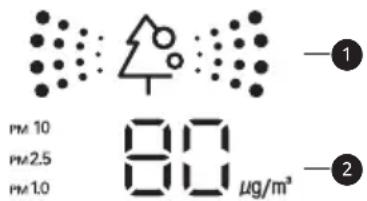
1 Overall cleanliness color display 2 Dust size dust concentration display
- Dust concentration is displayed in unit of 1 within 8~999 μg/m³. Dust concentration referred to the data sheet of the sensor manufacturer.
- Dust concentration may continuously change according to the change of the indoor environment.
- Overall cleanliness color is displayed based on the highest contamination level among fine dust(PM10), ultra fine dust(PM2.5), and super ultra fine dust(PM1.0).
- Overall cleanliness color is displayed in 4 levels according to the indoor contamination level.
- If dust concentration is high, the difference between the displayed dust concentration and the actual dust concentration may become bigger.
| Color Level | Display standard ( µg/m3 ) | |||
| Super ultra fine dust (PM1.0) | Ultra fine dust (PM2.5) | Fine dust (PM10) | ||
| Green | Green (Good) | 12 or less 12 | or less 54 or less | |
| Yellow | Yellow (Normal) | 13 - 35 13 | - 35 55 - 154 | |
| Orange | Orange (Bad) | 36 - 55 36 | - 55 155 - 254 | |
| Red | Red (Very bad) | 56 or more | 56 or more | 255 or more |
NOTE
- Fine / Ultra fine / Super ultra fine dust concentration may be different according to the surrounding environment. (Construction site, road side, factory, etc.)
- Dust concentration may be different according to the installation environment. It is influenced by couches, beds, carpets, cleaners, humidity, smoke, insects, pets, etc.
- In the environment with external air inflow such as near the door, window, or ventilation gate, etc., dust concentration may be measured as high.
- Even in the same space, due to air circulation, the displayed dust concentration may differ from other products.
- The cleanliness display shows the overall fine dust level, so it may differ from the concentration values of fine dust, ultrafine dust, or super ultrafine dust.
- The fine dust/ultrafine dust concentration displayed on the product may differ from the Ministry of Environment's announcements, and it may also differ from the measurement standards of other devices or products.
- The displayed fine dust, ultrafine dust, and super ultrafine dust concentration values may differ from the Ministry of Environment's forecast.
- If products that generate steam or fine particles (such as humidifiers, cooking appliances, sprays, etc.) are used, the fine dust concentration may change.
- You can check the cleanliness only when the air conditioner is in operation.
- The displayed dust concentration value may differ from the actual dust concentration, and the cleanliness color displayed may differ from the actual dust concentration level.
- Guide to dust particle sizes – Fine dust: particles with a diameter of 10 μm or less (generated from workplace combustion, vehicle exhaust, etc.)
- Ultrafine dust: particles with a diameter of 2.5 μm or less (composed of ionic components, carbon compounds, and metal compounds) – Super ultrafine dust: particles with a diameter of 1.0 μm or less (e.g., cigarette smoke)
- The dust concentration and overall cleanliness level displayed on the product may differ from the Ministry of Environment's announcements.
- The Ministry of Environment uses the gravimetric method or beta-ray absorption method to measure dust concentration, but LG products measure the number of dust particles and convert it to mass concentration, so the displayed value may differ from the actual dust concentration.
- The same standard as ultrafine dust is applied to the dust concentration level of super ultrafine dust. (LG standard)
- Dust concentration evaluation is carried out using LG standard test dust.
- The shaking around the dust sensor may hinder the normal operation of the dust sensor, and the displayed concentration may be different from the actual dust concentration.
- You can use it only in overall cleanliness function applied models.
- PM SENSOR button in the remote controller can make to check each dust particle's size dust concentration for 10 seconds.
- After 10 seconds, the display is displayed the worst dust concentration among Fine, Ultra fine, Super ultra fine Dust particle's size.
Using Special Functions
1 Turn the appliance on. 2 Press FUNC button repeatedly to select the desired function. 3 Press SET/CANCEL button to finish.
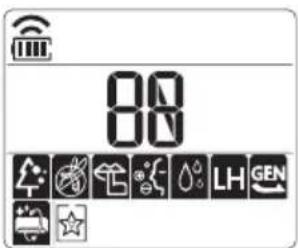
| Display Screen | Description |
 | To reduce noise from outdoor units. |
 | To remove moisture generated inside the indoor unit. |
NOTE
- Some functions may not be supported, depending on the model.
- Some functions may operate differently from the remote control display.
Canceling Special Functions
1 Press FUNC button repeatedly to select the desired function. 2 Press SET/CANCEL button to cancel the function.
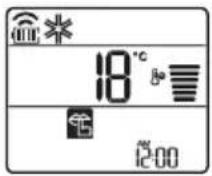
Using the Silent Function
This function prevents potential claims by neighbors, reducing noise from outdoor units.
• is displayed on the display screen.
NOTE
- This function is disabled when you press MODE, ENERGY CTRL, or JET MODE button.
- This function is available in Cooling, Heating, Auto Changeover, and Auto Operation modes.
- When connected to the Multi Outdoor unit, this function may not be supported.
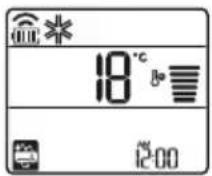
Using the Auto Clean Function
In Cooling and Dehumidification modes, moisture is generated inside the indoor unit. This function removes such moisture.
• is displayed on the display screen.
NOTE
- Some functions cannot be used while the Auto Clean function is in operation.
- If you turn off the unit, the fan continues to run for 30 minutes and cleans the inside of the indoor unit.
- is displayed on some indoor units, depending on the model.
LG ThinQ Application
This feature is only available on models with the 📄 or ThinQ logo.
The LG ThinQ application allows you to communicate with the appliance using a smartphone.
LG ThinQ Application Features
Communicate with the appliance from a smartphone using the convenient smart features.
Smart Diagnosis
If you experience a problem while using the appliance, this smart diagnosis feature will help you diagnose the problem.
Settings
Allows you to set various options on the appliance and in the application.
NOTE
- If you change your wireless router, internet service provider, or password, delete the registered appliance from the LG ThinQ application and register it again.
- The application is subject to change for appliance improvement purposes without notice to users. Functions may vary by model.
Before Using LG ThinQ Application
1 Check the distance between the appliance and the wireless router (Wi-Fi network).
- If the distance between the appliance and the wireless router is too far, the signal strength becomes weak. It may take a long time to register or installation may fail.
2 Turn off the Mobile data or Cellular Data on your smartphone.
3 Connect your smartphone to the wireless router.
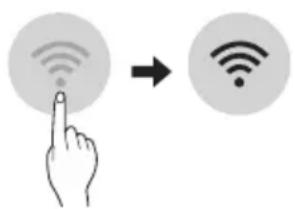
NOTE
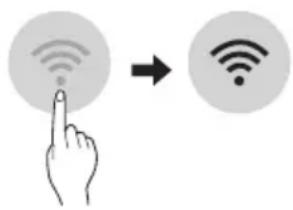
- To verify the Wi-Fi connection, check that icon on the control panel is lit.
- The appliance supports 2.4 GHz Wi-Fi networks only. To check your network frequency, contact your Internet service provider or refer to your wireless router manual.
- LG ThinQ is not responsible for any network connection problems or any faults, malfunctions, or errors caused by network connection.
- If the appliance is having trouble connecting to the Wi-Fi network, it may be too far from the router. Purchase a Wi-Fi repeater (range extender) to improve the Wi-Fi signal strength.
- The Wi-Fi connection may not connect or may be interrupted because of the home network environment.
- The network connection may not work properly depending on the Internet service provider.
- The surrounding wireless environment can make the wireless network service run slowly.
- The appliance cannot be registered due to problems with the wireless signal transmission. Unplug the appliance and wait about a minute before trying again.
- If the firewall on your wireless router is enabled, disable the firewall or add an exception to it.
- The wireless network name (SSID) should be a combination of English letters and numbers. (Do not use special characters.)
- Smartphone user interface (UI) may vary depending on the mobile operating system (OS) and the manufacturer.
- If the security protocol of the router is set to WEP, you may fail to set up the network. Please change it to other security protocols (WPA2 is recommended) and register the product again.
Installing the LG ThinQ Application
Search for the LG ThinQ application from the Google Play Store or Apple App Store on a smartphone. Follow instructions to download and install the application.
Open Source Software Notice Information
To obtain the source code under GPL, LGPL, MPL, and other open source licenses, that is contained in this product, please visit https://opensource.lge.com.
In addition to the source code, all referred license terms, warranty disclaimers and copyright notices are available for download.
LG Electronics will also provide open source code to you on CD-ROM for a charge covering the cost of performing such distribution (such as the cost of media, shipping, and handling) upon email request to opensource@lge.com. This offer is valid for a period of three years after our last shipment of this product. This offer is valid to anyone in receipt of this information.
Smart Diagnosis
This feature is only available on models with the 🧑 or 📁lego.
Use this feature to help you diagnose and solve problems with your appliance.
NOTE
- For reasons not attributable to LGE's negligence, the service may not operate due to external factors such as, but not limited to, Wi-Fi unavailability, Wi-Fi disconnection, local app store policy, or app unavailability.
- The feature may be subject to change without prior notice and may have a different form depending on where you are located.
Using LG ThinQ to Diagnose Issues
If you experience a problem with your Wi-Fi equipped appliance, it can transmit troubleshooting data to a smartphone using the LG ThinQ application.
- Launch the LG ThinQ application and select the Smart Diagnosis feature in the menu. Follow the instructions provided in the LG ThinQ application.
Using Audible Diagnosis to Diagnose Issues
Follow the instructions below to use the audible diagnosis method.
- Launch the LG ThinQ application and select the Smart Diagnosis feature in the menu. Follow the instructions for audible diagnosis provided in the LG ThinQ application.
1 Plug the power plug in the outlet properly. 2 Place the mouthpiece of your smartphone close to the or logo. 3 Press and hold the DIAGNOSIS [5 s] button for 5 seconds or longer while holding the smartphone mouthpiece to the logo until the data transfer is complete.
- Keep the smartphone in place until the data transfer has finished. Time remaining for data transfer is displayed.
4 After the data transfer is complete, the diagnosis will be displayed in the application.
NOTE
- For best results, do not move the phone while the tones are being transmitted.
- Be sure to keep ambient noise to a minimum or the phone may not correctly receive the buzzer beeps from the indoor unit.

WARNING
- Before cleaning or performing maintenance, disconnect the power supply and wait until the fan stops.
If the air conditioner will not be used for an extended period of time, dry the air conditioner to maintain it in best condition. Clean the product regularly to maintain optimal performance and to prevent possible breakdown.
- Dry the air conditioner in Fan mode for 3 to 4 hours and disconnect the power. There may be internal damage if moisture is left in its components.
- Before using the air conditioner again, dry the inner components of the air conditioner in Fan mode for 3 to 4 hours. This will help to remove the odor generated from moisture.
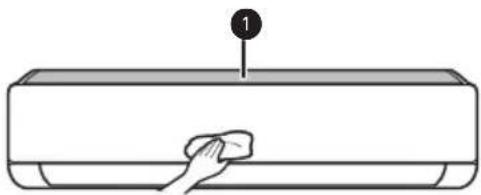

Micro Dust Filter
- The feature may be changed according to the type of model.
| Type Description | Option Interval | |
| Micro dust filter | Clean with a vacuum or brush. | Once a month |
| Triple filter | Do not clean the Triple filter. (It can be replaced only.) | - |
| Ionizer (Optional) | Use dry cotton bud to remove any dust. | Every 6 months |
| Indoor unit | Clean the Indoor unit surface by using a soft, dry cloth. | Regularly |
| Have a professional clean the condensate drain pan. | Once a year | |
| Have a professional clean the condensate drain pipe. | Every 4 months | |
| Replace the remote control batteries. | Once a year | |
| Outdoor unit | Have a professional clean the heat exchanger coils and the panel vents. (Consult with technician.) | Once a year |
| Have a professional clean the fan. | Once a year | |
| Have a professional clean the condensate drain pan. | Once a year | |
| Have a professional verify that all the fan assembly is firmly tightened. | Once a year | |
| Clean the electric components with air. | Once a year |
NOTE
- Never use water that is higher than 40 °C when you clean the filters. It may cause deformation or discoloration.
- Never use volatile substances when you clean the filters. They may damage the surface of the product.
- Do not wash the Triple filter with water, because the filter can be damaged (Optional).
- Do not wash the Micro dust filter with water, because the filter can be damaged.
Replace and Clean the Micro Dust Filter
Clean the micro dust filter once a month, or more, if necessary.
Disassemble and Clean the Micro Dust Filter
If you look at the indoor unit from above, you can assemble the top filter easily.
1 Turn off the power to the unit.
2 Hold the ionizer, lift it up slightly. And then, hold the knobs of the micro dust filter, lift it up slightly.
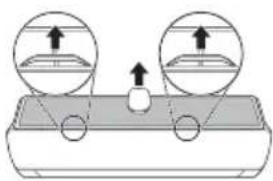
3 Remove it from the indoor unit.
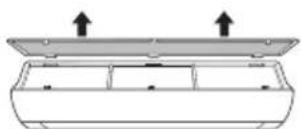
4 Clean the filter with a vacuum cleaner or brush. (Do not wash the micro dust filter with water.)
Assemble the Micro Dust Filter
1 Turn off the power to the unit.
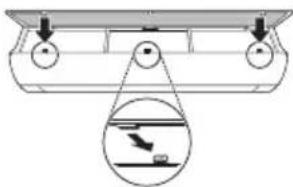
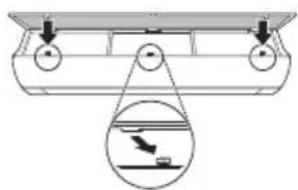
2 Hold the ionizer, lift it up slightly. And then insert the hooks of the micro dust filter into the front cover.
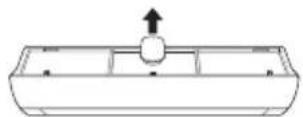
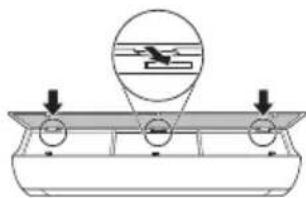
3 Push down hooks to assemble the micro dust filter.
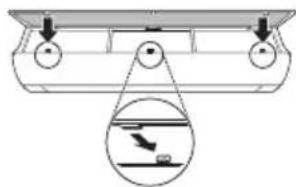
4 Check the side of the front cover for correct assembly of the micro dust filter.
NOTE
- The micro dust filter can be broken when it is bent.
- When the micro dust filter is not assembled correctly, dust and other substances can enter into the indoor unit.
- If dust is caught in the filter, cooling performance is degraded, wind sound gets rough, and the electricity bill increases, so clean the micro dust filter once a month and replace it once every 6 months.
Replace the Triple Filter (Optional)
It effectively removes indoor odor using activated carbon.
1 Take out the micro dust filter.
• See the Disassemble and clean the micro dust filter.
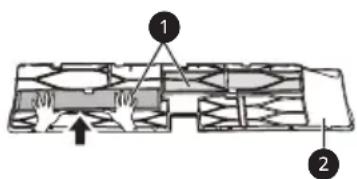
2 Take out the Triple filter (1).
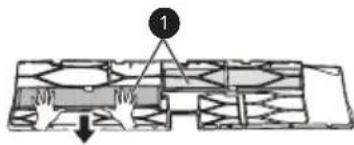
3 Assemble the new Triple filter (1) in the micro dust filter (2).
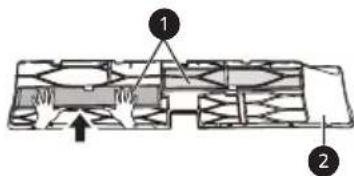
4 Assemble Triple filter and micro dust filter in the reverse order of disassembly.
CAUTION
- The front panel may fall and cause injury, so be careful.
- After filter replacement, during the re-insertion, completely insert entire micro dust filter. (If it is not fully inserted, it may cause performance degradation or other product failures.)
- Operating air conditioner without filter causes performance degradation and failure of the air conditioner.
- Do not disassemble Triple filter itself, and prevent damage or deformation of it. It may cause no-operation of the product or failure by abnormal operation.
- When you replace the filter, be careful not to drop it under the product.
- For safety, before cleaning or replacement, turn off the product power and pull out the power plug or turn down the main power switch.
NOTE
- The shape and composition of the filter may be different for each model.
- If you want filter replacement, you can purchase it at nearby service center.
- If contamination is severe, or if filter effect is degraded, replace with a new filter.
- During Triple filter storage, do not rip the packaging. (Filter's lifespan will be reduced.)
- Be careful not to have water enter inside Triple filter. (Filter's effect will be degraded.)
Clean the PM1.0 Sensor
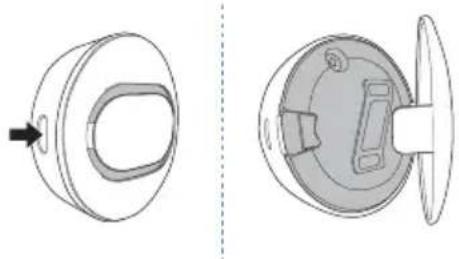
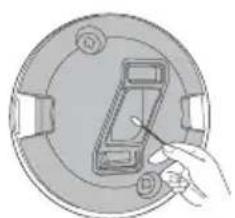
1 Open the PM1.0 sensor cover on the side of the product.
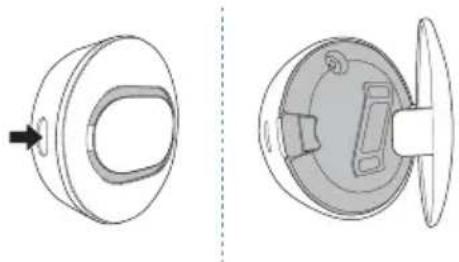
2 Put a little water on a cotton swab, wipe the lens, and wipe again it with a dry cotton swab to remove the moisture.
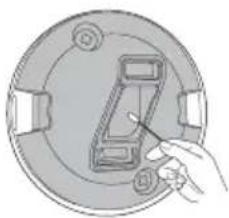
NOTE
- It is applied only for overall cleanliness display models.
Self-diagnosis Function
This product has a built-in self-diagnosis function. If an error occurs, the lamp of the indoor unit will blink in 2 second intervals. If this occurs, contact your local dealer or service center.
Before Calling for Service
Please check the following before you contact the service center. If the problem persists, contact your local service center.
| Symptoms | Possible Causes & Solution |
| The air conditioner does not work normally. | Burning smell and strange sounds are coming from the unit.Turn off the air conditioner, switch OFF, or disconnect the power supply, and contact the service center. |
| Water leaks from the indoor unit even when the humidity level is low.Turn off the air conditioner, switch OFF, or disconnect the power supply, and contact the service center. | |
| The power cable is damaged or it is generating excessive heat.Turn off the air conditioner, switch OFF, or disconnect the power supply, and contact the service center. | |
| A switch, a circuit breaker (safety, ground), or a fuse is not operated properly.Turn off the air conditioner, switch OFF, or disconnect the power supply, and contact the service center. | |
| The unit generates an error code from its self-diagnosis.Turn off the air conditioner, switch OFF, or disconnect the power supply, and contact the service center. | |
| The air conditioner does not work. | The air conditioner is unplugged.Check whether the power cord is plugged into the outlet or the power isolators are switched on. |
| A fuse exploded, or the power supply is blocked.Replace the fuse or check if the circuit breaker has tripped. | |
| A power failure has occurred.Turn off the air conditioner when a power failure occurs.When the power is restored, wait 3 minutes, and then turn on the air conditioner. | |
| The voltage is too high or too low.Check if the circuit breaker has tripped. | |
| The air conditioner was turned off automatically at a preset time.Turn the air conditioner on. | |
| The battery setting in the remote controller is incorrect.Make sure that the batteries are inserted correctly in your remote controller.If the batteries are placed correctly, but the air conditioner still does not operate, replace the batteries and try again. | |
| The air conditioner does not emit cool air. | Air is not circulating properly. • Make sure that there are no curtains, blinds, or pieces of furniture blocking the front of the air conditioner. |
| The micro dust filter is dirty. • Clean the micro dust filter once a month. • See “Replace and Clean the Micro Dust Filter” for more information. | |
| The room temperature is too high. • In summer, cooling the indoor air fully may take some time. In this case, select the Jet Mode to cool the indoor air quickly. | |
| Cold air is escaping from the room. • Make sure that no cold air is escaping through the ventilation points in the room. | |
| The desired temperature is higher than the current temperature. • Set the desired temperature to a level lower than the current temperature. | |
| There is a heating source nearby. • Avoid using heat generators like electric ovens or gas burners while the air conditioner is in operation. | |
| Fan Mode is selected. • During Fan Mode, air blows from the air conditioner without cooling or heating the indoor air. • Switch the operation mode to cooling operation. | |
| Outside temperature is too high. • The cooling effect may not be sufficient. | |
| The fan speed cannot be adjusted. | The Jet Mode, or Auto Operation Mode is selected. • In some operation modes, you cannot adjust the fan speed. Select an operation mode in which you can adjust the fan speed. |
| The temperature cannot be adjusted. | The Fan Mode or Jet Mode is selected. • In some operation modes, you cannot adjust the temperature. Select an operation mode in which you can adjust the temperature. |
| The air conditioner stops during operation. | The air conditioner is suddenly turned off. • The Timer Function may have timed out, which turns the unit off. Check the timer settings. |
| A power failure has occurred during operation. • Wait for the power to come back. If you have the Auto Restart function enabled, your unit will resume its last operation several minutes after power is restored. | |
| The indoor unit is still operating even when the unit has been turned off. | The Auto Clean function is being operated.Allow the Auto Clean function to continue since it removes any remaining moisture inside the indoor unit. If you do not want this feature, you can turn the unit off. |
| The air outlet on the indoor unit is discharging mist. | The cooled air from the air conditioner makes mist.When the room temperature decreases, this phenomenon will disappear. |
| Water leaks from the outdoor unit. | In the heating operations, condensed water drops from the heat exchanger.This symptom requires installing a drain hose under the base pan. Contact the installer. |
| There is noise or vibration. | A clicking sound can be heard when the unit starts or stops due to movement of the reversing valve.Creaking sound: The plastic parts of the indoor unit creak when they shrink or expand due to sudden temperature changes.Flowing or Blowing sound: This is the flow of refrigerant through the air conditioner.These are normal symptoms. The noise will stop. |
| The indoor unit gives off an odor. | Odors (such as cigarette smoke) may be absorbed into the indoor unit and discharged with airflow.If the smell does not disappear, you need to wash the filter. If this does not work, contact the service center to clean your heat exchanger. |
| The air conditioner does not emit warm air. | When Heating Mode starts, the vane is almost closed, and no air comes out, even though the outdoor unit is operating.This symptom is normal. Please wait until the unit has generated enough warm air to blow through the indoor unit. |
| The outdoor unit is in Defrosting Mode.In Heating Mode, ice/frost is built up on the coils when the outside temperature falls. This function removes a layer of frost on the coil, and it should finish in approximately 15 minutes. | |
| Outside temperature is too low.The heating effect may not be sufficient. | |
| There are differences of overall cleanliness display values and colors for each product. | Air circulation is continued after the product operation.If products of different models are used in one space, the contamination concentration value may be displayed differently by the indoor air circulation, and if it is a closed space, as more fine dusts are removed, the difference of the values gets smaller. |
| Overall cleanliness does not change from Good. All the windows of the room are closed. | If it is a closed space with almost no air circulation, the level may not change from Good.If overall cleanliness changes when the window or door of the room is opened and air is circulated, it is normal. |
| The PM1.0 Sensor is dirty.Clean the PM1.0 Sensor. | |
| Your home appliance and smartphone is not connected to the Wi-Fi network. | The password for the Wi-Fi that you are trying to connect to is incorrect.Find the Wi-Fi network connected to your smartphone and remove it, then register your appliance on LG ThinQ. |
| Mobile data for your smartphone is turned on.Turn off the Mobile data of your smartphone and register the appliance using the Wi-Fi network. | |
| The wireless network name (SSID) is set incorrectly.The wireless network name (SSID) should be a combination of English letters and numbers. (Do not use special characters.) | |
| The router frequency is not 2.4 GHz.Only a 2.4 GHz router frequency is supported. Set the wireless router to 2.4 GHz and connect the appliance to the wireless router. To check the router frequency, check with your Internet service provider or the router manufacturer. | |
| The distance between the appliance and the router is too far.If the distance between the appliance and the router is too far, the signal may be weak and the connection may not be configured correctly. Move the location of the router so that it is closer to the appliance. |
NOTE
- Some functions may not be supported, depending on the model.
OWNER'S MANUAL
AIR CONDITIONER

SMART FUNCTIONS....29
LG ThinQ Application....29
Smart Diagnosis (Smart Diagnosis) 31
MAINTENANCE....32
NOTE
2
LG ThinQ Application
Smart Diagnosis
NOTE
Smart Diagnosis
NOTE
Smart Diagnosis....31
MAINTENANCE 32
NOTE
NOTE
NOTE
1 Micro Dust Filter
NOTE
SMART FUNCTIONS....29
LG ThinQ app 29
Smart Diagnosis....31
MAINTENANCE 32
Replacing and cleaning the micro dust filter....34
TROUBLESHOOTING....37
NOTE
NOTE
NOTE
1 Micro dust filter
NOTE
Smart Diagnosis....31
MAINTENANCE 32
CAUTION
CAUTION
CAUTION
CAUTION
NOTE
NOTE

Micro dust filter
NOTE
Smart Diagnosis ....31
SUPPORT 32
NOTE
NOTE
NOTE

Micro dust filter
NOTE
SAFETY INSTRUCTIONS....3
IMPORTANT SAFETY INSTRUCTIONS 4
OPERATION....11
Operating notes....11
IMPORTANT SAFETY INSTRUCTIONS

WARNING
1 Air filter + micro dust filter 2 Ionizer 3 Air inlet 4 Front panel 5 PM1.0 sensor 6 Power on/off button 7 Air deflector (vertical louver) 8 Air deflector (horizontal vane) 9 Air outlet
NOTE
| 1Gumb | 2Prikaz zaslona | Opis | Dostupno Funkcija | |
| monosustavom | Multi | |||
 | Za uključivanje/isključivanje klima-uređaja automatski u željeno vrijeme. | O | O | |
| SET/CANCEL | - | Za postavljanje/poništavanje posebnih funkcija i brojača. | O | O |
 | - | Za poništavanje postavki brojača. | O | O |
[76621 | - | Za prilagodbu vremena. | O | O |
 | - | Za postavljanje svjetline zaslona na unutarnjoj jedinici. | O | O |
 | Za prikaz sobne temperature. | O | O | |
| Za prilagodbu protoka zraka na skretanje strujanja zraka. | O | O | ||
| - | Za postavljanje želite li prikazati informacije o energiji. | O | X | |
 | Za pozivanje učinka uštede energije. | O | X | |
| DIAGNOSIS[5 s] | - | Za jednostavno provjeravanje informacija o održavanju proizvoda. | O | X |
| PMSENSOR | - | Za provjeru stanja prašine u zatvorenom. | O | O |
| *AIR PURIFY | - | Generator iona koristi milijune iona kako bi pomogao u poboljšanju kvalitete zraka u zatvorenom prostoru. | O | O |
| 2Prikazzaslona | Opis | Dostupno Funkcija | |
| monosustavom | Multi | ||
 | Za uključivanje/isključivanje klima-uređaja automatski uželjeno vrijeme. | O | O |
| - | Za postavljanje/poništavanje posebnihfunkcija i brojača. | O | O |
| - | Za poništavanjepostavki brojača. | O | O |
| - | Za prilagodbuvremena. | O | O |
| - | Za postavljanjesvjetline zaslona naunutarnjoj jedinici. | O | O |
 | Za prikaz sobnetemperature. | O | O |
 | Za prilagodbu protokazraka na skretanjestrujanja zraka. | O | O |
| - | Za postavljanje želite liprikazati informacije oenergiji. | O | X |
| [2HZS] | Za pozivanje učinkauštede energije. | O | X |
| - | Za jednostavnoprovjjeravanjeinformacija oodržavanju proizvoda. | O | X |
| - | Za provjeru stanjaprašine u zatvorenom. | O | O |
| - | Generator iona koristimilijune iona kako bipomogao u poboljšanjukvalitete zraka uzatvorenom prostoru. | O | O |
2
 | 2Prikazzaslona | Opis | Dostupno Funkcija | |
| monosustavom | Multi | |||
| | Za smanjivanje buke vanjskih jedinica. | O | X |
 | Za uklanjanje vlage koja nastaje unutar unutarnje jedinice. | O | O | |
| RESET - | Za pokretanje postavki daljinskog upravljača. | O | O | |
NOTE
- Some functions may not be supported depending on the model.
- * Buttons may differ depending on the model type.
- Press the SET/CANCEL button to control the selected FUNC.
Automatic restart of the air conditioner
When the air conditioner is turned on again after a power failure, this function restores the previous settings.
Disabling automatic restart
1 Open the front panel (Type 2) or the horizontal vane (Type 1).
NOTE
• Or, it is displayed on some indoor units. - This function is disabled when you press the MODE or JET MODE button. - This function is also disabled and automatic vertical swing is set when you press the SWING button. - When this function is turned off, the horizontal vane operates automatically depending on the set operation mode.
Using the energy control function (Optional)
1 Turn on the unit.
2 Press the ENERGY CTRL button.
- Press the ENERGY CTRL button repeatedly to select each step.
- step 2. step 3. step
NOTE
- Step 1: The energy input is reduced by 20% compared to the rated energy input.
-80 is displayed on the screen.
- Step 2: The energy input is reduced by 40% compared to the rated energy input.
60 is displayed on the screen.
- Step 3 (Optional): The energy input is reduced by 60% compared to the rated energy input.
40 is displayed on the screen.
• L (Step 1), L (Step 2) is displayed on some indoor units.
3 Connect your smartphone to the wireless router.
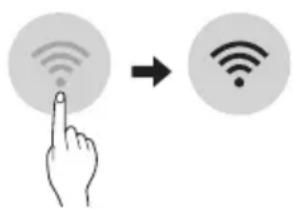
NOTE
- To check the wireless Wi-Fi connection, check if the icon on the control panel is lit.
- The device supports only 2.4 GHz Wi-Fi networks. To check the network frequency, contact your internet service provider or see the manual for the wireless router.
- LG ThinQ is not responsible for any network connection problems or any errors, malfunctions, or failures caused by the network connection.
- If the device has trouble connecting to the Wi-Fi network, it may be too far from the router. Get a Wi-Fi repeater (range extender) to improve the Wi-Fi signal strength.
- The Wi-Fi connection may not be established or may be interrupted due to the home network environment.
- The network connection may not work properly, depending on the internet service provider.
- The surrounding wireless environment may cause the wireless network to operate slowly.
- The device cannot be registered due to a problem with wireless signal transmission. Turn off the device and wait about a minute before trying again.
- If the firewall is enabled on the wireless router, disable the firewall or add an exception.
- The wireless network name (SSID) should be a combination of Latin letters and numbers. (Do not use special characters)
- The smartphone user interface (UI) may vary depending on the mobile operating system (OS) and manufacturer.
- If the router's security protocol is set to WEP, you may not be able to set up the network. Please change to other security protocols (WPA2 is recommended) and register the product again.

Micro dust filter
4 Clean the filter with a vacuum cleaner or brush. (Do not wash the micro dust filter with water.)
Assembling the micro dust filter
1 Turn off the power and unplug the power cord.
2 Hold the ionizer and gently lift it. Then insert the hooks of the micro dust filter into the front cover.
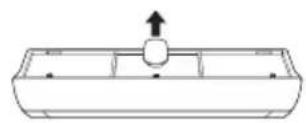
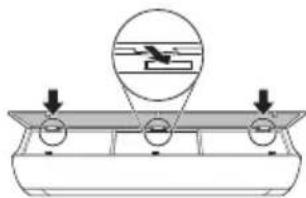
3 Push the hooks down to assemble the micro dust filter.
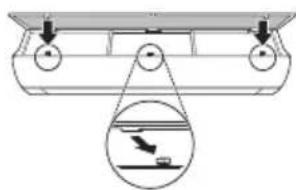
4 Check the side of the front cover for proper assembly of the micro dust filter.
NOTE
- The micro dust filter can break when bent.
- If the micro dust filter is not assembled correctly, dust and other substances can enter the indoor unit.
- When dust accumulates in the filter, cooling efficiency decreases, a rough air rustling sound is heard, and the electricity bill increases, so clean the micro dust filter once a month and replace it every 6 months.
Replacing the triple filter (Optional)
Using activated carbon, it effectively removes the odor of enclosed spaces.
1 Remove the micro dust filter.
- Refer to the section with instructions for disassembling and cleaning the micro dust filter.
2 Remove the triple filter (1).
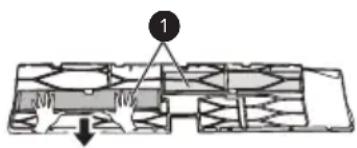
3 Install the new triple filter (①) into the micro dust filter (②).
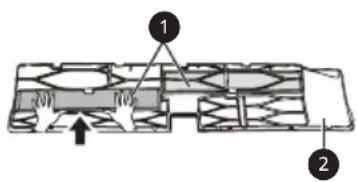
4 Reassemble the triple micro dust filter in the reverse order of disassembly.
CAUTION
- The front panel may fall and cause injury, so be careful.
- After replacing the filter, during reinstallation, fully insert the entire micro dust filter. (If not fully inserted, it may cause deterioration of performance or other product malfunctions.)
- Operating the air conditioner without a filter causes performance deterioration and malfunction of the air conditioner.
- Do not disassemble the triple filter yourself, and prevent it from being damaged or distorted. This may lead to the product being unable to operate or malfunction due to improper handling.
- When changing the filter, be careful not to let it fall under the product.
- For safety, turn off the product's power before cleaning or replacement, and unplug the plug or turn off the main switch.
NOTE
- The shape and composition of the filter may vary by model.
- If you need a replacement filter, you can purchase it at a nearby service center.
- In cases of heavy contamination or when the filter's performance is reduced, replace it with a new filter.
- Do not open the packaging while storing the triple filter. (The filter's lifespan will be reduced.)
- Be careful that water does not enter the triple filter. (The filter's performance will be reduced.)
Clean the PM1.0 particle sensor
NOTE
- Applies only to models with overall cleanliness display on the screen.
Self-diagnosis function
NOTE
NOTE
NOTE

Micro dust filter
NOTE
Important safety instructions....4
USAGE....11
Smart Diagnosis....31
MAINTENANCE 32
Important safety instructions

DANGER
CAUTION
2
ATTENTION
ATTENTION

Fine dust filter
3 To install the fine dust filter, push the hooks downward.
3 Install the new triple filter (1) into the fine dust filter (2).
1 Open the PM1.0 sensor cover on the side of the product.
ATTENTION
Smart Diagnosis....31
MAINTENANCE 32
Cleaning and Replacing the Fine Dust Filter....34
① Air Filter + Fine Dust Filter 2 Ionizer 3 Air Inlet 4 Front Cover 5 PM1.0 Sensor 6 On/Off Button 7 Air Deflector (Vertical Louver) 8 Air Deflector (Horizontal Louver) 9 Air Outlet
1 Air Inlet Vents
2 Air Outlet Vents
NOTE
Wireless Remote Control
Battery Replacement
If the display screen of the remote control starts to fade, replace the batteries. Insert AAA (1.5 V) batteries before using the remote control.
1. Remove the battery cover.
2. Insert the new batteries and make sure that the + and - terminals of the batteries are installed correctly.
Installing the Remote Control Holder
To protect the remote control, install the holder in a place where there is no direct sunlight.
1. Choose a safe place that is easy to reach.
NOTE
| 1Buttuna | 2Skrin tad-Displej | Deskrizzjoni | Funzjoni disponibbli | |
| maqsum singolari | Multi | |||
| - | Biex tixghel/titfi l-kundizzjonatur tal-arja. | O | O | |
| 88° | Sabiex tagğusta t-temperatura mixtieqa tal-kamra fil-modalità tat-tkessih, tat-tishin jew ta' bidla awtomatika. | O | O | |
| MODE | Sabiex taghžel il-modalità tat-tkessih. | O | O | |
| Sabiex taghžel il-modalità tat-tishin. | O | O | ||
| Sabiex taghžel il-modalità tad-deumidifikazzjoni. | O | O | ||
| Sabiex taghžel il-modalità tal-fann. | O | O | ||
| Sabiex taghžel il-modalità tal-bidla awtomatika/thaddim awtomatiku. | O | O | ||
| JET MODE | Po | Sabiex tbiddel it-temperatura tal-kamra malajr. | O | O |
| FAN SPEED | Sabiex tagğusta l-veločità tal-fann. | O | O | |
| Sabiex tagğusta d-direzzjoni tal-fluss tal-arja vertikalment jew orizzontalment. | O | O | ||
NOTE
| 1 Buttuna | 2 Skrin tad-Displej | Deskrizzjoni | Funzjoni disponibbli | |
| maqsum singolari | Multi | |||
|  | Sabiex tixghel/titfi l-kundizzjonatur tal-arja b'mod awtomatiku fil-hin mixtieq. | O | O |
| SET/CANCEL | - | Sabiex tikkonfigura/tikkancella l-funzjonijiet specjali u t-timer. | O | O |
 | - | Sabiex tikkancella s-settings tat-timer. | O | O |
 | - | Sabiex tagğusta l-hin. O | O | |
| LIGHT [3 s] | - | Sabiex tikkonfigura l-luminožità tal-iskrin fuq l-unità ta' ğewwa. | O | O |
| ROOM TEMP [3 s] |  | Sabiex turi t-temperatura tal-kamra. | O | O |
| *COMFORT AIR |  | Sabiex tagğusta l-fluss tal-arja sabiex tibdel id-direzzjoni tar-rih. | O | O |
| kW [3 s] | - | Sabiex tikkonfigura jekk turix jew le l-informazzjoni rigward l-energija. | O | X |
| *ENERGY CTRL | 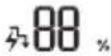 | Sabiex iğgib l-effett tal-iffrankar tal-energija. | O | X |
| DIAGNOSIS [5 s] | - | Sabiex tiččekkja l-informazzjoni tal-manutenzjoni ta' prodott b'mod konvenjenti. | O | X |
| PM SENSOR | - | Sabiex tivverifika l-istatus tat-trab fuq ğewwa. | O | O |
| *AIR PURIFY | - | Il-GENERatur joniku juža miljuni ta' jonji biex jgħin itejjeb il-kwalità tal-arja ta' ğewwa. | O | O |
2
| 1Buttuna | 2Skrin tad-Displej | Deskrizzjoni | Funzjoni disponibbli | |
| maqsum singolari | Multi | |||
| [WZZB] | Sabiex tnaqqas il-hoss mill-unitajiet ta' barra. | O | X |
| [X5Y2] | Sabiex tnehhi l-indewwa ğgenerata fl-unità ta' ğewwa. | O | O | |
| RESET - | Sabiex tinizjalizza l-konfigurazzjoniet tar-remote control. | O | O | |
NOTE
NOTE
- or is displayed on some indoor units.
- This function is disabled when you press the MODE or JET MODE button.
- This function is disabled and the automatic vertical swing direction is configured when you press the SWING button.
- When the function is off, the horizontal scroll works automatically, depending on the configured mode.
Using the Energy Control Function (Optional)
1 Turn on the device.
2 Press the ENERGY CTRL button.
- Press the ENERGY CTRL button repeatedly to select each step.
| pass 1 pass 2 pass 3 |
NOTE
• Step 1: The energy input is reduced by 20% compared to the rated energy input.
- 80 is displayed on the display screen.
• Step 2: The energy input is reduced by 40% compared to the rated energy input.
60 is displayed on the display screen.
- Step 3 (Optional): The energy input is reduced by 60% compared to the rated energy input.
3 Connect the smartphone to the wireless router.
NOTE
- To verify the Wi-Fi connection, check that the icon on the control panel is lit.
- This device supports only 2.4GHz Wi-Fi networks. To check the router frequency, contact your internet service provider or refer to the wireless router manual.
- LG ThinQ is not responsible for network connection problems, damage, or malfunctions caused by the network connection.
- If the appliance is far from the router, it may not be able to connect to the Wi-Fi network. Purchase a Wi-Fi repeater (range extender) to improve Wi-Fi strength.
- The Wi-Fi connection may be interrupted or fail to connect due to the home network environment.
- The network connection may not work properly due to the internet service provider.
- The surrounding wireless environment may cause the wireless network service to run slowly.
- The device cannot be registered due to problems with wireless signal transmission. Disconnect the device and wait about a minute before trying again.
- If the firewall on your wireless router is enabled, disable the firewall or make an exception for it.
- The wireless network name (SSID) should be a combination of English letters and numbers. (Do not use special characters)
- The smartphone user interface (UI) may vary depending on the mobile operating system (OS) and manufacturer.
- If the router's security protocol is set to WEP, you may not be able to operate the network. Please change it to other security protocols (WPA2 is recommended) and re-register the product.
How to install the LG ThinQ Application
Search for the LG ThinQ application from Google Play Store or Apple App Store on a smartphone. Follow the instructions to download and install the application.
1 Very fine dust filter
3 Lower the hooks to install the very fine dust filter.
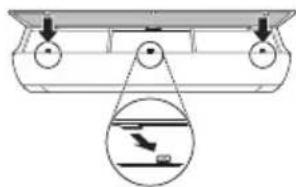
4 Check the side of the front cover for correct installation of the very fine dust filter.
NOTE
3 Install the triple filter (1) in the very fine dust filter (2).
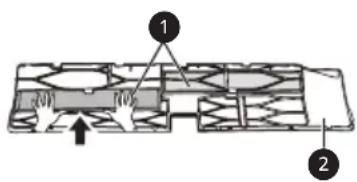
4 Install the triple filter and the very fine dust filter in the reverse order of removal.
CAUTION
2 Put a little water on a cloth, wipe the lens, and wipe it again with a dry cloth to remove moisture.
NOTE
- This applies only to general cleaning of display models.
Self-Diagnosis Function
SAFETY INSTRUCTIONS....3
IMPORTANT SAFETY INSTRUCTIONS ....4
OPERATION....11
Smart Diagnosis....31
MAINTENANCE....32
NOTE
2
NOTE
Step 1 Step 2 Step 3
NOTE
NOTE
1 Micro dust filter
NOTE
IMPORTANT SAFETY INSTRUCTIONS....4
OPERATION 11
Smart Diagnosis ....31
MAINTENANCE 32
Replacing and cleaning the micro dust filter....34
IMPORTANT SAFETY INSTRUCTIONS

WARNING
NOTE
NOTE
NOTE
1 Micro dust filter
NOTE
Smart Diagnosis....31
MAINTENANCE 32
Replace and clean the micro dust filter....34
Replace the triple filter (optional)....35
Clean the PM1.0 particle sensor....36
TROUBLESHOOTING 37
NOTE
NOTE
NOTE

Micro dust filter
3 Remove the filter from the indoor unit.
4 Clean the filter with a vacuum cleaner or brush (do not wash the dust microfilter with water).
Assemble the dust microfilter
3 Push the hooks downward to assemble the dust microfilter.
4 To ensure correct assembly of the dust microfilter, check the side of the front cover.
NOTE
3 Assemble the new triple filter (1) into the dust microfilter (2).
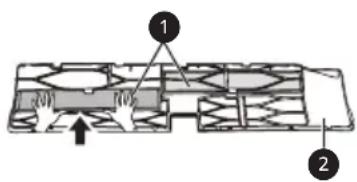
4 Assemble the triple filter and dust microfilter in the reverse order of disassembly.
CAUTION
NOTE
- Do this if you want to thoroughly clean models with a display.
Self-diagnosis function
This product has a built-in self-diagnosis function. If an error occurs, the indoor unit's light will blink at two-second intervals. If this happens, contact your local dealer or service center.
Before calling for service
Translation of original instructions
TABLE OF CONTENTS
Smart Diagnosis....31
APKOPE 32
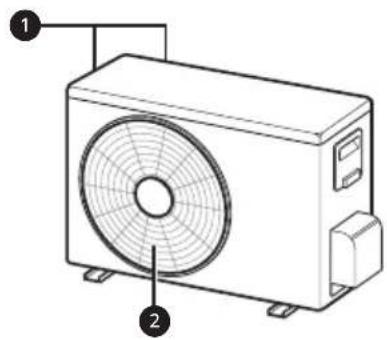
NOTE
NOTE
NOTE
NOTE
SAFETY INSTRUCTIONS....3
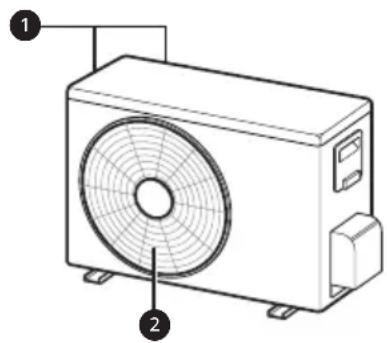
NOTE
NOTE
NOTE
NOTE
USER MANUAL
AIR CONDITIONER

Smart Diagnosis....31
TABLE OF CONTENTS....32
Replacing and Cleaning the Fine Dust Filter....34
Replacing the Triple Filter (optional) 35
Cleaning the PM1.0 Sensor....36
TROUBLESHOOTING 37
SAFETY INSTRUCTIONS
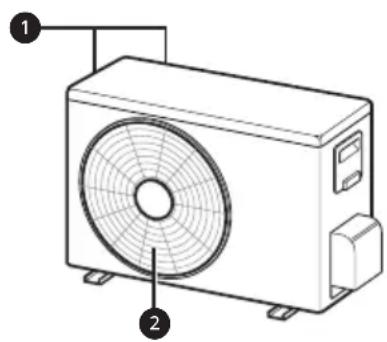
① Air Filter + Fine Dust Filter 2 Ionizer 3 Air Intake 4 Front Cover 5 PM1.0 sensor 6 On/Off Button 7 Air deflector (vertical) 8 Air deflector (horizontal) 9 Air outlet
1 Air Intake Fan 2 Air Outlet Fan
NOTE
NOTE
| 1Button | 2Scáthlán | Cur síos | Ar fáil Feidhm | |
| Singil scaoilte | lolrach | |||
| | Chun an aerchóiritheoir a chasadh air/as go huathoibríoch ag am faoi leith. | O | O |
| SET/CANCEL | - | Chun na feidhmeanna faoi leith a shocrú/ceal agus amadóir. | O | O |
 | - | Chun socruithe a chealú. | O | O |
| - | Chun am a roghnú. O O | ||
| LIGHT [3 s] | - | Chun gile an scáthláin san aonad laistigh a shocrú. | O | O |
| ROOM TEMP [3 s] |  | Chun teocht an seomra a thaispeáint. | O | O |
| *COMFORT AIR |  | Chun aershreabh a athrú nó gaoth a sraonadh. | O | O |
| kW [3 s] | - | Chun roghnú eolas a thaispeáint maidir le fuinneamh. | O | X |
| *ENERGY CTRL |  | Chun smacht a chur ar úsáid fuinnimh. | O | X |
| DIAGNOSIS [5 s] | - | Chun féachaint ar eolais cothabhála an gléis go héasca. | O | X |
| PM SENSOR | - | Chun stádas an deannaigh laistigh a sheiceáil. | O | O |
| *AIR PURIFY | - | Baineann an gineadóir ian leas as na milliúin ian chun cuidiú le feabhsú na hearcháilíochta laistigh. | O | O |
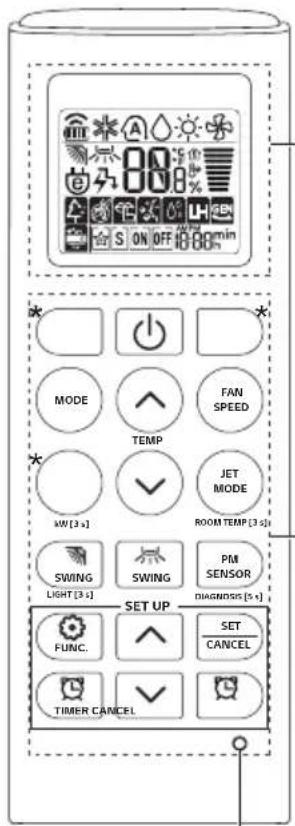
2
| 1Button | 2Scáthlán | Cur síos | Ar fáil Feidhm | |
| Singil scaoilte | lolrach | |||
| [7620] | Chun torann a ísliú ón aonad amuigh. | O | X |
| Chun tais ginithe taobh istigh den aonad laistigh a bhaint. | O | O | |
| RESET - | Chun socruithe an cianrialtáin a thosú. | O | O | |
NOTE
NOTE
3 Connect your smartphone to the wireless router.
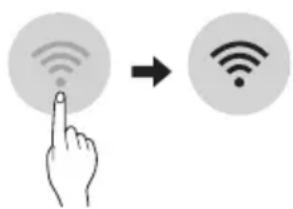
NOTE

Fine dust filter
3 Remove it from the indoor unit.
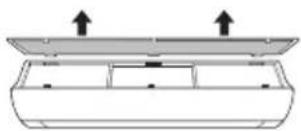
4 Clean the filter with a vacuum cleaner or brush. (Do not wash the fine dust filter with water.)
2 Put a little water on a cotton cloth, wipe the lenses, and wipe again with a dry cotton cloth to remove moisture.
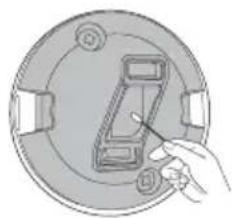
NOTE
IMPORTANT SAFETY INSTRUCTIONS....4
OPERATION....11
Operating notes....11
Parts and functions 11
Wireless remote controller 12
Automatic restart of the air conditioner....17
Using the mode function 17
Using the quick mode function ....20
Clean the PM1.0 sensor....36
TROUBLESHOOTING....37
IMPORTANT SAFETY INSTRUCTIONS

WARNING
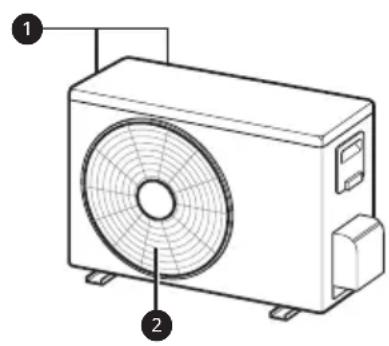
1 Air filter + dust microfilter 2 Ionizer 3 Air inlet 4 Front cover 5 PM1.0 sensor 6 On/Off button 7 Air deflector (vertical louver) 8 Air deflector (horizontal vane) 9 Air outlet
NOTE
- The remote control can also operate other electronic devices if pointed at them. Be careful to point the remote control at the signal receiver on the air conditioner.
- For proper operation, use a soft cloth to clean the transmitter and receiver of the signal.
- If the product does not have a certain function, no beep will sound on the product when the button for that function is pressed on the remote controller, except for the airflow direction (SWING) functions, energy display (○) kw[3s], and air purification (
| 1Dugme | 2Ekran | Opis | dostupan Funkcija | |
| Jednog deljenje | Višestruki | |||
| - | Za uključivanje/isključivanje klima uređaja. | O | O | |
| 88° | Za podešavanje željene temperature u prostoriji u režimu hlađenja, grejanja ili automatskog prebacivanja. | O | O | |
| MODE | Za izbor režima hlađenja. | O | O | |
| Za izbor režima grejanja. | O | O | ||
| Za izbor režima isušivanja vlage. | O | O | ||
| Za izbor režima ventilatora. | O | O | ||
| Za izbor režima automatskog prebacivanja / automatskog rada. | O | O | ||
| JET MODE | Po | Za brzu promenu temperature u prostoriji. | O | O |
| FAN SPEED | Za podešavanje brzine ventilatora. | O | O | |
| Za podešavanje pravca protoka vazduha vertikalno ili horizontalno. | O | O | ||
NOTE
| 1Dugme | 2Ekran | Opis | dostupan Funkcija | |
| Jednog deljenje | Višestruki | |||
 |  | Za automatsko uključivanje/isključivanje klima uređaja u željeno vreme. | O | O |
| SET/CANCEL | - | Za podešavanje/otkazivanje posebnih funkcija i tajmera. | O | O |
 | - | Za otkazivanje postavki tajmera. | O | O |
 | - | Za podešavanje vremena. | O | O |
| LIGHT [3 s] | - | Za podešavanje osvetljenosti ekrana na unutrašnjoj jedinici. | O | O |
| ROOM TEMP [3 s] |  | Za prikaz temperature u prostoriji. | O | O |
| *COMFORT AIR |  | Za prilagođavanje protoka vazduha da bi se preusmerilo duvanje. | O | O |
| kW [3 s] | - | Za podešavanje opcije da li će se prikazati informacije o energiji. | O | X |
*E | 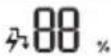 | Za aktiviranje uštede energije. | O | X |
| DIAGNOSIS [5 s] | - | Za praktičnu proveru informacija o održavanju uređaja. | O | X |
| PM SENSOR | - | Za proveru statusa prašine u zatvorenom prostoru. | O | O |
P  | - | Generator jona koristi milione jona radi poboljšanja kvaliteta vazduha u zatvorenom prostoru. | O | O |
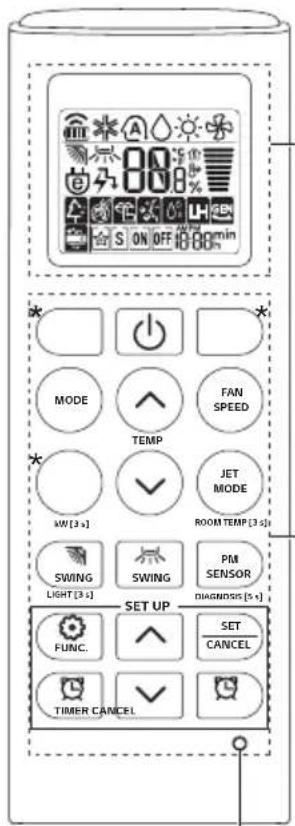
2
NOTE
- On some indoor units, the following is displayed:
- This function is disabled when you press the MODE or JET MODE button.
- This function is disabled and automatic vertical airflow direction is set when you press the SWING button.
- When this function is turned off, the horizontal louver operates automatically depending on the set mode.
NOTE
- To check the Wi-Fi connection, verify that the icon is lit on the control panel.
- The device supports only 2.4 GHz Wi-Fi networks. To check the network frequency, contact your internet service provider or refer to the wireless router manual.
- LG ThinQ is not responsible for network connection problems or for any interference, malfunctions, or errors caused by network connection.
- If the device cannot connect to the Wi-Fi network, it may be too far from the router. Purchase a Wi-Fi signal booster (range extender) to strengthen the Wi-Fi signal.
- The Wi-Fi connection may not be established or may be interrupted due to the conditions of your home network.
- Network connection may not work properly due to your internet service provider.
- Your wireless network may be slow due to surrounding wireless networks.
- The device cannot register due to a problem with wireless signal transmission. Turn off the device and wait about one minute before trying again.
- If the firewall is enabled on the wireless router, disable the firewall or add an exception.
- The wireless network name (SSID) should consist of a combination of Latin letters and numbers. (Do not use special characters.)
- The smartphone user interface may vary depending on the mobile operating system and manufacturer.
- If the router's security protocol is set to WEP, you may not be able to set up the network. Please change to other security protocols (WPA2 is recommended) and register the product again.
Installing the LG ThinQ application
Search for the LG ThinQ application in the Google Play Store & Apple App Store using your smartphone.

3 Push the hooks down to install the dust micro filter.
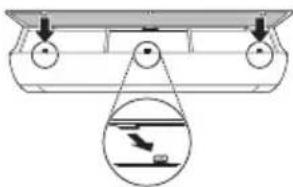
4 Check the side of the front cover to verify that the dust micro filter is correctly installed.
NOTE
3 Assemble the new triple filter (①) into the dust micro filter (②).
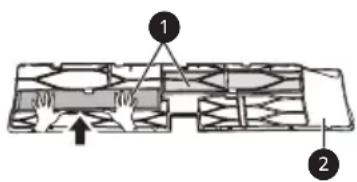
4 Assemble the triple filter and dust micro filter in the reverse order of disassembly.
CAUTION
- The front panel may fall and cause injury, so be careful.
- After replacing the filter, when reinserting, fully insert the entire dust micro filter. (If not fully inserted, it may lead to reduced performance or other product malfunction.)
- Using the air conditioner without a filter leads to reduced performance and malfunction of the air conditioner.
- Do not disassemble the triple filter itself and prevent its damage or deformation. This may lead to product malfunction or failure due to improper operation.
- When replacing the filter, be careful not to drop it below the product.
- For safety, before cleaning or replacement, turn off the product's power and unplug the power cord or turn off the main power switch.
NOTE
Put a little water on a cotton pad, wipe the lens, and then wipe it again with a dry cotton pad to remove moisture.
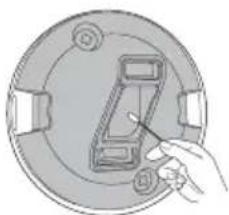
NOTE
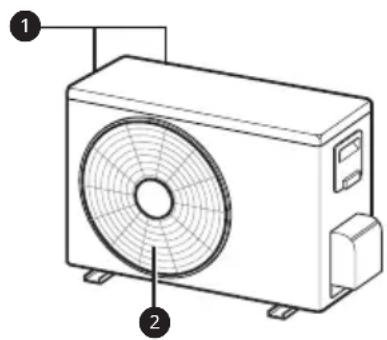
NOTE
NOTE
NOTE
NOTE
Smart Diagnosis....31
MAINTENANCE....32
Clean the PM1.0 sensor....36
TROUBLESHOOTING ....37
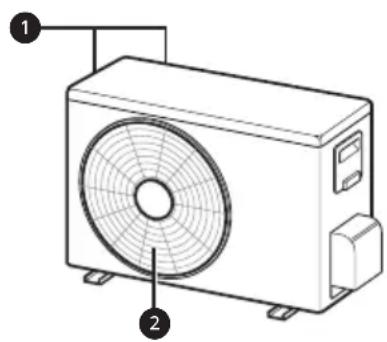
① Air filter + Dust microfilter 2 Ionizer 3 Air intake 4 Front cover 5 PM1.0 sensor 6 Power button 7 Air deflector (vertical blade) 8 Air deflector (horizontal blade) 9 Air outlet
NOTE
NOTE
NOTE

Dust Microfilter
Clean the PM1.0 sensor
NOTE
SAFETY INSTRUCTIONS....3
IMPORTANT SAFETY INSTRUCTIONS....4
OPERATION....11
Notes on operation....11
IMPORTANT SAFETY INSTRUCTIONS

WARNING
To reduce the risk of explosion, fire, death, electric shock, injury, or burns to persons when using this product, follow basic precautions, including the following:
Children in the household
This appliance is not intended for use by persons (including children) with reduced physical, sensory, or mental capabilities, or lack of experience and knowledge, unless they are under constant supervision or have been instructed on the use of the appliance by a person responsible for their safety. Children should be supervised to ensure that they do not play with the appliance.
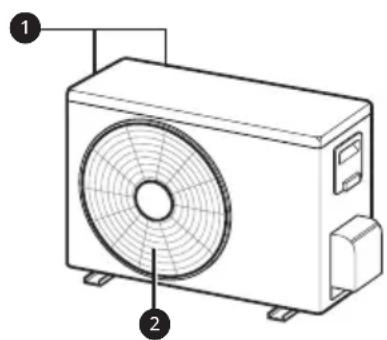
① Air filter + micro dust filter 2 Ionizer 3 Air inlet 4 Front cover 5 PM1.0 sensor 6 On/Off button 7 Air deflector (vertical vanes) 8 Air deflector (horizontal vanes) 9 Air outlet
NOTE
| 1Tipka | 2Displej | Opis | Dostupna funkcija | |
| Jednostruki Razdvojeni | Višestruki | |||
| - | Da biste uključili/isključili klima uređaj. | O | O | |
| 88° | Da biste podesili željenu temperaturu u načinu rada za hlađenje, grijanje ili u načinu rada automatskog prebacivanja. | O | O | |
| MODE | Da biste odabrali način rada za hlađenje. | O | O | |
| Da biste odabrali način rada za grijanje. | O | O | ||
| Da biste odabrali način rada za odvlaživanje. | O | O | ||
| Da biste odabrali način rada ventilator. | O | O | ||
| Da biste odabrali automatsko prebacivanje/automatski način rada. | O | O | ||
| JET MODE | Po | Da biste brzo promijenili sobnu temperaturu. | O | O |
| FAN SPEED | Da podesite brzinu ventilatora. | O | O | |
| Da podesite vertikalni ili horizontalni smjer protoka zraka. | O | O | ||
NOTE
- * Buttons may vary depending on the model.
- When connected to a multiple outdoor unit, the energy display, energy control, quiet function, and smart diagnosis may not be supported.
![2 MODE FAN SPEED TEMP JET MODE MW [3 s] ROOM TEMP [3 s] SWING SWING PM SENSOR LIGHT [3 s] DIAGNOSIS [5 s] SET UP FUNC. SET CANCEL TIMER CANCEL RESET](/content/2026/03/547089/images/fcd78f4490ac047d26066be0d003a8e3e632985c0081cf4d93872c2b7989befb.jpg)
| 1Tipka | 2Displej | Opis | Dostupna funkcija | |
| Jednostruki Razdvojeni | Višestruki | |||
 |  | Za automatsko uključivanje/isključivanje klima uređaja u željenom vremenu. | O | O |
| SET/CANCEL | - | Da podesite/otkažete posebne funkcije ili programator. | O | O |
 | - | Da biste otkazali postavke programatora. | O | O |
 | - | Da biste podesili vrijeme. | O | O |
| LIGHT [3 s] | - | Da podesite osvjetljenje displeja unutrašnje jedinice. | O | O |
| ROOM TEMP [3 s] |  | Za prikaz sobne temperature. | O | O |
| *COMFORT AIR |  | Da podesite protok zraka za skretanje puhanja. | O | O |
| kW [3 s] | - | Da biste podesili da li da prikažete ili ne prikažete informacije u vezi energije. | O | X |
*E  |  | Da biste ostvarili učinak uštede energije. | O | X |
| DIAGNOSIS [5 s] | - | Za ugodnu provjeru informacija o održavanju proizvoda. | O | X |
| PM SENSOR | - | Za proveru statusa prašine u zatvorenom prostoru. | O | O |
| *AIR PURIFY | - | Generator iona pomoću miliona iona doprinosi boljem kvalitetu zraka u zatvorenim prostorijama. | O | O |
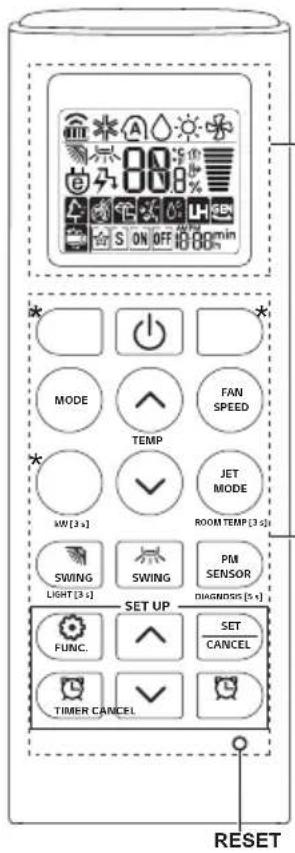
2
NOTE
NOTE
- To check the Wi-Fi connection, verify that the Wi-Fi indicator lights up on the control panel.
- This device supports only 2.4 GHz Wi-Fi networks. To check the network frequency, contact your internet service provider or refer to the user manual of your wireless router.
- LG ThinW is not responsible for any network connection problems or any interference, malfunctions, or errors caused by the network connection.
- If the device has trouble connecting to the Wi-Fi network, it may be too far from the router. Purchase a Wi-Fi repeater (range extender) to boost the Wi-Fi signal.
- Connecting to the Wi-Fi network may not be successful or the connection may be interrupted due to the home network environment.
- The network connection may not work properly depending on the internet service provider.
- The wireless network environment may cause the wireless network to be slow.
- The device cannot be registered due to wireless signal transmission issues. Disconnect the device and wait about a minute before trying again.
- If the firewall is enabled on the wireless router, disable it or add an exception.
- The wireless network name (SSID) should be a combination of English letters and numbers. (Do not use special characters.)
- The smartphone user interface (UI) may vary depending on the operating system (OS) and manufacturer.
- If the router's security protocol is set to WEP, you may not be able to set up the network. Set a different security protocol (WPA2 is recommended) and register the device again.
Installing the LG ThinQ Application
Search for the LG ThinQ application in the Google Play Store or Apple App Store on your smartphone. Follow the instructions to download and install the application.

4 Clean the filter with a vacuum cleaner or brush. (Do not wash the dust micro filter with water.)
Disassembling the Dust Micro Filter
1 Turn off the power and unplug the power cord from the outlet. 2 Hold the ionizer and lift it slightly. Then insert the hooks of the dust micro filter into the front cover.
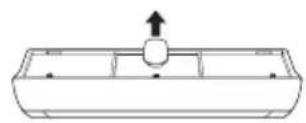

3 Push the hooks down to set the dust micro filter.
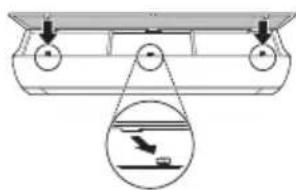
4 Check the side of the front cover to verify that the dust micro filter is correctly installed.
NOTE
3 Assemble the new triple filter (①) into the dust micro filter (②).
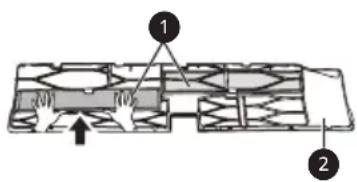
4 Assemble the triple filter and dust micro filter in the reverse order of disassembly.
CAUTION
- The front panel may fall and cause injury, so be careful.
- After replacing the filter, when reinserting it, fully insert the entire dust microfilter. (If it is not fully inserted, it may lead to reduced performance or other product malfunctions.)
- Using the air conditioner without a filter leads to reduced performance and malfunction of the air conditioner.
- Do not disassemble the triple filter yourself and prevent its damage or deformation. This may lead to product malfunction or failure due to improper operation.
- When replacing the filter, be careful not to drop it under the product.
- For safety, before cleaning or replacement, turn off the product's power and unplug the power plug or turn off the main power switch.
NOTE
2 Put a little water on a cotton swab, wipe the lenses, and then wipe them again with a dry cotton swab to remove moisture.
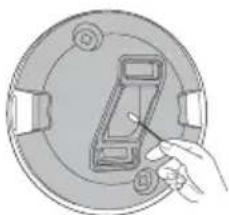
NOTE
- This applies only to the overall cleanliness of the displays that show data.
Self-diagnosis function
This product has a built-in self-diagnostic function. If an error occurs, the indoor unit's lamp will blink at intervals of 2 seconds. If this happens, contact your local dealer or service center.
- SAFETY INSTRUCTIONS
- OPERATION
- SMART FUNCTIONS
- MAINTENANCE
- TROUBLESHOOTING
- WARNING
- CAUTION
- IMPORTANT SAFETY INSTRUCTIONS
- CHILDREN IN THE HOUSEHOLD
- FOR USE IN EUROPE
- INSTALLATION
- TECHNICAL SAFETY
- NOTES FOR OPERATION
- SUGGESTION FOR ENERGY SAVING
- PARTS AND FUNCTIONS
- NOTE
- WIRELESS REMOTE CONTROL
- INSERTING BATTERIES
- INSTALLING THE REMOTE CONTROL HOLDER
- OPERATING METHOD
- SETTING THE CURRENT TIME
- INSERT BATTERIES
- OPERATING THE AIR CONDITIONER WITHOUT THE REMOTE CONTROL
- TYPE
- USING WIRELESS REMOTE CONTROL
- RESTARTING THE AIR CONDITIONER AUTOMATICALLY
- DISABLING AUTO RESTART
- USING THE MODE FUNCTION
- COOLING MODE
- AUTO OPERATION (ARTIFICIAL INTELLIGENCE)
- MULTI MODEL
- AUTO CHANGEOVER MODE
- SINGLE SPLIT MODEL
- DEHUMIDIFICATION MODE
- HEATING MODE
- FAN MODE
- USING THE JET MODE FUNCTION
- CHANGING ROOM TEMPERATURE QUICKLY
- USING THE FAN SPEED FUNCTION
- ADJUSTING THE FAN SPEED
- USING THE AIR FLOW DIRECTION FUNCTION
- SETTING THE ON/OFF TIMER
- SETTING THE ON TIMER
- CANCELING THE ON TIMER
- SETTING THE OFF TIMER
- CANCELING THE OFF TIMER
- CANCELING THE TIMER SETTING
- USING THE SLEEP FUNCTION (OPTIONAL)
- USING THE SIMPLE TIMER FUNCTION (OPTIONAL)
- USING THE ENERGY DISPLAY FUNCTION (OPTIONAL)
- DISPLAY THE CURRENT ENERGY USAGE
- USING THE LIGHT OFF FUNCTION (OPTIONAL)
- DISPLAY SCREEN BRIGHTNESS
- USING THE COMFORT AIR FUNCTION (OPTIONAL)
- COMFORT VANE OPERATION
- USING THE ENERGY CONTROL FUNCTION (OPTIONAL)
- HOW TO USE AIR PURIFICATION
- USING AIR PURIFICATION DURING OPERATION MODES
- SMART AIR PURIFICATION
- CHECKING OVERALL CLEANLINESS
- USING SPECIAL FUNCTIONS
- CANCELING SPECIAL FUNCTIONS
- USING THE SILENT FUNCTION
- USING THE AUTO CLEAN FUNCTION
- LG THINQ APPLICATION
- LG THINQ APPLICATION FEATURES
- SMART DIAGNOSIS
- SETTINGS
- BEFORE USING LG THINQ APPLICATION
- INSTALLING THE LG THINQ APPLICATION
- OPEN SOURCE SOFTWARE NOTICE INFORMATION
- USING LG THINQ TO DIAGNOSE ISSUES
- USING AUDIBLE DIAGNOSIS TO DIAGNOSE ISSUES
- REPLACE AND CLEAN THE MICRO DUST FILTER
- DISASSEMBLE AND CLEAN THE MICRO DUST FILTER
- ASSEMBLE THE MICRO DUST FILTER
- REPLACE THE TRIPLE FILTER (OPTIONAL)
- CLEAN THE PM1.0 SENSOR
- SELF-DIAGNOSIS FUNCTION
- BEFORE CALLING FOR SERVICE
- OWNER'S MANUAL
- AIR CONDITIONER
- SUPPORT
- AUTOMATIC RESTART OF THE AIR CONDITIONER
- DISABLING AUTOMATIC RESTART
- ASSEMBLING THE MICRO DUST FILTER
- REPLACING THE TRIPLE FILTER (OPTIONAL)
- CLEAN THE PM1.0 PARTICLE SENSOR
- USAGE
- DANGER
- ATTENTION
- OPEN THE PM1.0 SENSOR COVER ON THE SIDE OF THE PRODUCT
- BATTERY REPLACEMENT
- HOW TO INSTALL THE LG THINQ APPLICATION
- ASSEMBLE THE DUST MICROFILTER
- TABLE OF CONTENTS
- APKOPE
- USER MANUAL
- DISASSEMBLING THE DUST MICRO FILTER
Brand : LG
Model : AP12RT
Category : Air conditioner